
Why “Free” Is the Right Starting Point for Most Students
A semester’s tuition already strains most budgets. Adding a $10–$15/month note-taking subscription on top of textbooks, lab fees, and software licenses is a genuine hardship for many students. The good news: you can build a complete note-taking system for exactly $0/year — if you pick the right free plan for your devices and study habits.
The trap most students fall into is choosing an app based on its paid-feature list, then hitting a free-tier wall mid-semester — losing access to notes, hitting storage caps, or being forced onto a single device. A 2024 meta-analysis by Flanigan in Educational Psychology Review (covering 24 studies) found that handwritten notes produced higher course achievement (Hedges’ g = 0.248, p < 0.001), but the tool you use matters less than whether you can actually stick with it for 15 weeks.
This guide focuses exclusively on what you actually get at $0 — storage limits, device restrictions, handwriting support, collaboration, and the exact moment each free plan starts to hurt. If you need a broader overview of paid and free options across all majors, see our head-to-head comparison of the 8 best note-taking apps for students. Here, we stay at $0.
Free-Tier Comparison Table: What You Actually Get at $0
The table below compares the free plans of seven apps that students commonly consider. All data was cross-referenced against independent sources including PCMag, Zapier, and Drawboard, and was last verified in June 2026.
| App | Free Storage | Cross-Platform | Offline Access | Handwriting / Pen | OCR / Searchable Handwriting | Collaboration | Key Paywall Trigger |
|---|---|---|---|---|---|---|---|
| Microsoft OneNote | 5 GB (OneDrive) | Windows, Mac, iOS, Android, Web | Yes (full offline sync) | Yes (full ink engine) | Yes | Yes (real-time co-authoring) | Storage > 5 GB |
| Apple Notes | 5 GB iCloud (shared pool) | Apple only (Mac, iPhone, iPad) | Yes | Yes (on iPad/iPhone) | No (no OCR) | Yes (iCloud sharing) | Storage > 5 GB or non-Apple device |
| Google Keep | Unlimited (within Google account) | Web, Android, iOS | Yes (mobile app caching) | No (no pen layer) | No | Yes (real-time sharing) | Need folders, handwriting, or deep organization |
| Notion (.edu Plus) | Unlimited blocks, 7-day version history | Windows, Mac, iOS, Android, Web | Yes (mobile app caching) | No (no native pen support) | No | Yes (real-time) | Need > 7-day version history or AI features |
| Obsidian | Local only (unlimited) | Windows, Mac, Linux, iOS, Android | Yes (local-first) | No (no native pen support) | No | Via plugins (no real-time) | Need sync across devices ($4/month) |
| Joplin | Local + BYO sync (unlimited) | Windows, Mac, Linux, iOS, Android | Yes (local-first) | No (no native pen support) | No | Via sync target (no real-time) | Need real-time collaboration |
| Simplenote | Unlimited (text only) | Windows, Mac, iOS, Android, Web | Yes | No | No | Yes (real-time) | Need images, attachments, or formatting |
Deep Dives: What Each App’s Free Plan Delivers (and Where It Hits a Wall)
Microsoft OneNote — The Most Generous Free Plan for Cross-Platform Students
OneNote’s free plan includes all core features — rich text, tables, tags, audio recording, full ink support with pressure sensitivity, searchable handwriting (OCR), and real-time co-authoring — with no device limit. The only hard cap is 5 GB of OneDrive storage. For a typical semester of lecture notes, problem sets, and study guides, 5 GB is usually enough unless you are storing large audio recordings or embedded PDFs. PCMag gives OneNote a 4.5/5 Editors’ Choice rating, and Zapier names it the best free note-taking app overall.
The wall: If you exceed 5 GB, you need a Microsoft 365 Basic subscription ($1.99/month for 100 GB) or a Microsoft 365 Personal subscription ($6.99/month for 1 TB). For most students, 5 GB lasts at least one semester.
Apple Notes — Best for Apple-Only Students, but Locked to the Ecosystem
Apple Notes is completely free and pre-installed on every Mac, iPhone, and iPad. It supports rich text, tables, sketches, document scanning, and iCloud sharing. There is no artificial note limit — storage is drawn from your 5 GB free iCloud pool. For a student who owns only Apple devices and does not need OCR or cross-platform access, Apple Notes is a genuinely capable primary note-taking app.
The wall: There is no web client for non-Apple devices. If you ever need to access your notes on a campus Windows lab or a Chromebook, you cannot. Apple Notes also lacks OCR for handwritten text, so your handwritten lecture notes are not searchable.
Google Keep — Unlimited but Basic: A Quick-Capture Companion, Not a Primary App
Google Keep’s free plan is the real product — there are no artificial caps on notes, labels, or colors. It integrates deeply with Google Workspace (Gmail, Docs, Calendar) and supports real-time sharing. The College Investor calls it “best for quick note-taking,” and Notability’s blog describes it as a “lightweight, free quick-capture tool.”
The wall: Keep has no folders, no nested notebooks, no handwriting layer, no PDF import, and no deep organization. Drawboard explicitly states it is “not built for long-form note-taking or structured study organization.” Use Keep for to-do lists, quick ideas, and voice memos — not for your lecture notes.
Notion — Effectively Free for Any Student with a .edu Email
Notion’s standard Personal Pro plan costs $10/month, but students with a valid .edu email can upgrade to the Plus plan for free. This unlocks unlimited blocks, file uploads up to 5 MB per file, and 7-day version history. Atlas Workspace reports that Notion is “the most-installed note-taking app among college students in 2026,” and Drawboard confirms the free Student Pro upgrade is available with a .edu address.
The wall: Notion has no native handwriting or pen support, so STEM students who need to write equations or draw diagrams will need a companion tool. The 7-day version history means you cannot restore a page from earlier in the semester if something goes wrong. For a deeper look at whether Notion’s flexibility is worth the learning curve, see our Notion vs. dedicated note-taking apps comparison.
Obsidian — Free Locally, but Sync Costs $4/Month
Obsidian is free for personal use when you store your notes locally on one device. It is a powerful tool for building a personal knowledge base with backlinks, graph view, and plugins. PCMag gives it a 4.0/5 rating and calls it “best for power users.” Zapier notes it has a “serious learning curve.”
The wall: If you want to sync your vault across a laptop and a phone, you need Obsidian Sync at $4/month (or you can use a third-party sync service like iCloud or Dropbox, which requires manual setup). There is no native handwriting or real-time collaboration.
Joplin — Fully Free with Bring-Your-Own Sync
Joplin is an open-source, fully free note-taking app. You can sync your notes using your own cloud storage (Dropbox, OneDrive, Nextcloud) at no additional cost. PCMag gives it a 4.5/5 rating and calls it the best open-source option. It supports Markdown, tags, notebooks, and end-to-end encryption.
The wall: Joplin has no native handwriting support, no real-time collaboration, and a less polished mobile experience than OneNote or Notion. It is best for students who value privacy and are comfortable with Markdown.
Simplenote — Free, Fast, Text-Only
Simplenote is completely free with unlimited storage for plain text notes. It syncs instantly across all platforms and supports real-time collaboration. PCMag gives it a 3.5/5 rating and calls it “best for text-only notes.”
The wall: No images, no attachments, no formatting, no handwriting. Simplenote is useful for quick text capture and sharing, but it cannot serve as a primary note-taking app for any course that requires diagrams, equations, or embedded files.
Decision Framework by Device Type
Your device ecosystem is the single most important factor in choosing a free note-taking app. An app that works perfectly on an iPad may be unusable on a Chromebook. Here is how to match your devices to the right free plan.
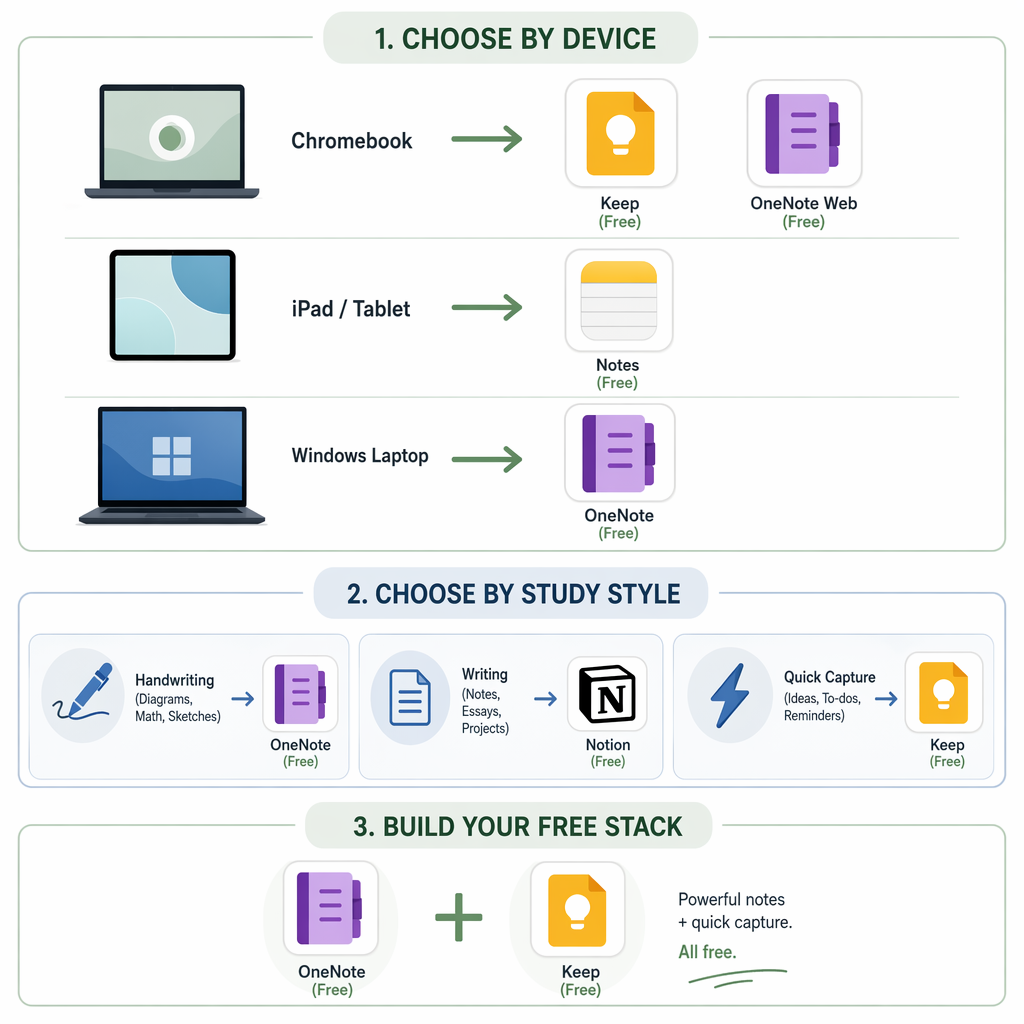
- Chromebook (web-only): Your best options are OneNote (full web app with offline support via Chrome) and Notion (web app with .edu Plus plan). Google Keep works well as a companion. Apple Notes is not available. For a deeper dive on laptop-specific performance, see our best note-taking apps for laptop comparison.
- iPad (with or without Apple Pencil): Apple Notes is the simplest free option with full handwriting support. OneNote is also excellent on iPad with full ink support and cross-platform sync. Notion works but lacks pen input. If you need handwriting, Apple Notes or OneNote are your free choices.
- Windows laptop (with or without pen): OneNote is the clear winner — it is the only free app with full pen support, OCR, and offline sync on Windows. Notion and Obsidian are strong for typing. For a detailed Windows-specific comparison, see our Windows note-taking app showdown.
- Android phone + Windows laptop (mixed ecosystem): OneNote is the safest choice — it works seamlessly on both platforms with full feature parity. Google Keep is a good quick-capture companion for your phone.
- iPhone + Mac (Apple-only): Apple Notes is the easiest, most integrated option. If you need cross-platform access later, OneNote is the best free backup plan.
Decision Framework by Study Style and Major
Beyond devices, your study style determines which free app will actually serve you through the semester. A 14-day test with 4 college students and 5 note apps, cited by Atlas Workspace, found that recall on a 30-question quiz was 71% for structured-template apps (OneNote, Notion) versus 58% for freeform apps (Apple Notes, GoodNotes). Structure matters, but so does the type of content you capture.
- STEM / Handwriting-heavy (math, physics, engineering, chemistry): OneNote is the only free app with full pen support, searchable handwriting (OCR), and infinite canvas. If you are on Windows with a pen, see our guide to the best notes apps for Windows with a pen for a deeper comparison.
- Writing-heavy / Humanities (English, history, philosophy, political science): Notion (with .edu Plus plan) excels for long-form writing, outlining, and linking ideas across courses. Its database and template features help organize research papers and reading notes. OneNote is also strong for typed notes with tagging.
- Quick capture / Reminders / To-do lists: Google Keep is the best free companion for capturing ideas, assignment deadlines, and voice memos. It is not a primary note-taking app, but it fills a gap that OneNote and Notion do not handle well.
- Local-first / Privacy-conscious: Obsidian (free locally) or Joplin (fully free with BYO sync) give you full control over your data. Both have steeper learning curves and no handwriting support, but they are excellent for students who want to build a long-term knowledge base.
The Free Stack: Pairing Two Free Tools for a Complete Semester
No single free app covers every note-taking need perfectly. The smartest strategy is to pair two free tools that complement each other. Here are three proven combinations that cost $0/year.
| Stack | Primary App (Lecture Capture) | Companion App (Quick Capture) | Best For |
|---|---|---|---|
| OneNote + Google Keep | OneNote (full notes, handwriting, OCR, organization) | Google Keep (to-dos, voice memos, quick ideas) | Cross-platform students with mixed devices |
| Apple Notes + Obsidian | Apple Notes (handwriting, sketches, iCloud sync) | Obsidian (local PKM, backlinks, long-term review) | Apple-only students who want a local knowledge base |
| Notion + Google Keep | Notion (.edu Plus: structured notes, databases, project tracking) | Google Keep (quick capture, reminders, shopping lists) | Students who love Notion’s structure but need a fast capture tool |