
Why $19.99/Month Rarely Stays $19.99
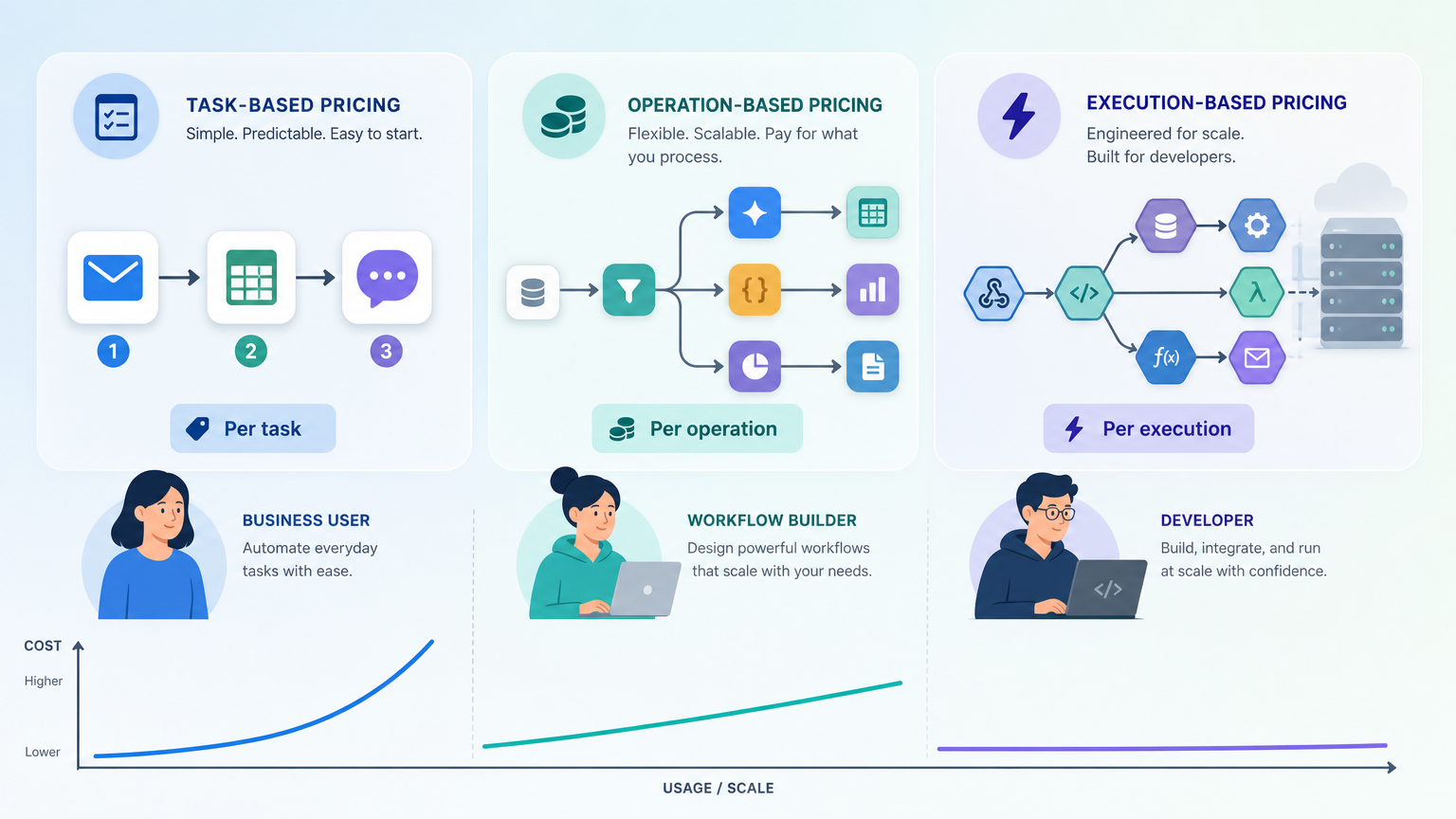
Every automation platform advertises a friendly entry price. Zapier's Starter plan shows $19.99 per month. Make's Core plan lists at $9 per month. n8n's cloud plan starts at $20 per month. These numbers look reasonable — until your workflows get more complex, your volume ticks up, and the billing model you didn't examine starts multiplying your costs.
The problem isn't that these platforms are expensive. It's that they count "work" differently. A single workflow run might consume one unit in one system and five units in another. The advertised price is a starting point, not a reliable forecast. For cost-conscious freelancers, startup founders, and small-team operations leads, understanding how each platform charges — and projecting those costs across realistic volume scenarios — is the difference between a predictable tool expense and a monthly bill shock.
This article decodes the three dominant pricing models in AI workflow automation — task-based, operation/credit-based, and execution-based — and projects real costs across light, medium, and heavy usage for Zapier, Make, n8n, and Gumloop. By the end, you'll know exactly which pricing model matches your workflow pattern — and which one will quietly drain your budget.
The Three Pricing Models Explained
Before comparing dollar amounts, you need to understand what each platform counts as a billable unit. The differences are not cosmetic — they determine whether your costs grow linearly, exponentially, or barely at all as you add steps and volume.
Task-Based Pricing (Zapier)
Zapier charges per "task." A task is defined as each action a Zap completes. If your Zap has three steps — trigger, action A, action B — each run consumes three tasks. Branching, looping, and error-handling retries add more tasks per run. According to the n8n blog, a single complex Zap with branching can consume 5 or more tasks per run. That means a plan advertised at 750 tasks per month might only support 150 real-world workflow runs — not 750.
Operation/Credit-Based Pricing (Make and Gumloop)
Make uses "operations." Each module execution in a scenario consumes one operation. A scenario with five modules uses five operations per run. AI-powered modules can consume multiple operations per use, and error handling steps also count. Make's Core plan offers 10,000 operations per month for $9 (billed annually), but the actual number of complete scenario runs depends entirely on how many modules each scenario contains.
Gumloop uses a credit system: the Solo plan includes 120,000 credits per year for $30 per month. Each workflow step consumes a variable number of credits depending on the action type, making cost prediction difficult without running the workflow first. The n8n blog notes that this variable consumption is a known challenge for Gumloop users trying to forecast monthly costs.
Execution-Based Pricing (n8n)
n8n charges per "execution." One workflow run counts as one execution regardless of how many steps, branches, or nodes it contains. This is the critical difference: a 20-step workflow costs the same as a 2-step workflow. n8n's cloud plan starts at $20 per month for 2,500 executions with unlimited steps. The HatchWorks comparison emphasizes that n8n bills based on workflow execution, not individual steps, so each run counts as a single execution regardless of complexity.
| Pricing Model | Platforms | Billable Unit | Key Cost Driver |
|---|---|---|---|
| Task-based | Zapier | Each action in a workflow | Number of steps per workflow run |
| Operation/Credit-based | Make, Gumloop | Each module execution or credit | Number of modules + variable AI step costs |
| Execution-based | n8n (cloud & self-hosted) | Each workflow run | Number of runs (steps are free) |
Real Cost Projections: Light, Medium, and Heavy Volume
To make the pricing models concrete, we projected monthly costs for three realistic volume scenarios. Each scenario assumes a moderately complex workflow with 5 steps per run — typical for a lead capture, content publishing, or customer onboarding automation.
Scenario Definitions
- Light volume: 500 tasks/operations/executions per month — a solo freelancer automating a few daily routines.
- Medium volume: 5,000 per month — a growing startup with multiple automated processes.
- Heavy volume: 50,000 per month — a scaling team with high-throughput automation.
For Zapier, a 5-step workflow consumes 5 tasks per run. For Make, a 5-module scenario consumes 5 operations per run. For n8n, each run counts as 1 execution regardless of steps. For Gumloop, we used an estimated 10 credits per run based on typical AI workflow consumption patterns.
| Scenario | Zapier (5-step workflow) | Make (5-module scenario) | n8n Cloud | n8n Self-Hosted | Gumloop Solo |
|---|---|---|---|---|---|
| Light (500 runs/mo) | $19.99 (750 tasks — fits within Starter) | $9 (10K ops — fits within Core) | $20 (2,500 exec — fits) | $0 + server cost | $30 (120K credits/yr — fits) |
| Medium (5,000 runs/mo) | $49 (2K tasks — exceeds Starter; need Professional) | $39 (10K ops — exceeds Core; need Pro) | $20 (2,500 exec — exceeds; need $50 plan or higher) | $0 + server cost | $30 (120K credits/yr — may exceed) |
| Heavy (50,000 runs/mo) | $599+ (Team plan or custom) | $299+ (Ultimate plan or custom) | $200+ (custom enterprise pricing) | $0 + server cost | Custom pricing required |
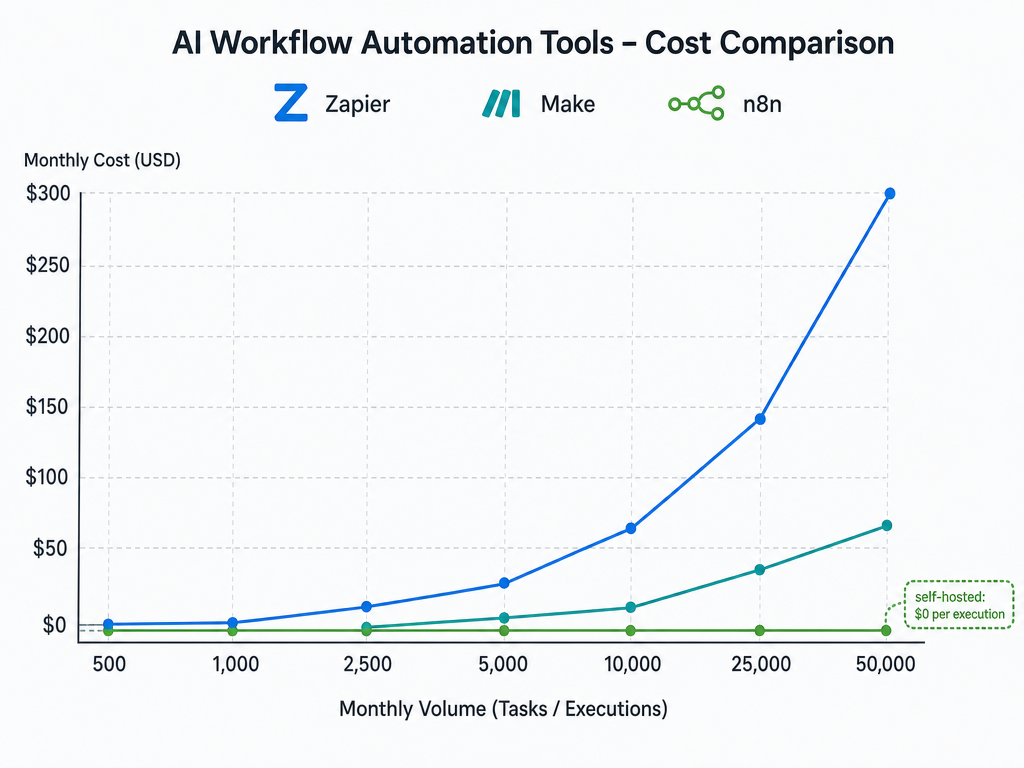
The table reveals the core insight: at light volume, all platforms are affordable. At medium volume, the differences become significant. At heavy volume, task-based and operation-based pricing can cost 10x to 30x more than execution-based pricing — and self-hosted n8n costs nothing per execution beyond server infrastructure.
Hidden Costs That Inflate Your Bill
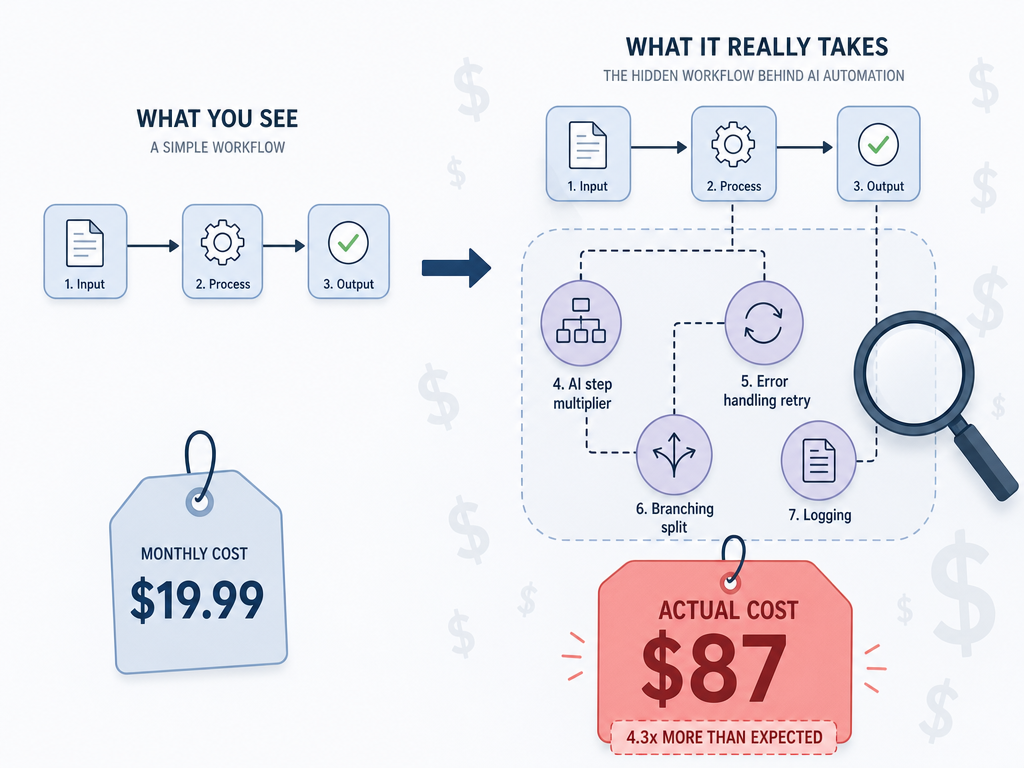
The projections above assume clean, linear workflows. Real-world automation is messier. Several hidden cost multipliers can inflate your bill far beyond what the pricing page suggests.
Multi-Step Workflow Multiplier
In Zapier, every action in a Zap counts as a task. A simple lead capture workflow — trigger (new form submission) → add to CRM → send email → post to Slack → update spreadsheet — uses 4 tasks per run. If that workflow runs 500 times per month, you've consumed 2,000 tasks, not 500. The n8n blog notes that a single complex Zap with branching can consume 5+ tasks per run. That means a $19.99 Starter plan (750 tasks) might only support 150 runs of that workflow — not 750.
AI Node Premium
Make charges extra operations for AI-powered modules. A scenario that uses an AI text generator or image analysis module may consume 2x to 5x the operations of a standard module. The n8n blog confirms that AI steps consume multiple operations per use, making cost prediction difficult for AI-heavy workflows.
Error Handling and Retries
When a workflow fails and retries, each retry counts as additional tasks (Zapier) or operations (Make). A workflow with a 10% error rate and 3 retries per failure effectively adds 30% more billable units. This is rarely mentioned on pricing pages but can significantly impact real costs.
The Self-Hosting Math: n8n's Zero-Per-Execution Advantage
n8n is the only major AI workflow automation platform that offers a free self-hosted option. Under its Sustainable Use License, you can run n8n on your own server with no per-execution costs, no task limits, and no operation caps. The n8n blog states that n8n is the only platform with a free self-hosted option that removes per-execution costs entirely. The HatchWorks comparison confirms that n8n can be self-hosted under its Sustainable Use License, eliminating per-execution costs, while Zapier is cloud-only with no self-hosting option.
The trade-off is infrastructure. Self-hosting requires a server (a basic VPS costs $5–$20 per month), technical skill to set up and maintain it, and time for updates and monitoring. For a solo freelancer with basic technical ability, this is manageable. For a non-technical team without DevOps support, the cloud plan at $20 per month for 2,500 executions may be the better choice.
| Cost Factor | n8n Self-Hosted | n8n Cloud | Zapier (Comparable Volume) |
|---|---|---|---|
| Monthly platform fee | $0 | $20 (2,500 exec) | $49 (2,000 tasks — Professional) |
| Server cost (VPS) | $5–$20 | $0 | $0 |
| Per-execution cost | $0 | $0.008 per exec beyond plan | $0.0245 per task beyond plan |
| Setup time | 1–3 hours | 5 minutes | 5 minutes |
| Technical skill required | Intermediate (CLI, Docker) | None | None |
| Cost at 50,000 runs/mo | $5–$20 (server only) | $200+ (custom pricing) | $599+ (Team plan) |
At heavy volume, the math is decisive. Self-hosted n8n costs $5–$20 per month regardless of whether you run 500 or 500,000 workflows. Zapier at 50,000 runs would cost $599 or more per month. The Kuse blog notes that n8n's self-hosting eliminates per-execution costs, and that Zapier's task-based pricing becomes expensive at high volumes.
Tool-by-Tool Breakdown with Current Pricing
Here is the current pricing landscape for each platform as of mid-2026. All prices reflect annual billing unless noted. For a deeper feature comparison, see our Zapier vs Make vs n8n: Pricing, AI, and Best-Fit Use Cases in 2026 article.
| Platform | Free Tier | Entry Paid Plan | Mid-Tier Plan | High-Volume Plan |
|---|---|---|---|---|
| Zapier | 100 tasks/mo | Starter: $19.99/mo (750 tasks) | Professional: $49/mo (2,000 tasks) | Team: $599/mo (50,000 tasks) |
| Make | 1,000 ops/mo | Core: $9/mo (10,000 ops) | Pro: $39/mo (40,000 ops) | Ultimate: $299/mo (150,000 ops) |
| n8n Cloud | N/A (trial only) | Starter: $20/mo (2,500 exec) | Pro: $50/mo (10,000 exec) | Enterprise: custom pricing |
| n8n Self-Hosted | Unlimited (free) | $0 + server cost | $0 + server cost | $0 + server cost |
| Gumloop | 24K credits/yr | Solo: $30/mo (120K credits/yr) | Team: $60/mo (360K credits/yr) | Enterprise: custom pricing |
For a detailed look at Zapier's features and limitations, read our Zapier Review: Features, Pricing, and Who It's Actually For. For a direct comparison of Make and Zapier on workflow complexity, see Zapier vs Make: Which Automation Tool Is Right for Your Workflow?.
Free Tier Comparison: What You Actually Get
Free tiers are useful for testing, but not all free tiers are created equal. Some are genuinely usable for real workflows; others are essentially trials with artificial volume limits.
| Platform | Free Tier Limit | Genuinely Usable? | Best For |
|---|---|---|---|
| Zapier | 100 tasks/mo | No — 100 tasks supports ~20 runs of a 5-step workflow | Testing a single simple Zap |
| Make | 1,000 ops/mo | Yes — 1,000 ops supports ~200 runs of a 5-module scenario | Light personal automation |
| n8n Self-Hosted | Unlimited | Yes — no artificial limits | Any volume, if you have server access |
| Gumloop | 24K credits/yr | Yes — 24K credits supports ~2,400 runs at 10 credits each | Light to medium personal automation |
The Kuse blog confirms that Zapier's free tier includes 100 tasks monthly, Make offers 1,000 operations monthly, and n8n is open-source with self-hosting free. The Miniloop comparison adds that n8n's self-hosted option is free, and Zapier's free tier is available but limited.
Enterprise Traps: When Workato and Agentforce Enter the Picture
If your workflows scale beyond 50,000 tasks per month or require enterprise-grade compliance (SOC 2, HIPAA, dedicated infrastructure), platforms like Workato and Salesforce Agentforce enter the conversation. These tools use flex-credit pricing models that start at $500+ per month and scale with usage.
For the primary audience of this article — freelancers, startups, and small teams — these platforms are overkill. The research context notes that enterprise-scale tools like Workato ($500+ flex credits), ServiceNow, and Kore.ai may be outside scope for knowledge workers and small teams. If you're reading this and wondering whether you need Workato, the answer is almost certainly no — you need to optimize your Zapier, Make, or n8n plan first.
Decision Table: Which Platform for Your Budget and Workflow?
Use this decision table to match your budget and technical profile to the right platform. For a broader view of how automation fits into your full productivity stack, see our guide on How to Build an AI Productivity Stack: Layer Your Tools for Maximum Impact.
| Your Profile | Budget | Recommended Platform | Why |
|---|---|---|---|
| Solo freelancer, light automation | Under $20/mo | Make Core ($9/mo) or n8n self-hosted ($0 + server) | Make's free tier and Core plan offer the best value for light multi-step workflows. n8n self-hosted if you have server access. |
| Growing startup, medium volume | Under $50/mo | n8n self-hosted ($0 + server) or Make Pro ($39/mo) | At 5,000 runs/mo, n8n self-hosted is free. Make Pro handles 40K ops for $39. |
| Scaling team, high volume | Under $100/mo | n8n self-hosted ($0 + server) | At 50,000 runs/mo, self-hosted n8n costs $5–$20/mo in server fees. Zapier would cost $599+. |
| Technical team with server access | Any | n8n self-hosted | Zero per-execution cost, unlimited steps, full control over infrastructure. |
| Non-technical team, no server access | Under $50/mo | Make Pro ($39/mo) or n8n Cloud ($20/mo) | Make offers the best operation-to-price ratio for managed cloud. n8n Cloud is simpler but more expensive per execution. |
| I don't know my volume yet | Free to start | Make free tier (1,000 ops/mo) or n8n self-hosted (unlimited) | Start with Make's free tier to test. If you need more volume, n8n self-hosted scales without cost surprises. |
For a broader comparison of AI productivity tools across categories, see our Best AI Productivity Apps in 2026: A Category-by-Category Comparison for Knowledge Workers.
Key Takeaway: Match the Pricing Model to Your Workflow Pattern
The cheapest platform on paper is rarely the cheapest platform in practice. Your actual cost depends on three variables: the number of workflow runs per month, the number of steps per run, and whether you have the technical ability to self-host.
- Task-based pricing (Zapier) is simple to understand but expensive at scale. Each additional step multiplies your costs. Best for simple, low-volume workflows with 1–3 steps.
- Operation-based pricing (Make) offers more flexibility than task-based models, but AI nodes and error handling can create unpredictable costs. Best for medium-volume workflows with moderate complexity.
- Execution-based pricing (n8n) rewards high volume and complex workflows. Each run costs the same regardless of steps. Best for teams running many multi-step workflows.
- Self-hosted n8n is the only zero-marginal-cost option. If you have server access and basic technical skills, it is the most cost-effective choice at any volume above light usage.
- Credit-based pricing (Gumloop) is the hardest to predict. Variable credit consumption makes cost forecasting difficult. Best for users who prioritize AI-native features over cost predictability.
Before choosing a platform, calculate your actual monthly task, operation, or execution count. Map your workflows, count the steps, estimate error rates, and project your volume for the next 6–12 months. Then compare that number against the pricing models above. The platform that looks cheapest at signup may not be the cheapest at scale — and the platform that looks expensive per unit may be the most cost-effective for your actual usage pattern.
The AI automation market is projected to reach $19.6 billion by 2026, growing at a 23.4% CAGR according to Grand View Research data cited by AdAI. Pricing competition is intensifying, and new entrants are likely to emerge. The platform you choose today should be one you can afford to grow with — not one that forces you to rebuild your automation stack when your volume doubles.