
The first useful AI prompt injection security tip for Notion users is not “write safer prompts.” It is: open Settings > Notion AI and break the path an agent would need to read private workspace content, follow hostile instructions from an untrusted page or file, and send the result somewhere outside the workspace.
That path is not a theoretical diagram. Simon Willison describes the “lethal trifecta” for AI agents as the combination of access to private data, exposure to untrusted content, and the ability to communicate externally.[1] CodeIntegrity later demonstrated a Notion agent exfiltration attack in September 2025 using Claude Sonnet 4, showing that a stronger frontier model does not make the attack class disappear by itself.[2]

Notion’s own guidance is also more careful than the usual vendor comfort blanket. Its prompt injection page frames protection as shared responsibility and says no system can fully protect against prompt injection risks.[3] That is the right starting point for admins: Notion can provide guardrails, but the workspace owner still decides how much an agent can read, what outside material it can encounter, and where it can act.
The Lockdown Flow
Use this as the quick pass before the slower explanation. The exact labels may vary slightly by plan, rollout, and localization; the Notion help pages used here were available in Japanese-localized versions, so the route below uses the English product terminology implied by Notion’s documentation rather than a verbatim localized UI capture.
| Layer | Where to look | What it breaks |
|---|---|---|
| Limit what AI can access | Settings > Notion AI > AI access / workspace content access | Private data access |
| Restrict untrusted inputs | Settings > Notion AI > file, page, and connector behavior | Untrusted content exposure |
| Constrain external connections | Settings > Notion AI > agent connections / connected apps | External communication |
| Control agent permissions | Settings > Notion AI > custom agents > permissions | Overbroad actions inside the workspace |
| Choose models deliberately | Settings > Notion AI > model picker / agent model settings | Avoidable susceptibility where Notion warns about model behavior |
| Review and monitor agent activity | Settings > Notion AI > agent activity, connection review, audit surfaces | Silent drift after the first setup |
The goal is not to make prompt injection impossible. The goal is to make the attack chain incomplete. If an agent can see sensitive pages but cannot touch untrusted content, the chain is weaker. If it can summarize a pasted web page but cannot reach private CRM notes, the chain is weaker. If it can read both but cannot send or write the answer anywhere useful to an attacker, the chain is weaker again.
Translate the Attack Before You Touch the Switches
A prompt injection attack against a workspace agent does not need to look like a user typing “ignore previous instructions.” It can be buried in a copied web page, an imported document, a shared note, an image, or another piece of content the agent is asked to process. OWASP’s Prompt Injection Prevention Cheat Sheet specifically includes multimodal injection patterns, where malicious instructions can be hidden in non-obvious input channels such as images or documents.[7]
In a Notion workspace, the dangerous version is straightforward: a user asks an agent to work with something untrusted; the agent also has permission to read private pages or databases; then the agent has some way to send, write, or expose what it found. That is why generic “be careful” training is too weak. The useful control is the one that removes a capability from the chain.
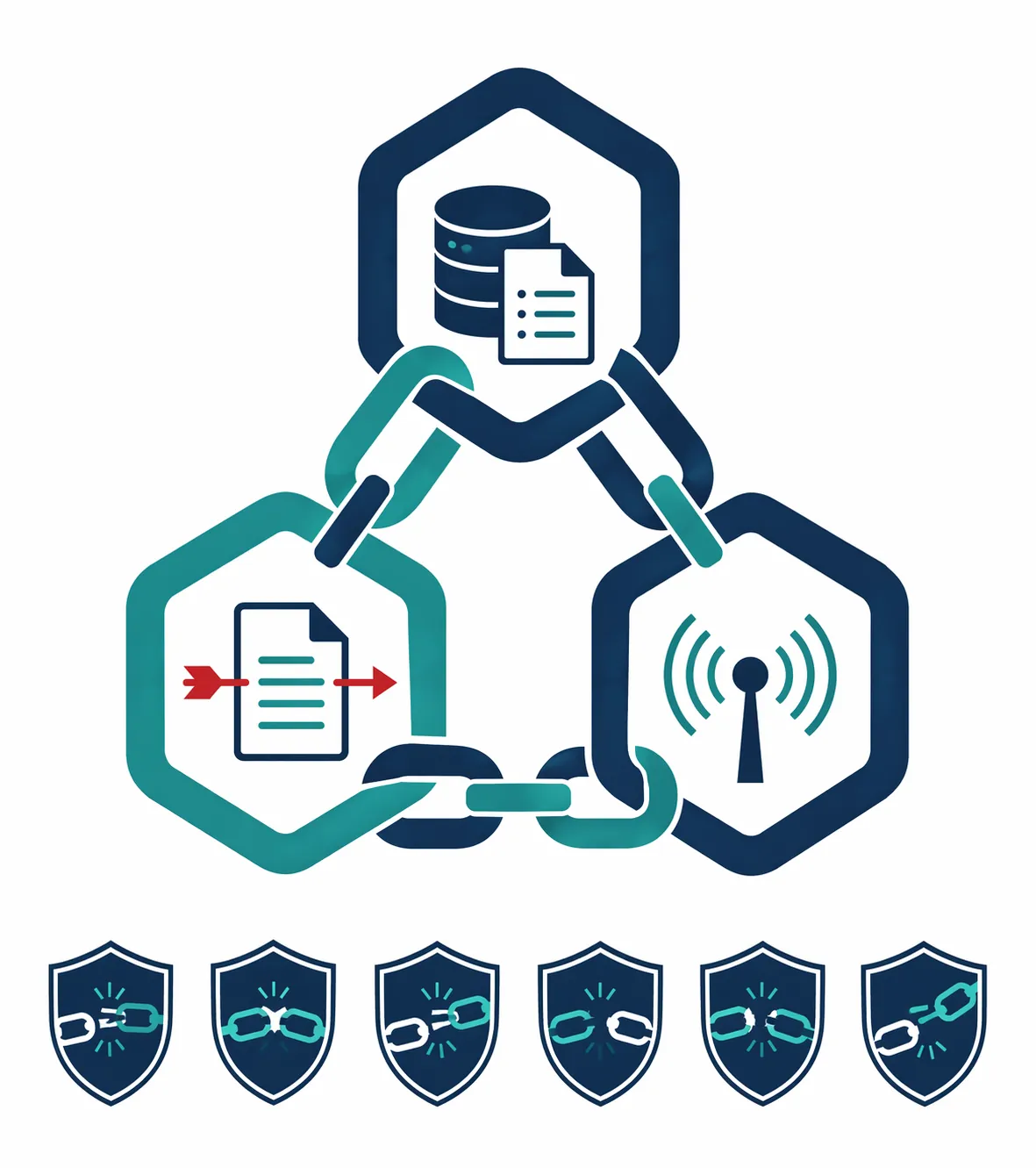
CodeIntegrity’s Notion demo matters because it keeps the discussion honest. The published attack used Notion agents with Claude Sonnet 4 in September 2025 and showed exfiltration behavior rather than merely describing a lab concern.[2] The lesson is not that Notion is uniquely reckless; it is that agentic workspace products inherit a structural problem when they combine broad context, tool use, and untrusted inputs.
Layer 1: Cut Down What Notion AI Can Read
Start with private data access because it is the leg most admins can reduce immediately. In Settings > Notion AI, review the controls that decide which workspace content AI can use. Do not treat “member can access this page” and “AI agent should use this page as context” as the same decision.
The practical move is to remove AI access from pages and databases that do not need agentic help: board packets, HR notes, investor updates, legal drafts, compensation planning, customer escalation logs, and anything copied from a CRM into a team wiki. A user may legitimately need access to a private page while an agent does not need that page to answer routine workspace questions.
Notion’s custom agent security blog says custom agents start with zero default permissions, so an agent receives access only when a creator grants it.[4] That is good design, but it also creates a review obligation: every permission grant becomes a security decision, not just a productivity setting.
- Create a short list of pages and databases that should never be used as AI context.
- Check whether custom agents have been granted access to any of those locations.
- Prefer narrow page or database access over broad workspace-level access when Notion gives the choice.
- Record who approved each high-sensitivity grant and why the agent needs it.
This is the least glamorous layer and usually the most valuable. If the agent cannot read the sensitive source, a malicious instruction has nothing sensitive to extract from that source.
Layer 2: Treat Imported Files and Copied Pages as Untrusted
The second stop is exposure to untrusted content. In practice, this means looking at how your team asks Notion AI to summarize, transform, or reason over material that came from outside the workspace: vendor PDFs, pasted web pages, customer exports, meeting transcripts, screenshots, applicant materials, or shared documents.
Notion’s prompt injection guidance describes built-in protections, but it also frames user and admin choices as part of the defense.[3] That distinction matters. A protection layer may reduce the chance that a hidden instruction succeeds; it does not make every imported artifact trustworthy.
For admins, the question is not whether employees are allowed to paste the web into Notion. They will. The question is whether an agent processing that pasted page can simultaneously reach the private pages from Layer 1 and the outbound tools from Layer 3.
- Keep agents that process external files away from sensitive internal databases.
- Use separate agents or workflows for external summarization and internal knowledge retrieval.
- Avoid giving a single agent both broad workspace context and frequent exposure to copied third-party content.
- When possible, route unknown files through a lower-privilege workspace area before they become part of the main knowledge base.
A hypothetical example is enough to show the shape: a sales teammate pastes a prospect’s procurement page into Notion and asks an agent to summarize it. If that same agent can read internal discount strategy and write to an external connected tool, the pasted page has become a possible instruction channel. The fix is not to scold the salesperson for using AI; it is to avoid giving that summarization path access to discount strategy in the first place.
Layer 3: Restrict Agent Connections Before They Become Exfiltration Paths
External communication is the leg that turns a bad answer into a data-loss incident. In Settings > Notion AI, review agent connections and connected apps with the assumption that every outbound-capable integration needs a reason to exist.
Notion’s security best practices for agent connections focus on reviewing and managing which connections agents can use.[5] That is the right place to be strict. A connection that is harmless for a human workflow can be risky when an agent can decide what to send through it after reading workspace context.
- Disable unused agent connections instead of leaving them available “just in case.”
- Separate read-only knowledge work from write-capable or send-capable workflows.
- Review connections after new departments adopt agents, not only during initial rollout.
- Treat any connection that can message, export, update, or create records outside Notion as higher risk.
This is where a workspace operator should be pleasantly boring. If an agent’s job is to answer questions from a policy wiki, it probably does not need a send-capable external connection. If its job is to create updates in another system, it probably should not also have broad access to confidential strategy pages.
Layer 4: Make Custom Agent Permissions Boring and Specific
Custom agents are where permissions drift can hide behind enthusiasm. A useful department agent starts as “let it help with our process” and slowly becomes “let it read the department, update the tracker, draft outbound notes, and consult old customer calls.” Each added permission may be reasonable alone. Together, they can rebuild the lethal trifecta.
Notion documents security features for custom agents, including permission controls that determine what an agent can access and do.[6] The administrative habit should be to grant agents job-shaped permissions, not role-shaped permissions. “This agent updates the launch checklist” is safer to configure than “this agent helps Marketing.”
| Agent job | Safer permission shape | Permission to question |
|---|---|---|
| Summarize a public-facing research folder | Read access to that folder only | Access to private strategy drafts |
| Update a project tracker | Write access to the tracker database | Read access to unrelated customer notes |
| Answer HR policy questions | Read access to approved policy pages | Access to employee relations or compensation planning pages |
| Prepare meeting follow-ups | Access to the relevant meeting database | External send capability without review |
The test is simple: if a permission would surprise the person whose data is on the page, do not bury it inside a friendly agent name. Either remove it or document why the agent needs it.
Layer 5: Read the Model Picker as a Security Control, Not a Performance Menu
Model choice is not a magic shield. The CodeIntegrity demo used Claude Sonnet 4, which is precisely why “we use a good model” is not an adequate control.[2] Still, Notion’s own model picker warning deserves attention because it tells admins where the product expects different susceptibility levels.
Notion’s February 2026 custom agent security post says its model picker warns that smaller models may be more susceptible to prompt injection.[4] That does not prove larger models are safe. It does mean model selection belongs in the security review for agents that can touch sensitive context or external tools.
- Use Notion’s warning text as a reason to review high-impact agents before switching models.
- Avoid pairing a more susceptible model choice with broad workspace access and outbound tools.
- Document model choices for agents that handle confidential pages, customer data, or external actions.
- Retest important workflows after a model change instead of assuming behavior will remain equivalent.
This layer is easy to overstate, so do not. Model selection can reduce avoidable risk where Notion itself warns about susceptibility, but it does not replace permission scoping or connection control.
Layer 6: Review Agent Activity Like a Workspace Change Log
The last layer is not a toggle so much as a maintenance habit. After the first lockdown pass, revisit Settings > Notion AI when teams create new agents, connect new apps, change model settings, or expand a workspace area that AI can read.
Notion’s agent connection and custom agent documentation gives admins surfaces to review connections, permissions, and security features.[5][6] Use those surfaces as operating records. The admin who gets blamed after a private page leaves the workspace will need more than “we thought the agent was safe.” They will need to show what the agent was allowed to access, which connections were enabled, and when those choices were reviewed.
- Save a dated record of Notion AI settings after the initial configuration pass.
- Review high-risk agents on a regular schedule and after major workspace reorganizations.
- Require an owner for each custom agent with sensitive access or external connections.
- Remove stale agents, stale connections, and access grants whose original business reason has expired.
This is also where broader AI-security warnings belong: in the maintenance plan, not as a reason to freeze. Bruce Schneier’s comment on the Notion attack was blunt: “We have zero agentic AI systems that are secure.”[8] The UK NCSC warning cited by Securance in December 2025 similarly described prompt injection as a problem that may never be fully fixed.[9] Those are not arguments against configuring Notion. They are arguments against pretending the first configuration pass is the last one.
What Not to Overclaim
There are other AI security cases worth knowing about, but they should not be misused as Notion evidence. EchoLeak and CurXecute are real CVE-labeled examples in the broader agentic AI risk landscape, but they are not Notion-specific based on the materials used here. PromptArmor’s disclosure about auto-saved edits has also circulated through secondary reporting, but the original disclosure was not directly available during source review, so it should not carry the same weight as Notion’s own documentation or CodeIntegrity’s Notion-specific demo.
The narrower conclusion is strong enough: Notion AI agents can instantiate the lethal trifecta when they combine private workspace context, untrusted content, and external communication. Notion provides documented controls that let workspace owners reduce those combinations. The remaining risk is structural, not imaginary.
A Practical Admin Baseline
If you already run Notion 3.0 agents, the responsible baseline is to document your current Notion AI settings, apply the six layers, and revisit them whenever Notion changes agent capabilities or your team adds new connected workflows. That will not make Notion AI “prompt injection proof.” It will materially reduce the chance that a hostile instruction can travel from an untrusted page to private workspace data and then out through an agent-controlled channel.
If you need the broader app-by-app risk picture before standardizing your team’s workspace, compare the same threat model across tools in AI Security Risks Across Six Note-Taking Apps Compared. For a Notion workspace that is already in production, the next useful move is inside Settings > Notion AI.
References
- The lethal trifecta for AI agents, Simon Willison, June 2025
- Notion AI Agent Prompt Injection, CodeIntegrity, September 2025
- How Notion 3.0 protects against prompt injection risks, Notion
- How we built security into custom agents, Notion, February 2026
- Security best practices for agent connections, Notion
- Custom agents security features, Notion
- Prompt Injection Prevention Cheat Sheet, OWASP Cheat Sheet Series
- Abusing Notion’s AI Agent for Data Theft, Schneier on Security, September 2025
- NCSC Warns Prompt Injection May Never Be Fully Fixed, Securance, December 2025





Comments
Join the discussion with an anonymous comment.