
The cleanest way to understand AI note-taking app security risks is not to start with a privacy promise. Start with a PDF.
In September 2025, researchers described a Notion AI agent prompt-injection vulnerability in which a malicious PDF used hidden white-on-white instructions to manipulate Claude Sonnet 4.0. The agent had access to private workspace data, was exposed to untrusted document content, and had a route to communicate externally. That combination maps closely to Simon Willison's “lethal trifecta”: access to private data, exposure to malicious instructions, and the ability to send information out.[1][2]
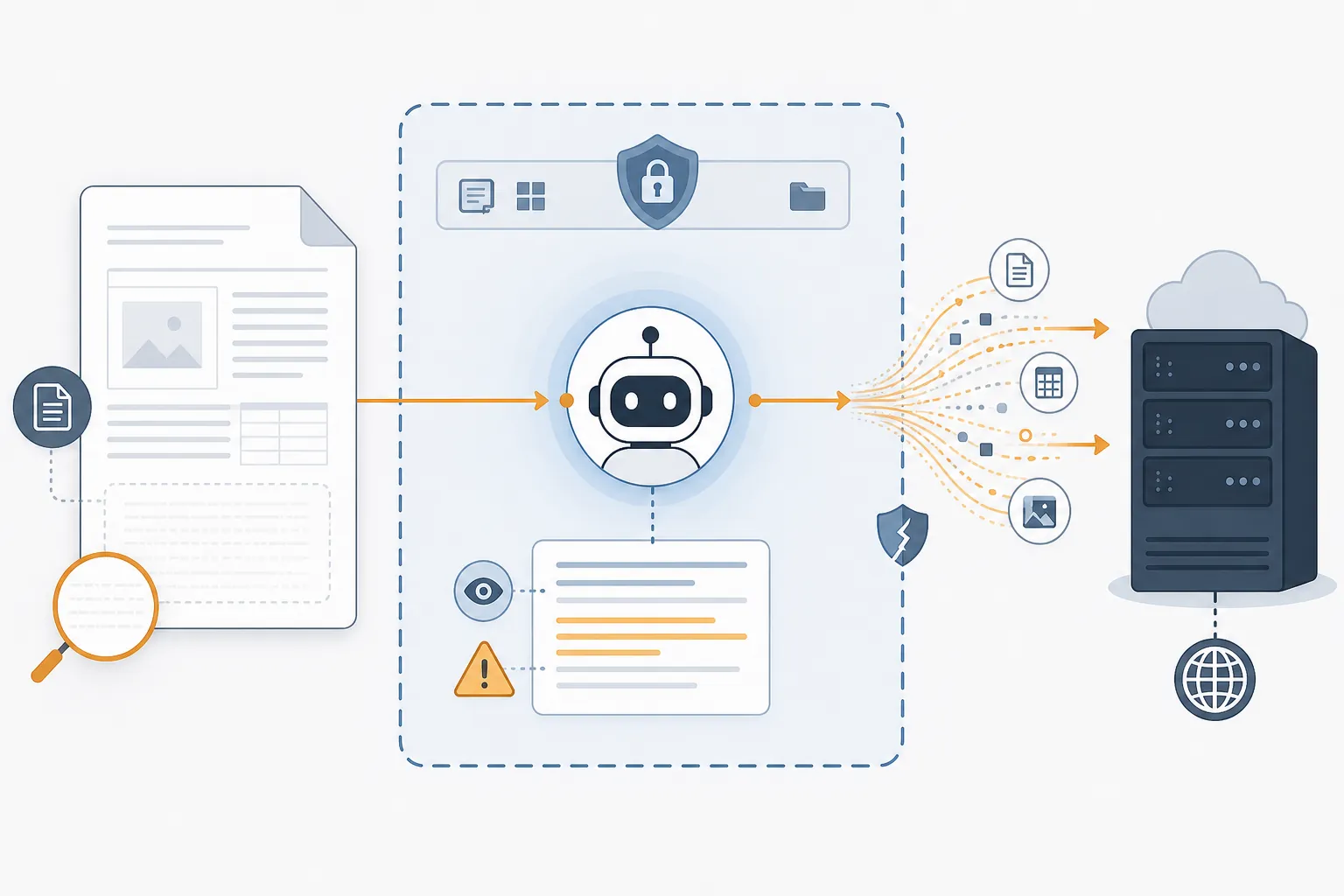
That case is not useful because it proves one app is uniquely careless. It is useful because it shows the shape of the problem. Once a notes app gives an AI system enough workspace access to be helpful, the boundary between “my notes” and “the AI's context” becomes the security boundary that matters. Encryption still matters. So do audits. But for AI features, the first practical question is simpler: when I click this button, what leaves my device, who receives it, how long can they keep it, and could untrusted content influence what happens next?
For readers still comparing the broader note-app market before narrowing on security, FlowDesk's best note-taking apps 2026 comparison covers the market shifts behind AI bundling and pricing. This article stays on the security surface: Notion, Obsidian, Logseq, Evernote, Apple Notes, and GoodNotes.
The Quick Security Comparison
| App | AI processing model | End-to-end encryption posture | Third-party AI retention | Training-data policy | Default AI behavior | Strongest caveat |
|---|---|---|---|---|---|---|
| Notion | Cloud AI with third-party providers including OpenAI and Anthropic | No end-to-end encryption for workspace content; Notion retains technical ability to decrypt | Free, Plus, and Business prompts may be retained by providers for up to 30 days; Enterprise gets zero-retention APIs | Vendor says customer data is not used to train models unless the customer opts in | AI is integrated into the workspace experience, with plan-specific controls | Helpful AI features sit on a cloud workspace architecture where provider retention and agent access matter |
| Obsidian | No built-in AI; AI is user-added through plugins or local models | Local-first by default; Obsidian Sync uses AES-256 end-to-end encryption and has been audited | Depends on the plugin, model, API key, or local setup the user chooses | No built-in AI training flow because AI is not native | No account or telemetry required for local use | Security can degrade quickly through plugins, external sync, or careless AI API configuration |
| Logseq | Local-first with optional AI integrations | Local-first files by default; sync and plugin choices change exposure | OpenAI integration sends only explicitly selected blocks or pages | Depends on chosen AI integration | AI disabled by default; explicit per-block or per-page opt-in with review before sending | The privacy model is strong at the interaction level, but plugin and sync choices still matter |
| Evernote | Cloud service with opt-in AI features | No full end-to-end encryption for the note database; server-side encryption at rest | Vendor materials do not provide the same technical detail as stronger security disclosures | Evernote says AI features do not train on user data | AI is opt-in per note | A 2016 privacy-policy controversy over employee access for machine-learning review still affects trust |
| Apple Notes | Apple Intelligence runs on-device where supported, with Private Cloud Compute fallback for some requests | iCloud Notes are not fully end-to-end encrypted unless Advanced Data Protection is enabled | Apple says Private Cloud Compute uses ephemeral processing and is not accessible even to Apple engineers | Apple says it does not use personal private data to train Apple Intelligence | Available AI behavior depends on device, OS, account settings, and feature support | The privacy promise depends heavily on Apple hardware, account configuration, and accepting vendor claims about PCC |
| GoodNotes | App-integrated AI features for notebook workflows | Available public materials are less detailed than the strongest audited disclosures | Provider-level retention detail is not as transparent in the available material | GoodNotes states it does not use notebook data for AI training | AI features require explicit user opt-in and consent | The strongest claims are vendor-stated and secondary-source supported here, not independently audited in the available material |
What the Notion Incident Actually Teaches
Prompt injection is often described as if it were a strange trick inside the model. In note-taking software, it is better understood as a permissions problem with language in the middle. A malicious document does not need to “hack” the database in the old sense if it can convince an authorized AI agent to use access it already has.
The September 2025 Notion case matters because the ingredients were ordinary. A user imports or opens a document. The AI agent reads it. Hidden instructions inside the document compete with the user's actual intent. If the agent can also access workspace data and communicate outside the workspace, the private-note boundary has moved from storage encryption to agent behavior.[1][2]
Notion's baseline architecture makes that boundary especially important. Notion does not provide end-to-end encryption for workspace content, which means the service has the technical ability to decrypt user content. Its AI security documentation says Notion uses providers including OpenAI and Anthropic, and that on Free, Plus, and Business plans, prompts may be retained by those providers for up to 30 days. Notion says Enterprise plans use zero-retention APIs.[3][4]
That does not mean every Notion AI request is equally risky. A team using Notion AI to summarize a public product-spec template has a different exposure profile from a legal assistant asking the same workspace AI to summarize client notes, or a researcher storing interview transcripts next to PDFs from outside sources. The problem is that the same convenient AI surface can touch very different data without the user always pausing to classify it.
This is where broad security language can mislead even careful users. A vendor can have formal security practices, access controls, and responsible AI policies while still running a model interaction that sends prompt content to an outside provider. It can say user data is not used for model training while still allowing temporary provider retention. It can encrypt data in transit and at rest while still not offering end-to-end encryption. Those are not contradictions. They are different layers, and AI note-taking collapses them into one user action.
The Risk Model: What Changes When AI Enters the Notes App
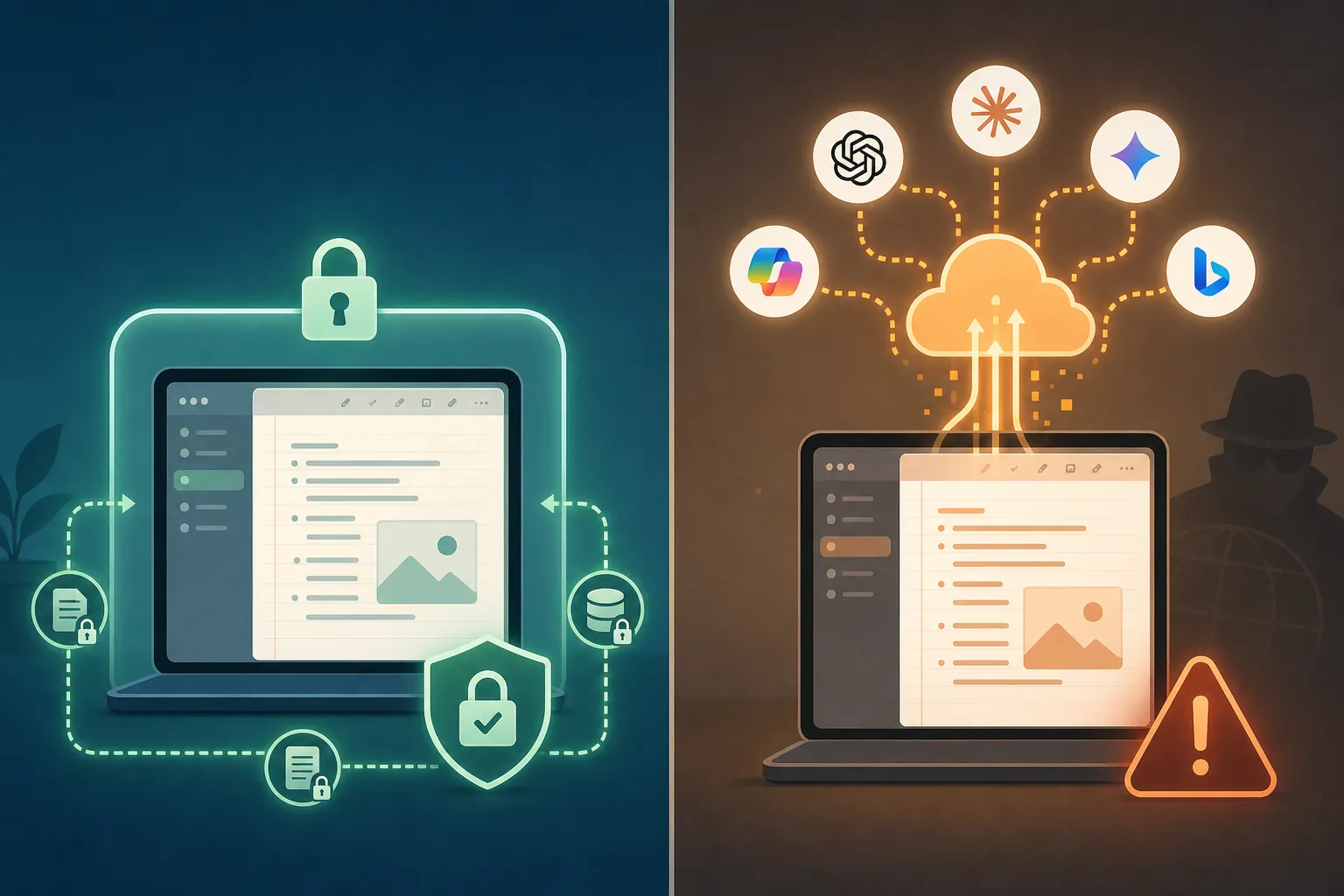
A normal cloud notes app already has privacy and security questions: account access, sync reliability, employee access controls, legal requests, backups, and retention. AI adds a second path through the data. Notes may become prompt context. Files may become model input. Search and summarization may retrieve more than the user expected. A plugin may send text to a model endpoint the notes app itself does not control.
For this comparison, the useful dividing lines are not “has AI” and “does not have AI.” They are more specific:
- Where the note begins: local file, app sandbox, vendor cloud, or shared workspace.
- Where the AI runs: on-device, vendor cloud, third-party model provider, or user-selected plugin endpoint.
- What consent looks like: global feature enablement, per-note opt-in, per-block selection, or invisible background context.
- What retention applies: zero retention, temporary provider retention, unclear vendor retention, or user-managed local storage.
- Who can technically read the notes: only the user, the sync provider under E2EE, the app vendor, or a chain of vendors and processors.
- What untrusted content can influence: imported PDFs, web clips, shared pages, meeting transcripts, emails, or plugin-generated context.
This is why a local-first app usually gets my attention faster. When data begins as plain files on a user's device and nothing leaves until the user chooses a sync or AI path, there are fewer hidden processors to discover later. But local-first is not magic. A single plugin with a broad permission scope, a copied OpenAI API key, or an unencrypted third-party sync folder can undo much of the advantage.
Notion: Productive, Polished, and Architecturally Exposed
Notion is the app in this group where AI convenience and cloud-workspace exposure most visibly meet. It is built around shared pages, databases, permissions, templates, imports, and connected workflows. Those are the same qualities that make AI agents useful: they can see a lot of structured work and act across it.
The security issue is not that Notion uses AI. It is that the workspace is not end-to-end encrypted, AI prompts can involve third-party processors, and provider retention differs by plan. Notion's own materials state that OpenAI and Anthropic do not use customer data to train models and describe plan-level handling, including zero-retention APIs for Enterprise customers. Independently, the practical difference remains: users outside Enterprise do not get the same provider-retention posture.[3][4]
That distinction matters in offices where people mix sensitive and ordinary material in one workspace. A researcher may have literature notes beside interview notes. A startup may have marketing drafts beside HR notes. A student may have lecture summaries beside disability-accommodation documentation. The AI button looks the same, but the consequence of sending context to a model provider is not the same.
The 2025 prompt-injection case also makes imported and shared content part of the security review. If an AI agent can read a malicious PDF and private workspace content in the same operation, the user is no longer only managing data storage risk. They are managing instruction-source risk: whose words get to control the agent?
For lower-sensitivity team knowledge bases, Notion AI may be a reasonable tradeoff, especially with disciplined workspace permissions and Enterprise controls. For privileged client material, unpublished research interviews, regulated health information, or source-protection notes, I would not treat a standard Notion workspace as the safest AI surface. The absence of E2EE and the plan-specific provider-retention model are too central to wave away as small print.
Obsidian: Local-First Helps, Plugins Decide the AI Risk
Obsidian starts from the opposite direction. By default, it is local-first: no account is required, the app does not require telemetry, and notes do not leave the device unless the user chooses a sync path. Obsidian's security page says Obsidian Sync uses AES-256 end-to-end encryption and has undergone independent audits by Cure53 in October 2024 and Trail of Bits in December 2025, with three independent security audits since 2023.[5]
That is a strong starting point for sensitive notes. It means a private vault can remain a local folder rather than a cloud workspace waiting to become AI context. For faculty field notes, legal research memos, therapy-adjacent personal journals, or source-sensitive reporting notes, this default is not a cosmetic distinction. It reduces the number of organizations that must be trusted before the user has done anything special.
Obsidian does not have built-in AI. AI arrives through community plugins, local model integrations, or external APIs. That is both the safety advantage and the operational trap. A user can run a local LLM plugin that keeps text on-device. Another user can install a plugin that sends selected notes to a cloud model using a personal API key. The vault may look equally private in both cases, but the exposure is completely different.
So the Obsidian question is not “Is Obsidian AI safe?” It is “Which plugin, which model endpoint, which notes, and which sync provider?” Obsidian gives the user more control than most cloud-first apps, but it also gives the user more rope. Teams need plugin policies, not just app approval. Solo users need to read plugin permissions and decide whether a local model is good enough before pasting sensitive vault content into a remote model.
For highly sensitive AI-assisted notes, Obsidian is one of the strongest candidates in this group if the user keeps the vault local or uses audited E2EE sync, avoids unknown plugins, and chooses on-device AI where possible. It is not automatically safe once a plugin starts moving text.
Logseq: Explicit AI Consent Is the Main Security Feature
Logseq is also local-first, but its most interesting AI control is not just storage location. Its AI discussion describes AI features as disabled by default, with OpenAI integration requiring explicit per-block or per-page opt-in. Users can review what will be sent before sending it.[6]
That preview step is the kind of control that sounds small until you have watched a team clean up after accidental disclosure. Per-block selection makes the user confront the exact material leaving the notebook. It does not solve every risk—OpenAI handling, account setup, and plugin behavior still matter—but it prevents the most common mental slip: assuming the AI saw only the sentence you had in mind.
Logseq's planned LogMind plugin is described as local-only AI processing in development, not as a finished guarantee for all users today.[6] That distinction matters. A future local AI path would strengthen Logseq's position for sensitive workflows, but current users should judge the actual integration they enable, not the direction of the roadmap.
For users who think in outlines, blocks, and research trails, Logseq's opt-in mechanics make it easier to compartmentalize AI use. It is a good fit when the user wants AI help occasionally, not a permanently AI-aware workspace. The same plugin caution applies here as in Obsidian: local-first architecture gives a safer baseline, then integrations decide the real exposure.
Apple Notes: Stronger If the Whole Apple Privacy Model Is Actually in Place
Apple Notes is easy to underestimate because it feels like a default utility rather than a knowledge system. For AI security, the important detail is that Apple Intelligence is described as processing many requests on-device on supported Apple Silicon Macs, with Private Cloud Compute used for some requests that need more capacity. Apple says Private Cloud Compute uses ephemeral processing and that data is not accessible even to Apple engineers.[7][8]
If those claims hold as designed, that is a materially different privacy posture from routinely sending note context to a third-party model provider. On-device processing gives the user a clearer boundary. Private Cloud Compute is still cloud processing, but Apple's claim is that it is purpose-built to avoid persistent server-side access to user data.[7]
The iCloud side needs more care. Privacy Guides notes that iCloud Notes are not fully end-to-end encrypted unless Advanced Data Protection is enabled.[8] Many users never check that setting. They assume “Apple privacy” means every synced note has the strongest protection, then later discover the account configuration did not match the assumption.
Apple Notes can be a sensible AI choice for users already inside Apple's hardware and account model, especially when the device supports on-device Apple Intelligence and the user has reviewed iCloud protections. It is a weaker fit for cross-platform teams, mixed-device research groups, or anyone who needs portable, auditable control over exactly which model receives which note. Vendor claims about Private Cloud Compute deserve attention; they are not the same thing as a third-party audit of every AI note interaction a user might trigger.
Readers who like Apple Notes but are reaching its limits may also want FlowDesk's guide on when to outgrow Apple Notes on Mac. That is a workflow question, not just a privacy one.
Evernote: Opt-In AI, But a Trust Record Users Still Remember
Evernote says its AI features do not train on user data and are opt-in per note.[9] That is the right direction for ordinary users: per-note AI is easier to reason about than a workspace-wide assistant, and a no-training statement addresses one of the first questions people ask.
The limitation is that Evernote's public AI-trust material is closer to a user-facing assurance than a technical security disclosure. It does not give the same kind of architectural clarity as a local-first design document or an audit page. Evernote also does not provide full end-to-end encryption for the note database; notes are encrypted at rest on servers, but Evernote retains access capability as a cloud service.[9]
Evernote's 2016 privacy-policy controversy still matters because trust has memory. The company proposed policy language that would have allowed employee access to user content for machine-learning-related review, then walked it back after public backlash.[10] A walked-back policy is not today's AI system, and it should not be treated as proof of current misuse. But for users deciding where to store sensitive notes for years, it is reasonable to weigh that history alongside current claims.
For low-to-moderate sensitivity notes, Evernote AI's opt-in-per-note model may be acceptable if the user is comfortable with Evernote's cloud architecture. For client-confidential notes, regulated data, or research material under ethics restrictions, the absence of E2EE and the limited technical detail should push users toward compartmentalization or migration. FlowDesk's Evernote alternative decision framework and Evernote to Obsidian migration guide are useful if that is where the risk review leads.
GoodNotes: Clear No-Training Claim, Less Public Technical Depth
GoodNotes sits in a slightly different part of the note-taking world: handwritten notebooks, study workflows, annotation, and tablet-first capture. Its AI security question is therefore often personal and academic rather than enterprise-wide. A student may have class notes beside health documentation. A clinician in training may have study material that resembles patient context. A researcher may annotate field PDFs by hand.
GoodNotes states that it does not use notebook data for AI training and that AI features require explicit user opt-in and consent.[11] Those are important claims. They address the two most common fears: background training and accidental enablement.
The evidence is thinner than I would like. The GoodNotes privacy FAQ was not fully available in the crawled material for this review, so the claim here relies on vendor-stated material as cross-verified through secondary sources rather than a fully reviewed technical disclosure. That does not make the claim false. It means the confidence level is lower than for a local-first app with published audits or an app with more detailed AI-provider handling documentation.
For ordinary study notes, GoodNotes AI may be a reasonable convenience if the user accepts the vendor's opt-in and no-training statements. For sensitive notebooks, users should separate material before enabling AI rather than assuming all handwriting stays outside model context. Readers evaluating GoodNotes beyond security can use FlowDesk's GoodNotes market position profile for the product-side picture.
A Brief Boundary: Meeting Notetakers Are a Different Risk Class
AI meeting notetakers such as bot-based transcription tools are outside this six-app comparison, but they explain why shadow AI keeps appearing in organizations. Dark Reading reported that some AI notetaker vendors lack basic cybersecurity maturity markers such as SOC 2, GDPR alignment, or strong encryption, and described one enterprise where 800 shadow AI accounts appeared in 90 days.[12]
Meeting bots also introduce consent risk. Brewer v. Otter.ai, filed as a 2025 class action, illustrates the legal problem of cloud AI notetakers joining meetings without full-party consent.[12] Local-first note apps avoid that exact bot-in-the-room structure, but they can still create disclosure risk when users paste meeting notes, transcripts, or client summaries into cloud AI features afterward.
For a deeper look at that adjacent category, FlowDesk separately compares bot-free vs bot-based AI note takers. The key point here is narrower: approving a notes app does not automatically approve every AI capture path employees may use around it.
Which App Fits Which Data Sensitivity?
A useful recommendation has to start with the notes, not the app logo. The same person may safely use more than one tool: a local vault for confidential work, Apple Notes for personal capture inside an Apple account they understand, and Notion for shared project documentation that was never sensitive in the first place.
| Data type | Safer fit | Use with caution | Avoid or compartmentalize |
|---|---|---|---|
| Highly sensitive research, legal, medical, source-protection, or confidential client notes | Obsidian local vault; Logseq local graph; local-only AI if needed | Apple Notes only when account settings, device support, and iCloud protection are understood | Standard cloud AI use in Notion, Evernote, or GoodNotes without separating sensitive material |
| Sensitive but routine professional notes | Obsidian or Logseq with controlled plugins; Apple Notes with reviewed privacy settings | Notion Enterprise with zero-retention APIs and strict workspace permissions | Workspace-wide AI use where imported files and private notes share the same agent context |
| Team knowledge bases and ordinary project documentation | Notion with appropriate permissions; Evernote or GoodNotes for low-risk personal workflows | Any AI feature that sends broad context instead of selected content | Storing confidential material in the same space as AI-assisted public documentation |
| Class notes, study notebooks, personal organization | Apple Notes, GoodNotes, Obsidian, or Logseq depending on platform and sync needs | GoodNotes AI or Evernote AI when opt-in scope is clear | Putting health, legal, or identity documents into the same AI-enabled notebook without separation |
If the notes are highly sensitive, start local-first. Obsidian and Logseq give the user the cleanest default boundary because data does not need to leave the device for the app to function. Add AI only after deciding whether the model runs locally, which text is sent, and whether plugins can be trusted.
If the user is already committed to Apple devices, Apple Notes can be a reasonable middle path, but only after checking Advanced Data Protection and understanding which Apple Intelligence features run on-device versus Private Cloud Compute. The weak version of this choice is assuming Apple's brand automatically means the strongest encryption posture is enabled.
If the work depends on collaborative databases, Notion may still be the right operational tool. The security-minded version is to separate sensitive notes from AI-enabled shared workspaces, use Enterprise controls where appropriate, restrict agent access, and treat imported files as untrusted inputs. The casual version—everything in one workspace, AI everywhere, no plan-level retention review—is where the risk concentrates.
Evernote and GoodNotes are harder to rank with confidence because the available AI security material is less technically deep. Their opt-in and no-training statements are meaningful, but for sensitive notes they should be treated as minimum assurances, not complete security models.
There is no universal winner here. The safer choice is the one where the exposure path is visible before the user clicks the AI button.
References
- Notion AI Data Exfiltration via Prompt Injection — Schneier on Security — 2025 — link
- The Lethal Trifecta for AI Agents — Simon Willison's Weblog — link
- Notion AI Security Practices — Notion — link
- Notion AI Safety & Privacy — Notion — link
- Security — Obsidian — link
- Why Logseq AI and How to Preserve Privacy — Logseq Forum — link
- Apple Intelligence Privacy — Apple — link
- Apple Notes — Privacy Guides — link
- Should You Trust AI With Your Private Notes? — Evernote — link
- Evernote Revisits Privacy Policy After User Backlash — Evernote Blog — 2016 — link
- Goodnotes Privacy FAQ — Goodnotes Support — link
- Cybersecurity Risks Lurking in AI Notetaker Apps — Dark Reading — link






Comments
Join the discussion with an anonymous comment.