
Last verified July 31, 2026: if the job is organizing notes with MiniMax H3, the answer is no in the ordinary note-app sense. H3 did not return tags, folder assignments, cleaned Markdown, or rewritten notes. It returned the thing H3 is built to return: a short video. MiniMax H3 launched as a video model on July 31, 2026, not as a notebook-maintenance model for Obsidian, Evernote, Notion, Apple Notes, or a local Markdown vault. [1]

The fast reality check is blunt because this is where a note vault can get messy: H3 is a video-generation model; the promised downloadable weights were not published at verification time; the API was the only testable route; the tested output path produced no usable note artifacts; and the one note-adjacent use case that worked was turning notes and references into a 2K recap clip. MiniMax’s own announcement frames H3 as an open model for tasks and modalities, but the model family and the API behavior matter more than the launch wording when the desired output is a cleaned note stack. [2]
- Need tags such as #project, #meeting, #research, or #follow-up? H3 did not output them as note artifacts.
- Need folders such as /Clients/Acme or /Research/AI? H3 did not file notes.
- Need rewritten Markdown with headings, backlinks, or front matter? H3 did not produce that usable cleanup output.
- Need a short recap video built from note text plus reference files? That is the part H3 can plausibly do.
The naming trap: H3 is not M3
The most expensive mistake here is not a bad prompt. It is picking the wrong MiniMax model. H3 is the Hailuo-line successor for video generation. M3 is the separate 1M-context text and multimodal LLM MiniMax released on June 1, 2026. Launch-day shorthand can make “H3,” “M3,” “multimodal,” and “open source” sound like neighboring choices inside the same note-cleanup toolbox. They are not interchangeable choices for a vault-maintenance job. [3]
For note organization, the useful model behavior is boring and inspectable: accept note text, decide what should happen to that text, and leave behind text files, metadata, tags, folder names, summaries, or transformation instructions. H3 can accept text in a prompt and can use reference media, but the documented workflow is still a video-generation workflow. The output target is a generated video, not a batch of updated notes. [4]
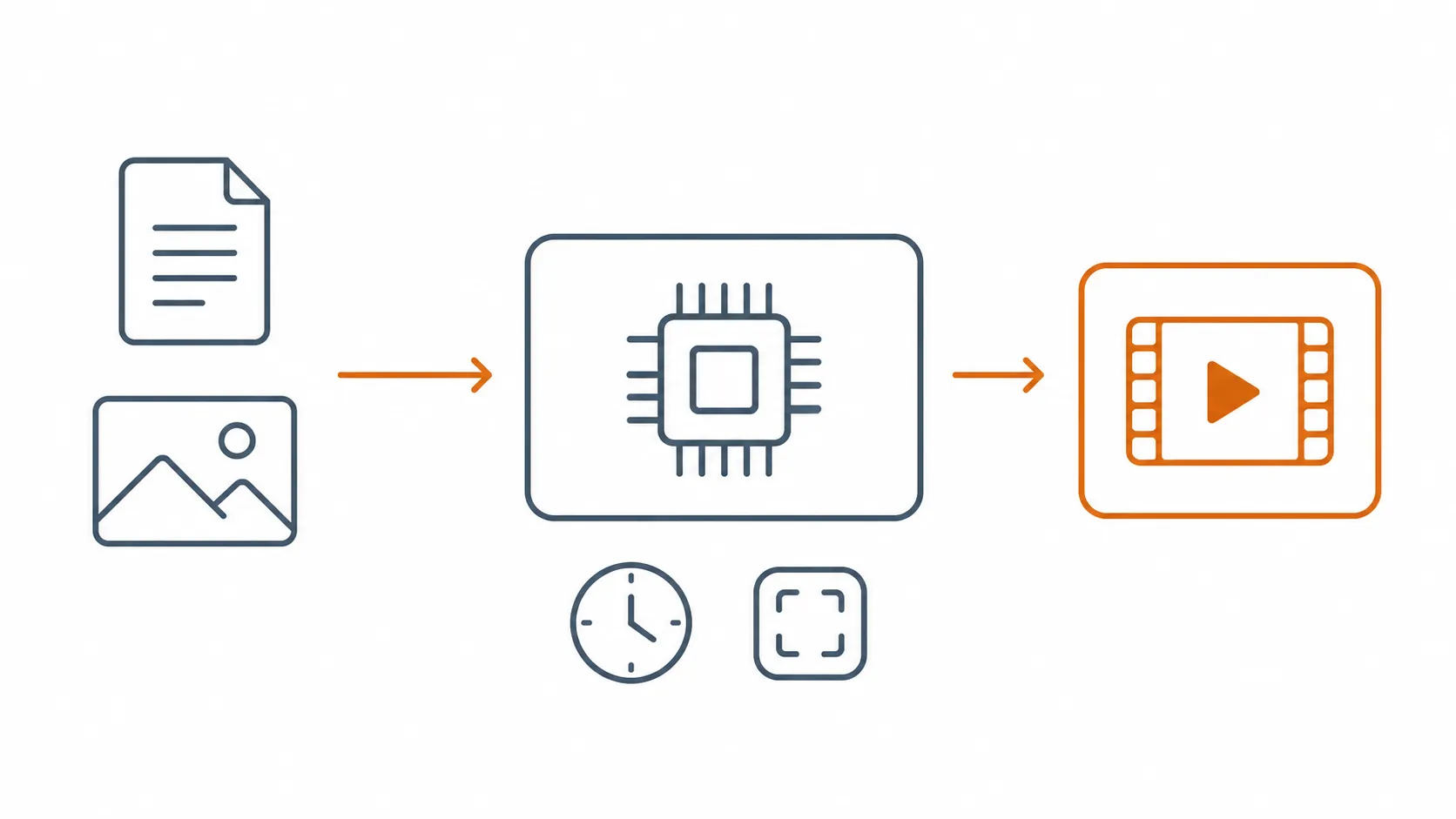
What the H3 note test actually asked for
The test was framed the way a tired note user would frame it, not the way a video prompt engineer would. The prompt supplied note text and asked for organizational artifacts: proposed tags, a folder/category assignment, a cleaned summary, and a rewritten note body. The reference-file path was treated as optional context, the same way someone might attach a screenshot, whiteboard photo, or meeting image to explain the note.
That framing matters because H3’s own input limits already tell you what kind of machine you are standing in front of. The prompt is capped at 7,000 characters. Reference input is capped at 12 files, with limits across images, videos, and audio. Audio references cannot be used alone. Output is 2K video, with duration set from 4 to 15 seconds in integer values, and text-to-video requires an explicit aspect ratio. [4]
| Test dimension | What H3 allowed | What note organization needed |
|---|---|---|
| Prompt text | A prompt up to 7,000 characters [4] | Often many long notes, or a whole vault, with preserved source text |
| Reference material | Up to 12 reference files across images, videos, and audio, with specific modality limits [4] | Attachments can help, but the main artifact still needs to be text metadata or rewritten notes |
| Output format | 2K video, 4–15 seconds [4] | Tags, folders, front matter, summaries, Markdown, or move instructions |
| Workflow shape | Create a video task, poll status, retrieve generated media [4] | Run text processing, review diffs, write or export changed notes |
The failed part was not that H3 misunderstood one label or chose an ugly tag name. It never crossed into the artifact type note users need. A successful note-cleanup run leaves a person with something to inspect in the file system or paste back into the app. H3’s tested path left a media output. That can be polished and impressive as video work while still being useless for folder cleanup.
The one note-adjacent H3 workflow that makes sense
There is a narrow version of “use notes with H3” that is real: give H3 a concise note-derived brief, attach reference images or media, and ask it for a short recap clip. Morphic’s H3 guide treats prompts as production briefs and discusses reference-job practice, which fits the model’s natural direction much better than asking it to behave like a tagger or Markdown refactorer. [6]
That can be useful for a meeting recap, a study-card animation, a product update teaser, or a tiny visual summary of research. It is not note organization. The original note stack remains where it was, with the same filenames, tags, duplicates, stale folders, and half-written summaries.
The API path proves the category mismatch
The H3 API flow is asynchronous video generation. In practical terms, the process is: create a generation task, poll until the task completes, then download or retrieve the generated result. That is normal for media generation, where rendering takes time. It is a strange shape for note organization, where the next responsible step should be reviewing text diffs or accepting proposed metadata changes. [4]
- Create the task with a prompt, output settings, and any allowed references.
- Poll the task status instead of receiving an immediate text transformation.
- Retrieve the generated media output once the task is done.
- Inspect the result as a clip, not as a set of changed notes.
If this were a note organizer, the nervous part would be different: Which files changed? Were original notes preserved? Can the user reject a tag? Did it create a new folder or move the source? The H3 test never reached those questions because the workflow did not produce those objects.
Cost: a 15-second H3 test is not a cheap tagger
Cost also pushes H3 away from routine note maintenance. MiniMax’s pay-as-you-go pricing lists H3 at $0.13 per second for 2K output. That makes a 15-second clip $1.95 before reference add-ons. The first five reference images are free, later reference images are $0.04 each, reference audio is free, and reference video is billed by the second. The $0.09-per-second 768P tier is listed as closed beta. [5]
| H3 item | Official pricing detail | Practical note-user consequence |
|---|---|---|
| 2K video generation | $0.13 per second [5] | $1.95 for a 15-second clip |
| Duration range | 4–15 seconds in integer values [4] | Even the maximum output is a short clip, not a processed notebook |
| Reference images | First 5 free, then $0.04 each [5] | Image-heavy context can add cost |
| Reference audio | Free [5] | Useful for video context, but audio references alone are not allowed in the documented reference setup [4] |
| Reference video | Billed per second [5] | Video context can become expensive quickly |
| 768P tier | $0.09 per second, closed beta [5] | Not the general route to price around |
A few dollars for a generated recap video may be reasonable. Paying video-generation rates to discover that no note files changed is not. For a vault with hundreds or thousands of notes, the right cost unit is usually tokens, local inference time, or plugin setup effort, not seconds of rendered video.
“Open source” was not a runnable local H3 setup on July 31

The open-source wording needs a date stamp. As of the July 31, 2026 verification, H3’s weights were promised but not published, and no MiniMax-H3 repository was available under the MiniMaxAI Hugging Face organization in the independent launch check. That means no local self-hosted H3 note experiment was repeatable at write time. The API was the testable path. [3]
That distinction is not pedantry. A local-first note user cares whether a model can run against a copied vault, whether files stay on the machine, whether outputs can be inspected before overwrite, and whether the whole process can be repeated after a service changes. “Weights soon” is not the same as “download this model today and run it against your notes.”
The planned license also has boundaries. Reporting on the MiniMax Community License describes free non-commercial use and commercial use only for organizations under US$20 million in annual revenue, with attribution. That may be workable for some individual and small-team experiments, but it is still not the same as an unrestricted local note-organizer available on launch day. [7]
There may be good video reasons to follow H3. MiniMax’s announcement makes broad creative-video claims, and SCMP reported Artificial Analysis ranking H3 first in video editing. Those claims do not answer the note question. A model can be strong at video editing and still produce nothing a Markdown vault can use. [2][7]
What to use instead if the artifact must be organized notes
If you want to stay near the MiniMax ecosystem, use M3 via API for text-capable note processing rather than H3. The meaningful prompt is not “make me a video from these notes,” but something closer to: read these notes, preserve the originals, propose tags, propose folder destinations, produce a cleaned Markdown version, and return changes in a format I can review before applying. M3 is the MiniMax model branch described for long-context text and multimodal LLM work; H3 is the video branch. [3]
For readers who want more control, the sturdier path is a local LLM plus Obsidian, with the usual warning that local does not mean effortless. XDA describes connecting Obsidian Copilot to LM Studio through a local endpoint at localhost:1234/v1, which is the kind of setup where the user can keep the vault local and inspect how the assistant interacts with notes. [8]
Another published first-hand test used AI Tagger Universe and Auto Note Mover with a local model, Gemma 3 12B, to process a 502-note Obsidian vault. That is not proof every vault will cleanly organize itself; plugin prompts, note quality, naming conventions, and review habits still matter. It does show the correct class of tool for this job: something that writes tags and moves or classifies notes, not something that renders a clip. [9]
If you are comparing paid cloud models against local Obsidian setups, the site’s Claude AI Obsidian workflow cost and safety guide is a closer decision model than any H3 launch demo. The important split is capture versus processing: a model may help summarize and reorganize notes you already own, but it needs a text output path and a review step. The same tested-verdict framing appears in Claude vs ChatGPT for note-taking, where the useful question is what artifact the model leaves behind.
| Desired result | Use H3? | Better route |
|---|---|---|
| A 4–15 second recap clip from notes and reference media | Yes, if video is the artifact | H3 API |
| Tags for existing notes | No | Text-capable LLM, Obsidian tagging plugin, or M3 via API |
| Folder or category assignments | No | Text-capable LLM plus a reviewable move workflow |
| Cleaned Markdown notes | No | M3 via API, Claude/ChatGPT-style text workflow, or local LLM |
| Local-first vault cleanup | No, not with H3 on July 31, 2026 | Obsidian plus local LLM, with plugin and model-risk checks |
Local AI note tools are useful, but not permanent infrastructure by default
The local route deserves trust only when it earns it. Plugins break, model servers change, prompts drift, and abandoned projects leave users maintaining their own glue. Reor, a local-AI self-organizing note app, was archived on March 7, 2026, which is a useful warning against treating any young AI note layer as permanent infrastructure. [10]
That does not make local Obsidian workflows a bad idea. It means they should be run like maintenance tools: copy the vault first, process a small folder, inspect the generated tags or moves, and only then scale up. The advantage is that the result is visible. If a plugin adds front matter or moves a file, you can see the changed file. If H3 makes a polished clip, the vault still needs cleaning afterward.
So the decision is simple as of July 31, 2026: use MiniMax H3 only when the desired artifact is a short video recap from notes and references. Do not use H3 to organize a note stack. For tags, folders, rewritten Markdown, summaries, or vault cleanup, choose a text-capable model such as M3 via API or a local Obsidian workflow you can inspect before it touches the rest of your files.
References
- China's MiniMax releases H3 video model, Reuters, July 31, 2026
- MiniMax H3: An Open Model Breaking the Boundaries Between Tasks and Modalities, MiniMax
- MiniMax H3 Video Model Launch: 2K Native Audio, Digital Applied
- Video Generation, MiniMax
- Pay-as-you-go Pricing, MiniMax
- MiniMax H3 Guide, Morphic
- MiniMax H3 open-weights and Community License report, South China Morning Post
- Using My Local LLM With Obsidian, XDA
- Letting a Local LLM Organize Obsidian Notes, MakeUseOf
- reorproject/reor, GitHub, archived March 7, 2026






Comments
Join the discussion with an anonymous comment.