
The fastest way to make an AI math prompt fail in Obsidian is to copy a browser-chat prompt into a plugin and assume the surrounding note will come along for the ride. It usually will not. Copilot, Text Generator, and local-model setups each expect context in different forms, and Obsidian will only render the final math cleanly if the output lands as Obsidian-native LaTeX rather than chat-flavored formatting.
That failure mode is not theoretical. Obsidian users have documented the irritating gap where ChatGPT output looks like LaTeX in chat, then pastes into Obsidian in a form that does not auto-render the way the note needs it to render.[1] For math notes, that turns a supposedly helpful answer into a cleanup task.
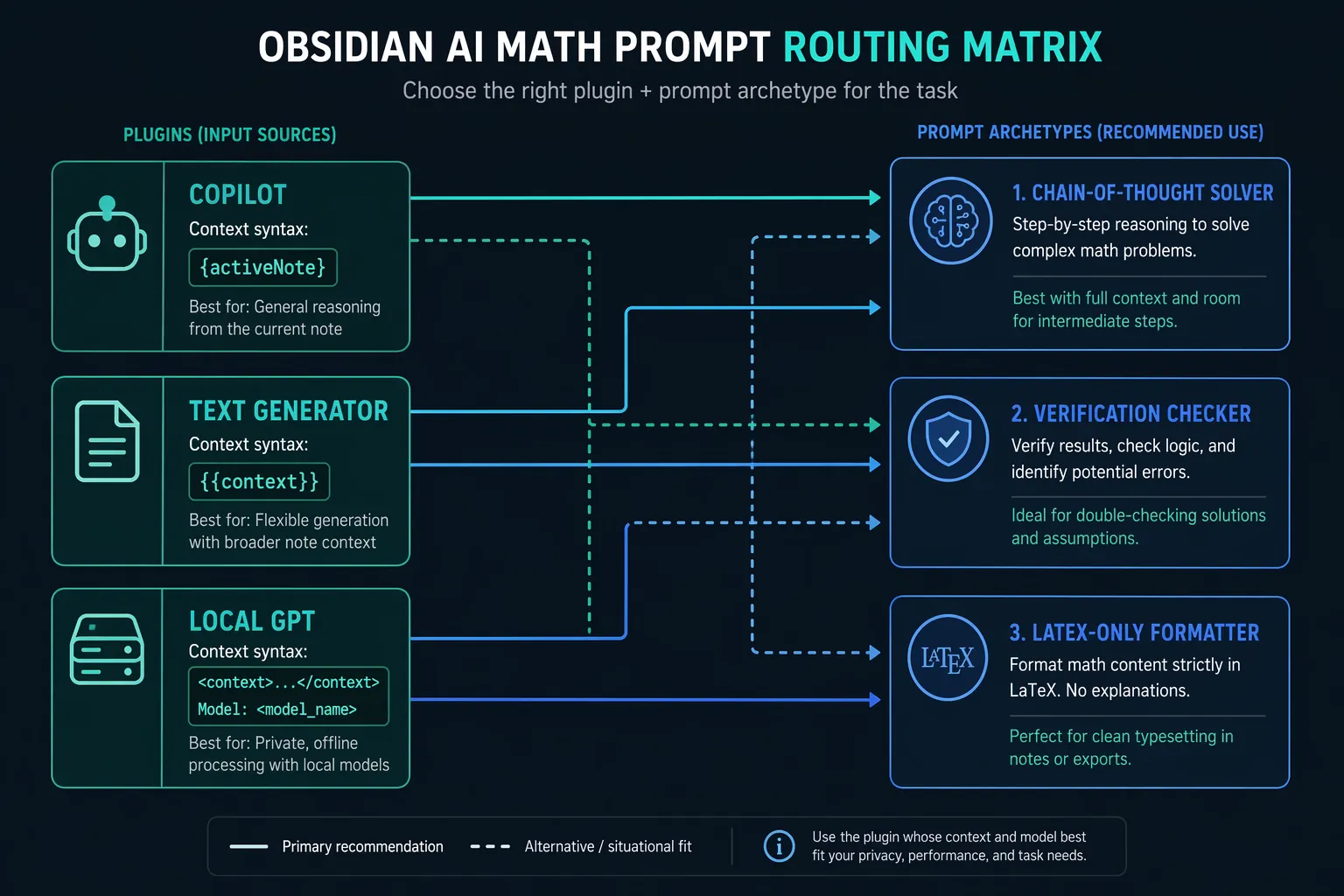
Start With The Plugin, Not The Prompt
| If you use | Use this context syntax | Best first prompt | Use when |
|---|---|---|---|
| Obsidian Copilot | {activeNote}, {selection}, and custom {placeholders} | Chain-of-thought solver | The problem and surrounding work are already in the current note |
| Text Generator | {{context}} through template frontmatter | Chain-of-thought solver or verifier | You want reusable templates and provider switching per template |
| Local GPT / local model plugin setup | Depends on the plugin or wrapper; pass only selected note text when possible | Verification checker or LaTeX formatter | You want notes to stay in a local-first workflow and can tolerate model limits |
| Any plugin after a solution is drafted | Selection-only context | LaTeX-only formatter | The reasoning is done, but the math block needs to render cleanly |
The table matters more than a polished universal prompt. Copilot’s custom prompt system uses curly-brace placeholders and stores custom prompts as Markdown files; its documentation specifically includes placeholders such as {activeNote}.[2] Text Generator workflows lean on template frontmatter and context variables such as {{context}}, with examples of switching providers per template in academic use.[3][4] Local-model branches are real, but they are not one syntax; the prompt has to be wrapped by whatever local plugin, Ollama bridge, or script is actually sending text to the model.
The Three Prompt Archetypes Worth Testing
Use three prompts, not one. A solver prompt should reason through the problem. A verification prompt should attack an existing solution. A formatter prompt should stop trying to think and only convert math into Obsidian-renderable LaTeX. Mixing those jobs is how you get confident prose, hidden algebra mistakes, and broken display blocks in the same answer.
1. Chain-of-thought solver
This is the prompt for a new problem, especially when the note already contains assumptions, definitions, or partial work. It should ask for structured reasoning without letting the model spray unrendered syntax across the note. The useful version also forces the model to separate the answer from the check.
You are solving a math problem inside an Obsidian Markdown note.

Use the note context below as the source of the problem and any prior work:

[CONTEXT]

Task:
1. Identify the exact problem to solve.
2. State any assumptions you need. If an assumption is not supported by the note, label it as an assumption.
3. Solve step by step.
4. Keep all displayed equations in Obsidian-compatible LaTeX using $$ ... $$ blocks.
5. Keep inline math in $ ... $.
6. Do not use \[ ... \], \( ... \), or HTML.
7. End with a short "Check" section that verifies the final result by substitution, dimensional reasoning, differentiation, or another appropriate method.

Return only the solved note section. Do not wrap the answer in a code block.
Replace [CONTEXT] with the plugin’s actual context variable. In Copilot, that usually means {activeNote} or a selection placeholder configured in a custom prompt file. In Text Generator, it usually means {{context}} inside a template.
2. Verification checker
Verification should be a separate pass because the model’s job changes. It should not continue the solution unless the existing work is wrong or incomplete. It should inspect assumptions, algebra, units, edge cases, and final substitution. That keeps the checker from becoming a second solver that politely repeats the same mistake.
You are checking an existing math solution inside an Obsidian Markdown note.

Review this selected solution or note context:

[CONTEXT]

Task:
1. Do not re-solve from scratch unless the solution has a material error.
2. Check each transformation for algebraic, calculus, logical, and notation errors.
3. Identify the first incorrect or unsupported step, if any.
4. If the solution is correct, say "No material error found" and give a compact verification.
5. If the solution is wrong, show the corrected step and continue only as far as needed to repair the answer.
6. Use Obsidian-compatible LaTeX only: $$ ... $$ for display math and $ ... $ for inline math.
7. Do not use HTML, \[ ... \], or \( ... \).

Return three sections: Verdict, Evidence, Corrected Work.
3. LaTeX-only formatter
The formatter is intentionally narrow. It is not allowed to solve. It is not allowed to improve the explanation. Its only job is to make pasted or generated math render in Obsidian.
Convert the selected math text into Obsidian-compatible LaTeX.

Input:

[CONTEXT]

Rules:
1. Preserve the original mathematical meaning.
2. Do not solve, simplify, or add new reasoning.
3. Use $ ... $ for inline math.
4. Use $$ ... $$ for display equations.
5. Do not use \[ ... \], \( ... \), HTML, screenshots, or Markdown tables.
6. Return only the corrected Markdown/LaTeX text.
7. Do not wrap the output in a code block.
Copilot: Use Custom Prompt Files And Real Placeholders
Copilot is the cleanest place to start because its custom prompt behavior is documented with exact placeholder syntax. Custom prompts are stored as .md files, and placeholders use curly braces, including {activeNote} for the current note.[2] That means the Copilot version should not contain a vague instruction like “use my note.” It should explicitly pass the note or selection.
You are solving a math problem inside Obsidian Copilot.

Use this active note as context:

{activeNote}

Task:
1. Find the main math problem in the note.
2. Solve it step by step.
3. If the note contains partial work, preserve correct steps and continue from the last valid step.
4. If a step is wrong, label it "Correction" and show the repaired step.
5. Use $$ ... $$ for display equations and $ ... $ for inline math.
6. Do not use \[ ... \], \( ... \), HTML, or code fences.
7. End with "Check" and verify the final answer.

Return only the inserted note text.
For selected text, make a second Copilot prompt that routes only the selection into the checker or formatter. That avoids asking the model to infer which equation in a long note needs attention.
You are checking selected math work in Obsidian Copilot.

Selected work:

{selection}

Task:
1. Check the selected work only.
2. Do not rewrite correct sections.
3. Identify algebra, calculus, notation, or assumption errors.
4. If incorrect, provide the smallest corrected replacement.
5. Format all math for Obsidian: $ ... $ inline and $$ ... $$ display.

Return only the review and corrected replacement.
Jordi Smit’s Copilot setup adds a useful idea here: route prompts based on cursor context, so the assistant behaves differently inside prose, code blocks, and $$ math blocks.[5] That is exactly the kind of boring automation that saves math notes. If the cursor is inside a display equation, the model should not produce a paragraph-length tutorial; it should repair the equation or produce compatible LaTeX.
One caveat: Copilot’s current v4 agent mode may not behave exactly like older setups described in third-party walkthroughs, so use the current Copilot documentation for placeholder syntax and treat older routing examples as design patterns, not guaranteed configuration instructions.[2][5]
Text Generator: Put Context And Provider Choice In The Template
Text Generator works better when the math prompt is treated as a reusable template rather than a pasted chat instruction. The plugin exists in the Obsidian community plugin directory, and Shabanov’s academic workflow shows the more important operational detail: templates can use frontmatter and switch providers per template.[3][4]
That matters because a solver and a formatter do not need the same model behavior. A stronger remote model may be useful for a symbolic derivation. A local or cheaper model may be enough to convert pasted equations into Obsidian-safe LaTeX. The template should say which job it is doing before it sends the note context.
---
title: Math Solver - Obsidian LaTeX
provider: your-preferred-provider
---
You are solving a math problem inside an Obsidian Markdown note.

Context:
{{context}}

Task:
1. Identify the problem.
2. Solve step by step.
3. Preserve correct existing work.
4. Correct wrong work explicitly.
5. Use $ ... $ for inline math and $$ ... $$ for display math.
6. Do not use \[ ... \], \( ... \), HTML, or code fences.
7. End with a compact Check section.

Return only Markdown that can be pasted directly into Obsidian.
---
title: Math Verification Checker
provider: your-preferred-provider
---
You are verifying math work inside an Obsidian note.
Context:
{{context}}
Task:
1. Check the existing solution rather than solving from scratch.
2. Find the first invalid algebraic, calculus, logical, or notation step.
3. If no material error is found, give a concise verification.
4. If an error is found, show only the corrected replacement and the minimum continuation needed.
5. Use Obsidian LaTeX: $ ... $ inline and $$ ... $$ display.
6. Do not output HTML, \[ ... \], \( ... \), or code fences.
Return sections: Verdict, Evidence, Corrected Work.---
title: Obsidian LaTeX Formatter
provider: your-local-or-fast-provider
---
Convert the context into Obsidian-compatible LaTeX.
Context:
{{context}}
Rules:
1. Do not solve or explain.
2. Preserve mathematical meaning.
3. Use $ ... $ for inline math.
4. Use $$ ... $$ for display math.
5. Remove unsupported wrappers such as \[ ... \] and \( ... \).
6. Do not return code fences.
Return only the corrected Markdown.The frontmatter keys above are deliberately shown as a pattern, not a universal drop-in for every vault. Use the provider names and template fields your Text Generator installation recognizes. The important part is the split: {{context}} carries the note material, while the template declares whether the model is solving, checking, or formatting.
Local GPT: Keep The Job Smaller
Local-model prompting belongs in this guide, but it should not be oversold. The available evidence is narrower: AI LaTeX Generator is an Ollama-based natural-language-to-LaTeX project, and Easy LaTeX is an Obsidian plugin for generating formulas from natural language with Tab-to-AI behavior.[6][7] Easy LaTeX was released in May 2026 and had 219 downloads at the time noted, so it is interesting, not enough evidence for broad reliability claims.[7]
For local models, the safest math workflow is narrower: selected text in, constrained output out. Ask a local model to verify a short derivation or format a formula before asking it to solve a dense multi-page proof. That recommendation is not about ideology; it is about reducing the context and syntax burden the local setup has to carry.
You are running locally and will receive a short selected passage from an Obsidian note.

Selected passage:

[SELECTED_TEXT_FROM_LOCAL_PLUGIN]

Task:
1. Check whether the math is internally consistent.
2. If there is an error, identify the first incorrect step.
3. Provide the smallest corrected replacement.
4. Use only Obsidian-compatible LaTeX: $ ... $ inline and $$ ... $$ display.
5. Do not add unrelated explanation.
6. Do not use HTML, \[ ... \], \( ... \), or code fences.

Return only the verification result and corrected replacement.
If your local plugin exposes a selection variable, replace [SELECTED_TEXT_FROM_LOCAL_PLUGIN] with that variable. If it only passes the full active note, keep the formatter and checker prompts short and run them on copied selections instead of whole lecture notes. For privacy-conscious readers comparing where AI processing runs, FlowDesk’s on-device AI limitations guide is the better place to go deeper; here, the practical point is that local math prompting works best when the scope is controlled.
LaTeX Rules That Prevent Obsidian Cleanup
Most broken AI math output in Obsidian is not mathematically sophisticated failure. It is wrapper failure. The model uses chat-friendly delimiters, escapes things oddly, or returns the answer inside a fenced code block that you then have to unwrap.
- Use
$ ... $for inline math. - Use
$$ ... $$for display math blocks. - Forbid
\[ ... \]and\( ... \)if your pasted output keeps misrendering. - Forbid code fences unless you specifically want a literal Markdown snippet.
- Tell the formatter not to solve, simplify, or improve the explanation.
Do not bury those rules at the end of the prompt. Put them where the model has to obey them before it generates the answer. The LaTeX-only formatter is also useful after an external chat session: paste the messy answer into a scratch note, select it, run the formatter, then insert the cleaned result into the permanent note.
A Testing Standard Before Calling A Prompt “Verified”
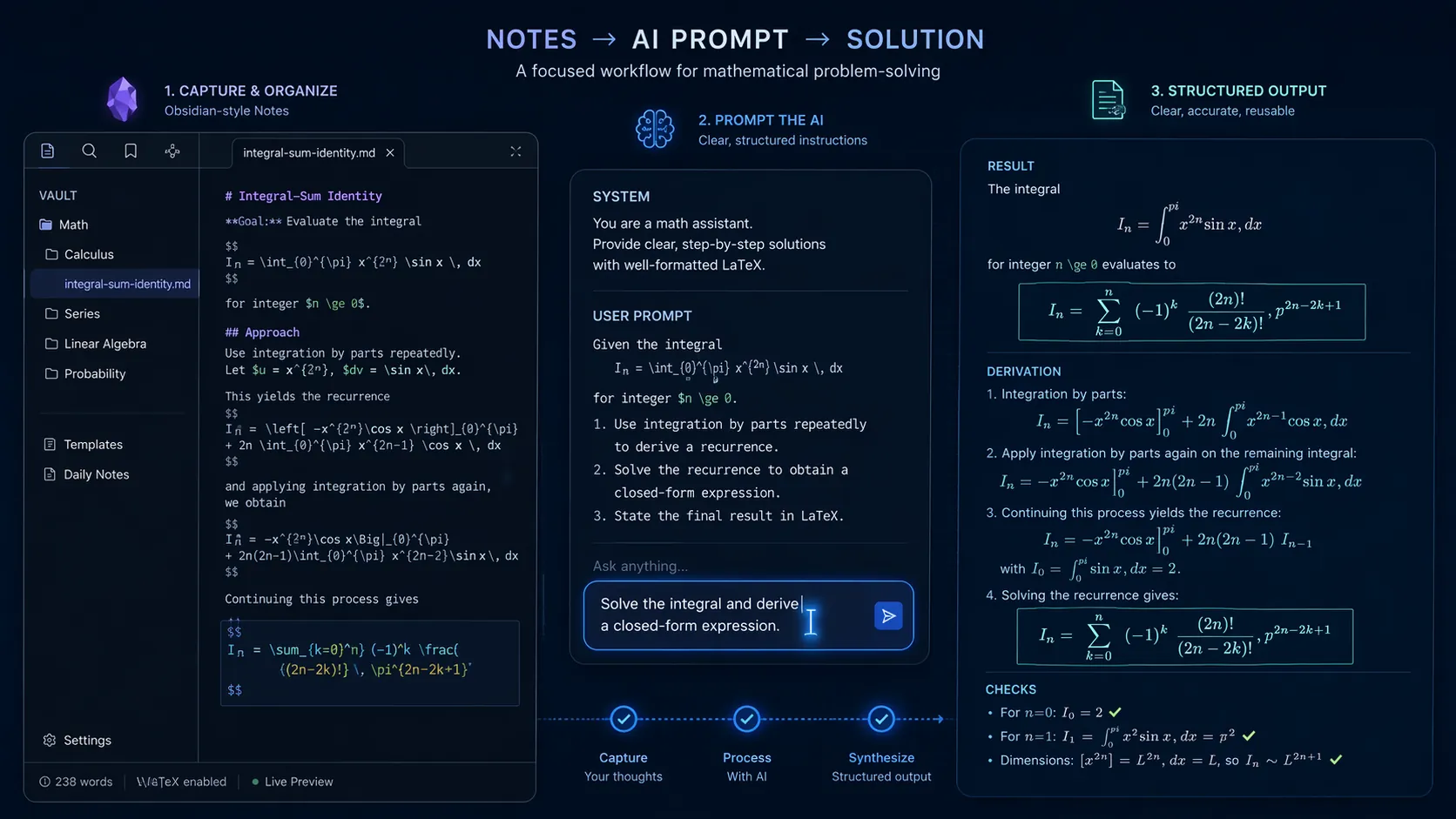
The templates above are configured from plugin documentation and documented workflows, but FlowDesk should still run and date-stamp its own Obsidian tests before presenting any one template as verified in the site’s strongest sense. The test should happen in the actual plugin, not in a browser chat.
| Test | Pass condition |
|---|---|
| Context intake | The model uses the selected text or active note without inventing missing problem details |
| Solver prompt | The solution keeps reasoning readable and separates the final check |
| Verifier prompt | The model reviews existing work instead of re-solving by default |
| Formatter prompt | The output renders in Obsidian without manual delimiter cleanup |
| Plugin syntax | Copilot placeholders or Text Generator context variables survive exactly as configured |
| Local branch | The prompt works on a short selected passage without requiring full-vault context |
That is the bounded recommendation: an AI prompt to solve math problems tested in Obsidian is not one magic paragraph. It is one of three prompt archetypes, wired to the plugin’s actual context syntax, with LaTeX output constrained for Obsidian rendering. Anything less may still be a decent ChatGPT prompt, but it is not yet an Obsidian workflow.
References
- Pasting ChatGPT LaTeX output into Obsidian: auto-render as LaTeX, Obsidian Forum.
- Custom Prompts, Obsidian Copilot.
- Text Generator, Obsidian Community Plugins.
- Adding AI to your academic workflow, Ilya Shabanov.
- What does it take to add Copilot to Obsidian?, Jordi Smit.
- AI LaTeX Generator, GitHub.
- Easy LaTeX, Obsidian Community Plugins, May 2026.






Comments
Join the discussion with an anonymous comment.