The practical question is not whether AI will reach note-taking apps. It already has. The question is whether the app holding years of private notes will keep behaving predictably as AI rules keep changing through 2027.
That answer starts in a less glamorous place than feature lists: where the notes go by default. A local markdown vault that sits on your disk has a different regulatory shape from a workspace whose summaries, searches, chats, or meeting notes depend on cloud processors. The impact of AI regulation on productivity apps and note-taking tools will not land evenly, because the apps are not built evenly.

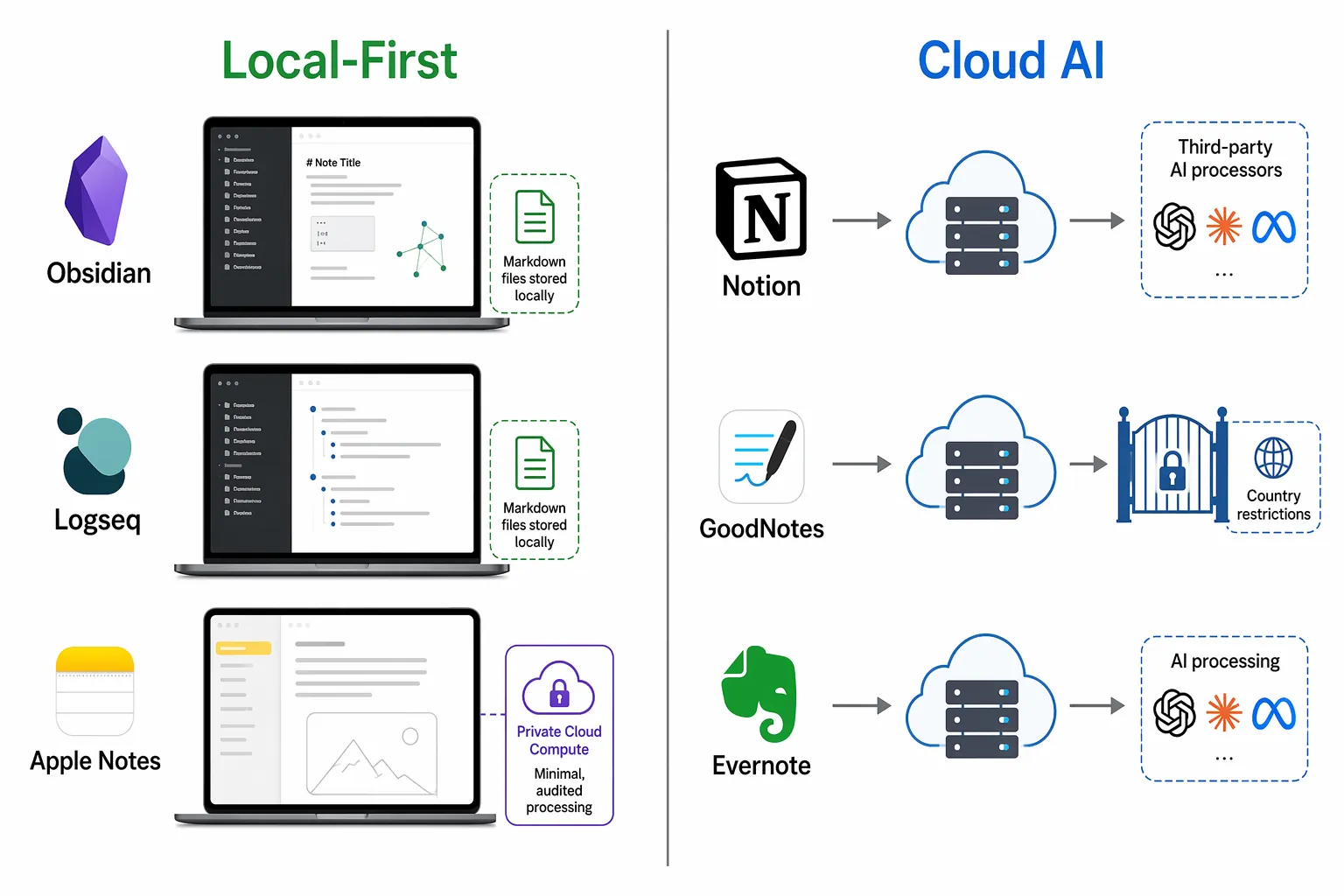
The strongest stability signal is not the most polished AI sidebar. It is whether user note content is sent to third-party AI processors by default. Obsidian and Logseq are structurally safer on that point than cloud-first AI notebooks. Apple Notes sits in a more nuanced middle: not a plain markdown vault, but backed by an unusually privacy-engineered split between on-device processing and Apple’s Private Cloud Compute. Notion AI, GoodNotes, and Evernote carry different kinds of cloud or AI-feature exposure, even when their policies are careful and their security work is serious.
Default Architecture Is Now a Regulatory Feature
AI law usually sounds abstract until it touches a daily workflow. Then it looks like a missing feature in one country, a new consent prompt before recording a meeting, an employer training requirement, a vendor subprocessor list, or a legal hold question nobody expected when they clicked “summarize.”
Local-first note apps reduce that surface area before policy language has to do much work. If the vendor does not receive the note content by default, it is not normally deciding which model processor sees it, which region handles it, whether it is retained by an AI provider, or whether a cloud AI output creates downstream liability. That does not make the user immune from every law. It does remove several vendor-side obligations that cloud AI systems have to manage.
| App | Default note-content path | Regulatory stability signal |
|---|---|---|
| Obsidian | Plain markdown files on the user’s local disk | Vendor does not process note content by default |
| Logseq | Local-first graph, open-source orientation | AI direction described as opt-in local processing |
| Apple Notes with Apple Intelligence | Hybrid of on-device processing and Private Cloud Compute for larger requests | More controlled than ordinary cloud AI, but not identical to never sending content anywhere |
| Notion AI | Cloud workspace with AI features involving third-party model providers | Enterprise zero-retention posture helps, but processor chains remain part of the design |
| GoodNotes | Cloud-connected app with AI features restricted by country | Feature availability already changes when local law conflicts arise |
| Evernote | Cloud note service with opt-in AI features and a history of privacy controversy | Trust depends more on policy, settings, and vendor governance than on local default storage |
This is why local-first has become more than a taste preference for people who dislike subscriptions or want offline access. It is a vendor-side exposure-reduction pattern. The fewer private notes that leave the machine by default, the fewer legal regimes, processors, transfer arrangements, retention promises, and feature gates can disturb the basic act of writing and retrieving notes.
Obsidian and Logseq Avoid the Cloud AI Chain by Default
Obsidian’s basic bargain is unusually legible: notes are files. More specifically, they are plain markdown files stored locally on the user’s device. That means a folder can be inspected outside the app, backed up with ordinary tools, searched by other software, or moved without waiting for an export job to reconstruct a proprietary workspace.
That architecture matters more under AI pressure than it did in the pre-AI note-app comparison era. If Obsidian adds no vendor-side AI processing to the default path, the vendor is not automatically receiving a vault full of personal notes for summarization, embedding, semantic search, or chat. AI can still enter the workflow through community plugins, user-provided API keys, or local models, but those are choices that change the path. The default path is still local storage.
Logseq reaches a similar place through a different culture. It is open-source and local-first by design, and its team has described AI features as moving toward opt-in local processing to preserve privacy. That distinction is small in marketing copy and large in practice. An opt-in AI route creates a decision point. A default cloud AI route creates dependence first and explanation later.
For a solo researcher, lawyer, student, or small team admin, this is not a theoretical comfort. It changes who has to be trusted. With a local-first vault, the app vendor does not need to promise that a model provider will not retain note content, because the vendor is not sending that content in the ordinary note-taking flow. Policies still matter, but architecture has already removed a category of promise.
Apple Notes Is a Privacy-Engineered Hybrid, Not a Markdown Vault
Apple Notes deserves a separate category because it is easy to overstate it in either direction. It is not Obsidian. The user is not managing a folder of portable markdown files as the primary data model. Notes sit inside Apple’s ecosystem, and iCloud behavior matters for many users.
But Apple Intelligence is also not the same exposure pattern as a generic cloud AI feature bolted onto a notes database. Apple says the vast majority of Apple Intelligence requests are processed on-device, and larger requests can use Private Cloud Compute, where Apple describes privacy protections including no retention of personal data and not using personal data to train its foundational models.[1]
That architecture is meaningful because it narrows the ordinary cloud AI bargain. The user is not simply handing note context to a rotating set of model vendors under a long subprocessor page. Apple is trying to make the cloud side behave more like an extension of the device: limited, auditable, and non-retentive. For many users, that is a stronger privacy posture than a cloud-first notebook with an AI assistant.
It is still not the same as never sending content anywhere. Once a request leaves the device, even under a more restrictive architecture, the user is depending on Apple’s design, disclosures, and implementation. That is a better place to be than ordinary cloud routing for many workflows, but it should not be confused with the simplicity of a local markdown folder.
Cloud AI Note Apps Carry the Processor Chain With Them
Notion AI is the useful counterexample because it is not a careless product. Notion states that enterprise AI uses zero-retention APIs from providers including OpenAI and Anthropic, and that it does not train on customer data by default.[2] For an enterprise buyer with procurement leverage, contract review, security questionnaires, and administrative controls, that posture may be enough.
The risk shape is different for ordinary users and small teams. Their private workspace depends on a cloud app, AI processors, subprocessor disclosures, regional availability, and vendor settings they usually cannot negotiate. The problem is not that Notion AI is uniquely reckless. The problem is that cloud AI productivity features create a chain, and every link in that chain can become relevant when law, enforcement, or litigation changes.
GoodNotes shows the same issue from another angle. Its AI FAQ says AI features are unavailable in 11 countries: Afghanistan, Belarus, China, Hong Kong, Iran, Macau, North Korea, Russia, Syria, Ukraine, and Venezuela.[3] That is not a prediction about future regulation. It is already a product reality: an AI note feature can exist for one user and disappear for another because the legal environment changes the supported path.
Evernote adds history to the risk profile. The company’s 2016 privacy-policy controversy, in which a policy change would have allowed employees to read user notes for machine-learning-related purposes, remains relevant because it exposed a basic asymmetry in cloud note apps: once the archive lives on the vendor’s servers, trust depends heavily on policy language, internal access controls, and future business decisions. Evernote’s current AI features may be opt-in, but the architectural memory is hard to erase.
The Legal Pressure Points Are Real, Even When the Outcomes Are Not Settled
The point is not that every note app is about to become a regulated high-risk AI system. That would be too broad. The more precise claim is that cloud AI note-taking features are increasingly adjacent to legal questions that local-first default storage often avoids.
AI meeting notetakers make the pressure easiest to see. Active class-action litigation involving Otter.ai, Fireflies.ai, and Google Cloud Contact Center AI is challenging consent design around AI transcription and recording features; as of July 2026, those cases remain unresolved rather than settled law.[4]
Consent problems become sharper when voices are involved. Under GDPR, recording a participant’s voice through an AI notetaker can constitute personal data processing requiring a lawful basis under Article 6, and discussions involving health information can trigger special-category data rules.[4] That does not mean a written local note has the same risk as a meeting bot in a call. It means AI productivity features that capture, process, or summarize other people’s speech have a wider legal footprint than private local notes.
California adds another layer. SB 243, effective January 2026, creates disclosure duties for companion chatbots, a category that can matter if a productivity app’s AI chat interface is designed in a way users might mistake for human interaction.[5] AB 316, also described as effective January 2026, precludes using AI autonomy as a liability defense, which matters for vendors trying to distance themselves from AI-generated outputs.[6]
The EU AI Act brings a different kind of burden. Article 4 requires employers to ensure sufficient AI literacy among staff using AI tools, which can create indirect obligations for companies deploying AI-enabled productivity apps.[7] Whether a specific note-taking feature becomes high-risk can depend on deployment context, such as education or employment evaluation, and interpretation is still evolving. That uncertainty is exactly why default architecture matters: a tool that does not route notes into vendor-side AI by default has fewer places where the uncertainty attaches.
There is also federal-state uncertainty in the United States. The Trump administration’s December 2025 executive order directed federal agencies to identify and challenge state AI laws viewed as obstructing innovation. That may affect timelines or enforcement scope, but it does not give note-app users a stable practical answer today. It mostly reinforces the same decision rule: reduce dependency on workflows whose legality and availability depend on a moving regulatory settlement.
Where Each App’s Risk Actually Changes
A fair comparison should not collapse all cloud apps into one bucket or all local-first apps into another. The relevant difference is the ordinary path of note content and the points where optional features change it.
| Tool | What lowers exposure | What can raise exposure |
|---|---|---|
| Obsidian | Local markdown storage; vendor does not touch note content by default | Cloud sync choices, AI plugins, external API keys, shared vault workflows |
| Logseq | Local-first design; opt-in local AI direction | Sync services, plugins, hosted collaboration, external model calls |
| Apple Notes | On-device Apple Intelligence for most requests; Private Cloud Compute for larger ones | Requests that leave the device; iCloud account and ecosystem dependencies |
| Notion AI | Enterprise zero-retention APIs and no default training on customer data | Third-party AI subprocessors; non-enterprise users’ limited contract leverage |
| GoodNotes | Explicit feature restrictions where local law conflicts arise | Country-level AI availability gaps; future restriction changes |
| Evernote | Opt-in AI features | Cloud note custody; policy and governance changes; user trust history |
For Notion, the deciding question is rarely “does it have security docs?” It does. The better question is whether your workflow can tolerate a cloud AI chain as part of the core workspace. If the answer is yes, Notion may still be the right tool, especially where collaboration matters more than vault portability. If the answer is no, polishing the processor language does not make it local-first.
For GoodNotes, the country-block list is the warning sign. A student or researcher who depends on AI handwriting cleanup, summaries, or study assistance should treat geographic availability as part of the feature, not a footnote. A feature gated by local law is less predictable than a local file you can open without asking a model service to participate.
For Evernote, the issue is not only AI. It is accumulated dependency. Longtime users often have thousands of clipped pages, PDFs, scans, web fragments, and attachments. Moving that archive later can mean duplicate files, damaged note links, and export settings that sound clear until the import fails. When AI regulation adds another reason to inspect the vendor relationship, the migration cost is already part of the risk.
FlowDesk’s app comparisons and migration guides cover those practical tradeoffs separately, including security risks across major note apps and Evernote-to-Obsidian migration planning. The regulatory angle does not replace those decisions. It changes the order in which they should be asked.
Local-First Stops Being Local-First When You Reconnect the Chain
The local-first advantage is real, but it is easy to spend it. A local vault with an AI plugin that sends entire notes to an external model is no longer operating with the same exposure profile. A Logseq graph synced through a third-party cloud service is not the same thing as a folder that never leaves a device. An Obsidian setup using a user’s own OpenAI or Anthropic API key may be perfectly intentional, but the regulatory surface has moved from the note app vendor to the user’s chosen model provider and account terms.
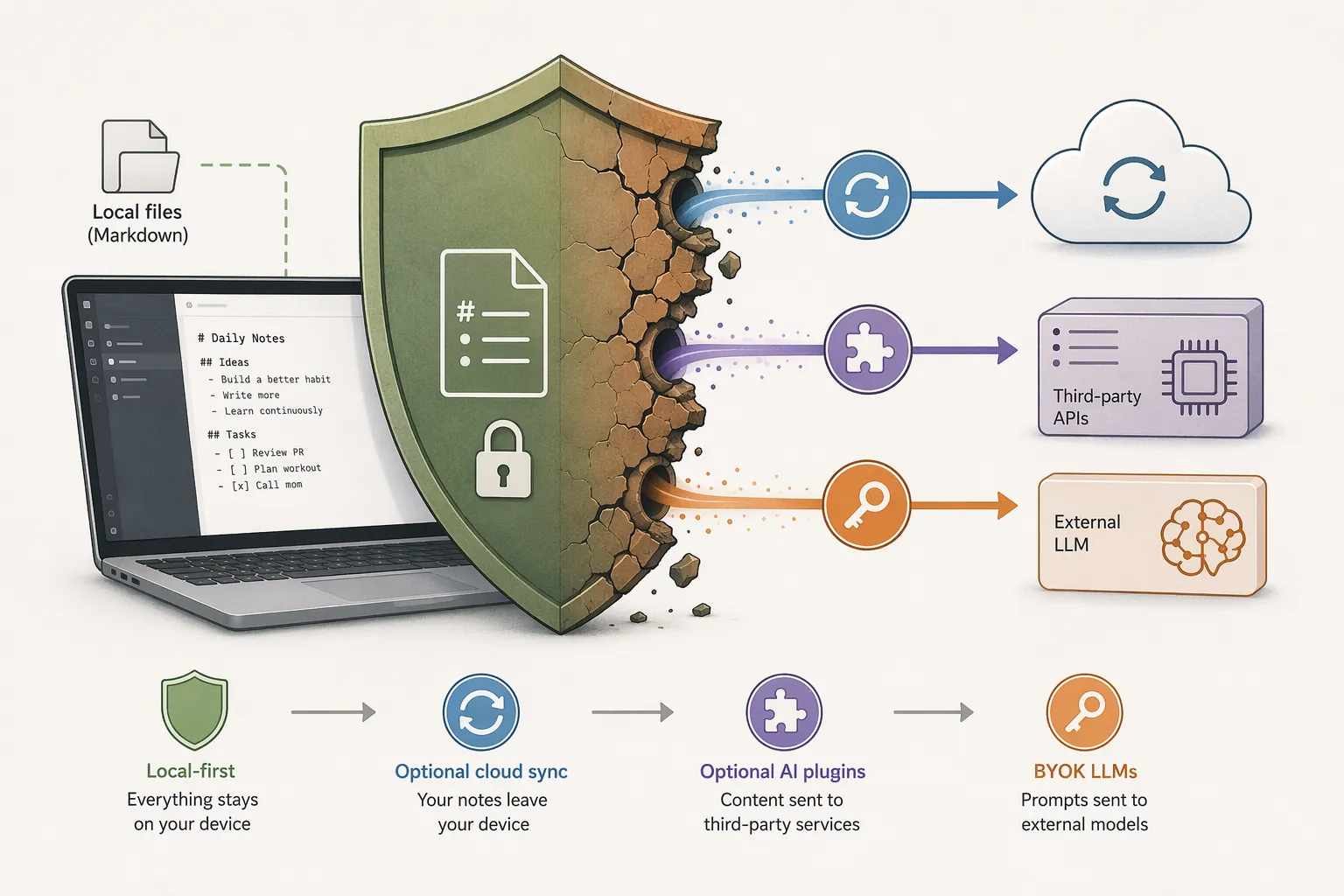
That is the part many local-first arguments skip. Architecture gives you a safer default; it does not bless every extension you add afterward. The moment an AI plugin sends notes to an external API, the relevant questions become familiar again: what content is transmitted, which provider receives it, whether data is retained, whether it can be used for training, what region processes it, and whether your use case involves other people’s personal data.
- Cloud sync changes custody: iCloud Drive, Dropbox, Google Drive, Obsidian Sync, or another sync layer may be acceptable, but it adds a separate trust relationship.
- AI plugins change processing: a local model and a cloud API call are not equivalent just because both appear inside the same note app.
- Employer management changes responsibility: a personal local vault and a company-administered deployment can trigger different training, retention, access, and audit obligations.
- Meeting notes change consent: private notes from your own reading are not the same as transcripts or summaries of other people’s speech.
- Legal and medical content changes stakes: attorney-client material, health information, or sensitive personal data should not be treated like ordinary project notes.
The legal-professional edge case is especially unforgiving. United States v. Heppner, a February 2026 decision from the Southern District of New York, held that consumer AI platforms could not support attorney-client privilege in that context.[8] That is a specific case, not a universal ban on every AI note feature. But it is enough to make “the AI assistant was convenient” a weak answer for lawyers using general-purpose cloud AI tools around privileged material.
A 2027 Decision Rule for Note App Choice
If the main priority is collaboration, a cloud workspace may still win. Notion’s database model, shared pages, permissions, comments, and team habits can outweigh the architectural risk for many groups. A student working alone, a solo lawyer, a private researcher, or a small team with sensitive notes may reasonably score the tradeoff differently.
For regulatory stability and predictable note ownership through 2027, the clearest signal is still the default content path. Ask that before asking which app has the cleverest AI summary.
- Where are my notes stored by default?
- Does the vendor receive note content during ordinary use?
- Do AI features send notes, recordings, or embeddings to third-party processors?
- Can I use the app without those AI features if regulation, pricing, or regional availability changes?
- If I leave, do I get durable files or a reconstruction project?
That rule does not make Obsidian or Logseq universally better than Notion, GoodNotes, Evernote, or Apple Notes. It makes their default architecture easier to reason about. If your choice is Notion versus Obsidian, Logseq versus Evernote, or Apple Notes versus a cloud AI notebook, start with the same question: where does the note content go before you change any settings? Then ask whether the AI feature you actually plan to use changes that answer.
References
- Apple privacy whitepaper, Apple
- Notion AI Security & Privacy Practices, Notion, https://www.notion.com/help/notion-ai-security-practices
- Goodnotes AI Frequently Asked Questions, Goodnotes, https://support.goodnotes.com/hc/en-us/articles/9795720752911-Goodnotes-AI-Frequently-Asked-Questions
- AI Notetakers: Productivity Tool or Emerging Legal Risk, Mayer Brown, June 2026, https://www.mayerbrown.com/en/insights/publications/2026/06/ai-notetakers-productivity-tool-or-emerging-legal-risk
- New California AI Laws, Pillsbury, https://www.pillsburylaw.com/en/news-and-insights/new-california-ai-laws.html
- California Leads Regulatory Frontier with New Privacy and Artificial Intelligence Laws for 2026, Buchanan Ingersoll & Rooney, https://www.bipc.com/california-leads-regulatory-frontier-with-new-privacy-and-artificial-intelligence-laws-for-2026
- The EU AI Act: What App Developers Actually Need to Know, Manchester Digital, https://www.manchesterdigital.com/post/foresight-mobile/the-eu-ai-act-what-app-developers-actually-need-to-know
- The Silent Guest in Your Meetings: Legal Risks of AI Note-Takers, Smith Law, https://www.smithlaw.com/newsroom/publications/the-silent-guest-in-your-meetings-legal-risks-of-ai-note-takers