
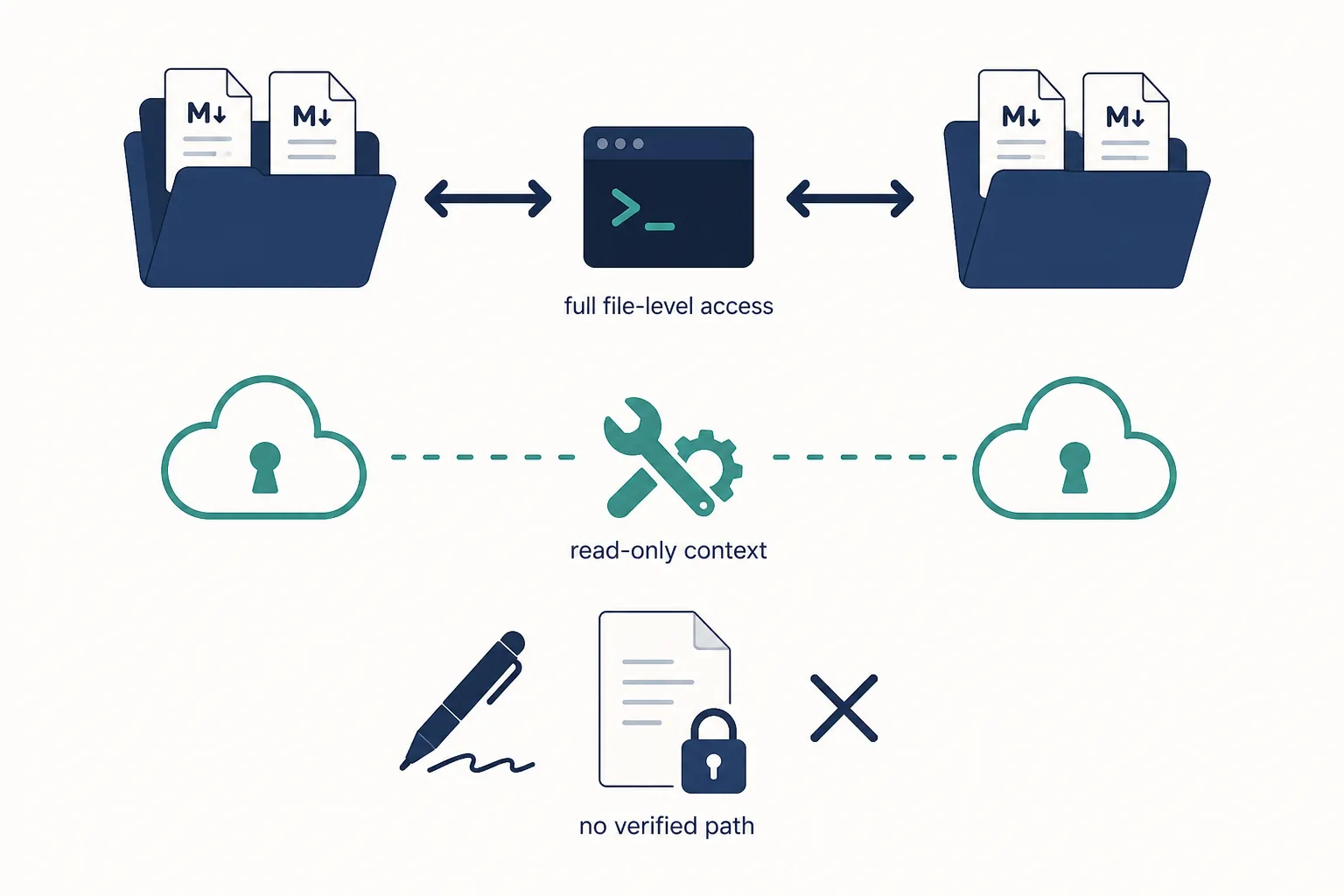
Tested / last checked: 2026-08-25. The practical answer is narrow: using ChatGPT Codex to automate note taking works when your notes are plain files on disk. In this pass, that means Obsidian vaults and Logseq graphs stored as local Markdown are realistic targets. Notion is a different category: it can feed context through connector or MCP plumbing, but it is not a simple Codex-controlled note folder. We found no verified Codex note-automation path for Evernote, Apple Notes, GoodNotes, or Notability.
The distinction matters because Codex is not being evaluated here as a chatbot that suggests what to do. It is being tested as an agent that can run against a folder: OpenAI describes Codex across surfaces including CLI, desktop, VS Code, and delegated cloud tasks, and the CLI documentation is the relevant surface when the job is to read, edit, and reorganize local files rather than answer questions in a browser tab.[1][2]

Where Codex can actually operate
The fastest way to decide whether Codex belongs in your note workflow is to ask one unglamorous question: can it see the notes as files? If yes, it can make real edits. If no, it needs an API, connector, MCP server, export step, or manual bridge. Those are not the same thing.
| Note app | What Codex can touch | Automation status in this 2026-08-25 pass | Practical judgment |
|---|---|---|---|
| Obsidian | Local Markdown files inside a vault folder; Codex CLI can be run from the vault root and instructed to read, edit, rename, and create files.[2] | Verified as the strongest fit. Third-party reports also show transcript conversion, index creation, capture routing, and work-task sync patterns against Obsidian-style vaults.[5][6][7][8] | Worth testing if the vault is under Git and you are willing to review diffs before accepting changes. |
| Logseq | Local graph files when the graph is stored as Markdown on disk; Codex is operating on the folder, not on a Logseq-specific integration. | Plausible by the same file-level mechanism as Obsidian, but less directly documented in the available third-party note-workflow accounts. | Test on a copy first, especially if your graph uses conventions that are easy to damage with bulk edits. |
| Notion | Connector or MCP-mediated context, not a local note folder. Native ChatGPT/Notion behavior is described as read-only Q&A, while MCP setup involves config.toml, a running server, and OAuth.[10][11] | Limited. Notion can be used as context for Codex-style work, but this is not the same as giving Codex safe write access to a vault. | Only sensible if you are comfortable with developer setup and accept the context-source limitation. |
| Evernote | No local plain-file vault surface verified in this research pass. | No verified Codex note-automation path found. | Do not assume Codex can safely automate it without a separate export/API workflow you have personally verified. |
| Apple Notes | No verified Codex-controlled note surface found. | No verified path found. | Not a fit for this article’s tested file-level automation claim. |
| GoodNotes | Handwriting-first app; no verified Codex note-automation path found. | No verified path found. | Do not treat Codex as a handwriting-note manager here. |
| Notability | Handwriting-first app; no verified Codex note-automation path found. | No verified path found. | Same answer as GoodNotes: no verified path in this pass. |
The Obsidian and Logseq case: Codex is useful because the notes are boring files
Obsidian is where Codex stops sounding like a productivity demo and starts becoming a file-maintenance tool. A vault is a folder. A note is a Markdown file. Frontmatter is text. Backlinks are text. That means Codex can search, edit, split, merge, and rename notes using the same kind of file access it uses on a codebase.
That is also why it can do damage. A chatbot that gives bad advice wastes a few minutes. An agent that renames 200 notes without updating links leaves the future version of you with broken navigation and an ugly Git diff. The usable setup is not “Codex plus a vault.” It is Codex plus a vault, instructions, scope limits, and a rollback path.
For Obsidian, the cleanest pattern is to run Codex from the vault root, not through a plugin that hides what is happening. Put the vault under Git. Start from a clean working tree. Ask Codex to inspect first, propose the files it intends to touch, then edit only after you approve the plan. After the run, read the diff like you would read a pull request.
Logseq can qualify under the same rule when the graph is accessible as local Markdown files. The caution is that Logseq’s block structure and page conventions are easier to disturb if Codex treats every file like generic prose. If your instructions do not tell it how blocks, page names, and daily notes are supposed to behave, it will infer structure. In note automation, inference is often where the cleanup bill starts.
A safer local-vault run loop
- Make sure the vault or graph is in Git and the working tree is clean.
- Add an AGENTS.md file at the vault root with rules for frontmatter, backlinks, folder boundaries, and files that must not be renamed.
- Give Codex a small task first: route five captures, normalize one meeting note, build one index page, or update one project folder.
- Ask for a plan before edits, including the exact files it expects to change.
- Review the Git diff. Keep the changes only if filenames, links, YAML keys, and note meaning survived.
- Commit after a clean result so the next automation pass has a known checkpoint.
# AGENTS.md

You are operating inside a personal knowledge vault.

Rules:
- Preserve existing YAML frontmatter keys unless explicitly told to change them.
- Do not rename files unless the task specifically requires it.
- If a file is renamed, update all Markdown links that point to it.
- Do not edit files in /Archive unless asked.
- Keep daily notes in YYYY-MM-DD format.
- Prefer small diffs over broad reorganization.
- Before editing, list the files you plan to touch.
What third-party testers have already shown — and what they have not
The public examples are useful as comparison points, not benchmarks. Aman HimSelf described Codex CLI turning a transcript into structured meeting material with decisions and action items; that supports the claim that Codex can transform raw note input when the files and instructions are available, but it does not prove a universal time saving for every vault.[5]
Jiradett Kerdsri reported a 34-second index build from a year of meeting notes while comparing Codex with Claude Code for an Obsidian vault.[6] That number should stay attached to that report. It is not a normal expected runtime, and it says more about one vault, one machine, one task, and one tester than about what will happen in a messy multi-year archive.
Aishwarya Srinivasan’s Obsidian-and-Codex setup is closer to the second-brain use case: capture, organize, and route notes with enough structure for the system to keep working later.[7] Tom Di Fulvio’s account goes further into work automation, including a Linear-to-vault task sync pattern through Playwright MCP.[8] Those are the right kinds of examples to study if your real goal is not “write prettier notes,” but “make the repetitive routing layer less manual.”
There is still a hard boundary around these reports. They are individual accounts. They do not replace a test on your vault copy. They also do not make cloud note apps equivalent to local Markdown folders.
Notion is not an Obsidian vault with prettier blocks
Notion deserves the slow answer because it is where “works with” becomes dangerously vague. A native ChatGPT connector that can answer questions from Notion is not the same as Codex managing your Notion workspace. The available Notion/Codex guides describe a read-only Q&A or context-feed reality, and the MCP route adds developer setup: editing config.toml, running an MCP server, and completing OAuth.[10][11]
That friction is not a moral failure of Notion. It is just a different architecture. Codex can operate cleanly when the notes are files in a folder because it can inspect and patch those files directly. Notion lives behind a product interface and API boundaries. Even OpenAI’s Notion material is best read as vendor evidence for Codex helping engineering workflows around Notion context, not as proof that Codex is a safe Notion note manager for ordinary users.[12]
If you are willing to wire up MCP, Notion can become part of a Codex-adjacent workflow. For example, Codex might use Notion pages as context while working elsewhere, or a custom bridge might move selected information between systems. That is already outside no-code note automation. It belongs to users who are comfortable debugging auth, servers, and permissions.
Aakash Gupta’s Codex guide includes a concrete app-building style example around a Notion voice-input workflow, reportedly built in a 3–4 hour window.[9] That is interesting, but it is not evidence that Codex can safely roam an existing Notion workspace and reorganize notes on command. It is evidence that a technical user can build a workflow around Codex.
Plan and cost reality, checked 2026-08-25
Pricing is unusually easy to get wrong because OpenAI changes plan names, model access, and limits often. As checked on 2026-08-25, OpenAI documented Codex access by ChatGPT plan, with Go at $8, Plus at $20, and Pro starting from $100; the pricing documentation also described Plus-tier local usage windows of 10–100 messages per 5 hours on GPT-5.6 Sol, with Pro limits expressed as 5x or 20x Plus depending on mode.[3][4]
| Plan | Price or access checked 2026-08-25 | What it means for note automation |
|---|---|---|
| Free | Codex access documented from the Free tier, with limits subject to OpenAI’s current plan rules.[3][4] | Enough to inspect the workflow idea, not the plan to rely on for repeated vault-wide work. |
| Go | $8 per month.[3] | A low-cost entry point where availability and caps still need checking before a large batch run. |
| Plus | $20 per month.[3] | The realistic starting point for many testers, but the 10–100 local-message per 5-hour window on GPT-5.6 Sol can matter during iterative cleanup.[4] |
| Pro | From $100 per month, with higher limits described as 5x or 20x Plus depending on mode.[3][4] | Only worth considering if Codex becomes part of a repeated operational workflow, not just an occasional note cleanup experiment. |
The plan decision should follow the vault test, not precede it. If Codex cannot preserve frontmatter, update links, and keep its diff small on your actual notes, a higher limit only lets it make a larger mess.
Where the setup breaks down
Browser control is the first common misunderstanding. Codex CLI is not a human with a mouse. Without an MCP browser server or another explicit bridge, it cannot simply click through arbitrary websites and operate cloud apps as if it were you. Aman HimSelf’s account is useful here because it treats MCP-mediated browser work as extra setup, not as a default Codex superpower.[5]
Plugins are the second place to slow down. The Obsidian Codex AI Agent plugin exists, but a plugin is not the same evaluation surface as OpenAI’s Codex CLI running against a Git-controlled folder.[13] If a plugin hides the exact context, file operations, or diff surface, it may feel more convenient while making review worse. For automation that can rename or rewrite notes, the review surface is not optional.
Community complaints about slowness, sloppy file edits, vault-copy testing, or cancellation behavior should be treated as leads until personally verified. We did not rely on uncrawled Reddit claims as facts in this pass. The test standard is simpler: run it on a copy, inspect the diff, and decide whether the changed files are ones you would have changed yourself.
For a broader comparison of adjacent vault tools, see FlowDesk’s tested profiles on Claude organizing Obsidian notes, ChatGPT organizing Obsidian notes, and the security test for AI note-taking agents. Those pieces are useful if you are choosing between agent surfaces rather than deciding only whether Codex qualifies.

Final qualifier
Codex is worth testing if your notes are local Markdown, you can give the agent a folder, and you are willing to use guardrails: AGENTS.md, small scopes, Git checkpoints, and diff review. It is not for you if you want a safe, no-code, cross-app note assistant for Notion, Apple Notes, Evernote, GoodNotes, or Notability. In those apps, the verified file-level path either does not exist in this pass or crosses into developer plumbing before it becomes useful.
References
- Introducing Codex — OpenAI, May 2025
- Codex CLI docs — learn.chatgpt.com
- Using Codex with your ChatGPT plan — help.openai.com
- Pricing — learn.chatgpt.com
- First few days with Codex CLI — amanhimself.dev
- Why I Switched from Claude Code to Codex for Managing My Obsidian Vault — Medium
- How to Set-up your Second Brain with Obsidian and Codex — Substack
- Building a Note-Taking AI That Learns at Work with Codex — Medium
- OpenAI's Codex is the Best Way to Use ChatGPT — Aakash Gupta's Substack
- A practical guide to OpenAI Codex integrations with Notion in 2026 — eesel.ai
- How to Connect Codex to Notion (and What It Can't Do) — usecarly
- What Codex unlocks for Notion — OpenAI
- Codex AI Agent — Obsidian Community Plugins