
What Automation Means Today: The Rule-Based World
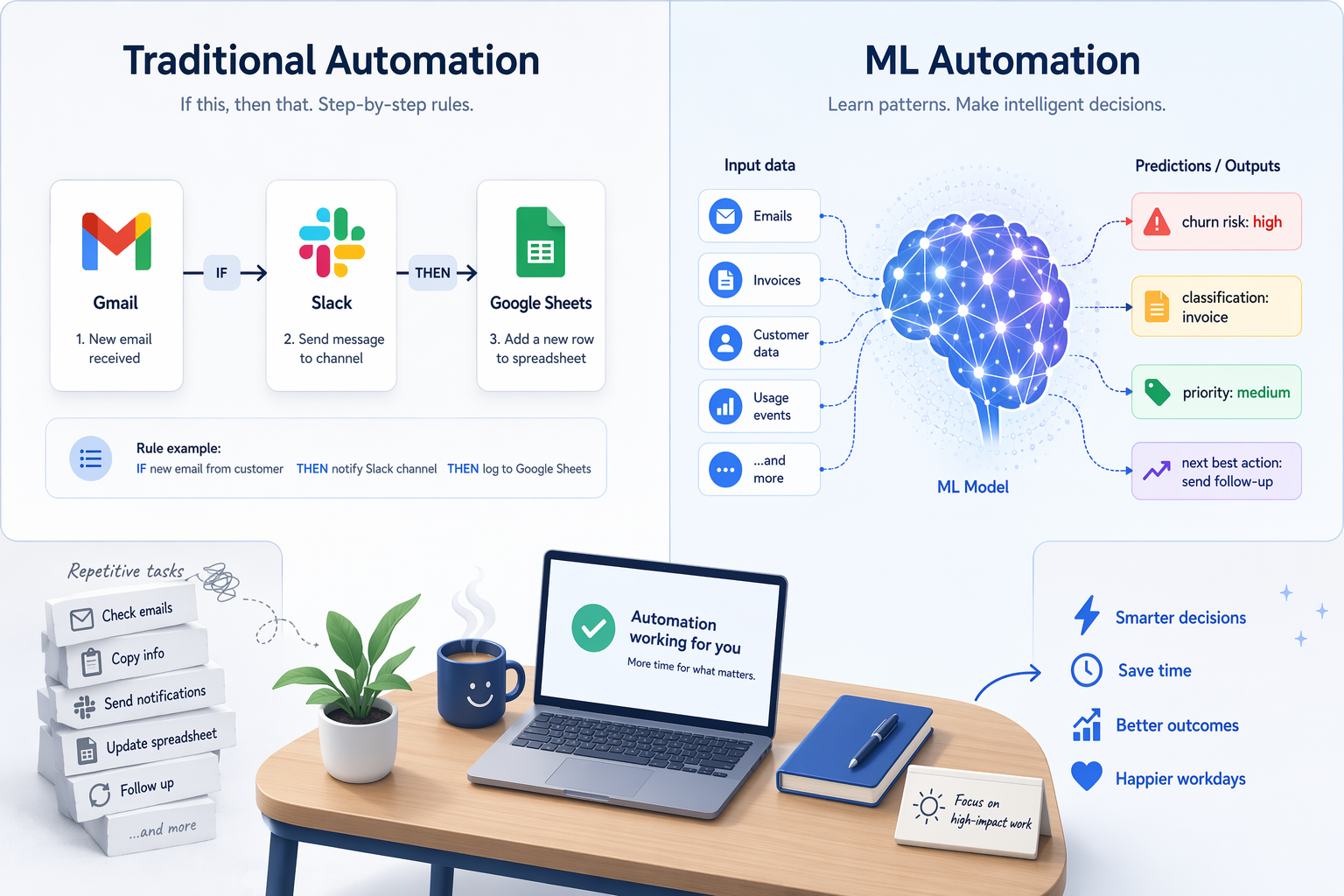
When most knowledge workers hear the word "automation," they picture a chain of if-this-then-that rules. A new email arrives with the label "invoice" — save the attachment to Google Drive, log the amount in a spreadsheet, and send a Slack notification to the finance team. This is rule-based automation, and platforms like Zapier and Make have made it accessible to anyone who can describe a process in plain steps.
These tools excel at deterministic tasks. Every input has a known, programmed output. If condition A is true, execute action B. There is no ambiguity, no learning, and no adaptation. The logic is written by a human, and it stays fixed until someone edits the rule. For the thousands of repetitive data-moving tasks that consume a knowledge worker's day — forwarding forms, filing attachments, updating CRM records — this model works brilliantly.
But rule-based automation has a hard ceiling. It cannot handle situations where the correct action depends on a pattern you haven't explicitly defined. It cannot look at a set of customer records and determine which ones are likely to churn. It cannot classify an email as "urgent" versus "routine" unless you write a rule for every possible keyword combination. For those tasks, you need a different kind of automation entirely.
What Machine Learning Adds: Learning from Data, Not Just Following Rules
Machine learning automation — often delivered through AutoML (automated machine learning) platforms — operates on a fundamentally different principle. Instead of a human writing explicit rules, the system analyzes historical data to discover patterns and then uses those patterns to make predictions or decisions on new data.
As the team at Nintex puts it, machine learning automation is "the use of AI-driven algorithms to automatically analyze data, learn from patterns, and improve processes or decisions without explicit human programming." The key phrase is "without explicit human programming." You do not tell the system what to do for each scenario. You show it examples — lots of them — and it figures out the logic on its own.
The market is responding to this shift. According to Grand View Research, the global AutoML market is projected to grow at a compound annual growth rate (CAGR) of 42.2% from 2024 to 2030. That explosive growth is driven largely by non-experts — knowledge workers, analysts, and managers — who want to apply machine learning without hiring a data science team.
Concrete Examples: Moving Data vs. Making Decisions
The difference between rule-based and ML-based automation becomes tangible when you look at what each actually produces.
Example A: Traditional Automation (Moving Data)
A project manager receives a new form submission from a client. The rule-based workflow looks like this:
- Trigger: New row in Google Sheets (form responses)
- Action 1: Create a task in Asana with the client name and project type
- Action 2: Send a confirmation email to the client
- Action 3: Post a message in the team Slack channel
Every step is predetermined. The workflow works perfectly as long as the form structure stays the same and the logic doesn't need to adapt. It moves data from point A to point B to point C.
Example B: ML Automation (Making Decisions)
A customer success manager has a CSV file with 10,000 customer records — signup date, number of support tickets, last login date, plan type, and whether each customer churned. The task is to predict which current customers are at high risk of leaving next month.
No rule-based system can handle this. You cannot write an if-then rule for every combination of variables that might indicate churn risk. But an AutoML tool can ingest that CSV, analyze the patterns in the historical data, and output a list of current customers ranked by churn probability. The output is not a data transfer — it is a decision-support prediction.
| Dimension | Traditional Automation | ML / AutoML Automation |
|---|---|---|
| What it does | Moves or transforms data based on fixed rules | Learns patterns from data to make predictions or classifications |
| Logic source | Written by a human | Discovered from historical data |
| Adaptability | Requires manual rule updates when conditions change | Improves (or degrades) as new data is added |
| Best for | Structured, repetitive tasks with known outcomes | Prediction, classification, anomaly detection, and prioritization |
| Example output | File saved, email sent, record created | Churn risk score, invoice category, priority ranking |
| Skill level needed | No coding; drag-and-drop interface | No coding for AutoML tools; some domain knowledge required |
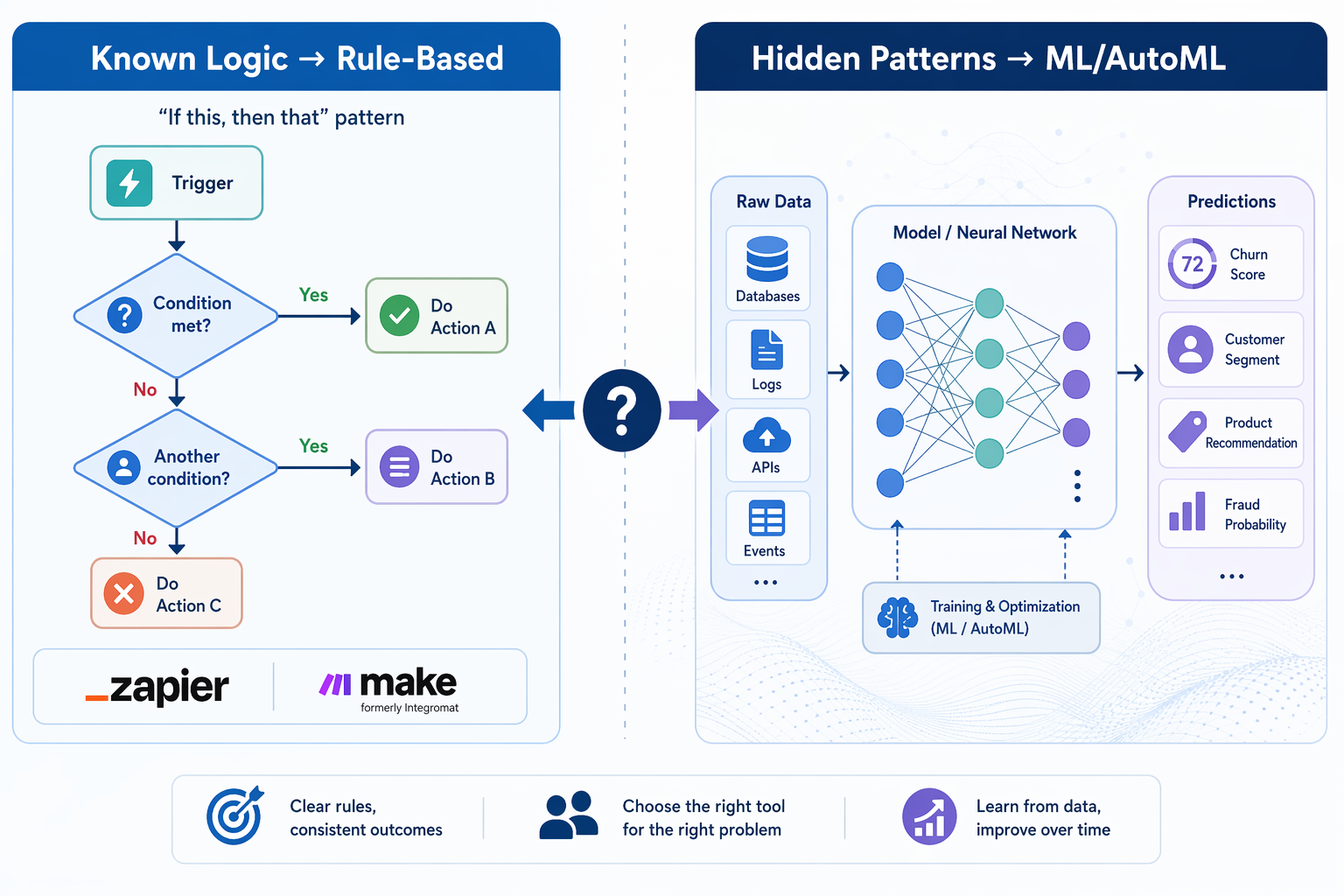
The Decision Framework: Rules When Logic Is Known, ML When Patterns Are Hidden
The most practical skill a knowledge worker can develop right now is not learning to code machine learning models — it is learning to recognize which type of automation a given problem requires. The decision framework is surprisingly simple.
Use Rule-Based Automation When:
- You can describe the exact steps for every possible input.
- The logic does not change frequently.
- The task is about moving, transforming, or notifying — not predicting.
- You need a guaranteed, auditable outcome every time.
Consider ML / AutoML When:
- You have historical data but do not know the exact decision rules.
- The task involves prediction, classification, or ranking.
- The patterns in your data are too complex for manual rules.
- You are making the same judgment call repeatedly and want to automate the decision.
A practical example: a support team could use Zapier to log every new ticket into a database (rule-based), then use an AutoML model to classify each ticket as "billing issue," "technical bug," or "feature request" based on the text (ML), and finally use another Zapier rule to route the classified ticket to the correct team. The rules handle the plumbing; the ML handles the judgment.
Tools Comparison: Traditional Automation vs. AutoML Platforms
To make the decision framework actionable, here is how the tools on each side compare across the dimensions that matter most to knowledge workers. For a deeper look at AutoML platforms specifically, see our dedicated AutoML platforms comparison.
| Feature | Traditional (Zapier / Make) | AutoML (AutoGluon / H2O / Vertex AI) |
|---|---|---|
| Primary function | Move and transform data between apps | Build and deploy predictive models from data |
| Who it's for | Anyone who can describe a process | Analysts and domain experts; no PhD required |
| Coding required | None — visual builder | None for H2O Flow, SageMaker Canvas, Vertex AI; minimal Python for open-source tools |
| Input | Trigger events (email, form, webhook) | Structured data (CSV, database tables) |
| Output | Actions in connected apps | Predictions, classifications, scores, or labels |
| Learning curve | Hours to days | Days to weeks for effective use |
| Open-source options | n8n, Huginn | TPOT, AutoGluon, FLAML, PyCaret, H2O |
| Typical use case | Invoice filing, lead routing, meeting note capture | Churn prediction, ticket classification, demand forecasting |
One of the most encouraging developments for non-coders is the rise of open-source AutoML frameworks. Tools like TPOT (which uses genetic programming to discover optimal ML pipelines) and AutoGluon (developed by AWS AI for high accuracy with minimal code) let you build a predictive model from a CSV file with just a few lines of Python. For those who want to avoid code entirely, H2O AutoML offers a no-code web interface called H2O Flow, and Google Cloud AutoML provides no-code interfaces for vision, natural language, and tabular data.
Practical Starter Path for Knowledge Workers
If you are a knowledge worker with no data science background and you want to try ML automation, the path is shorter than you think. The key is to start with a decision you already make manually, not with a tool you want to learn.
- Identify a repetitive decision you currently make by hand. This could be classifying support tickets as "urgent" vs. "routine," forecasting how many hours a project will take based on past projects, or scoring leads by likelihood to convert. If you are making the same judgment call more than 50 times a month, it is a candidate for ML automation.
- Collect the historical data. Export the relevant records as a CSV file. You need at least a few hundred examples with both the input variables (features) and the outcome you want to predict (label). The cleaner this data is, the better your model will perform.
- Try a no-code AutoML tool. Upload your CSV to H2O Flow or Google Cloud AutoML's free tier. These platforms will automatically try dozens of model architectures and return the best one. You do not need to understand the math — just evaluate whether the predictions look reasonable.
- Build a hybrid workflow. Use Zapier or Make to collect new data as it arrives and feed it into your AutoML model. Then use the model's output to trigger downstream actions — for example, automatically flagging high-churn-risk customers in your CRM.
Key Limitations and Risks to Know
AutoML is powerful, but it is not a magic wand. Knowledge workers who adopt it need to understand its limitations to avoid costly mistakes.
The Black Box Problem
Most AutoML models are difficult to interpret. You may get accurate predictions but have no clear explanation for why a particular customer was flagged as high-risk. As the Tryolabs guide notes, interpretability is a known challenge in AutoML — models can become "black boxes" that resist explanation. For regulated industries or decisions that require human justification (loan approvals, hiring screens), this is a serious concern.
Data Quality Dependency
An AutoML model is only as good as the data you feed it. If your historical data contains biases, missing values, or inconsistent labeling, the model will learn those flaws. Garbage in, garbage out applies more forcefully to ML than to rule-based automation because the flaws are hidden inside the learned patterns rather than visible in the code.
Domain Expertise Still Matters
AutoML automates the model-building process, but it does not automate problem framing. You still need to know which questions to ask, which data to collect, and how to evaluate whether the model's output is useful. The Tryolabs analysis emphasizes that "the most accurate models combine hand-coded domain-specific features derived from expert knowledge in the field with automated model exploration." In other words, the best results come from human-machine collaboration, not from handing a CSV to an algorithm and walking away.
Over-Reliance Risk
When a rule-based automation makes a mistake, the error is usually obvious — a file went to the wrong folder, an email was sent to the wrong person. When an ML model makes a mistake, the error can be subtle and persistent. A churn prediction model might systematically misclassify a certain customer segment, and you might not notice until those customers have already left. Always maintain human oversight on ML-driven decisions, especially in the early stages.
The data supports the potential: a 2026 industry survey found that 97% of companies deploying AI and machine learning technologies reported benefits including increased productivity and reduced human error. But that same statistic implies that 3% did not — often because they skipped the validation and oversight steps that separate useful automation from costly mistakes.
Comments
Join the discussion with an anonymous comment.