

What Does 'Machine Learning for Automation' Actually Mean?
If you've ever set up a rule in your email client — "move all messages from this sender to folder X" — you've used deterministic automation. The rule is fixed: if condition A is true, do action B. Machine learning for automation replaces that fixed rule with a model that learns from patterns. Instead of you writing the rule, the machine studies examples and figures out the rule itself.
Consider an email triage system. A rule-based approach might say: "If the sender domain is @client.com and the subject contains 'urgent', mark as high priority." An ML-based approach, by contrast, watches which emails you open first, which ones you archive unread, and which ones you flag. Over time, it learns to prioritize messages based on your actual behavior — even for senders and subjects you never explicitly configured.
This distinction matters because a 2026 report from DataCamp found that 69% of leaders now say AI literacy is important for their teams. Yet most knowledge workers still treat machine learning as a black box they cannot touch. The reality is that the tools have evolved. AutoML platforms, no-code ML builders, and AI-powered workflow engines now let anyone apply ML to automate decisions — without writing a single line of algorithm code.
To understand where ML fits, it helps to see the broader automation landscape. Rule-based automation (like Zapier triggers) handles straightforward if-this-then-that logic. Process automation (like RPA) mimics human clicks in software. ML automation sits above both: it predicts, classifies, and scores — turning unstructured inputs into structured decisions that feed into your existing workflows.
If you are new to the terminology, our related guide on workflow automation vs. process automation vs. RPA provides a clear breakdown of where each approach fits.
The Four Types of Machine Learning — And Which Ones Matter for Automation
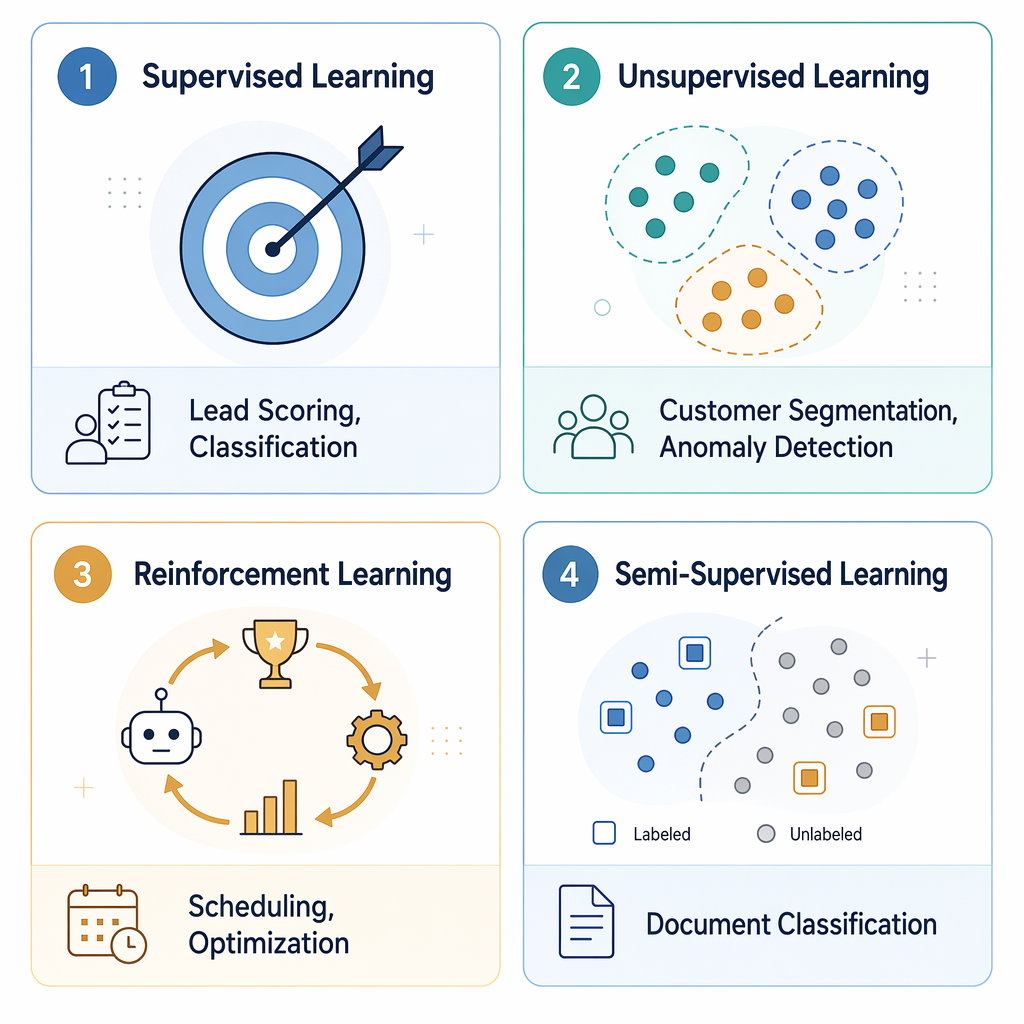
Not all machine learning is the same, and not every type is equally useful for automation. Here is a concise breakdown of the four main categories, each tied directly to a knowledge worker use case.
| ML Type | What It Does | Knowledge Worker Automation Use Case |
|---|---|---|
| Supervised Learning | Learns from labeled examples (input-output pairs) to predict outcomes for new data. | Lead scoring: train a model on past deals (won/lost) to automatically score incoming leads by conversion probability. |
| Unsupervised Learning | Finds hidden patterns or groupings in unlabeled data without predefined categories. | Customer segmentation: cluster your contact list into behavioral groups (e.g., high-engagement, at-risk, dormant) to trigger targeted follow-up sequences. |
| Reinforcement Learning | Learns optimal actions through trial and error, receiving rewards for desired outcomes. | Scheduling optimization: an agent learns to allocate meeting slots or shift assignments to minimize conflicts and maximize satisfaction over time. |
| Semi-Supervised Learning | Combines a small set of labeled data with a large set of unlabeled data to improve accuracy. | Document classification: label a few hundred support tickets, then let the model classify the remaining thousands into categories (billing, technical, feature request). |
For most knowledge workers starting out, supervised learning is the most immediately useful. It powers the lead scoring, email classification, and document triage use cases that map directly to daily workflow pain points. Unsupervised learning is valuable for discovery — finding patterns you did not know existed in your data. Reinforcement learning is more advanced and typically appears in scheduling and logistics automation. Semi-supervised learning is a practical middle ground when you have plenty of data but limited labeled examples.
The AutoML Revolution: How Machines Are Learning to Build Models
The single biggest reason ML automation is now accessible to non-programmers is Automated Machine Learning — AutoML. Instead of a data scientist spending weeks selecting algorithms, tuning hyperparameters, and validating models, AutoML handles the pipeline automatically. You provide the data and define the prediction target; the platform tries dozens of approaches and surfaces the best-performing model.
The market reflects this shift. According to Grand View Research data cited by Coursera, the AutoML market is projected to grow at a compound annual growth rate of 42.2% from 2024 to 2030. That kind of trajectory signals that AutoML is not a niche experiment — it is becoming a standard layer in how organizations build software.
Enterprise adoption is already producing measurable results. Valley Bank used DataRobot's AutoML platform to reduce false positives in its anti-money laundering detection system, cutting the noise that analysts had to investigate manually. PayPal deployed AutoML to automate the development of fraud detection models, allowing its team to iterate faster on new fraud patterns. These are not futuristic proofs of concept — they are production systems running today.
For the individual knowledge worker, tools like PyCaret (free, open-source) and RapidMiner Auto Model let you build classification and regression models through a visual interface or a few lines of Python. The G2 review aggregate for no-code model building scores 6.32 out of 7 across 399 reviews, with 91% of positive reviews specifically citing accessibility as a key strength. That is a strong signal that the "no code required" promise is holding up in practice.
Real-World Automation Use Cases for Knowledge Workers
Theory is useful, but concrete examples make ML automation tangible. Here are five scenarios where a knowledge worker can apply ML today, with the tools and approaches a beginner could use.
1. Email Triage and Prioritization
The problem: your inbox contains client requests, internal memos, newsletters, and spam — and you waste time sorting them manually. An ML model trained on your past email behavior (which messages you opened, replied to, or archived) can automatically tag incoming messages as "Action Required," "For Reference," or "Low Priority." Tools like Zapier now include AI steps that let you build this classification using natural language prompts — no training data required.
2. Lead Scoring
The problem: your CRM has hundreds of leads, but you cannot call all of them. A supervised learning model trained on your historical deal data (company size, industry, engagement level, deal outcome) can score each new lead with a conversion probability. You then automate follow-up sequences for high-scoring leads and suppress outreach for low-scoring ones. RapidMiner's Auto Model can build this in under an hour with a CSV export from your CRM.
3. Document Classification
The problem: your team receives hundreds of support tickets, contract drafts, or inbound invoices each week, and someone has to read each one to decide where it goes. A semi-supervised learning model can classify documents into categories (billing inquiry, technical issue, feature request, legal review) after being trained on just a few dozen labeled examples. PyCaret's NLP module makes this straightforward for anyone comfortable with basic Python.
4. Meeting Summarization
The problem: you attend five meetings a week and spend another hour writing summaries. AI-powered meeting tools (many of which use transformer-based ML models) can transcribe, summarize, and extract action items automatically. While this is more "applied ML" than "build your own model," it is a legitimate entry point: you are using ML to automate a task without touching any model configuration.
5. Predictive Scheduling
The problem: you manage a small team and spend time each week finding meeting slots that work for everyone. A reinforcement learning agent can learn from past scheduling patterns — which times tend to have conflicts, which team members prefer morning vs. afternoon meetings — and propose an optimized weekly schedule. This is more advanced, but platforms like Make (formerly Integromat) now offer AI modules that can handle this kind of optimization logic through visual workflows.
Tools You Can Use Today: From Free to Enterprise
The tool landscape for ML automation has fragmented into three broad tiers. Knowing which tier fits your current skill level and budget is more useful than memorizing a feature matrix.
- Free / Open-Source: PyCaret is the standout option. It is a Python library that wraps dozens of ML algorithms into a single, consistent interface. You can build a classification or regression model in five lines of code. It is free, well-documented, and runs on any laptop. The trade-off is that you need basic Python familiarity — but not data science expertise.
- Low-Code Platforms: RapidMiner Auto Model offers a visual drag-and-drop interface for building models. You upload a dataset, select the target column, and the platform automatically tests algorithms and presents the best performer. G2 reviewers rate no-code model building at 6.32/7, with 91% of positive reviews citing accessibility. These platforms typically offer free tiers with limited data rows and paid plans starting around $1,000/year for individual professionals.
- AI Workflow Automation: Zapier and Make now include AI steps that let you add ML decision-making to automations using natural language. For example, you can build a Zap that says "When a new email arrives, use AI to classify its sentiment, then route it to the appropriate Slack channel." No model training is required — the AI layer handles the classification. These tools are the easiest entry point for knowledge workers who already use automation but want to add ML without any technical setup.
- Enterprise AutoML: Platforms like DataRobot, H2O, and Amazon SageMaker Canvas (priced at $1.90/hour) target organizations with larger budgets and more complex requirements. They offer advanced features like model explainability, deployment pipelines, and governance controls. These are relevant if your team has dedicated analytics resources and needs production-grade ML infrastructure.
Limits and Pitfalls: What ML Automation Can't Do (Yet)
ML automation is powerful, but it is not magic. A clear-eyed understanding of its current limitations will save you from frustration and poor decisions.
- Limited customization during training. AutoML platforms automate the model-building process, but they also abstract away the knobs. If your data has unusual characteristics — extreme class imbalance, missing values that are not random, or complex temporal dependencies — the automated pipeline may produce a model that looks good on paper but fails in practice. You trade customization for speed.
- False sense of security. A model that scores 95% accuracy on your test set can still fail catastrophically when deployed on real-world data that differs from the training distribution. This is known as data drift. AutoML tools do not automatically monitor for drift — you have to build that monitoring yourself or rely on the platform's optional alerting features.
- Heavy focus on supervised learning. Most AutoML tools excel at supervised learning (classification and regression) but offer limited support for unsupervised or reinforcement learning. If your automation problem requires discovering unknown patterns or optimizing a sequence of decisions over time, you may need to look beyond the standard AutoML toolset.
- Data quality dependency. ML models are only as good as the data they are trained on. If your training data contains biases — for example, historical hiring data that reflects past discrimination — the model will learn and amplify those biases. Garbage in, garbage out applies with extra force in ML because the model's decisions are automated and scaled.
- Cost can escalate. On G2, pricing is the most common complaint across low-code ML platforms, cited in 71 reviews. Free tiers exist but often limit data volume, model complexity, or deployment options. As your automation scales, costs can grow faster than expected.
Your Learning Path for 2026: From Curious Beginner to Confident Practitioner
You do not need to enroll in a six-month data science bootcamp to start using ML for automation. Here is a practical, step-by-step path that builds confidence without overwhelming you with theory.
- Understand the concepts. You are already here. Make sure you can explain the difference between rule-based automation and ML-based automation to a colleague. If you can do that, you have the foundation.
- Experiment with a free AutoML tool. Download a CSV of your own data — a list of past projects with outcomes, or a contact list with engagement metrics — and run it through PyCaret or RapidMiner's free tier. The goal is not to build a production model; it is to see the workflow: load data, select target, train model, evaluate results.
- Try an AI workflow automation. Build a simple Zapier or Make automation that uses an AI step. For example, create a workflow that watches a Gmail label, passes new emails through an AI classifier, and posts the classification result to a Slack channel. This gives you hands-on experience with ML in a familiar automation context.
- Explore a low-code platform. Once you are comfortable with the basic workflow, try building a model on a real business problem — lead scoring, ticket classification, or invoice categorization. Use RapidMiner's visual interface to understand how different algorithms affect accuracy.
- Dive deeper into comparisons. When you are ready to evaluate platforms for your team or organization, our AutoML Platforms Compared article provides a structured comparison of ten tools across pricing, supported algorithms, and deployment options.
For readers who want to go further, the Two-Layer Automation Stack article explores how to combine no-code workflows with AI agents for more sophisticated automation patterns.
Frequently Asked Questions
Do I need to know Python to use ML for automation?
No. Tools like RapidMiner Auto Model, Zapier AI steps, and Make AI modules let you build ML-powered automations entirely through visual interfaces or natural language prompts. Python gives you more flexibility and access to free tools like PyCaret, but it is not a requirement to get started.
How much data do I need?
It depends on the problem. For simple classification tasks (e.g., sorting emails into two or three categories), a few hundred labeled examples can produce a usable model. For more complex tasks like predictive scheduling or anomaly detection, you may need thousands of examples. Most AutoML tools will tell you if your dataset is too small to produce reliable results.
Is ML automation expensive?
It can be, but it does not have to be. PyCaret is free and open-source. RapidMiner offers a free tier with limited data rows. Zapier's AI steps are included in their mid-tier plans starting around $30/month. Enterprise platforms like DataRobot and SageMaker Canvas are priced for organizational budgets. Start with free tools, prove the value on a small use case, and then evaluate whether paid platforms are worth the investment.
Will ML automation replace my job?
No — at least not in the way most people fear. ML automation handles pattern-based, repetitive decisions. It does not handle context, judgment, relationship-building, strategic thinking, or creative problem-solving. The knowledge workers who thrive in an ML-augmented workplace will be those who learn to define the problems, evaluate the model's output, and handle the exceptions that the model cannot manage. The role shifts from execution to oversight — which is generally more interesting work.
Comments
Join the discussion with an anonymous comment.