
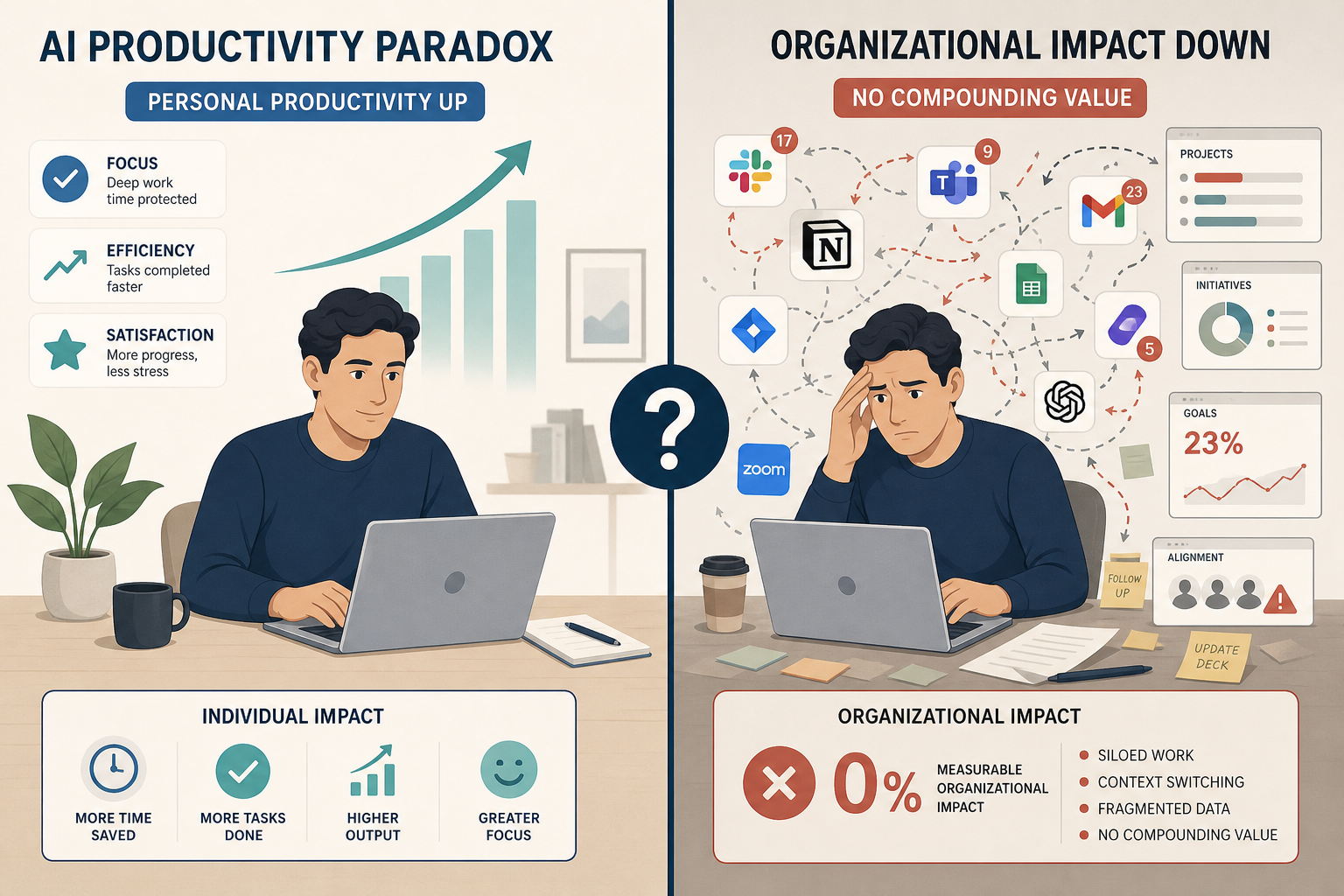
The $644 Billion Question: Why Massive Investment Hasn't Moved the Productivity Needle
In 2025, global spending on generative AI hit $644 billion — a 76.4% year-over-year surge, according to Gartner data compiled by SpeakWise. Roughly 80% of that sum went to hardware infrastructure, not software or implementation. Yet the return on that investment, measured at the organizational level, has been remarkably thin.
A February 2026 study from the National Bureau of Economic Research (NBER), surveying 6,000 CEOs and CFOs across the United States, United Kingdom, Germany, and Australia, found that 89% of firms report zero measurable productivity impact from AI. That figure is not an outlier. PwC's 29th Annual Global CEO Survey, released at Davos in January 2026, arrived at a similar conclusion: 56% of companies say they get nothing of value from their AI investments. The Penn Wharton Budget Model estimates that AI added only 0.01 percentage points to U.S. productivity growth in 2025.
These numbers create a paradox that anyone evaluating AI tools needs to understand. At the individual task level, controlled studies routinely find gains of 14% to 55% — BCG consultants completing work 25% faster with 40% higher quality, GitHub Copilot users coding 55% faster, customer service agents resolving 14% more issues per hour. The U.S. Federal Reserve Bank of St. Louis found that AI users save an average of 2.2 hours per week — a 5.4% time reduction — and are 33% more productive during AI-assisted hours.
How can individual gains be so large while organizational impact is so small? The answer lies in the difference between a task-level improvement and a workflow-level transformation — and in the 95% failure rate of enterprise AI pilots, which we will examine in detail.
Where AI Actually Delivers: Use Cases with Proven, Measurable Gains
Despite the bleak aggregate picture, several use cases have demonstrated consistent, independently verified productivity improvements. These are not vendor-funded pilot studies — they come from academic research, central bank analysis, and large-scale surveys. The common thread is that they target narrow, repetitive, or high-volume tasks where the cost of an error is low and the volume of output is high.
Writing, Summarization, and Content Generation
This is the most consistently documented win. Apollo Technical data, cited across multiple research compilations, shows that workers using AI for writing and summarization tasks are 40% faster with 18% higher quality compared to working without AI. The BCG study of consultants found a 25% speed improvement with 40% higher quality on a range of knowledge work tasks. These gains hold across experience levels, though they are largest for less experienced workers — a pattern we will return to.
Customer Support
NBER research led by Erik Brynjolfsson found that customer service agents using AI assistance resolve 14% more issues per hour. The effect is dramatically uneven by skill level: novice agents improved 34%, while top performers showed essentially zero improvement. This is not a bug — it is the primary mechanism by which AI delivers value in support environments, and it has major implications for team structure and training.
Email Management
A joint NBER and Microsoft study found that knowledge workers using generative AI for email management save 3.6 hours per week — a 31% reduction in time spent on email. This is one of the few use cases where the time savings translate directly into reclaimed hours, because email is a discrete, interrupt-driven task that does not require deep context switching.
Sales and Revenue Operations
Salesforce reports that AI-enabled sales teams achieve 17% higher revenue growth compared to teams not using AI. The mechanism is not magical — AI tools handle lead scoring, follow-up scheduling, and call summarization, freeing representatives to spend more time on actual selling. Salesforce also notes that 66% of service representatives' time is spent on non-customer-facing tasks, which is where AI-driven automation has the most room to operate.
Legal and Tax Professional Work
Thomson Reuters found that legal and tax professionals using AI save 240 hours per year, representing approximately $19,000 in value per professional. This is a high-value, narrow-domain application where the AI is trained on specialized legal and tax documents rather than general web text.
| Use Case | Measured Gain | Source | Key Context |
|---|---|---|---|
| Writing & summarization | +40% speed, +18% quality | Apollo Technical / NBER | Consistent across experience levels |
| Customer support | +14% issues/hr, +34% for novices | NBER / Brynjolfsson | Skill-leveling effect is the primary mechanism |
| Email management | 3.6 hrs/week saved (31% reduction) | NBER / Microsoft | Discrete, interrupt-driven task |
| Sales | +17% revenue growth | Salesforce | Frees time from non-customer-facing tasks |
| Legal & tax | 240 hrs/year saved (~$19K value) | Thomson Reuters | Narrow-domain, specialized training |
Where AI Fails: The Hidden Costs and Counterproductive Outcomes
The evidence for AI's failures is as strong as the evidence for its successes — and in some cases, more surprising. The most striking finding comes from METR (Model Evaluation and Threat Research), which in 2025 published a study on experienced software developers using AI coding assistants.
The Developer Productivity Paradox
METR found that experienced developers took 19% longer to complete complex coding tasks when using AI tools, compared to working without them. Yet those same developers perceived themselves as 20% faster — a perception-reality gap of 39 percentage points. This is not a small discrepancy. It means that the people most likely to advocate for AI adoption in engineering teams are systematically overestimating its benefits for complex work.
The mechanism is straightforward: AI-generated code is often "almost right, but not quite" — a frustration cited by 66% of developers in Stack Overflow's 2025 survey. Debugging, validating, and refactoring AI output takes time that would not exist if the developer wrote the code from scratch. For simple, well-defined tasks, the AI saves time. For complex, novel, or architecturally significant work, it adds overhead.
The Enterprise Pilot Failure Rate
The most cited statistic in the AI skepticism playbook is that 95% of enterprise AI pilots fail to scale — a figure attributed to MIT's NANDA program and widely reported by Forbes in January 2026. BCG's own research puts the number at 74% for generative AI pilots specifically. Either figure represents a staggering failure rate for a technology that has consumed hundreds of billions in investment.
The reasons are structural, not technical. A McKinsey survey found that 78% of enterprises are struggling to integrate AI with their current technology stacks. Integration challenges are the top obstacle cited by 44% of AI practitioners. And 73% of enterprise leaders feel pressure to show AI ROI that does not yet exist — pressure that leads to rushed deployments, inadequate change management, and pilots that never reach production.
Strategic Task Degradation
A joint study by BCG and Harvard Business School found that on complex strategic tasks — those requiring judgment, creativity, or multi-step reasoning — AI assistance led to 19 percentage points lower accuracy compared to unaided human performance. The AI did not help; it actively degraded outcomes. This finding is consistent with the METR developer study: AI excels at pattern matching and generation within well-defined boundaries, but it struggles with tasks that require understanding context, weighing tradeoffs, or making novel connections.
The Revision Tax and Workload Inflation
Zapier's 2026 survey of AI users found that 58% of workers spend 3 or more hours per week revising or redoing AI outputs. The Upwork Research Institute reported an even more striking finding: 77% of freelance workers using generative AI said it added to their workload rather than reducing it. These numbers capture the hidden cost of AI that does not appear in controlled task-level studies: the time spent reviewing, correcting, and re-prompting.
For a deeper look at how software pricing structures — automation quotas, seat minimums, add-on fees — can inflate your AI tooling bill by 2–3x, see our analysis of the hidden costs of workflow software. These structural costs compound the ROI problem for organizations already struggling to see value.
The Skill-Leveling Pattern: Why AI Helps Novices Most and Experts Least
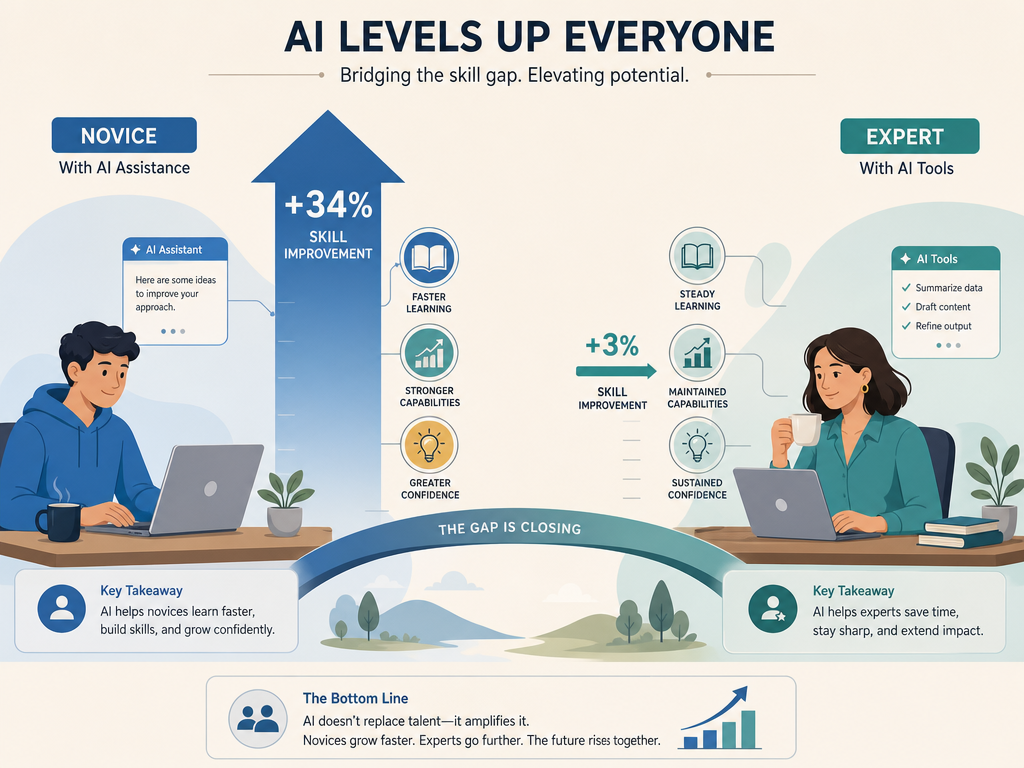
One pattern cuts across nearly every study of AI productivity, from customer support to software development to consulting: AI helps less experienced workers far more than it helps experts. This is not a marginal finding — it is the most consistent result in the literature.
| Study | Task | Novice Improvement | Expert Improvement | Gap |
|---|---|---|---|---|
| NBER / Brynjolfsson (2025) | Customer support | +34% issues resolved/hr | ~0% | 34 pp |
| METR (2025) | Complex coding | Faster (novices) | 19% slower | ~40 pp perception-reality gap |
| BCG / Harvard (2025) | Strategic consulting | Larger gains | Smaller or negative | Not quantified |
This pattern has profound implications for how organizations should deploy AI. If you staff your AI pilot with your best performers, you will see minimal gains — and may even see degradation on complex tasks. If you deploy AI to support junior team members, you can compress the learning curve and raise the floor of performance across the team.
The mechanism is intuitive: experts already have efficient mental models and workflows for their domain. AI output often conflicts with those models, requiring additional cognitive effort to evaluate and integrate. Novices, lacking established mental models, can use AI output as a scaffold — a starting point that accelerates their learning and output simultaneously.
This does not mean AI is useless for experts. It means the value proposition is different: for novices, AI is a productivity multiplier. For experts, AI is a tool for handling low-value, repetitive tasks so they can focus on the high-value work where their expertise matters most. Organizations that fail to distinguish between these two use cases will consistently overestimate the ROI of their AI investments.
A Framework for Measuring AI ROI at Your Organization
Given the gap between individual task gains and organizational impact, how should a skeptical manager evaluate whether a specific AI tool will deliver real value? The following framework is designed to be applied before any purchase decision, not after.
- Measure the baseline before deployment. How long does the target task take today? What is the current quality level? What is the error rate? Without a baseline, any post-deployment improvement claim is meaningless. Most organizations skip this step and rely on vendor-provided benchmarks that may not match their specific workflow.
- Distinguish task-level from workflow-level metrics. A tool that makes a single task 40% faster may add zero value if that task represents 2% of the worker's time, or if the time saved is consumed by revision and rework. Measure the end-to-end workflow, not just the AI-assisted step.
- Set a realistic time horizon. The NBER executive survey found that leaders expect AI to boost productivity by just 1.4% over three years — a far cry from the 25–55% gains reported in controlled studies. Short-term pilot results (2–4 weeks) often reflect novelty effects and early adopter bias. Plan for a 6-month evaluation window at minimum.
- Account for the revision tax. If 58% of workers spend 3+ hours per week revising AI outputs (Zapier), that time must be subtracted from any claimed productivity gain. The net gain may be zero or negative, especially for complex tasks.
- Apply the 10-20-70 rule. Only 10% of your AI investment should go to algorithms and models. 20% should go to technology infrastructure and data. The remaining 70% must go to people, process redesign, and organizational change. Organizations that ignore this ratio consistently fail to scale AI beyond the pilot phase.
For a practical guide on implementing this framework across multiple tools, see our walkthrough on how to build an AI productivity stack layer by layer.
The 10-20-70 Rule: Why Process Redesign Matters More Than the Algorithm
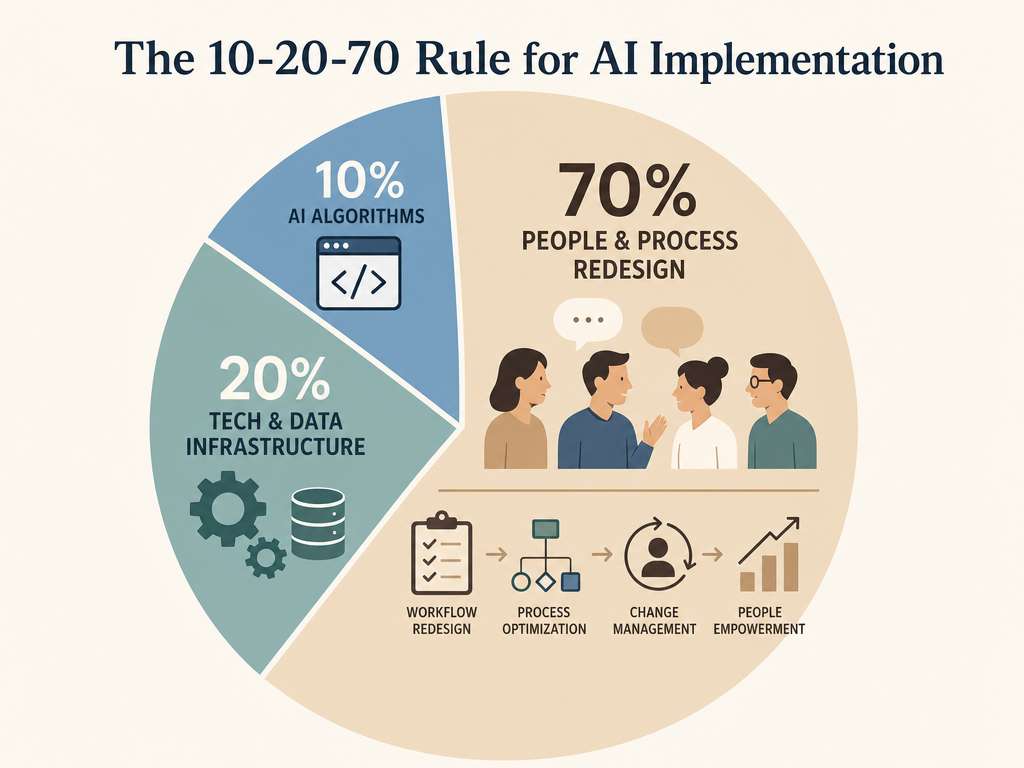
The BCG 10-20-70 rule is the single most important framework for understanding why most AI investments fail. It states that successful AI transformation requires allocating resources in a specific ratio: 10% to algorithms, 20% to technology and data infrastructure, and 70% to people, process redesign, and organizational change.
McKinsey's research confirms the pattern: only 6% of organizations qualify as "AI high performers" — those achieving 5% or greater EBIT impact from AI. The distinguishing factor is not the sophistication of their algorithms or the size of their data sets. It is that they redesigned their workflows before selecting their tools. They invested in change management, retraining, and process reengineering — the 70% that most organizations neglect.
The most cited example of this principle in action is Klarna. The fintech company deployed an AI assistant that handled 2.3 million conversations in its first month — the equivalent of 853 full-time agents. Customer resolution time dropped from 11 minutes to under 2 minutes. The company reported $60 million in savings through Q3 2025 and a 152% increase in revenue per employee.
Klarna's success was not primarily about the AI model. It was about the process redesign: routing inquiries to the AI first, defining clear escalation paths to human agents, retraining the support team to handle only complex cases, and measuring outcomes at the conversation level rather than the agent level. The algorithm was 10% of the investment. The process redesign was the other 90%.
Making Your Decision: A Checklist for Skeptical Buyers
The evidence presented in this article does not support either extreme of the AI debate — neither the "AI will transform everything" hype nor the "AI is useless" dismissal. The data supports a more nuanced position: AI delivers real, measurable gains in specific, well-defined use cases, and it fails — often spectacularly — when applied to complex, strategic, or poorly scoped problems.
If you are evaluating an AI tool for your team or organization, use this checklist to cut through the noise:
- Start with a specific bottleneck, not a general desire to "use AI." What task consumes the most team time? What task has the clearest inputs and outputs? That is your pilot candidate.
- Measure the baseline before you buy anything. Time per task, error rate, quality score, volume. Without these numbers, you cannot measure ROI.
- Pilot with your least experienced team members first. The skill-leveling effect means novices will show the largest gains. If the tool does not help them, it will not help anyone.
- Budget for process redesign, not just software. If you are not spending 70% of your AI budget on people, training, and workflow changes, you are following the same pattern that leads to 95% pilot failure.
- Set a 6-month evaluation window. Short-term gains often reflect novelty effects. Long-term adoption requires workflow integration, which takes months.
- Be honest about the 95% failure rate. Your pilot may fail. That is normal. The question is whether you learn enough from the failure to adjust your approach — or whether you move on to the next tool without changing your process.
The organizations that will extract real value from AI are not the ones that buy the most tools or deploy the most advanced models. They are the ones that start with a clear problem, measure their baseline, redesign their workflows, and deploy AI where the data — not the hype — says it will work.
Comments
Join the discussion with an anonymous comment.