
Why Your Workflow Software Bill Is Higher Than You Think
When you see a workflow management tool advertised at $9 per user per month, it is natural to multiply that by your team size and call it a day. A 25-person team, by that math, would cost $225 per month. Simple.
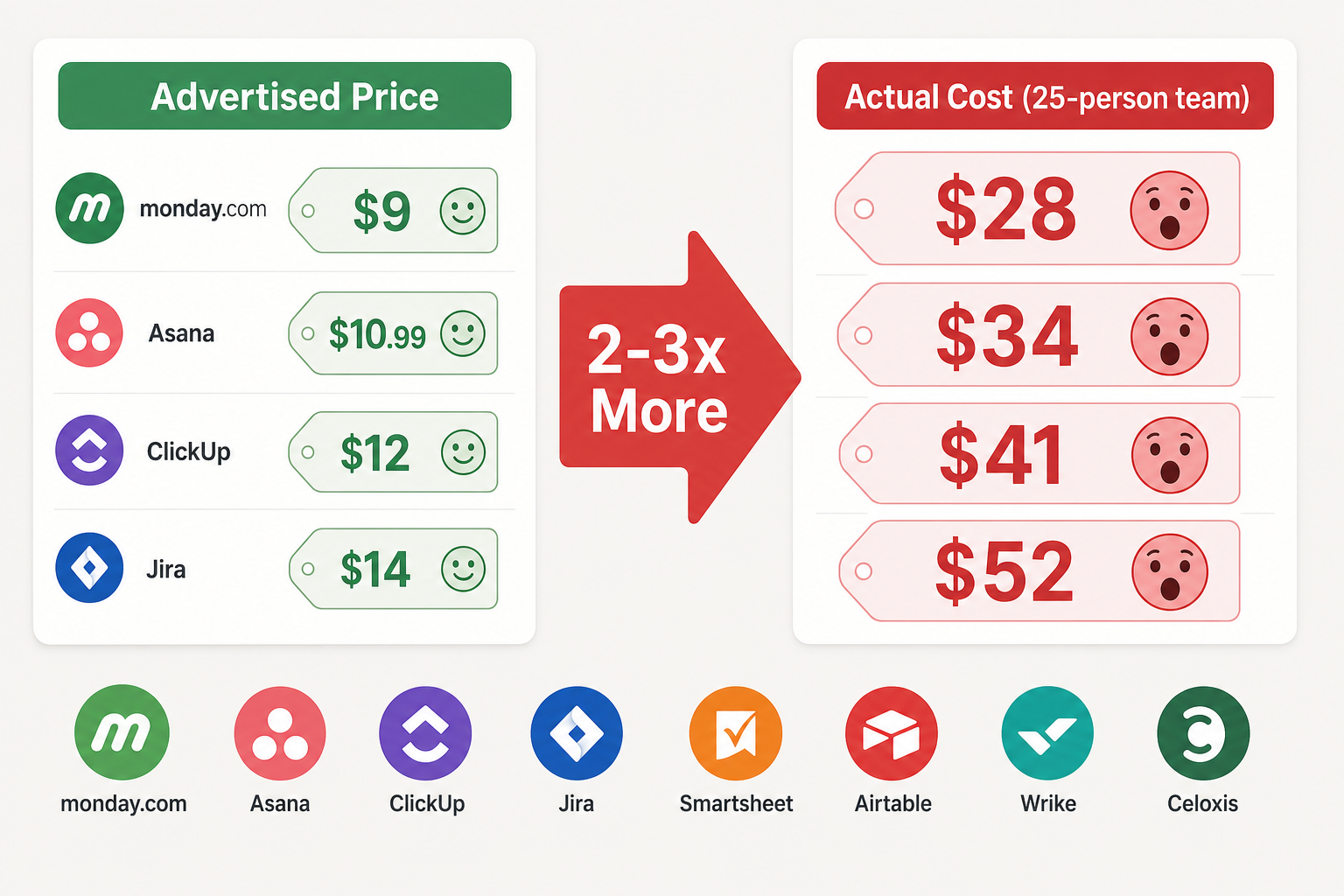
The reality is rarely that clean. Analysis from Celoxis indicates that the total cost of ownership — including implementation, training, add-ons, and admin resources — can 2–3x the advertised price in year one. That same $225 monthly estimate could land closer to $675 once automation quotas, seat minimums, AI credits, and locked features are factored in.
The workflow management software market has ballooned to $22.3 billion in 2026, growing at a 23.3% CAGR, according to Market.us data. With that growth comes increasingly complex pricing models designed to capture more revenue as your team scales. The tools are excellent — but the pricing structures are often opaque.
This article is written for budget-conscious ops managers, finance leads, and founders evaluating tools for teams of 10 to 100 people. We have analyzed the pricing structures of eight major workflow platforms — Monday.com, Wrike, Asana, Smartsheet, Jira, ClickUp, Airtable, and Celoxis — to expose the five traps that quietly inflate your bill. If you are in active decision mode, the table in Section 3 is where you should start.
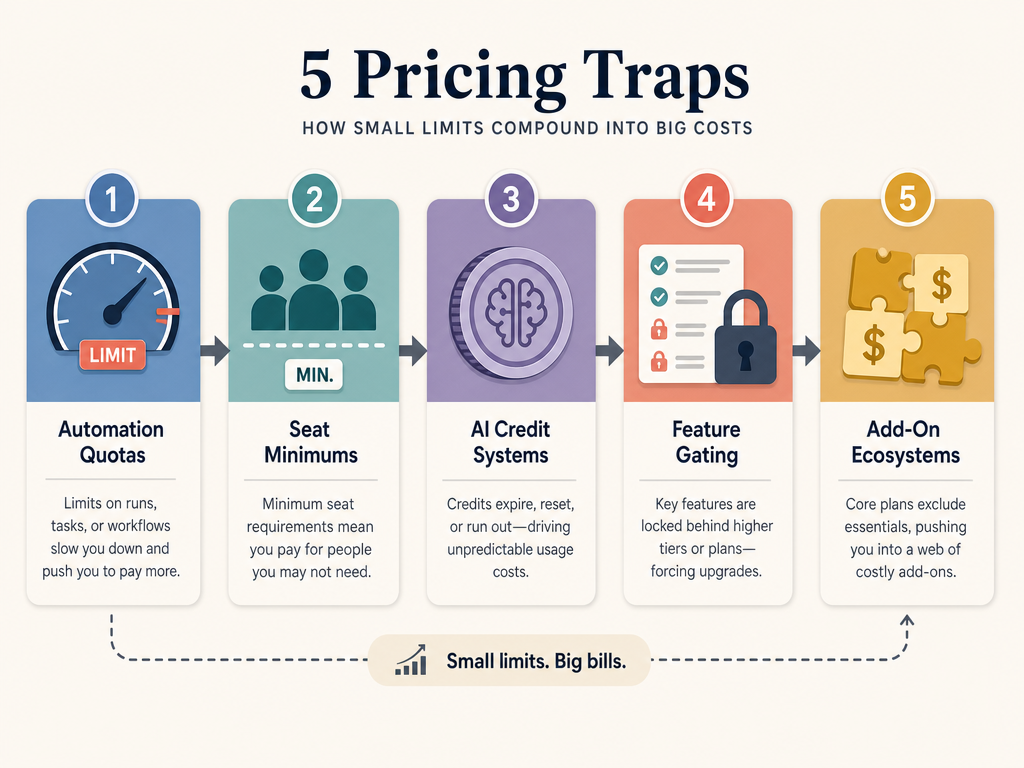
The 5 Pricing Traps That Inflate Your Bill
Each of these traps operates differently, but they share a common effect: the price you see on the pricing page is not the price you will pay. Here is how they work, with real examples from the tools we evaluated.
Trap 1: Automation Action Quotas
Most workflow tools advertise automation as a core feature, but they cap the number of automated actions your team can run each month. Exceed that cap, and you either pay overage fees or are forced to upgrade to a more expensive plan.
According to The Digital Project Manager, Monday.com's automation and integration features are gated behind the Standard plan — not available on Basic — and action quotas can create "automation surprise costs" at scale. Easy8 similarly notes that ClickUp's automation action quotas can require upgrades or add-on purchases as usage grows, and that Jira's automation quotas can constrain high-volume teams unless sized correctly. A team that relies heavily on automated task assignments, status updates, and notifications can hit these limits quickly.
Trap 2: Mandatory Seat Minimums and Seat Blocks
Few tools let you buy exactly the number of seats you need. Instead, they sell seats in fixed blocks, meaning you pay for capacity you do not use.
- Monday.com: Seats come in fixed increments of 3, 5, 10, and 15, as reported by both The Digital Project Manager and Plaky. A team of 14 pays for 15 seats. A team of 16 pays for 20.
- Wrike: Sells seats in blocks of 5 for teams up to 30 users, blocks of 10 for teams of 30–100, and blocks of 25 for teams over 100, based on their FAQ as cited by Plaky. A team of 27 pays for 30 seats.
- Quickbase: Their Team plan requires a minimum of 20 users, as noted by The Digital Project Manager.
For a 25-person team evaluating Wrike, the seat block structure means you are paying for 30 seats — a 20% premium on day one.
Trap 3: AI Credit Systems
AI features are increasingly common in workflow tools, but they are rarely included in the base per-user price. Instead, vendors use credit-based systems that add a separate recurring cost.
Plaky reports that Monday.com Pro users can purchase AI credits starting at 2,000 credits per month for $20, with higher tiers at 4,000 credits for $40 and 8,000 credits for $80. The Celoxis article confirms this structure, noting that Monday.com's AI Sidekick is credit-based. ClickUp's AI Agent Builder (Brain) costs $5 per user per month extra — adding $125 per month for a 25-person team, as cited by both Plaky and Celoxis.
Trap 4: Feature Gating
Feature gating occurs when essential capabilities — the very features that justified the tool purchase — are locked behind higher-priced tiers or paid add-ons.
Asana is a textbook example. Both Forbes Advisor and Plaky note that the Starter plan at $10.99 per user per month lacks portfolios, goals, and advanced dashboards. Teams that need portfolio-level visibility are pushed to the Advanced plan at $24.99 per user per month — more than double the advertised entry price.
Smartsheet takes a different approach. Forbes Advisor reports that Smartsheet locks resource management, premium support, and data tables behind paid add-ons. The base price looks competitive, but the monthly expenditure increases dramatically if these features are needed.
Trap 5: Add-On Ecosystems
Beyond AI credits and feature tiers, many tools maintain an ecosystem of paid add-ons for capabilities that might reasonably be considered core. Smartsheet's resource management add-on is one example. Easy8 also flags that Smartsheet's cost scaling is a recurring issue for bigger teams, with resource management locked behind paid add-ons.
The cumulative effect of these add-ons is hard to track because they are often presented as optional during the sales process but become de facto requirements as the team matures. What starts as a $12 per user per month tool can quickly become a $30+ per user per month tool once you add resource management, premium support, advanced reporting, and AI credits.
Real Cost Analysis: Advertised vs. Actual for 8 Tools (25-Person Team)
To make these traps concrete, we modeled the actual monthly cost for a 25-person team using each of the eight tools. The "advertised" column uses the lowest per-user price for a paid plan that includes automation and integrations. The "actual" column accounts for seat block waste, essential feature gating, AI credits (estimated at one mid-tier pack per team), and one essential add-on where applicable.
| Tool | Advertised Price (per user/mo) | Advertised Monthly (25 users) | Actual Estimated Monthly (25 users) | Key Cost Drivers |
|---|---|---|---|---|
| Monday.com | $12 (Basic, billed monthly) | $300 | $420–$500 | Seat block waste (25 users pay for 30); AI credits $20–$80 extra; automation gated behind Standard plan |
| Wrike | $9.80 (Team, billed annually) | $245 | $390–$450 | Seat block of 5 (25 users pay for 30); essential features may require higher tier |
| Asana | $10.99 (Starter, billed annually) | $274.75 | $624.75 | Starter lacks portfolios/goals; forced to Advanced at $24.99/user for full functionality |
| Smartsheet | $14 (Pro, billed annually) | $350 | $500–$600 | Resource management and data tables as paid add-ons; cost scales with team size |
| Jira | $8.60 (Standard, billed monthly) | $215 | $350–$420 | Automation quotas constrain high-volume teams; recent 5–10% price increase (Oct 2025) |
| ClickUp | $10 (Unlimited, billed annually) | $250 | $375–$425 | AI Agent Builder at $5/user/month extra ($125/mo); automation quotas may require upgrade |
| Airtable | $20 (Team, billed annually) | $500 | $650–$750 | Higher base price; automation and sync limits on Team plan; AI credits separate |
| Celoxis | $22.50 (Standard, billed annually) | $562.50 | $562.50–$650 | Higher base price but includes native EVM, stage-gate controls, and custom KPI dashboards without add-ons; seat blocks less punitive |
The table reveals a clear pattern: tools with the lowest advertised per-user prices (Jira at $8.60, Wrike at $9.80) often have the largest percentage gap between advertised and actual costs, because their pricing relies heavily on seat blocks and feature gating. Tools with higher base prices but more inclusive plans (Celoxis) show a smaller gap.
Total Cost of Ownership Framework: What to Calculate Before You Buy
Use this framework to calculate your own TCO before signing any contract. Copy these line items into a spreadsheet and fill in the values for each tool you evaluate.
- Base seat cost: Advertised per-user price × number of users you actually need.
- Seat block waste: Calculate the nearest seat block increment above your team size. Multiply the difference by the per-user price. This is money you pay for empty seats.
- Automation quota overage: Estimate your monthly automation actions (task assignments, status changes, notifications, integrations). Compare against the plan's quota. If you exceed it, add the cost of the next tier or overage fees.
- AI credits: Estimate how many AI actions your team will use per month. Multiply by the per-credit or per-user cost. For ClickUp, that is $5/user/month. For Monday.com, start at $20/month for 2,000 credits.
- Essential add-ons: List every feature your team requires that is not in the base plan — resource management, Gantt charts, portfolios, advanced dashboards, premium support. Add the cost of each.
- Implementation and training: One-time costs for setup, data migration, and team training. Divide by 12 to get a monthly equivalent for year-one TCO.
- Admin overhead: Estimate the monthly time cost of managing the tool — user provisioning, permission updates, workflow maintenance, and vendor management.
Sum these seven line items for each tool. The result is your estimated monthly TCO. Compare it against the advertised price to see the real multiplier.
How to Evaluate Pricing During a Free Trial
A free trial is your best opportunity to uncover hidden costs before you commit. Most teams spend their trial testing features and workflows, but they neglect to test the pricing boundaries. Here is what to do instead.
- Test automation limits: Set up your most common automation workflows and run them at scale. Monitor the action count. If the trial plan has a quota, calculate how many days of real usage it would take to hit the limit. A quota that lasts 20 days in a trial will last 20 days in production.
- Check what is locked: Make a list of features you consider essential — Gantt charts, resource management, portfolios, custom dashboards, audit logs. During the trial, verify whether each feature is included in the plan you intend to buy. If it is grayed out or labeled "upgrade," add its cost to your TCO.
- Calculate seat block waste: Ask the sales team for the exact seat increment structure. Do not assume you can buy exactly your team size. Multiply the waste by the per-user price and add it to your estimate.
- Request a full pricing breakdown: Before the trial ends, ask the sales representative for a written quote that includes all add-ons, AI credits, and any mandatory support or training fees. If they hesitate, that is a red flag.
- Simulate year-two pricing: Ask about historical price increases. Jira raised prices 5–10% in October 2025, as reported by Plaky. If a tool has a pattern of annual increases, factor that into your multi-year budget.
Enterprise Negotiation Tips: What to Ask for Before Signing
If you are evaluating enterprise plans — typically for teams of 50 or more — you have more leverage than you think. Pricing for enterprise tiers is almost always negotiable, but you need to know what to ask for.
- Waive seat minimums: Ask for a custom seat count that matches your exact team size. Vendors like Monday.com and Wrike can often flex their seat block rules for enterprise contracts. If they say no, calculate the waste and ask for a discount equal to that amount.
- Bundle AI credits: AI credits should be included in the enterprise price, not sold separately. If Monday.com wants $20/month for 2,000 AI credits, ask for 10,000 credits included in the base contract. If ClickUp wants $5/user/month for AI Agent Builder, ask for it to be bundled.
- Include premium add-ons: If Smartsheet charges extra for resource management, or if Asana charges extra for portfolios, ask for these to be included at no additional cost. These are essential features, not luxuries.
- Lock in pricing for 12–24 months: Given that Jira raised prices 5–10% in October 2025, a multi-year price lock is valuable. Ask for a fixed annual price for two years with a cap on any future increases (e.g., no more than 3% per year).
- Get a written commitment on future pricing: Ask the vendor to put in writing how they handle price increases for existing customers. Some vendors grandfather pricing; others do not. A written commitment protects your budget.
The Bottom Line: Don't Let Sticker Prices Fool You
The workflow management software market is growing fast — $22.3 billion in 2026 and projected to reach $70.9 billion by 2032, per Market.us data. With that growth comes increasingly sophisticated pricing models designed to capture more revenue as your team scales. The tools are genuinely powerful — 83% of IT leaders say workflow automation is not optional for digital transformation, according to Gartner data cited by Celoxis — but the pricing structures are often designed to obscure the true cost.
The key takeaways are straightforward:
- Always calculate TCO, not per-user price. Use the seven-line-item framework in Section 4 to get a realistic monthly estimate before you compare tools.
- Test automation quotas and feature gates during trials. A free trial that does not let you test the limits of the plan you intend to buy is not a useful trial.
- Negotiate seat blocks and add-on costs before signing. Enterprise contracts are negotiable. Ask for seat minimum waivers, bundled AI credits, and included premium features.
- Lock in pricing for 12–24 months. With vendors like Jira raising prices 5–10% annually, a multi-year price lock protects your budget and gives you predictable costs.