
The “nothing left” test for note apps
Antoine de Saint-Exupéry’s line is usually quoted as a design principle: “Perfection is achieved, not when there is nothing more to add, but when there is nothing left to take away.” [1] For note-taking, that sentence is less decorative than it first sounds. Every extra app creates another inbox to check, another search index to remember, another sync status to trust, and another place where a quote, meeting note, draft, or task can quietly disappear.
So if you arrived looking for a conventional Nothing Left book review productivity minimalism essay, the useful correction is this: there is no productivity book called Nothing Left doing the work here. The “review” worth making is of the principle itself, applied to the pile of tools many students and knowledge workers now maintain as if the maintenance were the work.
The trap is maintenance, not having options
The problem is rarely that an app is bad. Most note apps are good at something: fast capture, long-form writing, PDFs, backlinks, flashcards, task extraction, calendars, web clipping, or clean typography. The trap starts when each specialized strength becomes a permanent obligation.
Mindful Suite describes the productivity tool trap as the point where “the maintenance overhead gradually consumes the time the system was supposed to save.” [2] That is the sentence that makes the embarrassment visible. The issue is not abundance by itself. It is upkeep: moving notes between systems, re-tagging ideas, reconciling duplicate inboxes, checking whether the meeting action item landed in the task app or the notes app, then calling the whole routine a refined workflow.
A note stack can look sophisticated while quietly asking you to become its clerk. Once that happens, “more capable” stops meaning more useful. It just means there are more surfaces to clean.
The far edge: one text file, no ceremony
Jeff Huang’s never-ending .txt file is the cleanest extreme of the Saint-Exupéry test. He describes using a single text file over 14 years, reaching 51,690 lines, with no productivity app layer around it. [3] It is hard not to admire that. One file removes almost every decision that makes a modern note stack tiring: no database structure, no template marketplace, no capture taxonomy, no decision about whether a thought belongs in the “writing” app or the “knowledge” app.
But that example should not be turned into a purity contest. A single .txt file proves that complex knowledge work can survive radical reduction. It does not prove that everyone should flatten school notes, client work, research PDFs, writing drafts, and tasks into one document. The lesson is not “use a text file.” The lesson is “notice how much survives when the system stops trying to be impressive.”
There are smaller escape stories too. Android Police published a first-hand account of replacing four apps with Calmly Writer, which matters because it shows the more common pain point: not a philosophical objection to software, but fatigue from maintaining overlapping tools. [4] A calmer stack often begins with one ordinary realization: if two apps are both holding drafts, one of them is probably making you check twice.
A livable target: one or two apps that cover real work
Nat Eliason’s minimalist app philosophy lands closer to where most people can actually live: “if your life is only in 3-4 apps, it’s much easier to keep track.” [5] For note apps specifically, the practical target can usually be narrower. Most people do not need one perfect app. They need the fewest apps that cover essential workflows without breaking, often one or two.
One app is enough when it can reliably capture, store, retrieve, and support the kind of thinking you do most often. Two apps are justified when the work has a real boundary: for example, one place for durable notes and one place for writing drafts, or one place for research storage and one place for tasks. The boundary has to be functional, not aesthetic. “I like writing here” is weaker than “this is the only place where I can submit, format, review, or retrieve this work without loss.”
Run the audit before you migrate anything
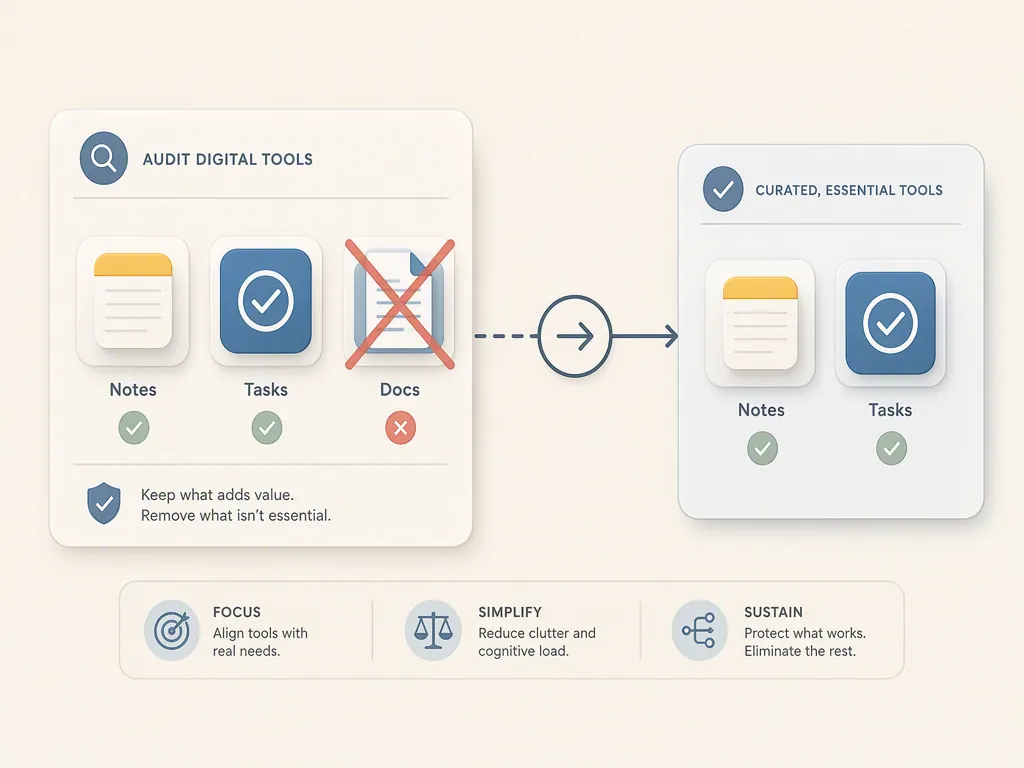
The fastest way to make a mess is to announce a migration before you know what must survive. Start with the work, not the tools. If you cannot yet name your actual note-taking patterns, pause here and sort that out first; a work-style view like Digital Note-Taking Apps by Work Style is a better first step than another migration.
| Audit question | What you are testing | What usually follows |
|---|---|---|
| What work would be damaged if this app disappeared? | Whether the app protects a real workflow or only feels useful | Keep it only if the damage is specific |
| Where is the app of record for each note type? | Whether one category is split across multiple systems | Choose one home and stop double-filing |
| Can another current app handle this job well enough? | Whether consolidation is possible without losing essential function | Move a small sample before moving everything |
| What do I check only because I once saved something there? | Whether the app has become an archive of anxiety | Export, archive, or remove it from daily use |
| Which integration would actually break if I removed it? | Whether the dependency is real or just convenient | Keep the integration only if work fails without it |
Start with workflows, not app names
Write down the kinds of notes you actually create. Not the categories you wish you maintained. The real ones. A student might have lecture notes, reading highlights, assignment drafts, exam review material, and administrative reminders. A consultant might have client meeting notes, reusable research, proposals, private planning, and follow-up tasks. A writer might have source notes, fragments, outlines, drafts, and submission records.
Then ask a harsher question for each workflow: what happens if this is handled badly? If the answer is mild annoyance, the workflow probably does not deserve its own app. If the answer is missed deadlines, lost source material, broken collaboration, failed review, or inability to retrieve required records, the workflow needs protection.
- Capture: where a thought, quote, meeting note, or task first lands.
- Storage: where the durable version lives after the moment passes.
- Retrieval: how you find it when you do not remember the exact wording.
- Production: where the note becomes an essay, report, project brief, study guide, or decision.
- Action: where commitments, deadlines, and next steps are reviewed.
The apps are secondary. A tool earns its place only by protecting one of those jobs better than the others can.
Name one app of record for each note type
The quiet disaster in a three-app stack is duplication with uncertainty. You do not merely have lecture notes in two places. You have to remember which place is authoritative. You do not merely save quotes in a reading app and a writing app. You have to remember which version contains the context, citation, or comment you added later.
For each note type, choose one app of record. Drafts may live in a writing editor, but source notes should have one durable home. Tasks may be captured in a notes inbox, but commitments should have one review home. Meeting notes may begin in a calendar event, but the decision record should not be scattered across every app that happened to be open.
This is where “nothing left to take away” becomes operational. If an app is not the app of record for anything, and it is not required to produce or submit the work, it is probably optional. Optional tools can still be pleasant. They just do not get to create a daily checking obligation.
Test consolidation with a small, ordinary sample
Do not migrate your entire archive to prove a point. Pick a small slice of current work: a few active notes, a draft, a saved quote, a meeting note, a task-like item, and one older item you often need to retrieve. Move or recreate those inside the candidate app. Then use them through a normal work cycle.
- Capture a new note quickly without opening three possible inboxes.
- Find an older item using the search terms you would actually remember.
- Turn a note into the next output: study material, draft, decision, brief, or task.
- Use it on the device where capture usually happens, not only on the device where setup feels tidy.
- Check whether collaboration, export, formatting, offline access, or review still works where those things are essential.
If the test fails, the answer is not automatically “keep everything.” It may mean the candidate app is wrong, the workflow boundary is real, or the archive should be separated from daily capture. What you are trying to avoid is the fake cleanliness of deleting an app and then rebuilding its function through workarounds.
Separate comfort from protection
A tool can feel useful because it is familiar, beautiful, or attached to a past version of your system. That is not nothing. Friction matters. But comfort alone is not a reason to keep a permanent slot in the stack.
| Keep the app when... | Remove or demote it when... |
|---|---|
| It is the only reliable home for a workflow you cannot afford to lose. | It mainly duplicates capture, storage, or search already handled elsewhere. |
| It supports a required format, review process, collaboration need, or submission path. | It exists because old notes are there and you feel nervous about exporting them. |
| It reduces total checking because its boundary is clear. | It increases checking because you no longer trust where things landed. |
| It helps turn notes into finished work. | It mostly gives you a better-looking place to postpone the work. |
That last distinction is the one people usually feel before they can explain it. There is a difference between an app that protects a workflow and an app that preserves a mood.
Delete in the order that reduces checking first
The first candidates are not always the least powerful apps. They are the ones that create the most ambiguity. Remove duplicate inboxes before you remove archives. Remove “someday writing” spaces before you remove the app holding active project notes. Remove extra clipping locations before you redesign your entire knowledge base.
- Stop sending new material into the weakest duplicate inbox.
- Export or archive its important contents without trying to perfect the archive.
- Remove it from your dock, browser share sheet, quick capture menu, or phone home screen.
- Leave read-only access if needed, but stop treating it as part of the active system.
- After the routine stabilizes, decide whether the archive deserves migration or can stay cold.
The point is to reduce the number of places waiting for you. A cold archive is less harmful than a live inbox you feel guilty about checking.
Where PARA helps without becoming another project
Tiago Forte’s PARA method is useful here because it gives a simple sorting lens: Projects, Areas, Resources, and Archives. Forte describes the system as needing to be simple enough to free attention rather than consume more of it. [6] That standard fits the “nothing left” audit well.
PARA should not become a second taxonomy layered on top of every app you own. Its value is the discipline of asking what a note is for. A project note supports an active outcome. An area note supports an ongoing responsibility. A resource is useful reference material. An archive is inactive but worth keeping. Once those boundaries are clear, many app decisions get easier.
| PARA category | What it means for app reduction |
|---|---|
| Projects | Keep these closest to the tools where work is reviewed and finished. |
| Areas | Give ongoing responsibilities one reliable home, not scattered partial homes. |
| Resources | Avoid keeping separate libraries unless the retrieval or format need is real. |
| Archives | Move them out of daily attention; they do not need to remain active inboxes. |
PARA is a lens, not a demand that every app be reorganized this weekend. If it helps you decide what can be removed, use it. If it becomes another place to maintain purity, it has missed its own point.
When more than one app is the honest answer
Consolidation is wrong when two tools protect genuinely different workflows. A researcher may need one system for source management and another for writing. A student may need a school-approved platform for class material and a private note system for synthesis. A manager may need a shared workspace for team decisions and a private capture tool for thinking before those decisions are ready.
Darwin Cruz’s simplification to Apple Notes, Things, and Calendar is a useful example because it does not pretend that one app must absorb every role. Notes, tasks, and time can be separate without becoming chaotic, as long as the boundary is obvious. [7] That is different from having three note apps that all claim to be the place where ideas live.
- Use one app when capture, storage, retrieval, and production can happen there without fragile workarounds.
- Use two apps when there is a stable boundary, such as notes plus writing, notes plus tasks, or research plus production.
- Use more than two when institutional, collaboration, format, compliance, or device constraints make consolidation damaging.
- Cut back when multiple apps answer the same question: “Where did I put that?”
This is the difference between minimalism and underfitting your work. A too-small system can be as annoying as an overbuilt one. The test is not whether the setup looks elegant in a screenshot. The test is whether removing one more app would damage the work.
The migration part should be boring
A note-app reduction project should not feel like founding a new religion. Pick the app of record, stop new capture into the apps you are retiring, move active material first, and let old archives cool down before deciding whether they deserve careful migration. If you want the broader version of this across your whole tool stack, the natural next stop is The Essential Digital Minimalism Productivity Setup. If the appeal is the general relief of owning fewer obligations, Why You Need to Declutter Your Life for Productivity covers the wider rationale.
The hard part is often not the export. It is the reflex. You will still open the old app because your hands remember it. That is habit friction, not evidence that the old stack was better. If that part keeps catching you, How Habits Form in the Brain is the more useful read than another feature comparison.
And if what drew you here was the book-review shape rather than the app audit, Bird by Bird Book Review: Productivity Lessons for Note App Migration takes that route more directly.
What is left after the audit
After the audit, the right stack may look almost disappointingly plain. One notes app. Or one notes app plus a task manager. Or one research store plus one writing environment. The cleanliness is not in the number by itself. It is in the absence of duplicate responsibility.
Perfection is not having nothing, and it is not forcing everything into one app at any cost. It is reaching the point where there is nothing left to remove without damaging the work.
References
- 50 Minimalism Quotes and Simplicity Quotes — Becoming Minimalist
- The Productivity Tool Trap — Mindful Suite
- My productivity app is a single never-ending .txt file — Jeff Huang
- I replaced four apps with Calmly Writer — Android Police
- Minimalist Apps — Nat Eliason
- The PARA Method — Forte Labs
- Three-app simplification to Apple Notes, Things, and Calendar — Medium
Comments
Join the discussion with an anonymous comment.