
If your question is “Microsoft replacing OpenAI: should you migrate from OneNote to Obsidian?”, the answer depends on what OneNote is doing for you. If it is mostly a handwriting pad, meeting-capture tool, PDF clipper, or familiar corner of Microsoft 365, this news is not an emergency. If Copilot has become part of how you search, summarize, connect, and reuse years of notes, Microsoft’s July 2026 MAI shift changes the risk calculation.
Bloomberg reported on July 7, 2026, that Microsoft had begun routing tens of thousands of AI prompts in Excel and Outlook to in-house MAI models, replacing OpenAI and Anthropic models in those flows, with the change rolling out across Microsoft 365 apps.[1] That does not prove OneNote Copilot has already been switched. The confirmed examples are Excel and Outlook. But OneNote Copilot sits inside the same Microsoft 365 Copilot strategy, and that is enough to make a serious notes user ask a more architectural question: do you want your thinking system’s AI layer controlled entirely by the platform owner?

My narrow recommendation: migrate toward Obsidian if AI quality, model choice, local control, and long-term portability matter more to you than OneNote’s built-in simplicity, handwriting support, and Microsoft 365 integration. Do not migrate just because a model name changed. Do consider migrating if the model change reveals a dependency you no longer want.
What Microsoft changed, and what it did not confirm
The relevant change is not that Microsoft is experimenting with its own AI models. That was already visible. Microsoft confirmed in April 2026 that its amended OpenAI partnership ended Microsoft’s exclusivity on OpenAI intellectual property, while preserving Microsoft’s access to OpenAI models through 2032.[2] In plain terms, Microsoft can still use OpenAI, but it is no longer just the infrastructure partner behind someone else’s frontier models. It is building a competing stack.
The uncomfortable part for OneNote users is where that stack appears: not in a separate experimental app, but inside paid Microsoft 365 Copilot workflows. Bloomberg’s reported examples were Excel and Outlook, so the responsible wording is not “Microsoft downgraded OneNote.” The better wording is: OneNote Copilot depends on a Microsoft-controlled Copilot pipeline whose model choices can change for strategic reasons outside your notebook.
That distinction matters. OneNote’s core note-taking features have not suddenly stopped working. Your notebooks do not become useless because Microsoft routes some Copilot prompts differently. But if you have started treating Copilot as the intelligence layer over your archive, the vendor’s model-routing decision becomes part of your notes architecture, whether Microsoft markets it that way or not.
The quality concern is not imaginary
The strongest reason this story lands badly is that early public testing has not made MAI look like a premium replacement. PCMag’s hands-on test of Microsoft’s MAI-Thinking-1 called it “surprisingly mediocre,” noting that it could not access the internet for current information and trailed Claude Sonnet on reasoning benchmarks.[3] One review does not settle a model’s long-term quality, and Microsoft can improve MAI. But for a paid productivity AI, “maybe it gets better later” is not a great answer.
Cybernews, citing internal documents, reported that MAI models perform significantly worse than premium rivals and closer to open-source alternatives such as DeepSeek V3.2.[4] That is a delicate claim because the internal documents are not being inspected directly here; the right attribution is to Cybernews. Still, the reported pattern matches the worry: Microsoft may reduce reliance on premium third-party models while users continue paying for a premium Copilot product.
For casual AI use, that may be tolerable. A rough meeting recap or a passable email draft can be good enough. Notes are different when they contain your own working memory: project history, research fragments, decisions, drafts, quotes, arguments, and old context you forgot you had. A weaker model does not merely answer a trivia question badly. It can miss the connection you were paying it to find.
OneNote Copilot is a paid pipeline you do not control
OneNote’s AI story is simple from the user’s side: buy Copilot, open OneNote, use the built-in assistant. That simplicity is real. It is also the lock-in point.
| Question | OneNote with Copilot | Obsidian with AI plugins |
|---|---|---|
| Who chooses the model? | Microsoft | You, through local models or API-connected plugins |
| Where do notes live by default? | Inside OneNote notebooks and Microsoft’s sync ecosystem | In a local vault of Markdown files |
| What happens if model quality changes? | You wait for Microsoft’s pipeline to change again | You can switch models or plugins |
| What do you pay for AI access? | A Copilot subscription tied to Microsoft’s AI bundle | No Obsidian AI subscription by default; local or third-party model costs depend on your setup |
| How official is the AI integration? | Built in and supported by Microsoft | Community plugin layer; quality and maintenance vary |
Microsoft Support describes OneNote Copilot access through Microsoft 365 Copilot for business users at $30 per user per month, or through Copilot Pro for personal users at $20 per month.[5] Those prices may be sensible if the AI consistently saves time across Word, Excel, Outlook, Teams, and OneNote. They feel worse if the model behind part of that bundle is quietly rerouted toward lower-performing in-house systems.
The irritation is not that Microsoft wants margin, independence, or strategic control. Of course it does. The irritation is that the user’s side of the bargain becomes vague. You pay a subscription price for Copilot, but you do not get durable control over which model reasons over your notes, how quickly that model changes, or whether quality trade-offs were made to serve Microsoft’s platform strategy rather than your archive.
Obsidian separates the notes from the model
Obsidian’s advantage is not that it has a prettier AI button. It usually does not. The advantage is that the notes and the AI layer are separate. Your vault is a folder of Markdown files, not a proprietary notebook database, and the AI features arrive through a configurable plugin ecosystem rather than one vendor’s bundled assistant.[8]
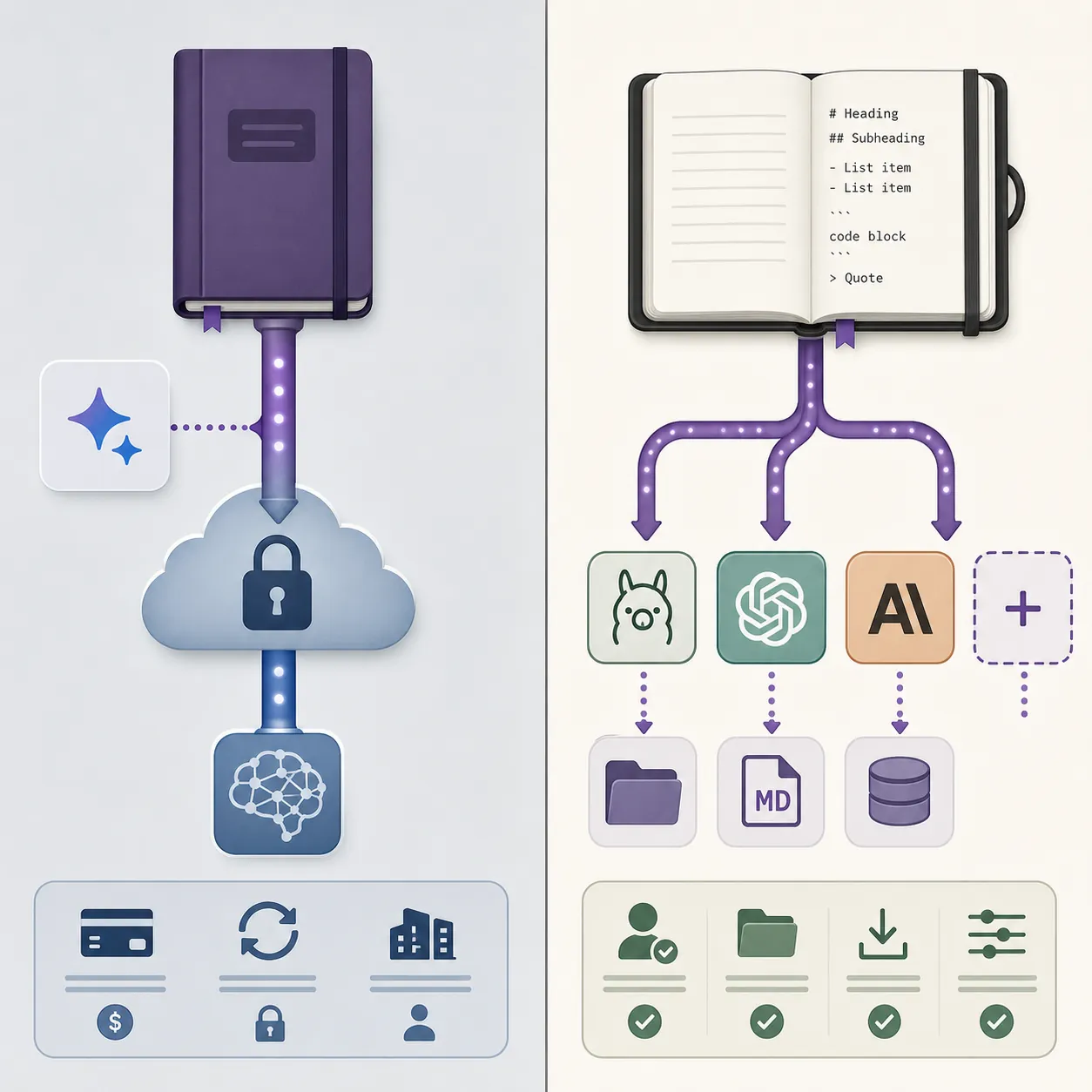
That structure changes your exit route. If a model gets worse, more expensive, slower, or unavailable, you can point the plugin layer somewhere else. Obsidian users commonly experiment with community plugins such as Smart Connections, Local GPT, and Copilot for Obsidian, connecting them either to local models or to external APIs. These are not official Obsidian AI products, and that caveat matters. Plugin maintenance, interface polish, and reliability vary. But the architectural choice is still yours.
The local path is the cleanest example. Open Resource documented a February 2026 workflow for running AI inside Obsidian through Ollama, describing a setup where “no data ever leaves your machine.”[6] That does not make local AI magically better than frontier cloud models. A small local model can be worse at reasoning, slower on weak hardware, or harder to configure. The point is control: you can decide whether a private, local, good-enough model is preferable to a cloud model chosen by someone else.
This is where Obsidian’s Markdown base matters. The AI layer can be replaced because the notes are not fused to it. Your files remain readable, searchable, and movable even if a plugin disappears. That is not a glamorous feature until the second time you move a serious archive and realize that export quality is not a footnote. It is the difference between a migration and a salvage operation.
The cost-quality mismatch is the real warning sign
Copilot pricing would be easier to accept if Microsoft were clearly giving users sustained access to the strongest available models. The July 2026 MAI reports make that assumption weaker. A OneNote user can now pay $20 to $30 per month for a bundled AI experience while having little visibility into whether a prompt is being handled by a premium external model, an in-house MAI model, or some future routing policy.[1][5]
Obsidian does not remove AI costs. If you use paid APIs, you still pay the model provider. If you run local models, you pay through hardware, setup time, and occasional annoyance. But Obsidian itself does not force a built-in per-query subscription for note AI. You can run local, bring your own API key, switch providers, or disable AI entirely without moving your notes again.
That makes the comparison less about sticker price and more about who absorbs the quality risk. In OneNote, Microsoft can change the model mix and the user mostly experiences the result. In Obsidian, the user has more work to do, but also more ways to respond. If Claude is better this month, you can use Claude through a compatible plugin. If a local model becomes good enough for private retrieval, you can test it. If a provider raises prices, you can leave the provider without leaving the vault.
The Microsoft-OpenAI split explains the direction, not the user benefit
There is a corporate logic here. The Verge reported in May 2026 on the deterioration of the Microsoft-OpenAI relationship, describing the companies as increasingly direct competitors building rival AI agents.[7] Seen from Redmond, reducing dependence on OpenAI and Anthropic is rational. Microsoft wants its own models, its own economics, and its own agent platform.
That does not automatically make it good for your notes. Platform strategy and user strategy overlap only when the platform’s incentives keep producing the experience you need. A company can make a smart long-term infrastructure move and still make your daily tool less trustworthy in the short term.
This is the trap in treating Copilot as a feature instead of a dependency. Once AI becomes how you interrogate your archive, rewrite your own material, and rediscover old decisions, model routing is no longer invisible plumbing. It is part of the knowledge system.
Where OneNote still makes sense
There are good reasons not to move. OneNote remains excellent at messy capture. It handles handwriting, ink, mixed media, meeting notes, embedded files, and Microsoft 365 workflows with less friction than Obsidian. If your notes are mostly handwritten, if your organization lives in Microsoft 365, or if you barely use Copilot, the MAI shift is a weak reason to disrupt your system.
Obsidian also asks more from you. You need to think about sync, backups, plugin trust, file organization, and model configuration. Community plugins can break. Local AI can be underwhelming on modest hardware. A bring-your-own-model setup is more resilient, but it is not more effortless.
So the decision is not “OneNote bad, Obsidian good.” It is more specific: OneNote is better when capture and Microsoft integration are the center of gravity; Obsidian is better when the archive itself, its portability, and the AI layer over it are the center of gravity.
A practical decision rule
Use the MAI news as a test of what you are actually buying. If Copilot is a convenience on top of OneNote, stay until OneNote itself stops serving you. If Copilot is becoming the interface to your memory, start planning an Obsidian migration before the archive gets harder to move.
- Stay with OneNote if handwriting, fast capture, Office integration, and low-maintenance sync matter more than model choice.
- Move toward Obsidian if you want Markdown files, local-first storage, and the ability to change AI models without changing note apps.
- Pause before paying for Copilot mainly for OneNote if your expectation is premium reasoning over a long-term archive.
- Test Obsidian with a copied subset of notes first if your archive contains years of structure, attachments, or handwritten material.
The cleanest migration is rarely a weekend export of everything. Move a representative working set: current projects, evergreen references, and a few ugly old notebooks with attachments. Then test search, links, AI retrieval, sync, and backup. If that subset works, you have evidence. If it does not, you have learned before turning your whole archive into a cleanup project.
For the broader app trade-offs, compare this AI-specific judgment with OneNote vs Obsidian vs Notion for Windows note-taking in 2026. If your main worry is dependency on cloud AI, the more relevant follow-up is which note apps keep working when ChatGPT goes down. And if you are ready to act rather than compare, use the OneNote-to-Obsidian migration guide next; the decision and the migration are separate jobs, and it is better to treat them that way.
References
- Microsoft Routes AI Prompts in Excel and Outlook to In-House MAI Models, Bloomberg, July 7, 2026, link
- Microsoft and OpenAI Partnership Amendment, Microsoft Blog, April 27, 2026, link
- MAI-Thinking-1 Hands-On Testing, PCMag, June 8, 2026, link
- MAI Models Perform Worse Than Premium Rivals, Cybernews, July 8, 2026, link
- Copilot in OneNote Requirements and Pricing, Microsoft Support, link
- Running Fully Local AI Inside Obsidian via Ollama, Open Resource, February 2026, link
- Microsoft and OpenAI Are Now Competitors Building Rival AI Agents, The Verge, May 2026, link
- OneNote vs Obsidian Architecture Comparison, Atlas Workspace, June 2026, link







Comments
Join the discussion with an anonymous comment.