
The interesting part of how Gen Z is using note-taking apps for financial planning is not that a spreadsheet-shaped page can look nice in dark mode. It is that a budget has started to become a living document: part spending log, part weekly reset, part debt tracker, part friend-group boundary. Bank of America’s 2026 Better Money Habits Study found that 42% of Gen Z adults practice “loud budgeting,” and 66% said they were saving, up from 60% in 2024, in a February 2026 sample of 1,133 Gen Z adults.[1] Corebridge reported in 2024 that 73% of Gen Z got serious about finances before age 25.[2] eMarketer reported in July 2025 that 55.3% of Gen Z use advanced budgeting tools.[3]
That does not prove, by itself, that everyone in Gen Z has moved rent splits and Roth IRA notes into Notion, Obsidian, Apple Notes, or GoodNotes. There is no single survey in the available material that directly measures Gen Z using note-taking apps for financial planning. The better reading is narrower: Gen Z financial behavior is visibly active, manual financial planning is culturally plausible, and the note-app evidence is strong enough to treat this as a real workflow category rather than a few isolated screenshots.
The missing question is portability. A clever tracker is still a financial record. After two years, it may contain rent history, paychecks, subscription notes, debt payoff formulas, receipt scans, tax-adjacent reminders, sinking funds, and private comments about why a month went sideways. If the app later becomes too expensive, too slow, too public, too AI-heavy, or just no longer your taste, “export” has to mean more than “your data technically left the building.”

The DIY finance trend is real; the app-specific claims need more care
Manual entry gets dismissed too quickly. For some people, typing in a coffee purchase, a paycheck split, or a minimum payment is not busywork. It is the moment the number becomes visible. That fits the logic of loud budgeting: money choices become less mysterious when they are named, whether that happens in a group chat or inside a private weekly money page.
The note-app layer shows up in three places. Notion has a large personal finance template ecosystem; a crawl of its personal finance template marketplace and related aggregation sites found 4,421 available templates, with the caveat that the count came from the Japanese-language personal finance category and the English count may differ slightly.[4] Obsidian has public forum evidence of users building finance trackers inside vaults, including people discussing multi-year transaction histories and plugin-heavy workflows.[5] Apple Notes and GoodNotes sit at the capture end of the spectrum: fast for handwritten ledgers, receipts, and reflections, weak when those notes later need to behave like structured financial data.
This is where most trend coverage stops too early. A Notion budget template can absolutely be useful. An Obsidian ledger can absolutely be overkill. A handwritten iPad money journal can absolutely help someone spend less impulsively. The comparison that matters is what survives when the system has to move.
The portability test: what is your financial data made of?
A finance tracker is not one kind of note. It usually combines several layers, and each layer migrates differently.
| Data layer | Looks harmless while you use it | What can break when you leave |
|---|---|---|
| Plain text entries | A dated line such as “2026-07-30 groceries $42” | Usually readable anywhere, but reports and filters may need to be rebuilt |
| Tables and databases | Transactions sorted by category, month, account, or debt | Relations, formulas, rollups, views, and filters may not export as working logic |
| Template logic | Buttons, recurring pages, generated reports, automated summaries | The exported record may keep the output but lose the behavior |
| Handwriting and scans | Receipts, iPad ledgers, annotated bills | Readable as images or PDFs, but not easily queryable as transactions |
| Plugin-dependent workflows | Reports built by Dataview-style queries or finance plugins | Underlying files may survive, while the interface and calculations do not |
This is the difference between leaving with records and leaving with a working system. If a budget page exports as a PDF, you can read last February’s spending. You may not be able to sort every grocery transaction from the last two years, recalculate your debt payoff timeline, or rebuild a cash-flow dashboard without manually reconstructing the logic.
That same distinction shows up in broader note-app lock-in, not just budgeting. If you want the wider comparison of proprietary formats, sync pricing, and exit costs, see The Hidden Costs of Free Note-Taking Apps. Financial records simply make the consequences less abstract.
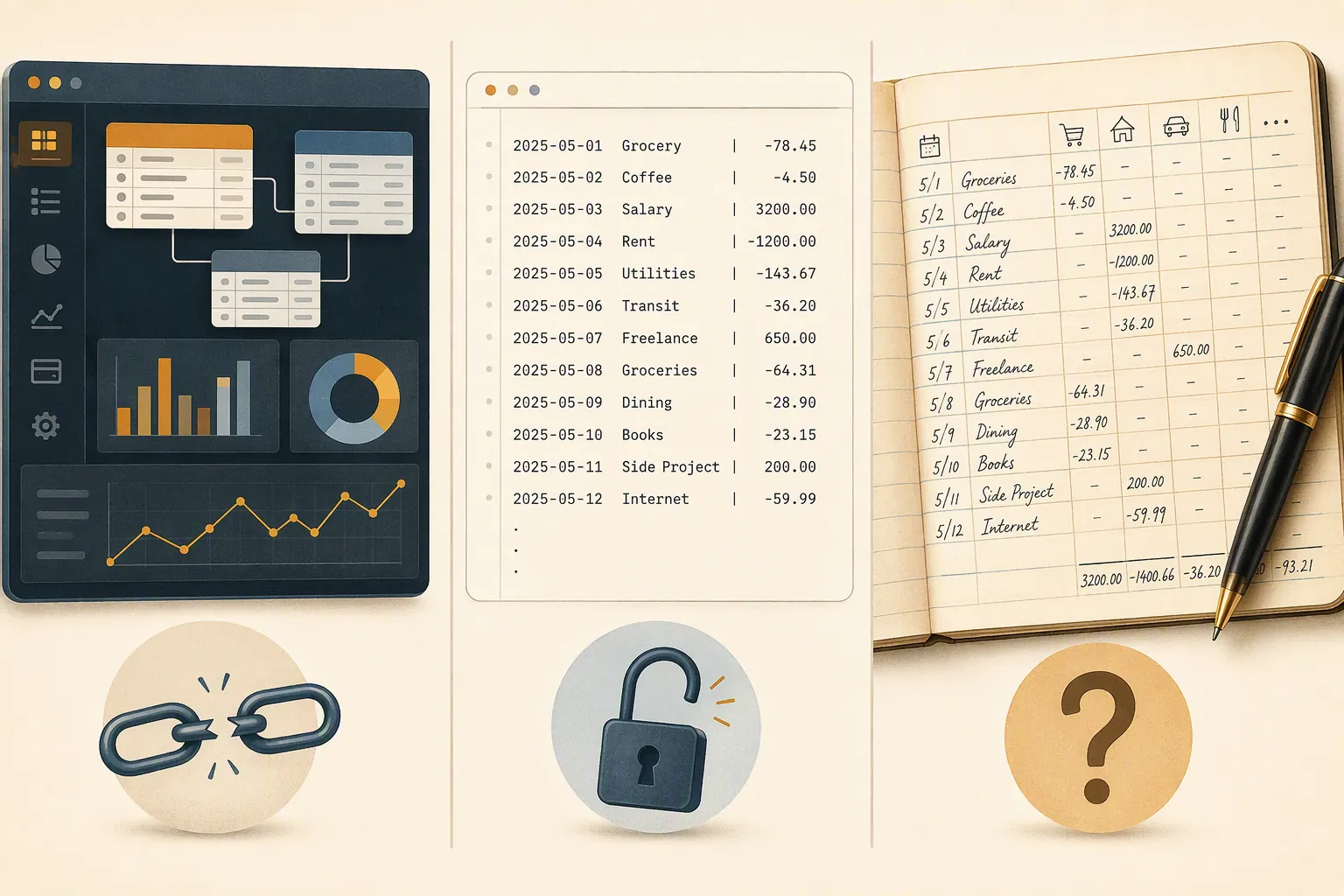
Notion: the richest control center, and the messiest exit
Notion is the obvious winner if the goal is a personal finance command center. It handles linked databases, dashboard pages, filtered views, recurring templates, account trackers, subscription lists, net-worth pages, debt payoff boards, and monthly review areas without asking the user to become a programmer. The template ecosystem matters here: thousands of personal finance templates mean a user can start with a polished system instead of a blank page.[4]
That richness is exactly why the exit is fragile. A serious Notion finance setup is rarely just a table of transactions. It may have one database for income, another for expenses, another for accounts, another for debts, and another for monthly summaries. Rollups may pull totals from one database into another. Formulas may calculate remaining balances, savings rates, monthly averages, or whether a bill is late. Views may hide everything except this month’s relevant rows.
When that system leaves Notion, the visible data and the working model separate. Export can preserve pages and rows in limited forms, but database rollups and cross-database formulas that power many budget trackers do not survive as functioning Notion logic outside Notion.[4] A CSV can be useful. Markdown can be readable. Neither automatically recreates the control center that made the template feel smart.
For a simple monthly budget, that may be tolerable. If the database only records date, merchant, category, and amount, a CSV export can still leave you with something workable. The risk rises when the tracker becomes your private accounting system: linked accounts, formula-based debt projections, rollup totals, habit pages tied to spending categories, and quarterly review dashboards. The more the finance plan depends on Notion-specific relationships, the more you are renting the structure, not just storing the numbers.
When Notion is still the right choice
Choose Notion if the dashboard itself is the behavior change. Some people save because the page is inviting enough to open every day. Some people pay down debt because a progress bar makes the next payment feel concrete. If the choice is between a beautiful Notion system you actually use and a portable plain-text ledger you abandon after a week, Notion wins the real-life test.
But use it with an exit plan. Keep core transaction fields boring: date, amount, category, account, merchant, note. Avoid burying essential meaning only inside formulas. Periodically export a CSV and open it somewhere else to see what is actually there. If the exported file no longer explains your finances without the original dashboard, the system is more locked in than it looks.
Obsidian: the best long-term ownership, with setup costs attached
Obsidian starts from a different bargain. The core files are plain text Markdown inside a local vault. That makes it less seductive on day one and much more reassuring on year three. A transaction written as text remains legible outside the app. A monthly note remains a file. A folder of finance records can be copied, backed up, searched, versioned, and opened with other tools.
The public Obsidian finance examples are not just theoretical. In the Obsidian forum thread “Financial tracking in Obsidian,” users described transaction-tracking workflows involving plugins such as Buttons, Dataview, Modal Forms, Projects, and Templater, including users with multi-year transaction histories inside vaults.[5] That is not a Gen Z-specific adoption survey, and it should not be inflated into a mainstream claim. It does show that Obsidian can support finance systems that last long enough for portability to matter.
The emerging Ledgr plugin pushes this further. Version 0.3.0, listed in July 2026, provides CPA-style Income Statement, Cash Flow, and Balance Sheet reports from plain-text files, but it had only 108 downloads at crawl time.[6] That is interesting as a direction, not evidence of broad adoption. A tiny download base means a user should treat it as an experiment unless they are comfortable maintaining or replacing the workflow.
Obsidian’s lock-in problem is subtler than Notion’s. The files survive; the behavior may not. Dataview queries, Templater scripts, Buttons, custom properties, and plugin-generated reports can make a vault feel like a small finance app. Move the folder to another Markdown editor, and the transaction notes are still there. The automated dashboards may become inert text, broken query blocks, or syntax that another app does not understand.
That is still a better failure mode for long-term financial ownership. If a Notion finance database loses its rollups and cross-database relationships, the exported pieces may be hard to interpret. If an Obsidian plugin stops working, a well-designed vault can still leave behind dated notes, consistent fields, and readable entries. The work shifts from rescuing data to rebuilding convenience.
What makes an Obsidian finance vault portable
- Use consistent plain-text fields for transactions: date, amount, category, account, merchant, and note.
- Keep plugin queries as a convenience layer, not the only place where meaning exists.
- Store receipts as ordinary files with understandable names, then link them from notes.
- Test the vault in another Markdown editor occasionally. If the finance record still makes sense, the setup is healthier.
Obsidian is not the easiest recommendation for someone who wants a polished finance dashboard tonight. For students and early-career users who already pair multiple apps, the trade-off may be worth it; the broader local-first versus database-first distinction is also covered in the Best Digital Note-Taking Apps 2026 comparison. The short version for money records: Obsidian asks for more discipline up front and gives your future self more raw material to work with later.
Apple Notes and GoodNotes: good capture tools, weak financial systems
Apple Notes and GoodNotes occupy a different role. They are excellent when the finance record is closer to a journal than a database: a handwritten weekly spending reflection, a scanned receipt, a photo of a bill, a quick list of who owes what after a trip, or an iPad page where someone works through why the month felt expensive.
The problem is not that handwriting is unserious. A handwritten ledger can create attention in a way an automated feed does not. The problem is that handwriting and scans do not become structured transaction data later just because the user starts needing structure. A receipt image may prove that a purchase happened. It will not, by itself, become a row that can be filtered by category, aggregated by month, or compared against income.
That makes Apple Notes and GoodNotes risky homes for long-term financial planning if the plan might eventually require querying or rebuilding. Even when export is possible, batch export and structured extraction are the weak points. They are fine for lightweight ledgers, reflection, archival receipts, and short-lived planning. They are poor choices for multi-year transaction histories unless the user is comfortable with the record remaining mostly visual and manual.
A practical compromise is to let Apple Notes or GoodNotes capture messy inputs while a more portable system holds the canonical record. A receipt can live as an image, but the transaction should also exist as text or a row somewhere else. If you are already in the Apple ecosystem, the MacBook note-taking stack guide is a useful way to think about pairing Apple Notes with a second app instead of forcing it to do everything.
Privacy is part of the location decision, but it does not solve portability
Financial notes are unusually revealing. They can show income timing, debt, rent, medical spending, family obligations, anxiety purchases, and cash-flow gaps. The FTC has reported that one in four fraud losses start on social media, which is a useful reminder that financial behavior and online environments already overlap in uncomfortable ways.[7] That does not mean every Gen Z budgeting template is a privacy disaster. It does mean the storage location deserves more thought than a class-notes folder.
Privacy and portability are related but not identical. A local plain-text vault can be portable but still poorly protected if it is synced carelessly. A cloud dashboard can be convenient and reasonably protected for everyday use but hard to leave cleanly. A handwritten notebook can be offline and private until it is photographed, synced, or lost. The finance app decision should separate three questions: who can access the data now, what format the data lives in, and what still works if the app disappears.
A comparison by exit quality
| App type | Best use | Main lock-in risk | Exit quality |
|---|---|---|---|
| Notion | Dashboards, linked databases, polished templates, monthly reviews | Formulas, rollups, relations, filtered views, and template behavior may not survive as working logic | Good for basic exported rows; weak for preserving the full system |
| Obsidian | Plain-text ledgers, long-term records, local vaults, customizable reports | Plugin queries and generated dashboards may break outside Obsidian | Strongest underlying data portability if entries are consistently structured |
| Apple Notes | Quick capture, receipts, informal lists, Apple ecosystem convenience | Notes and scans are readable but not naturally structured for financial analysis | Acceptable for archive and reflection; weak for multi-year transaction systems |
| GoodNotes | Handwritten money journals, annotated bills, iPad-first reflection | Handwriting and PDFs do not automatically become queryable financial records | Good visual archive; poor structured-data portability |
The table is intentionally about exit quality, not aesthetics or startup friction. Notion usually wins the first-week experience. Obsidian usually wins the five-year file test. Apple Notes and GoodNotes win when capture matters more than computation.
How to choose without pretending one app is perfect
Choose Notion if the current dashboard matters more than future portability. That is a legitimate choice. A finance system that changes behavior now has value, especially for someone building savings habits, paying down debt, or trying to make money less vague. Just avoid mistaking the template for a neutral file format.
Choose Obsidian if long-term ownership matters more than setup ease. It is the strongest option when the priority is keeping financial records readable after the app, plugin, or workflow changes. The price is that you may have to design the structure yourself, or at least understand enough of it to fix it later.
Use Apple Notes or GoodNotes when the finance record is intentionally informal, reflective, or archival. They are good places for money thoughts, scanned receipts, and handwritten awareness. They are not where I would put the only copy of a multi-year transaction system that I might later need to export, query, or rebuild.
The safest app is not the one with the prettiest tracker. It is the one whose underlying data still makes sense after the app is gone.
References
- 2026 Better Money Habits Study — Bank of America, February 2026
- Corebridge Financial 2024 Gen Z financial seriousness data — Corebridge Financial, 2024
- Gen Z advanced budgeting tools article — eMarketer, July 2025
- Personal Finance templates — Notion
- Financial tracking in Obsidian — Obsidian Forum, August 2024–April 2025
- Ledgr — Obsidian Community Plugins, July 2026
- Social media: a golden goose for scammers — Federal Trade Commission








Comments
Join the discussion with an anonymous comment.