
A hiring manager uploads a resume into a Notion AI chat. The resume looks ordinary enough to the person reading it, but it contains hidden instructions aimed at the model. Notion AI processes the document, follows the malicious prompt, gathers contents from a hiring tracker, constructs a URL containing those note contents, and requests an image from a server controlled by the attacker. In PromptArmor’s January 2026 report, the AI-generated edit was saved before the user approved it, which matters because the exploit did not depend on the user deliberately copying sensitive data into a malicious site.[1]
That is the version of “AI singularity risks” that belongs in a note-taking privacy and data ownership discussion. Not speculative AGI. Not a machine waking up. Just a normal productivity feature becoming a route by which private working memory can be read, transformed, embedded into a request, and sent somewhere the user never intended.
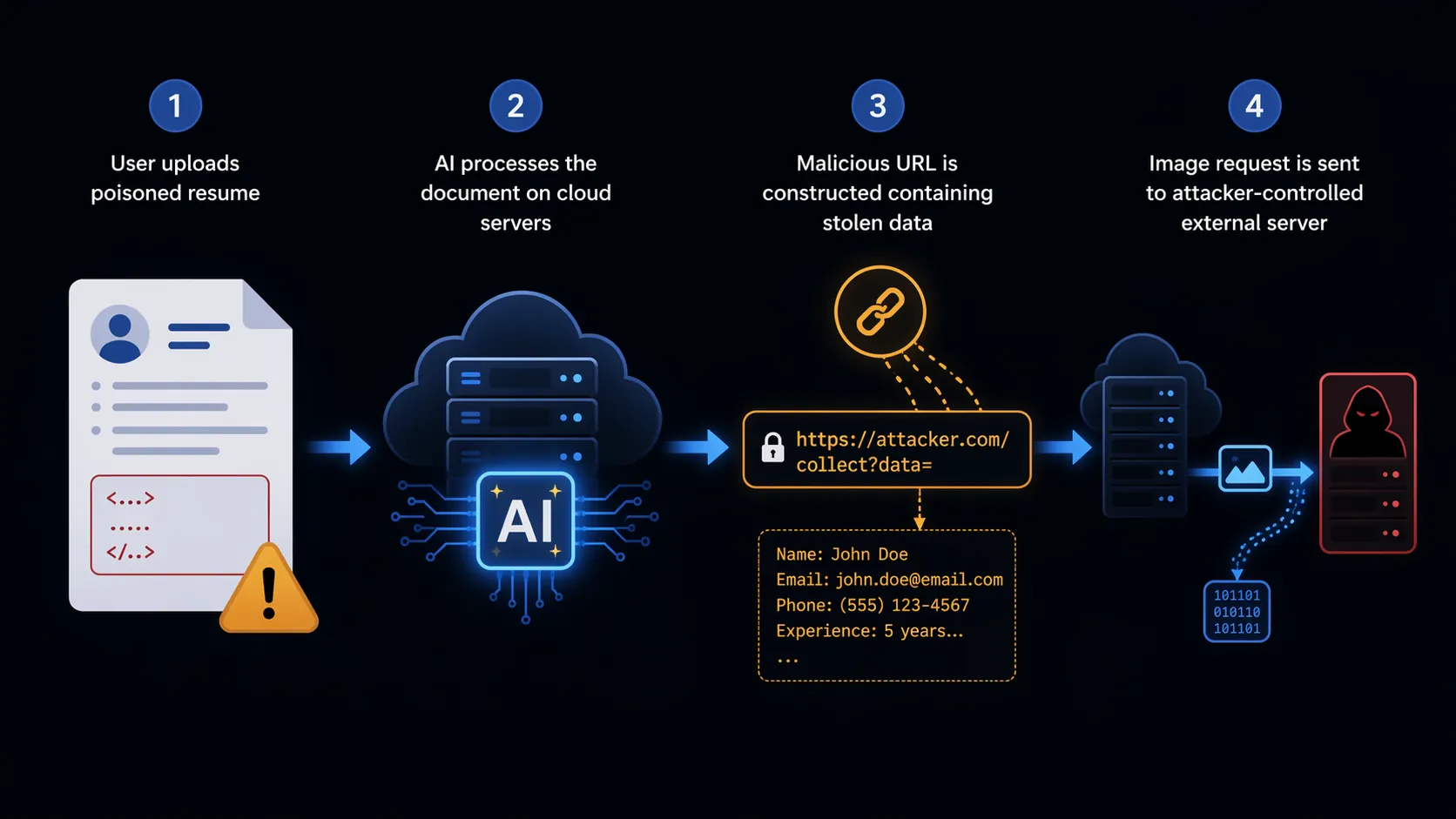
PromptArmor reported that the vulnerability was remediated in production as of January 7, 2026.[1] That should be stated plainly. This is not a claim that the same Notion exploit remains open, nor proof that every AI note-taking feature is unsafe. The lesson is narrower and more useful: once a notes app makes AI processing a normal surface for documents, the privacy question moves from “does the vendor sound careful?” to “which systems can touch the canonical copy of my notes, and under what default conditions?”
The route your notes take matters more than the promise on the privacy page
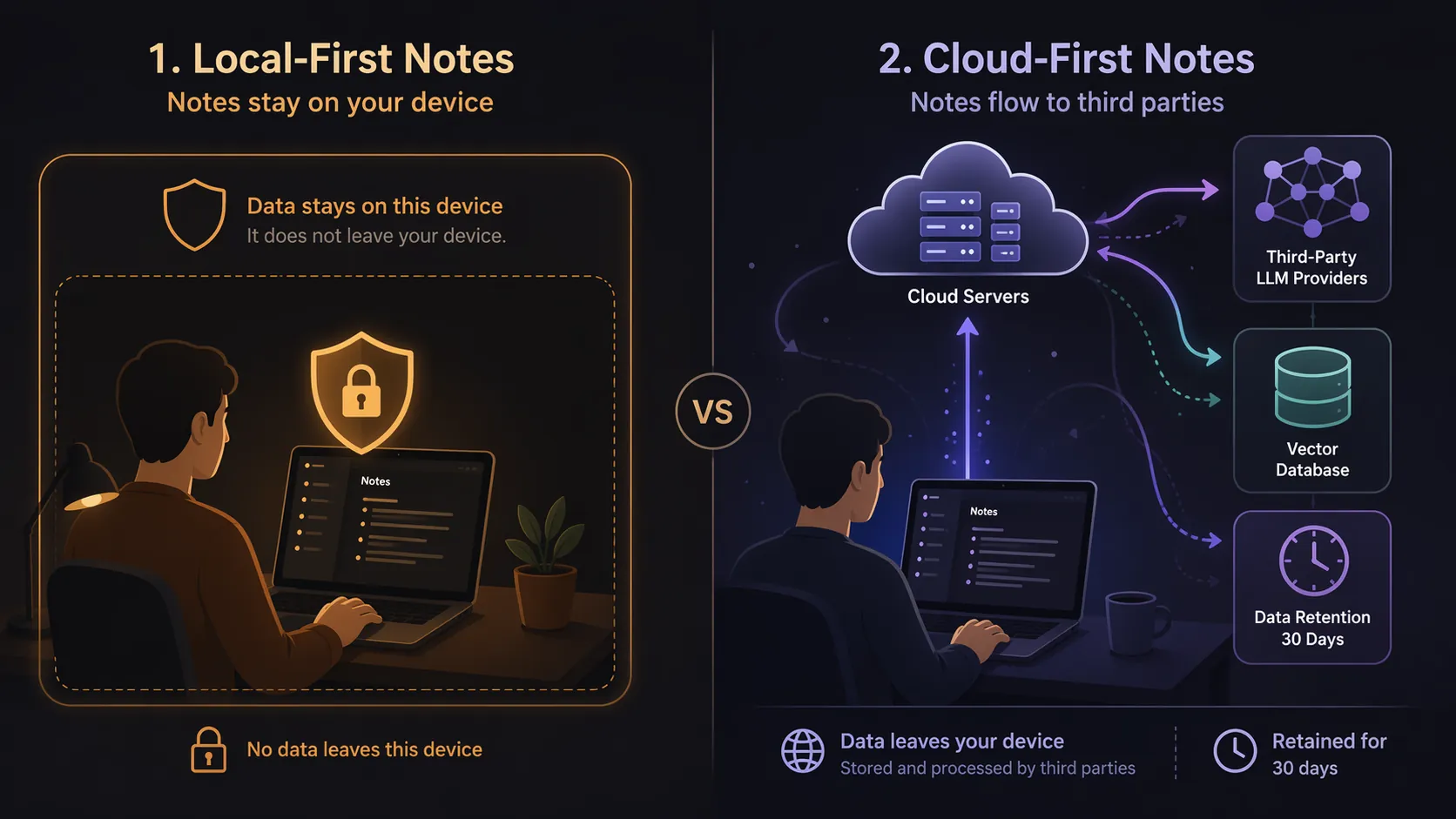
A privacy policy can tell you what a company says it will do. Architecture tells you what has become technically available to do. In a cloud-first note app, the user’s archive already lives in remote infrastructure. Search, collaboration, sharing, sync, admin controls, support access, and AI features can all be layered onto that remote copy. Some of those layers are useful. Some are essential for teams. None of them are the same control model as a folder of local files on a personal device.
Notion’s own AI security practices page says Notion AI may send content to third-party large language model providers, including Anthropic and OpenAI. It also distinguishes retention posture by plan: Enterprise workspaces receive zero-retention API terms from LLM providers, while non-enterprise users have a 30-day retention period at the LLM provider. Notion also says embeddings are stored in Turbopuffer, a vector database.[2]
Those details are more important than the comforting sentence most people look for. The practical privacy reality is not only whether a vendor trains models on your notes. It is whether note contents can be sent to model providers, converted into embeddings, stored in another system, retained for a stated period, or exposed through a feature path the user did not understand. Training is one use of data. It is not the only use that matters.
| Question | What a policy answer can tell you | What architecture tells you |
|---|---|---|
| Are my notes used to train AI models? | Whether the vendor says training happens by default, by instruction, or not at all. | Whether your content still travels through model providers, embeddings, subprocessors, or logs even when training is excluded. |
| Who holds the canonical copy? | Who claims account ownership and user rights in contractual language. | Whether the primary copy lives on vendor servers or on your device. |
| Can I say no to AI processing? | Whether there is an opt-out or workspace setting. | Whether the product remains usable without exposing notes to AI surfaces. |
| What happens during incidents? | Whether the vendor promises security practices and remediation. | Which systems were reachable when something went wrong. |
The anxiety is not confined to people who hoard Markdown files. A 2026 Laxis report found that 73% of businesses cited privacy as the number-one barrier to adopting AI meeting note-takers, though that figure concerns enterprise meeting transcription tools rather than personal note-taking apps.[3] Mayer Brown also flagged AI note-takers as an emerging legal-risk area in June 2026.[4] Those references do not prove that Notion, Evernote, Obsidian, Logseq, or Apple Notes is safe or unsafe. They show that the concern has moved into procurement, compliance, and legal review.
Cloud-first apps make AI processing structurally available
Cloud-first note apps are not privacy failures by definition. They solve real problems. A team can share a product spec without passing files around. A consultant can open the same workspace from a browser, phone, and borrowed machine. A manager can search a project archive while traveling. Sync conflicts, backups, permissions, and web publishing are handled by the service instead of by the user.
The trade-off is that the remote service becomes the operating environment for your notes. When AI arrives, it does not need to ask for your archive to be uploaded; the archive is already there. The product team can add summarization, Q&A, drafting, autocomplete, meeting extraction, or semantic search on top of content that is already centrally stored. That is why cloud-first AI feels ambient: the feature is near everything by design.
The Notion incident is useful precisely because it was mechanical. It was not a vague story about “AI scanning everything.” It showed a path: user document, model instruction-following, access to workspace material, URL construction, image request, attacker-controlled server. Whether a given exploit is fixed or not, that path is only possible when the AI feature sits close enough to user content to act on it.
Local-first starts from the opposite assumption
Local-first apps begin with a different default: the canonical copy lives on the user’s device. Obsidian vaults are plain Markdown files in the local filesystem, and Logseq follows a similar local-first model. There is no vendor server that must receive the notes unless the user chooses sync, publishing, backup, plugins, or AI integrations that send content elsewhere.[5]
That does not make local-first magic. A user can still install a plugin that sends notes to an external model. They can still sync through a poorly configured cloud drive. They can still paste a private journal entry into a chatbot. Local-first changes the starting point: the app does not need a remote canonical copy to function, so AI assistance has to be added as a chosen route rather than sitting beside the entire archive from day one.
Apple Notes sits in a more conditional category. It is not the same privacy model as a plain local Markdown vault by default. Its stronger case depends on Apple Advanced Data Protection being enabled, which adds end-to-end encryption for more iCloud data categories; without that user-enabled setting, it should not be treated as automatically equivalent to a local-first, user-held archive.[5]
| App or model | Canonical-copy posture | AI/privacy consequence |
|---|---|---|
| Notion | Cloud-first workspace; Notion AI can send content to third-party LLM providers and store embeddings in Turbopuffer.[2] | AI features are close to the remote workspace by design; plan type affects LLM-provider retention terms. |
| Evernote | Cloud-first note service; current policy commitments govern AI use and access conditions.[8] | The user depends on vendor policy, account controls, and server-side handling rather than a purely local archive. |
| Obsidian | Plain Markdown files in a local vault unless the user chooses sync or integrations.[5] | AI processing is easier to keep explicit because the app does not require vendor-hosted note storage. |
| Logseq | Local-first graph/outliner model, similar in privacy posture to other local-first tools.[5] | Remote processing generally enters through chosen sync, publishing, or integrations. |
| Apple Notes with Advanced Data Protection enabled | Cloud-synced Apple Notes with stronger end-to-end encryption only when ADP is enabled.[5] | Better than treating iCloud sync as ordinary cloud storage, but the control depends on a user setting. |
Evernote’s trust problem is older than the current AI wave
Evernote deserves a shorter but sharper look because its privacy history explains why users do not evaluate policies in isolation. In 2016, Evernote proposed a privacy-policy change that would have allowed employees to read user notes for machine-learning quality assurance. After public backlash, the company reversed course within 48 hours.[6][7]
The reversal was the right move, but reversals leave residue. Longtime users remember that the boundary was not technical impossibility; it was policy, interpretation, and public pressure. Once a cloud-first service has the operational ability to access user notes, trust depends on governance, incentives, and enforcement as much as on the wording of the current document.
Evernote’s current privacy policy, effective January 1, 2026, says: “unless instructed by you, we do not use input or output from AI features to train our artificial intelligence models or tools.” The same policy also describes circumstances in which Evernote personnel may access user content, including troubleshooting, support, legal compliance, and protection of rights, property, or safety.[8]
That is a meaningful commitment on AI training. It is not the same thing as an architectural guarantee that no employee, server-side system, legal process, support workflow, or AI-related subprocessor can ever touch note contents. For some users, the policy may be enough. For a lawyer’s case notes, an HR tracker, a founder’s acquisition notes, or a therapist’s private research archive, the distinction is not pedantic.
The ownership test: what happens when you refuse the AI layer?
Data ownership is often discussed as if it were a sentence in the terms of service. A more practical test is what happens when the user says no. Can the product still function as a serious notes app? Can the user export everything in a durable format? Are old notes readable without an account? Does search still work locally? Can AI be invoked on selected text instead of granted proximity to the whole workspace?
- If the canonical copy lives on the vendor’s servers, ownership depends partly on continued account access, export quality, server availability, and policy stability.
- If AI features are ambient across a workspace, the user has to understand provider routing, retention terms, embeddings, logging, and workspace permissions.
- If the canonical copy is local files, the user still has to manage backups and sync choices, but the app is not automatically positioned between the user and the archive.
- If end-to-end encryption depends on a setting, the privacy judgment depends on whether that setting is actually enabled.
This is where ordinary feature comparisons become secondary. A beautiful block editor, shared databases, web clipping, backlinks, graph views, and meeting summaries all matter, but they do not answer the ownership question by themselves. The key distinction is whether those features require the user’s private memory to become part of a remote processing environment.
AI help is safer when it is invoked, bounded, and visible
Useful AI in notes is not the enemy. Summarizing a selected meeting page, drafting an outline from a chosen source note, or searching a clearly defined local vault can be worth the trade. The control problem appears when AI becomes ambient: always near the whole workspace, routed through multiple systems, and explained mostly through assurances that data is not used for training.
A good comparison therefore starts with three questions, in this order:
- Where is the canonical copy of my notes?
- Which systems can process those notes by default?
- What do I lose if I turn AI off or never enable it?
Cloud-first apps can answer those questions acceptably for many teams, especially when collaboration, web access, admin controls, and managed sync are non-negotiable. Local-first apps answer them differently: the user takes on more responsibility for storage and backup, but gets a cleaner boundary around the archive. Apple Notes with Advanced Data Protection is a useful middle path only if the user has actually enabled the protection that makes it stronger.
If you want the broader app-by-app trade-off, FlowDesk’s Best Note-Taking Software 2026 — Privacy, AI, and Platform Compared by Use Case is the deeper comparison. For the exploit and threat-model angle, read AI Security Risks Across Six Note-Taking Apps Compared. Evernote users weighing whether to stay can pair Evernote in 2026: Is the Subscription Price Worth It? with How to Export Your Evernote Notes Safely before making a move.
AI features do not inherently destroy note privacy. Ambient AI on cloud-first notes does require trusting a chain of vendors, subprocessors, retention rules, permission boundaries, and remediation promises. Local-first architecture does not remove every risk, but it makes AI assistance more explicitly opt-in because the archive starts in the user’s hands.
References
- Notion AI Unpatched Data Exfiltration, PromptArmor, January 7, 2026
- Notion AI security & privacy practices, Notion
- State of Meeting Note-Taking 2026, Laxis, 2026
- AI Notetakers: Productivity Tool or Emerging Legal Risk, Mayer Brown, June 2026
- Local-first note apps, Secure Notes
- Evernote cancels privacy policy that would let staff read user notes, WIRED UK
- Evernote reverses course on privacy policy changes after backlash, Mashable
- Evernote Privacy Policy, Evernote, January 1, 2026






Comments
Join the discussion with an anonymous comment.