
Why “BPM Workflow” and “Workflow Automation” Get Confused
If you have ever built a Zapier automation to move a lead from a form into a CRM, then set up a Make scenario to route a support ticket to the right person, you have used workflow automation. You probably did not call it “business process management” — and you were right not to. Yet the two terms are constantly mashed together in vendor marketing, blog posts, and team discussions, leaving people who work with lightweight tools wondering whether they are doing BPM or just automating a few steps.
The confusion is understandable. Both concepts involve sequences of tasks, both aim to reduce manual effort, and both are sold under overlapping software categories. But treating them as synonyms leads to a specific kind of mistake: either over-engineering a simple approval chain with a heavyweight BPM platform, or trying to fix a broken cross-departmental process by stitching together a dozen disconnected automations that nobody can monitor or improve.
Defining the Two Concepts: Strategy vs. Execution
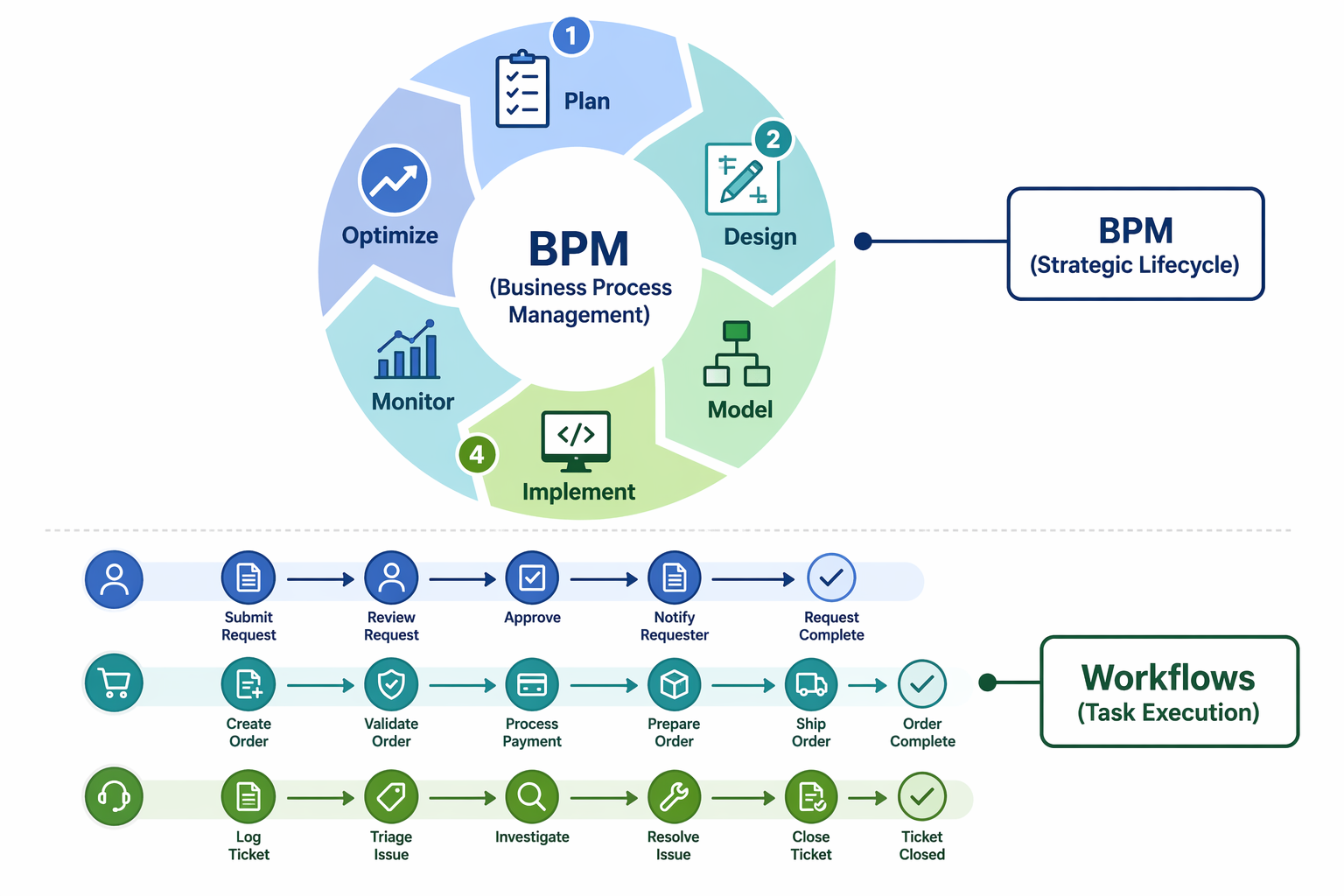
The cleanest way to separate BPM from workflow automation comes from an analogy used by Kissflow: if a workflow is how a single plane lands, BPM is managing the entire operations of an airport. The workflow gets the plane from approach to gate — a defined sequence of tasks with a clear start and end. BPM decides how many runways to build, which gates serve which airlines, how ground crews are scheduled, and what happens when a flight is delayed. One is execution; the other is the system that governs execution.
SAP Signavio reinforces this distinction with a different framing: “workflow is the operational layer of BPM.” In their model, BPM includes workflows but also encompasses process design, governance, analytics, and continuous improvement. A workflow tool handles the “how” — the sequence of tasks needed to complete a unit of work. BPM handles the “why” and the “what’s next” — whether the process is still aligned with business goals, where bottlenecks accumulate, and how the process should evolve over time.
The Three Types of BPM and What They Mean for Your Automation Needs
Not all BPM looks the same, and the type of BPM you need determines what your workflow automation should look like. Lucid identifies three categories, each mapping to a different automation pattern:
| BPM Type | What It Handles | Typical Automation Scenario | Tool Fit |
|---|---|---|---|
| Integration-centric BPM | Processes that move data between systems with minimal human involvement | Syncing customer records between a CRM and an ERP, or auto-generating invoices from order data | Zapier, Make, or n8n — lightweight connectors that pass data between APIs |
| Human-centric BPM | Tasks that require human judgment, reviews, or approvals | Expense report approval chains, content publishing workflows, hiring pipelines | Notion databases with status tracking, Monday.com boards, or a dedicated approval tool like Approve.com |
| Document-centric BPM | Processes centered on documents — contracts, proposals, compliance forms | Procurement contract routing, employee onboarding document collection, legal review workflows | A document management layer (Google Workspace, SharePoint) combined with a workflow tool for routing and signatures |
If your process is mostly integration-centric — data moving from one system to another — a no-code automation tool is often sufficient. If it is human-centric, you need a tool that handles status changes, notifications, and conditional routing. If it is document-centric, the workflow is only part of the solution; you also need version control, approval signatures, and audit trails. Recognizing which type you are dealing with is the first step in the decision framework.
A Decision Framework: Tactical Automation vs. Strategic Improvement
The core question is not “which software category should I buy?” but “what kind of problem am I solving?” The answer depends on two dimensions: scope and stability.
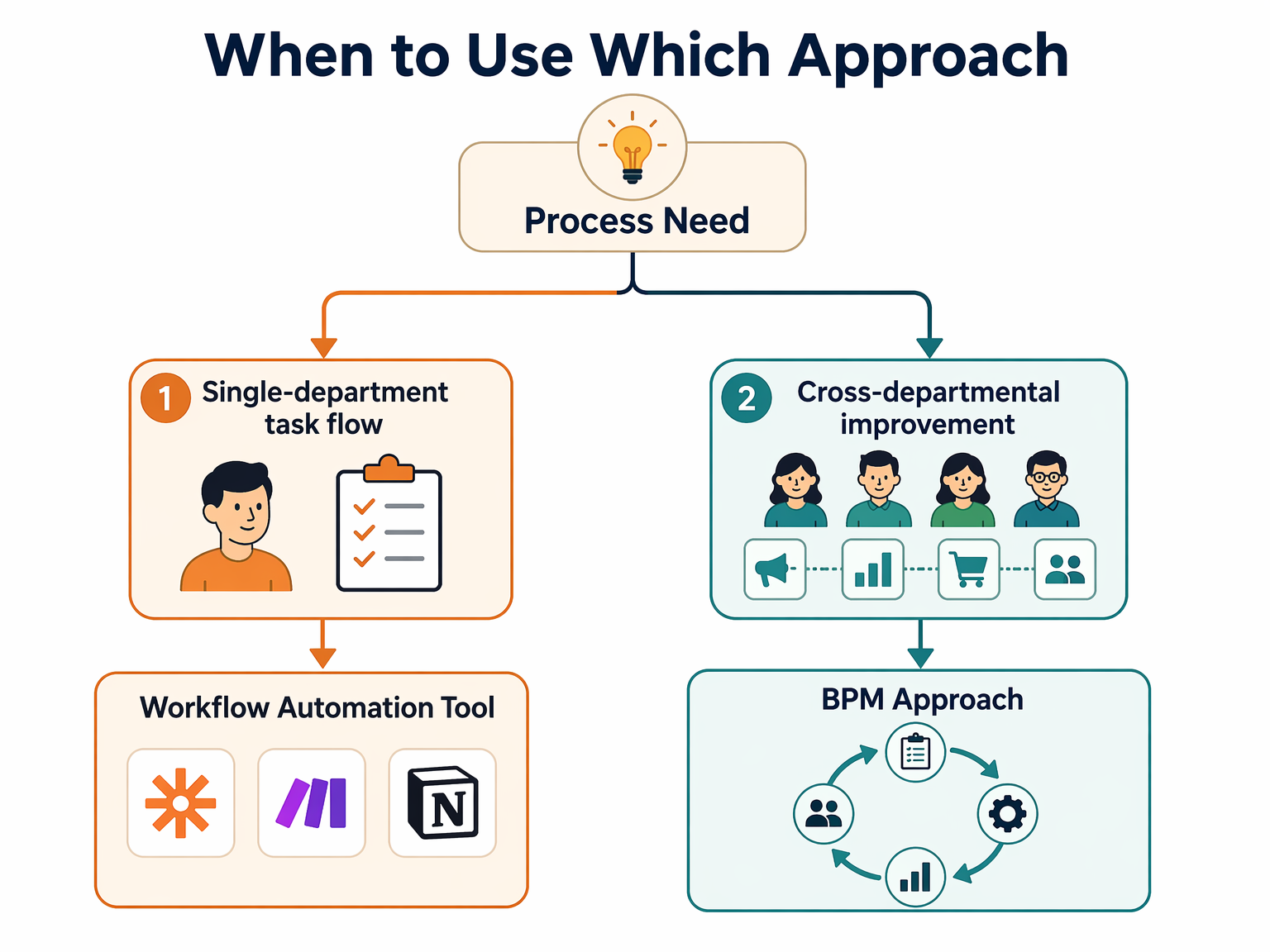
Use this checklist to determine your path:
- Is the process contained within a single team or department? If yes, a workflow tool is likely sufficient. If it crosses multiple departments (HR → IT → Finance), you need at least some BPM thinking to handle handoffs, data consistency, and exception routing.
- Does the process change frequently? A stable, repeatable process (e.g., monthly invoice generation) is a good candidate for a fixed workflow automation. A process that evolves with business conditions (e.g., customer onboarding that changes with new product lines) benefits from BPM’s monitoring and optimization loop.
- Do you need to measure and improve the process over time? Workflow tools execute tasks; they rarely tell you why a process is slow. If you need cycle-time analytics, bottleneck identification, or continuous improvement, you need BPM governance — even if you implement it with lightweight tools.
- Is the process high-risk or compliance-relevant? Processes involving financial approvals, data privacy, or regulatory reporting require audit trails, version control, and documented decision logic. These are BPM concerns, not just workflow concerns.
Three Scenarios: When to Use Which Approach
The framework is easier to apply with concrete examples. Below are three common scenarios that teams using lightweight tools encounter, each with a different answer.
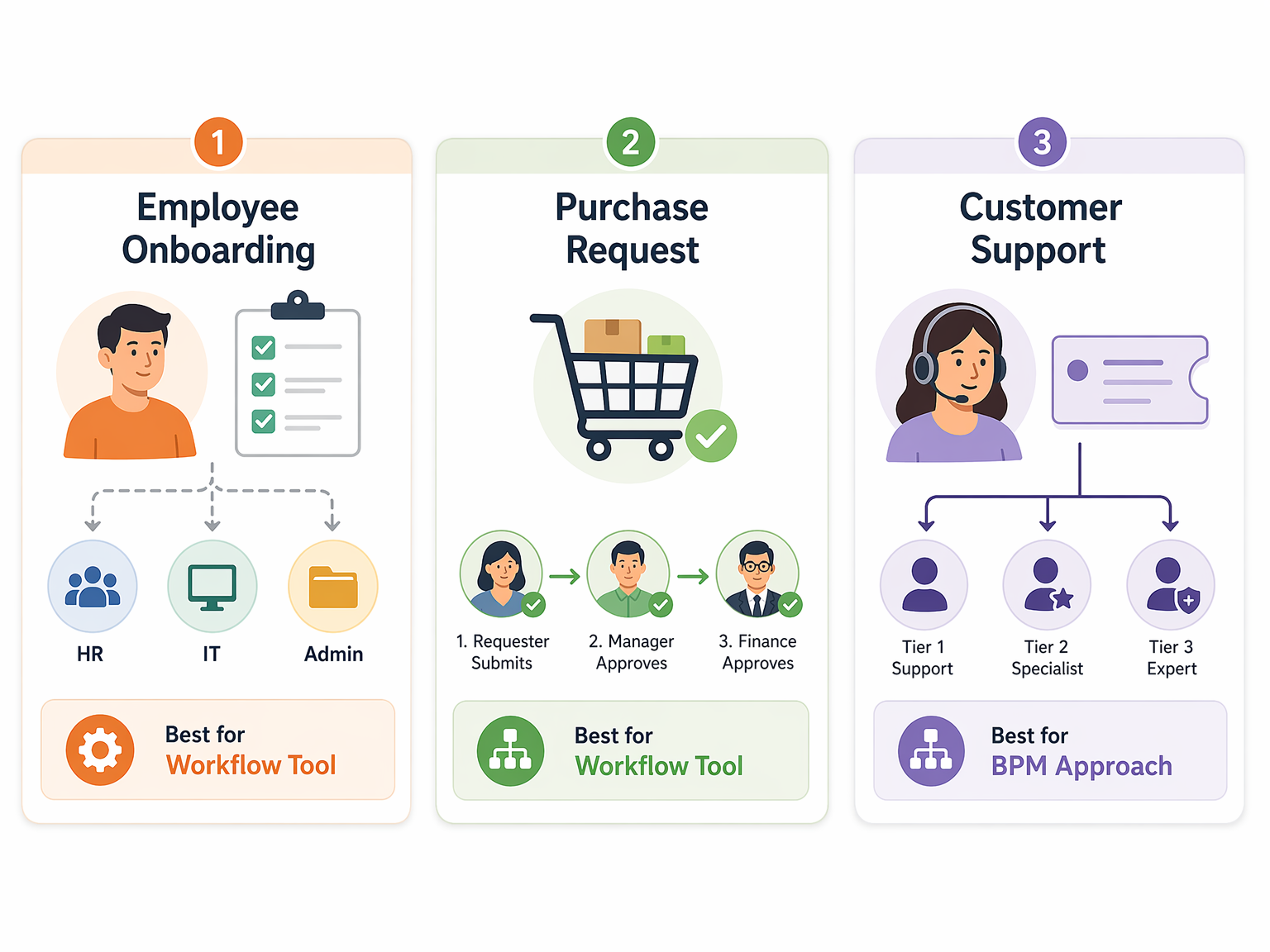
Scenario 1: Employee Onboarding (BPM Approach)
Onboarding a new hire touches HR (offer letter, benefits enrollment), IT (account creation, hardware provisioning), Facilities (desk assignment, badge access), and the hiring manager (training plan, introductions). Each step depends on the previous one, but the process also has parallel tracks — IT can provision accounts while HR processes paperwork. A simple linear workflow tool would struggle with the branching logic, the multiple owners, and the need to handle exceptions (e.g., a delayed background check). This is a human-centric BPM problem. You might still use a tool like Notion or Monday.com to manage the process, but you need to design it with BPM principles: defined roles, conditional routing, escalation rules, and a feedback loop to improve the process after each hire.
Scenario 2: Purchase Request Approvals (Workflow Tool)
An employee submits a purchase request under $5,000. It goes to their manager for approval, then to Finance for budget check, then back to the requester with a yes or no. This is a single approval chain with one owner per step, no parallel branches, and a clear start and end. A workflow tool like Zapier, Make, or a simple approval app on Monday.com handles this perfectly. There is no need for process analytics or continuous improvement — the process is stable, low-risk, and contained within two departments. Over-engineering this with a BPM platform would add cost and complexity without benefit.
Scenario 3: Customer Support Ticket Routing (Hybrid)
A support ticket arrives and needs to be routed to the right tier based on issue type, customer plan, and current agent workload. The routing logic itself is a workflow automation — a conditional sequence that can be built in Make or Zapier. But the overall support process — tracking resolution times, identifying recurring issues, updating knowledge base articles, and measuring customer satisfaction — is a BPM concern. In this scenario, the workflow tool executes the tactical task (routing), while a lightweight BPM layer (a shared dashboard in Notion or a weekly review in Monday.com) provides the strategic oversight. The two approaches complement each other.
How BPM and Workflow Tools Complement Each Other
The most productive teams do not treat BPM and workflow automation as an either/or choice. They use workflow tools to execute tasks and BPM thinking to govern the overall process. This is where the rise of low-code and no-code platforms becomes relevant.
According to Gitnux, low-code/no-code platforms accounted for 45% of new workflow deployments in 2023. That statistic matters because it means business users — not just developers — are now building the automation layer. And when business users build workflows, they naturally encounter BPM questions: “Who should approve this if the manager is out?” “What happens if the data doesn’t match?” “How do we know this process is still efficient?” The tools themselves do not answer these questions, but they make it possible to implement the answers without a dedicated IT project.
- Workflow tools execute tasks. They handle the “who does what when” with triggers, actions, and conditional logic.
- BPM provides the governance layer. It defines the process boundaries, success metrics, exception handling rules, and improvement cycle.
- Low-code platforms bridge the gap. They let non-technical teams build the workflow layer while adopting BPM practices — documentation, versioning, analytics — without needing a full BPM suite.
Market Context: Why This Distinction Matters Now
The distinction between BPM and workflow automation is not a theoretical exercise. Several converging trends make it a practical decision that teams need to get right.
First, the scale of adoption. SAP Signavio reports that 67% of business leaders say workflow automation is crucial for their digital transformation efforts. That figure, cited from Gitnux and McKinsey, reflects a broad consensus that automation is no longer optional. But when automation is everywhere, the difference between a well-governed set of automations and a chaotic collection of scripts becomes a competitive differentiator.
Second, the market is growing fast. Fortune Business Insights valued the global BPM market at USD 21.51 billion in 2025 and projects it will reach USD 91.87 billion by 2034, a compound annual growth rate of 17.2%. North America held 43.2% of that market in 2025. These numbers indicate that organizations are investing heavily in process management — but the investment only pays off if teams at every level understand what BPM actually means for their daily work.
Third, the democratization of automation. Gitnux also reports that 65% of mid-sized companies implemented no-code workflow tools in the last two years, and adoption in SMEs grew 40% year over year in 2023. When non-technical teams build automations, they need a decision framework that does not require a BPM certification. They need to know when a simple Zapier zap is enough and when they need to step back and think about the process as a whole.
For teams using lightweight tools, the takeaway is clear: the tools are powerful enough to handle both tactical automation and strategic process management. The limiting factor is not the software — it is knowing which mode to use for which problem.
Next Steps: Choosing Your Path
The decision between a tactical workflow tool and a strategic BPM approach starts with the problem, not the tool. Before you open Zapier, Make, or Monday.com, take fifteen minutes to map the process you want to automate.
- Draw the process from start to finish. Who initiates it? Who touches it? Where does it end? If the diagram fits on a sticky note with one owner and one handoff, you are in workflow territory. If it needs swimlanes, parallel tracks, and exception branches, you are in BPM territory.
- Identify the bottleneck. Is the problem that a task takes too long to execute (workflow problem) or that the process itself is poorly designed (BPM problem)? A workflow tool can speed up task execution; it cannot fix a process that routes work to the wrong person.
- Decide on the minimum viable governance. Even if you choose a workflow tool, add a simple monitoring step: a weekly check that the automation is still running correctly, a log of exceptions, and a quarterly review of whether the process still makes sense.
- Evaluate tools based on the process type, not the other way around. If you need human-centric BPM with conditional routing and multiple owners, a simple linear automation tool will frustrate you. If you need a straightforward approval chain, a full BPM suite will be overkill.
For teams ready to evaluate specific platforms, the BPM Workflow Tools Compared guide covers which platforms fit different team sizes and technical skill levels. And if you are curious about how no-code orchestration tools are making BPM concepts accessible to non-IT teams, the Best No-Code Workflow Orchestration Tools for Business Teams in 2026 roundup is a good next read.
The goal is not to become a BPM expert. It is to recognize that not every process problem needs a process management solution — and that the ones that do will not be solved by a workflow tool alone. Start with the problem, map the scope, and choose the approach that matches the reality of how your team works.
Comments
Join the discussion with an anonymous comment.