
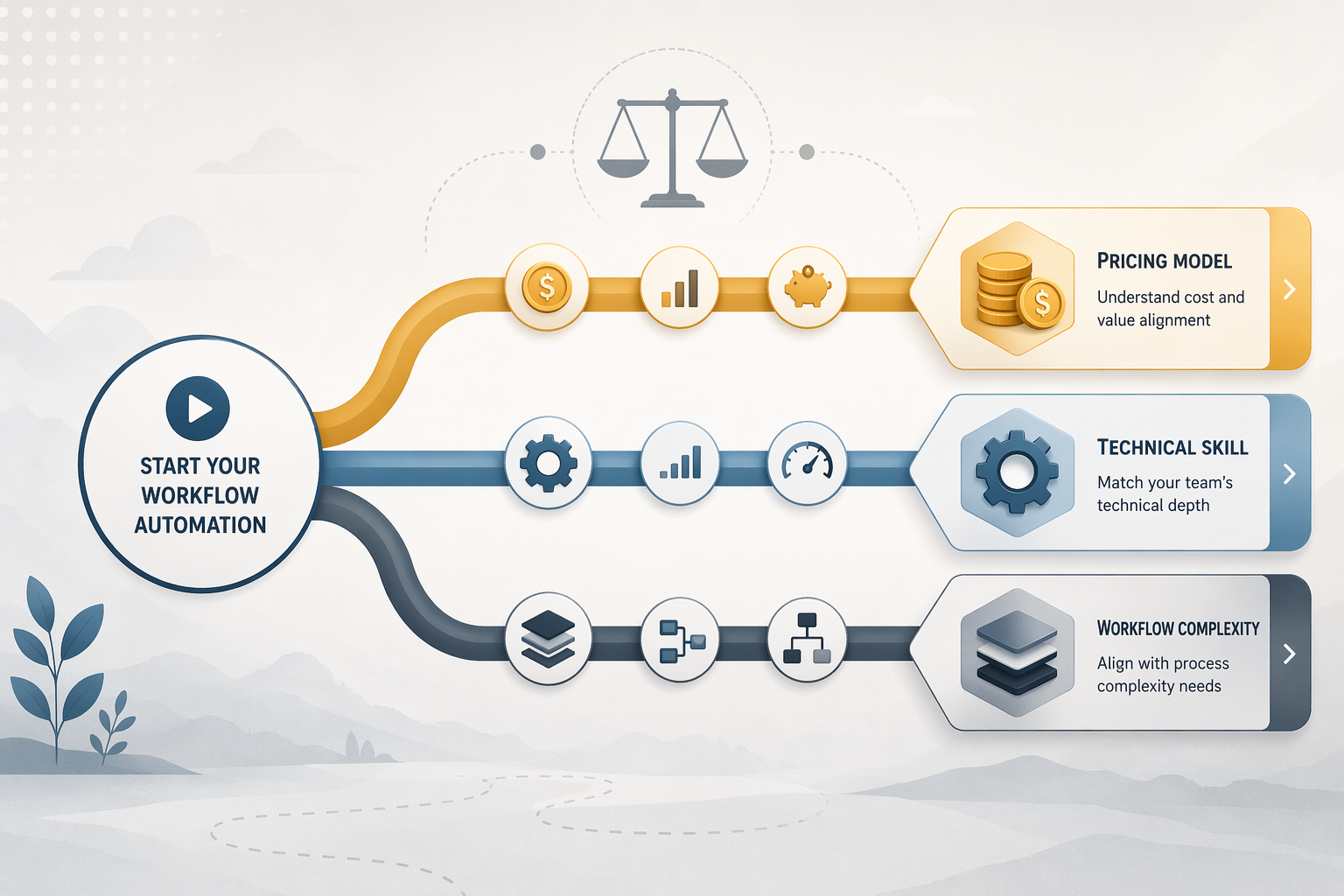
The easiest mistake in choosing workflow automation tools is comparing integration counts first. That is how a team ends up impressed by “connects to everything,” builds three clever workflows in a week, and only later realizes the real buying question was never just “Can it connect?” It was: how many times will this run, how many billable units does one run consume, who owns it when it breaks, and what happens when the workflow grows from three steps to ten?
Pricing and ownership matter earlier than most demos admit. A small RevOps or operations team can be perfectly happy with Zapier if the workflows are light, business-critical, and app coverage matters more than volume. The same team may move to Make when operation-based pricing is easier to defend. A technical team may save money with n8n, but only if someone is willing to own hosting, upgrades, credentials, logs, and the occasional late-afternoon mystery failure.
Quick verdicts before the invoice gets interesting
| Platform | Best fit | Cost/ownership shape | Not for you if |
|---|---|---|---|
| Zapier | Small teams that need broad app coverage and low technical friction | Per-task billing; simple to start, can get expensive as multi-step workflows run often | Your core workflows are high-volume, multi-step, data-heavy, or long-running |
| Make | Value-conscious teams comfortable with visual logic | Per-operation billing; strong value at moderate volume | Your team wants the absolute simplest interface and does not want to think in scenarios, operations, and data structures |
| n8n | Technical teams that want control, extensibility, and self-hosting options | Cloud or self-hosted; savings depend on whether you can actually maintain it | Nobody on the team can own infrastructure, credentials, errors, and upgrades |
| Power Automate | Microsoft 365-heavy organizations | Fits best inside Microsoft licensing and governance patterns | Your team mostly lives outside Microsoft apps and wants a clean, standalone automation budget |
| Workato | Enterprise automation with governance, scale, and cross-department ownership | Enterprise pricing; often far beyond small-team needs | You are trying to automate a handful of team workflows on a small budget |
| Tray.io | Technical enterprise teams building complex integrations | Enterprise pricing and implementation expectations | You need a simple no-code tool for a small operations team |
| Pipedream | Developer-friendly workflows and API automation | Best when code is acceptable and technical users are close to the workflow | Your nontechnical teammates need to maintain everything without developer help |
| Bardeen | Browser-based personal and team productivity automations | Useful for front-office tasks and repetitive web work | You need deep backend orchestration or governed enterprise process automation |
| Relay.app | Human-in-the-loop workflows and team handoffs | Good when approvals and review steps matter | You mainly need high-volume backend integration plumbing |
| Gumloop | AI-native workflows where reducing LLM and API setup friction matters | Appealing for AI-heavy teams; claims should be checked against real workflow needs | You need mature, broad, conventional SaaS coverage above all else |
| Stepper | AI-native or developer-adjacent teams exploring modern workflow building | Emerging option; best evaluated with a real pilot | You need a battle-tested default for a nontechnical team today |
| ClickUp AI | Teams already running work management inside ClickUp | Strongest when automation stays near tasks, docs, and project workflows | You need a general-purpose integration layer across many external systems |
The pricing model matters more than the integration count
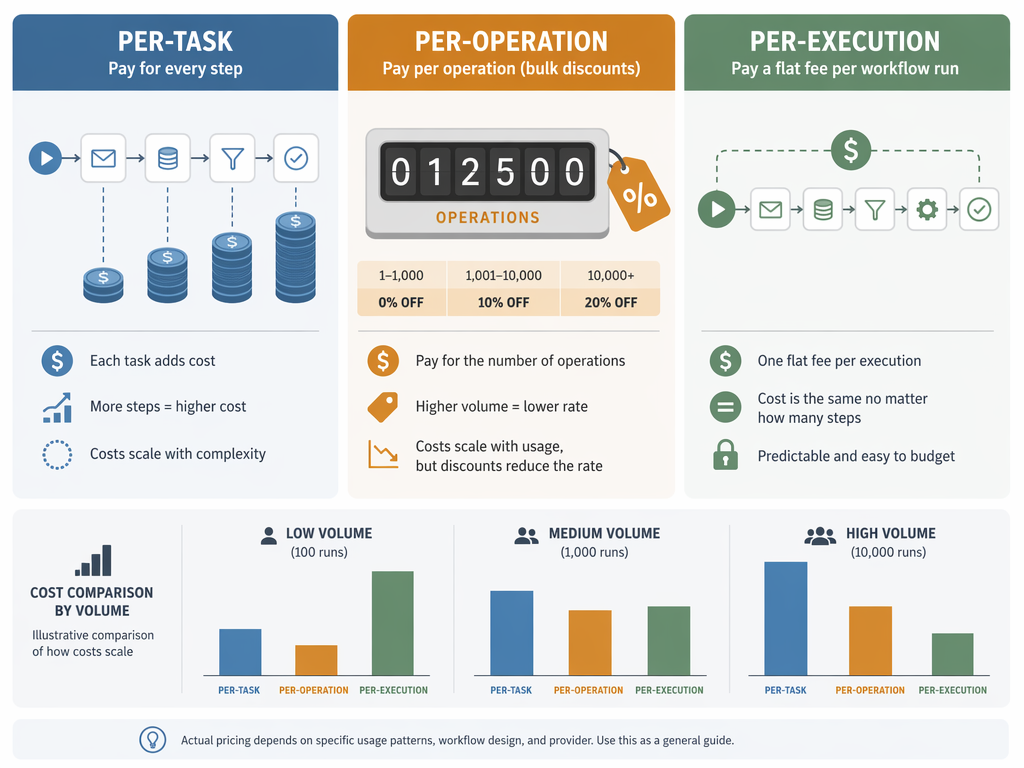
Three billing models show up again and again: per-task, per-operation, and per-execution. They sound interchangeable until a workflow moves from a tidy demo to daily production. A five-step lead enrichment flow running a few dozen times a week is one kind of budget conversation. A ten-step routing, enrichment, notification, update, and AI-summary flow running thousands of times a month is another.
| Billing model | How it behaves | Where it feels good | Where it hurts |
|---|---|---|---|
| Per-task | Each billable action can count separately | Short workflows with low or moderate run volume | Multi-step workflows that run frequently |
| Per-operation | Each module/action typically consumes operations | Teams that can estimate volume and optimize scenarios | Messy scenarios with lots of looping, searching, or unnecessary modules |
| Per-execution | A workflow run can be the main billing unit, depending on plan and platform | Complex workflows where many steps happen inside one run | Long-running or resource-heavy workflows if infrastructure or plan limits become the constraint |
| Self-hosted/open-source | Software cost may drop, but hosting and maintenance move to the team | Technical teams with clear ownership | Small teams pretending one analyst can be an unpaid DevOps department |
Zapier is the cleanest example of why per-task billing deserves attention. Its app ecosystem is very broad, but a ten-step workflow that runs 10,000 times can land in the $500+/month range, according to 2026 pricing comparisons and workload tests.[1][2] That does not make Zapier bad. It means the same workflow that felt harmless during testing can become a budget line the moment other teams start using it.
Make’s value point is easier to explain to a manager because the operation bucket is visible. Recent comparisons identify Make’s $9/month plan for 10,000 operations as a standout price point in Q2 2026.[1] That does not mean every Make workflow is cheap forever. A scenario that searches, iterates, filters, and updates records can burn operations quickly. But the cost mechanics are usually easier to inspect than a vague feeling that “automation got expensive.”
n8n changes the conversation again. Self-hosting can remove a large chunk of platform spend, but the practical break-even against Zapier is roughly $80–100/month of Zapier spend once hosting and maintenance are considered.[2][7] That is the number I would put in front of any small team before they say “we’ll just self-host.” If the team is spending less than that, the savings may not repay the extra operational responsibility. If the team is spending more and has technical ownership, n8n becomes much more compelling.
The big three: Zapier, Make, and n8n
Most small and mid-sized teams should understand Zapier, Make, and n8n before getting distracted by the rest of the market. They represent three different defaults: easiest app coverage, best visual value, and most control. For a deeper head-to-head after this overview, see the internal comparison of Zapier vs Make vs n8n.
Zapier: best when coverage and simplicity are worth paying for
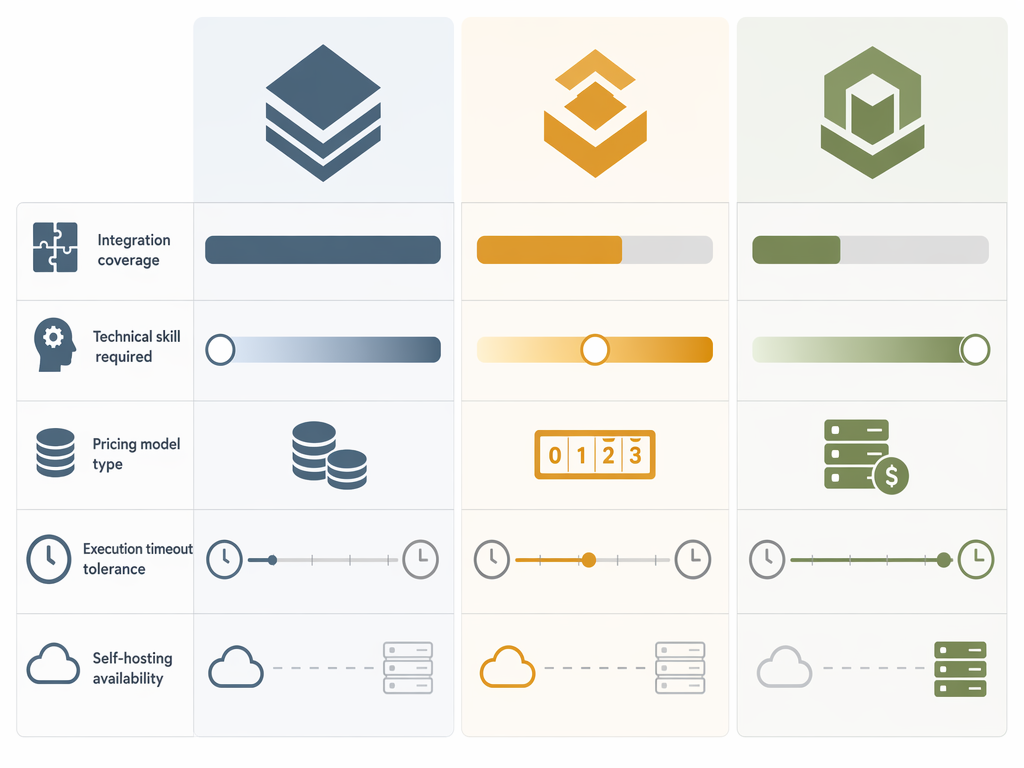
Zapier remains the obvious first stop for many teams because it supports 7,000+ integrations, far ahead of Make’s 1,500+ and n8n’s 400+ listed integrations.[3][2] That coverage matters when the team uses a long tail of SaaS tools and nobody wants to read API docs. The nontechnical teammate who needs a lead copied from a form into a CRM, a Slack channel, a spreadsheet, and an email sequence will usually get further in Zapier than in a more technical system.
The tradeoff is not hidden, but it is easy to underestimate. A workflow with ten paid steps does not feel like ten paid steps while someone is proudly showing the first successful test run. It feels that way after the workflow becomes normal operations and fires thousands of times. Zapier also has limits that matter for heavier workflows: a 30-second per-step timeout and 6MB payload limit, which can become real constraints for AI summaries, large data payloads, or slow third-party APIs.[2]
Choose Zapier when app coverage, low setup friction, and teammate accessibility are the priority, and when your expected volume still makes the bill defensible. It is not for you if your core automation is a high-volume, ten-step operational backbone or if long-running AI and data-heavy jobs are central to the workflow.
Make: best value for teams willing to understand the scenario
Make is often the better middle ground for teams that have outgrown simple zaps but do not want to run infrastructure. Its visual builder makes branching, routers, transformations, and multi-step flows more explicit. The pricing model also rewards teams that can reason about operations and clean up waste. The $9/month for 10,000 operations benchmark is the kind of number a team lead can actually use in a budget conversation.[1]
The learning curve is real. Make asks users to understand data structures sooner than Zapier does. That is not a flaw if the team has an analyst, ops manager, or technically curious builder who will maintain the scenarios. It is a problem if the workflow is going to be handed to a teammate who only wanted a button that says “send this to finance.”
Choose Make when volume matters, visual control matters, and someone can own the logic. It is not for you if the team needs the lowest possible cognitive load or if every automation owner is allergic to inspecting payloads, filters, iterators, and scenario history.
n8n: best when control is valuable enough to maintain
n8n has the appeal that makes technical operators lean forward: open-source roots, self-hosting, HTTP Request flexibility, community nodes, and room to build more complex logic than the typical no-code tool wants to expose. Its listed integration count is smaller than Zapier’s and Make’s, but HTTP Request and community nodes let teams cover virtually any API when they have the skill to do it.[2][7]
The timeout difference is especially important for AI and data-heavy workflows. Zapier’s 30-second per-step timeout contrasts with n8n’s configurable timeouts up to 60 minutes.[2] That can be the difference between a workflow that reliably waits for a large language model response or a slow export job, and one that fails just often enough to make everyone stop trusting it.
n8n’s enterprise momentum also matters. Its $180 million Series C in 2025 at a $2.5 billion valuation signaled demand for open-source and controllable automation in larger environments.[7] That does not make self-hosting automatically sensible for a five-person team. It does make n8n harder to dismiss as a hobbyist option.
Choose n8n when the team has technical ownership, wants control over execution, and can benefit from self-hosting or more flexible workflow logic. It is not for you if the automation builder is also the only person who understands the server, the credentials, the queue behavior, and the recovery process. If that is your current fork in the road, the internal guide to free vs paid workflow orchestration is the next question to answer.
AI-heavy workflows change the shortlist
AI automation is where the old “does it connect to my app?” checklist gets weak. LLM workflows often need longer timeouts, better error handling, prompt and response inspection, structured outputs, retry logic, and some way to keep API keys from becoming everyone’s shared spreadsheet problem. Low-code AI workflow comparisons emphasize native AI builders, LLM nodes, and agent functionality as increasingly important platform differences.[4][5]
This is why n8n’s configurable timeout deserves attention beyond the technical footnote. A customer-feedback summary, document classification, or sales-call note extraction job may not fail because the logic is wrong. It may fail because the model response takes too long, the payload is too large, or the platform treats a slow step like an exception. In those cases, a prettier builder does not compensate for execution limits.
Gumloop and Stepper are worth watching because they start closer to the AI workflow problem. Their pitch is less about traditional app-count dominance and more about reducing API-key management and complex node logic.[5] That is a real relief for teams trying to operationalize AI workflows without turning every automation into a miniature engineering project. The caution is that emerging AI-native tools should be tested against the boring parts too: permissions, logs, handoff, cost predictability, integrations, and who can fix the workflow when the original builder is gone.
ClickUp AI belongs in a different bucket. It can be useful when the automation stays close to tasks, docs, projects, and internal work management. It is not a general replacement for a broad integration platform if the main job is coordinating many external systems.
The rest of the field, by buyer type
Power Automate: the Microsoft 365 answer
Power Automate is often the right answer when the organization already lives in Microsoft 365. The appeal is not just automation; it is environment fit. If approvals, SharePoint, Teams, Outlook, Excel, Dynamics, and identity management are already Microsoft-centered, Power Automate can be easier to govern than a separate tool bought by one department.
The problem is licensing clarity. Power Automate licensing can be complex, which means small teams should be careful before assuming it is “included” in a way that covers every workflow they want.[3] Choose Power Automate for Microsoft-heavy organizations with admin support. It is not for you if your team mainly uses non-Microsoft SaaS tools and wants a simple, standalone automation budget.
Pipedream: when developers are part of the workflow
Pipedream makes sense when code is acceptable, APIs are central, and technical users are close to the business process. It can be a better fit than pure no-code when the workflow needs custom logic, webhooks, transformations, and developer-style debugging. It is not for you if the intended maintainer is a nontechnical operations teammate who should not have to read JavaScript to fix a broken handoff.
Bardeen and Relay.app: useful when the workflow is close to a person
Bardeen is strongest around browser-based productivity and repetitive front-office work. Relay.app is more interesting when human review, approvals, and team handoffs are part of the workflow. Neither should be evaluated as if it were simply a smaller Zapier. The better question is whether the automation happens around a person’s daily work or deep in the backend between systems.
Bardeen is not for you if the workflow needs durable backend orchestration across many systems. Relay.app is not for you if the main need is high-volume integration plumbing with minimal human involvement.
Workato and Tray.io: enterprise tools need enterprise reasons
Workato and Tray.io can be the right tools in governed, cross-functional, enterprise environments. That is a different buying situation from a small revenue team trying to automate lead routing and reporting. Enterprise platform pricing is often not publicly listed, and third-party estimates put tools such as Workato and Tray.io around $10,000+/year.[6] Treat that as an estimate, not a quote.
Choose these platforms when governance, scale, security review, auditability, and multi-team ownership justify the budget and implementation effort. They are not for you if the real problem is five small workflows and one team lead trying to avoid a bloated invoice. If you are not sure whether you belong in no-code automation or enterprise RPA territory, the internal guide to no-code vs enterprise RPA is a better next step than watching another enterprise demo.
A practical narrowing path
A workable shortlist usually appears once you stop asking for the “best” platform and start eliminating bad fits. The sequence below is the order I would use before letting anyone build a proof of concept.
- Estimate monthly runs and steps first. If one workflow runs 10,000 times and has ten meaningful actions, price it before admiring the canvas.
- Name the maintainer. If the builder leaves, who can read the logs, rotate credentials, update fields, and explain failures?
- Check execution limits. AI summaries, document processing, and large payloads need more than a trigger and an action.
- Match the environment. Microsoft-heavy teams should test Power Automate early; open-source-comfortable teams should test n8n; AI-heavy teams should test at least one AI-native option.
- Decide whether governance is real or aspirational. Enterprise platforms make sense when auditability, permissions, scale, and procurement requirements are already present.
For a more structured decision framework, use the companion guide on how to choose a process automation tool. If your needs are narrower, a use-case view may be more useful than another general roundup; see workflow automation tools compared by use case, or the focused guide to document workflow automation tools for small teams if most of your automation is document intake, review, and routing.
Do not overread AI platform claims
AI features are moving fast enough in Q2 2026 that any static comparison should be treated as a snapshot. A Gartner press release stated that 40% of agentic AI projects will be canceled by the end of 2027, a useful warning against treating every agent feature as a durable business case.[8] That statistic is about project risk, not proof that AI workflow tools are ineffective. The narrower lesson is better: pilot the exact workflow, measure where it fails, and avoid buying a platform mainly because the AI demo looked fluent.
For personal productivity and knowledge-worker automation, the best tool may not be the same one the company uses for governed business processes. The internal guide to business process automation for knowledge workers is useful when the real need is individual or team productivity rather than system-to-system orchestration.
Shortlist logic for 2026
Choose Zapier when broad app coverage and low technical friction are worth the per-task economics. Choose Make when the team can handle visual workflow logic and wants better value at moderate volume. Choose n8n when control, extensibility, long-running workflows, or self-hosting matter enough for someone to own the technical surface area.
Choose Power Automate when Microsoft 365 is the center of gravity. Consider Gumloop, Stepper, or other AI-native tools when LLM workflow simplicity is the main constraint, but test them against real maintenance and integration needs. Put Workato and Tray.io on the table only when governance, scale, and budget make enterprise automation a justified purchase rather than an expensive way to run a few team workflows.
References
- n8n vs Make vs Zapier [2026 Comparison] — Digidop
- n8n vs Zapier 2026: 90% Cost Gap and 400 vs 7,000 Integrations — Tech Insider
- 20 Best Workflow Automation Tools in 2026 — Getint.io
- Top 10 Low-Code AI Workflow Automation Tools (2026) — Vellum.ai
- The 12 Best Workflow Automation Tools to Use in 2026 — Stepper.io
- Best Workflow Automation Software in 2026 (Reviewed & Compared) — Noxus.ai
- The 10 Best Open-Source Workflow Automation Tools in 2026 — Leland
- 40% of Agentic AI Projects Will Be Canceled by End of 2027 — Gartner, June 2025