
For note taking, the useful first question is not whether Grok or Microsoft Copilot sounds smarter in a chat window. It is much duller, and much more decisive: after the tool makes the notes, where do they physically land?
That is the difference hiding inside most “grok bot vs microsoft copilot for note taking” searches. “Grok bot” is also imprecise search language: it may refer to the Grok chatbot generally, the Grok ecosystem inside xAI/X, or a specific agent-style product. This article treats it as the Grok ecosystem for note capture and reuse, because that is the workflow people are usually trying to compare with Copilot.

The short version: Copilot is more convincing when notes need to survive as assets. It can put useful output into Microsoft surfaces a person can return to — especially OneNote pages, Word documents, Teams recaps, and Copilot Notebooks. Grok is better understood as a conversational capture layer. It can help you think, summarize, and draft inside a thread, but its native home for that work is still chat history, not a durable notebook.
| Workflow question | Microsoft Copilot | Grok |
|---|---|---|
| Where do the notes land? | In Microsoft surfaces such as OneNote pages, Word documents, Teams recaps, and Copilot Notebooks. In OneNote, Copilot can generate notes directly onto the page canvas. [1][2] | Primarily in conversation threads. Grok’s memory stores selected facts, not a full notebook-style history. [4] |
| How do you find them later? | OneNote notebooks support search, tags, and version history; Copilot Notebooks can be used as grounded AI workspaces based on added references. [3] | You return to chat history, or rely on memory for selected retained facts. Community reporting from Anuma describes memory behavior as inconsistent across platforms. [4] |
| How do you edit them? | You can edit the resulting OneNote page or Word document as normal content after Copilot has produced it. | You can continue the thread, copy material out, or manually paste it into another notes app. |
| What does export look like? | OneNote and Word content has a clearer document/notebook export path, though migration can still lose structure depending on the destination. | Grok conversation history can be exported as a ZIP of JSON data, but the available materials do not show a clean import path into another note system. [5][4] |
Copilot’s advantage is boring in the best way: it leaves artifacts behind
A good AI note tool should not make you reconstruct your own thinking from memory. Copilot’s practical advantage is that much of its output can become an ordinary Microsoft object: a OneNote page, a Word document, a meeting recap, or a Copilot Notebook entry. That sounds less exciting than a model leaderboard, but it matters when the exam, client review, lab write-up, board memo, or weekly planning cycle arrives months later.
In OneNote, Copilot can summarize sections or selected text, create task lists, rewrite text, draft plans, and generate notes from Microsoft 365 documents and emails directly in the notebook environment.[1][2] The important part is not just that Copilot can summarize. Many AI tools can summarize. The important part is that the summary can sit on a OneNote canvas where it can be edited, searched, tagged, reorganized, and mixed with the rest of the user’s notes.
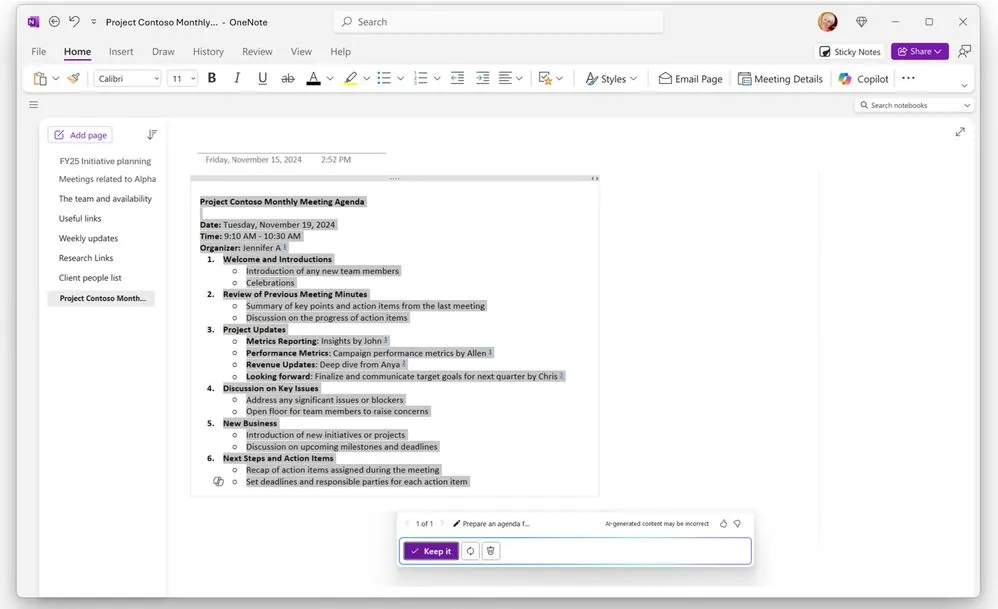
That changes the cleanup burden. If Copilot drafts lecture notes from a source document, the user can still rename the page, move it to the right section, add a tag, correct the summary, and place it beside handwritten notes or pasted references. If it produces a task list, the list is not trapped as “that thing the AI said last Tuesday.” It can become part of the notebook.
This is also why a pure intelligence comparison misses the point. A sharper answer that remains buried in a thread can become less useful than a slightly duller answer that lands in a system you already review every Friday.
The naming trap: Copilot Notebooks are not the same thing as OneNote notebooks
Microsoft did not make this easy. “Copilot Notebooks” and “OneNote notebooks” sound close enough that a rushed buyer can assume they are variations of the same product. They are not.

A Copilot Notebook is an AI grounding workspace. Microsoft describes it as a place where Copilot grounds answers only on the references you add, with support for up to 300 files, and it can live in the Copilot app or OneNote.[3] That makes it useful for asking questions across a bounded pile of material: a project packet, a reading set, a policy folder, a draft proposal, a cluster of meeting documents.
A OneNote notebook is the long-term structured repository. Microsoft’s own comparison distinguishes OneNote notebooks by their durable note-taking features, including tagging, search, and version history.[3] That is the place where notes can age properly. You can file them into sections, combine them with older material, and return through normal notebook habits rather than reopening a temporary AI workspace and hoping it still means what you think it means.
The safest mental model is simple: use Copilot Notebooks to reason over a defined source set; use OneNote notebooks to keep notes. They can touch each other, but they should not be treated as interchangeable just because the names rhyme.
There is one operational flaw here that deserves more attention than it usually gets. Microsoft says deleting a Copilot Notebook or a page is currently permanent and cannot be undone, while a recycle bin is in development.[6] For a workspace that may contain hard-won synthesis, that is not a minor footnote. If you use Copilot Notebooks for serious work, do not treat them as the only copy of anything important.
Retrieval is where the Copilot workflow starts to pull away
A note system is tested after the first burst of usefulness has worn off. Three months later, the question is not whether the AI answer felt clever. It is whether you can locate the paragraph, verify the source context, change the wording, and reuse the work without opening a forensic investigation.
Copilot benefits from the fact that Microsoft already has storage surfaces with recognizable behaviors. A Word document can be renamed, placed in a folder, shared, versioned through Microsoft’s document workflow, or exported. A OneNote page can sit inside a notebook structure and be found again through search or tags. A Teams recap, where it is available in the user’s Microsoft setup, belongs to the meeting context rather than disappearing into a general-purpose AI thread.
This does not make Copilot magically portable. OneNote exports and migrations still deserve skepticism, especially if the destination is a markdown-first system such as Obsidian. If that is the path you are considering, our OneNote-to-Obsidian migration guide is the more useful reality check: formatting, attachments, links, and hierarchy do not always travel as cleanly as the word “export” implies.
Still, imperfect export from a real notebook is a different problem from rescuing scattered useful passages from chat. One problem is migration cleanup. The other is first deciding what your note even was.
Grok is useful capture, but chat history is doing most of the storage work
Grok’s lane is not fake. For conversational capture, fast brainstorming, turning a rough idea into a memo draft, or interrogating an idea before you know whether it deserves a permanent home, Grok can be a perfectly reasonable assistant. If your habit is to ask, react, refine, and then copy the useful result somewhere else, the chat-first design may not bother you.
The trouble starts when chat history is quietly promoted into a note archive. Threads are excellent while the conversation is alive. They are much worse when you are trying to recover one claim from a messy session that also included side questions, false starts, and five versions of the same draft.

Grok’s persistent memory does not solve that problem in the way a note-taker might hope. Anuma reports that Grok added persistent memory in April 2025, but describes it as storing selected facts rather than a continuous conversation history; the same analysis reports inconsistent behavior across web, iOS, and Android, and unavailability in parts of the EU and UK.[4] That is useful context personalization, not a searchable research archive.
The source matters here. The platform-inconsistency claim comes from Anuma’s analysis, not from primary xAI documentation in the available research. So it should be treated as a reported limitation, not as a vendor-published specification. Even with that caution, the narrower point stands: memory that retains selected facts is not the same as a notebook that preserves the actual notes you plan to cite, edit, and migrate.
Exporting Grok data is not the same as moving your notes
Grok does offer a data export route. xAI’s consumer FAQ says users can export account data through Settings > Data > Export Data or accounts.x.ai/data, and the available comparison material describes conversation-history export as a ZIP of JSON data.[5][4] That is better than having no copy at all.
But ZIP plus JSON is not portability in the ordinary note-taking sense. It may help with record keeping, compliance review, or personal backup. It does not, by itself, produce a clean notebook, a folder of markdown files, a set of editable documents, or an importable archive for the next system. The research material also does not show Grok offering import tools that would let a user rebuild working context inside Grok after leaving and returning from another system.[4][5]
This is where “I can export my data” and “I can migrate my notes” part ways. A JSON transcript can preserve what happened. A note archive should help you continue the work.
The model-performance question is real, just secondary
There are legitimate reasons to compare model quality: summarization faithfulness, retrieval from supplied material, formatting discipline, hallucination control, and cost per usable output. If that is the decision you are making, use a test designed for that question. Our Grok 4.6 note-taking battery is the better companion piece for model-performance tradeoffs.
For this comparison, though, model quality is not the center. A strong model still leaves you with a weak note workflow if the answer is hard to retrieve, revise, or move. A slightly less dazzling model can be the better note-taking choice if it leaves behind cleaner working material.
External reviewers have noticed Copilot’s strength in this category. PCMag named Copilot in OneNote an Editors’ Choice pick for AI note-taking, rating it 4.5 and identifying it as “Best for Research” in an article updated August 13, 2026.[7] That is not the reason to choose it by itself, but it lines up with the workflow evidence: Copilot’s value rises when the notes need to live inside a researchable, editable system.
Which one should you use?
Choose Microsoft Copilot if the captured material needs to become part of a durable body of work. That includes class notes, research syntheses, client notes, policy summaries, project planning, meeting follow-ups, and anything you expect to search, revise, cite, or export later. Copilot’s advantage is not that every Microsoft surface is elegant. It is that the output can become a normal page, document, recap, or grounded workspace instead of remaining only an AI exchange.
Choose Grok if the job is conversational capture: brainstorming, quick summarization, argument testing, idea expansion, or temporary work where the useful result will either be copied somewhere else or allowed to fade. In that lane, chat history is not necessarily a defect. Some people do not want another archive. They want a responsive thinking partner and are comfortable deciding manually what deserves to be saved.
The danger is pretending those two workflows are the same. Grok can help make notes. Copilot is more likely to place those notes where a note system can take over.
Not for you if
Copilot is not the right answer if you dislike Microsoft’s ecosystem, do not want your notes tied to Microsoft 365 surfaces, or cannot justify the current plan and feature requirements. Pricing and consumer feature availability have changed recently enough that they should be checked at the time you buy, not assumed from an old comparison. Copilot Notebooks also deserve caution until deletion has a safer recovery path.
Grok is not the right answer if you expect the AI layer itself to become your long-term note repository. Its memory is not a continuous archive, its native storage pattern is chat-first, and its export story is closer to data access than note migration. If you are already worried about switching costs, our broader note-taking app switching-cost comparison is the better frame for deciding how much lock-in you can tolerate.
References
- Welcome to Copilot in OneNote, Microsoft Support
- Take notes with Copilot in OneNote, Microsoft Support
- Compare Microsoft Copilot Notebooks and Microsoft OneNote Notebooks, Microsoft Support
- Grok Memory: Features, Limits & Alternatives, Anuma
- xAI Consumer FAQ, xAI
- How Microsoft Copilot Notebooks works, Microsoft Support
- The Best AI Note-Taking Apps for 2026, PCMag, August 13, 2026