
If you are an individual knowledge worker searching for business process automation solutions, you probably do not need an enterprise BPA suite. You need a workflow tool you can control yourself: something that watches for a trigger in Gmail, Google Calendar, Slack, Notion, a CRM, a spreadsheet, or a form, then moves the next small piece of work without waiting for you.
The practical choice is usually between Zapier, Make, and n8n. They sit below enterprise platforms in cost and governance overhead, but above simple reminders and manual checklists. The decision is less about “automation strategy” and more about three constraints: how many tasks the workflow will run, how comfortable you are with technical setup, and whether you need AI agents rather than ordinary app-to-app automation.

Start with the 30-hour test
A recurring task is usually worth automating when it costs more than 30 hours per year and has a clear trigger. That threshold is a working heuristic, not a benchmark from a controlled study. It is useful because it keeps personal automation from becoming a hobby project.
The math is deliberately plain. A task that takes 15 minutes every workday costs roughly an hour and a quarter per week. Over a year, that is comfortably above the threshold. A task that takes five minutes twice a month is probably better handled by a checklist, a template, or a calendar reminder.
The best candidates are not the most annoying tasks in isolation. They are the tasks that force a context switch: copy a detail from an email into a CRM, turn a meeting note into a follow-up reminder, create a weekly status update from scattered project activity, or file a support request in the right place. The time saved matters, but so does the reduced need to remember where the next tiny handoff belongs.
Why enterprise BPA is usually the wrong starting point
Enterprise BPA platforms are built for shared processes, compliance controls, permissions, audit trails, and system-wide change management. Those needs are real. They are also a poor fit for someone trying to stop retyping the same project update every Friday.
The case for automation itself is not weak. Kissflow’s guide cites McKinsey research stating that 57% of U.S. work hours are automatable with existing technology, up from about 30% in 2023.[1] A separate Kissflow statistics page cites Salesforce/ADP survey data in which 73% of IT leaders said automation saves around 50% of task time, though that figure should be treated as older adoption research rather than fresh 2026 evidence.[2]
Those figures support a broad conclusion: many digital work activities can be automated. They do not prove that an individual analyst, manager, or IC should buy into a heavy enterprise suite. For personal productivity, the control surface matters. If you cannot configure the workflow, cannot connect the apps you use, or need an administrator for every small change, the platform may be powerful without being useful to you.
There are edge cases. If your company already gives you access to Power Automate, UiPath, or another approved platform, and the apps you need are inside that environment, it may be sensible to use it. But as a personal purchase or self-directed setup, enterprise BPA is rarely the cost-effective first move.
The three personal tiers: Zapier, Make, and n8n
The useful distinction is not “simple versus advanced” in the abstract. It is whether the tool matches the amount of automation you will actually run and the amount of configuration you are willing to own.
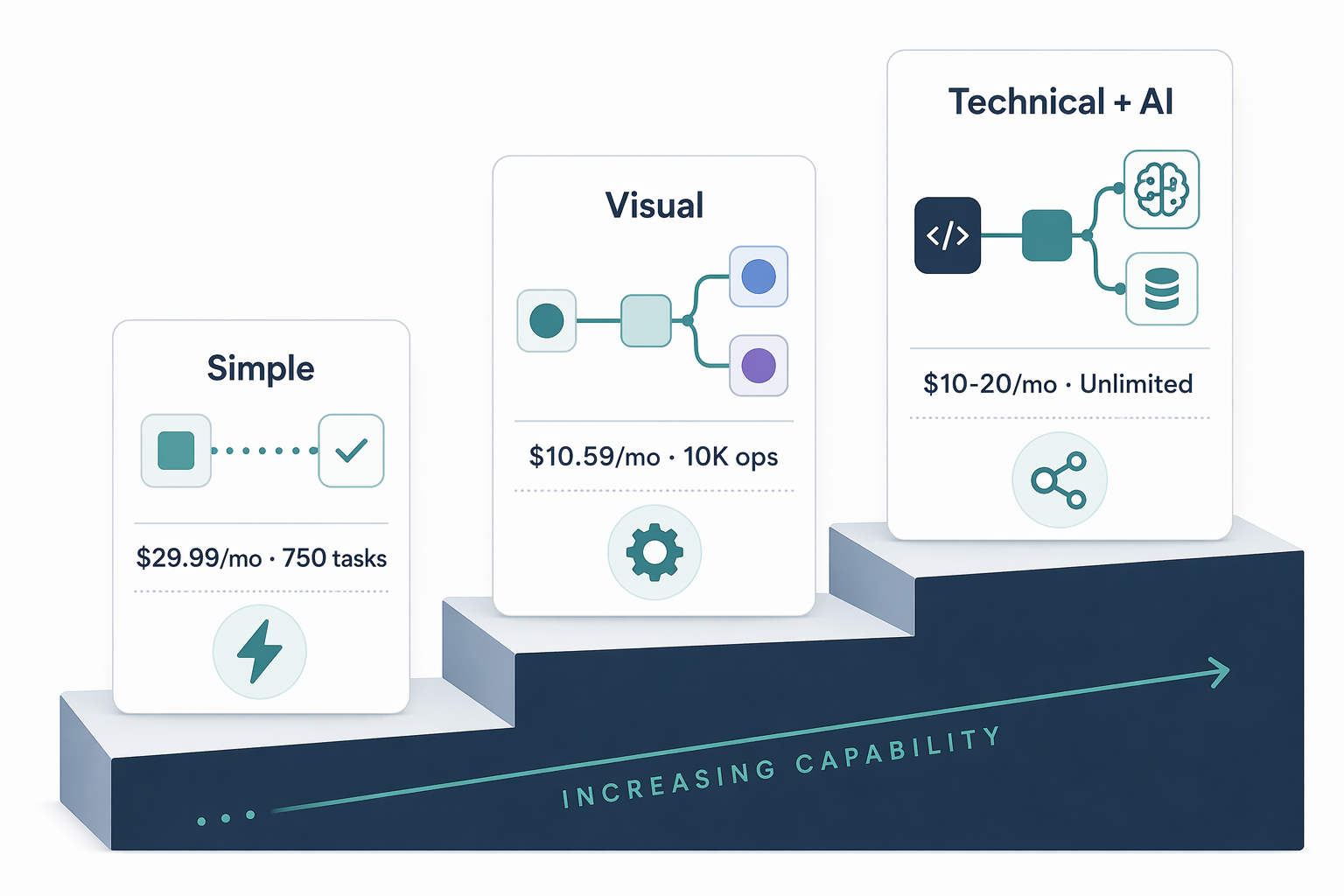
| Tool | Best fit | Useful signal | Pricing and volume notes |
|---|---|---|---|
| Zapier | Fast setup for common app-to-app workflows | You want the easiest path and broad app coverage | $29.99/month for 750 tasks, last verified June 2026 |
| Make | Visual workflows with more control over branching and data handling | You expect moderate volume and want to see the logic clearly | $10.59/month for 10K operations, last verified June 2026 |
| n8n | Technical users, self-hosting, custom logic, and AI-heavy workflows | You are comfortable with Docker or developer-style setup | $10–20/month VPS self-hosting estimate with unlimited executions, last verified June 2026 |
Zapier is the safest first choice when the workflow is ordinary and the app coverage matters more than fine control. Its strength is that the path from “I need this email attachment saved somewhere” to a working automation is short. Digidop’s 2026 comparison describes Zapier as having 9,000+ app connectors and a Copilot natural-language workflow builder.[3]
Make becomes attractive when the workflow has more visible logic: multiple branches, data transformations, filters, or scenarios that are easier to reason about on a visual canvas. It is often the middle tier for knowledge workers who have outgrown simple zaps but do not want to maintain their own automation infrastructure.
n8n is the most powerful of the three for people who can tolerate technical setup. The self-hosted cost advantage is real only if you are comfortable maintaining a VPS, Docker-based deployment, credentials, updates, and failure recovery. For many knowledge workers, that maintenance burden is enough to erase the apparent savings.
Task volume should shape the decision earlier than features
Most people compare automation tools by browsing feature lists. That is backward for personal use. First estimate monthly runs. A workflow that fires five times a week is a different purchase from one that fires hundreds of times a day because it processes inbound leads, form submissions, alerts, or tickets.
- Under roughly 750 tasks per month: Zapier is often enough if the workflow is straightforward and the apps are well supported.
- Around 1,000 to 10,000 operations per month: Make is usually worth considering because pricing and visual control become more important.
- Above roughly 5,000 executions per month, or when workflows are custom and technical: n8n becomes more compelling, especially for users who can self-host.
These are not hard cutoffs. They are buying signals. A low-volume workflow that prevents missed client follow-ups may justify a paid plan. A high-volume workflow that only creates noisy notifications may be automation waste.
Automate handoffs before you automate judgment
The first personal automations should usually move information, not make important decisions. That means watching for a trigger, collecting the relevant data, placing it where it belongs, and prompting a human when judgment is required.
Moxo’s small-business workflow automation guide lists recurring administrative workflows such as client intake, billing and payment, document collection, project status updates, follow-up sequences, meeting scheduling, and support ticket intake.[5] Those categories map well to knowledge work because they share the same pattern: information arrives in one place, needs formatting or routing, and then waits for someone to act.
A good first automation might create a CRM note from a tagged email, draft a meeting follow-up after a calendar event, add a form response to a project tracker, or post a weekly reminder when a status field has not changed. The tool should remove the clerical step while leaving the substantive decision visible.
For readers who want a wider scan of the category before picking one tool, the broader process automation tools for knowledge workers comparison is the better companion piece. The narrower decision here is about the first personal workflow you can actually maintain.
Where AI agents change the tool choice
In 2026, the more interesting shift is not that workflow tools connect more apps. It is that they increasingly include AI agents or AI-assisted builders. That changes which tool makes sense when the work involves summarizing, classifying, drafting, searching across personal documents, or deciding which branch of a workflow should run.
Zapier’s advantage is accessibility. Its Copilot-style builder and large connector library make it suitable when you want to describe a workflow in natural language and delegate simple execution across familiar apps.[3] That does not mean the agent should be trusted with sensitive or high-stakes decisions by default. It means the setup barrier is lower.
Make’s Maia conversational builder points in the same direction: workflow construction is moving closer to conversation, while the underlying scenario still matters.[3] For a knowledge worker, that is useful when the hard part is not writing code but translating a messy routine into a sequence the system can follow.
n8n is the strongest candidate when AI is part of the workflow itself rather than just the setup interface. Digidop describes n8n’s LangChain integration and 70+ AI nodes; Tech Insider also highlights n8n’s AI-oriented architecture in its 2026 comparison.[3][6] That makes n8n relevant for personal RAG over email, Slack, or documents, custom routing logic, and workflows where an LLM needs structured context rather than a single prompt.
That extra power comes with an extra duty to design failure paths. If an AI step summarizes a meeting, the consequence of a bad summary is usually manageable. If it classifies a sales lead, sends an external message, or updates a system of record, the workflow needs review points, logs, and a way to undo or correct the action.
If the AI layer is the main reason you are evaluating tools, it is worth separating workflow builders from AI assistants. The AI automation platform comparison covers that distinction more directly, while the machine learning for automation profile is more useful for document extraction and classification use cases.
A practical selection rule
Choose Zapier if your main goal is to get a common workflow running quickly, especially at lower task volume. It is the least intimidating place to start when your automation is mostly “when this happens in one app, do that in another app.”
Choose Make if you expect more branching, transformation, or moderate volume, but still want a managed tool rather than a technical project. It fits people who need to see the flow and adjust it without thinking like a software engineer.
Choose n8n if you are technical, expect higher execution volume, want self-hosting control, or need AI-heavy workflows that benefit from LangChain-style orchestration. Do not choose it only because the infrastructure cost looks low. The real cost is whether you can keep it running.
For a first build, pick one workflow that passes the 30-hour test, has a clear trigger, and ends with a visible output. Avoid workflows where the trigger is vague, the input is inconsistent, or the automation would make a decision you are not ready to delegate.
A simple starter sequence is enough: capture the trigger, move the data, notify the right person, and log the result. The detailed setup can come later; if you need a walkthrough, use the first process automation tool setup guide after you have chosen the tool tier.
The boundary of the recommendation
Personal automation is strongest when the process is repetitive, digital, and observable. It is weak when the work depends on ambiguous judgment, private context that should not enter a third-party system, or exceptions that outnumber normal cases.
The right business process automation solution for a knowledge worker is therefore not the largest platform. It is the smallest tool that reliably removes a recurring handoff you no longer need to perform manually. For most people, that means Zapier first, Make when the workflow becomes more complex, and n8n when technical control or AI orchestration is worth the maintenance burden.
References
- The Ultimate Guide to Business Process Automation, Kissflow.
- Business Process Automation Statistics, Kissflow.
- n8n vs Make vs Zapier [2026 Comparison], Digidop.
- Zapier vs Make vs n8n for Solopreneurs 2026, F³ Fund It.
- Workflow automation for small businesses, Moxo.
- n8n vs Zapier 2026: 90% Cost Gap, Tech Insider.