
The Knowledge Worker Automation Problem: You Are Wasting 20% of Your Day
If you have ever found yourself manually copying data from an email into a spreadsheet, dragging the same file into three different folders, or checking your calendar for the fifth time to confirm a meeting time, you are not alone. The average knowledge worker spends a significant portion of their day on repetitive, low-value tasks that do not require judgment, creativity, or domain expertise. The question is no longer whether to automate these tasks but which tool to use and how to start without burning budget or time.
The core thesis of this guide is simple: the best process automation tool for you depends on the type of repetitive work you do, not on a generic tier or team size. A freelancer who needs to sync form submissions to a CRM has a fundamentally different problem than a knowledge worker who wants to build a searchable knowledge base from meeting transcripts. And neither of those problems is solved by the same tool that handles enterprise-wide invoice processing.
We will walk through three distinct categories of automation that actually matter for knowledge workers, break down the top tools in each category with real 2026 pricing, and give you a concrete 30-minute setup plan that costs nothing to start. By the end, you should know exactly which tool to try first and how to get your first automation running before lunch.
Three Types of Automation That Actually Matter for Knowledge Workers
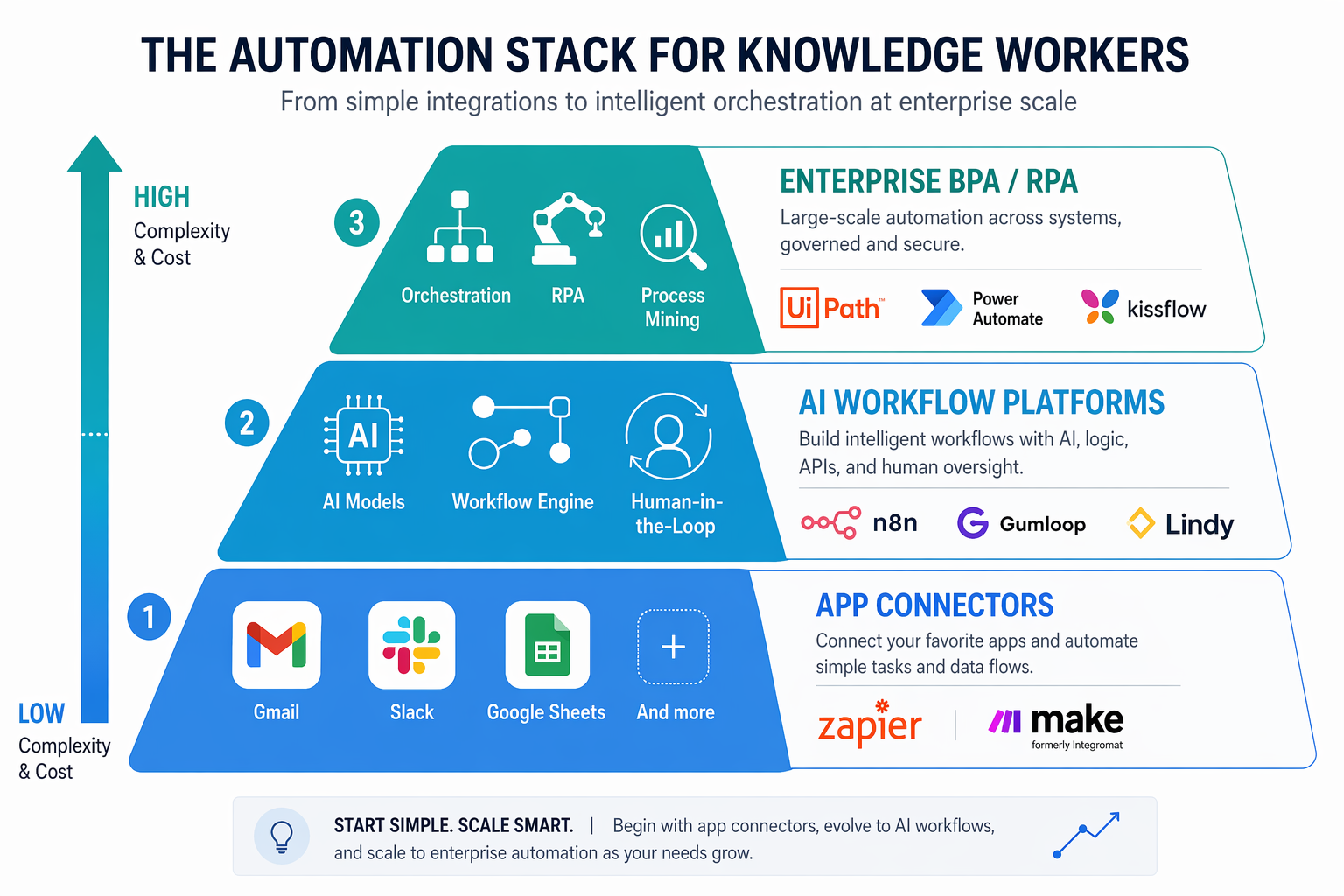
Before comparing tools, it helps to understand what kind of automation you actually need. The automation market has fragmented into three distinct categories, each serving a different type of repetitive work. Picking the wrong category is the most common reason knowledge workers try automation once and never return.
1. Rule-Based App-to-App Tasks
This is the oldest and most mature category. These tools connect two or more apps through triggers and actions: when something happens in App A, do something in App B. The logic is deterministic — if this, then that — and no AI or machine learning is involved.
Common examples include: saving email attachments to Google Drive, posting Slack messages when a new form submission arrives, or creating a Trello card from a new Gmail message. The two dominant tools here are Zapier and Make. They are the right choice when your workflow is simple, rule-based, and involves apps that already have public APIs.
2. AI-Powered Document and Data Workflows
This category has exploded in the past 18 months. These tools combine traditional workflow logic with large language models (LLMs) to handle unstructured data: summarizing meeting transcripts, extracting structured data from PDFs, building retrieval-augmented generation (RAG) chatbots over personal notes, or generating draft responses from email threads.
The leading tools here are n8n and Gumloop. n8n offers a source-available, self-hostable platform that gives developers and technically inclined users granular control over AI workflow logic. Gumloop targets the same use case but with a no-code interface and a hosted AI assistant called Gummie that helps build workflows. Both tools are used by teams at companies like Shopify, Instacart, and Webflow, which signals strong market validation for this category.
3. Personal Admin Agents
The newest category, and arguably the most relevant for knowledge workers who do not want to build workflows at all. Personal admin agents are AI-powered assistants that manage your calendar, triage your inbox, monitor brand mentions, or schedule meetings. You give them a goal — "manage my inbox" or "find me times to meet with X" — and they act autonomously within defined boundaries.
Lindy is the standout tool in this category. It integrates with over 2,500 apps via Pipedream and pulls data from 4,000+ sources using Apify scrapers. Its free tier covers up to 400 tasks per month, which is enough for basic inbox triage or calendar management. The trade-off is that AI agents can make mistakes — Lindy's own blog notes that its brand monitoring agent surfaced outdated information during testing, which is a reminder that human oversight remains essential.
Tool-by-Tool Breakdown: What Each Tool Does Best (and Where It Falls Short)
Each tool in this comparison excels in a specific use case. The table below summarizes the key differences, followed by detailed notes on each tool's strengths and limitations.
| Tool | Best For | Pricing (Paid Plan) | Free Tier Limit | Key Limitation |
|---|---|---|---|---|
| Zapier | Simple app-to-app connections with the largest integration library | Pro $29.99/mo (multi-step Zaps) | 100 tasks/mo | Costs scale quickly with task volume; limited AI capabilities |
| Make | Visual, rule-based workflows at the lowest entry price | Core $9/mo (10,000 credits) | 1,000 credits/mo | Fewer native integrations than Zapier; steeper learning curve for complex logic |
| n8n | Developer-grade AI workflows with self-hosting and execution-based pricing | Starter $24/mo (2,500 executions) | Free self-hosted (unlimited executions) | Requires technical comfort for self-hosting; no-code interface is less polished than Make |
| Gumloop | No-code AI workflows with a built-in AI assistant | Pro $37/mo (20k+ credits) | Limited free tier | Newer platform with smaller community; pricing can be opaque at scale |
| Lindy | Personal admin agents for calendar, email, and inbox management | Pro $49.99/mo (5,000 credits) | 400 tasks/mo | AI agents can surface outdated or incorrect information; requires human oversight |