
Last verified: June 27, 2026. Pricing for AI workflow automation tools changes often, especially around AI-agent add-ons, usage bundles, and newer platforms. Treat the numbers below as a decision model, then confirm the live pricing page before you buy.
The uncomfortable part of AI workflow automation pricing is that two tools can look almost identical in month one and behave completely differently once the workflow starts doing real work. Zapier’s paid plan starts at $19.99 per month with 750 tasks, while n8n’s cloud plan starts at $20 per month with 2,500 executions.[1][2] That sounds like a small difference until a single client-intake automation has five steps. On Zapier, 150 runs of that workflow can consume roughly 750 tasks. On n8n, the same 150 runs are 150 executions, assuming each run completes once.
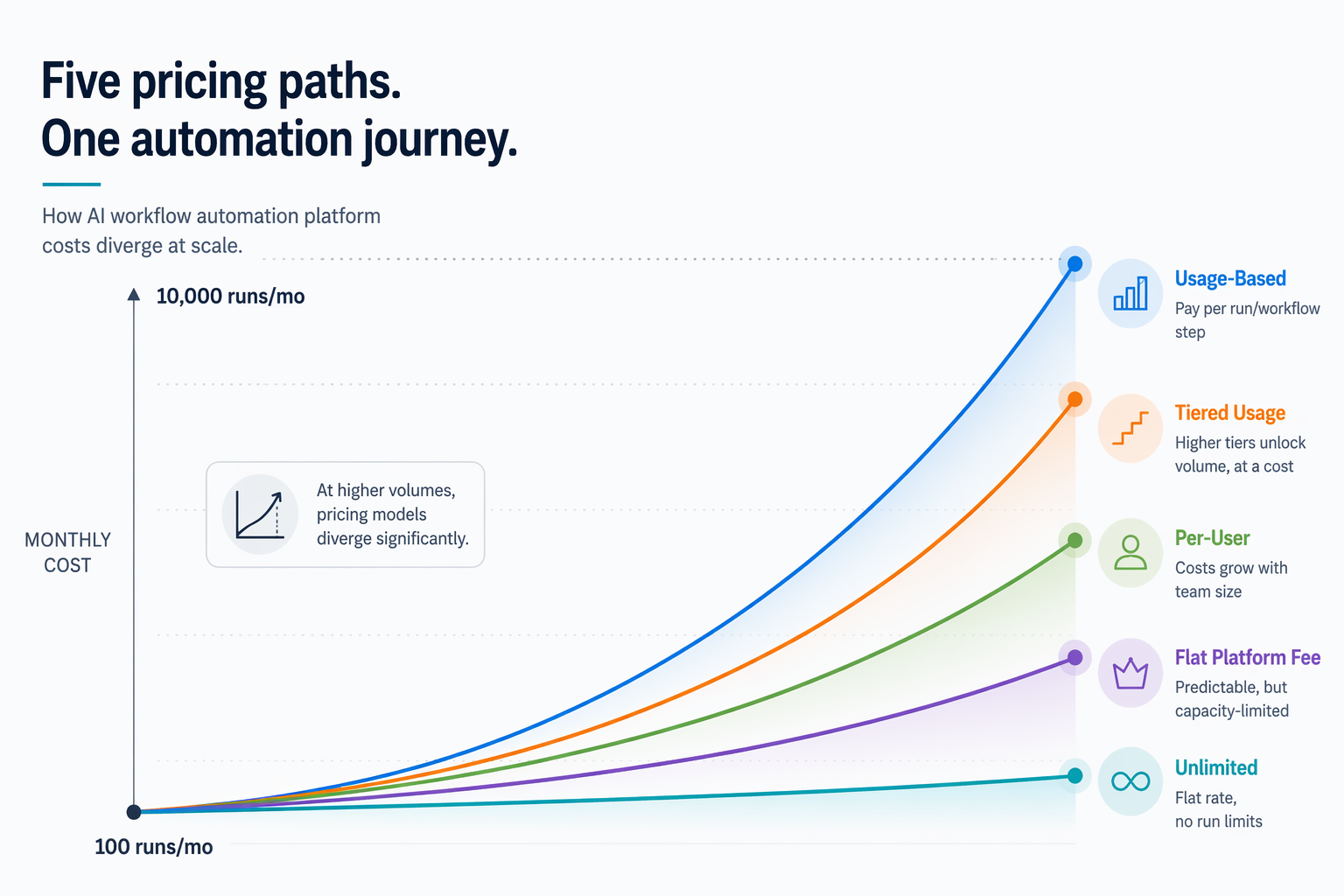
That is the pricing trap: the unit matters more than the entry price. A form submission, CRM update, Slack alert, AI summary, and follow-up email may feel like one automation to the person who built it. To the billing system, it may be one run, five tasks, five operations, several credits, or simply activity under a paid seat.
The question is getting more urgent because more teams are now trying low-code and no-code AI automation. Worldmetrics reports that 64% of businesses adopted low-code or no-code AI tools for automation in 2026, and it also reports productivity claims such as a 37% reduction in task completion time and 40% productivity boosts.[6] Stonebranch’s Q1 2026 survey of more than 400 respondents gives the colder counterweight: only 21% of organizations run AI workflows at enterprise scale.[7] Pilots are easy to start. Durable operating systems have to survive billing.
The five pricing currencies that decide your real bill
Before comparing Zapier, Make, n8n, Gumloop, and Lindy AI, separate the product from the meter. Most pricing pages sell the product. Your invoice follows the meter.
| Pricing currency | What it usually means | Why it matters at scale | Platforms in this comparison |
|---|---|---|---|
| Per-task | Each billable action inside a workflow consumes a task. | A five-step workflow can use about five tasks every time it runs. | Zapier |
| Per-execution | One workflow run counts as one execution, even if the workflow contains many steps. | More steps do not automatically multiply the billable unit. | n8n Cloud |
| Per-operation or per-credit | Steps, modules, AI actions, or platform-specific units consume operations or credits. | Complexity can still multiply usage, and AI steps may consume more than simple routing steps. | Make, Gumloop |
| Per-seat | The subscription is tied mainly to users rather than every workflow run. | Good for personal-agent use cases, but usage limits and feature gates still need checking. | Lindy AI |
| Self-hosted or no per-unit platform scaling | You run the software yourself and absorb infrastructure and maintenance instead of paying a hosted per-run meter. | The platform bill can stop rising with every run, but the operating burden moves to you. | n8n self-hosted |
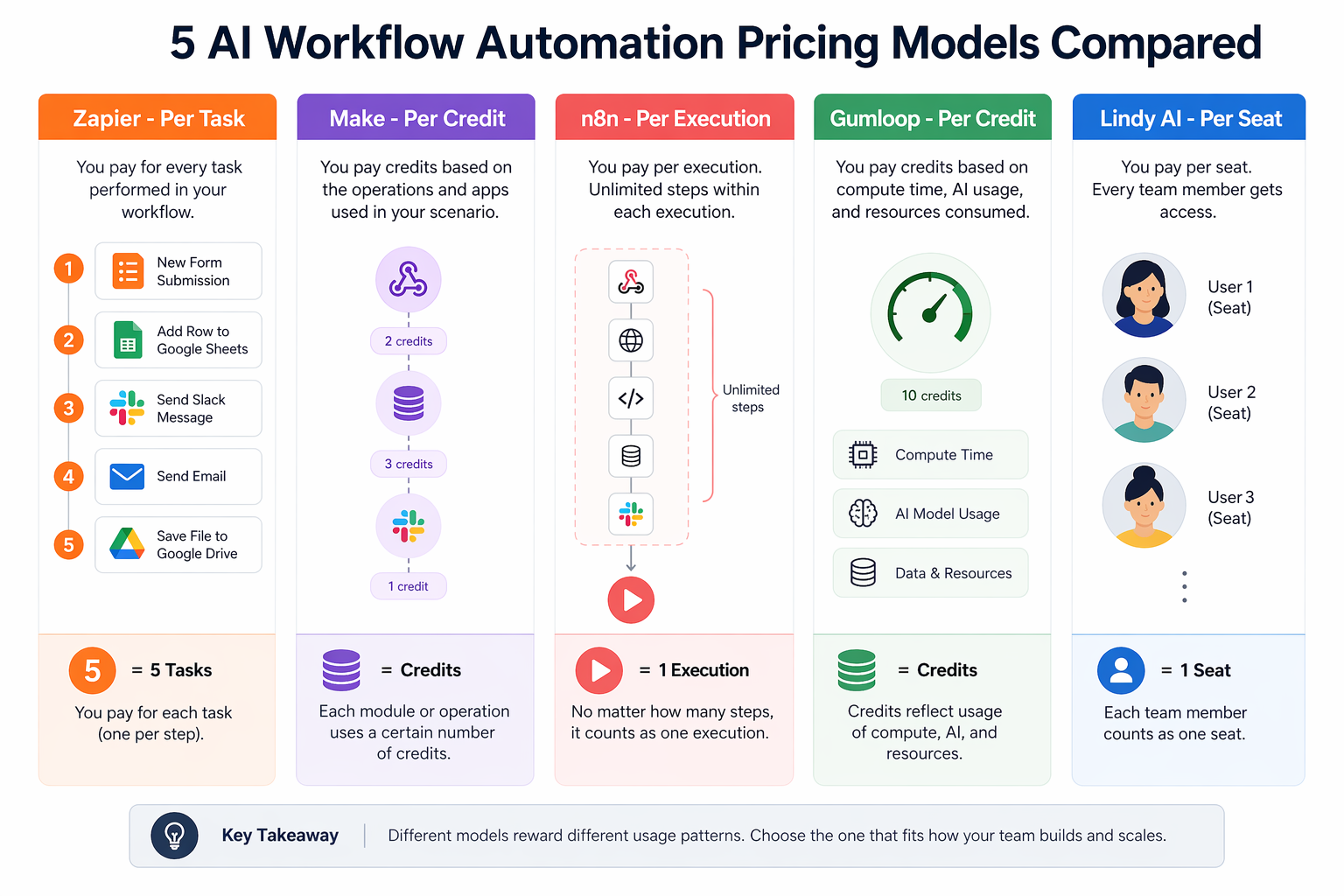
Zapier’s pricing unit is the task. Its Pro plan is listed at $19.99 per month with 750 tasks.[1] If your automation has one trigger and four billable follow-up actions, the useful mental model is not “one automation ran.” It is “several billable tasks were used.” The exact task count can depend on which steps are billable, but multi-step workflows are the place where task pricing starts to bite.
n8n’s cloud pricing uses executions. Its entry cloud plan is listed at $20 per month with 2,500 workflow executions, and n8n describes those executions as supporting unlimited steps.[2] That does not make n8n automatically cheaper for everyone; it does make the scaling math easier when one run contains many actions.
Make’s Core plan is listed at $9 per month with 10,000 operations.[3] That can be attractive for low-volume and moderately complex automations, especially when visual branching matters. The caution is that operations are still step-like units. A scenario that checks conditions, branches, calls AI, updates records, and sends notifications can consume multiple operations per run.
Gumloop’s Pro plan is listed at $37 per month with 250 credits.[4] Gumloop is built around AI-native workflows, which can save setup time because users are not necessarily wiring their own model APIs for every workflow. But credits are not as intuitive as runs. Before you commit, you need to know how many credits the specific nodes in your workflow consume, not just how many workflows you plan to build.
Lindy AI’s Pro plan is listed at $39.99 per month and is framed around seats.[5] That makes it a different kind of comparison. Lindy is closer to natural-language personal automation and AI-assistant workflows than to a pure operations meter. Per-seat pricing can be calmer when one person is automating their own recurring work, but it does not remove the need to inspect usage limits, agent limits, and add-ons.
A simple scale model: 100, 1,000, and 10,000 runs per month
To keep the comparison honest, use one hypothetical workflow throughout: a five-step client or lead workflow. For example, a form submission triggers a CRM update, creates an AI summary, posts a Slack alert, and sends a follow-up email. This is not a real customer case; it is a deliberately plain model so the pricing units are visible.
The table below does not invent higher-tier prices that were not in the available research. Instead, it shows whether the named entry paid plan can absorb the workload and where the meter forces an upgrade, overage, or closer quote check.
| Platform | Entry paid plan in brief | 100 runs/mo, five-step workflow | 1,000 runs/mo, five-step workflow | 10,000 runs/mo, five-step workflow |
|---|---|---|---|---|
| Zapier | $19.99/mo Pro, 750 tasks | About 500 tasks in the simplified model; fits inside 750 tasks if those five steps are billable in that pattern. | About 5,000 tasks; exceeds the cited Pro task allowance. | About 50,000 tasks; far beyond the cited Pro allowance. |
| n8n Cloud | $20/mo, 2,500 executions | 100 executions; fits comfortably. | 1,000 executions; fits comfortably. | 10,000 executions; exceeds the cited cloud entry allowance, but step count itself does not multiply executions. |
| Make | $9/mo Core, 10,000 operations | About 500 operations if each step maps to one operation; fits in the simplified model. | About 5,000 operations if each step maps to one operation; fits in the simplified model. | About 50,000 operations if each step maps to one operation; exceeds the cited Core allowance. |
| Gumloop | $37/mo Pro, 250 credits | Cannot be safely translated without the workflow’s credit consumption. Fits only if the workflow averages 2.5 credits or fewer per run. | Would exceed 250 credits even at one credit per run. | Would exceed 250 credits even at one credit per run. |
| Lindy AI | $39.99/mo Pro, per-seat framing | Run-based comparison is not the right primary meter; check seat, agent, and usage limits. | Run-based comparison is still secondary to seat and usage-limit terms. | At this volume, verify whether the use case belongs in a personal-agent plan or a higher operational tier. |
At 100 runs per month, almost anything can look reasonable. Zapier’s task model is not painful yet. Make’s operations allowance has plenty of room in the simplified model. n8n is barely touched. Gumloop may be fine if the workflow is credit-light. Lindy may be perfectly sensible if the work belongs to one person’s assistant rather than a process queue.
At 1,000 runs per month, the difference becomes visible. Zapier’s five-step workflow model is already around 5,000 tasks, well past the 750 tasks included in the cited Pro plan.[1] n8n remains inside 2,500 executions because complexity did not multiply the execution count.[2] Make still fits the simplified one-operation-per-step model at 5,000 operations, but AI-heavy scenarios can move faster than this clean arithmetic suggests.[3]
At 10,000 runs per month, the entry-price comparison has mostly stopped being useful. Zapier’s modeled task demand is about 50,000 tasks. Make’s modeled operation demand is about 50,000 operations. n8n’s cloud entry plan is also exceeded at 10,000 executions, but the reason is volume alone, not volume multiplied by steps. That distinction matters when you are deciding whether to simplify the workflow, upgrade the plan, or move the workload somewhere else.
Where each platform still makes sense
This is not a feature-tour comparison. If you need the broader interface and integration breakdown first, start with FlowDesk’s Zapier vs. Make vs. n8n comparison. Here, the useful question is narrower: does the pricing unit match the thing you expect to repeat?
Zapier: best when app coverage matters more than step-heavy volume
Zapier’s advantage is still its broad app ecosystem and low-friction setup. Vendor and comparison materials consistently treat Zapier as one of the easiest ways to connect mainstream business apps quickly.[8] For a freelancer who needs a few simple automations across a familiar stack, that convenience can be worth the task meter.
The cutoff is not a moral one; it is arithmetic. If your workflow is simple and runs a few dozen times a month, task pricing may stay boring. If one successful client campaign turns 150 monthly runs into 1,500, the person who built the Zap is suddenly explaining why a harmless pilot became a budget conversation.
n8n: strongest when multi-step workflows are expected to repeat
n8n deserves attention because its execution-based cloud pricing keeps the bill tied to workflow runs rather than every internal step. Its cloud plan lists 2,500 executions at $20 per month, and the pricing model supports unlimited steps within executions.[2] For multi-step AI workflow automation, that is a cleaner unit to forecast.
The other lever is self-hosting. n8n’s source-available model and self-hosted option make it the clearest path in this group for teams that want to avoid platform per-unit scaling, although they then inherit infrastructure, updates, security, and internal support work.[8] That trade is attractive only if someone is genuinely prepared to own it.
Make: low entry price, strong visual branching, watch the operation count
Make’s $9 Core plan with 10,000 operations gives it the lowest cited entry price in this comparison.[3] It is often a good fit when the workflow logic is visual: routers, branches, filters, and multi-app scenarios that a non-engineer still wants to inspect.
The pricing risk is not identical to Zapier’s, but it rhymes with it. A run that touches five modules is not the same as a run that touches fifteen. AI steps can also change the economics if they consume more than simple operations. Make is not a bad scaling choice; it is a choice that needs scenario-level counting before a process becomes busy.
Gumloop: promising for AI-native builds, less predictable from the outside
Gumloop’s appeal is that it starts closer to AI-native workflow building. Its own materials emphasize prebuilt templates and AI workflow setup without forcing users to manage infrastructure in the same way a self-hosted system would.[9] Independent comparison coverage also frames Gumloop and n8n as meaningfully different choices rather than interchangeable automation tools.[11]
The issue for a budget-conscious operator is that 250 credits on a $37 Pro plan are hard to interpret until the actual workflow is mapped.[4] If the automation is high-value and low-frequency, Gumloop may be an elegant answer. If the automation is going to fire thousands of times a month, credit consumption needs to be tested before the workflow becomes operationally important.
Lindy AI: better judged as personal automation than process plumbing
Lindy AI is the awkward fit in a run-volume table because its Pro plan is presented around a per-seat price of $39.99 per month.[5] Its vendor materials emphasize natural-language AI automation and assistant-style workflows.[10] That makes it relevant for founders, consultants, and operators who want to delegate recurring personal work, not necessarily for teams trying to meter a high-volume process queue.
A per-seat model can feel refreshingly simple until the use case stops being personal. If one user is asking an assistant to draft replies, summarize calls, or prepare follow-ups, the seat is a reasonable buying unit. If the same system is expected to process thousands of inbound records, check the usage boundaries carefully before treating the seat price as the whole cost.
Buyer guidance by workflow shape
A useful automation budget starts with a boring forecast: runs per month, average billable steps per run, expected AI calls, number of users, and whether anyone can maintain self-hosting. If that sounds too fussy for a pilot, it is exactly the work that prevents the pilot from turning into an invoice surprise.
- Choose Zapier when the workflow is simple, the app coverage is the main requirement, and expected volume is low enough that task multiplication will not dominate the bill.
- Choose n8n when the workflow has many steps, is likely to repeat often, or may eventually justify self-hosting to avoid platform per-unit scaling.
- Choose Make when visual branching and a low entry price matter, and you are willing to count operations before promoting a scenario from pilot to production.
- Choose Gumloop when the workflow is AI-native, setup speed matters, and you can test credit consumption against the real process before scaling.
- Choose Lindy AI when the problem is closer to personal AI assistance than high-volume operational automation.
For readers still deciding which class of automation tool fits their team size, FlowDesk’s small-business vs. enterprise process automation guide is the better companion piece. For AI-heavy Zapier and Make scenarios, the Zapier vs. Make AI automation comparison goes deeper on those two platforms.
The calculation to run before you pick a platform
Before choosing any AI workflow automation platform, write down the workflow as a billing equation:
monthly platform usage = monthly runs × billable units per runThen translate that equation into the platform’s own unit. On Zapier, that usually means tasks. On n8n Cloud, executions. On Make, operations. On Gumloop, credits. On Lindy AI, seats plus whatever usage limits apply.
The cheapest pilot is often the one with the friendliest starting price. The cheapest operating model is the one whose pricing unit matches the workflow you expect to repeat.
References
- Zapier Pricing — Zapier.
- Pricing — n8n.
- Pricing — Make.
- Pricing — Gumloop.
- Pricing — Lindy AI.
- AI Workflow Automation Statistics 2026 — Worldmetrics, 2026.
- 2026 Global State of IT Automation Report — Stonebranch, 2026.
- Top AI Workflow Automation Tools for 2026 — n8n Blog, 2026.
- 10 Best AI Workflow Automation Tools I'm Using in 2026 — Gumloop, 2026.
- I Tested the Top 10 AI Automation Platforms in 2026 — Lindy, 2026.
- Gumloop vs n8n 2026: Which Automation Tool Is Best? — Cybernews.