
Why True Cross-Platform Note-Taking Is Harder Than It Looks
Every note-taking app on the market claims to be cross-platform. The fine print, however, tells a different story. An app might have a polished native client for macOS and iOS, but its Windows version feels like a web wrapper from 2018. Another might sync flawlessly between two Android phones but produce conflict files the moment you edit a note on a MacBook. The gap between marketing claims and real-world performance is wide enough to lose a week's worth of meeting notes in.
The core problem is that building and maintaining a native app for six platforms — macOS, Windows, Linux, iOS, Android, and the web — is expensive. Most teams prioritize the platforms their core user base occupies, leaving the rest with second-class experiences. Apple Notes, Bear, and Craft, for instance, are excellent on Mac and iOS, but as the Atlas Workspace guide (May 2026) explicitly calls out, they are poor choices for Windows and Android users. If your device mix includes a Windows PC and an Android phone, those apps are non-starters.
This article cuts through the marketing. We tested eight apps across macOS, Windows, Linux (where available), iOS, Android, and the web in Q2 2026. We stress-tested sync reliability with offline edits, evaluated feature parity between platforms, and verified every pricing tier against official sources. The result is a practical, platform-specific guide for anyone who juggles multiple devices and needs a note-taking app that doesn't play favorites.
How We Tested: 5 Criteria for Cross-Platform Evaluation
To move beyond checkbox-style "cross-platform" claims, we evaluated each app against five specific criteria. Every app had to earn its score in each category through hands-on testing, not spec-sheet reading.
- Native app availability: Does the app offer a native (not just web-based) client for each platform? A web app that works in a browser is not a substitute for a native app with offline support, system-level shortcuts, and proper integration with the OS.
- Sync reliability: We created notes on one device, turned off the network, edited the same note on a second device, then reconnected to see how conflicts were resolved. Apps that produced silent data loss or unreadable conflict files were marked down.
- Feature parity: A cross-platform app should not strip features on mobile. We checked whether search, tagging, rich formatting, and file attachments worked identically on iOS and Android compared to the desktop versions.
- Export portability: We tested each app's ability to export notes in open formats (Markdown, plain text, HTML) and verified whether attachments, folder structures, and metadata survived the export. An app that locks your data in a proprietary format is a long-term risk.
- Sync-layer pricing: Some apps are free to use but charge for sync. Others bundle sync into a subscription. We calculated the annual cost of keeping your notes synchronized across all your devices, including any storage limits.
All pricing data was verified against official sources in May and June 2026. Where sources disagree on a figure — for example, Obsidian Sync is listed at $4/month by PrimeTech Insights and $8/month by Atlas Workspace — we note the discrepancy and explain the likely cause (monthly vs. annual billing).
The 8 Best Cross-Platform Note-Taking Apps in 2026
Below are the eight apps that made the cut, ordered by overall cross-platform polish. Each profile includes a platform grid, a use-case verdict, and honest strengths and weaknesses. Pricing reflects US-market publicly listed prices as of Q2 2026.
Notion
Notion remains the most polished cross-platform experience for knowledge workers who need more than a simple notes app. It offers native apps on macOS, Windows, iOS, and Android, plus a capable web app. The Personal Pro plan costs $10/month (billed annually), and the free plan is generous enough for individual use. However, there is no native Linux client, and offline support is limited — you can view recently accessed pages offline, but creating or editing notes without a connection is unreliable. Notion is best understood as a workspace builder rather than a pure note-taker; if you want a lightweight, distraction-free capture tool, it may feel heavy.
Microsoft OneNote
OneNote is the best free cross-platform option for most users. It offers native apps on macOS, Windows, iOS, and Android, plus a web app. Linux users are limited to the browser version. The free tier includes 5 GB of OneDrive storage, which is enough for text-heavy notes. For $1.99/month, you get 100 GB. PCMag (updated May 20, 2026) gives OneNote a 4.5/5 rating and calls it "the first application most people should consider." Its freeform canvas with notebook/section/page structure is unique, and the web clipper is excellent. The main drawbacks are that the Windows version is more feature-rich than the macOS version, and the mobile apps can be slow with large notebooks.
Obsidian
Obsidian is the king of cross-platform note-taking for power users and Linux enthusiasts. It offers native apps on all six platforms: macOS, Windows, Linux, iOS, Android, and the web. The core app is free for personal use. Sync costs $4–$8/month depending on billing cycle (PrimeTech Insights lists $4/month; Atlas Workspace lists $8/month for monthly billing). Obsidian is fully offline by design — your notes are stored as local Markdown files, so you never lose access. The extensive plugin ecosystem adds tremendous flexibility. The trade-off is a steeper learning curve and a less polished mobile experience compared to Notion or OneNote. PCMag (4.0/5) praises its flexibility and local-first architecture.
Joplin
Joplin is the top open-source pick for cross-platform note-taking. It is completely free and open source, with native apps on macOS, Windows, Linux, iOS, and Android. Sync is bring-your-own: you can use Dropbox, OneDrive, WebDAV, or the optional Joplin Cloud (€2.99/month for 2 GB). PCMag (4.5/5) calls it the best open-source option. Joplin supports Markdown, notebooks, tags, and attachments. The interface is functional rather than beautiful, and the mobile apps are less polished than the desktop versions. But for users who want full control over their data and zero subscription pressure, Joplin is hard to beat.
Standard Notes
Standard Notes is the privacy champion. It offers end-to-end encryption by default across all platforms — macOS, Windows, Linux, iOS, Android, and the web. The free plan is text-only but unlimited in note count. The Productivity plan ($90/year) adds rich text, Markdown, code editor, file attachments, and themes. The Extended plan ($149/year) adds cloud backup and version history. Standard Notes is the only app in this roundup where E2E encryption is not an optional add-on but the default architecture. The trade-off is a spartan interface and no handwriting or drawing support. If your primary concern is data privacy and ownership, this is the app.
Evernote
Evernote has improved its cross-platform story, but its pricing and free-tier limitations are hard to ignore. Native apps are available on macOS, Windows, iOS, Android, and the web. The free plan is now limited to 50 notes and one device — essentially a trial. The Personal plan costs $14.99/month. PCMag (4.0/5) notes that Evernote has powerful AI features but expensive pricing. For cross-platform users, Evernote's sync is reliable and its web clipper remains best-in-class. However, the free tier is too restrictive for serious use, and the paid plans are among the most expensive in this comparison.
Logseq
Logseq is a free, open-source, local-first knowledge management tool that has gained a loyal following among PKM enthusiasts. It offers native apps on macOS, Windows, Linux, iOS, and Android. Like Obsidian, it works with local Markdown and Org-mode files. Logseq's unique selling point is its outliner-based interface, which makes it excellent for bidirectional linking and graph-based thinking. The mobile apps are functional but less refined than the desktop versions. Logseq is free with no paid tiers — you bring your own sync solution (iCloud, Git, or a third-party sync service). It is best for users who want a Zettelkasten-style workflow and are comfortable with a slightly rough-around-the-edges experience.
Google Keep
Google Keep is the simplest app on this list, and that is both its strength and its limitation. It is fully free with 15 GB of Google storage shared across Drive, Gmail, and Photos. Native apps are available on Android, iOS, and the web. There is no native macOS or Windows app, but the Chrome extension and web app work well. Keep excels at quick captures — voice notes, checklists, and reminders — and integrates deeply into the Google ecosystem (Gmail sidebar, Google Docs). Offline support is available on mobile but not on desktop. Keep is not suitable for long-form writing, project management, or knowledge base building. It is a capture tool, not a note-taking system.
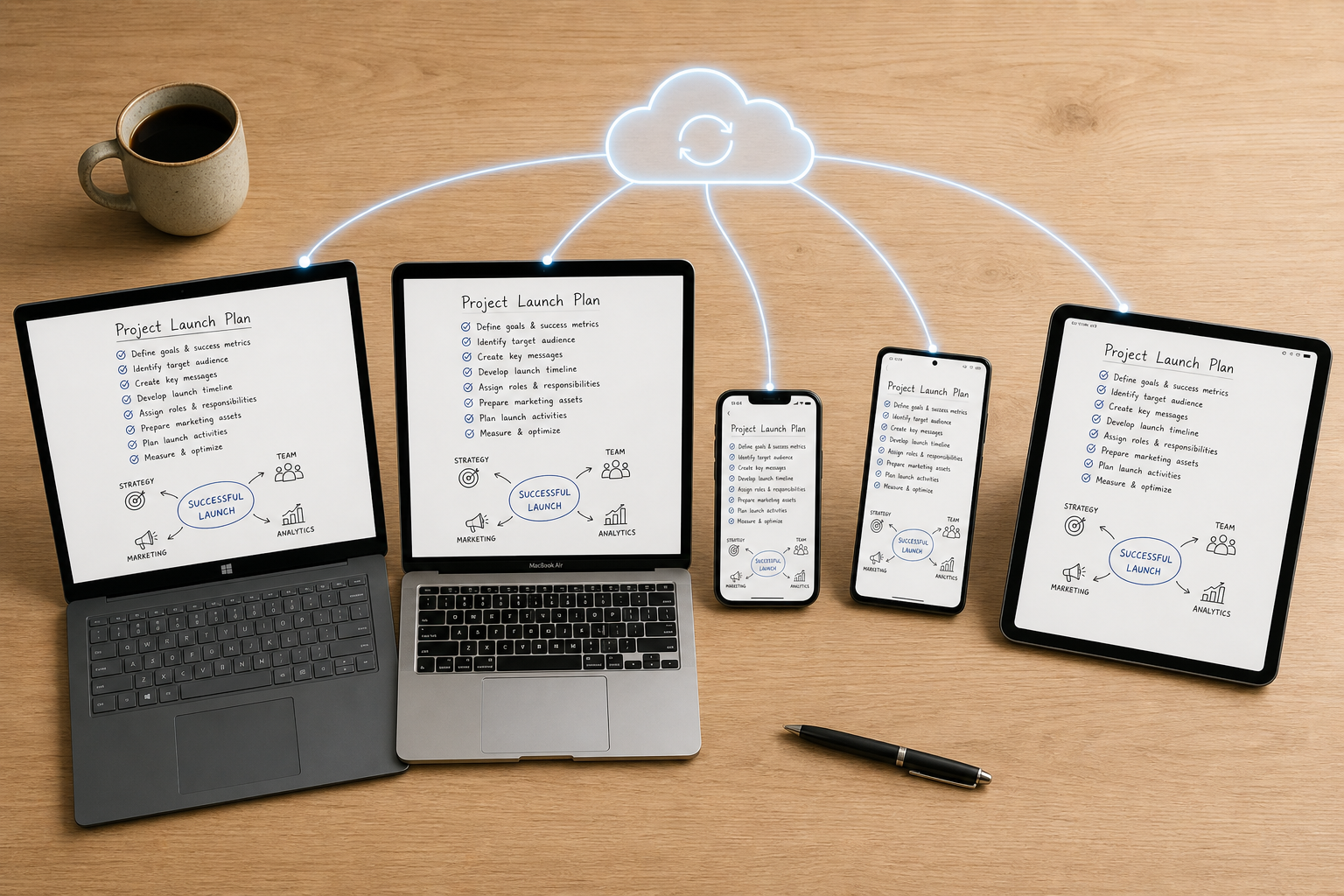
Cross-Platform Comparison Table
The table below provides a scannable overview of all eight apps across the dimensions that matter most for cross-platform users: platform availability, free plan, sync model, offline capability, export formats, and starting price.
| App | Mac | Win | Linux | iOS | Android | Web | Free Plan | Sync Model | Offline | Export | Starting Price |
|---|---|---|---|---|---|---|---|---|---|---|---|
| Notion | ✓ | ✓ | — | ✓ | ✓ | ✓ | Yes | Server-authoritative | Limited | Markdown, HTML, PDF | $10/mo (Personal Pro) |
| OneNote | ✓ | ✓ | — | ✓ | ✓ | ✓ | Yes (5GB) | Server-authoritative | Yes | PDF, Notebook export | Free |
| Obsidian | ✓ | ✓ | ✓ | ✓ | ✓ | ✓ | Yes | File-based / E2E (Sync) | Yes | Markdown | Free (core) |
| Joplin | ✓ | ✓ | ✓ | ✓ | ✓ | — | Yes | File-based (BYO) | Yes | Markdown, JEX | Free |
| Standard Notes | ✓ | ✓ | ✓ | ✓ | ✓ | ✓ | Yes (text-only) | E2E encrypted | Yes | Plain text, HTML | $90/yr (Productivity) |
| Evernote | ✓ | ✓ | — | ✓ | ✓ | ✓ | Limited (50 notes, 1 device) | Server-authoritative | Yes | ENEX, HTML | $14.99/mo (Personal) |
| Logseq | ✓ | ✓ | ✓ | ✓ | ✓ | — | Yes | File-based (BYO) | Yes | Markdown, Org-mode | Free |
| Google Keep | — | — | — | ✓ | ✓ | ✓ | Yes (15GB) | Server-authoritative | Mobile only | Google Takeout | Free |
Sync Architecture: Server-Authoritative vs. File-Based vs. E2E Encrypted
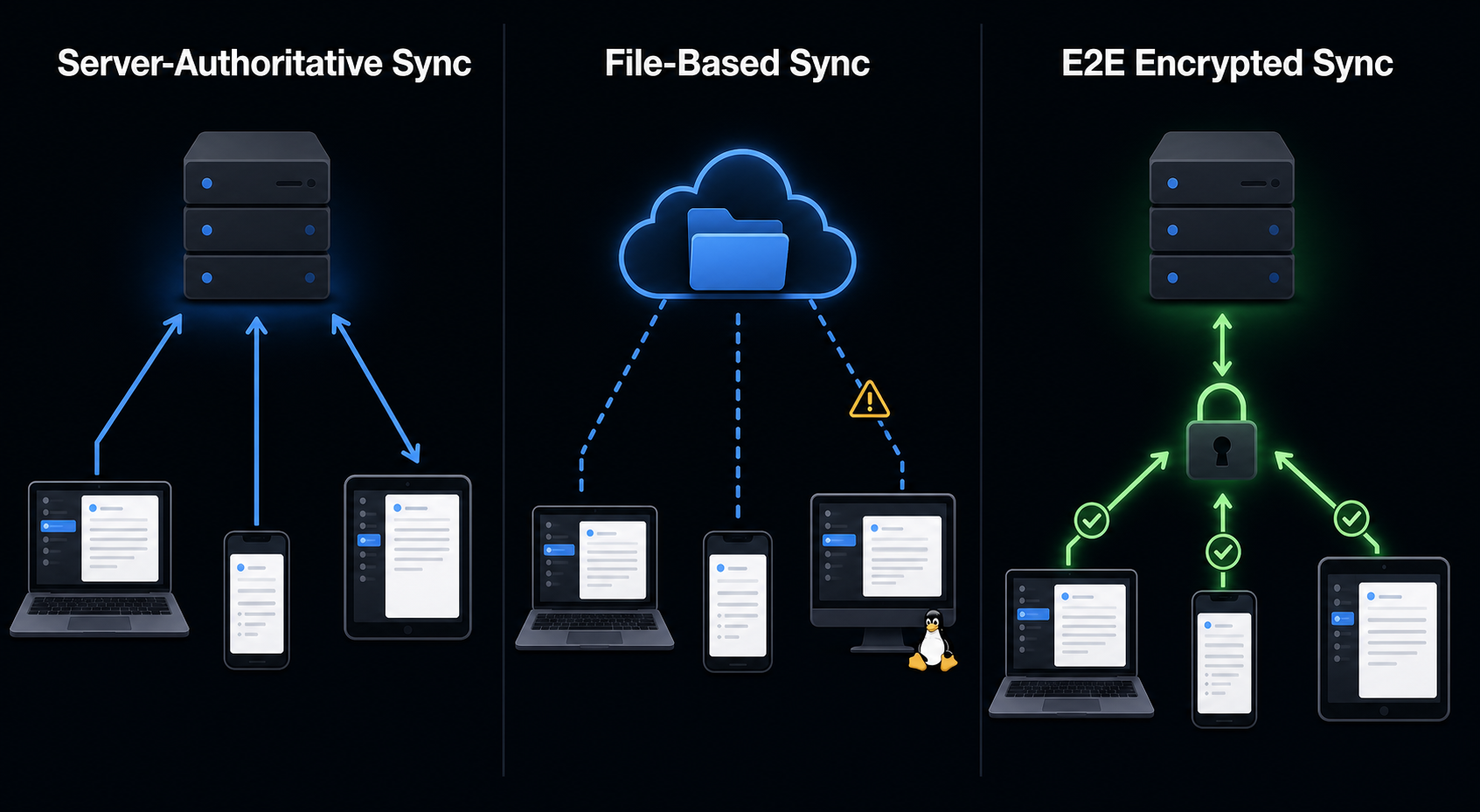
The way an app syncs your notes is the single most important factor in determining how reliable, private, and portable your data will be. The eight apps in this comparison fall into three distinct sync architectures, each with its own trade-offs.
Server-Authoritative Sync
Apps like Notion, OneNote, Evernote, and Google Keep use server-authoritative sync. The server holds the canonical version of your notes. When you make an edit on one device, it sends the change to the server, which then pushes it to your other devices. This model is invisible to the user — you never see conflict files or sync status indicators. The downside is that you are entirely dependent on the vendor's servers. If the company shuts down, changes its pricing, or experiences an outage, your access to your notes is at risk. Notion has published a SOC 2 Type II report, which is a positive signal for enterprise users, but it does not change the fundamental vendor dependency.
File-Based Sync
Obsidian, Joplin, and Logseq use file-based sync. Your notes are stored as individual files (typically Markdown) on your local file system. Syncing is handled by a third-party service like Dropbox, OneDrive, or a Git repository. This gives you full ownership of your data — you can open your notes with any text editor, back them up with standard file tools, and migrate to another app without vendor lock-in. The trade-off is that file-based sync can produce conflict files if you edit the same note on two devices before the sync completes. Obsidian's paid Sync service adds E2E encryption and conflict resolution on top of the file-based model.
E2E Encrypted Sync
Standard Notes is the only app in this roundup that offers end-to-end encryption by default on all plans. Obsidian Sync offers opt-in E2E encryption as a paid add-on. In this model, your notes are encrypted on your device before they leave, and only you hold the decryption key. The server never sees your plain-text content. This is the strongest privacy guarantee available, but it comes with minor UX overhead: you cannot search note content on the server, and password recovery is impossible if you lose your encryption key. For users who handle sensitive information — client notes, personal journals, research data — E2E encryption is worth the trade-off.
Privacy and Encryption Across Platforms
Privacy is not a binary feature — it exists on a spectrum. The table below shows where each app falls on that spectrum, from server-side encryption (the vendor can read your notes) to end-to-end encryption (only you can read your notes).
| App | Encryption at Rest | Encryption in Transit | End-to-End Encryption | Zero-Knowledge Architecture |
|---|---|---|---|---|
| Standard Notes | Yes (AES-256) | Yes (TLS) | Yes (default) | Yes |
| Obsidian (with Sync) | Yes (AES-256) | Yes (TLS) | Yes (opt-in) | Yes |
| Notion | Yes (AES-256) | Yes (TLS) | No | No |
| OneNote | Yes (Microsoft-managed) | Yes (TLS) | No | No |
| Evernote | Yes (AES-256) | Yes (TLS) | No | No |
| Joplin (with E2E) | Yes (AES-256) | Yes (TLS) | Yes (opt-in) | Yes |
| Logseq | Local only | Depends on sync | No (BYO sync) | Depends on sync |
| Google Keep | Yes (Google-managed) | Yes (TLS) | No | No |
If privacy is your top priority, Standard Notes is the clear winner. If you want the flexibility of Obsidian with E2E encryption, the paid Sync add-on covers that need. For most users, server-side encryption (as used by Notion, OneNote, and Evernote) is sufficient for everyday notes, but it is important to understand that the vendor has technical access to your content. For a deeper dive into privacy-focused note-taking, see our Best Note-Taking Apps for Privacy and Data Ownership in 2026: Local-First vs. Cloud.
Offline Capability Breakdown
Offline support is where many cross-platform apps fall short. An app that works perfectly online but fails when you lose connectivity is not truly cross-platform — it is a cloud app with a local cache. We tested each app by creating notes, turning off the network, editing the same notes, and then reconnecting to see what happened.
| App | Offline Reading | Offline Editing | Conflict Resolution | Notes |
|---|---|---|---|---|
| Obsidian | Full | Full | Manual (Sync) / File-based | Fully offline by design; local Markdown files |
| Joplin | Full | Full | Manual (conflict notes) | Fully offline; sync is optional |
| Logseq | Full | Full | Manual (file-based) | Fully offline; local Markdown/Org files |
| Standard Notes | Full | Full | Automatic (E2E sync) | Fully offline on all platforms |
| OneNote | Full | Full | Automatic | Offline notebooks sync when online |
| Evernote | Full | Full | Automatic | Offline notebooks available on paid plans |
| Notion | Limited | Limited | N/A | Can view recent pages; editing unreliable offline |
| Google Keep | Mobile only | Mobile only | Automatic | No offline support on desktop |
Pricing Across Tiers: Free to Paid Annual Costs
Pricing is one of the most volatile aspects of the note-taking app market. The figures below were verified against official sources in May and June 2026. We include both free-plan limits and the annual cost of the most common paid tier for each app.
| App | Free Plan | Paid Tier (Individual) | Annual Cost | Best Value For |
|---|---|---|---|---|
| OneNote | 5GB OneDrive storage | Microsoft 365 Personal (1TB) | $99.99/yr | Budget-conscious users |
| Obsidian | Unlimited (core app) | Sync ($4–$8/mo) | $48–$96/yr | Power users and Linux users |
| Joplin | Unlimited (BYO sync) | Joplin Cloud (2GB) | €35.88/yr | Open-source advocates |
| Standard Notes | Unlimited (text-only) | Productivity plan | $90/yr | Privacy-focused users |
| Notion | Unlimited (personal use) | Personal Pro | $120/yr | Workspace builders |
| Evernote | 50 notes, 1 device | Personal | $179.88/yr | Heavy web clipper users |
| Logseq | Unlimited (BYO sync) | None | $0 | Zettelkasten and PKM users |
| Google Keep | 15GB Google storage | Google One (100GB) | $19.99/yr | Quick capture users |
For pure cost minimization, OneNote on a Microsoft 365 Family plan ($129.99/year shared with up to 6 users) is the cheapest per-seat option at roughly $21.67 per person per year. For individual use, the free tiers of Obsidian, Joplin, Logseq, and Standard Notes (text-only) offer the most value with no recurring cost. For a detailed analysis of which free plans actually stay free, see our Free Note-Taking Apps 2026: Which Free Plans Actually Stay Free? A Transparency Report.
Vendor Risk Assessment: Who Will Still Be Here in 5 Years?
Choosing a note-taking app is a long-term commitment. Migrating thousands of notes between apps is painful, and some data — folder structures, tags, formatting — is almost always lost in translation. Evaluating vendor risk is therefore as important as evaluating features.
- Microsoft (OneNote): Low risk. Microsoft is a trillion-dollar company with no incentive to shut down OneNote. The app is bundled into Microsoft 365, which has hundreds of millions of subscribers. OneNote is the safest bet for long-term stability.
- Notion: Medium risk. Notion is well-funded and growing rapidly, but it is still a startup. Pricing has increased in the past, and the company could shift its focus toward enterprise customers, leaving individual users with fewer features or higher costs. The SOC 2 Type II report is a positive signal for data security, but it does not guarantee long-term product direction.
- Obsidian: Low-medium risk. Obsidian is developed by a small independent team. The core app is free, and the company generates revenue from Sync, Publish, and commercial licenses. The local-first architecture means your data is safe even if the company disappears. However, the plugin ecosystem and future development depend on the team's continued funding.
- Standard Notes: Medium risk. Standard Notes is also a small independent team. The open-source client and E2E encryption mean your data is portable, but the company's long-term viability depends on subscription revenue. The free plan is generous, which may limit conversion to paid plans.
- Joplin: Low risk (community-dependent). Joplin is open source and community-driven. Even if the core maintainers step away, the codebase can be forked and maintained by the community. Your data is stored in standard Markdown files, so migration is straightforward.
- Logseq: Medium risk. Logseq is open source but has a smaller community than Joplin. The project has received some funding, but its long-term development pace is uncertain. Local Markdown files provide a safety net.
- Evernote: Medium-high risk. Evernote has undergone multiple ownership changes and pricing restructurings. The free tier has been progressively restricted. While the app is still functional, the trend is concerning for long-term users.
- Google Keep: Low risk. Google is not going to shut down Keep, but it may deprioritize it or integrate it into another product (as it did with Google Reader, Hangouts, and many others). The Google Takeout export provides a safety net.
Best by Use Case: Which App Should You Choose?
There is no single "best" cross-platform note-taking app. The right choice depends on your device mix, workflow style, privacy requirements, and budget. Below are scenario-specific recommendations.
- Best for Linux users: Obsidian, Joplin, or Logseq. These are the only apps in this comparison with native Linux clients. Obsidian offers the most polished experience; Joplin is the most open; Logseq is best for outliner-based workflows.
- Best free option: OneNote. The free tier includes 5 GB of storage and native apps on all major platforms except Linux. PCMag calls it "the first application most people should consider."
- Best for privacy: Standard Notes. End-to-end encryption by default on all platforms. No other app in this comparison offers the same level of default privacy.
- Best for overall polish: Notion. The most feature-rich and visually polished cross-platform experience, provided you do not need Linux support or reliable offline editing.
- Best for open-source advocates: Joplin. Fully open source, free, and cross-platform. The bring-your-own-sync model gives you full control over your data.
- Best for quick captures: Google Keep. Fast, free, and deeply integrated into the Google ecosystem. Not suitable for long-form notes or knowledge management.
- Best for power users and PKM: Obsidian. Local-first, plugin-extensible, and fully offline. The learning curve is steeper, but the flexibility is unmatched.
Cross-Platform Pitfalls to Avoid
After testing eight apps across six platforms, we identified several common mistakes that cross-platform users make. Avoiding these pitfalls will save you time, frustration, and potential data loss.
- Assuming a web app equals a native experience. A web app cannot access local file systems, system notifications, or offline storage the way a native app can. If an app only offers a web version on your primary platform, it is not truly cross-platform.
- Ignoring sync conflict risks. File-based sync (Obsidian, Joplin, Logseq) can produce conflict files if you edit the same note on two devices before the sync completes. Understand how your chosen app handles conflicts before you encounter one.
- Choosing an app without checking Linux support. If you use Linux on any device — even occasionally — your options are limited to Obsidian, Joplin, Logseq, and Standard Notes. Notion, OneNote, and Evernote do not offer native Linux clients.
- Overlooking export limitations. Before committing to an app, export a sample of your notes and verify that formatting, attachments, and folder structures survive. Some apps (Evernote, Notion) have export formats that lose metadata or create messy output.
- Underestimating the cost of premium sync features. An app may be free to download, but if you need sync across multiple devices, you may end up paying $48–$120 per year. Factor sync costs into your total cost of ownership.
- Assuming all platforms get the same features. OneNote's Windows version has features that the macOS version lacks. Notion's mobile apps have a different layout than the desktop version. Test the app on your least-used platform — that is where the gaps will be most visible.
Frequently Asked Questions
Can I use Apple Notes on Windows?
Apple Notes is available on the web at icloud.com/notes, but the web version is significantly less capable than the native macOS and iOS apps. There is no native Windows app, no offline support on Windows, and no Android app. If you use a Windows PC or an Android phone, Apple Notes is not a viable cross-platform option.
Is Obsidian Sync worth the cost?
Obsidian Sync costs $4–$8/month depending on billing cycle. It provides E2E encrypted sync, version history, and conflict resolution. If you value privacy and want a seamless sync experience without managing your own cloud storage, it is worth the cost. If you are comfortable using Dropbox, OneDrive, or a Git repository for sync, you can use Obsidian for free.
How do I migrate from Evernote to another app?
Evernote supports export in ENEX format, which can be imported into Notion, Obsidian (via third-party tools), and Joplin. The migration is not always perfect — tags, formatting, and attachments may need manual cleanup. We recommend exporting a small notebook first to test the process before migrating your entire library.
Which app has the best handwriting support across platforms?
Handwriting support is a weak spot for most cross-platform note-taking apps. OneNote has the best handwriting and drawing support across Windows, macOS, iOS, and Android. Nebo and GoodNotes offer excellent handwriting support but are limited to Apple devices and Android (Nebo only). If handwriting is a primary requirement, OneNote is the safest cross-platform choice.
Does Notion work offline?
Notion has limited offline support. You can view recently accessed pages without an internet connection, but creating or editing notes offline is unreliable. Changes made offline may not sync correctly when you reconnect. For reliable offline use, consider Obsidian, Joplin, Logseq, or Standard Notes.
What is the best app for Chromebook users?
Chromebook users have fewer native app options. Google Keep works natively on ChromeOS. OneNote and Notion are available as web apps or Android apps. Obsidian and Standard Notes offer Linux apps that can run on Chromebooks with Linux support enabled. For a detailed guide, see our Best Note-Taking Apps for Chromebook in 2026: From Quick Captures to Full PKM Systems.