
The Shift from Manual Linking to AI-Organized Knowledge Bases
For years, the promise of personal knowledge management came with a hidden tax: hours of manual tagging, linking, and folder maintenance. Traditional PKM tools like Obsidian, Notion, and Roam Research give you a blank canvas and a set of structural primitives — backlinks, tags, databases — but they demand that you do the organizing yourself. The result is a high setup cost that many users never fully recover from.
Multiple sources confirm that traditional PKM tools require 2–3 weeks of setup before becoming productive. During that period, you are building a structure — a folder hierarchy, a tagging taxonomy, a linking convention — that may or may not survive contact with real-world use. A McKinsey estimate cited by Storyflow notes that knowledge workers spend 19% of the working week searching for information, which suggests that even after the initial setup, the manual approach does not eliminate the retrieval problem — it just shifts it from "where did I save this?" to "did I link this?"
AI-native tools — Mem, Tana, Reflect, Atlas — approach this differently. Instead of asking you to file and connect notes manually, they use semantic search, embeddings, and large language models to infer structure from the content itself. Atlas's own guide describes the shift plainly: "Traditional PKM relies on you tagging, linking, and filing. AI-native tools shift the burden: semantic search and embeddings handle structure." The result is a setup time measured in days rather than weeks.

How AI Features Work Across Today's PKM Apps
The term "AI-native" gets thrown around loosely, but the four tools in this category handle AI in meaningfully different ways. Understanding those differences is essential before deciding which — if any — fits your workflow.
Mem: Auto-Organization Without Folders
Mem's core pitch is that you never need to file a note again. Write or paste anything, and the tool uses AI to surface related notes, suggest connections, and organize content without explicit tags or folders. Multiple sources, including Kosmik and Deepak Gupta, list Mem at $14.99/month — though as of Q2 2026, Mem 2.0 is in a free beta period, and its historical pricing has fluctuated between $10 and $15 per month. This unsettled pricing is itself a signal worth noting.
Tana: Supertags + AI Credits
Tana takes a hybrid approach. Its "supertags" let you apply structured metadata to notes — similar to a lightweight database schema — while AI credits power summarization, semantic search, and auto-tagging. According to Tool Finder and Kosmik, Tana offers a free tier with 500 monthly AI credits and a Plus plan at $8/month (annual) or $10/month (monthly) that bumps the limit to 2,000 AI credits. A Pro tier at $16/month targets power users. This credit-based model means heavy AI users may find themselves throttled or paying more than the base price suggests.
Reflect: Encrypted AI Meeting Synthesis
Reflect differentiates itself with end-to-end encryption — a rare feature in the AI-native space. Its AI capabilities focus on meeting transcription, weekly synthesis, and Google Calendar integration. Tool Finder and Kosmik both confirm Reflect at $10/month (annual billing required) for all features. If your primary need is capturing and summarizing meetings without exposing your data to third-party servers, Reflect is the strongest candidate in this group.
Atlas: Cited AI Answers and Mind Maps
Atlas positions itself as a research-oriented AI-native tool. Its standout feature is cited AI answers — when you ask a question, Atlas returns a response grounded in your own notes with source citations, plus an automatically generated mind map showing how concepts connect. Atlas's own guide confirms the Pro plan at $20/month for unlimited AI usage, with a free tier available. For researchers and analysts who need traceable answers rather than conversational summaries, Atlas's approach is the most rigorous.
For a broader look at how AI is reshaping the note-taking landscape — including meeting bots, study tools, and the convergence of categories — see our overview of the AI note-taking landscape in 2026.
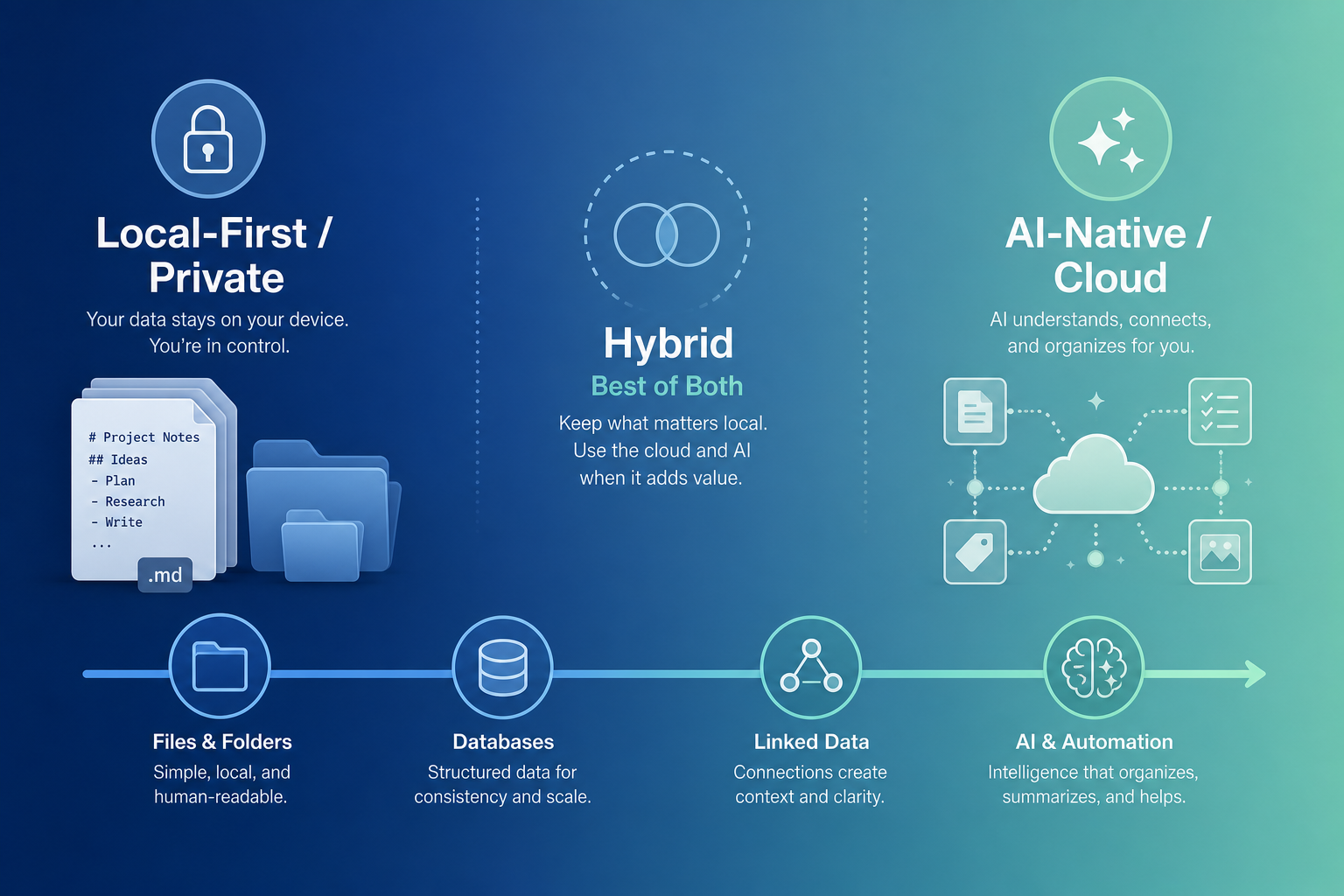
AI-Native vs. Traditional PKM: A Side-by-Side Comparison
To make the trade-offs concrete, the table below compares AI-native and traditional PKM tools across four dimensions that matter most to knowledge workers: setup time, retrieval quality, data ownership, and cost.
| Dimension | Traditional PKM (Obsidian, Notion, Roam) | AI-Native PKM (Mem, Tana, Reflect, Atlas) |
|---|---|---|
| Setup time | 2–3 weeks before becoming productive (confirmed by Atlas and Deepak Gupta) | Days — AI handles linking and structure automatically |
| Retrieval quality | Depends on manual linking discipline; high quality if maintained, brittle if neglected | Semantic search and embeddings surface related content even without explicit links; quality depends on AI model accuracy |
| Data ownership | Local-first (Obsidian: plain Markdown files; Logseq: open-source); full control over export and backup | Cloud-dependent; data stored on vendor servers; export options vary and may lose AI-generated metadata |
| Cost | Obsidian: free (personal), $4/mo Sync, $50/yr commercial; Notion: free (limited), $10/mo Plus; Roam: $15/mo | Mem: $14.99/mo (currently free in beta); Tana: free (500 AI credits), $8/mo Plus; Reflect: $10/mo; Atlas: $20/mo Pro |
One notable outlier is Obsidian. Multiple sources — including Kosmik, Tool Finder, and Atlas — confirm that Obsidian deliberately has no native AI integration, citing privacy concerns. AI features arrive through community plugins, but their quality is uneven and they lack the tight integration of native AI tools. This is not a gap Obsidian is rushing to fill — it is a deliberate architectural choice that aligns with its local-first philosophy.
The Privacy and Lock-In Risks of AI-Only Approaches
The convenience of AI-native tools comes with a set of risks that are easy to overlook during the honeymoon phase of rapid note capture and instant retrieval. These risks fall into three categories.
Data Residency and Vendor Access
When you use an AI-native tool, your notes are processed on the vendor's servers. Even with encryption in transit, the AI model needs access to the plain text to generate embeddings, summaries, and connections. Reflect is the only tool in this group that offers end-to-end encryption for its AI features — the others store and process your data on their infrastructure. For knowledge workers handling sensitive client information, proprietary research, or personal health data, this is a genuine concern.
Pricing Volatility and Feature Access
Mem's unsettled pricing is a case study in this risk. The tool is currently free during its 2.0 beta, but historical pricing points to $14.99/month — and there is no guarantee that the free tier will persist or that pricing will stabilize. Tana's AI credit system means that heavy users may face unexpected costs if they exceed the 2,000-credit monthly limit on the Plus plan. If a tool's AI features are central to your workflow and the vendor raises prices or changes the credit model, you face a difficult choice: pay more or lose functionality.
Vendor Lock-In and Data Portability
The most insidious risk is lock-in. AI-native tools generate metadata — embeddings, AI-generated summaries, auto-tags, connection graphs — that may not survive export. If you decide to leave Mem or Atlas, you can likely export your raw notes as Markdown or JSON, but the AI-generated structure that made the tool useful may be lost. Contrast this with Obsidian, where your entire knowledge base is a folder of plain Markdown files that any text editor can read. Local-first tools give you ownership; AI-native tools give you a service.
- Data residency: Most AI-native tools process notes on vendor servers; Reflect is the exception with E2E encryption.
- Pricing risk: Mem's unsettled pricing and Tana's credit caps create uncertainty about long-term costs.
- Export limitations: AI-generated metadata (embeddings, summaries, auto-tags) may not be portable to other tools.
- Vendor viability: Smaller AI-native startups may pivot, raise prices, or shut down — leaving your knowledge base stranded.
The Hybrid Recommendation: Best of Both Worlds
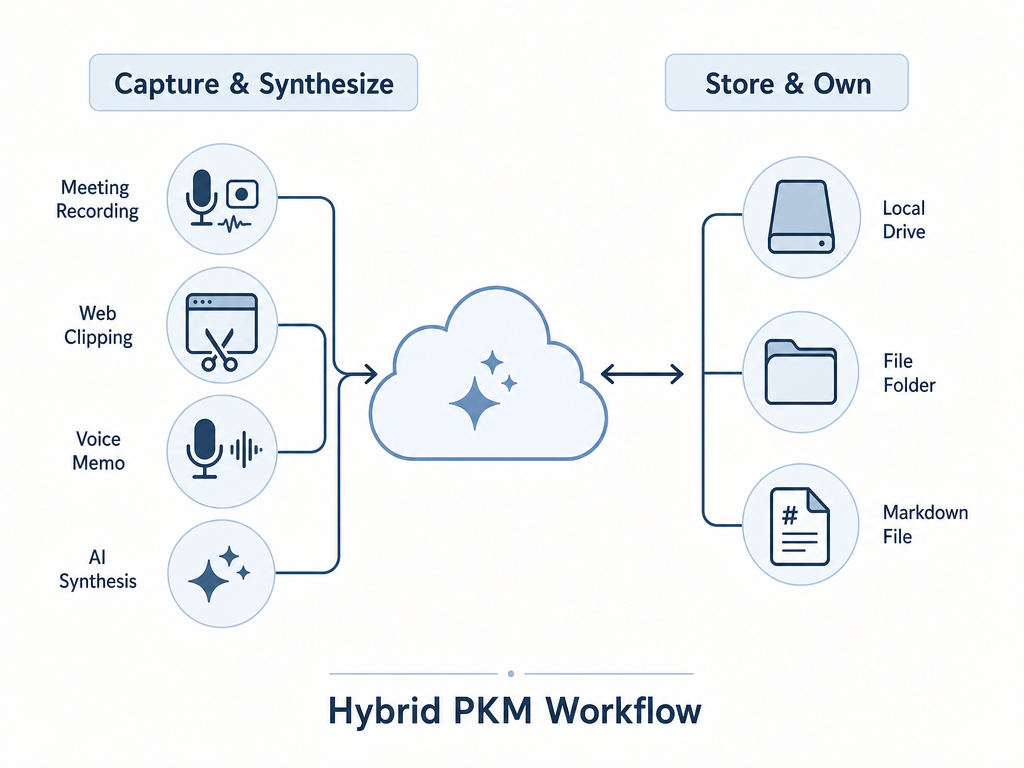
The argument of this article is not that AI-native tools are bad or that traditional tools are superior. It is that for most knowledge workers, the optimal approach is a hybrid: use AI-native tools for capture and synthesis, and local-first tools for long-term storage and deep linking.
This strategy maximizes convenience where AI adds the most value — ingesting information quickly, summarizing meetings, and surfacing connections — while preserving data ownership where it matters most: in a durable, portable format that no vendor can take away.
Proven Hybrid Combinations
- Obsidian + Readwise: Use Readwise to capture highlights from articles, books, and Twitter threads. Readwise's AI can generate summaries and surface related passages. The highlights sync into Obsidian as Markdown files, where you can link, tag, and organize them manually. This gives you AI-assisted capture with local-first storage.
- Logseq + AI plugins: Logseq is free, open-source, and stores data as plain Markdown or Org-mode files. Its plugin ecosystem includes AI-powered summarization and semantic search tools. You get the benefits of AI without surrendering data ownership.
- Reflect for meetings + Obsidian for permanent notes: Use Reflect's encrypted AI meeting transcription and weekly synthesis to capture conversations. Export key insights to Obsidian for long-term linking and retrieval. This keeps sensitive meeting data encrypted in transit and at rest in Reflect, while your permanent knowledge base remains portable.
- Tana for structured capture + Obsidian for archival: Tana's supertags are excellent for capturing structured data — project notes, contact records, task lists — with AI-assisted metadata. For archival and cross-project linking, export or sync to Obsidian where you own the data.
For a detailed look at how Obsidian's local-first approach works in practice — including its 2026 updates to Bases, Mobile 2.0, and real-time collaboration — see our full Obsidian review.
Pricing Comparison for AI Features Across PKM Tools (Q2 2026)
The table below provides a scannable reference for comparing AI feature pricing across the tools discussed. All data was verified against multiple sources in May–June 2026. Pricing in this category changes frequently — treat these figures as a starting point, not a guarantee.
| Tool | Plan / Price | Key AI Features | Free Tier | AI Credit / Usage Limits |
|---|---|---|---|---|
| Mem | $14.99/mo (currently free during 2.0 beta) | Auto-organization, semantic search, AI-suggested connections | Yes (beta) | Unlimited during beta; post-beta TBD |
| Tana | Plus: $8/mo (annual) / $10/mo (monthly); Pro: $16/mo | Supertags + AI summaries, semantic search, auto-tagging | Yes (500 AI credits/mo) | Plus: 2,000 AI credits/mo; Pro: higher limits |
| Reflect | $10/mo (annual billing required) | E2E encrypted AI meeting transcription, weekly synthesis, Google Calendar integration | No | Unlimited AI usage on paid plan |
| Atlas | Pro: $20/mo | Cited AI answers grounded in user notes, auto-generated mind maps, cross-source connections | Yes (limited) | Unlimited AI usage on Pro plan |
| Obsidian | Free (personal); Sync: $4/mo; Commercial: $50/yr | No native AI (privacy concerns); community plugins available with uneven quality | Yes | N/A — AI is plugin-dependent |
Which Path Is Right for You?
There is no single correct answer — only a set of trade-offs that align differently with different priorities. The framework below is designed to help you map your own situation to the approach that fits.
Go Local-First (with Optional AI Plugins) If:
- You prioritize data privacy and long-term ownership over convenience.
- You handle sensitive or proprietary information that should not be processed on third-party servers.
- You are willing to invest 2–3 weeks in setup and ongoing maintenance in exchange for full control.
- You want your knowledge base to outlast any single vendor.
Go AI-Native If:
- You have tried traditional PKM and abandoned it because the maintenance burden was too high.
- Your primary need is rapid capture and retrieval, not deep linking or long-term archival.
- You are comfortable with cloud dependency and the associated privacy and pricing risks.
- You are willing to accept that your AI-generated metadata may not be portable.
Go Hybrid If:
- You want the convenience of AI for capture and synthesis without surrendering long-term data ownership.
- You are willing to manage a two-tool workflow in exchange for the best of both worlds.
- You have a clear separation between "transient" information (meetings, quick captures) and "permanent" knowledge (research, project archives).
- You want to experiment with AI-native tools without committing your entire knowledge base to a single vendor.