

The Automation Tool Landscape in 2026: Why the Two-Tier Split Matters
If you shopped for a workflow automation tool in 2022, your decision was relatively simple: pick the platform with the most integrations at a price you could stomach. That era is over. The automation market has bifurcated into two fundamentally different tiers, and choosing the wrong one leads to workflows that are either too brittle to handle judgment-heavy steps or too expensive for simple routing tasks.
On one side sit the traditional connectors — Zapier and Make. These platforms excel at deterministic, if-this-then-that logic: when an event happens, move data from point A to point B, transform it, and trigger an action. They are mature, well-documented, and backed by thousands of pre-built connectors. On the other side are the AI-native builders — Gumloop and n8n (with its AI nodes). These tools embed large language model reasoning directly into the workflow, enabling judgment calls, content generation, and data extraction that traditional connectors cannot handle.
This split is not a marketing gimmick. The no-code AI market is growing at a 31–38% CAGR and is projected to reach roughly $25 billion by 2030, according to Vellum. Meanwhile, 84% of organizations already use low- or no-code tools, and AI-enabled workflows are expected to grow eightfold — from 3% to 25% of enterprise processes by the end of 2025. The global machine learning market, which underpins these AI-native platforms, is forecast to expand from $91.31 billion in 2025 to $1.88 trillion by 2035, per Itransition data.
For freelancers and small business owners, the stakes are practical. Pick a traditional connector for a workflow that needs AI reasoning, and you will end up duct-taping together brittle workarounds — passing data through webhooks, calling external APIs, and praying the JSON parsing holds. Pick an AI-native builder for a simple file-transfer task, and you will pay for GPU cycles you do not need. Understanding which tier fits which job is the single most important decision you will make when choosing an automation platform in 2026.
Zapier vs Make vs n8n vs Gumloop: Head-to-Head Comparison
Each of these four tools occupies a distinct position in the automation landscape. Below is a detailed breakdown of what each platform does best, where it falls short, and how its pricing and AI capabilities stack up as of mid-2026.
Zapier: The Integration King
Zapier remains the default choice for anyone who needs to connect two apps quickly. Its library of 7,000+ integrations is the largest in the market, covering everything from Gmail and Slack to niche CRMs and accounting software. The platform's strength is breadth: if an app has an API, there is almost certainly a Zapier connector for it.
On the AI front, Zapier has added AI-powered features — including natural-language workflow building and AI steps that can generate text or classify data — but these feel bolted on rather than native. The core architecture remains deterministic. Pricing starts at free (100 tasks/month), with the Professional plan at $29.99/month for 750 tasks and the Team plan at $103.50/month for 2,000 tasks. Costs scale linearly with task volume, which makes Zapier expensive for high-frequency workflows.
Best for: Users who need maximum integration breadth and are willing to pay a premium for it. Not for you if: you run high-volume automations (thousands of tasks per month) or need workflows that require LLM reasoning at every step.
Make: The Value Champion for Traditional Automation
Make (formerly Integromat) offers the best price-to-capability ratio among traditional connectors. Its visual scenario builder is more powerful than Zapier's linear editor — you can branch, loop, and aggregate data within a single workflow without resorting to code. With 1,800+ apps, the integration library is smaller than Zapier's but covers the vast majority of tools a freelancer or small business needs.
Make's Core plan costs $10.59/month for 10,000 credits, which translates to significantly more operations per dollar than Zapier's equivalent tier. However, Make has no native AI reasoning. You can integrate with AI services via HTTP modules and API calls, but the platform does not offer built-in LLM nodes. This makes Make ideal for deterministic workflows but a poor fit for any process that requires contextual decision-making.
Best for: Cost-conscious users running traditional automation at scale. Not for you if: your workflows require native AI reasoning or you need an integration that only exists in Zapier's library.
n8n: The Open-Source Powerhouse
n8n occupies a unique position: it is the only platform in this comparison that offers a fully functional open-source version you can self-host for free. The cloud-hosted Starter plan costs $24/month for 2,500 executions, and the Pro plan is $60/month. With 400+ integrations, the library is smaller than both Zapier and Make, but the platform compensates with deep customization — you can write JavaScript directly in nodes, use webhooks freely, and build complex branching logic that would be impossible in Zapier's linear model.
n8n's AI capabilities have expanded significantly. The platform now includes dedicated AI nodes for LLM calls, vector stores, and embedding operations, making it a legitimate AI-native contender — especially for users who are comfortable with some technical configuration. The trade-off is the learning curve: n8n requires more upfront investment than Zapier or Make, and self-hosting demands server management skills.
Best for: Technical users who want open-source flexibility, self-hosting, or deep AI integration without vendor lock-in. Not for you if: you need a plug-and-play experience with minimal setup or require 2,000+ pre-built integrations.
Gumloop: The AI-Native Builder
Gumloop represents the new wave of automation tools built from the ground up around LLM reasoning. Unlike Zapier or Make, where AI features are layered on top of a deterministic engine, Gumloop embeds AI into the core of every workflow. Its nodes can read, summarize, classify, extract, and generate content without requiring external API calls or complex JSON parsing.
Gumloop offers a free tier with 5,000 credits and a Pro plan at $37/month for 20,000+ credits. The credit-based model means you pay for AI compute, not task count — which can be more cost-effective for workflows that involve heavy LLM processing but fewer discrete operations. The trade-off is a smaller integration library and a younger platform with a less mature ecosystem than Zapier or Make.
Best for: Users who need AI reasoning as a first-class citizen — content summarization, data extraction from unstructured text, intelligent routing based on semantic meaning. Not for you if: your workflows are purely deterministic (move file A to folder B) or you need integrations with niche enterprise apps.
Comparison Table: At-a-Glance Decision Matrix
The table below compresses the key decision factors into a single scannable view. Pricing was last verified against official sources in June 2026.
| Feature | Zapier | Make | n8n | Gumloop |
|---|---|---|---|---|
| Free tier | Yes (100 tasks/mo) | Yes (1,000 credits/mo) | Yes (self-hosted OSS) | Yes (5,000 credits/mo) |
| Starter price | $29.99/mo (750 tasks) | $10.59/mo (10k credits) | $24/mo (2,500 executions) | $37/mo (20k+ credits) |
| Native AI reasoning | Limited (AI steps added) | None (API workaround) | Yes (AI nodes) | Yes (core architecture) |
| Integration count | 7,000+ | 1,800+ | 400+ | Growing (smaller library) |
| Deployment options | Cloud only | Cloud only | Cloud + self-hosted | Cloud only |
| Learning curve | Beginner | Intermediate | Advanced | Intermediate |
| Best-fit use case | Broad integration needs | High-volume deterministic | Custom/open-source AI | AI-native reasoning |
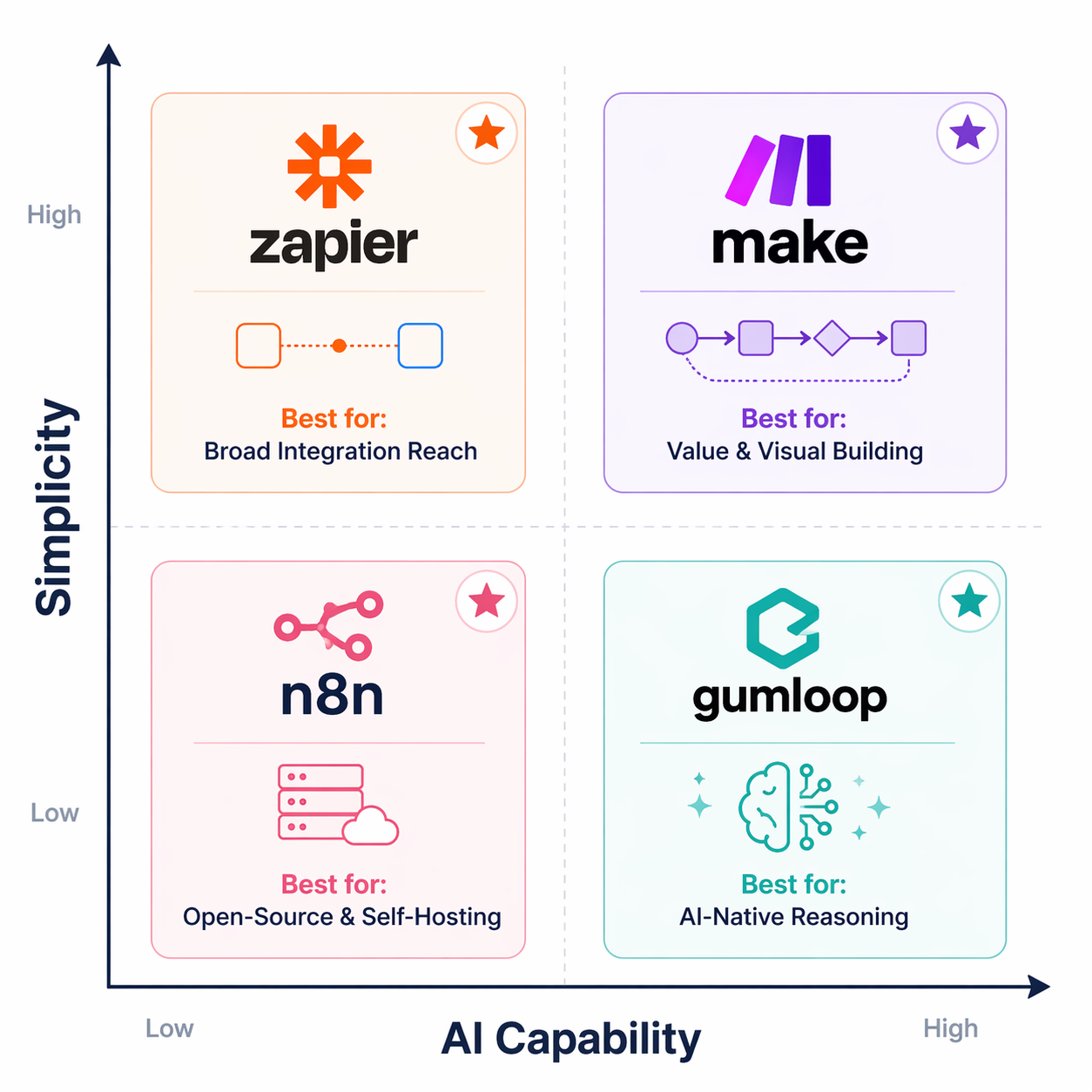
When to Choose Each Tool: A Decision Framework
Rather than declaring a single winner, the most useful approach is a decision framework that maps your specific profile and use case to the right platform. Here is how to think about each tool.
Choose Zapier when integration breadth is your top priority
If you need to connect a niche CRM, a specialized email marketing tool, and a custom database — and you need it done in minutes, not hours — Zapier is the safest bet. Its 7,000+ integrations mean you will almost never encounter an app that lacks a connector. This makes Zapier the default choice for freelancers who work with a wide variety of client tools and cannot afford to build custom integrations.
However, be aware of the cost ceiling. At $29.99/month for only 750 tasks, a single high-volume workflow (e.g., syncing every new CRM contact to your email platform) can blow through that limit in days. Zapier is best for low-to-medium volume, broad-integration scenarios.
Choose Make when you need value-driven traditional automation at scale
Make's $10.59/month Core plan delivers roughly 13x more operations per dollar than Zapier's Professional plan, assuming you use the credits efficiently. The visual scenario builder also supports branching, aggregation, and data transformation that would require multiple Zaps or custom code in Zapier. For any deterministic workflow that runs more than a few hundred times per month, Make is almost certainly the cheaper and more capable option.
The catch is the lack of native AI. If your workflow needs to decide between three different email templates based on the sentiment of an incoming message, Make cannot do that without an external AI service. For pure data-movement and transformation tasks, though, Make is the value king.
Choose n8n when you want open-source flexibility and AI integration on your terms
n8n is the only platform here that gives you full control over your infrastructure. The open-source version can be self-hosted on your own server, which means no per-task fees, no data leaving your network, and no vendor lock-in. For a small business that processes sensitive client data — legal documents, medical records, financial information — this alone can be the deciding factor.
The AI nodes in n8n make it a strong contender for AI-native workflows, especially if you already have some technical comfort. You can connect to any LLM provider, use vector stores for RAG (retrieval-augmented generation), and build complex multi-step reasoning chains. The trade-off is the learning curve: n8n expects you to understand concepts like webhooks, JSON paths, and execution contexts in a way that Zapier and Make abstract away.
Choose Gumloop when AI reasoning is the core of your workflow
Gumloop is purpose-built for workflows where the primary value comes from LLM reasoning. If you need to automatically summarize every incoming email, extract structured data from PDF invoices, or generate personalized responses based on customer history, Gumloop handles these tasks natively without requiring you to stitch together separate AI API calls.
The credit-based pricing model ($37/month for 20,000+ credits) can be more economical than paying per task for AI-heavy workflows, since a single Gumloop workflow can process a large document in one credit. However, the platform's smaller integration library means you may need to use webhooks or HTTP modules to connect to apps that lack native connectors. Gumloop is best for users who prioritize AI capability over integration breadth.
Real-World Workflow Examples Mapped to the Right Tool
Abstract comparisons are useful, but the real test is how each tool handles the workflows you actually run. Below are four common scenarios, each mapped to the platform that fits best.
Scenario 1: Lead capture and CRM update
A potential customer fills out a contact form on your website. You need to add them to your CRM, send a welcome email, and notify your sales team in Slack.
Best tool: Make. This is a textbook deterministic workflow — three sequential actions triggered by one event. Make's branching capabilities also let you handle edge cases (e.g., if the contact already exists in the CRM, skip the creation step). At $10.59/month, the cost is negligible for a workflow that may run dozens of times per day.
Scenario 2: Content repurposing with AI summarization
You publish a new blog post. You want the AI to summarize it into a LinkedIn post, a Twitter thread, and a newsletter blurb — each tailored to the platform's tone and length constraints.
Best tool: Gumloop. This workflow requires LLM reasoning at every step: reading the article, understanding its key points, and generating three distinct outputs with different tones. Gumloop's AI-native architecture handles this in a single workflow without external API calls. Make and Zapier would require you to call an LLM API separately for each output, multiplying both complexity and cost.
Scenario 3: Invoice processing with data extraction
You receive PDF invoices via email. You need to extract the invoice number, date, total amount, and vendor name, then log them into a Google Sheet and flag any invoice over $5,000 for manual review.
Best tool: n8n (self-hosted) or Gumloop. This workflow combines deterministic steps (email trigger, Sheet update) with an AI-powered extraction step. n8n's AI nodes can handle the PDF parsing and data extraction, while its traditional nodes handle the routing and logging. If you process sensitive financial data, self-hosting n8n keeps everything on your infrastructure. Gumloop is a strong alternative if you prefer a fully managed solution.
Scenario 4: Social media scheduling across platforms
You create a content calendar in Airtable. When you mark a post as 'ready to publish,' it should be scheduled on LinkedIn, Twitter, and Instagram at the optimal time.
Best tool: Zapier. Social media scheduling requires integrations with multiple platforms (LinkedIn, Twitter, Instagram) that Zapier covers natively. The workflow is purely deterministic — no AI reasoning needed — and the volume is typically low (a few posts per day), so Zapier's task limits are not a constraint. The 7,000+ integration library ensures you can connect Airtable to any scheduling tool you use.
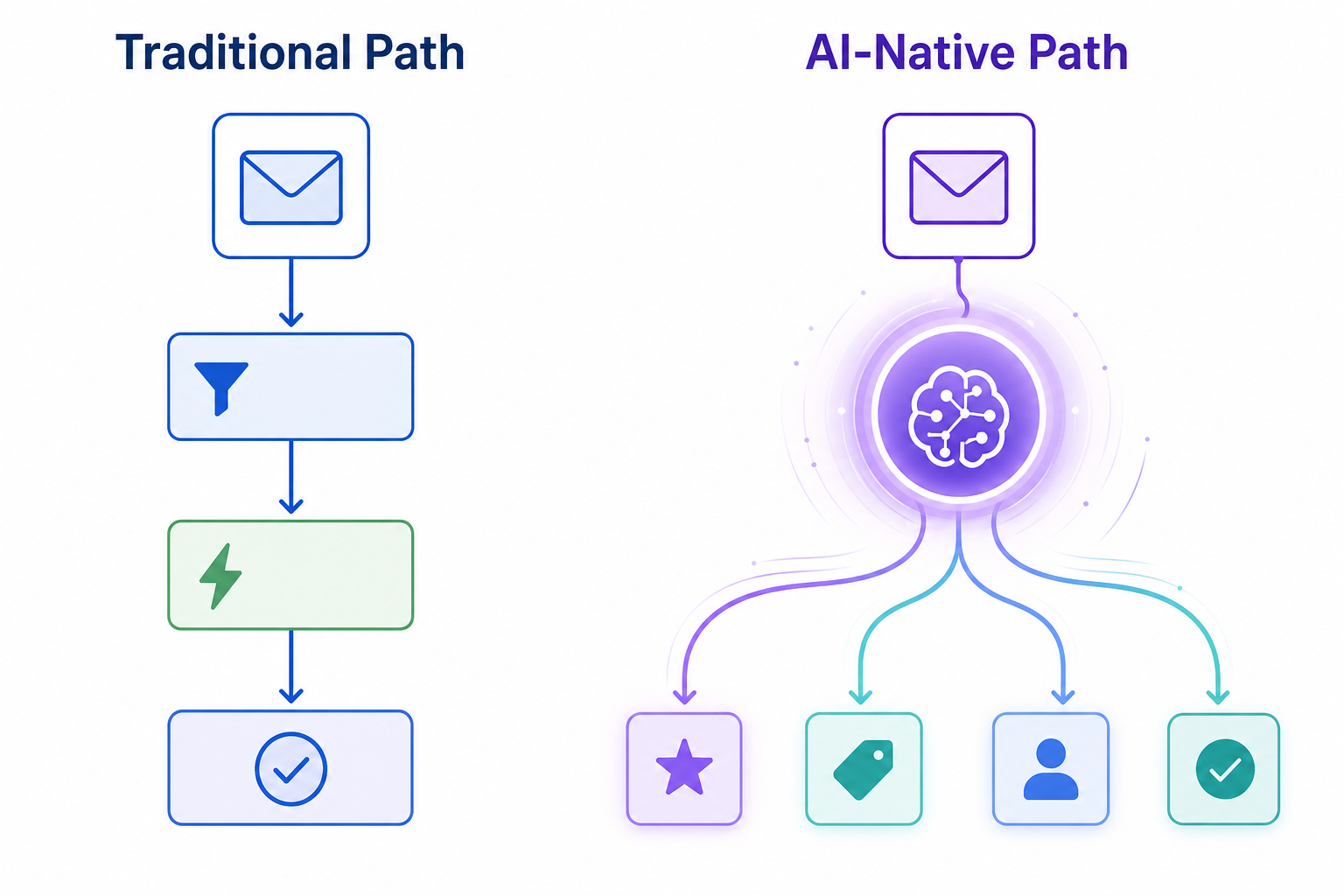
The Verdict: Best-for Picks Summary
No single tool wins across every dimension. The right choice depends on whether your workflows are deterministic or AI-reasoning-heavy, how many integrations you need, and whether you value cost, control, or ease of use most. The table below summarizes the best-fit recommendation for each common profile.
| Best for | Tool | Why |
|---|---|---|
| Broad integration needs (any app, any API) | Zapier | 7,000+ integrations, beginner-friendly, but expensive at scale |
| High-volume deterministic automation on a budget | Make | Best value per operation, powerful visual builder, no native AI |
| Open-source flexibility and self-hosting | n8n | Full control, AI nodes, strong community, steeper learning curve |
| AI-native reasoning as the core workflow value | Gumloop | Built for LLM workflows, credit-based pricing, smaller integration library |
| Combination of deterministic + AI workflows | Make + Gumloop | Use Make for routing, Gumloop for AI steps — best of both tiers |
The two-tier split is not a temporary phase. As AI-native tools mature and traditional connectors add more AI features, the line between the tiers may blur, but the fundamental distinction will remain: some workflows need deterministic reliability, and others need contextual reasoning. Building your automation stack with this distinction in mind — rather than trying to find one tool that does everything — is the single best strategy for 2026 and beyond.