
The Switching-Cost Trap: Why Your Next Note-Taking App Choice Matters More Than Ever
In 2025, Evernote raised its annual subscription from $69.99 to $129.99. That single price change triggered one of the largest note-app migrations in recent memory. Users who had accumulated thousands of notes over a decade suddenly faced a choice: pay double or figure out how to move their entire digital brain to a new home. The problem was that many of them couldn't easily leave.
This is the switching-cost trap. When your notes are locked inside a proprietary format, the cost of leaving — in time, effort, and risk of data loss — can outweigh even a steep price increase. The note-taking app market reached $13.3 billion in 2026, growing at a 20.6% CAGR, according to The Business Research Company. With that growth comes consolidation, price hikes, and feature bloat. The app you choose today needs to survive not just your workflow evolution, but also the vendor's next pricing committee meeting.
In 2026, three hidden factors determine whether your note system will hold up over the long term: AI retrieval quality, data portability, and offline integrity. Feature lists change every quarter. These three factors are structural. They determine whether you own your data, whether you can find it, and whether you can access it when the internet goes down. This comparison evaluates the top note-taking apps on exactly these axes.
The Five-Axis Evaluation Framework: How We Scored Each App
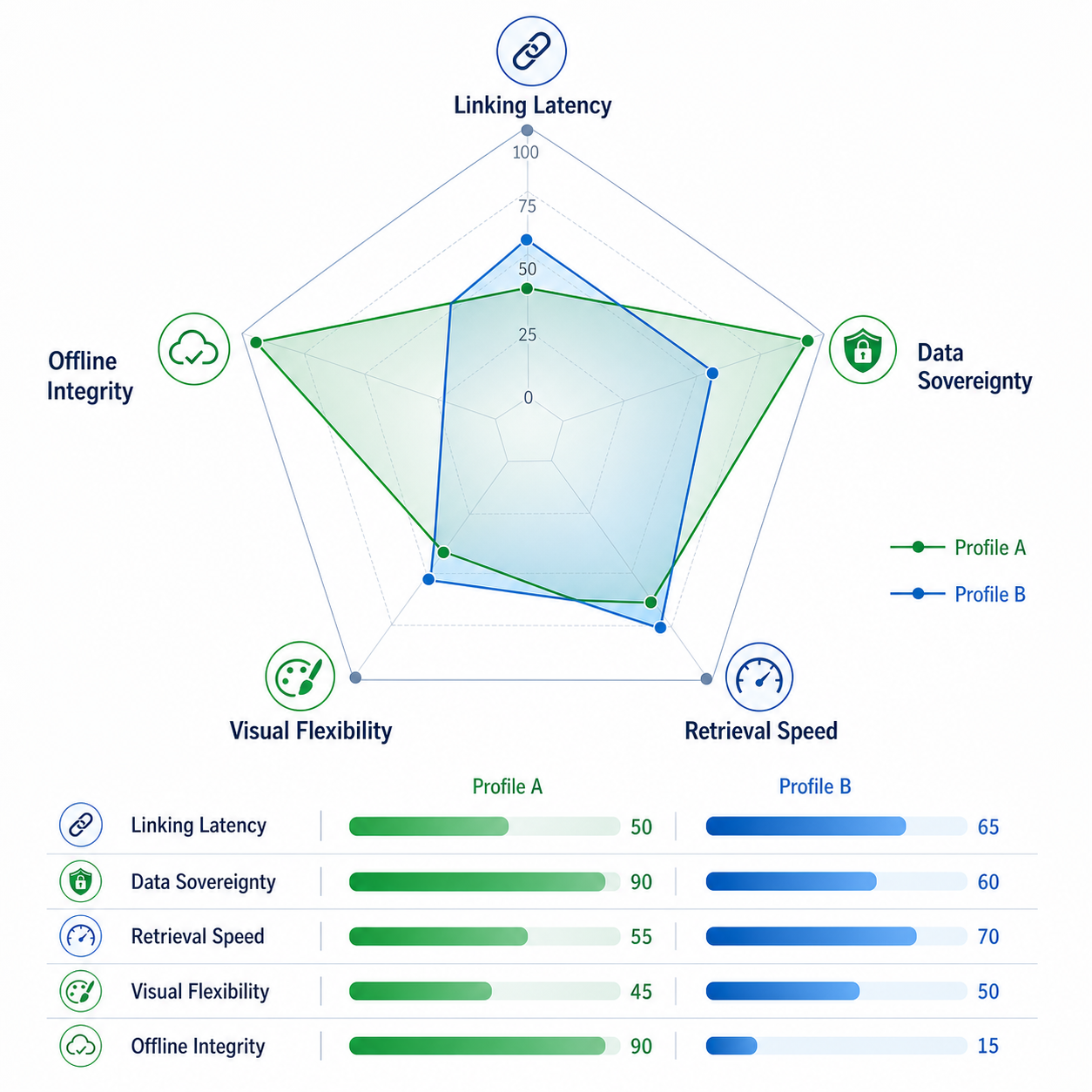
In April 2026, Atlas Workspace published a five-axis evaluation of eight note-taking apps based on a test set of 187 notes. Their framework measures the dimensions that matter most to knowledge workers and PKM enthusiasts who treat their notes as a long-term asset. We use this framework as a primary reference point, supplemented by our own hands-on testing and community feedback.
The five axes are:
- Linking Latency: How quickly can you create and navigate bidirectional links between notes? Fast linking is the foundation of a networked thought system.
- Data Sovereignty: Do you control your data, or does the vendor? Local-first, plain-text formats score highest. Proprietary cloud databases score lowest.
- Retrieval Speed: How fast can you find a specific note or piece of information? This includes full-text search, AI-powered Q&A, and tag-based filtering.
- Visual Flexibility: Can you organize notes with databases, boards, kanban views, and rich layouts, or are you limited to a linear list of documents?
- Offline Integrity: Can you create, edit, search, and link notes with zero internet connectivity? This is the most overlooked factor until you lose signal on a plane or during a commute.
Head-to-Head Comparison Table: The Verdict at a Glance
The table below summarizes how each app scores on the five axes, along with pricing and platform availability. Scores are drawn from the Atlas evaluation where available, supplemented by our own assessment for tools not covered in that study.
| App | Overall Score | Linking Latency | Data Sovereignty | Retrieval Speed | Visual Flexibility | Offline Integrity | Pricing (Personal) | Platforms |
|---|---|---|---|---|---|---|---|---|
| Obsidian | 8.8 / 10 | 10 / 10 | 10 / 10 | 8 / 10 | 6 / 10 | 10 / 10 | Free; Sync $4/mo | Win, Mac, Linux, iOS, Android |
| Logseq | 6.7 / 10 | 9 / 10 | 9 / 10 | 6 / 10 | 5 / 10 | 9 / 10 | Free | Win, Mac, Linux, iOS, Android |
| Bear | 6.2 / 10 | 7 / 10 | 5 / 10 | 7 / 10 | 7 / 10 | 6 / 10 | $2.99/mo | Mac, iOS |
| Craft | 5.6 / 10 | 6 / 10 | 4 / 10 | 6 / 10 | 8 / 10 | 5 / 10 | Free; Pro $4.99/mo | Mac, iOS, Web |
| Apple Notes | 5.2 / 10 | 3 / 10 | 3 / 10 | 6 / 10 | 4 / 10 | 7 / 10 | Free (5GB iCloud) | Mac, iOS, Web |
| Evernote | 5.0 / 10 | 4 / 10 | 2 / 10 | 7 / 10 | 6 / 10 | 5 / 10 | Free (50 notes); Starter $15/mo | Win, Mac, iOS, Android, Web |
| Notion | 4.7 / 10 | 5 / 10 | 2 / 10 | 5 / 10 | 8 / 10 | 1 / 10 | Free; Plus $10/mo; AI add-on | Win, Mac, iOS, Android, Web |
| Joplin | N/A (not in Atlas) | 6 / 10 | 10 / 10 | 5 / 10 | 3 / 10 | 10 / 10 | Free; Cloud Basic €2.99/mo | Win, Mac, Linux, iOS, Android |
Obsidian leads the pack with a perfect 10 in both Data Sovereignty and Offline Integrity, earning an overall score of 8.8/10. Notion, despite its powerful database features and Visual Flexibility score of 8/10, bottoms out at 4.7/10 overall — dragged down by an Offline Integrity score of 1/10. For Windows users specifically, our dedicated Windows comparison provides a deeper dive into OneNote, Obsidian, and Notion on that platform.
AI Feature Deep-Dive: Which Apps Actually Help You Find What You Need?
McKinsey estimates that knowledge workers spend 19% of their workweek searching for and gathering information. AI features in note-taking apps promise to cut that time dramatically — but only if they actually retrieve the right information from your notes. The quality of AI retrieval varies enormously between apps.
Here is how the major players compare on AI capabilities:
| App | AI Features | Retrieval Quality | Pricing for AI | Key Limitation |
|---|---|---|---|---|
| Notion | AI Q&A, summarization, draft expansion, meeting notes | High — grounded answers from your workspace | Business plan $24/user/mo (includes AI) | Requires internet; no offline AI |
| OneNote | Copilot: summarization, Q&A, task extraction | Medium — works within notebooks, limited to Microsoft 365 | Included with Microsoft 365 subscription | Only available on Microsoft 365; no standalone AI |
| Mem | Voice Mode, Deep Search, auto-tagging, AI writing | High — Deep Search retrieves across all notes | Pro $12/mo | Cloud-only; no offline mode |
| Evernote | Paraphrase, summarize, proofread, translate, transcribe | Medium — useful for single-note tasks, not cross-note retrieval | Included in paid plans (Starter $15/mo+) | AI prompts interrupt workflow; no Q&A across notes |
| Obsidian | Community AI plugins (e.g., Copilot, Smart Connections) | Variable — depends on plugin quality and local model | Free (plugins); may need local LLM setup | Requires technical setup; no built-in AI |
| Apple Notes | Apple Intelligence: text rewrite, image generation, summarization | Low — on-device, limited to single note | Free (requires compatible Apple device) | Apple-only; no cross-note retrieval |
Notion AI and Mem's Deep Search stand out for their ability to retrieve grounded answers from your entire corpus. If you have thousands of notes and need to find a specific decision made six months ago, these tools can save significant time. Evernote's AI, by contrast, operates on individual notes — it can paraphrase or summarize what you are currently looking at, but it cannot answer questions across your collection.
Obsidian's approach is different: instead of a built-in AI, it offers a plugin ecosystem. The Copilot plugin and Smart Connections plugin can connect to local or cloud LLMs, giving you AI retrieval without sending your data to a third party. However, this requires technical comfort with installing plugins and potentially running a local model.
Data Portability Audit: Plain Markdown vs. Proprietary Blobs
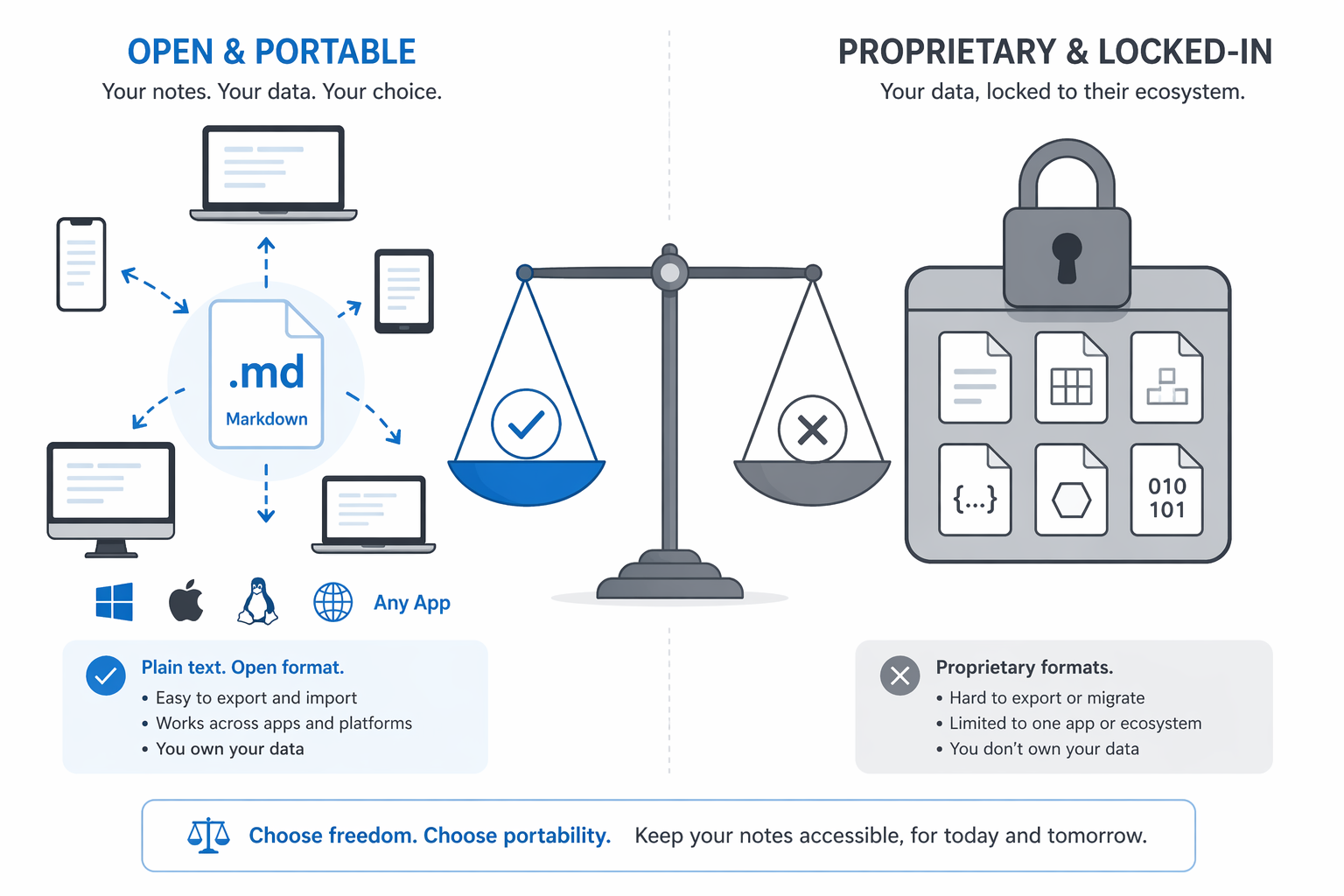
The single most important factor in long-term data ownership is whether your notes are stored in an open, portable format. Plain Markdown files that you can open in any text editor, version-control with Git, and move between tools with minimal friction. Proprietary formats — like Evernote's .enex or Notion's internal database — create switching costs that can trap you when the vendor changes pricing or direction.
| App | Native Format | Export Options | Import Support | Portability Score |
|---|---|---|---|---|
| Obsidian | Plain Markdown (.md) | Markdown, HTML, PDF | Obsidian Importer: 9+ formats (Apple Notes, Bear, Craft, Evernote, Google Keep, OneNote, Notion, Roam) | 10 / 10 |
| Joplin | Markdown (in local database) | Markdown, JEX, RAW, PDF | Evernote (.enex), Markdown | 9 / 10 |
| Logseq | Plain Markdown / Org-mode | Markdown, OPML, JSON | Markdown, Org-mode | 9 / 10 |
| Bear | Markdown (proprietary DB) | Markdown, HTML, PDF, DOCX | Limited (Evernote via Bear's import) | 5 / 10 |
| Notion | Proprietary database | Markdown (partial), HTML, PDF, CSV | Notion Importer: Evernote, Asana, Trello, etc. | 4 / 10 |
| Evernote | Proprietary (.enex) | ENEX, HTML, PDF | Evernote Importer: limited | 3 / 10 |
| Apple Notes | Proprietary (Core Data) | PDF, HTML (manual) | None (import only via Obsidian Importer) | 2 / 10 |
| OneNote | Proprietary (OneNote section) | PDF, DOCX, HTML (partial) | Limited | 2 / 10 |
The Obsidian Importer plugin is a game-changer for portability. It supports one-step migration from Apple Notes, Bear, Craft, Evernote, Google Keep, OneNote, Notion, and Roam. This means that switching cost is no longer a tiebreaker for anyone moving to Obsidian — you can bring your entire note history with you in a single operation.
Privacy & Encryption Comparison: Who Can Read Your Notes?
Encryption models vary dramatically across note-taking apps. The key question is not just whether data is encrypted in transit (all modern apps do that), but whether the vendor has access to your plaintext notes. True end-to-end encryption (E2EE) means that even the service provider cannot read your content.
| App | Encryption Model | E2EE? | Vendor Can Read Notes? | Notes |
|---|---|---|---|---|
| Joplin | AES-256 E2EE | Yes | No | Keys derived from master password; true local-only encryption |
| Obsidian | Local files (no cloud encryption needed) | N/A (local-first) | No (if using local sync) | Obsidian Sync uses E2EE; third-party sync depends on provider |
| Logseq | Local files (same as Obsidian) | N/A (local-first) | No (if using local sync) | Sync via Git or third-party; no built-in E2EE cloud |
| Standard Notes | AES-256 E2EE | Yes | No | Designed specifically for encrypted notes |
| Apple Notes | iCloud encryption (not E2EE for most data) | Partial | Yes (Apple has access to some data) | iCloud Advanced Data Protection enables E2EE for notes (opt-in) |
| Notion | Encryption at rest (AES-256), TLS in transit | No | Yes | Notion can access your content; no E2EE option |
| OneNote | Encryption at rest (Microsoft-managed) | No | Yes | Microsoft can access your notebooks; no user-controlled E2EE |
| Evernote | Encryption at rest (AES-256), TLS in transit | No | Yes | Evernote can access your notes; no E2EE |
| Google Keep | Encryption at rest (Google-managed) | No | Yes | Google can access your notes; no E2EE |
Joplin stands out as the only mainstream note-taking app with true AES-256 end-to-end encryption, where encryption keys are derived from your master password and never leave your device. This means that even if Joplin's servers were compromised, your notes would remain unreadable.
For readers who want a deeper exploration of local-first versus cloud architecture and its implications for privacy and data ownership, our privacy-focused comparison covers that angle in detail. The key takeaway here is that if privacy is a non-negotiable requirement, your options are limited to local-first tools (Obsidian, Logseq, Joplin) or E2EE-focused apps (Standard Notes).
Real Migration Stories: What Happens When You Actually Switch?
The Atlas Workspace team documented a real migration: moving 18,750 notes from Evernote to Obsidian in a single weekend. This is an extreme case — most users have far fewer notes — but it demonstrates that large-scale migration is feasible with the right tools and preparation.
Here are the practical steps that make a migration successful:
- Audit your note volume. Know how many notes you have, how much storage they consume, and what types of content (text, images, attachments, handwritten notes) are included. This determines which destination tool can handle your workload.
- Test export quality first. Export a small subset of notes (50-100) and import them into your target app. Check for formatting loss, broken links, missing attachments, and tag structure. Do not discover these issues after you have exported everything.
- Choose a destination that matches your workflow. If you rely on databases and kanban views, Notion may still be the right choice despite its portability limitations. If you prioritize data ownership and offline access, Obsidian or Joplin are better fits.
- Plan for a transition period. Keep your old app accessible for at least a month after migration. You will inevitably discover notes that did not transfer correctly or that you forgot to export.
- Use the Obsidian Importer if moving to Obsidian. It supports one-step migration from nine different source apps, including Evernote, Notion, OneNote, and Apple Notes. This dramatically reduces the manual work involved.
Decision Table: Which App Should You Choose in 2026?
No single app is perfect for every use case. The table below maps reader personas to the most appropriate tools, based on the three-axis framework of AI quality, data portability, and offline integrity.
| Your Priority | Best App | Runner-Up | Why This Works |
|---|---|---|---|
| Maximum data ownership and offline access | Obsidian | Joplin | Plain Markdown, perfect offline, no vendor lock-in |
| AI-powered retrieval across thousands of notes | Notion (with AI) | Mem | Best-in-class AI Q&A; Notion's offline weakness is a trade-off |
| Privacy above all (E2EE required) | Joplin | Standard Notes | True end-to-end encryption; vendor cannot read your notes |
| Microsoft 365 ecosystem integration | OneNote | Notion | Native Copilot AI, familiar Office interface, team collaboration |
| Budget-conscious student (free, cross-platform) | Obsidian | Apple Notes (Apple users) | Free, powerful, works on all platforms; Apple Notes is zero-cost for Apple users |
| Quick capture + long-form PKM (two-app strategy) | Obsidian + Apple Notes | Obsidian + Google Keep | Use Apple Notes or Keep for rapid capture; Obsidian for deep knowledge management |
The note-taking app market will continue to evolve. New AI features will appear, pricing will change, and some tools will disappear. The three factors evaluated here — AI retrieval quality, data portability, and offline integrity — are structural. They determine whether your note system can adapt to whatever comes next. Choose based on these axes, and your notes will survive the next vendor price hike, acquisition, or workflow evolution.