
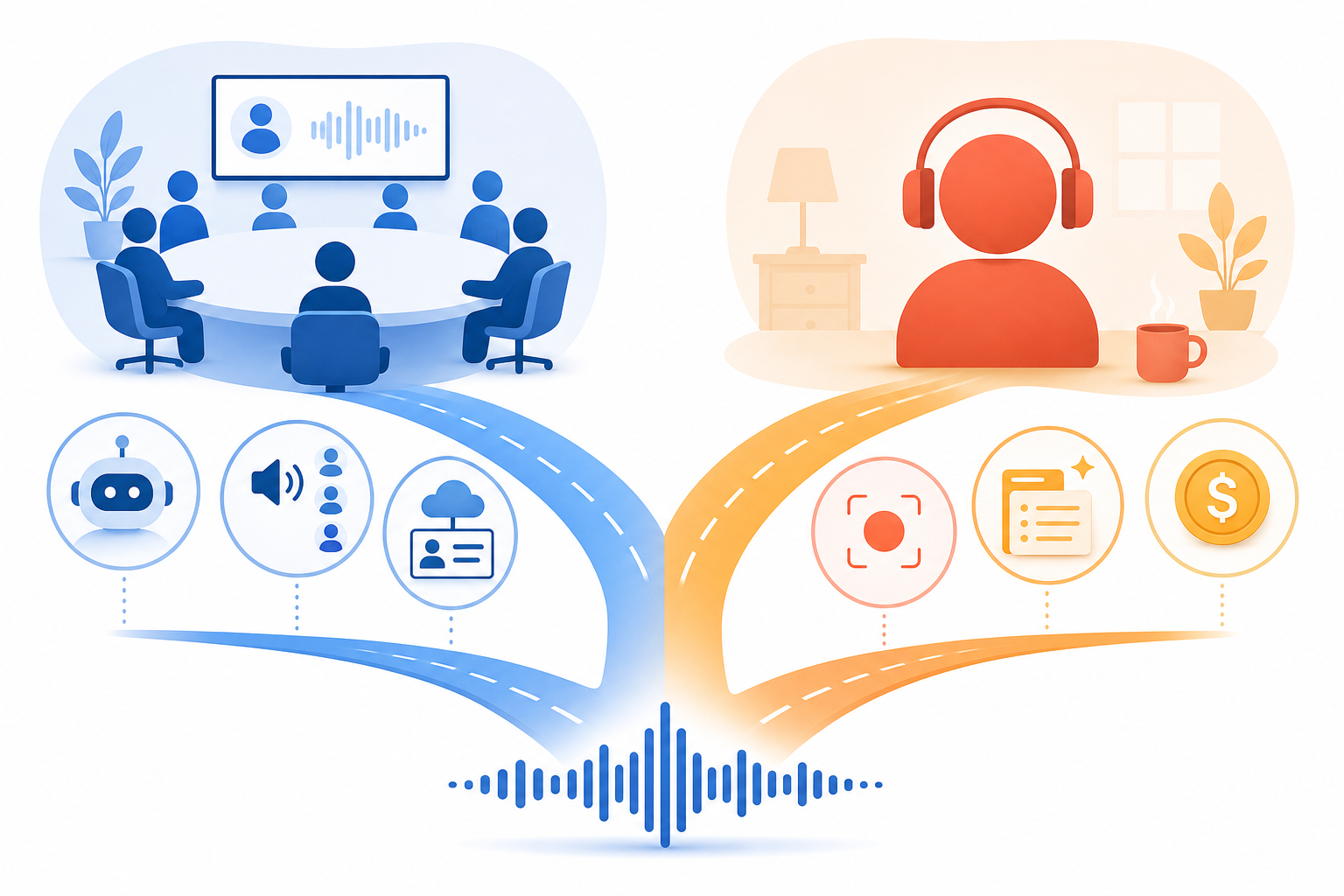
The Fork in the Road: Meeting Intelligence vs. Personal Voice Capture
If you search for an app that takes notes from voice, you will find dozens of recommendations lumped together in a single list. Otter.ai sits next to Apple Voice Memos. Fireflies.ai is ranked alongside Flint. The implication is that these tools compete with each other. They do not.
The voice-to-notes market in 2026 has split into two fundamentally different categories, and the first decision you need to make has nothing to do with features or pricing. It has to do with where your microphone is pointed.
- Meeting intelligence tools (Otter.ai, Fireflies.ai, Notta) are built for multi-speaker virtual calls. They identify who said what, integrate with your CRM, and let teams search across every meeting. They assume the input is a conversation.
- Personal voice capture tools (Flint, Voicenotes, AudioPen, Apple Voice Memos) are built for one person talking to themselves. They optimize for quick capture, AI summarization, and output formatting. They assume the input is a monologue.
Using a meeting tool for personal brain dumps is expensive overkill. Using a personal capture tool for team meetings means losing speaker identification, collaboration features, and CRM sync. The fork is not a marketing gimmick — it is the single most important filter you can apply before evaluating any tool.
This article is not another ranked list. It is a decision framework. Read the next two sections to identify your primary use case, then use the comparison table and pricing analysis to make a confident choice.
Category 1: Meeting Intelligence Tools (Otter.ai, Fireflies.ai, Notta)
Meeting intelligence tools are designed for one scenario: you are on a virtual call with multiple people, and you need a searchable, shareable record of what was discussed. They join your meetings as a bot, transcribe the audio in real time, identify speakers, and produce summaries that can be pushed to Salesforce, HubSpot, Slack, or Notion.
The three most prominent tools in this category are Otter.ai, Fireflies.ai, and Notta. Each approaches the problem slightly differently, but they share a common architecture: cloud-based processing, multi-speaker diarization, team collaboration features, and a subscription model priced per user per month.
| Feature | Otter.ai | Fireflies.ai | Notta |
|---|---|---|---|
| Reported accuracy | ~85% | 90–95% | Not publicly specified |
| Languages supported | 16 | 60+ | 58 (transcription) / 104 (translation) |
| Native CRM integration | No (Slack, Dropbox, Zoom, Google Meet, Teams) | Yes (Salesforce, HubSpot, Pipedrive, Asana, Notion, Slack) | Limited |
| Free tier recording limit | 300 min/month, 30 min per conversation | 800 min/month | Limited plan available |
| Paid plan starts at | $8.33/month (annual) or $16.99/month | $10/month (annual) or $18/month | $13.49/month |
| G2 rating | 4.3/5 (303 reviews) | 4.7/5 (733 reviews) | Not available in sources |
| SOC 2 Type II | Yes | Yes | Not confirmed in sources |
Fireflies.ai leads on accuracy and CRM integration, which makes it the stronger choice for sales teams and revenue operations. Otter.ai, with over 25 million users, has the largest user base and deeper integrations with meeting platforms like Zoom and Google Meet, but its ~85% accuracy lags behind Fireflies. Notta is a strong contender for multilingual teams, supporting transcription in 58 languages and translation in 104 languages.
For a deeper dive into meeting-specific features — including bot vs. botless approaches, compliance considerations, and a broader tool set — see our dedicated guide: Best AI Meeting Note-Taking Apps in 2026.
Category 2: Personal Voice Capture Tools (Flint, Voicenotes, AudioPen, Apple Voice Memos)
Personal voice capture tools solve a completely different problem. You are not in a meeting. You are walking your dog, driving to work, or lying in bed at 2 a.m. with an idea that will evaporate if you do not capture it immediately. These tools are optimized for one speaker, one take, and one goal: getting the thought out of your head and into a useful format as fast as possible.
Compared to meeting intelligence tools, personal capture apps are simpler, cheaper, and more private. They do not need speaker identification, CRM sync, or team dashboards. What they need is a fast trigger, reliable transcription, and AI that turns a rambling voice memo into a clean summary, a to-do list, or a blog draft.
| Feature | Flint | Voicenotes | AudioPen | Apple Voice Memos |
|---|---|---|---|---|
| Pricing model | Free tier + $12 one-time (Pro) | Free tier + $14.99/month or $99.99/year | $99/year | Free (included with Apple devices) |
| Recording limit | Unlimited (free: 2 hrs premium cloud transcription) | Unlimited (free tier has limits) | 15 minutes per recording | Unlimited |
| Platforms | iOS (Action Button, Lock Screen widgets) | iOS, Android, Mac, Windows, Apple Watch, Wear OS, WhatsApp | Web, iOS, Android | iOS, iPadOS, macOS |
| AI summary formats | Multiple (bullet points, paragraphs, to-do lists, etc.) | Multiple | Multiple | Basic transcription only (on iPhone 12+) |
| Offline transcription | Yes (on-device for free tier) | No (cloud-based) | No (cloud-based) | Yes (on-device, iPhone 12+) |
| Privacy approach | Local-first (audio stays on device, text sent to cloud) | Cloud-based | Cloud-based | On-device processing |
Flint is the standout in this category for 2026. Its $12 one-time Pro plan, unlimited recording, and local-first privacy design make it purpose-built for individual capture. The free tier includes 2 hours of premium cloud transcription and unlimited on-device transcription, which is enough for most casual users. Support for the iPhone Action Button and Lock Screen widgets means you can start recording in under a second.
Voicenotes is the most cross-platform option in the group, working on iPhone, Android, Mac, Windows, Apple Watch, and Wear OS. It also accepts input via WhatsApp, which is a genuinely useful feature for capturing voice notes from any device. The tradeoff is the price: $14.99 per month or $99.99 per year is significantly more expensive than Flint's one-time payment.
AudioPen sits at the same $99/year price point as Voicenotes but caps recordings at 15 minutes. That is a hard limit for anyone who tends to ramble during a voice memo. Apple Voice Memos, meanwhile, is free and offers on-device transcription on iPhone 12 and later, but it lacks the AI summarization that turns raw transcripts into actionable notes.
For a detailed head-to-head comparison of Flint, Voicenotes, and AudioPen — including recording limits, output format quality, and privacy tradeoffs — see our dedicated guide: Flint vs. Voicenotes vs. AudioPen.
Direct Comparison: Meeting Intelligence vs. Personal Capture Across 10 Dimensions
The following table maps the two categories against the dimensions that matter most when choosing a voice-to-notes tool. Use it to quickly identify which category aligns with your priorities.
| Dimension | Meeting Intelligence | Personal Voice Capture |
|---|---|---|
| Primary use case | Multi-speaker virtual meetings | Single-speaker ideation and capture |
| Speaker identification | Yes (automatic diarization) | No |
| Reported accuracy | 85–95% (varies by tool and audio quality) | Up to 99% (single speaker, clear audio) |
| Recording limits (free tier) | 300–800 min/month | Varies (unlimited on-device to 15 min/recording) |
| AI summary quality | Meeting minutes, action items, keyword highlights | Bullet points, paragraphs, to-do lists, blog drafts |
| Output formats | Transcript, summary, highlights, CRM notes | Transcript, AI summary, Markdown, formatted text |
| Offline capability | Limited (cloud-dependent) | Varies (Flint: on-device; Voicenotes: cloud-only) |
| Privacy model | Cloud-based (SOC 2 Type II common) | Mixed (Flint: local-first; others: cloud-based) |
| Collaboration features | Team dashboards, shared search, CRM sync | None or limited (single-user focus) |
| Pricing range | $10–40/month per user | $0–12 one-time to $99/year |
The most striking difference is in pricing and collaboration. Meeting intelligence tools are priced per user per month because they are designed for teams. Personal capture tools are priced per individual, often as a one-time payment or a low annual subscription, because they are designed for one person's workflow.
Pricing Comparison: The Cost of Choosing the Wrong Category
The pricing gap between the two categories is not small. It is the difference between a one-time cup of coffee and a monthly utility bill. Choosing the wrong category means paying for infrastructure you do not use or missing features you need.
| Tool | Category | Cheapest Paid Plan | Annual Cost (Individual) |
|---|---|---|---|
| Flint | Personal capture | $12 one-time (Pro) | $12 (one-time) |
| Apple Voice Memos | Personal capture | Free | $0 |
| Voicenotes | Personal capture (hybrid) | $14.99/month or $99.99/year | $99.99 |
| AudioPen | Personal capture | $99/year | $99 |
| Otter.ai (Pro) | Meeting intelligence | $8.33/month (annual) or $16.99/month | $203.88 |
| Otter.ai (Business) | Meeting intelligence | $20/month (annual) or $30/month | $480 |
| Fireflies.ai (Pro) | Meeting intelligence | $10/month (annual) or $18/month | $216 |
| Fireflies.ai (Business) | Meeting intelligence | $19/month (annual) or $29/month | $348 |
| Notta (Premium) | Meeting intelligence | $13.49/month | $161.88 |
Consider a professional who attends 10 meetings per week and captures 5 personal ideas per day. If they use Otter.ai for everything, they pay $203.88 per year (Pro) or $480 per year (Business). If they use Flint for personal capture ($12 one-time) and Fireflies for meetings ($216/year), the total is $228/year — roughly the same as Otter Pro alone, but with better accuracy and CRM integration on the meeting side.
The reverse mistake is more common but less expensive: using a personal capture tool for team meetings. You save money but lose speaker identification, shared search, and CRM sync. For a solo freelancer who only joins client calls occasionally, this might be acceptable. For a team of five, it is a productivity loss that far exceeds the subscription cost.
Hybrid Options: Can One Tool Do Both?
Some professionals genuinely need both meeting notes and personal voice capture. The question is whether one tool can serve both roles without compromising on either side.
Voicenotes is the strongest hybrid option available today. Its cross-platform support — iPhone, Android, Mac, Windows, Apple Watch, Wear OS, and even WhatsApp input — means you can capture a personal idea from almost any device. The AI summarization works well for single-speaker recordings. However, it lacks speaker identification and CRM integration, so it cannot replace a meeting intelligence tool for team calls. If your meetings are one-on-one client calls where speaker ID is not critical, Voicenotes might be sufficient. For team meetings with multiple stakeholders, it will not cut it.
Otter.ai can technically be used for personal voice capture. You can open the app, hit record, and dictate a memo. But the interface is designed for meetings — it expects a title, a duration, and a context. The free tier limits you to 300 minutes per month and 30 minutes per conversation, which is restrictive for frequent personal capture. And at $203.88 per year for Pro, it is an expensive way to record grocery lists and blog ideas.
For most professionals who need both, the pragmatic answer is two tools: a meeting intelligence tool for work calls and a personal capture tool for everything else. The combined cost is often lower than a single enterprise meeting tool, and you get purpose-built features for each use case.
Final Verdict: Choose Based on Your Primary Use Case
The decision matrix below summarizes the article's recommendations. Use it as a quick reference after you have identified your primary use case.
| Your Primary Use Case | Best Category | Top Pick | Runner-Up |
|---|---|---|---|
| Team meetings with multiple speakers (5+ people) | Meeting intelligence | Fireflies.ai (90–95% accuracy, CRM sync) | Otter.ai (larger user base, deeper meeting platform integrations) |
| One-on-one client calls with occasional personal capture | Hybrid (leaning personal) | Voicenotes (cross-platform, WhatsApp input, $99.99/year) | Otter.ai (if you already have a Pro subscription) |
| Frequent personal ideation (10+ captures/day) | Personal capture | Flint ($12 one-time, unlimited recording, local-first privacy) | Apple Voice Memos (free, on-device, iPhone 12+) |
| Multilingual meetings and transcription | Meeting intelligence | Notta (58 languages transcription, 104 languages translation) | Fireflies.ai (60+ languages) |
| Budget-conscious student or freelancer | Personal capture (free tier) | Flint free tier (2 hrs premium cloud + unlimited on-device) | Apple Voice Memos (free, no AI summaries) |
| Sales team needing CRM integration | Meeting intelligence | Fireflies.ai (native Salesforce, HubSpot, Pipedrive sync) | Notta (limited CRM integration) |
For a comprehensive overview of all voice-to-note tools across every category — including free OS-level dictation, dedicated apps, and enterprise assistants — see our full guide: Apps That Take Notes From Voice: 12 Best Tools Compared in 2026.