
Why Generic BPM Explanations Fall Short
If you are a department head or operations manager, you have likely read a dozen articles that define business process management as "a structured approach to improving organizational workflows." That definition is technically correct, but it does not help you decide what to do on Monday morning. It does not tell you which of your team's recurring headaches — late invoices, slow onboarding, compliance bottlenecks — is worth automating first, or what the concrete payoff will look like.
This article takes the opposite approach. Instead of starting with theory, it starts with specific, repeatable pain points in finance, HR, customer service, IT, legal, and operations. For each example, you will see the manual "before" process, the automated "after" process using BPM workflows, the measurable impact (drawn from recent industry data), and a practical implementation step you can adapt. At the end, you will find a scoring framework to help you rank your own processes and decide which one to tackle first.
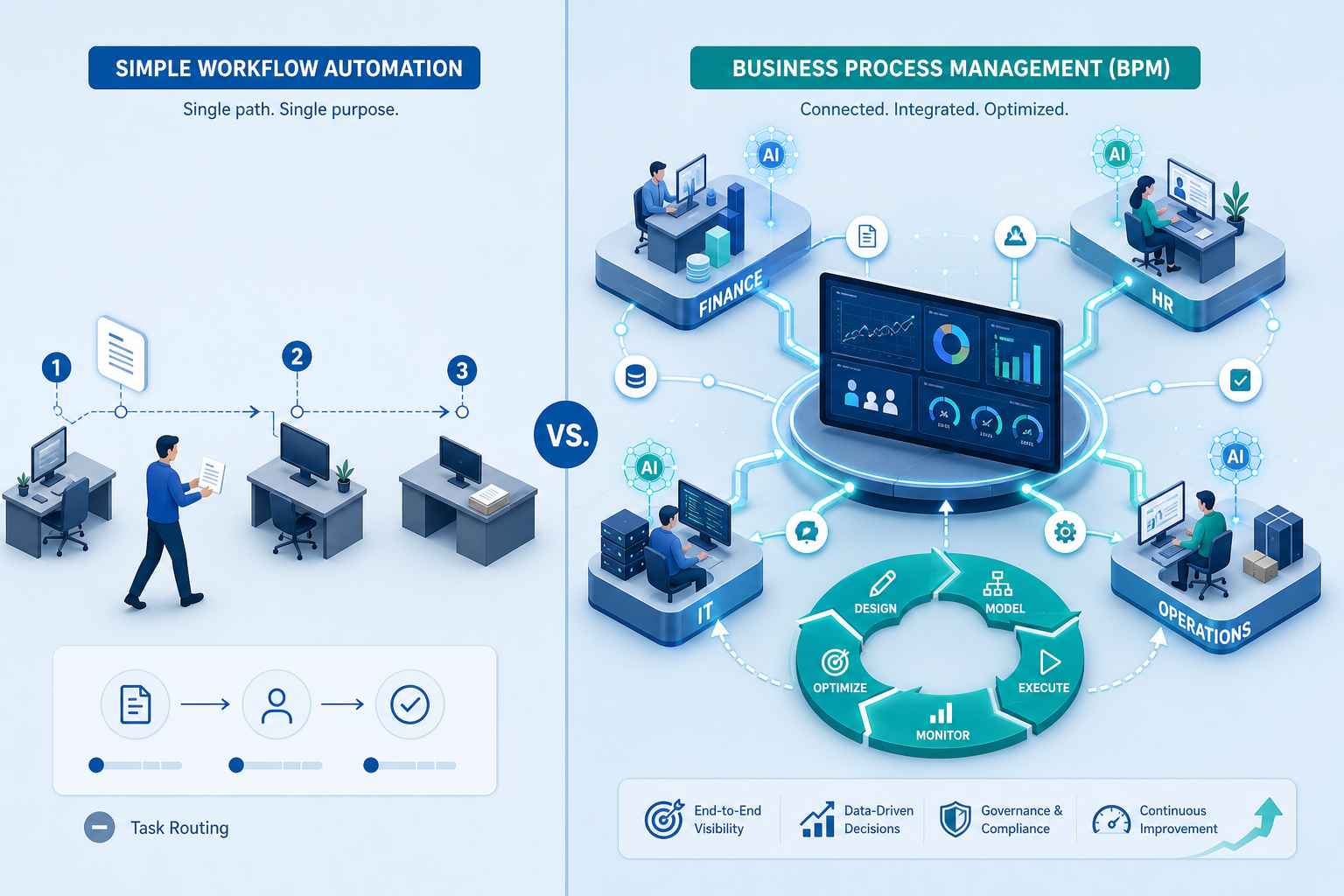
The BPM Lifecycle in 60 Seconds
Before diving into department examples, a quick vocabulary check. BPM operates through a five-stage lifecycle that turns a messy manual process into a measurable, continuously improving system. Multiple sources — including IBM, Microsoft Power Automate, and Zite — describe the same core stages:
- Design: Map out the current process as it actually happens, not as the policy manual says it should happen.
- Model: Build a visual representation of the desired workflow, including decision points, handoffs, and system integrations.
- Execute: Deploy the automated workflow using a BPM tool, replacing manual handoffs with automated triggers and tasks.
- Monitor: Track performance metrics — cycle time, error rate, cost per transaction — against the baseline you established in the design phase.
- Optimize: Use the monitoring data to identify bottlenecks and refine the process iteratively.
Finance: Invoice Processing, Expense Reimbursement, and Month-End Close
Invoice Processing
The pain point is universal: accounts payable teams drown in paper invoices, email attachments, and manual data entry. Each invoice requires matching against a purchase order, routing for approval, and posting to the ERP. Errors — duplicate payments, miskeyed amounts, lost documents — are common and expensive.
The manual before-process: An invoice arrives via email or mail. A clerk prints it (or saves the PDF), opens the ERP, enters the vendor name, invoice number, date, and amount. If the invoice matches a purchase order, the clerk attaches the PO number. The invoice is then emailed to the appropriate manager for approval. The manager may take days to respond. If approved, the clerk returns to the ERP to post the invoice and schedule payment. If rejected, the cycle restarts.
The automated after-process with BPM: An invoice arrives via email, EDI, or a supplier portal. The BPM system automatically extracts key fields using OCR or AI-based data capture. It matches the invoice against the corresponding PO in the ERP. If the match is clean, the system routes the invoice through an automated approval chain based on dollar thresholds — no human touch required. If the match fails or exceeds a threshold, the system sends a notification to the appropriate approver with all context pre-loaded. Once approved, the BPM tool posts the invoice to the ERP and triggers the payment run.
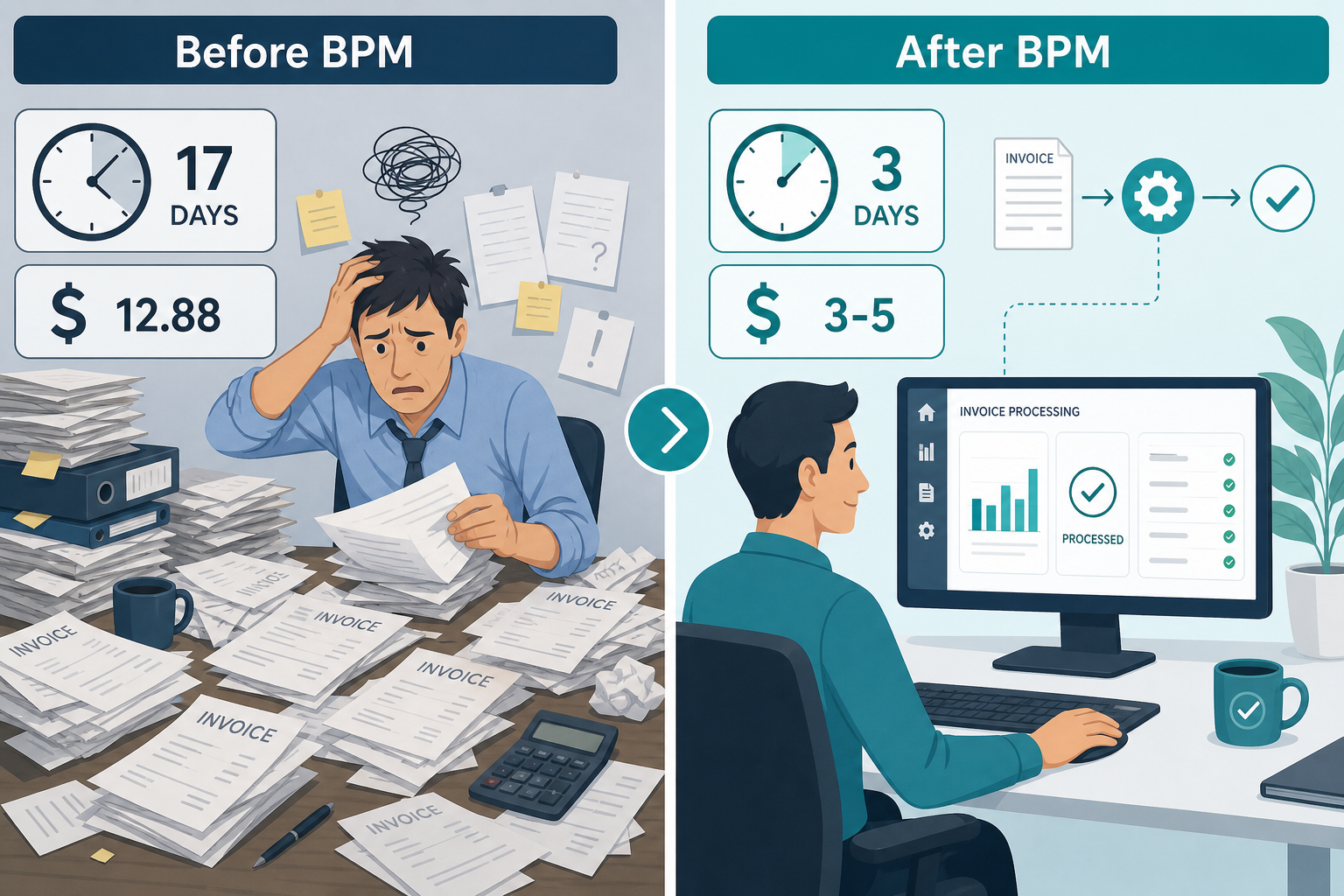
Expected impact: According to data cited by Zite from Ardent Partners and Resolve Pay, manual invoice processing costs $12.88 per invoice and takes an average of 17.4 days from receipt to posting. Automated BPM workflows reduce that cost to $3 to $5 per invoice and cut cycle time to 3 to 5 days. For a company processing 1,000 invoices per month, that is an annual savings of roughly $94,000 to $118,000.
Implementation step: Start with a pilot covering your top 5 vendors by invoice volume. Map the current approval chain for those vendors, configure the BPM tool to capture invoice data from email attachments, and set up the ERP integration for PO matching. Run the pilot for one month, compare the cost and cycle time against your baseline, then expand.
Expense Reimbursement
Manual expense reporting is a drain on both employees and finance teams. Employees lose receipts, fill out forms incorrectly, and wait weeks for reimbursement. Finance teams spend hours verifying claims against policy and chasing missing documentation.
The manual before-process: An employee collects paper receipts, fills out an expense report template, scans or photographs the receipts, and emails the package to their manager. The manager reviews, asks for missing receipts, and approves. The report then goes to finance for policy compliance review. Finance may reject it for a policy violation, sending it back to the employee. Once approved, finance enters the data into the accounting system and schedules reimbursement.
The automated after-process with BPM: The employee submits expenses through a mobile app or web form that integrates with the corporate credit card feed. Receipts are captured via photo and automatically categorized using AI. The BPM system checks each line item against company policy in real time — flagging out-of-policy spending before submission. The report routes to the manager with all policy checks already completed. After approval, the system posts the reimbursement to the payroll or accounts payable module and archives the digital receipt.
Expected impact: Organizations typically see reimbursement cycle time drop from 2-3 weeks to 2-3 days. Finance team effort per report falls by 60-70% because policy checks are automated. Employee satisfaction improves because reimbursements arrive faster and submissions are rejected less often.
Implementation step: Integrate your corporate card provider with the BPM platform first. Configure the policy rules engine with your existing expense policy. Roll out the mobile submission app to a pilot group of frequent travelers, then expand department by department.
Month-End Close
The month-end close is a high-pressure, time-sensitive process that involves multiple teams — accounts payable, accounts receivable, payroll, treasury, and external auditors. Manual coordination via email and spreadsheets leads to missed deadlines, data inconsistencies, and last-minute fire drills.
The manual before-process: The controller sends a close checklist via email. Each team lead completes their tasks independently and reports status back. There is no centralized view of progress. If one team is delayed, the entire close slips. Reconciliation is done manually in spreadsheets, increasing the risk of errors.
The automated after-process with BPM: The BPM system orchestrates the entire close calendar. It triggers tasks in sequence — for example, "Post all AP batches" must complete before "Run intercompany reconciliation" begins. Each task has an assigned owner, a due date, and automated reminders. The dashboard shows real-time close progress. Reconciliation rules are automated, flagging discrepancies for human review only when they exceed a threshold. The system generates the close package automatically and distributes it to auditors.
Expected impact: Companies using BPM for month-end close typically reduce close time by 30-50%, moving from 7-10 business days to 3-5. Error rates in reconciliation drop significantly because manual data entry is eliminated.
Implementation step: Document your current close checklist as a sequential workflow in the BPM tool. Assign owners to each task and set dependencies. Run the automated close in parallel with your manual process for one month to validate the workflow, then switch over.
HR: Employee Onboarding and Performance Reviews
Employee Onboarding
A poor onboarding experience is one of the fastest ways to lose a new hire. When IT accounts are not ready, paperwork is missing, and the first week is chaotic, new employees start disengaging before they have even contributed.
The manual before-process: When a new hire accepts an offer, HR sends a series of emails to IT (for account creation), facilities (for desk assignment), and the hiring manager (for team introductions). Each department works independently. IT may not receive the request until the day before the start date. Paperwork — tax forms, direct deposit, benefits enrollment — is handled through email attachments or printed forms. The new hire spends their first day filling out forms instead of learning their role.
The automated after-process with BPM: When HR enters the new hire's start date in the HRIS, the BPM system triggers a parallel set of workflows. IT receives an automated ticket to provision accounts, email, and hardware — with a due date set to 48 hours before the start date. Facilities gets a desk assignment request. The hiring manager receives a welcome kit with a schedule for the first week. The new hire receives a pre-boarding portal link to complete tax forms and benefits enrollment before day one. On the first day, everything is ready.
Expected impact: Onboarding time drops from 5+ days of administrative overhead to same-day readiness. The new hire is productive from day one. HR administrative effort per new hire falls by 60-80%.
Implementation step: Map the full onboarding checklist — IT provisioning, facilities, benefits, training, team introductions — as a parallel workflow in your BPM tool. Set trigger conditions based on the start date field in your HRIS. Test with a single department before rolling out company-wide.
Performance Reviews
Annual or quarterly performance reviews are notoriously inconsistent. Managers forget deadlines, forms get lost, and the process lacks standardization across departments. The result is a demoralizing experience for employees and unreliable data for compensation decisions.
The manual before-process: HR sends a review schedule via email. Managers download a form, fill it out, and email it back. If the review requires peer feedback, the manager manually collects it. Completed reviews are stored in a shared drive or printed and filed. There is no audit trail, no automated reminders, and no way to enforce deadlines.
The automated after-process with BPM: The BPM system triggers the review cycle based on the employee's hire date or a fixed calendar schedule. Managers receive a notification with a link to a standardized review form. The system automatically sends peer feedback requests to selected colleagues and tracks completion. If a manager misses the deadline, automated escalations go to their supervisor. Completed reviews are stored in the HRIS with a full audit trail. The system aggregates scores and comments for compensation review meetings.
Expected impact: Review completion rates rise from 60-70% to 95%+. The time HR spends chasing late reviews drops to near zero. Standardization ensures that every employee is evaluated on the same criteria, reducing bias and legal risk.
Implementation step: Define the review form and scoring criteria in the BPM tool. Set up the trigger schedule (quarterly, semi-annual, or annual). Configure the escalation chain for missed deadlines. Run a pilot with one department to validate the workflow before expanding.
Customer Service: Escalation and Ticketing Workflows
Support Ticket Escalation
When a customer submits a support ticket, every minute of delay erodes satisfaction. Without a structured escalation workflow, tickets sit in individual inboxes, get forgotten, or bounce between teams without clear ownership.
The manual before-process: A customer emails support or submits a ticket through a web form. The ticket lands in a shared inbox. A support agent picks it up, tries to resolve it, and if they cannot, forwards it to a senior agent or another team via email. There is no SLA tracking. The customer follows up repeatedly to check status. Management has no visibility into how many tickets are stuck or where the bottlenecks are.
The automated after-process with BPM: The BPM system receives the ticket from the customer portal or email integration. It categorizes the ticket based on keywords (e.g., "billing issue" vs. "technical bug") and assigns it to the appropriate queue. An SLA timer starts. If the ticket is not resolved within the SLA, the system escalates it to the next tier automatically and notifies the team lead. If the ticket requires input from another department (e.g., billing needs to confirm a charge), the system routes it with full context and tracks the response. The customer receives automated status updates at each stage.
Expected impact: According to data cited by Zite, structured escalation workflows reduce average resolution time by 30-40%. First-response time drops from hours to minutes for high-priority tickets. Customer satisfaction scores (CSAT) typically rise by 10-15 points.
Implementation step: Define your ticket categories and SLA targets in the BPM tool. Configure the escalation rules — for example, "If priority 1 ticket is unassigned for 15 minutes, escalate to team lead." Integrate with your existing ticketing system or help desk platform. Run a pilot with one product line or customer segment.
Customer Onboarding
Customer onboarding is a cross-functional process involving sales, support, product, and sometimes engineering. When it is managed manually, new customers experience delays, inconsistent communication, and a fragmented first impression.
The manual before-process: After a sale closes, the sales rep sends an email to the customer with login instructions and a link to a knowledge base. The customer is left to figure out setup on their own. If they encounter issues, they email support, starting the process over. There is no structured sequence of welcome calls, training sessions, or milestone checks.
The automated after-process with BPM: When a deal is marked closed-won in the CRM, the BPM system triggers a multi-stage onboarding workflow. Day 1: The customer receives a personalized welcome email with account setup instructions and a link to schedule an onboarding call. Day 3: The system checks whether the customer has logged in. If not, it sends a reminder and alerts the customer success manager. Day 7: The onboarding call is conducted, and the system logs key outcomes. Day 30: A milestone check triggers a satisfaction survey and a handoff to the ongoing support team.
Expected impact: Customer onboarding time drops by 40-50% with structured BPM workflows, according to Zite. Time-to-value for the customer shrinks, reducing early-stage churn. Customer success teams can manage a larger portfolio because manual follow-ups are automated.
Implementation step: Map the ideal customer journey from closed-won to fully onboarded. Define the triggers (e.g., "deal closed-won in CRM") and the sequence of automated actions. Integrate the BPM tool with your CRM and email platform. Test the workflow with a small cohort of new customers before full rollout.
IT: Access Provisioning and Employee Offboarding
Access Provisioning
When a new employee or contractor needs access to systems, the delay between the request and the actual provisioning creates a productivity bottleneck. When the process is manual, it also creates security risks — orphaned accounts, excessive permissions, and inconsistent deprovisioning.
The manual before-process: A manager emails IT with an access request. IT opens a ticket, manually creates the account in Active Directory, assigns groups, and provisions access to each application one by one. There is no standardized request form, so IT often has to follow up to clarify which systems are needed. The process takes days, sometimes weeks.
The automated after-process with BPM: The manager submits an access request through a self-service portal that lists all available applications and role-based access templates. The BPM system validates the request against the employee's role and department. It then triggers automated provisioning in Active Directory, the identity management platform, and each target application. The system logs every action for audit purposes. If the request requires a manager or security approval (e.g., access to sensitive financial data), the workflow routes it to the appropriate approver before provisioning.
Expected impact: Access provisioning time drops from days to hours. For standard role-based requests, provisioning can happen in minutes. Error rates in permission assignment drop to near zero because the process is template-driven rather than manual. Audit readiness improves because every access grant is logged with a timestamp and approver.
Implementation step: Define role-based access templates for the most common positions in your organization. Configure the BPM tool to integrate with your identity provider (e.g., Azure AD, Okta). Start with a single application and one role template, validate the workflow, then expand to additional applications and roles.
Employee Offboarding
Employee offboarding is a high-risk process. If departing employees retain access to systems, the organization faces data breach exposure. If the process is manual, steps are frequently missed — accounts are not deactivated, laptops are not returned, and final paychecks are delayed.
The manual before-process: When an employee resigns, HR sends separate emails to IT (to deactivate accounts), facilities (to collect badge and equipment), and payroll (to process final pay). Each department acts independently. IT may not deactivate accounts until days after the employee's last day. Equipment may never be returned. There is no centralized checklist or confirmation that all steps were completed.
The automated after-process with BPM: When HR enters the employee's termination date in the HRIS, the BPM system triggers a parallel offboarding workflow. IT receives an automated ticket to deactivate all accounts, revoke VPN access, and initiate the laptop return process — with a due date set to the employee's last day. Facilities gets a badge deactivation request. Payroll receives a notification to process final pay. The system tracks completion of each task and sends a consolidated offboarding report to the manager and HR. If any task is not completed by the deadline, an escalation is triggered.
Expected impact: Account deactivation happens within hours of the employee's last day instead of days or weeks. Equipment return rates improve because the process is tracked. Audit and compliance risk drops significantly because every offboarding step has a timestamp and owner.
Implementation step: Map the complete offboarding checklist — IT deprovisioning, facilities, payroll, manager review — as a parallel workflow. Set the trigger to the termination date in the HRIS. Configure escalation rules for overdue tasks. Test with a single department before rolling out organization-wide.
Legal: Contract Lifecycle Management and Compliance Audits
Contract Lifecycle Management
Contracts are the backbone of business relationships, yet many organizations manage them through email attachments and shared drives. Contracts get lost, renewal dates are missed, and approval bottlenecks delay deals.
The manual before-process: A sales rep or procurement manager drafts a contract using a template. They email it to legal for review. Legal makes edits in tracked changes and emails it back. The contract goes through multiple rounds of email-based revisions. Once finalized, it is signed via a separate e-signature tool. The signed PDF is saved to a shared drive. There is no central repository, no automated renewal reminders, and no visibility into contract status.
The automated after-process with BPM: The contract request is initiated through a self-service portal. The BPM system selects the appropriate template based on contract type (NDA, vendor agreement, client contract). It routes the draft through a predefined approval chain — legal review, finance review (for pricing terms), and final approval. Each reviewer receives the contract with full context and a deadline. The system tracks version history and stores all comments. Once approved, the contract is sent to the e-signature platform automatically. The signed contract is stored in a central repository with metadata (effective date, expiration date, auto-renewal terms). The system sends renewal reminders 90, 60, and 30 days before expiration.
Expected impact: Contract cycle time — from request to signed agreement — drops by 40-60%. Legal team time spent on administrative routing and version management is reduced by 50% or more. Renewal leakage (contracts that expire without action) is virtually eliminated because automated reminders ensure no deadline is missed.
Implementation step: Start with one contract type — for example, NDAs — which have a simple approval chain. Configure the template, approval workflow, and e-signature integration. Validate the process with a small number of requests, then add more contract types and complexity.
Compliance Audits
Compliance audits — whether internal or external — require gathering evidence from multiple departments, tracking findings, and ensuring corrective actions are completed. Without a structured workflow, audits are chaotic, evidence is incomplete, and findings go unresolved.
The manual before-process: The compliance officer sends an email requesting evidence from each department. Department leads respond with attachments or links. The compliance officer manually tracks what has been received and what is missing. When an audit finding is identified, it is tracked in a spreadsheet. Corrective actions are assigned via email, and follow-up is inconsistent.
The automated after-process with BPM: The BPM system creates an audit instance with a predefined evidence checklist. Each evidence item is assigned to a department owner with a due date. The system sends automated reminders and tracks receipt. When evidence is submitted, it is stored with a timestamp and linked to the audit instance. If an audit finding is identified, the system creates a corrective action workflow — assigning an owner, setting a due date, and tracking progress. The dashboard shows real-time audit status: what evidence is still outstanding, which findings are open, and which corrective actions are overdue.
Expected impact: Audit preparation time drops by 30-50% because evidence collection is automated and tracked. Finding resolution rates improve because corrective actions have clear owners and deadlines. Audit readiness is continuous rather than reactive.
Implementation step: Define a standard audit template with the evidence checklist and finding categories. Configure the BPM tool to create a new audit instance when triggered by a scheduled date or manual initiation. Assign evidence owners and set deadlines. Run a mock audit to validate the workflow before using it for a real compliance audit.
Operations: Procurement, Vendor Onboarding, and Supply Chain Change Requests
Procurement Requisition
Procurement is a cross-functional process involving the requesting department, procurement, finance, and sometimes legal. When managed manually, purchase requisitions get stuck in email chains, budget checks are missed, and approvals take weeks.
The manual before-process: An employee fills out a paper or PDF requisition form and emails it to their manager. The manager approves and forwards it to procurement. Procurement checks for an existing vendor, gets quotes, and emails the request to finance for budget verification. Each step is a separate email with no visibility into overall status.
The automated after-process with BPM: The employee submits a purchase requisition through a self-service portal. The BPM system checks the request against the budget automatically — if sufficient funds exist, it proceeds; if not, it routes to the budget owner for approval. The system then routes the request through the appropriate approval chain based on dollar amount and category. For purchases over a threshold, it triggers a quote collection workflow. Once fully approved, the system generates a purchase order and sends it to the vendor.
Expected impact: Requisition-to-PO cycle time drops from 5-10 days to 1-2 days. Budget compliance improves because checks are automated. Procurement team effort per requisition falls by 50-70%.
Implementation step: Define the approval chain based on dollar thresholds and categories. Configure the budget integration with your ERP. Set up the self-service requisition form. Start with a single category (e.g., office supplies) to validate the workflow, then expand.
Vendor Onboarding
Adding a new vendor to the system involves collecting tax information, verifying compliance, setting up payment terms, and entering data into the ERP. When done manually, this process is slow, error-prone, and often incomplete.
The manual before-process: A procurement specialist emails the vendor a W-9 form and a vendor setup questionnaire. The vendor fills it out and emails it back. The specialist manually enters the data into the ERP. If the vendor is international, additional compliance checks (OFAC, anti-bribery) are done via separate email threads. The process takes 30 days or more.
The automated after-process with BPM: The vendor receives a link to a self-service portal where they upload their W-9, banking information, and compliance certifications. The BPM system validates the data against tax databases and compliance lists automatically. It then routes the vendor record through an approval workflow — procurement review, compliance review (if international), and finance review for payment terms. Once approved, the system creates the vendor record in the ERP automatically and sends the vendor a confirmation with their vendor ID.
Expected impact: According to Zite, vendor setup time drops from 30+ days to under 10 with structured BPM workflows. Data entry errors are eliminated because the vendor enters their own information. Compliance risk is reduced because automated checks ensure no vendor is onboarded without proper verification.
Implementation step: Build the vendor self-service portal with fields for W-9, banking info, and compliance certifications. Configure the ERP integration for automatic vendor record creation. Set up the compliance check rules (OFAC, tax ID validation). Test with a small group of new vendors before full rollout.
Supply Chain Change Requests
Supply chains are dynamic. Suppliers change lead times, shipping routes shift, and demand fluctuates. Managing these changes through email and spreadsheets creates chaos — outdated information, missed updates, and slow decision-making.
The manual before-process: A supplier sends an email about a lead time change. The supply chain analyst updates a spreadsheet. The change is communicated to the planning team via email. There is no formal approval process for the change, no impact assessment, and no audit trail.
The automated after-process with BPM: A supplier submits a change request through a supplier portal. The BPM system categorizes the change (lead time, pricing, specification) and routes it to the appropriate team for impact assessment. The system automatically checks the change against current inventory levels and open orders. If the change has a significant impact, it routes to a cross-functional review team. Once approved, the system updates the relevant systems (ERP, planning, inventory) and notifies all affected stakeholders.
Expected impact: Change request cycle time drops from weeks to days. The risk of acting on outdated information is eliminated because the system enforces a structured review process. Audit trails ensure every change is documented and approved.
Implementation step: Define the change request categories and the corresponding review workflows. Configure the supplier portal for change submission. Integrate the BPM tool with your ERP and inventory management systems. Start with one category (e.g., lead time changes) to validate the process.
How to Prioritize Which Process to Automate First
After reviewing the examples above, you likely identified three or four processes in your own department that could benefit from BPM. The question is: which one should you tackle first? Automating the wrong process — one that is low-impact or rarely used — can undermine the business case for future BPM investments.
The following scoring framework helps you rank your candidate processes objectively. For each process, score it from 1 (low) to 5 (high) on each dimension, then sum the scores. The process with the highest total is your best candidate for a first BPM implementation.
| Dimension | 1 (Low) | 3 (Medium) | 5 (High) |
|---|---|---|---|
| Frequency | Occurs quarterly or less | Occurs weekly | Occurs daily or multiple times per day |
| Pain level | Minor annoyance | Moderate frustration | Causes significant delays, errors, or customer complaints |
| Error rate | Errors are rare (<1%) | Errors occur occasionally (1-5%) | Errors are frequent (>5%) or have high cost per error |
| Number of teams involved | Single team | 2-3 teams | 4+ teams or external parties |
| Compliance risk | No regulatory impact | Some regulatory guidelines apply | Direct regulatory or audit requirements |
Comments
Join the discussion with an anonymous comment.