
The short answer: Keep captures, NotebookLM comprehends
If you search “google take notes” and land between Google Keep and NotebookLM, the confusing part is that both can contain notes, but they do not solve the same moment. Keep is for getting a thought down before it disappears. NotebookLM is for working with a prepared set of sources once the material deserves questions, connections, summaries, study aids, or an output.
That makes the usual “which one wins?” comparison a little misleading. A grocery item, a client question typed from the Gmail sidebar, a voice memo from a walk, and a highlighted sentence from an article should not have to become a research workspace on arrival. They need a low-friction landing pad first. Later, some of them may deserve the NotebookLM treatment.
| Tool | Best for | Pricing and limits, last checked June 25, 2026 | Platform and use-case context | Not for you if |
|---|---|---|---|---|
| Google Keep | Fast capture: quick notes, lists, reminders, voice notes, image text, small scraps from daily work | Free, unlimited notes, with a 20K-character limit per note [1] | Works well as a lightweight Google capture layer, including labels-only organization and fast entry points | You need notebooks, backlinks, rich formatting, AI synthesis, or a real research environment [2] |
| NotebookLM | Source-grounded comprehension: asking questions of documents, finding overlaps, producing study and research outputs | Free tier: 100 notebooks, 50 sources per notebook, 50 daily chat queries. NotebookLM Plus starts at $7.99/month; Ultra is listed at $249.99/month [3][4] | Works best when you intentionally upload or collect sources and then spend time interrogating them | You mostly need to capture fleeting thoughts in seconds, or you do not want source setup and usage caps |
| Use both | A full Google note-taking workflow: capture first, then promote selected material into source-grounded analysis | Keep remains free; NotebookLM depends on whether the free caps are enough for your workload | Best for people who live in Google tools but do not want every stray note to become a project | You want one polished writing environment for everything; this comparison does not cover Google Docs or meeting transcription workflows |

Why Keep still matters when a note is born
The most important Keep feature is not exotic. It is that the app usually gets out of the way fast enough for the note to survive. A thought can enter through the Android widget, the Chrome extension, the Gmail sidebar, a voice note, an image, or a simple checklist without first asking you to name a project, pick a folder, define a template, or decide whether the sentence is permanent knowledge.
That speed matters because early notes are often badly shaped. “Ask Megan about renewal language” is not a document. “Buy basil” is not knowledge management. A sentence from a podcast might become an essay idea, or it might mean nothing tomorrow. Keep is useful precisely because it lets those fragments exist without pretending they are finished.
The capture features are practical rather than glamorous: voice notes with automatic transcription, OCR from images, location-based reminders, Gmail sidebar access, a Chrome extension, and Android widget capture are all part of the reason Keep remains hard to replace for quick input [1][5]. If the job is “save this before I forget,” a heavier system can be worse even when it is more powerful.
Keep also gives you just enough retrieval for lightweight material. Labels, color, pinning, search, and reminders can carry a surprising amount of everyday work. But the boundary arrives quickly. Keep has labels rather than notebooks, and it does not provide backlinks, rich text formatting, or AI synthesis across notes [1][2]. Those are not tiny omissions if you are trying to build a serious research archive.
This is where guilt about not having a “real” knowledge system becomes unhelpful. Keep is not failing when it behaves like a capture tool. It is failing only if you expect it to behave like a thinking tool. If retrieval style is the real thing you are choosing, it helps to separate flat search-and-label systems from tools that retrieve by structure, links, or AI context; that distinction is the point of Good Note-Taking Apps Start with How You Retrieve.
A Keep note is allowed to be unfinished
The mistake is treating every captured item as if it must immediately be organized for its final use. In practice, most Keep notes should be disposable, temporary, or only lightly processed. A few deserve a label. Some need a reminder. A handful become source material for a later question. Many should simply be checked off, archived, or deleted.
- Use Keep when the cost of opening a more complex workspace would stop you from saving the note at all.
- Use labels for broad retrieval, not for building a perfect taxonomy.
- Use reminders when the note is action-based, especially if place or timing matters.
- Use voice and image capture when typing would make the thought disappear.
- Archive aggressively. A capture stream is healthier when it is not pretending to be a permanent library.
If you want every note linked, formatted, nested, and atomized from birth, Keep will feel crude. That does not make it useless. It means it belongs at the front of the workflow, where friction is more dangerous than mess.
Where NotebookLM earns its setup time
NotebookLM starts later in the life of a note. It is not at its best when you are trying to catch a half-sentence while walking into a meeting. It becomes useful when you have a body of material: PDFs, pasted text, notes, articles, slides, transcripts, or exported snippets that you want to question as a group.
Its central difference is source-grounding. NotebookLM uses retrieval-augmented generation, meaning its answers are meant to come from the sources you provide rather than from a general, free-floating chatbot response [3]. That does not remove the need to check answers, but it changes the work. You are not just asking an AI what it knows; you are asking it to reason over a bounded pile of material you selected.
The value is clearest when the source set is too large or too scattered for ordinary search. NotebookLM can answer questions from uploaded sources, cite where claims come from, and generate Studio outputs such as reports, slide decks, mind maps, audio and video overviews, infographics, quizzes, and flashcards [4]. For students, that can turn a course packet or reading set into study material; for work, it can turn a messy research pile into something closer to a brief.
The scale also matters. NotebookLM’s 1M-token context window gives it room to work across long source sets, and that is one reason it belongs in a deeper AI tier than note apps that only summarize the current page or paragraph [4]. If you are comparing AI features across tools, Best Note-Taking Apps in 2026: How AI Depth Tier Defines the Right Tool is the more useful frame than asking whether an app has “AI” at all.
The trade-off is that NotebookLM asks for intention. You need to choose sources. You need to upload or collect them. You need to decide what question is worth asking. That setup is a feature when the material matters, and a tax when the note is just “bring charger.”
The caps are part of the product decision
NotebookLM’s free tier is generous enough for real use, but it is not unlimited: 100 notebooks, 50 sources per notebook, and 50 daily chat queries are listed for the free plan, while NotebookLM Plus starts at $7.99 per month and Ultra is listed at $249.99 per month [3][4]. Those numbers matter because comprehension work can become query-heavy. If you are asking follow-ups, testing interpretations, generating outputs, and comparing source clusters, daily caps may become visible.
This is also why NotebookLM should not be described simply as “Google Keep with AI.” Keep has no comparable source-grounded analysis layer. NotebookLM has no comparable always-ready capture habit. The overlap is the word “note,” not the work being done.
For student-specific workflows, especially lecture packets, readings, quizzes, and study guides, AI Note-Taking Apps for Students 2026 goes deeper into where NotebookLM-style outputs fit. The point here is narrower: NotebookLM is strongest after you have material worth understanding, not before you have captured it.
A practical Google note-taking workflow
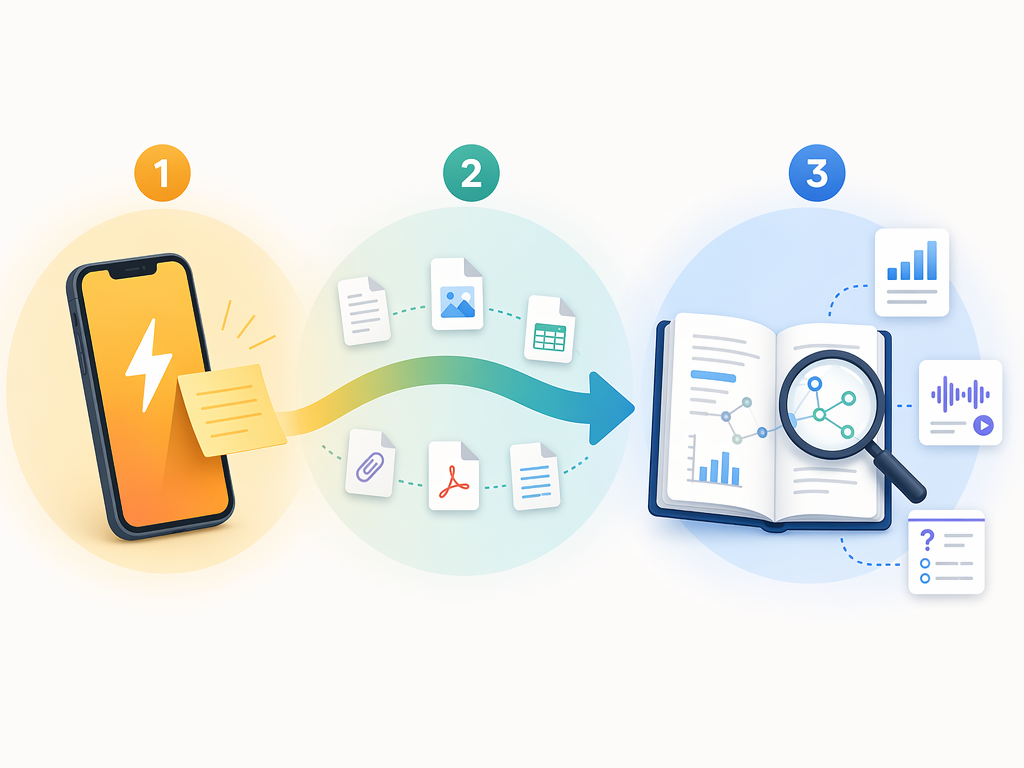
The cleanest workflow is not complicated: capture broadly in Keep, promote selectively, then use NotebookLM when the promoted material becomes a source set. The middle step is the important one. Not everything in Keep deserves to move.
- Capture in Keep without overthinking the final destination.
- Review periodically and identify notes that are still meaningful after the moment has passed.
- Move only the useful material into a NotebookLM source set, usually by copy-paste or export rather than by trying to synchronize everything.
- Ask NotebookLM questions that ordinary search cannot answer well: What themes repeat? Which notes contradict each other? What does this source set imply for a memo, study guide, plan, or report?
- Save the output somewhere appropriate for action or writing. That may be a document, a task list, a study plan, or a cleaned-up note.
Some users describe a pattern of dumping everything into Keep and periodically transferring meaningful notes into NotebookLM to surface connections across scattered snippets [6]. That is a useful example, not a law. The better rule is to move material only when you can name the reason: a client brief, an exam, a recurring theme, a research question, a content plan, a decision you need to make.
A small example: suppose Keep contains six half-formed notes about customer objections from different calls, a screenshot of a competitor claim, and a few pasted lines from internal documentation. In Keep, those items are retrievable if you remember the right label or keyword. In NotebookLM, once they are assembled with the relevant source documents, you can ask where the objections overlap, which claims are supported by the documentation, and what a sales enablement FAQ should include. The first tool preserved the raw material. The second tool makes the pile answerable.
Android Police’s comparison involving NotebookLM, Obsidian, and Keep with long PDF material is useful here because it points to the same boundary: AI organization is most meaningful when there is enough source material to organize, not when the job is simply to catch a fragment [7]. NotebookLM can help with structure and synthesis, but the usefulness still depends on what you feed it and what you ask.
What each tool should not be forced to do
Do not force Keep to become a personal knowledge management system. It can hold a lot, and search can rescue more than expected, but the app does not give you the structure, relationships, or synthesis layer that PKM users usually mean. If you are trying to decide whether you need lightweight note-taking or a more deliberate knowledge system, PKM Apps vs. Note-Taking Apps: A Decision Framework is the cleaner comparison.
Do not force NotebookLM to become your default scratchpad. It can contain notes and generate useful outputs, but opening a notebook, managing sources, and deciding what belongs there is too much ceremony for many daily fragments. If the note would die while you were setting up the workspace, the workspace is wrong for that moment.
| Situation | Use | Reason |
|---|---|---|
| You need to remember something in the next hour | Google Keep | Fast capture plus reminders beats source setup |
| You are collecting messy observations over days or weeks | Keep first, then review | Most raw notes should not become research sources automatically |
| You have PDFs, notes, transcripts, or articles to interrogate together | NotebookLM | The value comes from source-grounded answers and citations |
| You want a study guide, quiz, flashcards, briefing, report, or overview | NotebookLM | Studio outputs are built for turning source sets into learning or communication material |
| You want a single elegant writing and publishing surface | Neither as the whole answer | Keep is too thin; NotebookLM is not meant to replace a structured writing app |
| Your workflow has both fleeting inputs and serious source work | Use both | Capture and comprehension are different phases |
The decision rule
Use Google Keep when the note must be captured before it disappears. Use NotebookLM when the material is worth understanding, connecting, questioning, or turning into an output. Use both when your Google note-taking workflow has both kinds of work: fleeting inputs at the edge of your day and serious source sets that deserve more than storage.
References
- Google Keep Review. Cloudwards. 2026.
- NotebookLM vs Google Keep. XDA Developers.
- What Is NotebookLM?. DigitalOcean.
- NotebookLM Changed Completely: Here’s What Matters in 2026. Jeff Su.
- The best note-taking apps. Zapier.
- NotebookLM Plus + Google Keep Productivity Powerhouse. XDA Developers.
- Can AI organize notes better than you? NotebookLM, Obsidian, Keep. Android Police.