The Great Fragmentation: Why Document Workflow Automation Isn't One Market Anymore
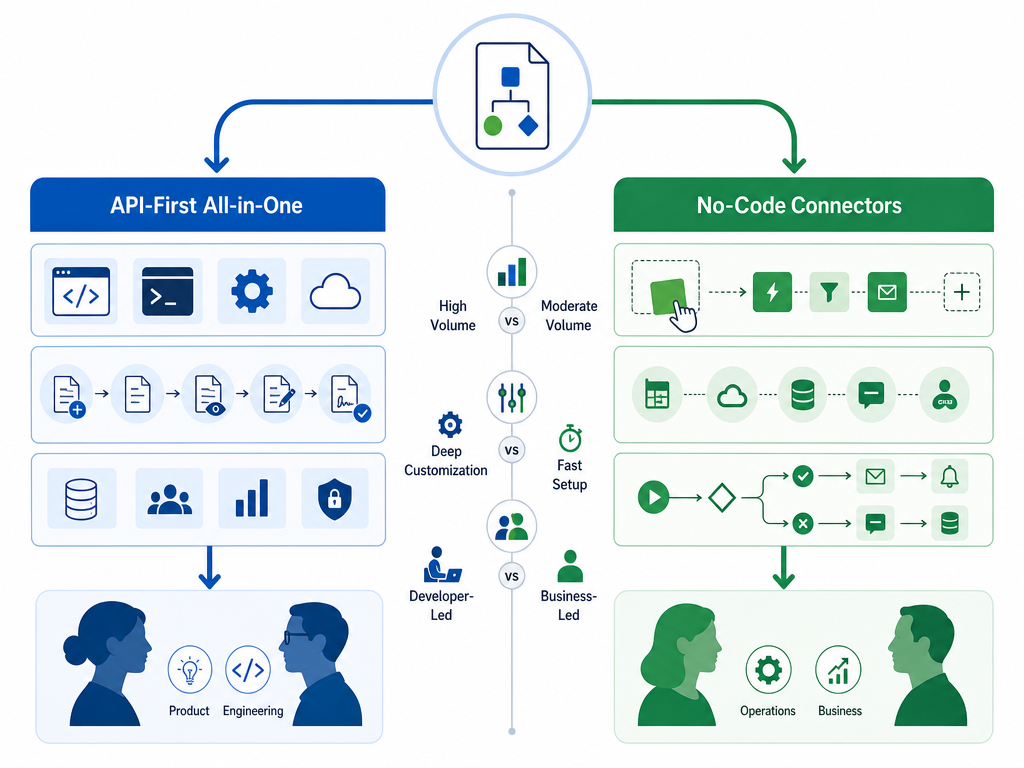
If you search for "document workflow automation" today, you'll find two very different kinds of tools pretending to solve the same problem. On one side, API-first all-in-one platforms like Anvil and PandaDoc offer end-to-end document pipelines — fill, generate, route, sign, store — all within a single ecosystem. On the other, no-code connectors like Zapier, Make, and Power Automate let you stitch together documents across your existing apps without writing a line of code. They both call themselves document workflow automation, but they serve fundamentally different teams with different technical capacity, document volume, and integration needs.
This fragmentation isn't a bug in the market — it's a sign of maturity. The global workflow automation market was valued at $26.5 billion in 2024 and is projected to exceed $78 billion by 2030 at a 19.5% compound annual growth rate, according to Grand View Research data cited by Cflow. 66% of organizations have now automated processes in at least one business function, up from 57% the previous year (McKinsey). Yet only 4% of businesses have achieved fully automated workflows, per Formstack and Mantis Research — a massive gap between aspiration and execution.
That gap is exactly where the fragmentation lives. Large enterprises still drive 71% of workflow automation revenue (Mordor Intelligence, 2026), but small and midsize businesses are adopting at a 10.19% CAGR — and they don't have dedicated engineering teams to build custom document pipelines. The result is a market split: API-first platforms for product teams who need deep customization and high-volume processing, and no-code connectors for business users who need fast, app-to-app automation without developer involvement.
Quick Comparison: Top Document Workflow Automation Tools at a Glance
The table below organizes the eight most relevant tools by category — API-first all-in-one platforms versus no-code connectors — so you can immediately see which group fits your team's profile. Pricing data changes frequently; all figures were last verified on June 15, 2026.
| Tool | Category | Starting Price (per month) | Key Differentiator | Best For |
|---|---|---|---|---|
| Anvil | API-first all-in-one | Free tier; paid plans from $98 | REST APIs for PDF fill, generation, e-signature, and workflows | Product teams needing end-to-end document pipelines |
| PandaDoc | API-first all-in-one | Free e-sign; paid from $19 | CRM-driven sales document automation | Sales teams and CRM-heavy workflows |
| DocuSign | API-first all-in-one | Personal $10; Business Pro $40 | Enterprise e-signature with ISO 27001 compliance | Compliance-heavy enterprise deployments |
| Zapier | No-code connector | Free tier; paid from $19.99 | 9,000+ app integrations with AI orchestration | Cross-app document routing without developers |
| Make | No-code connector | Free tier; paid from $9 | Complex logic, branching, and error handling | Teams needing multi-step conditional workflows |
| Power Automate | No-code connector | Free tier; paid from $15 | Deep Microsoft ecosystem integration + AI Builder | Microsoft 365-native organizations |
| Formstack | Hybrid / no-code suite | From $50 | Forms, documents, and e-signatures in one no-code platform | Teams wanting a unified no-code document stack |
| Cflow | Hybrid / SMB-focused | From $30 | Approval workflow automation for SMBs | Small businesses with structured approval chains |
API-First All-in-One Platforms: Anvil, PandaDoc, and DocuSign
API-first platforms treat document workflow as a single, programmable pipeline. You don't stitch together separate tools for PDF generation, e-signature, and approval routing — the platform provides all of it through REST APIs, webhooks, and embedded interfaces. This approach is ideal when your team has developer resources, needs deep customization, or processes high document volumes where every second of latency and every manual handoff costs money.
Anvil: The API-First All-in-One Contender
Anvil provides four core capabilities through REST APIs: PDF filling, PDF generation, embedded e-signatures, and Workflows that chain webforms to document creation and signing. For product teams building custom document experiences — think onboarding packets, government forms, or compliance paperwork — Anvil's API-first approach means you can embed the entire document lifecycle inside your own application without redirecting users to a third-party interface.
Where Anvil stands out is its all-in-one scope. Many API-first tools specialize in one piece — e-signature or PDF generation — and leave you to wire the rest yourself. Anvil's Workflows feature bridges webform data collection, document generation, and signing into a single automated sequence. That matters when a single document process involves multiple parties, conditional fields, and audit requirements.
PandaDoc: CRM-Driven Document Automation
PandaDoc is built for sales and CRM-driven document workflows. Its strength is in automating proposals, quotes, and contracts that originate from a CRM pipeline — pulling customer data, generating a document, routing it for approval, and capturing e-signatures without manual file management. If your document workflow starts with a Salesforce or HubSpot deal stage, PandaDoc's native integrations reduce friction significantly.
However, PandaDoc is less suited for non-sales document types — internal HR forms, compliance checklists, or operational paperwork — where the CRM trigger isn't relevant. Its API capabilities exist but are narrower than Anvil's; you're buying into a sales-document ecosystem, not a general-purpose document pipeline.
DocuSign: The Enterprise Compliance Standard
DocuSign is the incumbent in e-signature, and for good reason. It publishes ISO 27001:2022, ISO 27017:2015, ISO 27018:2019, and PCI DSS certifications — a compliance portfolio that matters for regulated industries like finance, healthcare, and insurance. Its API-first capabilities include embedded signing, bulk send, and audit trails with IP tracking and tamper detection.
The tradeoff: DocuSign is primarily an e-signature platform with document workflow features bolted on, not a document pipeline from scratch. If your need is signing contracts at enterprise scale with airtight compliance, DocuSign is the safe choice. If you need to generate, fill, route, and sign documents as a unified process, Anvil's all-in-one approach may serve you better.
No-Code Connectors: Zapier, Make, and Power Automate
No-code connectors take the opposite approach: instead of bringing everything into one platform, they let you connect the tools you already use — Google Drive, Slack, Dropbox, CRM, email — and automate document movement between them. These platforms are built for business users and operations managers who need results this week, not next quarter.
Zapier: The Integration Giant
Zapier offers 9,000+ app integrations and has expanded into AI orchestration with Zapier Copilot, Zapier MCP, and the Zapier SDK. For document workflows, this means you can trigger a document generation in Google Docs when a new row appears in Airtable, then automatically email it as a PDF and store it in Dropbox — all without writing code.
Zapier's strength is breadth: if your document workflow touches multiple apps, Zapier likely connects them. Its weakness is depth: complex conditional routing, error handling, and multi-step approval chains can become unwieldy in Zapier's linear trigger-action model. For straightforward "when X happens, do Y with this document" patterns, Zapier is the fastest path to automation.
Make: Complex Logic Without Code
Make (formerly Integromat) offers a visual scenario builder that supports branching, looping, error handling, and custom JavaScript or Python modules. For document workflows that require conditional routing — "if the contract value exceeds $50,000, route to legal for review; otherwise, send directly to the client" — Make's visual logic is more intuitive than Zapier's linear steps.
Make also handles data transformation better than most no-code tools. You can parse, merge, and reformat document data between steps without needing a separate middleware tool. The tradeoff is a steeper learning curve: Make's interface is more powerful but less beginner-friendly than Zapier's.
Power Automate: The Microsoft Ecosystem Lock-In
Power Automate is the no-code connector for organizations already living inside Microsoft 365. Its deep integration with SharePoint, Teams, Outlook, and OneDrive means document workflows that originate from email attachments, Teams approvals, or SharePoint document libraries require almost no setup. Power Automate also includes AI Builder, which can extract data from documents using pre-built AI models — useful for invoice processing, form data extraction, and document classification.
The catch: Power Automate's integration depth drops sharply outside the Microsoft ecosystem. Connecting to non-Microsoft apps often requires premium connectors or custom APIs. If your document workflow lives entirely in Microsoft 365, Power Automate is the natural choice. If you use a mix of Google Workspace, Slack, and specialized tools, Zapier or Make will serve you better.
Hybrid and SMB-Focused Platforms: Formstack and Cflow
Not every team fits neatly into the API-first or no-code connector bucket. Some organizations — particularly small businesses and mid-market teams — need more than basic app-to-app connections but lack the developer resources to integrate an API-first platform. That's where hybrid platforms like Formstack and Cflow enter.
Formstack: A No-Code Document Suite
Formstack combines online forms, document generation, and e-signatures into a single no-code platform. If your document workflow starts with a webform — customer intake, employee onboarding, event registration — Formstack lets you capture data, generate a PDF, route it for approval, and collect signatures without leaving the platform. It's not as customizable as Anvil's API-first approach, but it doesn't require a developer to set up.
Formstack is best for teams that need a unified document stack but don't have the volume or complexity to justify a full API integration. The tradeoff is less flexibility in document design and routing logic compared to API-first platforms.
Cflow: Approval Workflows for SMBs
Cflow focuses specifically on approval workflow automation — purchase orders, expense reports, leave requests, and contract approvals. It's designed for SMBs that need structured approval chains with conditional routing, escalation rules, and audit trails, but don't need the full document generation and e-signature capabilities of an API-first platform.
Cflow's niche is narrow but valuable: if your primary pain point is manual approval routing (email chains, lost requests, delayed sign-offs), Cflow solves that specific problem without the overhead of a broader document automation platform. It integrates with common business apps but doesn't offer the 9,000+ integrations of Zapier or the deep API customization of Anvil.
Feature Checklist: What to Look for in a Document Workflow Automation Tool
Regardless of which category you lean toward, every document workflow automation tool should be evaluated against the same core capabilities. The checklist below covers the features that separate a genuinely useful platform from one that creates more complexity than it removes.
- Trigger flexibility: Can the workflow start from an event (new form submission, email attachment, CRM deal stage change), a schedule (daily report generation), or a webhook (external system push)? The more trigger types, the more workflows you can automate without workarounds.
- Conditional routing and approval logic: Can the system route documents to different approvers based on document value, department, or content? Can it handle parallel approvals, sequential approvals, and escalation if an approver doesn't respond?
- Native eSignature capability: Does the platform include e-signature natively, or do you need to integrate a separate e-sign tool? Native eSignature reduces integration complexity and ensures the signing step is part of the same audit trail.
- Integration depth: How many pre-built connectors does the platform offer? More importantly, do those connectors support the specific actions you need (create document, update field, trigger approval) or just basic read/write operations?
- Audit trails and compliance: Does the platform log every action — who viewed, edited, approved, or signed a document and when? For regulated industries, look for ISO certifications, SOC 2 reports, and tamper detection on signed documents.
- No-code setup vs. developer requirements: Can a business user set up the workflow without developer help, or does it require API integration? Be honest about your team's technical capacity — overestimating it is the most common reason automation projects stall.
Decision Matrix: Which Approach Is Best for Your Persona?
The right choice depends on four variables: your team's technical capacity, document volume, budget, and whether you prioritize end-to-end workflows or app-to-app integrations. The table below maps common personas to the recommended approach and specific tools.
| Persona | Technical Capacity | Document Volume | Recommended Approach | Top Tool Picks |
|---|---|---|---|---|
| Product team (building custom document experiences) | Has developers | High (1,000+ docs/month) | API-first all-in-one | Anvil, DocuSign (for compliance-heavy use cases) |
| Sales team (CRM-driven proposals and contracts) | Limited developers | Moderate (100–500 docs/month) | API-first all-in-one | PandaDoc |
| Operations manager (cross-app document routing) | No developers | Moderate (100–500 docs/month) | No-code connector | Zapier, Make |
| Microsoft 365-native organization | No developers | Moderate to high | No-code connector | Power Automate |
| Small business owner (simple approval workflows) | No developers | Low (under 100 docs/month) | Hybrid / SMB-focused | Cflow, Formstack |
| Enterprise compliance team (regulated documents) | Has developers | High (5,000+ docs/month) | API-first all-in-one | DocuSign, Anvil |
The ROI case for automation is well-documented. Forrester's 2024 Total Economic Impact study documented a 248% three-year ROI for enterprises deploying workflow automation platforms. Basic automation reduces operational costs by 20%–30%, while intelligent automation achieves 50%–70% cost reductions (McKinsey & Gartner). Over half of businesses see full ROI within 12 months, per Cflow's analysis of industry data.
FAQ: Costs, Implementation Timelines, and Common Pitfalls
How much does document workflow automation cost?
Costs vary dramatically by approach. No-code connectors like Zapier and Make offer free tiers and paid plans starting at $9–$20 per month, making them accessible for small teams. API-first platforms like Anvil and PandaDoc start higher ($19–$98 per month) but include more capabilities per tier. Enterprise plans for DocuSign and PandaDoc can run $40–$100+ per user per month. The average organization saves $46,000 per year by automating finance-related workflows like invoicing and approvals (DocuClipper, citing Formstack's 2022 State of Digital Maturity report).
How long does implementation take?
No-code connectors can be set up in hours to days for simple workflows. A basic "new form submission → generate PDF → email to team" Zapier workflow takes about 30 minutes to configure. Complex multi-step scenarios in Make or Power Automate may take 1–3 days of testing and iteration.
API-first platforms require 2–6 weeks for initial integration, depending on the complexity of your document templates, routing logic, and compliance requirements. The integration phase includes API key setup, webhook configuration, template design, and testing. Plan for ongoing maintenance — API changes, template updates, and new compliance requirements all consume developer time after launch.
Can I start with no-code and migrate to API-first later?
Yes, but plan for it. No-code connectors and API-first platforms use fundamentally different data models and integration patterns. A Zapier workflow that sends documents via email won't directly translate to an Anvil API pipeline that generates, signs, and stores documents programmatically. If you anticipate outgrowing no-code within 12–18 months, choose an API-first platform from the start — the upfront integration cost is lower than rebuilding your entire document workflow later.
What are the hidden costs?
- Integration maintenance: API changes, deprecations, and version updates require ongoing developer attention. Budget 5–10 hours per month for maintaining integrations.
- Training and onboarding: No-code tools still require training for team members who will build and maintain workflows. API-first platforms require developer training on the platform's API documentation and SDKs.
- Compliance overhead: If your industry requires audit trails, data residency, or specific certifications (ISO, SOC 2, HIPAA), verify that your chosen platform supports these requirements in your region. Some enterprise compliance features are only available in higher pricing tiers.
- Scaling costs: Most platforms charge per document, per API call, or per active workflow. As your document volume grows, costs can scale faster than expected. Review pricing tiers for volume caps and overage charges before committing.
How do I know if I need document workflow automation vs. general workflow automation?
The distinction matters. Document workflow automation focuses on the lifecycle of a document — creation, editing, approval, signing, distribution, and storage. General workflow automation covers any process, including task assignments, notifications, data entry, and system integrations. If your primary pain point is manual document handling (emailing PDFs for approval, tracking versions, chasing signatures), you need document workflow automation. If your pain point is broader process inefficiency, start with general workflow automation and add document-specific tools as needed.