
The Orchestration Ceiling: Why Your Automations Keep Breaking
You set up a Zapier automation to handle a new lead: when a form submission arrives, it creates a CRM contact, sends a Slack notification, and adds a task to your project board. It works beautifully — until it doesn't. The CRM step fails because of a duplicate field, but the Slack message already fired. You fix the CRM entry and rerun the automation, but now you have two Slack messages and two project tasks. The lead is confused, your team is annoyed, and you're manually cleaning up duplicates.
This is the orchestration ceiling. You've hit the point where basic automation tools — designed for simple, stateless triggers — can no longer handle the complexity of your real-world processes. The problem isn't that you need more automations; it's that you need a fundamentally different approach to managing them.
The n8n blog's 2026 architectural breakdown identifies this exact scenario as the double-execution problem: without a record of state, a system that fails midway will restart a half-finished process and create duplicate data. This isn't a bug — it's a fundamental limitation of stateless automation. When your processes span multiple systems, involve conditional branching, or require reliable error recovery, you've outgrown the tool's design.
Workflow Automation vs. Workflow Orchestration: A Clear Definition
Before diagnosing the solution, it's worth establishing precise definitions — because the industry uses these terms loosely, and the distinction matters for your architecture decisions.
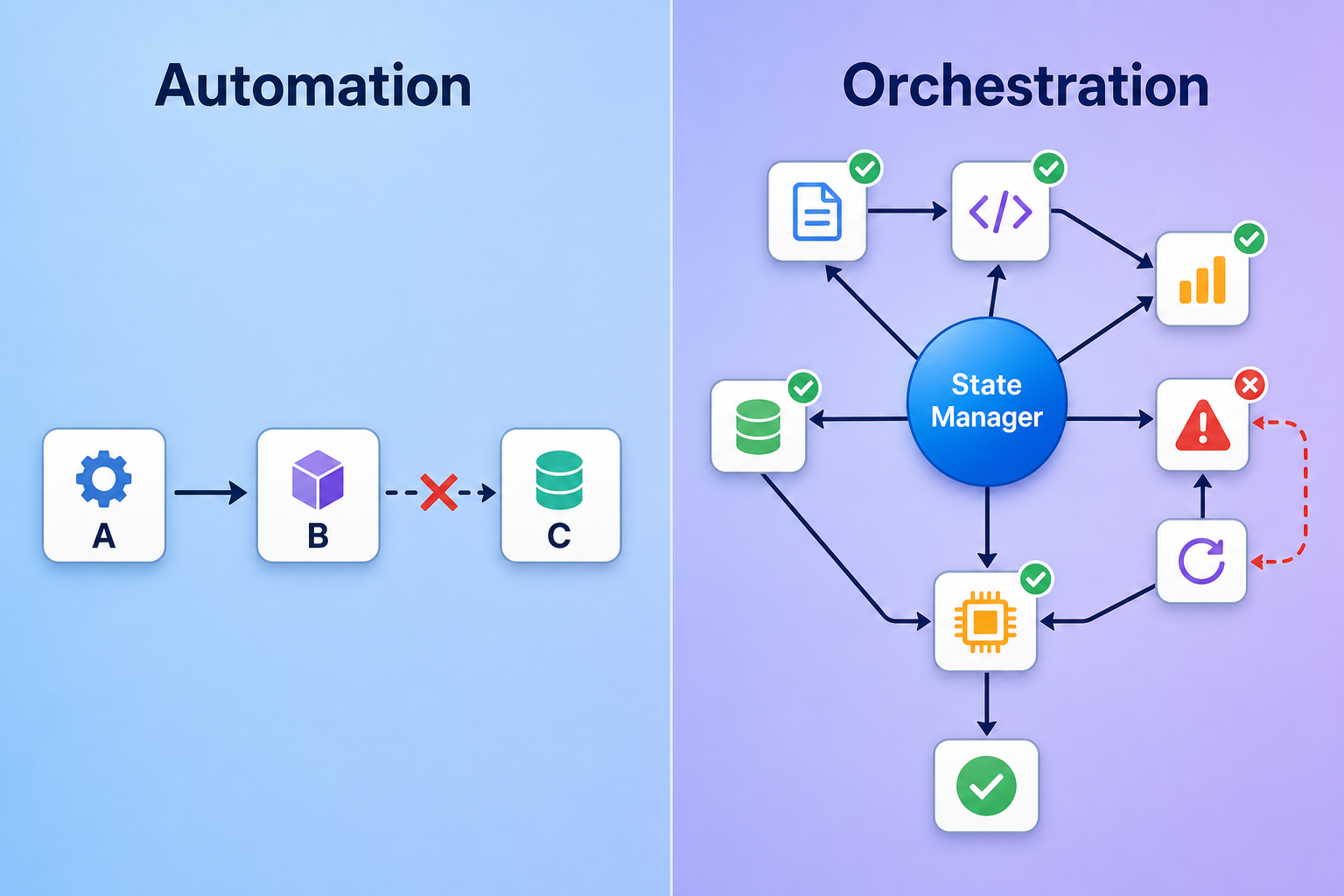
Workflow automation executes individual actions in response to a trigger. It is stateless between executions, bounded in scope, and typically handles a single task or a simple linear sequence. As IBM defines it in their April 2026 update, "Workflow automation focuses on automating individual tasks." A classic example: "When a new email arrives in Gmail, save the attachment to Google Drive." The tool fires, completes, and forgets.
Workflow orchestration manages the entire sequence. It is a central controller that coordinates multi-step, cross-system processes with state management, error recovery, and dependency tracking. IBM continues: "Workflow orchestration creates a connected framework where these automated tasks interact efficiently, follow a logical sequence and integrate with other systems to achieve an end-to-end business process." The n8n blog describes it as a central controller that manages multiple automated tasks with centralized state management.
The Teamwork.com guide (April 2026) offers a practical framing: automation means "trigger this action when that happens," while orchestration means "manage the entire sequence." Their full definition adds specificity: "the coordination of automated tasks, systems, and people across a defined sequence, with built-in logic to handle dependencies, failures, and conditional branching."
The Architectural Difference: State Management Is Everything
The single most important distinction between automation and orchestration is state management. This is not an abstract engineering concept — it has direct, practical consequences for how your processes behave when things go wrong.
In a stateless automation, each execution is independent. The tool receives a trigger, performs an action, and discards all context. If the process has three steps and step two fails, the tool has no memory of step one having succeeded. When you retry, it starts from the beginning — hence the double-execution problem. The n8n blog's architectural breakdown explains that without a record of state, a system that fails midway would restart a half-finished process and create duplicate data.
In an orchestrated system, a central controller maintains the full process context: which steps completed, what data each step produced, where the failure occurred, and what recovery actions are available. This enables three critical capabilities that stateless automation cannot provide:
- Graceful error recovery: The controller can retry the failed step, skip it if the error is non-critical, or roll back completed steps to maintain consistency.
- Conditional branching: The process can take different paths based on intermediate results — for example, route high-value leads to a different approval workflow than standard leads.
- Dependency tracking: The controller knows which steps depend on which, and can parallelize independent tasks while sequencing dependent ones.
Automation vs. Orchestration: A Side-by-Side Comparison
The following table distills the architectural differences across the key dimensions that matter for operational decision-making. It draws on the comparison frameworks from the n8n blog, IBM's definition, and the Teamwork.com guide.
| Dimension | Workflow Automation | Workflow Orchestration |
|---|---|---|
| State management | Stateless — no memory between executions | Centralized state tracking across the entire process |
| Error handling | Fail and stop; manual retry creates duplicates | Configurable retry, skip, rollback, or escalate |
| Execution flow | Linear, single-path trigger → action | Directed acyclic graph (DAG) with branching and parallelism |
| Governance posture | Per-automation configuration, no central audit trail | Centralized logging, audit trails, and role-based access |
| Observability | Per-execution logs, limited visibility into process health | Real-time dashboards, SLA monitoring, and failure alerts |
| Typical scope | Single task or simple linear sequence | Multi-step, cross-system, end-to-end business process |
| Recovery model | Rerun from start (double-execution risk) | Resume from point of failure |
Real-World Examples: When Each Approach Shines
The distinction becomes concrete when you map it to actual workflows. Most teams use both layers — the question is which layer handles which process.
Good candidates for stateless automation
- When a new form submission arrives, send a Slack message and create a Trello card. Two independent actions, no dependency between them, and failure of one does not affect the other.
- When a new invoice is marked paid in QuickBooks, update the customer record in HubSpot. Single data sync, linear path, easy to re-run if it fails.
- When a new blog post is published in WordPress, share it to Twitter and LinkedIn. Fire-and-forget notifications where duplicates are a minor annoyance, not a data integrity issue.
Good candidates for orchestration
- When a customer signs a contract, provision their SaaS account, send a personalized welcome sequence, update the CRM with contract terms, create onboarding tasks in the project system, notify the customer success team — and if provisioning fails, retry three times before escalating to engineering.
- When an employee submits an expense report, validate receipts against policy, route to the appropriate approver based on amount and department, update the accounting system, trigger reimbursement, and log the audit trail — with automatic escalation if approval is not received within 48 hours.
- When a support ticket is escalated, gather context from the CRM, knowledge base, and previous tickets, assign to the right tier based on issue complexity, notify the assigned agent with a summary, and create a follow-up task for the next business day if no response is received.
Notice the pattern: orchestration becomes necessary when the process has dependencies between steps, requires conditional logic, spans multiple systems, or needs reliable error recovery. The same team might use Zapier for the simple notification automations and n8n or Prefect for the customer onboarding flow — and that is exactly the right architecture.
5 Signs You've Outgrown Basic Automation
How do you know when it's time to invest in orchestration? These five diagnostic signals indicate that your process complexity has exceeded what stateless automation can handle.
- Your automations break silently. You discover a failure hours or days later when someone asks why a task wasn't completed. Stateless tools log per-execution errors but do not provide centralized failure monitoring or alerting.
- You're manually restarting half-finished processes. When a multi-step automation fails mid-sequence, your team has developed a ritual of checking which steps completed, fixing the issue, and manually re-running the remaining steps. This is the double-execution problem in practice.
- You need to coordinate across three or more systems. Each additional system multiplies the failure surface area. A process that touches the CRM, email platform, project management tool, and accounting system has too many potential failure points for stateless error handling.
- You're building workarounds for missing error handling. Custom scripts that check whether a previous step succeeded before proceeding. Manual approval gates inserted into automated flows. Spreadsheet logs tracking which automations ran successfully. These are signs your tool is not meeting your needs.
- Your team spends more time fixing automations than benefiting from them. The maintenance burden has crossed the threshold where the time saved by automation is consumed by debugging, re-running, and cleaning up after failures.
Cost Considerations: Automation vs. Orchestration
Cost is often the first objection when teams consider moving from automation to orchestration. The surface-level comparison is misleading: automation tools appear cheaper per task, but the total cost of ownership for complex processes tells a different story.
| Cost Factor | Stateless Automation (Zapier, Make) | Orchestration Platform (n8n, Prefect, Camunda) |
|---|---|---|
| Per-task pricing | Low — typically $20–$100/month for moderate usage | Higher — often $50–$500/month for self-hosted or cloud tiers |
| Failure cleanup cost | High — manual intervention for each failure, duplicate data cleanup | Low — automated retry, rollback, or escalation reduces manual work |
| Process complexity limit | Hard ceiling — complex branching requires workarounds or custom code | Built-in support for DAGs, conditional logic, and parallel execution |
| Observability cost | Hidden — time spent checking logs, building manual dashboards | Included — centralized monitoring, SLA dashboards, failure alerts |
| Scaling cost | Linear — each new automation adds cost and maintenance burden | Sub-linear — orchestration handles increased volume with marginal cost |
The market context reinforces that orchestration is becoming a mainstream investment. According to BMC's March 2026 blog citing Gartner's August 2025 Magic Quadrant, the service orchestration and automation platform market reached $3.8 billion in 2024, up from $3.3 billion in 2023, with expectations to grow to $4.9 billion by 2028. Gartner also projects that by 2029, 90% of organizations currently delivering workload automation will use service orchestration platforms, and that 75% of workflows will leverage GenAI to increase troubleshooting efficiency by 50%.
Enterprise platforms like ServiceNow, Pega, and Appian serve the high end of this market, but their pricing is not publicly disclosed — expect "contact sales" with annual contracts typically starting in the five-figure range. For teams that do not need enterprise-grade governance, open-source and self-hosted options like n8n and Prefect offer orchestration capabilities at a fraction of the cost.
How Modern Platforms Bridge Both Layers
One of the most important developments in the automation space is that modern platforms no longer force you to choose between automation and orchestration. Tools like n8n, Prefect, and Camunda support both patterns on the same infrastructure, meaning teams can start with simple automations and add orchestration capabilities incrementally as complexity grows.
The n8n blog explicitly positions this as a key advantage: the platform supports both patterns on the same infrastructure. A team can build a simple two-step automation today and, as the process grows to include conditional branching, error recovery, and cross-system coordination, add orchestration capabilities without re-platforming. The same workflow engine handles both cases.
This architectural bridge eliminates the traditional migration pain point. Historically, teams would outgrow their automation tool and face a costly, risky migration to a completely different platform. Modern orchestration platforms are designed to accommodate both stateless and stateful execution, allowing teams to evolve their processes without changing their tool stack.
- Start with simple automations: trigger → action, no state tracking, no error recovery.
- Add conditional branching: if-then logic based on intermediate results.
- Enable state management: track which steps completed and what data each produced.
- Configure error recovery: retry policies, rollback actions, escalation paths.
- Implement observability: centralized dashboards, SLA monitoring, failure alerts.
For a deeper look at how this layered approach fits into a broader business process automation strategy, see our article on The Two-Layer Automation Stack: Why 2026's Best BPA Strategy Combines No-Code Workflows with AI Agents, which covers the no-code-plus-AI-agent pattern in depth.
Decision Framework: Should You Invest in Orchestration?
Use the following diagnostic questions to determine your next step. Answer each honestly based on your current processes, not your aspirational ones.
- How many steps does your typical process have? If most processes are 1–3 steps with no dependencies, automation is likely sufficient. If processes regularly exceed 5 steps with conditional branching, orchestration will save you significant maintenance time.
- How critical is error recovery? If a failed automation causes data duplication, customer-facing errors, or compliance issues, you need orchestration's state-aware recovery. If failures are a minor inconvenience, automation may still suffice.
- Do you need audit trails? If your processes require compliance logging, role-based access control, or detailed audit trails, orchestration platforms provide these natively. Automation tools typically do not.
- How many systems are involved? Processes that touch three or more systems have a high failure surface area. Orchestration's centralized error handling becomes valuable at this threshold.
- Is your team spending more time maintaining automations than benefiting from them? If the answer is yes, the cost of orchestration is likely lower than the hidden cost of maintenance.
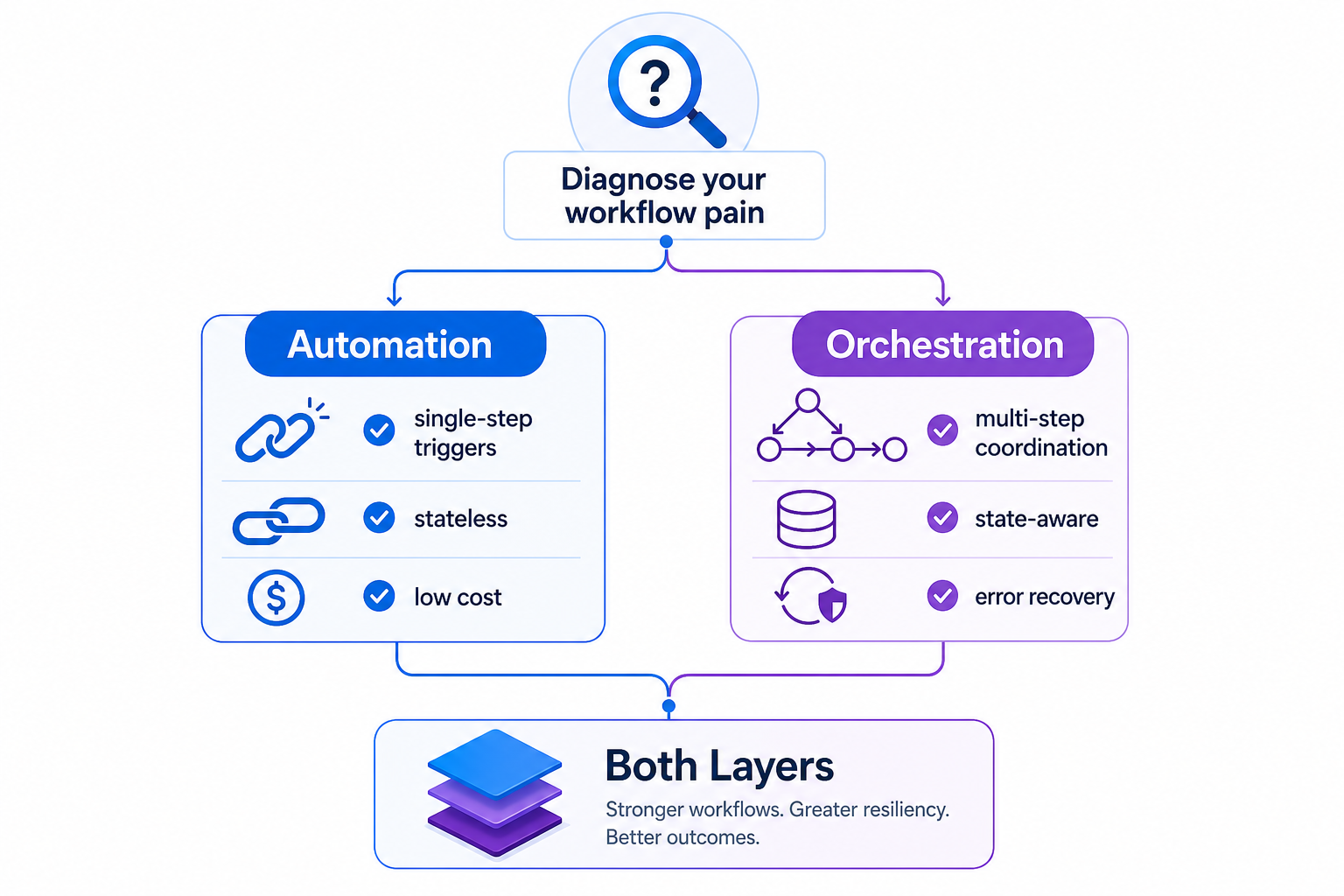
Based on your answers, route to one of three paths:
- Stick with automation: If your processes are simple, failures are rare and non-critical, and you are not spending significant time on maintenance, your current approach is appropriate. Focus on optimizing your existing automations rather than adding complexity.
- Add orchestration to your current stack: If you have a few complex processes but most are simple, consider a platform that supports both patterns. Start by migrating your highest-friction processes to orchestration while keeping simple automations on your existing tool.
- Evaluate a dedicated orchestration platform: If most of your processes are multi-step, cross-system, and failure-sensitive, it is time to invest in a dedicated orchestration platform. See our Best Workflow Orchestration Tools in 2026 comparison for a detailed head-to-head evaluation of the leading options.