

Defining RPA vs. BPA vs. AI Process Automation
Before comparing tools, it helps to clarify three terms that often get used interchangeably but describe fundamentally different approaches to automation. Understanding the distinction is the first step toward choosing the right architecture for your team.
Robotic Process Automation (RPA) refers to software bots that mimic human interactions with user interfaces. An RPA bot logs into a legacy system, clicks buttons, copies text from one field, and pastes it into another — exactly as a person would, but faster and without breaks. The bot has no understanding of the data it moves; it follows a rigid, step-by-step script. This makes RPA fast to deploy on systems without APIs, but also fragile: if a button moves two pixels or a field label changes, the bot breaks.
Business Process Automation (BPA) is a broader category. BPA platforms orchestrate end-to-end workflows that may involve multiple systems, human approval steps, conditional routing, and business rules. Unlike RPA, which automates a single task at the UI level, BPA automates the entire process — from trigger to completion — and often includes dashboards, reporting, and compliance tracking. Modern BPA platforms increasingly embed AI capabilities, blurring the line between the two categories.
AI Process Automation (sometimes called intelligent automation or agentic automation) adds a layer of cognition. These tools use machine learning, natural language processing, and large language models to handle unstructured data — emails, PDFs, chat transcripts — and make contextual decisions. An AI automation tool can read an invoice in any format, extract the relevant fields, route it to the correct approver based on the amount and department, and flag anomalies for review. It does not need a stable UI to interact with; it works through APIs and adapts when the underlying data changes.
| Dimension | Traditional RPA | BPA | AI Process Automation |
|---|---|---|---|
| Interaction method | UI clicks and keystrokes | APIs, forms, and integrations | APIs, NLP, and LLMs |
| Data handling | Structured, predictable | Structured and semi-structured | Structured, unstructured, and contextual |
| Decision logic | Fixed rules (if-then) | Rules with conditional routing | Probabilistic models and learned patterns |
| Resilience to change | Low — breaks on UI updates | Medium — depends on integration depth | High — adapts via API contracts and AI |
| Typical use case | Data entry, screen scraping | Approval workflows, cross-department processes | Document processing, intelligent triage, anomaly detection |
For a deeper look at how these concepts relate to each other, see our guide on workflow automation vs. orchestration, which explains when to upgrade from simple task automation to full process orchestration.
When Traditional RPA Still Makes Sense
Despite the momentum behind AI-native automation, traditional RPA is not obsolete. There are specific scenarios where a UI-mimicking bot remains the most practical — and sometimes the only — option. Acknowledging these use cases keeps the conversation honest and helps teams avoid over-investing in AI capabilities they do not yet need.
- Legacy systems with no API access. Many enterprises run on mainframes, terminal emulators, or on-premise software that predates modern APIs. RPA can interact with these systems through their existing user interfaces without requiring any changes to the underlying application. This is often the fastest path to automation when the IT department cannot or will not modify the legacy system.
- High-volume, structured data processing. If your process involves moving large volumes of predictable, well-formatted data between two systems — for example, copying customer records from a CSV file into a CRM — a simple RPA script can handle it reliably and cheaply. The data is consistent, the rules are clear, and there is little need for contextual decision-making.
- Strict compliance and audit requirements. In regulated industries such as banking, insurance, and healthcare, auditors often require deterministic, fully traceable execution. RPA bots produce a clear log of every click and keystroke, which can be reviewed and validated. AI models, by contrast, introduce probabilistic outputs that are harder to audit. If your compliance team needs to prove exactly why a decision was made, a rule-based RPA bot may be the safer choice.
- Short-term automation needs. If you need to automate a process for a few months — during a system migration, a seasonal spike, or a temporary regulatory requirement — the setup cost of an AI-native platform may not be justified. A lightweight RPA bot can be deployed quickly and retired when the need passes.
When AI-Native Automation Wins
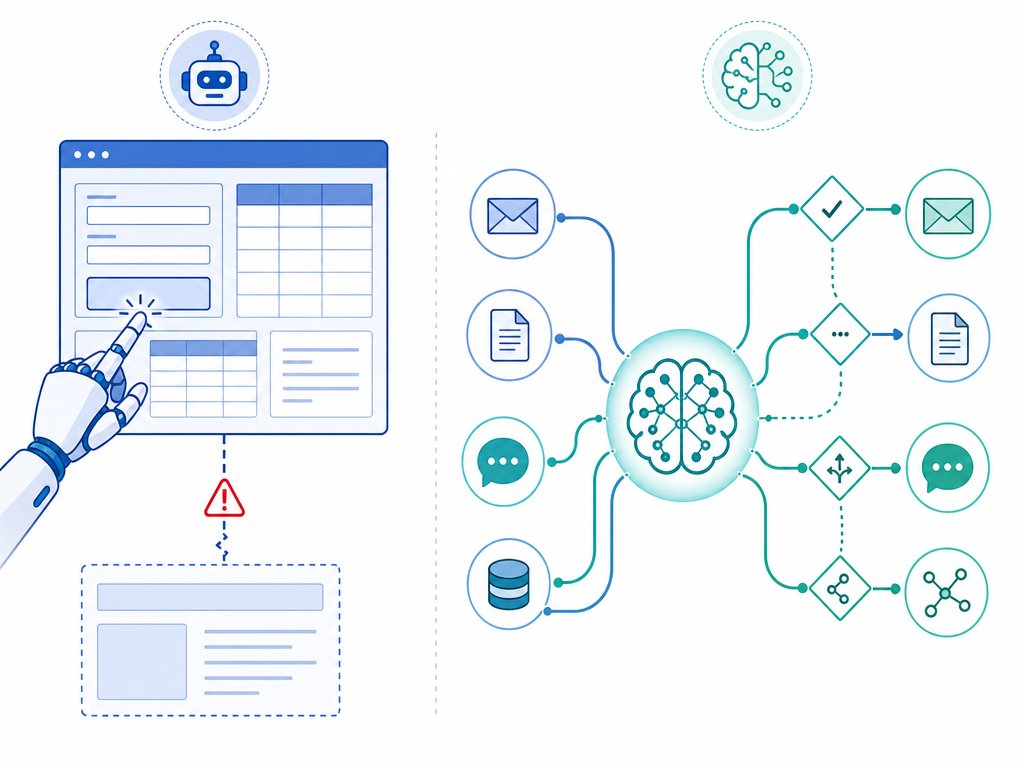
AI-native automation tools excel in exactly the areas where traditional RPA struggles. If your workflows involve unstructured data, contextual decisions, or frequent change, an AI-powered platform will likely outperform a UI-mimicking bot — and require less ongoing maintenance.
Handling Unstructured Data
Consider invoice processing. A traditional RPA bot can handle invoices only if they arrive in a consistent format — same layout, same fields in the same positions. The moment a vendor sends a PDF with a different template, the bot fails. An AI-native tool, by contrast, uses OCR and natural language processing to extract relevant fields regardless of layout. It can read the invoice total, vendor name, and line items from any format, then pass that data into your accounting system. The same principle applies to processing emails, contracts, support tickets, and chat transcripts.
Making Contextual Decisions
RPA follows fixed rules: if condition A is true, do action B. AI automation can weigh multiple factors, learn from past decisions, and handle edge cases that were not explicitly programmed. For example, an AI-powered customer support triage system can read an incoming ticket, assess its sentiment, determine whether it matches a known issue, check the customer's account history, and route it to the appropriate team — all without a human writing a rule for every possible scenario. This capability is transforming how teams handle high-volume, variable workflows.
Adapting to Change Without Breaking
Because AI-native tools interact with systems through APIs rather than user interfaces, they are inherently more resilient to change. When a SaaS application updates its interface, an RPA bot may stop working until someone updates the bot's script. An API-native integration continues to function as long as the API contract remains stable — which is almost always the case. This resilience translates directly into lower maintenance costs and fewer emergency fixes.
The Hybrid Approach: Tools That Do Both
For many organizations, the choice is not binary. Several major platforms now offer both traditional RPA capabilities and AI-powered automation within a single product, allowing teams to use the right approach for each task without managing separate tool stacks.
| Platform | RPA Capabilities | AI Capabilities | Starting Price |
|---|---|---|---|
| UiPath | Attended and unattended desktop bots, UI automation, screen scraping | Agentic Automation: bots work toward goals using LLMs (OpenAI, Google Vertex) for language tasks like drafting emails and summarizing reports | $420/month for Pro plan (1 dev license, 3 tenants, automation ops, StudioX add-on) |
| Microsoft Power Automate | Attended desktop flows (Premium plan), unattended desktop flows (Process plan), legacy Windows app automation | Cloud AI flows, premium connectors, process mining, AI Builder for document processing and prediction | $15/user/month (Premium), $150/bot/month (Process), $215/bot/month (Hosted Process with VM) |
| Automation Anywhere | Desktop automation, task bots, meta bots for reusable components | IQ Bot for document processing, AI-powered decision engines, integration with LLMs | Contact sales for pricing |
UiPath's Agentic Automation is a notable development. Instead of requiring a detailed step-by-step script, the platform allows bots to work toward a defined goal using AI models to make decisions along the way. For example, a bot can be told to "process incoming invoices" and then use an LLM to determine the correct workflow for each invoice based on its content, rather than following a rigid script that breaks on the first unexpected format.
Microsoft Power Automate bridges the gap between cloud-native automation and legacy system integration. Its Premium plan ($15/user/month) includes attended desktop flows for automating on-screen tasks in Windows applications, while the Process plan ($150/bot/month) adds unattended desktop flows that run on virtual machines. This makes Power Automate a strong choice for organizations that need to automate both modern SaaS tools and legacy Windows applications within a single platform.
For a detailed comparison of Power Automate against cloud-native alternatives, see Power Automate vs Zapier vs Make in 2026.
Cost Comparison: RPA Licensing vs. AI Automation Pricing
The pricing models for traditional RPA and AI-native automation differ fundamentally, and understanding these differences is critical for budgeting. RPA platforms typically charge per bot — a license for each automated worker — while AI-native platforms charge per user or per execution. The implications for cost at scale are significant.
| Cost Factor | Traditional RPA (e.g., UiPath Pro) | AI-Native Automation (e.g., Zapier, n8n, Gumloop) |
|---|---|---|
| Licensing model | Per bot (per automation worker) | Per user or per execution |
| Entry-level price | $420/month for 1 dev license (UiPath Pro) | $0–$50/month per user |
| Scaling cost | Adds $420+/bot for each new automation | Adds $0–$50/user for each new team member |
| Infrastructure | Often requires dedicated servers or VMs for unattended bots | Cloud-native, no infrastructure management |
| Maintenance cost | High — bots break on UI updates, require ongoing scripting | Low — API integrations remain stable |
| Hidden costs | Bot monitoring, error handling, re-scripting after updates | API rate limits, premium connector fees |
The per-bot pricing model of traditional RPA creates a disincentive to automate broadly. If each new automation costs $420 per month, teams tend to automate only the highest-volume, most stable processes — leaving the long tail of smaller, more variable workflows untouched. AI-native platforms, with their per-user pricing, encourage broader adoption because adding a new automation does not increase the license cost.
For a deeper dive into how AI automation pricing scales, see AI Workflow Automation Pricing Decoded, which compares costs across platforms as your usage grows.
Vendor Landscape: Who Plays in Which Space
The automation vendor landscape has become more complex as traditional RPA companies add AI capabilities and AI-native platforms expand into enterprise territory. Understanding which category each vendor primarily serves helps you narrow your options based on your team's technical maturity and automation needs.
| Category | Vendors | Best For |
|---|---|---|
| Pure RPA | Blue Prism, Automation Anywhere (traditional) | Legacy system automation, high-volume structured data, strict compliance environments |
| AI-Native Automation | Zapier, n8n, Gumloop, Lindy | Cloud-first teams, unstructured data processing, contextual decision flows, rapid prototyping |
| Hybrid (RPA + AI) | UiPath, Microsoft Power Automate, Automation Anywhere (newer versions) | Organizations with both legacy and modern systems, gradual migration from RPA to AI |
| BPA Orchestrators | Kissflow, Pipefy | Cross-departmental workflow management, human-in-the-loop approvals, process visibility and compliance |
For teams evaluating the no-code versus developer-oriented path, our comparison of AI workflow automation platforms for no-code vs. developer teams provides a detailed breakdown of where each tool fits.
It is worth noting that the boundaries between these categories are blurring rapidly. Automation Anywhere now offers AI-powered document processing. UiPath has introduced Agentic Automation. Even pure-play RPA vendors are racing to add AI capabilities, recognizing that the market is shifting toward intelligent, adaptive automation. When evaluating a vendor, look at their current product roadmap and AI integration depth, not just their historical category.
Migration Considerations for Teams Already Using RPA
If your organization has existing RPA investments, the prospect of migrating to AI-native automation can feel daunting. The good news is that you do not need to rip and replace everything at once. A phased approach allows you to protect your existing automation investments while gradually introducing AI capabilities where they deliver the most value.
- Identify your most fragile bots first. Review your RPA portfolio and flag bots that require frequent maintenance due to UI changes. These are the highest-cost, lowest-value automations and should be the first candidates for replacement with API-native AI workflows. A bot that breaks every time the CRM updates its interface is costing you more in maintenance than it saves in labor.
- Run RPA and AI in parallel during a transition period. You do not need to shut down your RPA environment overnight. Identify processes that are stable and low-maintenance, and leave them running on RPA while you build AI-native replacements for the fragile, high-variability workflows. Over time, the balance will shift naturally as your team gains confidence with the new platform.
- Evaluate hybrid platforms for consolidation. If you are currently using a pure RPA tool like Blue Prism or Automation Anywhere, consider whether a hybrid platform like UiPath or Power Automate can consolidate both your RPA and AI needs into a single stack. This reduces vendor management overhead and allows your team to learn one platform rather than two.
- Use the market shift as strategic rationale. Gartner predicts that by 2028, 33% of enterprise software applications will embed agentic AI capabilities — an exponential shift from 2024's negligible levels. This means the standalone RPA tools you use today will increasingly become features within larger platforms. Planning your migration now positions your team ahead of this curve rather than reacting to it.
For a strategic framework on combining no-code workflows with AI agents, see The Two-Layer Automation Stack, which explains how organizations can combine both approaches effectively.
Decision Flow: Which Approach Is Right for Your Team?
Use the following questions as a decision framework to evaluate your team's specific situation. The answers will point you toward the most appropriate automation approach.
- Do your processes involve unstructured data — emails, PDFs, chat transcripts, scanned documents? If yes, prioritize AI-native automation. RPA cannot handle variable formats without constant maintenance.
- Do your target systems have modern APIs? If yes, you can use AI-native or hybrid platforms that interact through stable API contracts. If your systems are legacy mainframes or terminal emulators with no API access, RPA may be your only option.
- Does your team have the technical skill to maintain RPA scripts? If you have dedicated automation engineers who can update bots when UIs change, RPA remains viable. If your team is small or non-technical, AI-native platforms with lower maintenance overhead are a better fit.
- What is your budget constraint? If you need to automate a small number of high-volume, stable processes, the per-bot pricing of RPA may be acceptable. If you want to automate broadly across many workflows, the per-user pricing of AI-native platforms will scale more cost-effectively.
- Do you need deterministic, fully auditable execution for compliance? If your auditors require a complete, rule-based trace of every action, traditional RPA may be the safer choice. If your compliance framework can accommodate probabilistic AI outputs, AI-native automation offers more flexibility.
- Are you starting fresh or migrating from existing RPA? If you are building automation from scratch in 2026, start with an AI-native or hybrid platform. If you have existing RPA investments, use the phased migration approach outlined above.