
If you already live in Notion and want your moon manifestation rituals in the same place, the cleanest answer is not another pretty journal page. It is a small system: one database that knows the lunar phases, one database that stores your ritual entries, a few reusable templates, and one external moon calendar embed to cover the thing Notion does not natively know how to do.
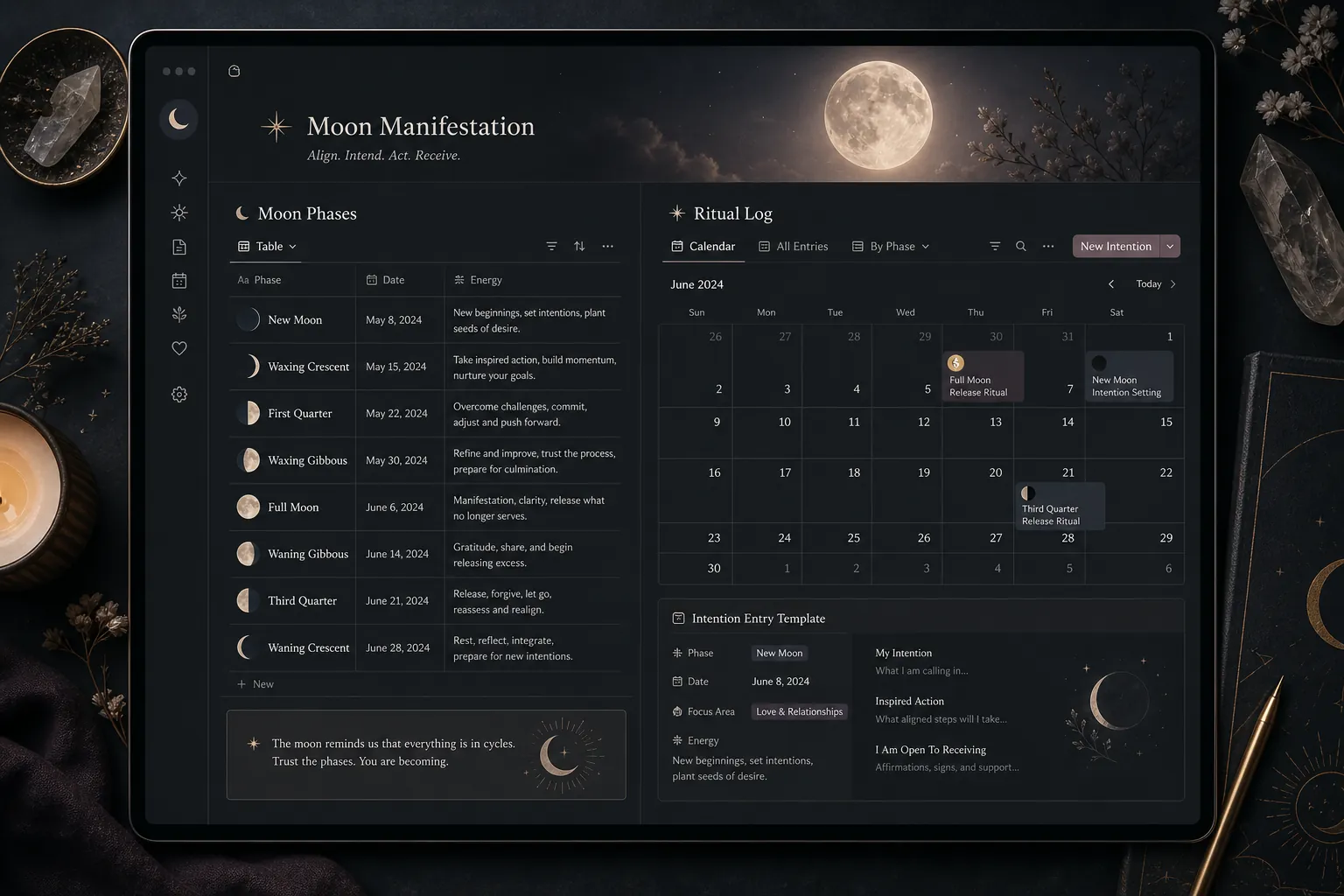
The finished setup has four working parts:
| Part | What it does | Why it matters |
|---|---|---|
| Moon Phases database | Stores the eight-phase reference system, phase meanings, ritual focus, and optional correspondences | Keeps the ritual framework consistent instead of rewritten from memory each month |
| Ritual Log database | Stores every intention, release, action, and reflection as a dated entry | Turns scattered journal writing into searchable history |
| Ritual templates | Preloads prompts for new moon, full moon, waxing, and waning entries | Makes the right question easy to find at the right moment |
| Moon calendar embed or manual phase field | Shows the current and upcoming moon phase | Covers Notion’s missing native lunar automation |
This is not simpler than downloading a dedicated moon app. It is better only if the value is integration: your intentions can sit beside project notes, therapy notes, reading notes, habit logs, or a weekly review without being trapped in a separate ritual silo.
Start with the Moon Phases database
Create a database called Moon Phases. This is not the journal itself. It is the reference layer your journal entries will link back to, so that a full moon entry, a waning crescent reflection, and a new moon intention do not all become indistinguishable text notes.
Use the eight-phase structure as the backbone: New Moon, Waxing Crescent, First Quarter, Waxing Gibbous, Full Moon, Waning Gibbous, Third Quarter, and Waning Crescent. Slow North’s moon phase ritual guide frames those phases as a cycle of intention, growth, action, refinement, illumination, gratitude, release, and rest, which maps cleanly into a Notion reference table.[1]
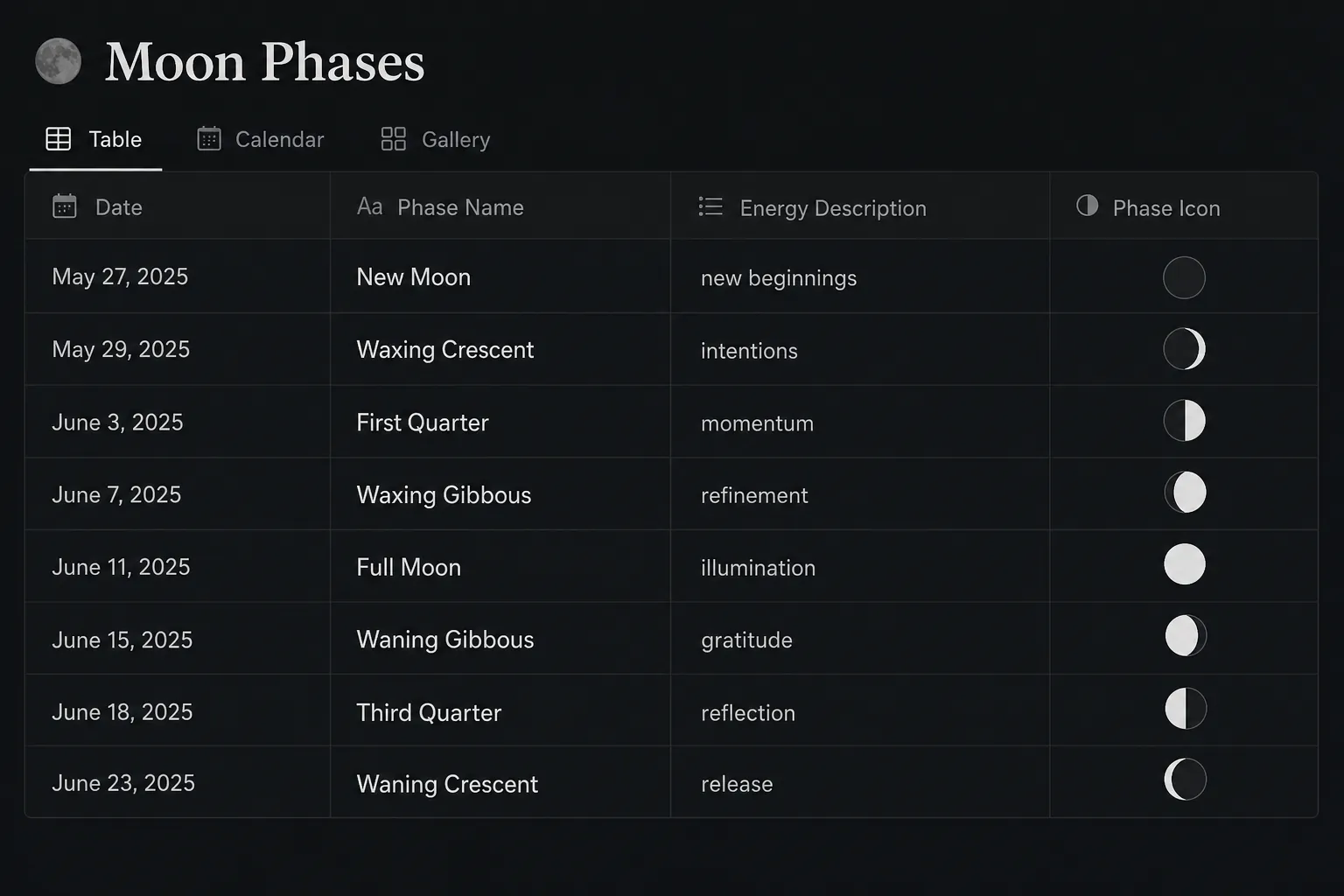
| Property | Type | Use |
|---|---|---|
| Phase Name | Title | The phase row name, such as New Moon or Full Moon |
| Phase Order | Number | Keeps the eight phases sorted in cycle order |
| Energy Description | Text | A short description of the phase’s emotional or ritual emphasis |
| Ritual Focus | Select or multi-select | Intention, action, refinement, release, reflection, rest |
| Best Prompt | Text | The main question you want surfaced during that phase |
| Optional Correspondences | Text | Crystals, herbs, colors, or other personal correspondences if you use them |
| Current Cycle Date | Date | The date this phase occurs in the current lunar cycle, entered manually or copied from an external calendar |
| Ritual Entries | Relation | Links this phase to entries in the Ritual Log database |
The most important property here is not the aesthetic one. Moon icons are nice. The relation is what makes the system useful. Once each ritual entry links to a phase, you can later ask Notion to show every full moon release you have written, every waxing crescent action list that actually moved, or every waning phase that kept returning to the same theme.
For the phase rows, keep the language short enough that you will actually read it inside a template. A usable version might look like this:
| Phase | Ritual focus | Prompt to store |
|---|---|---|
| New Moon | Intention | What am I ready to begin? |
| Waxing Crescent | First movement | What small action would make this intention less abstract? |
| First Quarter | Decision and effort | Where do I need to choose instead of waiting? |
| Waxing Gibbous | Refinement | What needs adjustment before it can be received? |
| Full Moon | Illumination and release | What has become visible, and what am I ready to release? |
| Waning Gibbous | Integration | What did this cycle teach me? |
| Third Quarter | Letting go | What pattern no longer needs my energy? |
| Waning Crescent | Rest | What can be left unfinished until the next cycle? |
Build the Ritual Log as the real journal
Create a second database called Ritual Log. This is where you write. Each entry should be specific enough to retrieve later, but not so overbuilt that you start performing for the database instead of using it.
| Property | Type | Use |
|---|---|---|
| Entry | Title | A plain name like New Moon Intention - July Cycle |
| Date | Date | The date you perform or write the ritual |
| Moon Phase | Relation | Links the entry to one row in the Moon Phases database |
| Ritual Type | Select | Intention, Release, Action, Reflection, Rest |
| Cycle Theme | Text | A short phrase for the broader pattern of the lunar cycle |
| Intention | Text | The main desire, direction, or commitment |
| Release | Text | What you are letting go of |
| Next Action | Text | The next grounded step attached to the ritual |
| Felt Sense | Select | Optional emotional tone, such as clear, resistant, tender, energized, depleted |
| Review Date | Date | When you want to revisit the entry |
| Status | Select | Open, In motion, Integrated, Released |
The Next Action field is where the setup avoids becoming a mood board with timestamps. Moon manifestation sources often place intention at the beginning of the cycle and release around the full moon, but the middle phases still ask for movement, adjustment, and attention.[1][2] If an intention has no action attached, that may be honest. It should still be visible.
Create a New Moon Intention template
Inside the Ritual Log database, create a database template named New Moon Intention. Set Ritual Type to Intention and link Moon Phase to New Moon.
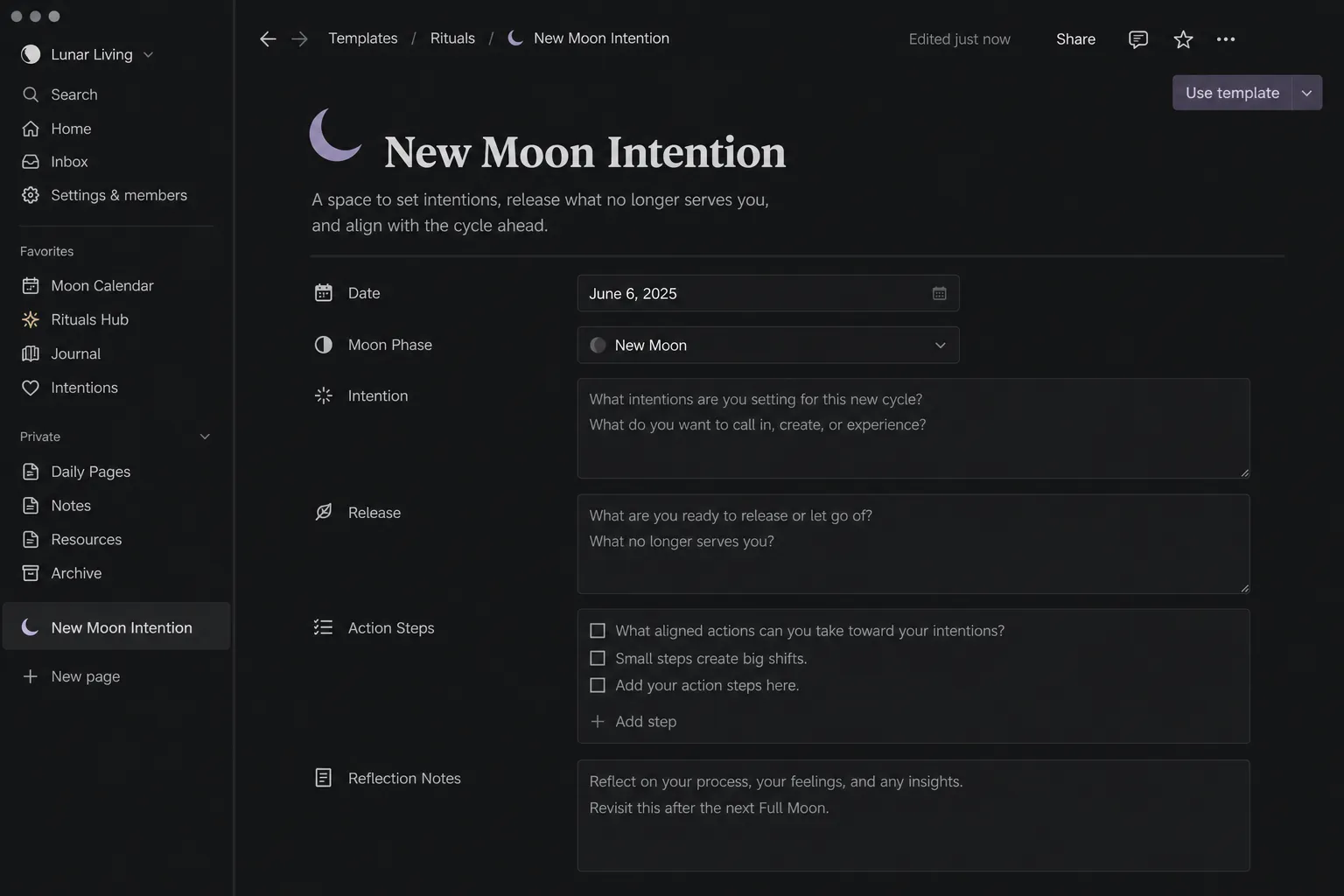
Gisele Stein’s moon manifestation guide centers the new moon on setting intentions, naming what you want to call in, and pairing the ritual with written clarity rather than vague wishing.[2] In Notion, that becomes a template that opens with a few fields and then gives you room to write.
- Intention: What am I calling in during this cycle?
- Why now: Why does this matter at this point in my life?
- Embodied signal: How would I know this intention is becoming real in daily life?
- First action: What is one small thing I can do before the waxing crescent?
- Support needed: What environment, boundary, or person would make this easier to honor?
Add a linked view of the same Ritual Log database at the bottom of the template. Filter it to entries where Ritual Type is Intention. Sort by date descending. This makes past intentions visible while you write the new one, which is the practical advantage over a notebook you rarely page through.
Create the Full Moon Release template
The full moon template should not be a duplicate of the new moon template with the word intention replaced by release. Full moon practices in Stein’s structure emphasize illumination, gratitude, and letting go; House of AïA’s beginner guide also describes moon rituals as a flow that can include grounding, intention, release, and reflection rather than a single rigid script.[2][3]
Create a database template named Full Moon Release. Set Ritual Type to Release and link it to Full Moon.
- What became visible this cycle?
- Which intention moved, changed, or lost its charge?
- What am I grateful for without needing to keep it forever?
- What am I ready to release?
- What boundary, deletion, conversation, or rest would make the release real?
Use a relation or linked view to show entries from the current cycle above the release prompts. A full moon review works better when the new moon intention is on the same page, not vaguely remembered from two weeks ago. If your cycle theme was “creative consistency,” the full moon entry can show whether that meant publishing, practicing, refusing extra work, or admitting that the original wording was too vague to act on.
Use the middle phases for action and adjustment
New moon and full moon entries usually get the ceremonial attention, but the Notion system becomes more useful when the waxing and waning phases are not empty. They do not all need elaborate rituals. Some phases only need a short check-in that keeps the intention from evaporating.
| Template | Use it when | Keep it short |
|---|---|---|
| Waxing Action Check | You want to move an intention into behavior | What is the next visible action? |
| First Quarter Decision | You are meeting resistance or delay | What decision am I avoiding? |
| Waxing Gibbous Adjustment | The plan needs refinement | What needs to change before I continue? |
| Waning Integration | The peak has passed and you need to understand the cycle | What did I learn from what happened? |
| Third Quarter Release | A pattern is ready to be named and dropped | What am I done carrying? |
| Waning Crescent Rest | You need closure rather than more effort | What can wait for the next cycle? |
Cassie Uhl’s moon journaling prompts and Yop & Tom’s moon journaling guide are useful here because they treat moon journaling as repeated self-inquiry, not only as a new moon or full moon event.[4][5] Pull from them sparingly. A template with twenty prompts looks generous until you are tired, late, and trying to write before bed.
For the middle phases, the best Notion move is often a compact template with three blocks: one prompt, one action field, and one linked view of the current cycle. That is enough structure to preserve the thread without turning every quarter moon into admin.
Add views that make the ritual easy to return to
A Notion moon ritual setup succeeds or fails in the views. The databases hold the material, but the views decide whether you can find the material at the moment you need it.
- Today / This Week: Ritual Log filtered to Date is within the current week, sorted ascending.
- Current Cycle: Ritual Log filtered to the current cycle theme or date range.
- New Moon Intentions: Ritual Log filtered to Ritual Type is Intention.
- Full Moon Releases: Ritual Log filtered to Ritual Type is Release.
- Open Actions: Ritual Log filtered to Status is Open or In motion.
- Past Cycles Gallery: Ritual Log grouped by Cycle Theme or lunar month.
Put the Today / This Week view near the top of your main dashboard. Put the Past Cycles view lower down, where it can be consulted rather than constantly watched. Ritual history is valuable, but it does not need to become another inbox.
If you already use a broader notes dashboard, add a small linked view there instead of creating a separate moon command center. The point is to keep the practice inside the workspace you actually open. FlowDesk’s guide to the best Notion note-taking templates can help if you want this ritual log to sit inside a larger notes system rather than as a standalone page.
Handle moon phase tracking honestly
Notion does not natively calculate lunar phases. A database can store the phase, relate entries to it, filter by it, and display it beautifully. It cannot, by itself, look at today’s date and know that the moon is waxing gibbous unless you supply that information.
There are two practical ways to deal with this:
- Embed an external moon phase calendar widget on your dashboard, then manually create the ritual entry from the right template.
- Update the Current Cycle Date property in the Moon Phases database manually at the start of each lunar cycle.
The embed is more convenient for daily checking. Manual updates are cleaner if you want the database itself to drive your views. A reasonable setup uses both: a calendar widget at the top of the page for phase awareness, and a manually maintained date field for the specific rituals you plan to write.
This is where dedicated moon apps still win. They can usually tell you the current phase without setup. The tradeoff is that your ritual notes live inside that app. If you want the release entry linked to your project notes, your therapy reflections, or your weekly review, Notion’s manual friction may still be worth it.
Where paper journals and marketplace templates fit
A handwritten moon journal can feel more intimate than typing into a database. The r/GoodNotes community’s free moon journal template is a good example of that appeal: it gives people a designed space to write by hand rather than turning the practice into software configuration.[6] If handwriting is part of the ritual, Notion should not pretend to replace that texture.
What Notion adds is retrieval. You can filter every release entry from the last several cycles, search for a repeating phrase, connect an intention to a task list, or review all entries tagged with the same emotional tone. Paper can hold the feeling. Notion is better at showing the pattern.
Existing Notion marketplace templates such as Lunar Light, Moon Cycle Intentions, Manifestation Journal, and Lunar Tracker also show that people are already trying to solve this inside Notion. They may be a good starting point if you want a predesigned page. The reason to build your own is control: you decide which ritual framework matters, which prompts stay, which fields are searchable, and where the system connects to the rest of your workspace.
Simone Samuels’ lunar self-care ritual structure is worth keeping in mind if you want the system to lean more reflective than manifestation-focused; it frames lunar journaling as an ongoing self-care practice rather than only a goal-setting cycle.[7] In Notion terms, that may mean more emphasis on felt sense, rest, and review, and less emphasis on action fields.
A simple page layout that holds together
Once the databases and templates exist, make one dashboard page called Moon Rituals. Keep it boring enough to use.
- Place the external moon calendar embed at the top.
- Add a linked view of Ritual Log filtered to this week.
- Add buttons or visible template options for New Moon Intention and Full Moon Release.
- Add the Current Cycle view below the active ritual area.
- Add Past Cycles and Moon Phases reference views at the bottom.
That order matters. The current phase comes first because it tells you what kind of entry to create. The current log comes next because it shows what is already in motion. The reference database belongs lower because you should not have to study the entire lunar cycle every time you sit down to write.
From there, the setup can expand only if it earns the space. You might add a relation to a goals database, a filtered view inside a weekly review, or a template button inside a personal dashboard. If you are comparing note apps or template ecosystems more broadly, FlowDesk’s guide to note-taking platforms with the strongest template ecosystems gives the larger context for why Notion is unusually good at this kind of custom ritual system.
Notion can replace the journal and much of the dedicated moon app experience when the priority is structure, memory, and integration. It cannot replace native lunar automation without help from an external calendar. Build the database for what Notion is good at: holding the thread between intention, action, release, and reflection long enough for a pattern to become visible.
References
- Moon Phase Ritual Guide, Slow North
- How to Manifest with the Moon Phases, Gisele Stein
- Moon Rituals Beginners Guide, House of AïA
- 10 Topics for Moon Journaling + Free Moon Phase Calendar, Cassie Uhl
- Moon Journaling, Yop & Tom
- I made a moon journal template free to download, Reddit r/GoodNotes
- How to Start a Lunar Self-Care Journaling Ritual, Simone Samuels, December 10, 2019





Comments
Join the discussion with an anonymous comment.