
The number that usually disappoints people is not the error rate they see on their own pages. It is the number they saw before they uploaded anything: 98%, 99%, “near-perfect handwriting recognition.” If you are trying to convert handwritten notes to text across a real stack of lecture notes, field notebooks, meeting minutes, lab records, or scanned cursive, that kind of claim sounds like a promise that cleanup will be light. Then the export arrives with missing words, rearranged lines, confident substitutions, and a few phrases that look plausible until you compare them against the scan.
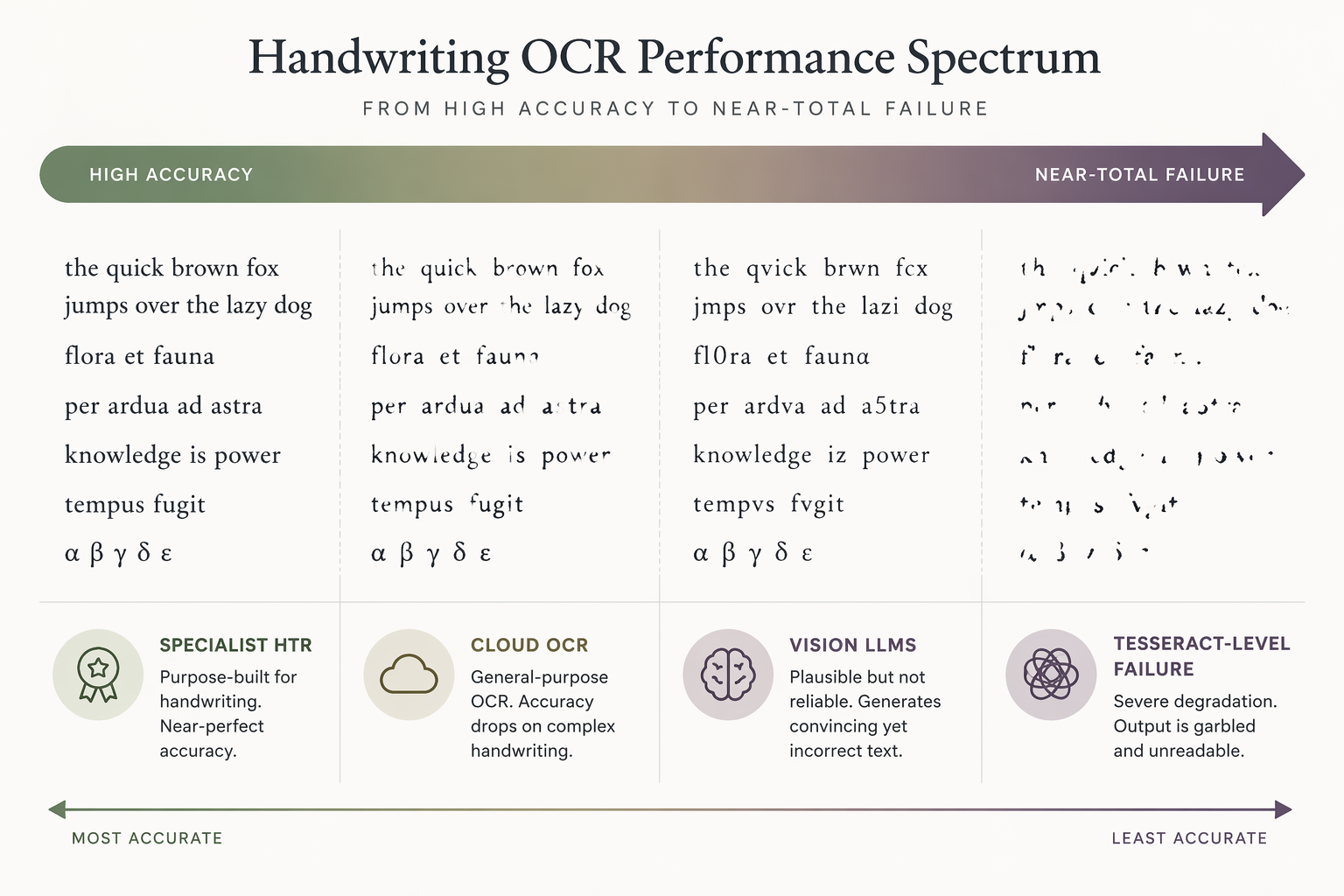
The most useful 2026 benchmark starts in exactly the right place: the same 100-word legible English cursive passage, tested across nine tools. The results ranged from 0.9% Word Error Rate for specialist handwriting recognition services to 95.4% WER for Tesseract, the open-source OCR engine many people still try first because it is familiar and free [1]. That spread matters more than any single vendor percentage. It explains why two products can both be described as handwriting OCR and yet create completely different amounts of repair work.
The Benchmark Gap Is the Story
A 100-word sample is not the whole world. It does not tell you how a system will behave on rushed seminar notes, mixed print and cursive, faded pencil, marginal arrows, chemistry notation, non-Latin scripts, or a notebook photographed under a kitchen light. Still, a controlled sample does something valuable: it removes the excuse that every bad result is your fault. Same passage, same words, same handwriting. Different systems saw radically different documents.
| Tool family or tool | Reported result on the shared cursive sample | What that means in practice |
|---|---|---|
| Specialist HTR services such as HandwritingOCR and Transkribus | About 0.9% WER | Close enough on this sample that cleanup may be mostly verification rather than reconstruction |
| Best general cloud OCR result cited in the benchmark: Azure | 8.67% WER | Usable for many readable notes, but enough errors remain to matter in long documents |
| Google Document AI | 23.3% WER, with reading order problems noted | The raw error rate understates the cleanup burden when lines or sentences are scrambled |
| Tesseract | 95.4% WER | Effectively failed for this handwriting task |
Word Error Rate is a blunt but useful measure. If the reference text has 100 words, a 1% WER means roughly one word-level error after accounting for substitutions, insertions, and deletions. A 10% WER means the reader is no longer just glancing for typos; they are checking the sentence against the image. At 20% or higher, the text may still contain recognizable islands, but proofreading starts to feel like re-transcription.
The jump from 0.9% to 8.67% is not just an academic difference. Across 50 pages, a tool that misses one word in a short passage and a tool that misses several words per passage create different workdays. The first asks you to verify. The second asks you to edit continuously. The third, if it breaks reading order, asks you to become both proofreader and layout restorer.
Why “98% Accuracy” Can Still Produce a Bad Export
Accuracy claims usually come from cleaner conditions than the documents people actually need to process. A vendor can test clear writing, flat scans, good contrast, ordinary vocabulary, and short samples. None of that is dishonest by itself. The problem begins when that number is treated as a forecast for a notebook with cramped margins, crossed-out words, arrows between paragraphs, abbreviations, and lines that slope into the binding.
There is also a measurement problem. Character accuracy, Word Error Rate, Character Error Rate, semantic similarity, and human satisfaction are not interchangeable. A transcript can preserve the general meaning while changing a key term. It can spell most words correctly while losing the order of lines. It can look clean while silently replacing an unfamiliar word with a common one. The cleanup burden depends on the error pattern, not just the headline percentage.
This is why the Google Document AI result in the nine-tool test is worth noticing beyond its 23.3% WER. The benchmark notes that it lost reading order on prose handwriting [1]. That is a different class of failure from a misread letter. A misspelled word can often be fixed in place. Scrambled line sequence forces you back to the image, hunting for where each phrase belongs.
Specialist HTR, Cloud OCR, Vision LLMs, and Traditional OCR Fail Differently
Specialist handwriting text recognition systems are built for connected handwriting. In the 2026 nine-tool test, that category produced the strongest result on the controlled cursive sample, with HandwritingOCR and Transkribus near 0.9% WER [1]. That does not mean they will stay below 1% on your notes. It does mean that, when the source is legible cursive prose, a specialist HTR engine is starting from the right problem.
General cloud OCR is broader. It may be excellent for printed documents, forms, invoices, and mixed office scans, but handwriting is not always its strongest lane. Azure’s 8.67% WER in the same benchmark was the best cited general cloud OCR result, behind the specialist HTR tools but far ahead of traditional open-source OCR on the sample [1]. That level can be acceptable if your handwriting is clean and your output only needs light editing. It is less comfortable when every word matters.
Traditional OCR is where expectations need the hardest reset. Tesseract’s 95.4% WER on the cursive passage is not a “needs tuning” result for most note-digitization jobs. It is a failure for handwriting recognition in this setting [1]. The common hope that open-source OCR has simply caught up with commercial handwriting systems is not supported by this benchmark. For printed scans, Tesseract can still have a place. For cursive notes, it should not be your default unless you are deliberately experimenting.
Vision LLMs sit in a separate evaluation frame. AIMultiple’s 2026 benchmark tested handwriting recognition across 100 cursive samples from 10 writers and used cosine similarity to evaluate semantic preservation. In that benchmark, GPT-5 and Gemini 3 Pro Preview tied for top semantic similarity among general models, while Claude Sonnet 4.6 was reported at 11.2% WER and GPT-5 at 14.4% WER [2]. Those numbers should not be merged into the handwritingocr.com leaderboard as if the methods were identical. They answer a related but different question: how much meaning survives, and how do general vision-language models behave on handwriting?
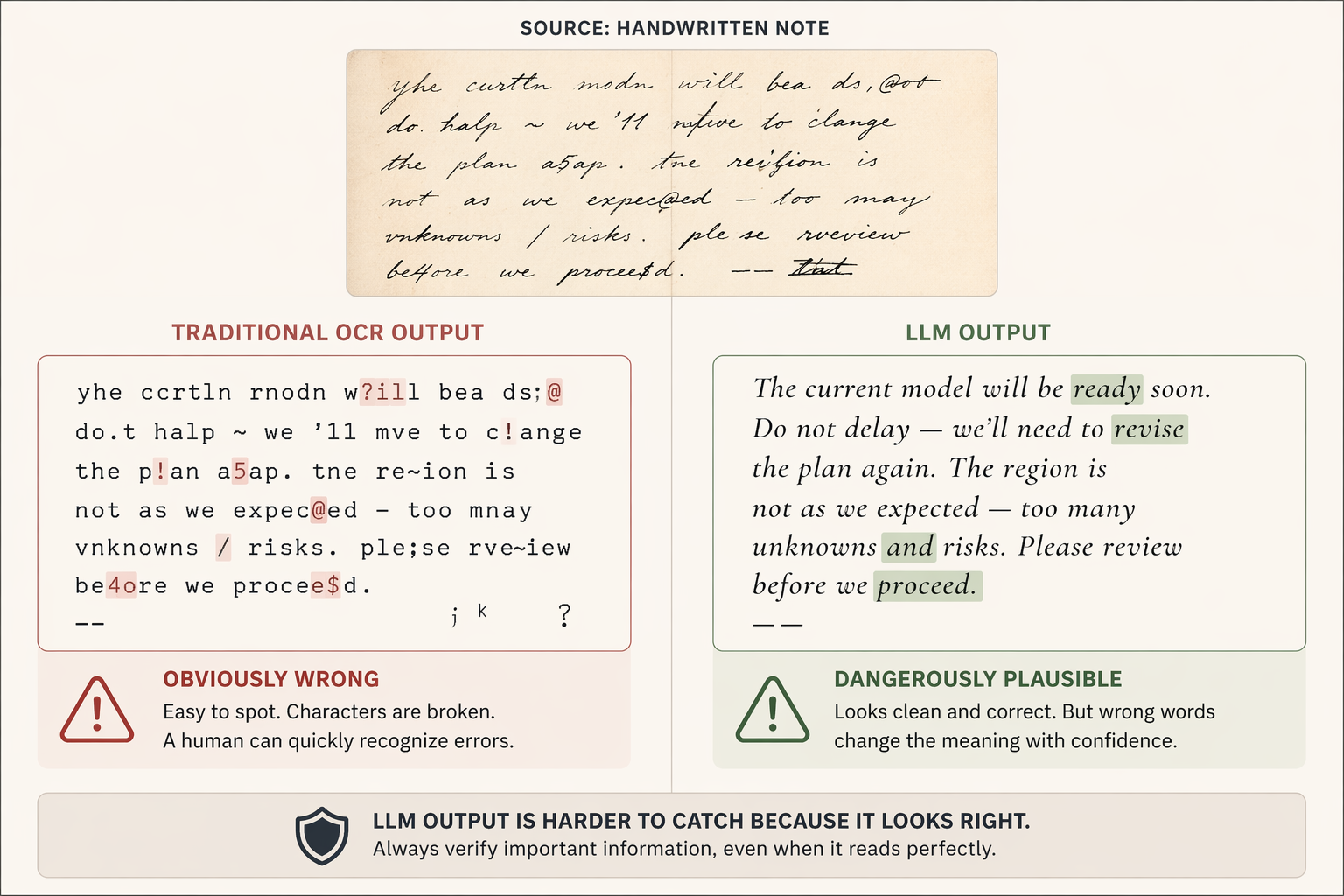
The main caution with LLM output is not that it always looks worse. Often it looks better than it deserves. A traditional OCR engine may give you broken characters, obvious nonsense, or visible uncertainty. A vision model may produce fluent text that quietly normalizes a name, changes a technical term, or fills in a word it could not actually read. For casual note review, that may be tolerable. For quotations, lab values, source transcription, legal notes, medical notes, or research coding, confident wrong text is more dangerous than obvious garbage because it slows down error detection.
Readers who want the deeper technical split between traditional OCR, specialist recognition, and AI-based approaches can use Traditional OCR vs. AI Handwriting Recognition as the companion explanation. The practical point here is simpler: do not judge tools only by whether they say “AI.” Judge them by the kind of mistakes they leave you to repair.
What Accuracy You Need Depends on the Job
The right accuracy threshold is not universal. A searchable archive, an editable transcript, and an automated extraction workflow have different tolerance for error. This is where a lot of handwriting OCR advice becomes too vague. “Good enough” for finding a page later is not good enough for publishing a transcript. “Readable after cleanup” is not good enough for unattended data entry.
| Output goal | Practical accuracy threshold | What errors do to the workflow |
|---|---|---|
| Searchable archive | About 80–85% character accuracy may be adequate | Search can still surface likely pages, especially when terms repeat |
| Editable text | About 95%+ accuracy is usually needed | Below this, proofreading can approach the effort of manual retyping |
| Structured extraction | About 99%+ accuracy is usually required | A single wrong field can corrupt downstream processing |
For a searchable archive, missed words are annoying but not always fatal. If you are digitizing old class notes and only need to find the page where “photosynthesis” or “supply elasticity” appears, imperfect OCR can still help. Repeated terms, headings, and nearby context give search more chances to hit. You may accept a transcript that you would never quote.
Editable text is less forgiving. If the goal is to turn 50 pages of notes into a clean study guide, manuscript draft, interview memo, or research appendix, every paragraph has to survive as language. At around 95% accuracy, proofreading may still be worthwhile. Much below that, the work changes character. You stop correcting a transcript and start reconstructing the original.
Structured extraction is the strictest case. Dates, names, measurements, checkbox labels, medication names, experiment IDs, and survey responses cannot be approximately right. A system that is impressive on prose may still be unsuitable for automated extraction if it makes rare but consequential substitutions. The issue is not whether the page “looks transcribed.” It is whether the wrong word can pass through without a human seeing it.
Handwriting Type Changes the Baseline
A single accuracy claim collapses too many source types into one number. Clean printed handwriting, neat cursive, average cursive, rushed meeting notes, and historical manuscripts are not variations of the same task. They are different inputs with different failure rates and different cleanup costs.
| Handwriting class | Supported 2026 expectation range | Editorial judgment |
|---|---|---|
| Clean print | 95–99% | A good tool can often produce genuinely useful editable text |
| Neat cursive | 85–95% | Specialist HTR is worth testing first; general OCR may still need steady cleanup |
| Average cursive | 80–90% | Expect proofreading, especially across long batches |
| Messy or rushed writing | 70–85% | Use OCR as a draft aid, not as a finished transcript |
| Doctor-like notes | 50–80% | Manual verification is central, and wrong fluent guesses are risky |
| Historical manuscripts | 40–70% | Performance depends heavily on script, scan quality, language, and training data |
The table is not a promise. It is a way to stop comparing unlike documents. A student with careful block print and a researcher working through nineteenth-century cursive are both doing handwriting recognition, but they should not expect the same tool behavior or the same cleanup time. Even within one notebook, the first page written at a desk and the last page written during a fast lecture can behave like different datasets.
Volume Turns Small Error Rates Into Real Labor
A one-page demo hides the main cost of note digitization: repetition. On one page, an 8% or 10% word error rate may feel manageable. Across 50 pages, it becomes a standing proofreading job. If the errors are obvious, you can move quickly. If the model produces fluent substitutions, you have to compare more of the output against the image. That is slower and more tiring than fixing visible OCR debris.
Long batches also expose problems that single-page benchmarks tend to miss. Vision models can handle isolated pages well enough to look attractive, but multi-page processing adds opportunities for context drift, inconsistent terminology, and uneven formatting. Most public benchmarks still test single pages or short samples, so they do not fully measure what happens when someone uploads an entire notebook and expects a stable, searchable document.
For readers moving from accuracy numbers to tool choice, the companion guide Best Tools to Convert Handwritten Notes to Text in 2026 applies this accuracy framework to specific recommendations. If your main constraint is the capture method rather than the recognition engine, Best Handwriting-to-Text Apps in 2026 separates tools by how the notes enter the system.
Cost Is Part of Accuracy, Because Cleanup Has a Price
Pricing changes too often to treat any 2026 table as permanent without checking it at publication time. Cloud APIs, model access, page bundles, free tiers, and consumer app limits move around. The more stable comparison is the one people usually forget to price: how much human correction follows the export.
A free tool that turns 50 pages into a reconstruction project is not free in the practical sense. A paid specialist service can still be a poor choice if your source is outside its strengths, but the cost question should include the time you spend fixing word errors, restoring reading order, checking names, and rebuilding tables or lists. The Free vs Paid Handwriting-to-Text Tools guide is the better place for current pricing tradeoffs, especially because those details need fresh verification.
For free methods specifically, the important question is not whether they can read a neat sample. Some can. The question is whether they hold up on the exact pages you need to process and whether the correction time is still acceptable. The free-method test notes in Convert Handwritten Notes to Text: Free Methods That Actually Work are most useful after you know what level of error your workflow can tolerate.
A Practical Test Before You Commit 50 Pages
Do not test handwriting OCR with the prettiest page in the notebook. Pick a representative batch: one clean page, one average page, one difficult page, and one page with the structure you care about most. If your notes include lists, arrows, tables, equations, names, or abbreviations, include them. If the final job is 50 pages, a five-page trial is small enough to run quickly and large enough to expose failure patterns.
- Check word errors, but also check line order, paragraph order, headings, and whether marginal notes land in the right place.
- Mark errors that are obvious at a glance separately from errors that look fluent but wrong.
- Time the cleanup on at least one page instead of estimating from the demo result.
- Decide whether the output is for search, editing, or structured extraction before judging whether the accuracy is acceptable.
- Repeat the test if you change scan quality, lighting, crop method, or file format.
If the workflow will become routine, build around the error pattern you actually observe. A tool that preserves order but misses occasional words can be paired with human proofreading. A tool that scrambles sequence needs a layout repair step. A model that guesses terminology needs stricter comparison against the image. For larger repeatable jobs, How to Build an Automated Handwriting-to-Text Pipeline is the natural next step, but automation should come after you know which mistakes you are automating around.
For one-off note sets, a scenario guide may be enough. How to Convert Handwritten Notes to Text is useful when the input type is the main decision: lecture notes, meeting notes, journal pages, whiteboards, or scanned archives.
What the 2026 Benchmarks Actually Settle
The benchmarks do not settle which tool is best for every notebook. They do settle a more important point: handwriting OCR accuracy is not a narrow race among similar systems. On the same legible cursive passage, the difference between specialist HTR and traditional open-source OCR was the difference between a near-clean transcript and practical failure [1]. General cloud OCR landed in the middle. Vision LLMs showed useful recognition ability under a different measurement method, while carrying the special risk of fluent wrong text [2].
So the practical rule is straightforward. Choose based on your handwriting class and required output, then test a representative batch of your own pages before committing to the full workflow. Vendor claims describe best-case samples. Benchmarks reveal comparative behavior. Your own documents decide whether the result is merely impressive or actually usable.
References
- Best AI handwriting OCR in 2026: nine tools tested — handwritingocr.com
- Handwriting Recognition Benchmark: LLMs vs OCRs (2026) — AIMultiple
Comments
Join the discussion with an anonymous comment.