
The Real Cost of Converting Handwritten Notes to Text
Imagine this: you've just finished a two-hour lecture, your notebook is full of diagrams, margin scribbles, and rushed cursive. You snap a photo with your phone and run it through a free OCR app. The result is a digital document where "mitochondria" became "mito chondria," "equation" became "equa tion," and half your margin notes are missing. You spend the next 30 minutes correcting errors.
Now imagine the same scenario with a paid service. You upload the same photo, and within seconds you get a text file with 97% accuracy. You spot-check two words, make one correction, and move on.
The difference between these two experiences is not just about accuracy percentages. It is a trade-off between the price of a subscription and the value of your time spent correcting errors. For a student processing 20 pages of notes per month, that trade-off can mean the difference between a $30 monthly time cost and a $5 monthly subscription. This article quantifies that trade-off using concrete accuracy benchmarks, real pricing data, and a decision framework based on your handwriting quality and document volume.
What You Get at Each Price Tier: Accuracy Benchmarks
The handwriting-to-text market has three distinct price tiers, and each delivers a fundamentally different accuracy level. The table below summarizes the key benchmarks from independent tests and vendor data verified in early-to-mid 2026.
| Tier | Price Range | Accuracy Range | Example Tools | Best For |
|---|---|---|---|---|
| Free | $0 | 60–75% | Google Keep, OneNote Free, Apple Scribble, Samsung Notes | Occasional use, neat print handwriting, low volume |
| Mid-Tier Paid | $3.99–$11/mo or one-time purchase | 90–95% | Nebo, Pen to Print, GoodNotes 6 | Regular use, legible cursive, moderate volume |
| Premium / Enterprise | $11–$76/mo or $199 one-time | 95–99%+ | Suparse, ABBYY FineReader, Transkribus | High volume, messy handwriting, professional use |
The gap between free and paid is not incremental — it is a step change. Generic free OCR tools average 60–70% accuracy on handwriting, while specialized AI-powered services consistently achieve 97% or higher, according to benchmarks from handwritingocr.com. That 30+ percentage point gap translates directly into how many errors you must fix per page.
Free Tools: What Works, What Doesn't, and Why
Free handwriting-to-text tools are not all created equal. Some excel at real-time conversion on specific devices, while others struggle with anything beyond neat block letters. Here is what the data shows about the most popular free options.
Google Lens and Google Keep
Google Keep's built-in OCR is the most accessible free option — it works on any smartphone with the Google app. However, its accuracy on cursive handwriting is limited. Independent tests show Google Keep achieves 65–75% accuracy on cursive, according to handwritingocr.com. It handles neat print and block handwriting reasonably well, but struggles with low-light photos, angled pages, and anything resembling a doctor's prescription.
Microsoft OneNote (Free Version)
OneNote's "Ink to Text" feature is a strong free contender, particularly on Windows and iPad. Benchmarks from handwritingocr.com place its accuracy at 70–80% on tablet writing. The feature works best when you write directly on a tablet with a stylus, rather than taking photos of paper notes. OneNote's free version includes handwriting conversion on desktop and tablet apps, but not on the web version. For students already in the Microsoft ecosystem, this is the most capable free option.
Apple Scribble and Samsung Notes
Apple Scribble, available on iPadOS, offers real-time handwriting-to-text conversion that is system-wide and free. It converts handwriting as you write, making it ideal for live note-taking. However, it is locked to the Apple ecosystem and works best with the Apple Pencil. Samsung Notes provides a similar experience on Galaxy tablets, with good accuracy for legible print and cursive, though features vary by device model.
Microsoft Lens
Microsoft Lens (formerly Office Lens) is a free scanning app that includes OCR. A 2026 evidence-based comparison by Suparse found that Microsoft Lens achieves OCR accuracy on low-light handwritten notes that is 12.7% higher than Adobe's mobile offering. This makes it a strong choice for students who take photos of whiteboards or lecture slides in dimly lit rooms.
Mid-Tier and Premium Paid Tools: When Accuracy Matters
Paid tools justify their cost by delivering accuracy that approaches human-level transcription. The key distinction is that they use AI models trained specifically on handwriting, rather than generic OCR engines.
Mid-Tier Options ($3.99–$11/mo or One-Time Purchase)
Nebo (MyScript) is widely regarded as the industry leader for legible cursive and print on stylus devices. It offers a free version with limited features and a one-time purchase for the full pack. Its live handwriting recognition is excellent for tablet users who write in a consistent style.
Pen to Print uses a credit-based system with a free trial, then switches to a subscription. It is designed specifically for converting photos of handwritten notes and works well for legible print and cursive. Accuracy depends heavily on scan or photo quality.
GoodNotes 6 offers high accuracy with AI-powered spellcheck, but it is iPad-only and uses a subscription model. Its handwriting-to-text conversion is a core feature, not an add-on, and it benefits from tight integration with the iPad's neural engine.
Premium Options ($11–$76/mo or $199 One-Time)
Suparse claims over 99% accuracy for handwriting, with pricing starting at $11 per month for 100 pages, according to its 2026 comparison page. This places it in the premium tier but accessible for moderate-volume users.
ABBYY FineReader is a long-standing OCR powerhouse. Its latest version achieves 92–95% accuracy on handwriting, per Suparse's benchmarks. It costs $16 per month or $199 for a one-time purchase, making it the best option for users who want a perpetual license rather than a subscription.
| Tool | Price | Accuracy | Best For |
|---|---|---|---|
| Nebo | Free / One-time purchase | 90–95% | Stylus users, legible cursive |
| Pen to Print | Free trial, then credit-based | 90–95% | Photo-based conversion, legible print |
| GoodNotes 6 | Subscription (iPad only) | 90–95% | iPad note-takers, integrated workflow |
| Suparse | $11/mo (100 pages) | 99%+ | High accuracy, moderate volume |
| ABBYY FineReader | $16/mo or $199 one-time | 92–95% | Perpetual license, professional use |
The Hidden Cost of 'Free': Quantifying Your Time
Free tools have a price that does not appear on any pricing page: your time. Every error a free tool introduces is an error you must find and fix. When you multiply that time by your hourly rate, the "free" option can become surprisingly expensive.
Here is a simple formula to calculate the hidden cost:
(Pages per month × Error rate × Errors per page × Correction time per error) × Your hourly rate = Monthly time cost
Let's walk through a realistic example for a student:
| Variable | Free Tool Scenario | Paid Tool Scenario |
|---|---|---|
| Pages per month | 20 | 20 |
| Accuracy | 70% | 97% |
| Error rate (words needing correction) | 30% | 3% |
| Estimated errors per page | ~15 words | ~1–2 words |
| Correction time per error | 2 minutes | 30 seconds |
| Total correction time per month | ~2 hours | ~10 minutes |
| Hourly rate (student) | $15/hr | $15/hr |
| Monthly time cost | $30 | $2.50 |
In this example, the student's time cost of using free tools ($30/month) exceeds the price of most mid-tier paid subscriptions ($3.99–$11/month). Even at a lower hourly rate, the math often favors paid tools for anyone processing more than 10–15 pages per month.
Decision Matrix: Should You Stay Free or Upgrade?
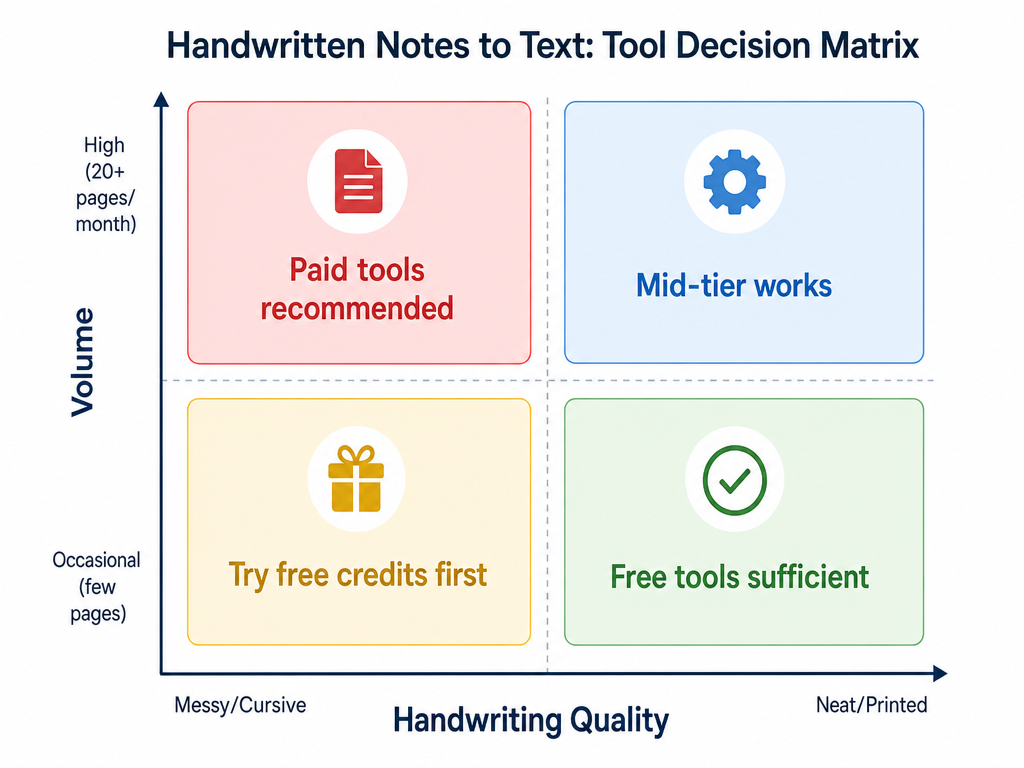
The decision to pay for handwriting-to-text conversion depends on two factors: your handwriting quality and your document volume. The matrix below maps these two axes to specific recommendations.
| Handwriting Quality | Volume | Recommendation | Why |
|---|---|---|---|
| Neat / Printed | Occasional (1–5 pages/mo) | Free tools sufficient | Google Keep or OneNote free will handle this with minimal errors |
| Neat / Printed | High (20+ pages/mo) | Mid-tier works | Time cost of correcting errors at volume justifies $3.99–11/mo |
| Messy / Cursive | Occasional (1–5 pages/mo) | Try free credits first | Use free credits from specialized AI services before committing |
| Messy / Cursive | High (20+ pages/mo) | Paid tools recommended | Free tools will produce too many errors; premium accuracy is essential |
Tips for Maximizing Free Tool Accuracy
If you decide to stick with free tools, you can significantly improve accuracy by following a few best practices. Research from Extend shows that high-resolution scans with good contrast can improve accuracy by 20–30% compared to low-quality mobile photos.
- Scan at 300 DPI minimum. Lower resolutions lose the fine details that OCR engines need to distinguish similar characters. Most smartphone cameras can achieve this with good lighting.
- Use good, even lighting. Avoid shadows across the page, which can cause the OCR engine to miss entire sections. Natural daylight from a window works best.
- Write in neat print rather than cursive. Print-style handwriting generally achieves 10–15% higher accuracy than cursive, according to Extend's benchmarks.
- Keep your handwriting on the line. Characters that float above or below the baseline confuse OCR engines that rely on line detection for word segmentation.
- Preprocess your images before OCR. Crop out margins, straighten the page, and increase contrast. Even a 5-degree tilt can meaningfully increase error rates, per toolkuai.com's analysis.
Frequently Asked Questions
Can I get 95% accuracy for free?
Yes, but with a volume limit. Free credits from specialized AI services like HandwritingOCR, Transkribus, and Suparse offer the same AI accuracy as their paid plans. The limitation is quantity, not quality. If you only need to convert a few pages per month, free credits are a viable path to high accuracy without paying.
Which free tool is best for students?
For Windows and iOS users, Microsoft OneNote's free version offers the best balance of accuracy (70–80% on tablet writing) and cross-platform availability. For iPad users, Apple Scribble provides the best real-time conversion experience. For Android users, Samsung Notes (on Galaxy devices) or Google Keep are the most accessible options.
Do e-ink devices like reMarkable convert handwriting well?
Yes, but with caveats. The reMarkable uses MyScript for handwriting conversion and requires an internet connection for cloud processing. It exports to .txt or PDF with embedded text. The Supernote offers real-time conversion on-device and supports over 60 languages, working offline after initial activation. Both are solid options for users who prefer the e-ink writing experience.
How do I know if my handwriting is 'good enough' for free tools?
Test with a single page. Write a sample page in your typical handwriting, scan it at 300 DPI with good lighting, and run it through Google Keep or OneNote. If the output is readable with fewer than 5–10 corrections per page, your handwriting is good enough for free tools. If you are spending more than 2 minutes correcting each page, consider upgrading.
What about AI models like GPT-5 and Gemini?
Large language models are increasingly capable of handwriting recognition. AIMultiple's January 2026 benchmark placed GPT-5 at 95% accuracy on cursive handwriting and Gemini 2.5 Pro at 93%. However, these models are not yet available as dedicated handwriting-to-text tools with a simple upload interface. They are more relevant for developers building custom solutions than for individual users looking for a quick conversion.
Comments
Join the discussion with an anonymous comment.