
Tested: August 3, 2026, in Q3 2026. Scope: FlowDesk Tool Profile, Profiles category, focused on the UGREEN NASync line as an Obsidian vault backup destination, not as a Plex box, VM host, or general NAS trophy.
Short answer: yes, a UGREEN NASync is credible for local-first Obsidian vault backup in mid-2026, but only if you choose the right path. UGOS Pro now gives the platform the basic backup surface a vault owner should expect — snapshots, Sync & Backup, SMB/NFS/WebDAV/FTP/SFTP, and Docker on supported DXP models — so this is no longer just a promising hardware box waiting for software to catch up.[1]
The three paths that matter are clear: the new UGREEN NAS Sync Obsidian plugin, an SMB share with scheduled zip snapshots, and Docker with LiveSync/CouchDB. My safest default is still the least glamorous one: mount the NAS over SMB, write dated zip backups of the vault to it, let the NAS snapshot that backup folder, and keep an offsite copy somewhere else. The new plugin is useful. Docker can be powerful. Neither should be confused with a boring restore chain you can inspect when something has already gone wrong.
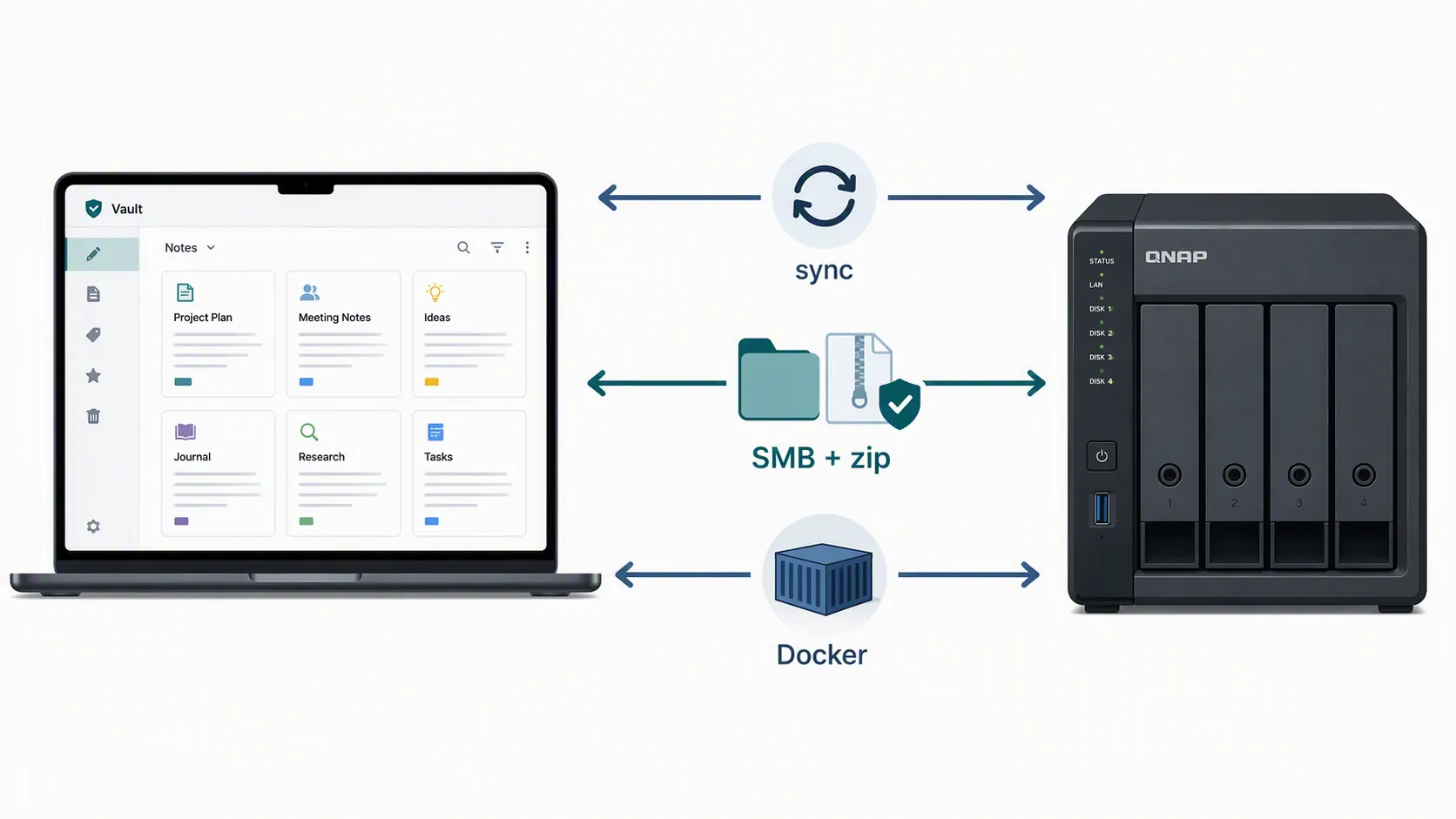
The tested decision map
For Obsidian, the useful question is not whether the NAS can move files quickly. A Markdown vault is small work for this class of hardware. The useful question is what happens after a bad sync, a mistaken deletion, a corrupted attachment, or a laptop replacement.
| Path | What you set up | What it is good at | Where restore confidence depends on something else | Best fit |
|---|---|---|---|---|
| UGREEN NAS Sync plugin | Install the Obsidian community plugin, connect it to the NAS, and run whole-vault two-way sync at a 1–60 minute interval.[2][3][4] | Convenient local-first sync without building a Docker stack. | Remote deletes rely on UGOS trash behavior; point-in-time recovery still depends on NAS snapshots or another backup. | Users who want simple NAS sync and understand that sync is not the backup layer. |
| SMB share plus zip snapshots | Mount a NAS share, send dated vault zip backups to it, snapshot the NAS folder, and copy at least one version offsite. Community vault-backup examples commonly layer Local Backup zips, NAS copies, Git/history, and offsite storage; SMB-over-private-network setups are also documented.[5][6] | Clear restore behavior: pick a dated archive, unzip it, inspect files, and recover the vault or a single note. | It is not magic near-real-time sync unless you add separate sync tooling. | The safest default for most vault owners. |
| Docker plus LiveSync/CouchDB | Run the sync backend on the NAS, usually through Docker, then connect Obsidian clients to it. A NAS-hosted CouchDB/LiveSync pattern has been documented for self-hosted Obsidian sync.[7] | Near-real-time multi-device sync under your control. | The database and container stack also need backups; speed does not automatically make restores simpler. | Tinkerers and power users who accept setup and maintenance burden. |
Path 1: the UGREEN NAS Sync plugin is convenient, and young
The dedicated plugin is the most interesting new piece in this profile because it changes the shape of the UGREEN answer. UGREEN NAS Sync was released on June 20, 2026; Obsidian Stats listed v1.0.13 on July 2, 2026, with roughly 435 downloads at the time checked for this profile.[2][3] That is enough to make it real, not enough to treat it like a mature backup appliance.
Mechanically, the plugin is a whole-vault, two-way sync tool. The interval can be set from 1 to 60 minutes, which is close enough to feel automatic without being an always-on remote editor. The author documents three safety behaviors that matter for a vault: first sync does not treat missing files as deletions, remote deletes are moved to UGOS trash, and conflicts keep a local copy.[2]
Those are sensible choices. First-sync protection avoids the nightmare version of a new target erasing a real vault. Conflict copies are exactly what you want when two devices touch the same note. Moving remote deletes to UGOS trash is also better than a hard delete. The slow-down is that the delete protection is now tied to the NAS trash and whatever snapshot policy sits behind it. If a file is edited badly rather than deleted, the plugin itself is not a dated backup archive. If a deletion propagates and the trash is emptied, you are back to snapshots or some other retained copy.
The plugin also deserves a plain security reading. It is a community plugin rather than an Obsidian-staff-reviewed backup product, and the surfaced permissions include full vault access, network access, and file-system adapter APIs.[3][4] The available material also says it does not provide plugin-level encryption.[2][3] Those are risk flags, not proof of bad behavior. They mean the plugin belongs in a trust decision: do you want this code reading the whole vault and talking to your NAS, and are you comfortable relying on your network and NAS controls for protection?
For a small personal vault, the plugin can be a good convenience layer. For a work vault with sensitive notes, legal material, client files, or attachments you cannot casually expose to another plugin, I would either keep it off that vault or wrap it in a stricter NAS account, narrow network access, snapshots, and a separate export routine. The plugin can move your vault. It should not be the only thing standing between you and loss.
Path 2: SMB plus zip snapshots is still the baseline I would trust first
The safest UGREEN setup for most Obsidian users is boring by design: keep the working vault local, mount a NAS share, write dated zip archives of the vault into that share, and let UGOS Pro snapshot the backup folder. Then copy at least one retained version offsite. A NAS is one copy in a larger plan, not the whole plan; the 3-2-1 backup strategy is still a useful shorthand for keeping multiple copies, on different media, with one offsite.[8]
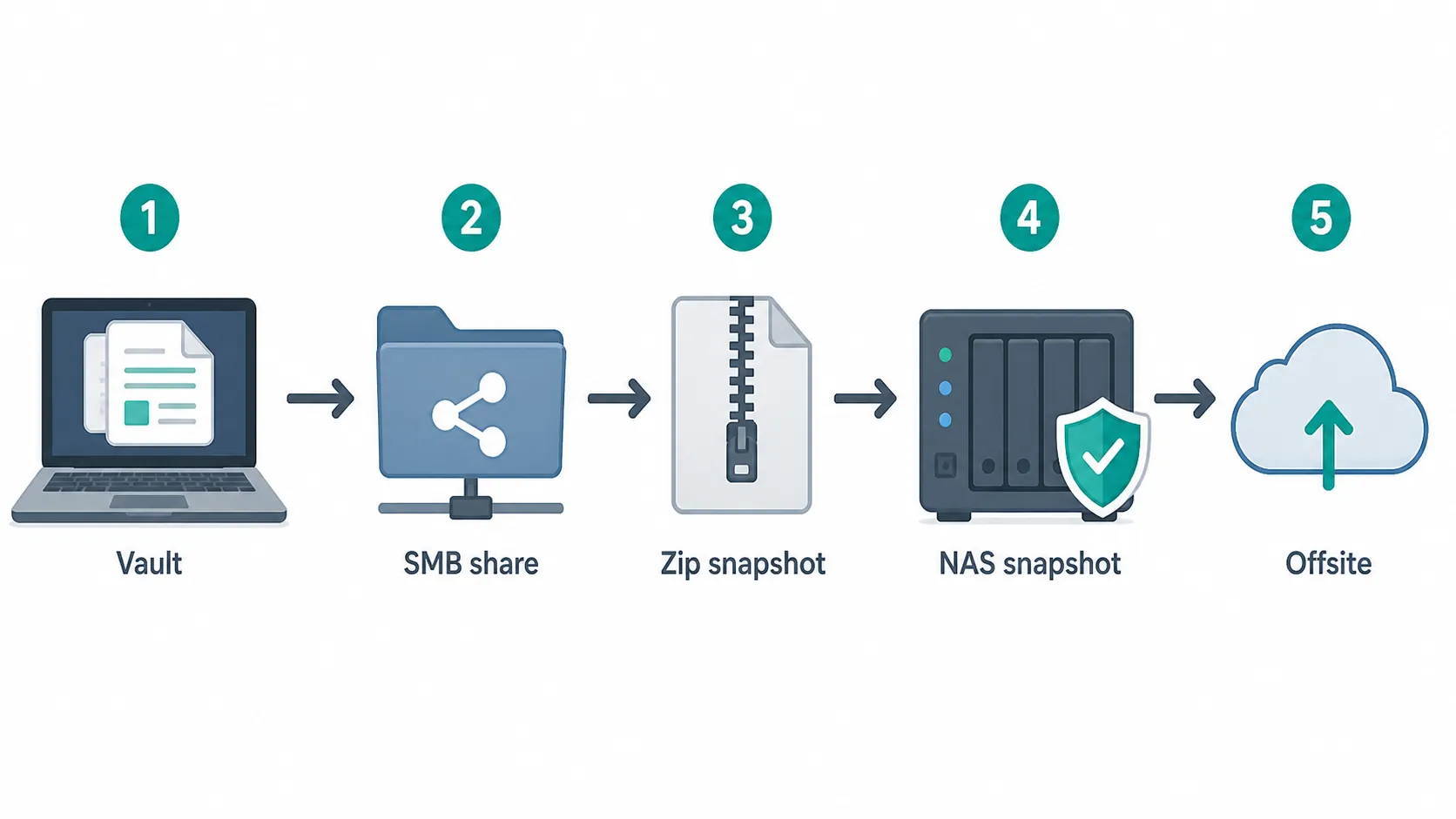
This path has the best failure posture because it preserves shape. A zip file is not a sync state. It is a dated object. If Tuesday’s sync deletes an attachments folder, you can go to Monday’s archive, open it, confirm the folder exists, and restore only what you need. If a plugin mangles front matter across hundreds of notes, you can compare the archive against the live vault. If the laptop dies, the restore target is not a proprietary database. It is a folder of Markdown files and attachments.
The practical chain looks like this:
- Keep Obsidian’s active vault on the laptop or desktop, not inside a remote share that can disappear when the network drops.
- Create a NAS shared folder dedicated to vault backups.
- Mount that folder over SMB on the computer that owns the vault.
- Use a local backup routine to write dated zip archives into the mounted share.
- Enable NAS snapshots on the backup folder.
- Copy retained archives offsite, either with UGOS Sync & Backup or another offsite job.
- Test restore by unzipping one archive into a temporary folder and opening it as a separate Obsidian vault.
That last step is where many backup plans stop being theoretical. A vault backup is not verified because a scheduled task says it ran. It is verified when a second copy opens cleanly, attachments render, and the files you care about are visible. If you already maintain a disaster-minded note workflow, the same habit belongs here; a short restore drill is more useful than another page of NAS feature comparison. For a broader restore-checking mindset, see Build a Tornado Safety Plan for Your Digital Notes.
There are two common variations. One is to use the NAS only as a backup target and leave sync to Obsidian Sync, Git, Syncthing, or another tool. The other is to combine SMB access with private networking, as in documented SMB-over-Tailscale Obsidian setups.[6] If you add file sync, be deliberate about noisy or machine-specific folders. One community backup write-up documents ignore rules for paths such as .obsidian/workspace, .vault-stats, .git, and .stversions when synchronizing notes across systems.[5]
The weakness is obvious: this is not the slickest multi-device experience. A scheduled archive taken every few hours will not make your phone instantly match your laptop. That is acceptable if the NAS’s primary job is backup. If you need instant note movement, add sync. Do not replace backup with sync and call the problem solved.
Path 3: Docker plus LiveSync buys speed at the cost of attention
The Docker path is for the user who wants a self-hosted sync service rather than a folder of archives. The documented pattern is to run CouchDB on a NAS and connect Obsidian clients through a community LiveSync setup, which gives a private alternative to hosted sync services.[7] UGREEN’s current software surface makes this plausible because Docker is part of UGOS Pro on supported DXP systems.[1]
There is also a related UGREEN-specific path for running Obsidian through Docker using Portainer and a linuxserver image, documented by Marius Hosting.[9] That is not the same thing as a clean vault-backup plan; it is evidence that UGREEN’s Docker environment is capable enough for Obsidian-adjacent workloads. The demand is real enough that Obsidian forum users have asked about NAS-oriented Obsidian images and packages for devices such as UGREEN and Synology.[10]
The tradeoff is maintenance gravity. CouchDB needs its own backup. Containers need updates. Credentials and network exposure need care. If replication spreads a bad edit quickly, the elegance of near-real-time sync does not help you unless you also retained versions outside the live sync state. Docker makes the NAS more capable; it also gives you more moving parts to remember when you are already in recovery mode.
The 8GB default memory configuration is another reason not to treat Docker as free. AppleInsider’s June 2026 DXP4800 GT review praised the price-to-performance story but noted the 8GB default RAM ceiling under Docker workloads.[14] A CouchDB/LiveSync stack is not necessarily heavy by homelab standards, but the moment the NAS is also doing media indexing, other containers, backups, and snapshots, Obsidian becomes one workload among many. For vault backup, I would rather underuse the NAS than build a fragile stack just because the box can run it.
Does Plus versus GT change vault safety?
Not much. It changes headroom, network shape, and Docker comfort. It does not change the backup logic.
The DXP4800 Plus is already far beyond what typical Markdown vault backup needs. PCMag lists the DXP4800 Plus with an Intel Pentium Gold 8505, 8GB DDR5 expandable to 64GB, two M.2 Gen4x4 slots, one 10GbE port, one 2.5GbE port, and a $799.99 MSRP; its measured 2.5GbE file-transfer numbers were 288MB/s write and 168MB/s read.[11] Even a vault with thousands of notes and a heavy attachments folder is not a workload that justifies choosing a NAS by benchmark alone.
The DXP4800 GT is the more obviously muscular four-bay option. TechRadar lists it with an AMD Ryzen Embedded R2514, 8GB DDR4, dual 10GbE, 64GB eMMC for the OS, and a $659.99 MSRP; in its testing, the unit delivered 272.96MB/s read and 268.35MB/s write over 2.5GbE RAID 5, and about 1034MB/s read and 585MB/s write over 10GbE.[12] NASCompares also reported about 1.3GB/s reads with four SATA SSDs and roughly 45W idle draw with four hard drives.[13]
Those numbers matter if the same NAS will serve multiple users, run containers, back up several machines, or saturate a 10GbE workstation. They matter far less if the only job is receiving zip archives from an Obsidian vault. The GT’s dual 10GbE and AMD platform are nice to have. The Plus is already enough for the backup workflows in this profile. A safer SMB-and-zip plan on the less exciting box beats a near-real-time sync plan you do not know how to restore.
One GT caveat is worth naming because it affects buyers who like to repurpose hardware: its 64GB eMMC OS arrangement complicates third-party OS installs.[12] That is not a problem for the vault-backup paths above if you intend to run UGOS Pro. It is a problem only if your real plan is to buy UGREEN hardware and immediately make it something else.
UGOS Pro is credible now, but still not invisible

The platform story is better in Q3 2026 than early UGREEN NAS coverage might lead you to expect. Current UGOS Pro documentation lists snapshots, Sync & Backup, file services including SMB/NFS/WebDAV/FTP/SFTP, and Docker on DXP models plus DH4300 Plus, excluding DH2300 from Docker support.[1] For Obsidian backup, those are the pieces that matter: a share protocol, a way to run jobs, a way to retain versions, and an optional container layer.
Current reviews still leave reasons to be conservative. AppleInsider’s June 2026 review called the DXP4800 GT “about 90% of Synology’s offering,” which is praise with a boundary around it.[14] NASCompares gave the GT an 8.4/10 and noted missing or limited enterprise-style safety features at test time, including no WORM, no encrypted pools, and a limited security scanner.[13] For a personal Obsidian vault, those gaps are not automatically disqualifying. For regulated or highly sensitive vaults, they move UGREEN out of the casual-default category.
Snapshots deserve special attention because they are the safety net behind both the plugin path and the SMB path. If the plugin moves a remote deletion to UGOS trash, snapshots can provide a second retained state. If a zip archive folder is changed or pruned incorrectly, snapshots can give you another route back. Without a retention policy, snapshots are just a checkbox someone forgot to turn into recovery.
Known issues and fit checks
These are the points I would check before trusting a UGREEN NASync with a serious Obsidian vault:
- The UGREEN NAS Sync plugin is young. Its June 2026 release and small early download count argue for caution, especially on vaults that contain sensitive work.[2][3]
- The plugin is two-way sync, not a backup archive. Deletes, bad edits, and conflicts need separate retention through trash, snapshots, zip archives, Git, or another versioned layer.
- The plugin has whole-vault access and network access flags, and the available material does not show plugin-level encryption.[2][3][4]
- UGOS Pro snapshots and Sync & Backup make the platform credible, but current review material still notes security-feature limits compared with more mature NAS ecosystems.[13]
- Docker is a real option, not a casual one. If you use LiveSync/CouchDB, back up the database and configuration, not just the visible Markdown folder.
- A NAS-dependent workflow has a power and network dependency. Keep a current local vault on the laptop if you expect to work during outages or travel. The same offline-access thinking applies to broader emergency work kits; see How to Stay Productive During Flash Floods and Tornadoes.
- MSRP and street pricing are point-in-time signals. Do not let a launch discount decide a backup architecture.
Buyer’s verdict for Obsidian vault owners
Buy a UGREEN NASync for Obsidian backup if you want a capable local-first destination and you are willing to design the restore path instead of merely turning on sync. In Q3 2026, the hardware is more than adequate and UGOS Pro has the right basic tools. The remaining risk is mostly workflow choice.
Choose SMB plus dated zip snapshots as the default. It gives the cleanest answer to the question that matters after damage: what exact copy can I restore? Use the UGREEN NAS Sync plugin when convenience matters and you understand its two-way behavior, permissions, lack of plugin-level encryption, and reliance on UGOS trash plus snapshots for delete recovery. Use Docker plus LiveSync/CouchDB only if you want self-hosted near-real-time sync badly enough to maintain the container stack and back it up separately.
Between the DXP4800 Plus and DXP4800 GT, choose for ports, Docker headroom, price, and broader NAS use. Do not expect the faster box to make a fragile vault plan safe.
References
- UGREEN NAS Apps & Software | UGOS Pro, Docker & VM Support — UGREEN official FAQ
- GitHub — TsFreddie/obsidian-ugreen-sync — GitHub
- UGREEN NAS Sync | Obsidian Stats — Moritz Jung
- UGREEN NAS Sync — Obsidian Plugin community listing — Obsidian
- How I synchronize and backup my Obsidian Notes — Sébastien Dubois
- Syncing Obsidian — Leetsaber
- I made my own Obsidian Sync server with my NAS and a free plugin — XDA Developers
- The 3-2-1 Backup Strategy — Backblaze Blog
- How to Install Obsidian on Your UGREEN NAS — Marius Hosting
- Obsidian image/package for NAS — Obsidian Forum
- Ugreen NASync DXP4800 Plus Review — PCMag
- Ugreen NASync DXP4800 GT NAS review — TechRadar
- UGREEN DXP4800GT NAS Review — NAS Compares, June 8, 2026
- UGREEN NASync DXP 4800 GT review: The best NAS price-to-performance in 2026 — AppleInsider, June 9, 2026