The short answer, as of the public beta
If you were waiting to see whether macOS Golden Gate makes Apple Notes enough, here is the practical answer: Golden Gate is the biggest Notes update in years, and it meaningfully improves Apple Notes for casual-to-moderate note-taking and productivity. But as of July 30, 2026, Golden Gate is still public beta software, with the final macOS 27 release expected in September, so anything here should be treated as last-checked rather than permanent.[1]
For an Apple Notes user who mostly wanted cleaner text transfer, section-level navigation, quick dividers, Mac drawing tools, and better Siri capture, Golden Gate removes several daily irritations. For someone whose system depends on backlinks, graph navigation, plain-text files, bulk export, plugins, or reliable access outside Apple platforms, the same dealbreakers are still sitting where they were.

What Golden Gate actually fixes in Apple Notes
The useful parts of this update are not abstract. They sit exactly where Apple Notes has been most annoying for people who otherwise like it: moving formatted text between apps, jumping around long notes, making quick visual breaks, sketching without an iPad, and capturing something before it evaporates.
| Golden Gate addition | What it improves | What it does not change |
|---|---|---|
| Copy as Markdown and Markdown paste conversion | Selected rich text can be copied out as Markdown, and Markdown pasted into Notes can auto-convert into rich text.[2][3] | Apple Notes is still not a live Markdown editor and does not store notes as individual .md files.[2] |
| Links to sections inside a note | A link can jump directly to a heading or section within a longer note.[2][3] | This is not the same as backlinks, wikilinks, or a graph-based knowledge system. |
| Drawing on Mac | Markup drawing tools come to Apple Notes on a Mac for the first time, using a mouse or trackpad.[3] | A non-touchscreen Mac still is not an iPad; usefulness depends on how much drawing you actually do. |
| Divider lines | Command-L inserts a horizontal rule, which is exactly the kind of small formatting shortcut Apple Notes should have had already.[2][3] | It improves note layout, not information architecture. |
| Siri note actions | Siri can create notes, add information to existing notes, and reformat content before saving.[4] | Voice capture and rewriting do not replace export, backlinks, plugins, or open storage. |
| Liquid Glass, new icons, folder icons, Image Playground updates | The interface looks more current, folders can be more scannable, and Image Playground gains photorealistic generation with iCloud+ daily limits.[1][4] | These are pleasant, but they do not decide whether Apple Notes can carry a power-user archive. |
That table is the shape of the whole decision. Golden Gate makes Apple Notes kinder to use. It does not make Apple Notes structurally more open.
Markdown copy/paste is a bridge, not native Markdown
This is the feature most likely to be overstated. In Golden Gate, Apple Notes can copy selected text as Markdown. It can also take Markdown pasted from another app and convert it into rich text.[2][3] That is useful. It is also not the same thing as Apple Notes supporting Markdown as its editing model.
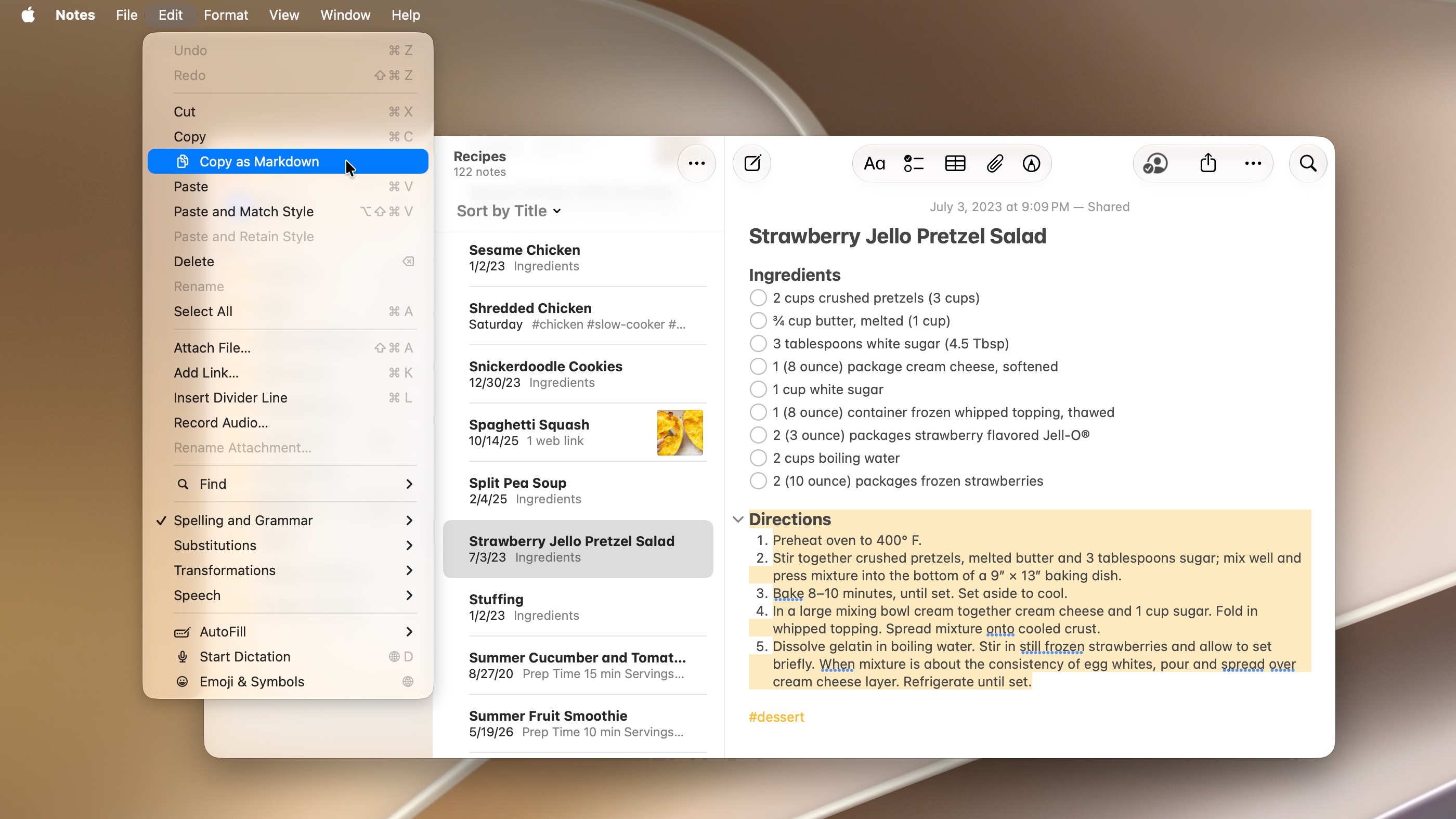
The difference matters when you are deciding whether to stay. If you write a heading in Obsidian, Bear, or another Markdown-first editor, the Markdown syntax is part of the document model. You can usually see, edit, search, export, sync, and recover that text as text. In Golden Gate Apple Notes, Markdown is an interchange format. It helps you get material in and out more cleanly, but you are still editing a rich-text note inside Apple’s system.
So no, Golden Gate does not mean you can type # Heading in Apple Notes and expect live Markdown rendering the way you would in a Markdown editor. Mac O’Clock’s hands-on piece makes the strongest sympathetic case for the feature: for a user who mainly needed to move writing between Notes and publishing tools, Apple may have removed the last reason to pay for a separate writing app.[5] That is a real use case. It is not the same as replacing a plain-text knowledge base.
This is where Apple’s choice feels both generous and carefully limited. Copy as Markdown means the person who keeps drafts, meeting notes, lists, and research snippets in Apple Notes can now leave a note with less cleanup. It does not mean the person with thousands of .md files, scripts, templates, and external editors can move that system into Notes without giving up the file layer.
The migration test for Markdown
Before treating Markdown copy/paste as a reason to stay, ask what you actually wanted Markdown for. If the answer is “I want cleaner copy into a blog editor, email, documentation tool, or another note app,” Golden Gate helps. If the answer is “I want my notes to exist as ordinary files that another editor can open tomorrow,” Golden Gate does not solve it.
The remaining export problem is not cosmetic. Apple Notes still does not offer bulk export to .md, .txt, or another open format, and its notes are not stored as individual Markdown files that you can browse in Finder and open elsewhere.[3][6] You can improve the doorway without changing the building.
Section links are useful, but they are not backlinks
Section links are the other feature that can look, from a distance, like Apple Notes is moving toward Obsidian territory. In Golden Gate, you can create a link that jumps to a specific section heading inside a note.[2][3] For long notes, this is immediately helpful.
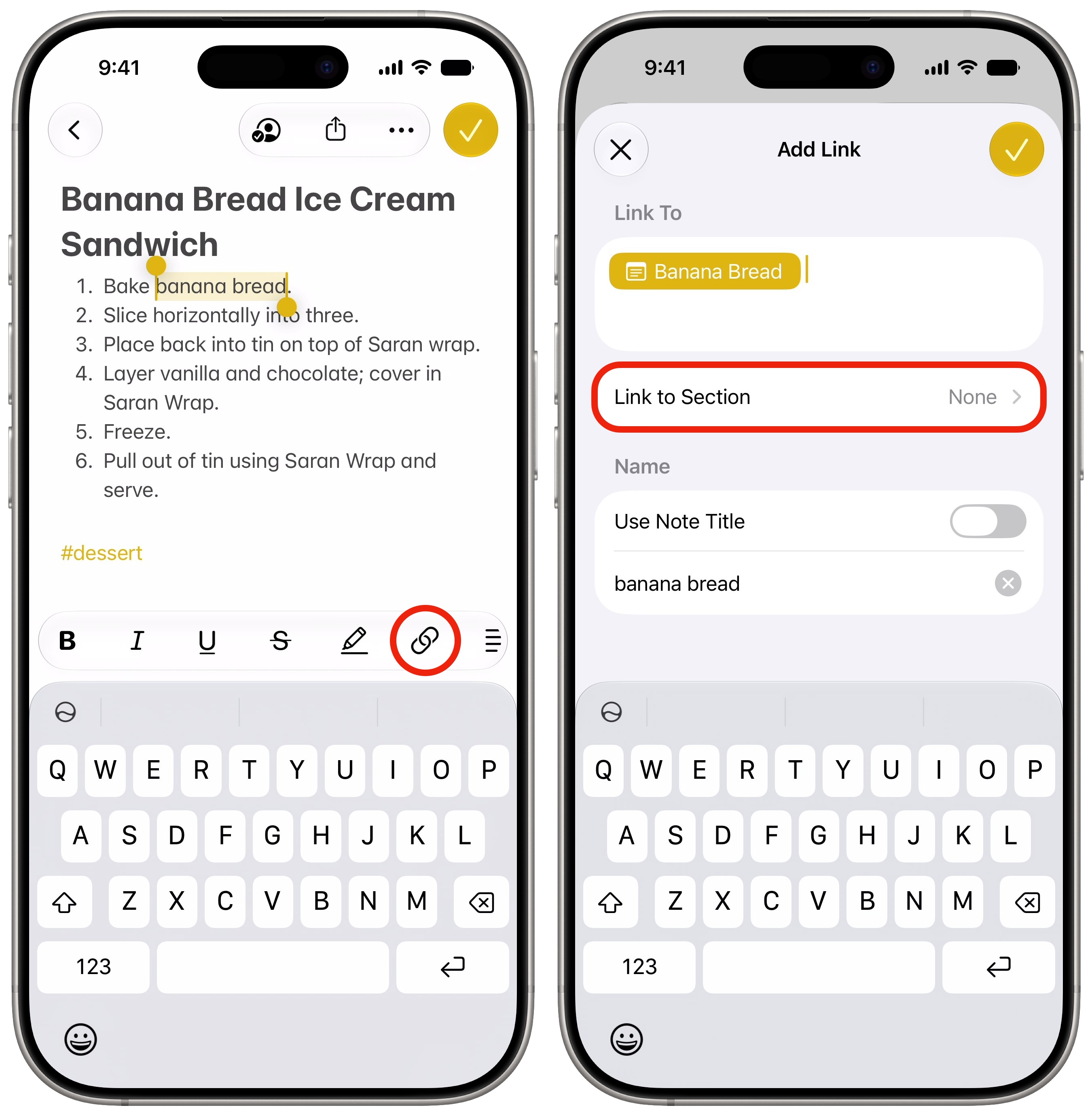
Think about a running project note: agenda at the top, decisions in the middle, open questions below, reference links at the end. A section link lets you point someone—or future you—straight to “Decision log” instead of saying “scroll about halfway down.” For recipes, travel plans, client notes, school notes, or recurring meeting notes, this is the sort of low-drama improvement that makes Apple Notes feel less like a scratchpad and more like a working notebook.
But section links do not create the bidirectional linking model that power users mean when they talk about backlinks. In Obsidian- or Logseq-style systems, a link is not just a clickable jump. It also becomes part of the note’s relationship map: the target note can show what links to it, pages can be connected through [[wikilinks]], and a graph view can expose clusters or orphaned notes. Apple Notes still does not add graph view, wikilinks, backlinks, or a plugin ecosystem that would let the community build those layers on top.[6]
That does not make section links minor. It makes them a different tool. They improve navigation inside a document. Backlinks improve discovery across a body of knowledge. If your current pain is “my long Apple Notes are hard to move through,” Golden Gate helps. If your current pain is “I need to see how ideas connect across years of reading, projects, meetings, and drafts,” it remains the wrong level of machinery.
Drawing, dividers, and UI refinements make Notes feel less unfinished
Drawing on Mac is one of those Apple Notes features that sounds late because it is late. Golden Gate brings Markup drawing tools to Notes on a non-touchscreen Mac for the first time, using a mouse or trackpad.[3] I would not pretend a trackpad sketch replaces Pencil on iPad, but it does make small annotations, quick diagrams, and visual markups possible without switching devices.
The divider shortcut is even simpler: Command-L inserts a horizontal rule.[2][3] It will not sell anyone on Apple Notes, but it removes one of those silly frictions that makes a built-in app feel less finished than the third-party tools around it. Folder icons and Liquid Glass refinements sit in the same category. They help you see and sort your workspace faster, especially if you have years of folders, but they do not change what happens when you need to export or restructure that archive.
Image Playground’s photorealistic generation is more interesting for creative workflows than for note architecture. Golden Gate adds photorealistic generation, with daily limits tied to iCloud+.[1][4] If you use Notes for mood boards, visual planning, or quick idea capture, it may be welcome. It is not a reason to keep a research archive locked in Apple Notes.
Siri helps capture and reshape notes, with the usual boundaries
The Siri side of Golden Gate is more than a Notes feature, but it matters because capture is where built-in Apple apps often win. Siri can create a new note with web-researched content, add information to an existing note, and reformat content before saving.[4] Golden Gate also brings Siri into Spotlight-style workflows, so Command-Space becomes closer to a unified search-and-ask entry point across the Mac.[7]
That is a good fit for Apple Notes. Built-in notes apps live or die by the moment when you have ten seconds to save something. If Siri can append the right detail to the right note, or clean up a rough captured thought before it lands, that reduces the maintenance work Apple Notes users normally have to do later.
The boundaries are not small. Apple’s Golden Gate preview notes regional and hardware limitations for Apple Intelligence features, including availability restrictions in the EU and China at launch, and some advanced AI capabilities require an M3 chip or later with at least 12GB of RAM.[8] Those limits matter if your note system has to work across older Macs, family devices, travel contexts, or regulated workplaces.
I also would not make an app-switching decision on the assumption that system-wide AI writing will behave identically inside every third-party editor. Test your actual note app on your actual Mac before you decide that Golden Gate’s writing tools erase the difference between Apple Notes, Obsidian, Notion, Bear, and Craft.
Where Apple Notes still wins
Apple Notes has one advantage that no feature matrix captures cleanly: it is already there. It opens quickly, syncs through the Apple account most Mac users already have, accepts quick capture from the share sheet, works with system search, and does not ask you to become the administrator of your own tiny publishing platform.
That matters more than productivity discourse likes to admit. A lot of people do not need a personal knowledge management system. They need a reliable place for receipts, meeting notes, half-formed drafts, scans, travel plans, checklists, and the one paragraph they will paste into something else tomorrow. Golden Gate improves that life directly.
Apple Notes also benefits from being a native Mac app. If you are choosing between Apple Notes and heavier cross-platform tools, the architecture question is not theoretical: startup feel, memory use, battery impact, menu behavior, offline confidence, and system integration all shape whether you actually keep using the app. If that trade-off is central for you, FlowDesk’s Native vs. Electron on Mac comparison is the next piece to read.
Where the power-user gap remains
Once the question shifts from “Can I take better notes?” to “Can this hold my long-term system?”, Golden Gate leaves the major gaps intact.
- No native Markdown editing model: Markdown copy/paste improves interchange, but Apple Notes still does not become a live Markdown editor.[2][5]
- No plain-text file layer: notes are not stored as individual .md files you can open, version, script, or move through Finder.[6]
- No bulk export to open formats: Apple Notes still lacks a straightforward bulk export path to .md, .txt, or another open format.[3][6]
- No graph view: visual knowledge-base navigation remains an Obsidian-style differentiator.[6]
- No wikilinks or backlinks: section links are useful, but they do not create a bidirectional note network.[6]
- No plugin ecosystem: Apple Notes remains limited to what Apple ships.[6]
- No real escape from Apple-platform dependence: Golden Gate does not turn Notes into a Windows, Android, or web-first workspace comparable to cross-platform tools.[6]
This is why the Obsidian, Notion, Bear, and Craft comparison still matters. They do not all solve the same problem. Obsidian is strongest when local Markdown files, links, plugins, and graph thinking are central. Notion is stronger when databases, shared workspaces, and structured project pages matter. Bear is closer to the Mac-first writing lane, with Markdown-oriented editing and a more deliberate writing environment. Craft sits nearer the polished document and sharing side. A broader app-by-app breakdown belongs in FlowDesk’s Best Note-Taking Apps for Mac in 2026 guide, but the key point here is simpler: Golden Gate improves Apple Notes without changing its category.
Should you stay with Apple Notes after Golden Gate?
Stay with Apple Notes if your missing pieces were mostly practical: cleaner copy into Markdown-aware tools, easier Markdown paste, section-level links inside long notes, quick divider lines, drawing on the Mac, native Apple capture, and Siri-assisted note creation or cleanup. That is the user Golden Gate serves well.
Stay also if you already have years of Apple Notes and do not actually want a new system. Migration has a cost even when the destination app is better on paper. Attachments, scans, links, tables, formatting, locked notes, folder structures, and shared notes all become somebody’s cleanup job. If you need help judging that cost before moving, FlowDesk’s Notes App for MacBook comparison is the more migration-minded next stop.
Switch if your workflow depends on backlinks, graph navigation, open Markdown files, bulk export, plugins, automation around a file system, or serious use from Windows and Android. Golden Gate does not remove those reasons to leave. It just makes the decision less automatic for everyone else.
References
- macOS Golden Gate Guide: All the new features, Macworld
- iOS 27 Adds Four New Features to Notes App, Including Markdown Copy-and-Paste, MacRumors, June 17, 2026
- Notes features in iOS 27 and macOS Golden Gate, Cult of Mac
- Here's everything new for Apple Notes in iOS 27, 9to5Mac, June 10, 2026
- Apple Notes Just Removed My Last Reason to Pay for a Writing App, Mac O'Clock/Medium
- Apple Notes vs Notion vs Obsidian vs Bear vs Craft, Stik.ink, 2026
- macOS Golden Gate: The MacStories Overview, MacStories
- macOS 27 Golden Gate Preview, Apple