
The awkward question with Claude Opus 5 API note-taking is not whether the model can make a daily notebook feel smarter. It is whether a normal day of capture, cleanup, and project thinking turns into a calm bill or a surprise one.
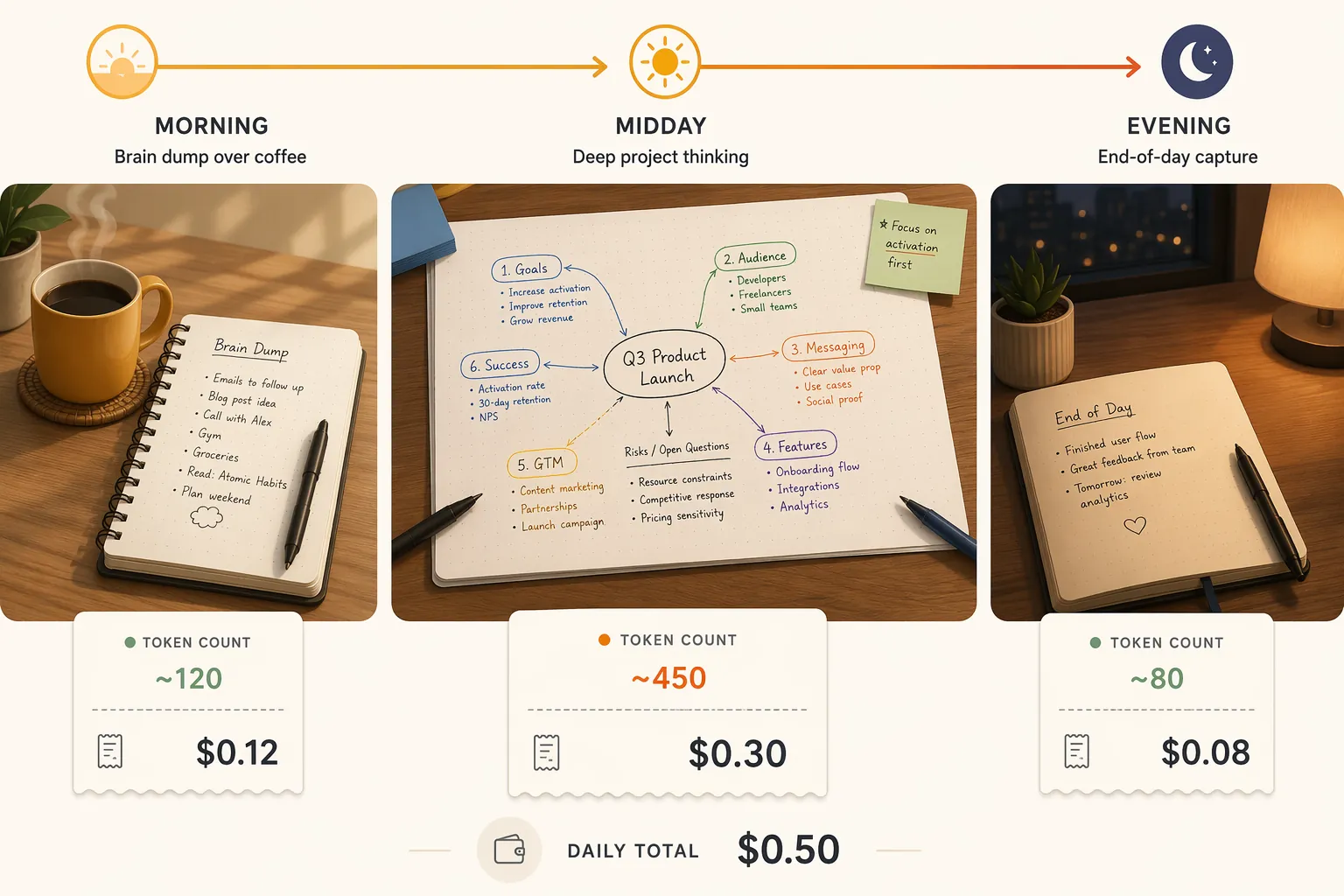
Using the standard Opus 5 API rate card, a practical daily note loop comes out roughly like this: about $0.12 for a morning brain-dump, about $0.30 for a deeper project-thinking session, and about $0.08 for an end-of-day capture. Running all three every day lands near $15 per month before prompt caching. With aggressive caching of repeated context, the same pattern can fall toward roughly $5 per month, but only if the workflow is actually designed around reusable context rather than fresh long prompts every time.[1][2][3]
That is the useful starting point. Not the per-million-token number by itself, and not a blanket claim that API use is cheaper than a subscription. The real answer depends on how much text you send, how much the model writes back, whether your project context repeats, and whether you are buying the API for something a $20 Claude Pro subscription cannot do.
The Rate Card Behind The Note-Taking Math
Claude Opus 5 launched on July 24, 2026. Anthropic’s announced standard API pricing is $5 per million input tokens and $25 per million output tokens. Fast Mode is priced at $10 per million input tokens and $50 per million output tokens. Batch pricing is $2.50 per million input tokens and $12.50 per million output tokens.[1]
For daily notes, standard pricing is the relevant lane. Fast Mode can matter when users are waiting on a live interface, but ordinary capture, summarization, tagging, and restructuring are not usually latency-sensitive enough to justify doubling the rate. Batch is more interesting, but mostly for archive work: summarizing a folder of old meeting notes overnight, classifying years of journal entries, or producing backfilled project indexes.
| Opus 5 API mode | Input price | Output price | Note-taking relevance |
|---|---|---|---|
| Standard | $5/MTok | $25/MTok | Best baseline for daily capture and project notes |
| Fast Mode | $10/MTok | $50/MTok | Usually unnecessary for note-taking latency |
| Batch | $2.50/MTok | $12.50/MTok | Useful for bulk archive summarization and cleanup |
| Cached input reads | $0.50/MTok | Output unchanged | Useful when stable prompts, briefs, or project context repeat |
The output side matters more than many note-takers expect. A model that turns a rough page into a structured summary, task list, backlinks, and follow-up questions is not just reading your note. It is writing a new artifact. At Opus 5 standard pricing, every million output tokens costs five times as much as a million input tokens.[1]
Three Sessions, One Realistic Daily Budget
The cleanest way to price note-taking is by session, because that is how the work actually happens. A notebook day is not one undifferentiated token stream. It is usually a short morning dump, one or more deeper thinking sessions, and a quick closing pass where loose ends become tomorrow’s starting points.
| Session | Estimated input | Estimated output | Standard Opus 5 cost |
|---|---|---|---|
| Morning brain-dump | ~8K tokens | ~3K tokens | ~$0.12 |
| Project-thinking session | ~20K tokens | ~8K tokens | ~$0.30 |
| End-of-day capture | ~5K tokens | ~2K tokens | ~$0.08 |
Those estimates are inferred from published descriptions of conversational Claude-assisted note-taking patterns and general token budgeting, not from a public log of a real user running Opus 5 API for notes. That distinction matters. This is a budget model, not a published Opus 5 note-taking usage log: recognizable sessions, explicit token assumptions, and visible arithmetic.[2]
A morning brain-dump at roughly 8K input tokens and 3K output tokens costs about $0.115, which rounds to $0.12. The input charge is about $0.04; the output charge is about $0.075. This is the kind of session where the API reads yesterday’s loose context, today’s rough thoughts, maybe a standing instruction about formatting, then returns a cleaned note with themes, next actions, and a few open loops.[1][2]
A project-thinking session is where the bill starts to reveal the workflow. At roughly 20K input tokens and 8K output tokens, the session costs about $0.30. This is not expensive as a one-off. It becomes meaningful when it happens several times a day, includes long project briefs every time, or asks the model to produce polished plans rather than compact working notes.[1][2]
An end-of-day capture at roughly 5K input tokens and 2K output tokens costs about $0.075, rounded to $0.08. It is the cheapest of the three because the job is usually narrower: compress loose notes, extract tasks, name unresolved questions, and maybe prepare tomorrow’s landing page.[1][2]
Monthly Cost: Light, Full, And Heavy Use
The monthly picture changes less from the official rate card than from how often the deep session appears. A daily capture-only user and a person routing every project decision through Opus 5 are not in the same budget category.
| Usage pattern | What it looks like | Approximate monthly cost |
|---|---|---|
| Light daily use | One note session per day | ~$9–15/month |
| Full daily use | Morning brain-dump, project-thinking session, end-of-day capture | ~$15/month |
| Caching-optimized full daily use | Same sessions, with repeated context served from cache | ~$5/month |
| Heavy use | Multiple deep project-thinking sessions per day | Up to ~$60/month |
The full daily pattern adds up to about $0.50 per day before caching: $0.12 for the morning session, $0.30 for the project session, and $0.08 for the evening session. Multiplied across a month, that lands near $15. The number is surprisingly reasonable if the sessions stay compact. It is also fragile, because a single habit change can move it quickly: asking for longer rewrites, including entire project archives, or running multiple project-thinking sessions every day.
Light use is not automatically cheaper than Pro by enough to matter. One session a day can sit around $9–15 per month depending on whether it resembles the short evening capture or the larger project-thinking session. That is below $20, but not by a margin large enough to ignore maintenance, logging, retries, prompt design, and the inconvenience of debugging your note pipeline when you wanted to be writing.
Heavy use is where the API stops feeling like a tiny metered utility. Multiple deep sessions per day can push the monthly cost up to about $60. That still may be rational for a person whose notes are part of client work, research synthesis, engineering planning, or a serious writing pipeline. It is harder to justify if the output is mostly prettier summaries of thoughts that would have fit comfortably inside a subscription chat window.
Prompt Caching Is The Difference Between Paying For Memory And Reusing It
Prompt caching deserves more attention than a footnote because note-taking workflows repeat themselves. A stable system prompt, a project brief, formatting rules, personal taxonomy, active goals, and background documents may be sent again and again. Anthropic’s pricing lists cached input reads at $0.50 per million tokens, compared with the standard $5 per million input tokens.[3]
That is a 90% reduction on cached input reads. It does not discount the model’s output, and it does not magically shrink fresh notes. It helps when the same material appears across sessions: the same project brief in every planning pass, the same capture schema in every morning page, or the same long reference packet while you work through a multi-day research thread.[3]
In practice, caching rewards a particular design. Put durable context in a reusable layer. Keep the daily note itself separate. Ask for compact outputs when a compact output is enough. If every session is one giant newly assembled prompt with copied notes, copied instructions, copied project summaries, and copied reference material in a different order, the aggressive caching case will not hold.
This is how the full daily loop can plausibly move from around $15 per month toward roughly $5 per month: much of the recurring input is read at the cached rate, while fresh input and output remain normally priced. It is also why the lower number should be treated as a workflow-dependent scenario, not the default bill every API note-taker will see.[3]
The Uncomfortable Pro Comparison
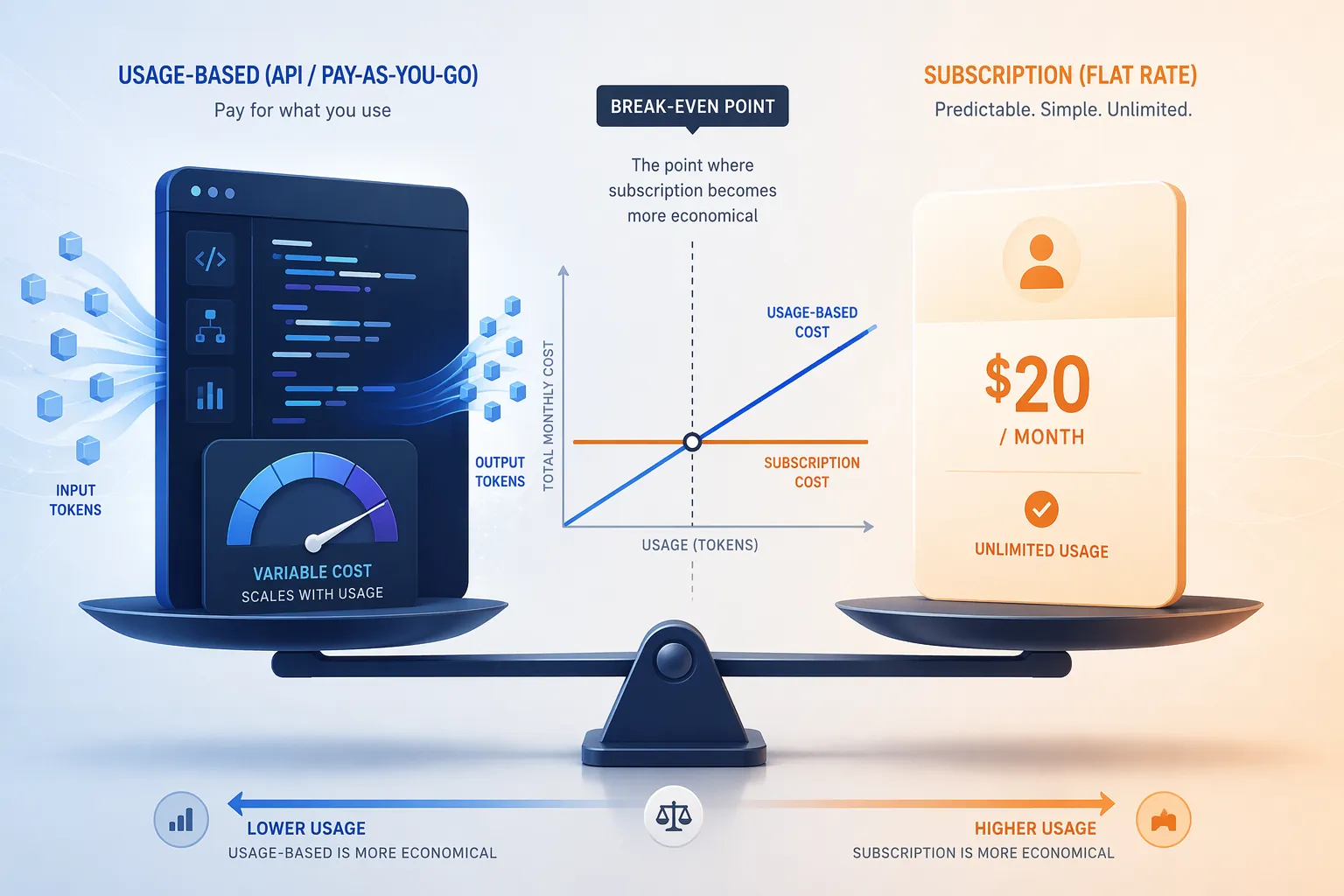
Claude Pro is $20 per month. That single fact makes many API-cheaper arguments look too tidy. Pro includes Opus 5 access, Claude Code, and web search, so the comparison is not only token cost against token cost. It is also whether the note-taker values the broader subscription surface.[4]
A CloudZero pricing analysis places a Pro-versus-API break-even around 3.7 million tokens per month in a calculation based on Sonnet 4.6. That is not a direct Opus 5 note-taking break-even, and it should not be treated as one. Opus 5 has its own rate card, and Pro includes Opus access. Still, the comparison points in the same direction: once usage gets beyond very light API activity, the flat subscription becomes hard to beat for an individual who mainly wants interactive help.[4]
This is where the API enthusiast has to be honest about what is being purchased. If the goal is to chat with Claude about notes, rewrite entries, ask follow-up questions, and occasionally summarize a project, Pro is probably the economical default. If the goal is to connect Obsidian, Notion, a local folder, a task manager, and a custom capture script into one repeatable system, the API is buying control that Pro does not provide.
The API and subscription are not mutually exclusive. A sane setup for some users is Pro for interactive thinking and the API for narrow pipeline jobs: nightly cleanup, archive tagging, batch summarization, or automated conversion of raw captures into a preferred note format.
Where Max Fits
Claude Max is less useful as the central comparison for everyday note-taking, but it matters as an upper bound. Max 5x is priced at $100 per month and Max 20x at $200 per month. A BenchLM analysis found those Max tiers can be 15–36 times cheaper than equivalent API usage at high volumes.[5]
For a solo note-taker, that mostly says this: if your planned API use looks like hundreds of dollars of Opus calls because you want a huge interactive Claude workload, stop and examine the subscription tiers first. API flexibility does not automatically make the API the rational buying path.
When The API Actually Wins
The API is strongest when the notebook is not just a place where a human chats with an assistant. It wins when notes are moving through a system: captured in one place, normalized somewhere else, linked to projects, reviewed on a schedule, and processed without the user manually pasting context into a web app.
- Custom tooling: you want scripts, buttons, scheduled jobs, or editor commands that call Claude from inside your own note environment.
- Programmatic session management: you want each note pass logged, templated, routed, retried, or stored with metadata.
- Long-context processing: you need to include large project documents or reference material, including workflows over 500K tokens.
- Batch archive work: you want discounted bulk processing for old notes rather than live interaction.
- Usage-window avoidance: you do not want a subscription cap or rolling window interrupting an automated workflow.
Those are real reasons. They are just not the same as cheapness. A custom pipeline has its own cost in maintenance. Someone has to decide what happens when the model returns too much text, when a job fails halfway through, when a prompt change doubles output length, or when the invoice needs explaining.
For readers still deciding whether they want a DIY AI layer at all, FlowDesk’s broader AI productivity app comparison is the better next branch. If the real question is whether to buy a finished second-brain product instead of wiring an API into an existing vault, the AI-powered PKM tools comparison is the more direct comparison.
The Model Choice Nobody Should Skip
Opus 5 is the expensive flagship choice in this setup. That can be reasonable for ambiguous project synthesis, long-context reasoning, or notes that become decisions. It is less convincing for routine cleanup: add headings, extract tasks, convert bullets, assign tags, or summarize a short capture.
For those simpler jobs, Haiku 4.5 changes the math. At $1 per million input tokens and $5 per million output tokens, it cuts per-session cost by about 80% compared with Opus 5 standard pricing. A note pipeline does not have to use one model everywhere. The boring but efficient design is to send routine formatting and extraction to the cheaper model, then reserve Opus 5 for the moments where reasoning quality is actually the point.
That matters more than shaving tiny tokens from a prompt. The biggest avoidable cost is not always a verbose instruction. Sometimes it is sending every capture, no matter how mechanical, to the most expensive model in the stack.
A Practical Decision Rule
Use Claude Pro if you mostly want interactive daily note help: talking through ideas, summarizing entries, rewriting rough notes, using web search, and occasionally leaning on Claude Code. At $20 per month, it is the cleaner default for most individual note-takers, especially once maintenance time is counted.[4]
Use the Opus 5 API if the notebook is becoming infrastructure. The case is strongest when custom tooling, programmatic capture, recurring project context, long-document processing, or batch archive work would save more friction than the metered bill creates. Expect roughly $15 per month for a full daily pattern under the session assumptions here, closer to $5 if prompt caching is genuinely effective, and up to about $60 if multiple deep sessions become normal.[1][2][3]
Use a cheaper model such as Haiku 4.5 when the note task is mechanical and flagship reasoning is not buying much. The API path becomes easier to defend when the pipeline routes work by difficulty instead of treating every note as an Opus-worthy problem.
If the deeper concern is not Claude at all but the long-term economics of where notes live, the adjacent decisions are worth separating: the hidden cost of supposedly free note apps, whether Notion is really free for note-taking, and whether a local-first or cloud PKM setup fits the way the notebook will be maintained.
References
- Introducing Claude Opus 5 — Anthropic, July 24, 2026.
- The Claude AI Feature That's Quietly Replacing My Entire Note-Taking System — Medium.
- Anthropic pricing page — Anthropic.
- Claude Pricing In 2026 — CloudZero.
- Subscription vs API cost gap — BenchLM.