
The Productivity Paradox: Why Most AI Tools Fail to Deliver
Here is the uncomfortable truth of the AI productivity boom: three out of four knowledge workers now use AI at work, according to Microsoft's 2025 Work Trend Index, which surveyed 31,000 respondents across 31 markets. Yet a February 2026 study by the National Bureau of Economic Research, covering 6,000 CEOs, found that 89% of firms report zero measurable productivity impact from their AI investments. That gap — between widespread adoption and near-universal disappointment — is not a failure of the technology itself. It is a failure of selection.
The market in 2026 offers hundreds of AI productivity apps, each promising to save you hours. But the data suggests most users pick a tool before they identify their bottleneck. The result is a stack of subscriptions that generate activity, not output. The Federal Reserve Bank of St. Louis found that AI users save an average of 2.2 hours per week — a 5.4% time reduction. That is real, but it is far from the revolution the marketing copy promises.
This article takes a different approach. Instead of ranking tools by feature count or popularity, we start with your biggest workflow bottleneck — writing, scheduling, meetings, knowledge management, or automation — and match it to the category of tool that actually solves it. The comparison table below covers 12–15 leading apps across five categories, with honest pricing, platform notes, and the specific use case each tool serves best.
Quick-Reference Comparison Table: 12–15 AI Productivity Apps
The table below organizes every tool covered in this roundup by category, starting price, free-plan availability, and the single differentiator that matters most for each. Use this as your first pass: scan the "Best For" column, identify your bottleneck, then jump to the corresponding deep-dive section.
| Tool | Category | Best For | Starting Price | Free Plan | Key Differentiator |
|---|---|---|---|---|---|
| ChatGPT Plus | General Assistant | Creative & iterative work | $20/mo | Yes (limited) | Best for brainstorming, drafting, and multi-turn conversations |
| Claude Pro | General Assistant | Long documents & analysis | $20/mo | Yes (limited) | 200k token context window; top SWE-bench coding score (72.5%) |
| Perplexity Pro | General Assistant | Real-time research | $20/mo | Yes (limited) | Deep Research: ~8 searches per query, ~42 sources, ~1,300-word reports in <3 min |
| Motion | Scheduling | Auto-scheduling tasks | $34/mo (individual) | No | Replaces your calendar; auto-prioritizes and reschedules |
| Reclaim | Scheduling | Habit & meeting blocking | $12/seat/mo | Yes (limited) | Augments Google Calendar; blocks time for habits, tasks, and meetings |
| Clockwise | Scheduling | Calendar optimization | $6.75/mo | Yes (limited) | Optimizes existing schedules; promises to save 1 hour/week |
| Fireflies | Meeting Assistant | CRM-integrated meeting notes | $19/seat/mo (Pro) | Yes (limited) | Bot-based (Fred); deep Salesforce, HubSpot, Pipedrive integration |
| Granola | Meeting Assistant | Discreet note-taking | Not disclosed | Yes (limited) | No bot; captures audio from your device; works with Zoom, Meet, Teams |
| Otter.ai | Meeting Assistant | Free transcription | $16.99/mo (Pro) | Yes (300 min/mo) | Generous free tier; real-time transcription and search |
| Notion AI | Knowledge Mgmt | AI inside your wiki | $10/member/mo (add-on) | Yes (trial) | AI writing, summarization, and Q&A within Notion workspace |
| Grammarly Premium | Writing | Style & tone refinement | $12/mo (approx.) | Yes (basic) | Context-aware suggestions across apps and browsers |
| Jasper | Writing | Marketing & long-form content | $49/mo | Yes (trial) | Brand voice customization; templates for ads, blogs, emails |
| Zapier | Automation | No-code integrations | $19.99/mo (Starter) | Yes (limited) | Connects 5,000+ apps; 78% of enterprises struggle with AI integration |
| n8n | Automation | Self-hosted workflows | Free (self-host) | Yes (full) | Open-source; advanced logic; managed cloud from €20/mo |
General AI Assistants: ChatGPT, Claude, and Perplexity
The three leading general-purpose AI assistants — ChatGPT, Claude, and Perplexity — all cost $20 per month for their Pro tiers. On the surface they look interchangeable. In practice, they serve fundamentally different use cases, and the most effective strategy is to use them as a complementary trio rather than picking a single winner.
ChatGPT: Creative and Iterative Work
ChatGPT remains the strongest option for open-ended creative tasks: brainstorming, drafting, role-playing scenarios, and multi-turn conversations where the output evolves through back-and-forth refinement. An MIT study found that access to ChatGPT reduced the time required for writing assignments by 40%, while the quality of output rose by 18%. Its mobile app revenue surged from $174 million in 2024 to $1.35 billion in 2025, per TechCrunch — a signal of how deeply it has embedded into daily workflows.
Claude: Long Documents and Enterprise Workflows
Claude Pro, powered by the Opus 4 model, offers a 200,000-token context window — enough to analyze an entire book or a dense legal contract in a single pass. It scores 72.5% on SWE-bench, making it the top AI coding model as of mid-2026, according to Anthropic's May 2025 benchmark. For knowledge workers who need to summarize lengthy reports, compare multiple documents, or debug complex code, Claude is the better choice than ChatGPT.
Perplexity: Real-Time Research
Perplexity Pro's Deep Research feature performs approximately eight searches per query, consulting an average of 42 sources, and produces reports of roughly 1,300 words in under three minutes. For market research, competitive analysis, or any task that requires synthesizing information from multiple live sources, Perplexity is faster and more thorough than manually searching and reading. It is the weakest of the three for creative writing or long-form analysis, but it is the strongest for research velocity.
| Tool | Pro Price | Best Use Case | Key Limitation |
|---|---|---|---|
| ChatGPT Plus | $20/mo | Brainstorming, drafting, iterative writing | Shorter context window than Claude; less research depth than Perplexity |
| Claude Pro | $20/mo | Long documents, code, enterprise analysis | Weaker at real-time research; less creative flexibility than ChatGPT |
| Perplexity Pro | $20/mo | Real-time research, source synthesis | Weak at creative writing and long-form content generation |
AI Scheduling Tools: Motion vs. Reclaim vs. Clockwise
AI scheduling tools are often lumped together, but their underlying philosophies differ sharply. Motion replaces your calendar by auto-scheduling tasks based on priority and deadlines, then dynamically rescheduling when conflicts arise. Reclaim augments your existing calendar by automatically blocking time for habits, tasks, and meetings — it works with your current schedule rather than replacing it. Clockwise optimizes the schedule you already have, shifting flexible meetings to create focused work blocks.
Motion starts at $34 per month for individuals and $29 per seat per month for teams. It is the most aggressive of the three: it will move your lunch break to accommodate a deadline if that is what the algorithm decides. That works well for people who struggle with prioritization, but it can feel jarring for those who prefer to maintain control over their calendar. Reclaim starts at $12 per seat per month and integrates natively with Google Calendar. It is better suited for knowledge workers who already have a structured schedule but want to protect time for deep work, exercise, or recurring tasks. Clockwise, at $6.75 per month, is the lightest option — it promises to save one hour per week by shifting meetings, but it does not handle task scheduling.
| Tool | Starting Price | Philosophy | Best For |
|---|---|---|---|
| Motion | $34/mo (individual) | Replace: auto-schedules tasks, reorganizes calendar | People who struggle with prioritization and need a calendar that manages them |
| Reclaim | $12/seat/mo | Augment: blocks time for habits, tasks, and meetings | Knowledge workers with structured schedules who want to protect focus time |
| Clockwise | $6.75/mo | Optimize: shifts flexible meetings to create focus blocks | Teams with heavy meeting loads who want more uninterrupted work time |
Meeting Assistants: Fireflies, Granola, and Otter.ai
AI meeting note-takers have become a staple for remote and hybrid teams, but the privacy implications differ significantly between bot-based and device-based approaches. Fireflies uses a bot named Fred that joins your calendar meetings automatically. It supports deep CRM integrations with Salesforce, HubSpot, and Pipedrive, and offers sentiment analysis, topic tracking, and buying signal detection — making it the strongest choice for sales teams. However, the bot appears as a participant, which can raise privacy concerns with external clients. Fireflies Pro costs $19 per seat per month.
Granola takes a fundamentally different approach: it is a Mac-native AI notepad that captures audio from your device rather than joining the meeting as a bot. It works with Zoom, Google Meet, and Microsoft Teams without adding a visible participant. For internal meetings or sensitive discussions where a visible bot would be inappropriate, Granola is the better choice. Its pricing is not publicly listed on the same scale as Fireflies, and it currently only supports macOS.
Otter.ai offers the most generous free tier: 300 transcription minutes per month. Its Pro plan costs $16.99 per month. It is a solid middle-ground option for individuals or small teams who need reliable transcription without the complexity of CRM integrations or the privacy concerns of a bot. However, it lacks the deep sales analytics of Fireflies and the discreet capture of Granola.
| Tool | Starting Price | Method | Best For |
|---|---|---|---|
| Fireflies Pro | $19/seat/mo | Bot (Fred) joins meetings | Sales teams needing CRM integration and conversation analytics |
| Granola | Not disclosed | Device audio capture (no bot) | Internal or sensitive meetings where a visible bot is inappropriate |
| Otter.ai Pro | $16.99/mo | Bot joins meetings | Individuals and small teams needing reliable, affordable transcription |
Knowledge Management and Writing: Notion AI, Mem, Grammarly, and Jasper
AI-powered knowledge management and writing tools are best understood as augmentations to existing workflows rather than replacements. Notion AI is an add-on costing $10 per member per month that brings AI writing, summarization, and Q&A directly into your Notion workspace. If your team already lives in Notion, the add-on is a natural extension. If you do not use Notion, the AI features alone are not a reason to migrate — the tool's value is deeply tied to its ecosystem.
Grammarly Premium adds style and tone suggestions across browsers and desktop apps. It is the most frictionless writing tool on this list because it works where you already write — email, documents, Slack messages — without requiring you to open a separate interface. For knowledge workers who write all day, it is often the highest-ROI single subscription.
Jasper, starting at $49 per month, is purpose-built for marketing teams producing long-form content, ad copy, and email sequences. It offers brand voice customization and templates for specific content types. It is overkill for individual knowledge workers who just need help drafting emails, but it can be a strong investment for content teams producing high volumes of output.
| Tool | Starting Price | Best For | Key Limitation |
|---|---|---|---|
| Notion AI | $10/member/mo (add-on) | Teams already using Notion who want AI inside their wiki | Requires Notion subscription; AI features alone don't justify migration |
| Grammarly Premium | ~$12/mo | Anyone who writes daily — email, docs, Slack | Limited to writing refinement; no content generation or research |
| Jasper | $49/mo | Marketing teams producing high-volume content | Expensive for individual use; overkill for basic writing tasks |
Workflow Automation: Zapier and n8n
Automation is the category where the productivity paradox hits hardest. A Zapier survey found that 78% of enterprises struggle to integrate AI with their existing tech stacks. The tools exist, but connecting them into a coherent workflow remains a significant challenge. Two platforms dominate this space: Zapier for ease of use and breadth of integrations, and n8n for flexibility and self-hosted control.
Zapier connects over 5,000 apps and offers a visual, no-code interface that non-technical team members can use. Its Starter plan costs $19.99 per month. For teams that need to connect SaaS tools quickly without engineering support, Zapier is the pragmatic choice. However, its pricing scales with usage, and complex multi-step workflows can become expensive.
n8n is open-source and free to self-host. Its managed cloud plans start at €20 per month. It supports advanced logic, error handling, and custom code nodes that Zapier does not offer. For teams with technical resources who need to build complex, mission-critical automation pipelines — or who have data sovereignty requirements that preclude cloud-only solutions — n8n is the stronger choice. The trade-off is setup effort: n8n requires technical knowledge to deploy and maintain.
| Tool | Starting Price | Best For | Key Limitation |
|---|---|---|---|
| Zapier | $19.99/mo (Starter) | Non-technical teams connecting SaaS tools quickly | Cost scales with usage; limited advanced logic |
| n8n | Free (self-host); €20/mo (cloud) | Technical teams needing complex, self-hosted automation | Requires technical knowledge to deploy and maintain |
How to Choose: A Bottleneck-First Decision Framework
The most common mistake in the AI productivity space is adopting tools before identifying the problem. The data supports this: PwC's 29th Annual Global CEO Survey, published in January 2026, found that 56% of companies report "getting nothing out of AI." That is not because the tools do not work. It is because they are applied to the wrong bottlenecks.
Use the following framework to identify your single highest-impact bottleneck and match it to the right tool category:
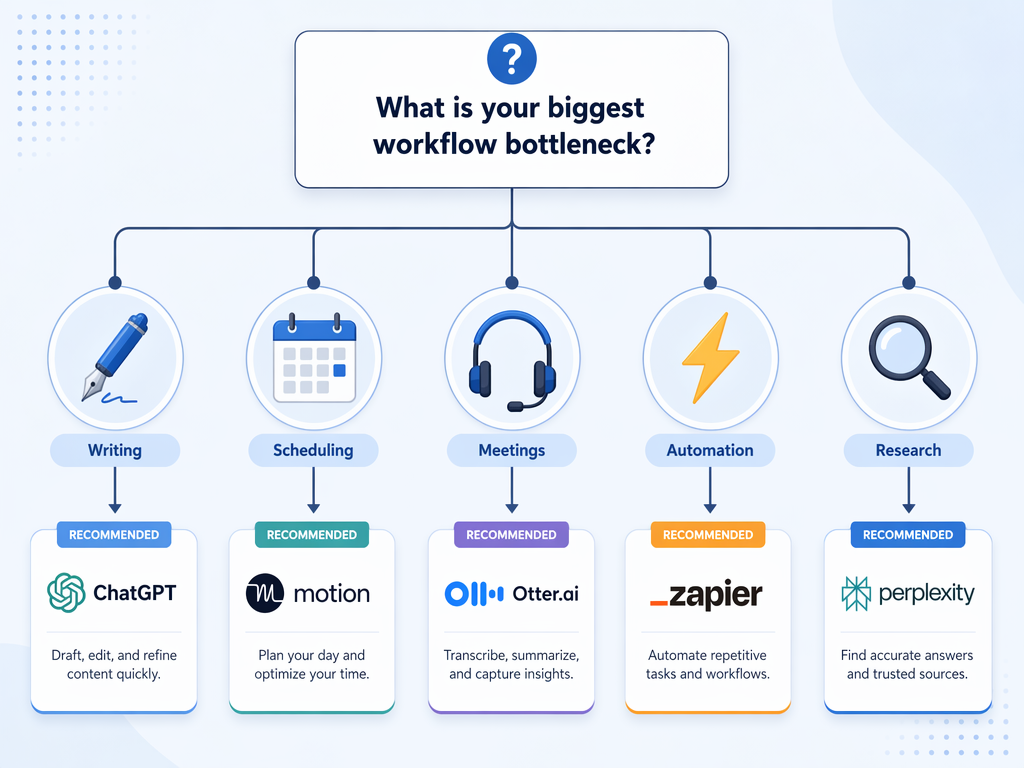
- If your bottleneck is writing and content creation: start with a general AI assistant (ChatGPT or Claude) for drafting, then add Grammarly for refinement. Consider Jasper only if you produce marketing content at scale.
- If your bottleneck is scheduling and time management: identify your relationship with your calendar. If you want the calendar to manage you, choose Motion. If you want to protect existing focus time, choose Reclaim or Clockwise.
- If your bottleneck is meeting overload and missed action items: choose a meeting assistant based on privacy needs. Fireflies for CRM-heavy sales teams, Granola for sensitive internal meetings, Otter.ai for general-purpose transcription on a budget.
- If your bottleneck is disconnected tools and manual data transfer: start with Zapier for quick wins, then evaluate n8n if you need complex, self-hosted automation.
- If your bottleneck is research and information synthesis: Perplexity Pro is the fastest path to synthesized answers. Use Claude for deep analysis of the resulting documents.
For a deeper breakdown of ROI by category — including which tools deliver measurable time savings and which are likely to become shelfware — see our dedicated analysis: AI Productivity Apps in 2026: Which Tools Actually Deliver ROI — A Category-by-Category Comparison.
Quick-Start Recommendation: Start Small, Master One Tool
The 56% of companies getting nothing from AI, per PwC's January 2026 survey, share a common pattern: they adopted multiple tools simultaneously without mastering any of them. The same dynamic plays out at the individual level. A knowledge worker who subscribes to ChatGPT, Claude, Perplexity, Motion, Fireflies, Notion AI, and Zapier in the same month is not building a productivity system — they are building a management burden.
The recommendation is deliberately conservative: identify your single biggest bottleneck from the list above, pick one tool in that category, and use it consistently for 30 days before adding anything else. The Federal Reserve Bank of St. Louis data showing a 5.4% time reduction (2.2 hours per week) comes from users who integrated AI into their workflow — not from users who accumulated subscriptions.
For real-world validation of how these tools perform under sustained use, read our hands-on testing results: We Tested 50+ AI Productivity Apps — Here's What Actually Worked (and What Didn't). That article covers the tools that survived long-term testing and the ones that were abandoned after the initial trial period.