
The Productivity Promise: What the Data Says
The conversation around machine learning for automation has shifted from "is it useful?" to "how much does it actually save?" For knowledge workers, the answer is increasingly precise. A 2025 study from the Federal Reserve Bank of St. Louis found that generative AI users save an average of 5.4% of their work hours per week — roughly 2.2 hours in a standard 40-hour week. That is not a vague productivity boost; it is a measurable, repeatable time savings that compounds across teams and quarters.
The UK government's Department for Science, Innovation and Technology (DSIT) reported in 2025 that 75% of UK organizations that adopted AI tools saw productivity increases. Yet only 12% reported revenue increases from the same adoption. That gap — productivity without immediate monetization — is a critical nuance. It suggests that the first wave of ML automation delivers operational efficiency (faster document processing, fewer manual data-entry errors) rather than top-line growth. For knowledge workers, this is still a strong return: time saved on repetitive tasks can be reinvested into higher-value analysis, client work, or strategic thinking.
At the industry level, the impact is even more pronounced. PwC's 2025 analysis found that AI-exposed industries in the US saw revenue per employee rise 27% — more than three times the rate of less AI-ready sectors. The global AI automation market is projected to grow from $129.92 billion in 2025 to $1,144.83 billion by 2033, according to Grand View Research, representing a compound annual growth rate of 31.4%. These figures make one thing clear: the organizations that figure out how to deploy ML automation at scale are pulling ahead.
Where ML Automation Delivers Best for Knowledge Workers
Not every task benefits equally from machine learning for automation. The highest returns come from processes that are repetitive, data-intensive, and governed by patterns that a human can recognize but would be too slow to execute at scale. For knowledge workers, the following use cases consistently deliver the strongest ROI.
- Document processing and data extraction: ML models trained on invoice layouts, contract clauses, or form fields can extract structured data from PDFs and scanned documents with accuracy rates that rival manual entry — at a fraction of the time. A large e-commerce company, for example, used ML for invoice automation and achieved a 70% reduction in processing costs.
- Email triage and intelligent routing: Natural language processing models can classify incoming emails by intent (request, complaint, inquiry), prioritize them by urgency, and route them to the correct team or draft a suggested reply. This is one of the quickest wins for knowledge workers who spend hours each day managing inboxes.
- Meeting transcription and action-item extraction: AI-powered meeting tools can transcribe conversations in real time, identify action items, and automatically populate task management systems. This eliminates the need for manual note-taking and follow-up emails.
- Lead scoring and content personalization: ML models can analyze customer behavior data to score leads by likelihood to convert, or personalize content recommendations based on past interactions. These use cases are particularly relevant for marketing and sales teams.
- Automated reporting and dashboard generation: Instead of manually pulling data from multiple sources every week, ML pipelines can generate standardized reports, flag anomalies, and push summaries to Slack or email — freeing analysts to focus on interpretation rather than assembly.
These use cases share a common characteristic: they involve structured or semi-structured data where the decision boundary is clear enough for a model to learn. If you are unsure whether a task is a good candidate, ask yourself: "Could I write a simple set of rules for this, but the rules would be too many or too brittle to maintain?" If yes, ML automation is likely a fit. For a deeper look at how ML-based approaches differ from traditional rule-based automation, see our article on AutoML vs. Traditional Automation.
Real-World Case Studies: ROI in Action
Statistics are persuasive, but case studies make the numbers tangible. The following examples illustrate how organizations across different sectors have translated ML automation into measurable outcomes.
Global beauty retailer: AI chatbot cuts response times by 60% A global beauty retailer deployed an AI-powered chatbot to handle customer inquiries. The result: response times dropped by 60%, and the chatbot handled a significant portion of routine questions without human escalation. This is a textbook example of the cost differential driving customer-service automation — AI chatbot interactions cost between $0.50 and $0.70, compared to $6 to $15 for a human agent, representing a 10x to 30x cost advantage.
Large e-commerce company: 70% reduction in invoice processing costs A large e-commerce company applied ML to its accounts payable workflow. By automating data extraction from invoices, the company reduced processing costs by 70%. The model handled variations in invoice formats, extracted line items, and matched them against purchase orders — a task that previously required a team of data-entry clerks.
JPMorgan Chase: 30% reduction in servicing costs with 100+ gen AI tools JPMorgan Chase invested $18 billion in technology in 2025 and deployed over 100 generative AI tools across its operations. The result: a 30% reduction in servicing costs, a 10% reduction in operational headcount through attrition and redeployment, and a 25% increase in customer engagement. This case is notable because it demonstrates that scaled deployment — not just experimentation — is where the compound returns appear.
The Adoption Reality: Why Scale Remains Elusive
If the ROI is so clear, why hasn't every organization scaled ML automation? The answer lies in a persistent gap between experimentation and production deployment. McKinsey's research indicates that 88% of organizations use AI in at least one function, but only about 33% have scaled it across the enterprise. That is a massive gap — and it is where most knowledge workers find themselves today: using AI tools sporadically, but not yet embedded in daily workflows.
The three main barriers are:
- Data quality: 65% of organizations cite data quality as a key barrier to AI adoption. ML models are only as good as the data they are trained on. If your data is scattered across spreadsheets, email attachments, and legacy databases, cleaning and structuring it for a model is often the hardest part of the project.
- Skills gap: 60% of UK firms report a skills gap as a barrier to AI adoption. Knowledge workers may understand their domain but lack the technical vocabulary to specify what a model should do. This is where no-code AutoML platforms are making a difference — they lower the barrier to entry, but they do not eliminate the need for thoughtful problem definition.
- Integration with legacy systems: Even when a model works in a sandbox, connecting it to existing CRM, ERP, or document management systems can be technically complex. Many organizations get stuck at the "it works in testing" stage because the production infrastructure is not ready.
Importantly, the dominant pattern is augmentation, not displacement. The UK Office for National Statistics (ONS) found that only 4% of UK businesses using AI report headcount decreases. The vast majority are using ML to make existing workers more productive, not to replace them. This is a crucial distinction for knowledge workers evaluating whether to invest time in learning ML automation: the risk is not obsolescence, but being left behind as your peers automate the repetitive parts of their jobs.
A Practical Getting-Started Framework
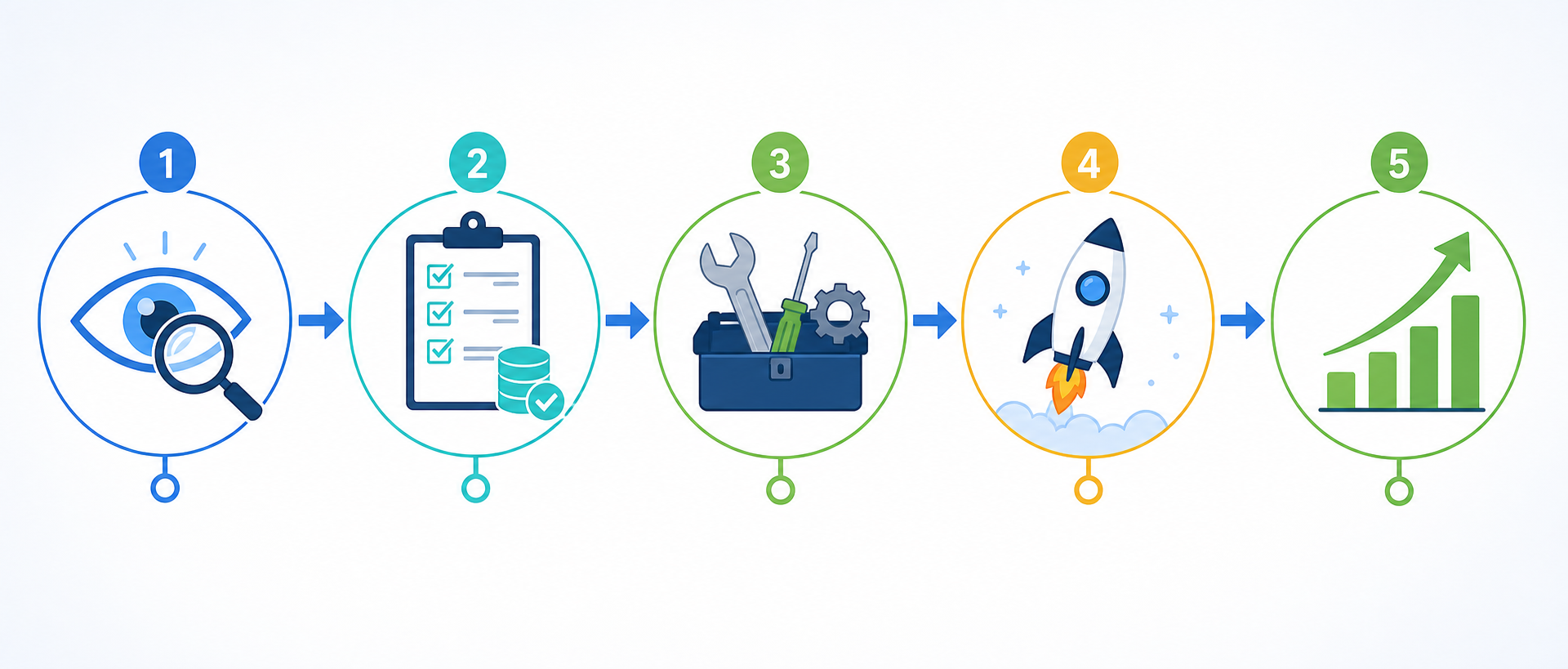
The gap between experimentation and scaled deployment is real, but it does not mean you should wait. The most effective approach is to start with a single, well-defined pilot and build from there. The following five-step framework is adapted from implementation patterns used by organizations that have successfully moved from pilot to production.
| Step | Key Question | Action |
|---|---|---|
| 1. Identify high-impact processes | Which task consumes the most team time and follows a predictable pattern? | Audit your weekly tasks. Look for repetitive, data-heavy, rule-governed activities. Document the current time cost. |
| 2. Assess data readiness | Do we have clean, labeled data for this task? | Check data quality: completeness, consistency, format. If data is scattered, invest in cleaning before modeling. |
| 3. Pick the right tool | Should we use a no-code AutoML platform, a custom model, or an API-based service? | Match tool capability to your team's technical skill. No-code platforms are ideal for first pilots. |
| 4. Run a pilot | Can we measure success in 4–6 weeks? | Define a clear success metric (time saved, error rate reduction). Run the pilot on a small, non-critical dataset. |
| 5. Scale and optimize | What did we learn, and how do we expand? | Document failures as thoroughly as successes. Expand to adjacent processes only after the pilot is stable. |
For step 3, choosing the right tool is often the most intimidating part for non-technical knowledge workers. Our detailed comparison of AutoML platforms covers ten tools with their strengths, pricing, and ideal use cases — it is the natural next step after you have identified your pilot process.
If you want a hands-on, no-code tutorial that walks through building a real automation from scratch, our Practical Guide for Knowledge Workers is designed specifically for people who are not data scientists.
What Not to Automate: Knowing the Limits
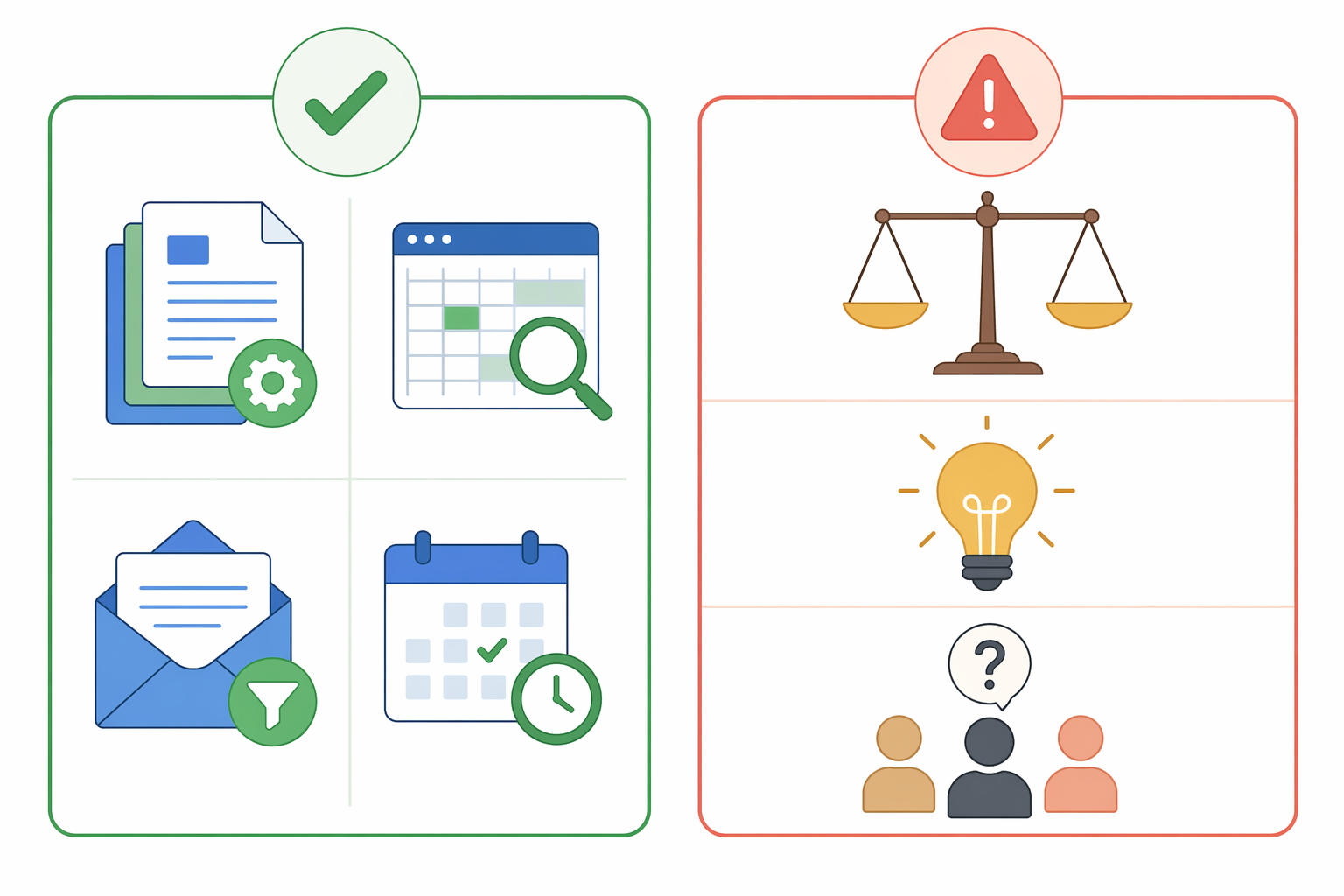
Knowing what to automate is only half the equation. Knowing what to leave alone is equally important. ML models excel at pattern recognition and repetitive decisions, but they struggle with ambiguity, context shifts, and tasks that require genuine human judgment. Automating the wrong process can create more work than it saves — or worse, introduce errors that are hard to detect.
- What to automate: Document classification, data extraction from standardized forms, email routing by intent, meeting transcription and action-item extraction, lead scoring based on historical data, automated report generation, and invoice processing.
- What not to automate: High-judgment decisions (hiring, firing, performance reviews), creative strategy (campaign concepting, product vision), nuanced customer empathy (handling distressed customers, negotiating complex contracts), edge cases that occur too rarely to generate training data, and any process you do not fully understand yourself.
The Bottom Line: Start Small, Think Big
The data on machine learning for automation is clear: the productivity gains are real, measurable, and significant. Workers save an average of 2.2 hours per week. 75% of adopters report productivity increases. AI-exposed industries see 27% higher revenue per employee. The market is growing at over 30% annually. But the gap between experimentation and scaled deployment — 88% using AI vs. only 33% scaling it — means that most organizations are leaving value on the table.
The path forward is not to try to automate everything at once. It is to identify one high-impact, repeatable process, assess your data readiness, pick a tool that matches your skill level, run a focused pilot, and scale only after you have proven the model works. The organizations that are pulling ahead are not the ones with the biggest AI budgets — they are the ones that have built a repeatable process for identifying, testing, and deploying automation.
For knowledge workers, the message is equally direct: the risk is not that ML automation will replace you. The risk is that your peers will automate the repetitive parts of their jobs while you continue doing them manually. The 2.2 hours per week that the Federal Reserve study identified is not a theoretical maximum — it is a baseline that early adopters are already realizing. The question is not whether to start, but which task to automate first.
Comments
Join the discussion with an anonymous comment.