
The cancellation notice lands, and for three seconds the hour looks enormous.
Then it starts shrinking. There is the inbox you could clear, the document you could reopen, the errand you could move up, the walk you badly need, and the small glowing rectangle that can consume the whole block before you have technically chosen anything. Adjusting your schedule when events are canceled is hard because the time is both real and psychologically slippery.
Researchers call this kind of unexpected opening “windfall time.” In research summarized by Popular Science, Gabriela Tonietto and colleagues studied more than 2,300 participants across 7 surveys and found that an hour gained from a canceled event feels longer than an hour that was already free on the calendar. The reason is not that the clock changes. It is that the mind compares the newly freed hour against the busyness it had expected, which makes the gap feel unusually valuable. The same research also found that people choose longer activities for windfall time and that last-minute cancellations can bias people toward unproductive leisure, an “indulgence effect” that will sound familiar to anyone who has opened a feed “just for a minute” after a meeting evaporated [1].

The point is not to treat every cancellation as a moral test. Sometimes the best use of the hour is recovery. The problem is letting the hour be decided by surprise, relief, and whatever tab was already open.
The First Two Minutes Matter More Than the Whole Hour
A canceled event does not drop you into a clean, planned work block. It drops you out of preparation mode. You may have been bracing for a difficult conversation, rehearsing an update, waiting for a call, or holding a half-finished task in suspension because there was “no point” getting deeply into it before the meeting.
That release can feel wonderful. CHIBE’s discussion of why canceling plans feels good connects the relief partly to anticipatory emotions: tension can build before an event, and cancellation can release that pressure. The article draws on George Loewenstein’s broader work on anticipatory emotions, so it is safer to treat this as a plausible psychological explanation rather than a direct finding about workplace meeting cancellations [2]. Still, it explains why the moment feels less like ordinary free time and more like a door opening.
That is exactly why the first move should be stabilizing, not optimizing. Before deciding whether to write, answer messages, plan, walk, or rest, spend a minute making the transition visible:
- Check whether the cancellation creates any immediate follow-up, such as a reschedule request, a decision now needed in writing, or a deadline that moved.
- Look at the next fixed commitment so the gap has a real boundary.
- Name your current state: relieved, scattered, tired, annoyed, newly focused, or still mentally inside the canceled meeting.
- Choose from a pre-made menu instead of inventing the perfect use of time on the spot.
That minute can feel like overhead. It is usually cheaper than spending that time bargaining with yourself.
Two Traps Make Windfall Time Disappear
The first trap is guilt-spiraling: you feel lucky to have the time, fail to use it perfectly, then spend the remaining minutes punishing yourself for not having become a different person on short notice. This is a bad bargain. It turns a useful opening into emotional admin.
The second trap is panic-rebooking. The meeting goes away, and you immediately fill the space with another call, a vague “catch up” block, or low-value busywork because an empty calendar square feels suspicious. If your work week is meeting-heavy, a buffer is not necessarily waste. Microsoft Human Factors Lab research found that workers with 5- to 10-minute buffers between meetings showed 22% better later-day cognitive performance, which supports a small but important point: not stuffing a gap can be a productive choice when the alternative is cognitive pileup [3].
Busywork is the quieter version of panic-rebooking. It looks responsible from a distance because you are clicking, replying, sorting, and moving things around. But if the task was not worth doing before the cancellation, the windfall did not magically make it strategic.
Use Gap Size Before You Use Motivation
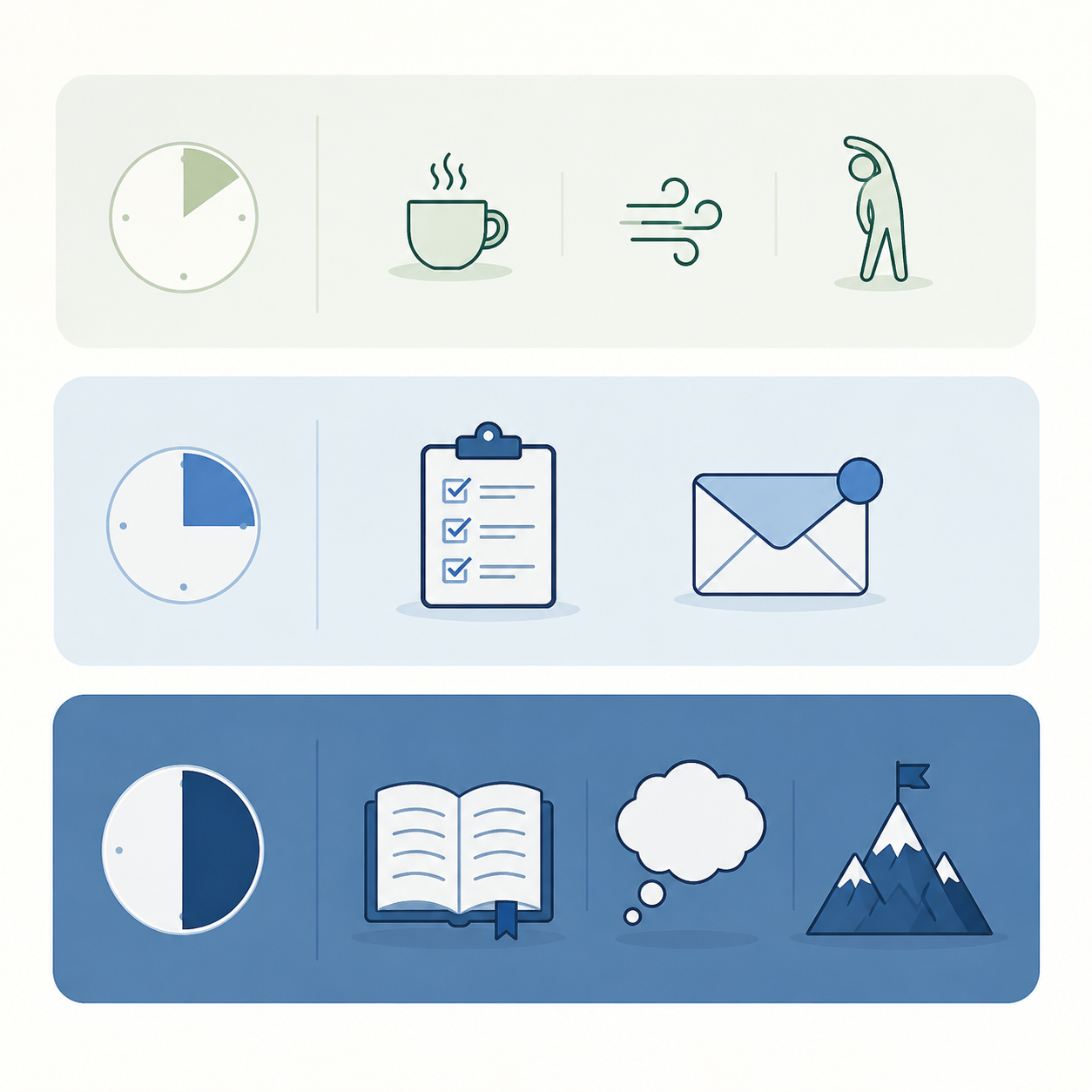
The fastest way to stop negotiating with a canceled hour is to sort the gap by size. Not by ambition. Not by guilt. Not by what your most disciplined self would do after eight hours of perfect sleep. Size first.
| Windfall size | Best default use | Avoid |
|---|---|---|
| 5-15 minutes | Reset, close a tiny loop, or protect a buffer | Starting anything that requires setup |
| About 30 minutes | Contained admin, meeting prep, light review, or one small decision | Opening a sprawling project |
| 60+ minutes | A real work block, recovery block, or meaningful personal task | Assuming the whole hour is usable without transition cost |
For 5-15 Minutes, Do Less Than You Think
A tiny cancellation is where productivity advice often gets silly. Five newly free minutes are not a secret portal to your most important work. They are enough to reduce friction for the next thing.
Good uses for this tier are physical and administrative because they have almost no re-entry cost: stand up, refill water, close the canceled meeting’s materials, write down the one thing you would have said, confirm whether anything needs rescheduling, or scan the next meeting’s agenda. If your calendar regularly leaves no breathing room, this is also where tools and norms matter; readers trying to create more systemic buffers may want a separate look at AI agents for calendar scheduling.
The standard here is not “Did I produce something impressive?” It is “Did I enter the next commitment less frayed than I would have?” Microsoft’s buffer finding makes this small choice easier to defend, especially in workplaces where every open slot looks available to someone else [3].
For About 30 Minutes, Pick a Container
Thirty minutes is long enough to be useful and short enough to punish overreach. The right task has edges. It should be possible to know when it is done, pause it cleanly, or hand the result to someone else.
- Reply to three messages that are blocking other people.
- Prepare the decision points for a later meeting.
- Review a document only for comments you can make in one pass.
- Clear one small queue, such as approvals, invoices, or scheduling replies.
- Draft the first ugly version of a note you were avoiding, without trying to finish it.
A useful 30-minute task often begins with a verb you can complete: send, decide, review, outline, reconcile, update. “Work on strategy” is not a 30-minute task. “List the three unresolved strategy decisions before Thursday’s review” might be.
This is also the tier where a maintained task list earns its keep. If your system cannot show you small, ready-to-run tasks without another round of thinking, the cancellation becomes a search problem. A prioritization system, whether manual or AI-assisted, should be able to hold these small candidates; the comparison of AI task manager prioritization approaches is a natural companion if your list is currently more archive than menu.
For 60+ Minutes, Count the Setup Cost
An hour-plus cancellation is the one that creates the most temptation. It looks like deep work. Sometimes it is. But a windfall hour is not the same as an hour you protected yesterday, especially if you have to reconstruct context, find files, reread notes, and remember what the hard part was.

Task switching is not just a feeling of annoyance. A Qatalog/Cornell Idea Lab statistic cited in later productivity reporting puts the average cost of returning to focus after switching tasks at 9.5 minutes; the same reporting says 45% of workers report that context-switching makes them less productive, and 43% say it causes fatigue [4]. The APA’s overview of multitasking research is broader but points in the same direction, noting that task switching can cost up to 40% of productive time [5].
Those numbers do not mean you should never use a canceled hour for demanding work. They mean the first question is not “What is the most important project?” The better question is “Which important project can I enter without spending the whole first third finding the doorway?”
Good 60-minute windfall candidates are already warm: a draft you touched this morning, analysis with the files open, a proposal with comments waiting, a presentation whose next section is obvious, or a reading task that only requires attention. Poor candidates are cold, ambiguous, politically sensitive, or dependent on someone else’s answer.
If the hour really can become a focus block, protect it like one. Silence the channels you are allowed to silence, set an end point before the next commitment, and choose a single output. A focus tool can help if the problem is distraction rather than task choice; the guide to which focus app fixes your actual problem is most relevant here, not for the 5-minute reset tier.
And if your body’s honest answer is “I need to recover,” choose recovery deliberately. Take the walk. Eat without the screen. Sit outside. Fast Company’s list of ways to use unexpected free time includes the option to indulge yourself, which is useful precisely because planned rest is different from accidental disappearance into a feed [6].
A Simple Windfall-Time Menu
The menu should be built before the next cancellation. If you wait until the notification arrives, you are asking a startled brain to become an operations manager.
Keep it short enough that you will actually use it. One page, one note, one pinned task-list section, or one recurring calendar note is enough. The format matters less than the fact that it is visible within a few seconds.
| Menu section | What to put there | Selection rule |
|---|---|---|
| Reset | Stretch, water, breathe, walk around the block, close meeting tabs | Use when the next commitment is soon or your attention feels jagged |
| Tiny closure | One reply, one approval, one note, one reschedule decision | Use when the task removes friction for someone else |
| Contained admin | Inbox pass, prep notes, expense review, calendar cleanup | Use when the gap is about 30 minutes and the end is clear |
| Warm deep work | Draft continuation, analysis already open, comments to resolve | Use when the gap is 60+ minutes and setup is low |
| Deliberate recovery | Walk, meal, quiet, reading, no-phone pause | Use when depletion is the real constraint |
The menu also needs a “do not open” category. Mine would include social feeds, the analytics dashboard I check when I am avoiding writing, and any project whose next action is still a fog bank. Yours may include shopping carts, Slack archaeology, or reorganizing a task app in the name of readiness.
A useful test is whether the task has a clean exit. If the next meeting starts in 28 minutes, you should not choose work that will leave five mental windows open and a resentment hangover. The speed vs. judgment framework is a helpful companion rule here: some windfall tasks reward quick execution, while others require careful thinking and should not be jammed into a surprise gap just because the calendar blinked.
What to Do When the Cancellation Notice Arrives
Use this as the immediate script. It is intentionally plain because the moment itself is already noisy.
- Confirm the practical consequence: canceled, postponed, replaced by async, or waiting for your response.
- Find the real edge of the gap by checking the next fixed commitment.
- Take one stabilizing action: stand, breathe, close the meeting materials, or write the follow-up line.
- Choose the tier by size: 5-15 minutes, about 30 minutes, or 60+ minutes.
- Pick one item from the matching menu, including deliberate rest if that is the honest best use.
- Stop when the gap ends. Do not let the windfall create a new transition mess.
Acknowledging the emotional wobble is not softness; it is part of the operating procedure. Thrive Global’s advice on sudden schedule changes emphasizes adaptive coping moves such as acknowledging feelings before acting, which fits the practical reality of cancellations: people do not respond from a neutral state just because the calendar says they are free [7].
The win is not using every canceled event for heroic output. The win is reducing the number of times a genuinely useful opening dissolves into indecision, guilt, or reflexive busyness. A windfall-time menu lets the decision exist before the surprise does.
References
- “Psychologists confirm that a canceled meeting is good for you,” Popular Science.
- “Why Cancelling Plans Feels So Good, According to Psychology,” CHIBE.
- “Brain research shows back-to-back meetings are stressful,” Microsoft WorkLab.
- “The High Cost of Context Switching at Work,” Spinach.ai.
- “Multitasking: Switching costs,” American Psychological Association.
- “7 Smart Ways to Use Unexpected Free Time,” Fast Company.
- “How to Handle Sudden Changes to Your Schedule,” Thrive Global.