
The usual focus-app failure is almost boring in how predictable it is. You search for a focus app for deep work in 2026, download the one that appears in three rankings, use it for a few days, then quietly stop opening it. The app is still fine. You are not unusually weak. More often, the app was built to interrupt a different kind of breakdown than the one ruining your workday.
That mismatch matters because the handoff between intention and distraction is now very short. Gloria Mark’s work, cited by Reclaim.ai, puts average attention on a single screen at 47 seconds, down from 2.5 minutes in 2004.[1] A tool that asks for too much setup, adds the wrong kind of friction, or protects the wrong surface can lose you before it has a chance to help.
The strongest recent evidence for focus apps is encouraging and inconvenient at the same time. In a 2025 PNAS Nexus randomized trial discussed by The Conversation, blocking mobile internet for two weeks using Freedom improved sustained attention by an amount described as comparable to reversing about 10 years of age-related decline; average screen time fell from 314 to 161 minutes per day, and 91% of participants improved on at least one outcome.[2] But only 119 of 467 participants completed the full intervention.[2] That is the category in miniature: focus tools can work, but keeping them in place is the harder problem.
Start With the Breakdown, Not the App
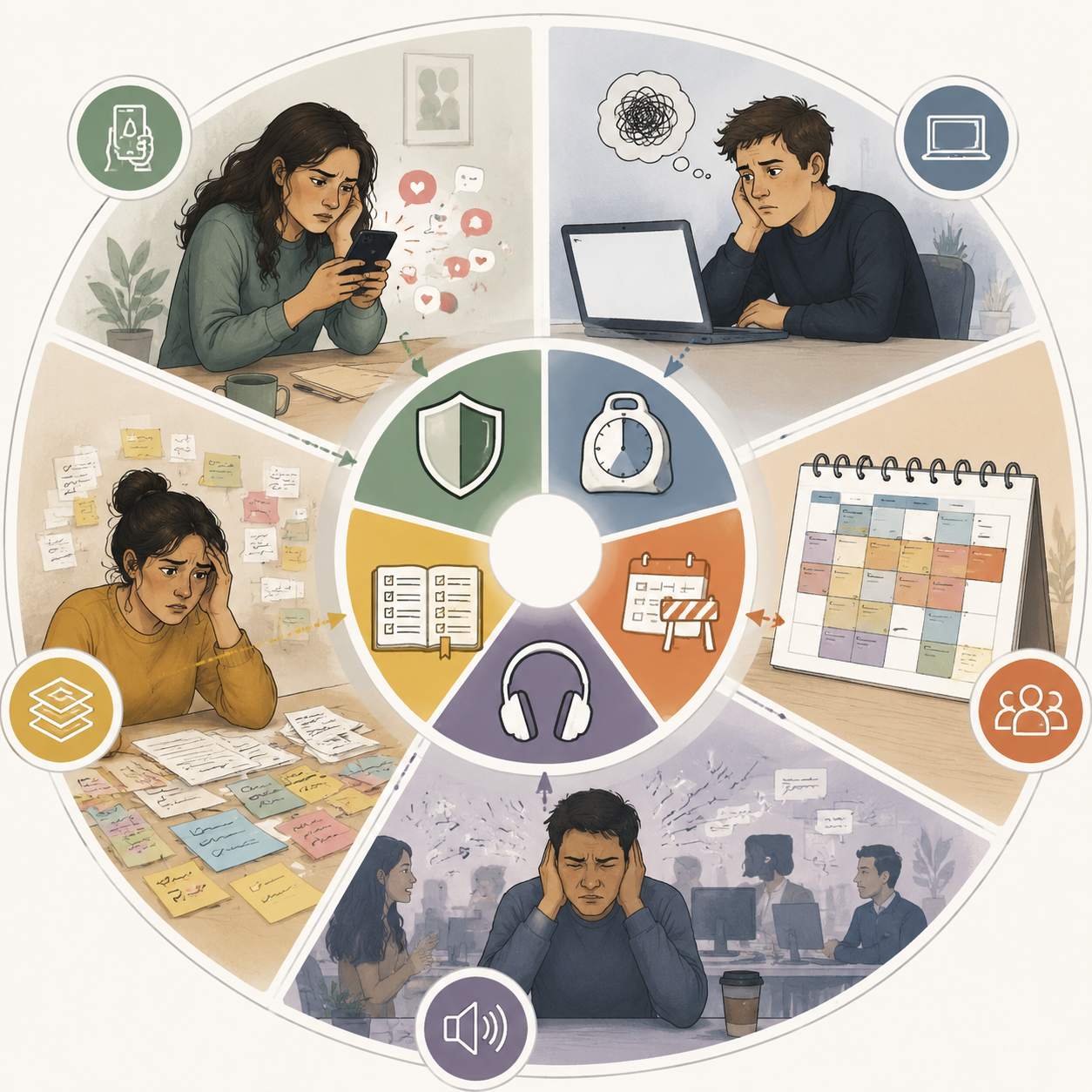
A blocker, a timer, a calendar defender, a focus-music app, and a distraction-free writing device should not be in the same “best overall” contest. They touch different failure points. One stops access. One lowers the activation energy of beginning. One guards the calendar. One changes the environment. One reduces ambiguity about what deserves your next hour.
Use this as the first pass:
| Where deep work breaks | What it feels like | Tool category that usually fits | Tools to consider | Common wrong match |
|---|---|---|---|---|
| Compulsive phone or notification checking | You know what to do, but keep reaching for apps, sites, or feeds | Blockers and physical friction | Freedom, Cold Turkey, Opal, Blok | A cute timer that leaves the escape route open |
| Difficulty starting | The task is clear, but the first 10 minutes feel impossible | Timers and gentle session starters | Session, Pomofocus, Forest | A severe blocker that makes the work feel even more punitive |
| Meeting creep and calendar fragmentation | Your day is sliced into fragments before deep work can begin | Calendar defense | Reclaim and related scheduling tools | A browser blocker that cannot create protected time |
| Environmental noise or device temptation | The room, phone, or working surface keeps pulling attention away | Environmental aids and physical friction | Brain.fm, Blok, reMarkable | A planner that organizes tasks but leaves the environment unchanged |
| Task overload and competing priorities | Everything seems important, so you keep switching | Energy-aware planners and day orchestrators | Lifestack, rivva, Sunsama, Reclaim | A hard blocker that stops sites but not priority confusion |
If You Keep Checking Your Phone, Use a Real Blocker
Compulsive checking is the place where gentle tools are most likely to flatter you and then fail. If the pattern is “I opened Instagram before I noticed I was opening Instagram,” a Pomodoro timer is not standing in the doorway. It may make the work session look intentional while the phone remains completely available.
Freedom is the serious default when the problem spans devices. Its value is not that it inspires you; it removes options across phone and computer. The PNAS Nexus trial evidence should not be stretched into “all blockers work for everyone,” because that trial tested Freedom, mobile internet blocking, and a two-week intervention.[2] Still, it gives blocking more evidentiary weight than the usual productivity-app testimonial.
The adherence caveat is not a footnote. If only 119 of 467 participants completed the intervention, then the real question is not whether blocking can improve attention under use. It is whether you will tolerate the blocker long enough for it to matter.[2] That is why stricter is not automatically better.
Cold Turkey fits a narrower and harsher version of the same problem: desktop sites or apps you should not be able to talk your way back into during work. It is useful when you need severity on a computer, not when the workday already feels like a punishment. If your problem is hesitation, fear of starting, or unclear priorities, Cold Turkey may add pressure without addressing the bottleneck.
Opal is more natural when the phone is the battlefield. It is not trying to become your whole productivity system; it tries to make the phone less available at the moments you have already decided matter. That distinction is important. If your laptop is clean but your phone keeps turning into a second screen of escape, a desktop-first blocker is solving the wrong surface.
Blok adds a physical NFC card to the equation, so the interruption is not only digital. That can help when tapping a screen is too frictionless: you have to interact with a physical object before the block changes.[3] This is not magic. It is a small speed bump placed exactly where automatic behavior usually slides through.
Not for you if: you are not actually escaping into apps. If you are sitting in front of the right document and simply cannot begin, a blocker can make the room quieter while leaving the starting problem untouched.
If Starting Is the Hard Part, Do Not Overbuy Discipline
Task initiation has a different texture. The tab is open. The phone may even be away. Nothing is technically stopping you. The problem is the first small move: naming the next action, tolerating the blank page, or staying with the uncomfortable first minutes before the task gathers shape.
This is where a plain timer can beat a sophisticated blocker. Session, Pomofocus, and Forest are not weak because they are simple; they are aimed at a lighter failure mode. A 10-minute start, a visible session, or a small gamified commitment can reduce the dread enough to cross the threshold. Mindful Suite’s 2026 focus-timer guide treats these as timer-specific tools rather than full distraction-control systems, which is the right lane for them.[4]
Session makes the most sense if you work in a Mac-centered setup and want sessions to feel integrated rather than ceremonial. Pomofocus is the low-friction version: free, browser-based, and easy to abandon if the method is not for you. Forest is charming when a light consequence helps, but it should not be mistaken for a blocker. If you can kill the tree and open the app anyway, the tool is depending on your willingness to care.
The wrong move is to interpret every failed start as a need for harsher control. If a task is vague, emotionally loaded, or too large, a locked-down computer may simply trap you with a poorly formed assignment. In that case, the better first move is smaller: define the next visible action, run one short session, and stop judging the tool by whether it produced a heroic three-hour block on day one.
If Meetings Keep Eating the Day, Protect the Calendar Before Blocking Websites
Some people do not lose deep work to weak will. They lose it to Tuesday. A meeting lands at 10:30, another at 1:00, a “quick sync” appears at 3:00, and the remaining spaces are too short to hold work that needs continuity. A blocker cannot defend a writing block that was never put on the calendar.
Reclaim belongs here. Its focus-app value is less about stopping a forbidden website and more about defending time on the calendar. It can schedule habits, tasks, and focus blocks around existing commitments, which puts it closer to calendar infrastructure than to a classic blocker.[1] For someone whose day gets fragmented by other people’s availability, that distinction matters more than another blacklist.
Calendar defenders are also easier to underestimate because they do not feel dramatic. There is no locked browser, no red warning screen, no punishment. The consequence appears earlier: the focus block exists before the meeting request arrives, and the day has fewer orphaned scraps of time.
Not for you if: your calendar is already protected and you still keep bypassing your own rules. At that point, you may need a blocker layered on top, not another scheduling assistant. The calendar can reserve the time; it cannot stop you from opening the escape hatch.
If the Room Is the Problem, Change the Working Surface
Environmental distraction is easy to misdiagnose as a planning problem. You can have a perfect task list and still be working beside a Slack-heavy monitor, a phone in reach, construction noise, or an open office where every movement enters your peripheral vision. In that setting, another prioritization screen may only add one more thing to manage.
Brain.fm is the cleanest example of an environmental aid: it tries to shape the sound layer around work. Reclaim’s 2026 roundup includes Brain.fm among focus tools, and a 2024 Communications Biology study examined amplitude-modulated focus music, but the safer claim is narrow: this is for people whose environment is noisy or under-stimulating, not for people who need sites blocked or priorities clarified.[1]
Blok can also fit here when the environmental problem is the phone’s physical availability. The value is not only that an app is blocked; it is that the phone becomes less effortless to negotiate with. That is different from a timer, which may sit politely on the same device that keeps pulling you away.
A reMarkable-style writing device is the more expensive, more physical version of the same instinct: move the work to a surface with fewer invitations. Future Humanism’s 2026 focus-app survey includes reMarkable Paper Pure among productivity tools, with a listed price of $399.[5] That does not make it the rational default for everyone. It makes sense only if your recurring deep-work task can actually live on a low-notification writing or reading device.
Not for you if: the environment is not the bottleneck. Buying a quieter surface for work will not resolve a calendar that never leaves room for work, or a task list where five priorities are all competing for the same hour.
If Everything Feels Urgent, Use a Planner That Reduces Ambiguity
Task overload is where many people choose the wrong category. They install a blocker because they are switching constantly, then discover that blocking social apps does not answer the question underneath the switching: what deserves my next block of attention?
Energy-aware planners and day orchestrators are built for that ambiguity. Lifestack’s 2026 deep-work tracker material emphasizes scheduling work around energy and capacity rather than only filling empty time slots.[6] rivva’s 2026 productivity-tools guide frames deep work more as part of a layered productivity system than a single app choice.[7] Sunsama sits in the same broad family: less “block this site” and more “decide what today can realistically hold.”
That makes these tools useful when the day fails at the decision layer. If your morning begins with a project board, a calendar, a notes app, a manager’s message, and three half-finished obligations, you may not need more force. You may need one place where the day becomes finite.
The tradeoff is that planners are only as good as the trust they earn. Newer tools such as Lifestack and rivva have less long-term public evidence behind them than older names such as Freedom or Forest. Their claims should be treated as product positioning unless backed by independent study. That does not make them useless; it means you should judge them by whether they reduce daily switching, not by whether they sound more intelligent than your current task list.
Not for you if: your priorities are already clear and you keep escaping anyway. An energy-aware planner can arrange the day beautifully and still fail if the moment of weakness is a reflexive phone check. In that case, planning and blocking may need to be stacked, with the planner deciding what gets protected and the blocker enforcing the protection.
Pricing and Platform Notes, Last Verified July 5, 2026
Prices move often, especially for lifetime plans, free-tier limits, and annual discounts. Treat this table as a buying shortlist, not a permanent pricing record.
| Tool | Best fit | Category | Pricing noted in source set | Caveat |
|---|---|---|---|---|
| Freedom | Cross-device checking and mobile internet blocking | Blocker | $39.99/year; Tool Finder also lists Freedom pricing data.[8] | Best evidence in this group, but the 2025 trial was short and had major dropout.[2] |
| Cold Turkey | Hard desktop blocking | Blocker | $39 one-time.[8] | Can be overkill if the real problem is starting or priority confusion. |
| Opal | Phone-first blocking | Blocker | $99.99/year; included in Reclaim’s 2026 focus-app roundup.[1] | Stronger fit for phone compulsion than for calendar fragmentation. |
| Blok | Phone friction with a physical step | Physical blocker | $59.99/year plus NFC card.[3] | Useful when physical friction matters; less proven than older blockers. |
| Session | Mac-native work sessions | Timer | $4.99/month.[8] | Good for initiation, not a substitute for hard blocking. |
| Pomofocus | Simple Pomodoro starts | Timer | Free; covered in timer-focused 2026 roundups.[4] | Too light for compulsive checking. |
| Forest | Gamified short sessions | Timer | $1.99 one-time; included in Reclaim and timer-focused roundups.[1][4] | Works only if the game consequence still matters to you. |
| Reclaim | Meeting creep and calendar protection | Calendar defender | Free starter tier; covered in Reclaim’s own 2026 focus-app guide.[1] | Does not by itself stop app or website escapes. |
| Lifestack | Energy-aware scheduling | Planner | Pricing not fixed in the checked source set; covered in Lifestack’s 2026 deep-work tracker guide.[6] | Promising for overload, but newer and less independently validated. |
| rivva | Layered productivity and deep-work planning | Planner | Pricing not fixed in the checked source set; covered in rivva’s 2026 productivity-tools guide.[7] | Better judged by reduced switching than by feature breadth. |
| Sunsama | Daily planning and realistic workload selection | Planner | Included in the source set as an energy-aware scheduler. | Not a browser-level blocker. |
| Brain.fm | Noise, under-stimulation, and auditory focus support | Environmental aid | Included in Reclaim’s 2026 focus-app roundup.[1] | Does not solve priority overload or app access. |
| reMarkable Paper Pure | Low-notification writing or reading surface | Physical device | $399; included in the checked source set and Future Humanism’s 2026 survey context.[5] | Only useful if your deep work can move onto that device. |
When a Focus App Makes Things Worse
There is one group of readers who should be especially cautious about escalating strictness. A June 2026 Future of Good report on UBC research described qualitative interviews with 27 neurodivergent participants and found that inflexible timer-based distraction blockers can deepen productivity shame when they assume attention works “like a faucet.”[9] The report points to patterns such as hyperfocus, digital stimming, and task-based goal structures that do not fit neatly into rigid start-stop focus models.[9]
That is emerging qualitative research, not a settled universal rule. It was preliminary and, according to the available source material, not independently replicated as of publication. Still, it is enough to justify a gentler decision rule: if a blocker or timer repeatedly leaves you more ashamed, more brittle, or more likely to rebel against the system, do not treat that as proof that you need a harsher app.
A different approach may fit better: task-based goals instead of timed sessions, analog planning, body-doubling, a lower-notification device, or a planner that helps choose the next task without trying to police every minute. The point is not to avoid structure. It is to avoid a structure that turns every fluctuation in attention into a personal failure.
The Shortlist by Failure Mode
- If you keep checking apps or sites: start with Freedom for cross-device blocking, Cold Turkey for severe desktop blocking, Opal for phone-first blocking, or Blok if physical friction would slow the reflex.
- If you cannot start: try Session, Pomofocus, or Forest before assuming you need a harsher blocker.
- If meetings fragment the day: use Reclaim or another calendar defender before shopping for another browser blocker.
- If the environment keeps pulling you away: consider Brain.fm for sound, Blok for phone friction, or reMarkable only if your work can live on a low-notification device.
- If too many priorities keep competing: look at Lifestack, rivva, Sunsama, or Reclaim as planning tools, then add blocking only where escape routes remain.
The best focus app is not the one with the most severe lock, the prettiest timer, or the longest feature table. It is the one that puts the right amount of friction at the exact point where your work usually breaks. Even then, the trial is not over when the app works once. The real test is whether you can keep using it without turning focus into another thing you fail at.
References
- What Are the Best Focus Apps? 13 Picks for 2026 — Reclaim.ai
- Focus apps claim to improve your productivity. Do they actually work? — The Conversation
- The 9 best focus apps in 2026 (and which ones you can actually stick with) — Blok.so
- The Ultimate Guide to the Best Focus Timer Apps for 2026 — Mindful Suite
- Focus Apps That Actually Work in 2026 — Future Humanism
- Best Deep Work Tracker Apps in 2026 — Lifestack
- 10 Best Productivity Tools for Deep Work in 2026 — rivva
- 7 Best Focus Apps in 2026: Block Distractions — Tool Finder
- Focus apps are failing neurodivergent minds, new research finds — Future of Good