
The uncomfortable answer is tier-specific: ChatGPT Free and Plus are risky places to put sensitive notes; ChatGPT Enterprise and Team remove the training-use problem but still process notes on OpenAI’s servers; Obsidian or Logseq paired with an on-device model removes server transit from the AI workflow, at the cost of setup, collaboration convenience, and some model quality.
That distinction matters because note-taking feels like private work even when the technical path is not private. A pasted client-call transcript, a rough research memo, a strategy note, or a personal reflection may look like temporary scratch space to the person trying to get a clean summary before the next meeting. To the system receiving it, it is input data with retention rules, account controls, review policies, share links, logs, and sometimes training implications.
This is no longer a fringe mistake. Cyberhaven reported that 34.8% of employee ChatGPT inputs contained sensitive data in Q4 2025, up from 11% in 2023.[1] Separately, Group-IB reported more than 225,000 ChatGPT credentials found on dark-web markets in 2024, which matters because compromised credentials can expose full chat histories, including the notes people assumed were protected by a login screen.[2]

The Short Verdict by Setup
| Setup | What improves | What still worries me | Best fit |
|---|---|---|---|
| ChatGPT Free or Plus | Fast summaries, outlines, extraction, rewriting, and follow-up questions with almost no setup | Consumer-tier training defaults, possible human review, 30-day post-deletion retention, account compromise, share links, and server-side processing | Low-sensitivity notes, sanitized excerpts, personal productivity where the user has deliberately accepted the data path |
| ChatGPT Enterprise or Team | No training on business data, admin and compliance controls, stronger organizational governance | Notes still transit and are processed on OpenAI servers; account, admin, legal, breach, and sharing surfaces still exist | Teams that need cloud AI quality, centralized controls, compliance support, and collaboration |
| Obsidian or Logseq with a local LLM | Notes stay in local files and AI processing can happen on-device | Model quality, hardware limits, setup effort, weaker collaboration, and local device security become the tradeoff | Sensitive knowledge work where server transit itself is the unacceptable part |
The useful question is not whether ChatGPT is “secure” in the abstract. It is what kind of note you are putting into which version of the product, and whether the risks that remain are risks you can manage with settings or risks you would rather remove by design.
Where the Note Actually Goes
A normal ChatGPT note-taking workflow has more moving parts than the text box suggests. The note leaves your device, reaches OpenAI’s infrastructure, may be stored with your account history, may be subject to the plan’s data-use rules, may remain recoverable for a deletion window, and may later be exposed through a compromised account or an accidentally shared URL. Some of those risks can be reduced. Some cannot be reduced without changing the architecture.
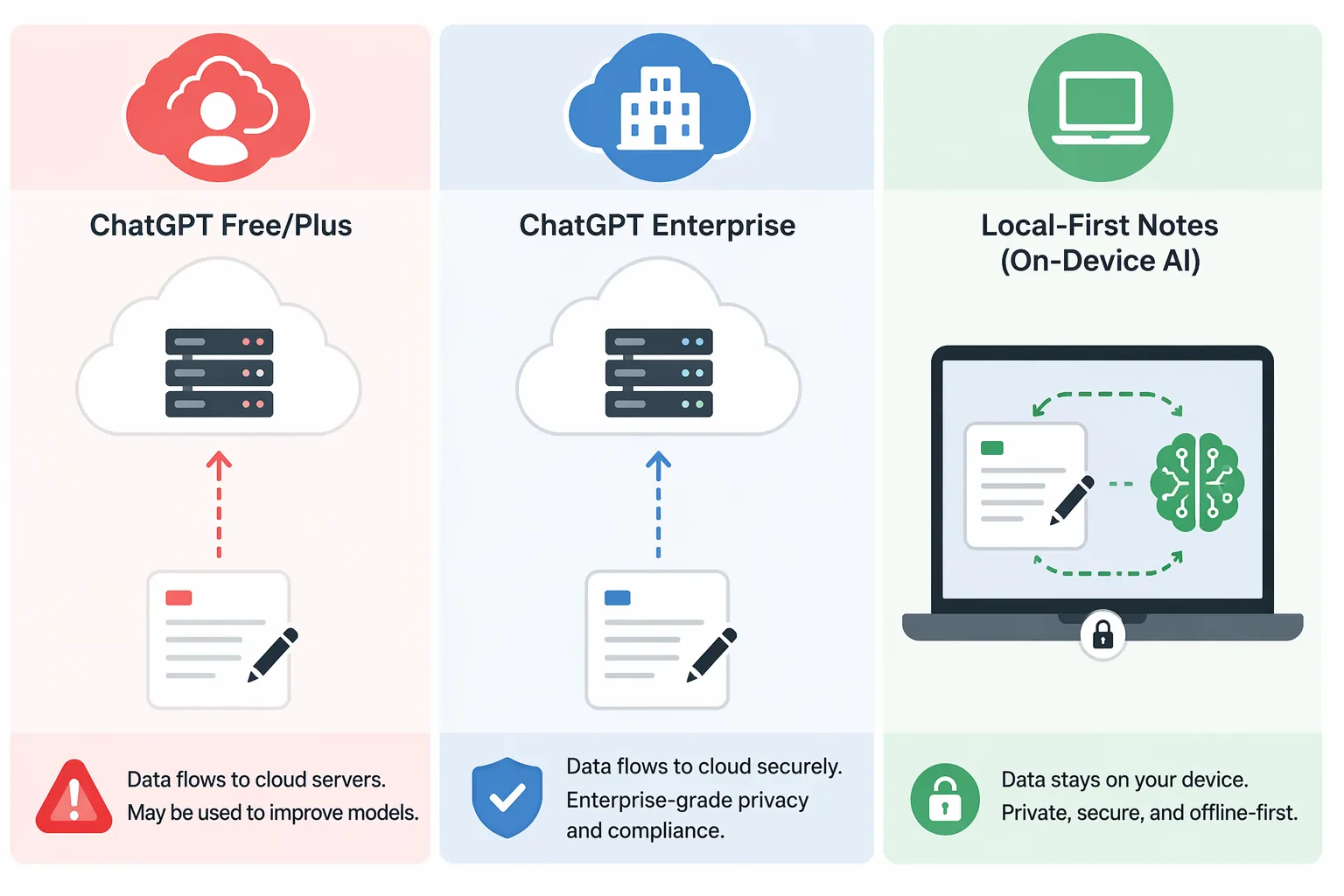
The architectural difference is simple enough to sketch:
- With ChatGPT Free or Plus, the note is a consumer-cloud input unless you have changed the relevant data controls.
- With ChatGPT Enterprise or Team, the note is still a cloud input, but the business-data policy and administrative controls are different.
- With Obsidian or Logseq plus a local model, the note can remain in local storage and the model can process it on the same machine.
That last sentence is why local-first tools deserve serious attention here. They do not make a laptop magically safe. They do remove the need to send the note to a third-party AI service just to summarize, tag, question, or restructure it.
The Consumer ChatGPT Risk Stack
ChatGPT Free and Plus are attractive for notes for the same reason they are risky for notes: they are fast, familiar, and forgiving. You can paste a bad transcript and ask for decisions, owners, risks, and next actions. You can dump a messy research clipping pile and get an outline. You can ask it to turn a private journal entry into a calmer plan. The friction is low enough that the security review usually happens after the useful output appears.
The first issue is training policy. OpenAI says consumer ChatGPT conversations may be used to improve models unless the user opts out through data controls; it also says turning off training stops future use but does not remove data that has already been used for training.[3] For ordinary notes, that may be acceptable. For client material, unpublished research, regulated data, employee records, security findings, legal analysis, or acquisition planning, “remember to opt out before pasting” is a weak control.
The second issue is human access. OpenAI’s enterprise privacy materials distinguish consumer services from business offerings, noting that customer content in business products is not used to train models by default and that access is restricted to purposes such as abuse monitoring, security, and legal obligations.[4] The consumer side has historically allowed review by staff or contractors for safety and model improvement. That does not mean someone is casually reading your meeting notes. It does mean the workflow is not equivalent to processing the text inside your own notes app.
The third issue is retention after deletion. Consumer guidance from security vendors has consistently described a 30-day retention window for deleted ChatGPT conversations before permanent deletion, primarily for abuse monitoring.[5] The practical consequence is that deleting a sensitive chat is not the same as instantly removing it from all server-side systems.
The fourth issue is account security. If the account is taken over, the attacker may not need a model-training pipeline, a subpoena, or a vulnerability. They may simply open the chat history. The Group-IB credential-exposure figure is the kind of number that should change behavior because it punctures the reassuring idea that “it is behind my login” is enough for a knowledge base.[2] If you keep using ChatGPT for notes, account hygiene is not optional; the dedicated guide to ChatGPT account security for note-takers is the place to start.
The fifth issue is sharing. ChatGPT share links are useful for sending a result to a teammate, but a shared conversation URL changes the exposure model. The note may stop being a private account artifact and become something reachable by anyone with the link, depending on the product behavior and settings at the time. That risk is mundane, which is exactly why it belongs in the model: people share links faster than they classify data.
There is also the vulnerability class to keep in view without turning it into scare copy. Check Point Research documented a DNS tunneling vulnerability in ChatGPT’s code-execution runtime that could silently exfiltrate conversation data; the issue was patched on February 20, 2026.[6] The lesson is not that this specific bug is still active. It is that once notes are processed in a cloud AI runtime, they inherit the security properties and occasional failure modes of that runtime.
What Enterprise and Team Actually Fix
ChatGPT Enterprise and Team deserve separate treatment. Lumping them together with Free and Plus produces bad advice. OpenAI states that it does not train on business data from ChatGPT Team, Enterprise, or API by default, and Enterprise adds administrative and compliance controls such as SOC 2 support and Business Associate Agreement availability for eligible HIPAA use cases.[4]
That changes the calculus for teams. If a research group, consulting firm, legal department, or engineering organization needs shared AI workflows, policy enforcement, central administration, and a vendor posture that procurement can evaluate, Enterprise is not just “Plus with a bigger bill.” It removes the most obvious consumer-tier training concern and gives the organization something to govern.
It does not turn cloud AI into local AI. The note still leaves the device. It is still processed on OpenAI-controlled infrastructure. It may still be subject to account compromise, administrative access, legal process, service logging, retention configuration, and vulnerabilities in cloud execution paths. Those are not reasons to reject Enterprise outright; they are reasons to stop describing it as if the sensitive note never left the room.
For many organizations, this is the reasonable middle. IBM reported that one in five organizations had a breach involving shadow AI, while only 37% had policies to manage it.[7] A sanctioned Enterprise deployment can be safer than pretending employees will never paste notes into whatever tool gives them the fastest summary. The enemy is often not AI use; it is unmanaged AI use with sensitive text flowing through consumer accounts.
Pricing also belongs in the decision, though it should be checked at purchase time. Mid-2026 sources placed ChatGPT Enterprise in a broad $25–$60 per user per month range, depending on plan and terms.[8] That may be easy to justify for high-value collaborative work. It is harder to justify for a solo note-taking habit whose main need is private summarization.
What Local-First On-Device AI Removes
A local-first setup changes the threat model rather than merely adding controls to the old one. In Obsidian, notes are Markdown files stored locally by default. In Logseq, the graph is also file-based. When those notes are paired with an on-device model through tools such as Ollama, Jan, GPT4All, or an Obsidian local-AI plugin, the summarization or Q&A step can happen without sending the note to a cloud AI provider.
Privacy Guides and LocalAlternative both describe local LLMs such as Llama 3 and Mistral running through tools like Ollama or Jan as feasible for private AI chat on consumer hardware, especially for summarization and note-analysis workloads on machines with roughly 8–16 GB RAM.[9][10] That does not make a small local model equivalent to ChatGPT’s strongest hosted models. It does make it good enough for a lot of the note work people actually do: summarize this meeting, extract action items, ask questions of this project folder, rewrite this rough note, cluster related ideas, or draft a title.
The Obsidian Private AI plugin is a useful example because it shows the pattern rather than just the principle: it can route AI queries through local models or through the user’s own API key, giving the user control over whether note data stays on-device or leaves for an external model.[11] The important setting is not that the feature is called AI. The important setting is where the text is processed.
This is the part cloud-first AI security advice often underplays. If a note never leaves the laptop for AI processing, you do not need an opt-out to prevent model training by a cloud vendor. You do not need a 30-day server-deletion clock. You do not need to worry that a share-link feature exposed a conversation containing the source note. You still need disk encryption, backups, device security, and sane plugin choices. But whole categories of cloud-service risk disappear instead of becoming another checklist item.
That is why local-first architecture matters more than a privacy toggle. A toggle can reduce a vendor’s future use of data. Architecture can prevent the data from entering that vendor path in the first place. For a broader explanation of the storage model underneath this comparison, see Local-First vs Cloud-First Note-Taking in 2026.
The Tradeoffs Are Real
Local-first AI is not a universal upgrade. It is a trade: less server exposure, more responsibility on the user’s machine. A local model may be slower. It may miss nuance that a frontier hosted model catches. It may struggle with long context, complex reasoning, or multi-document synthesis. It may need model downloads, plugin setup, hardware choices, and occasional debugging. Anyone promising the same experience with no compromise is selling a cleaner story than the tools currently support.
The collaboration gap is just as important. ChatGPT Enterprise can fit into a team’s existing access-control, admin, and procurement process. Obsidian plus a local model is excellent for a single person or a small disciplined group, but it is not automatically a replacement for a managed collaborative AI workspace. If the work requires shared prompts, real-time review, centralized logging, or organization-wide controls, local-first may reduce one risk while creating operational friction somewhere else.
There is also a regulatory pressure point. As AI governance obligations expand, including EU AI Act high-risk provisions taking effect on August 2, 2026, and state-level AI laws in California and Colorado, organizations have more reason to distinguish cloud AI processing from local processing.[12] Local-first note workflows do not erase every compliance duty, but they can reduce the number of external processors and data-transfer paths an organization has to account for. The related analysis on how local-first note-taking apps sidestep AI regulation risks goes deeper into that angle.
A Practical Decision Framework
Use ChatGPT Free or Plus for note-taking only when the note is low sensitivity, sanitized, or deliberately treated as data you are willing to send into a consumer cloud AI service. Before pasting, assume the workflow includes training settings, possible review, deletion retention, account compromise risk, and share-link risk. If that sounds too heavy for the note in front of you, do not paste the note.
Use ChatGPT Enterprise or Team when the organization needs strong cloud AI, collaboration, admin controls, and a vendor privacy posture that removes training on business data. This is often the most realistic answer for teams that already know people are using AI and want to pull that behavior into a governed environment instead of leaving it in shadow accounts.
Use Obsidian or Logseq with an on-device model when the notes are sensitive enough that server transit is the problem. This is the cleanest answer for confidential research notes, client notes, personal knowledge bases, early strategy work, or private reflections where the AI task is mostly summarization, extraction, light synthesis, tagging, or Q&A over local files.
Do not choose local-first AI if you need effortless collaboration, the strongest frontier-model reasoning, zero configuration effort, or a vendor-administered workspace your whole team can use tomorrow. In those cases, a governed Enterprise setup may be safer in practice than a local system nobody maintains well.
From there, choose the next step that matches the risk you are actually trying to reduce.
- Secure the cloud workflow: ChatGPT Account Security for Note-Takers
- Compare local-first options: Local-First Note-Taking Apps in 2026
- Check the limits before switching: On-Device AI Limitations in Note-Taking Apps
- Move old material out: Which ChatGPT Export Method Works Best for Obsidian Markdown?
References
- AI Insider Threats: How Generative AI Creates Data Security Risks (2026), Cyberhaven, 2026.
- Hi-Tech Crime Trends 2023/2024, Group-IB, 2024.
- Data Controls FAQ, OpenAI.
- Enterprise Privacy, OpenAI.
- Does ChatGPT Save Your Data? Here’s What You Need to Know, ESET.
- ChatGPT Vulnerability: From Prompt Injection to Exfiltration of Conversation Data, Check Point Research, February 2026.
- Cost of a Data Breach Report 2025, IBM, 2025.
- How Much Does GPT API Note Taking Cost vs App AI in 2025?, FlowDesk, 2025.
- Recommended AI Chat: Private ChatGPT Alternatives, Privacy Guides.
- Best Local AI for Privacy 2026, LocalAlternative, 2026.
- Private AI, Obsidian Stats.
- How Local-First Note-Taking Apps Sidestep AI Regulation Risks, FlowDesk, 2026.