
The moment ChatGPT becomes part of a note-taking workflow, the security question changes. It is no longer only a chat box where you paste a paragraph and leave. It may remember preferences across sessions, hold pasted meeting notes in chat history, receive files, or read from open note apps on a Mac. That does not make it unsafe by default, and it does not point to a newly discovered model vulnerability. It does mean ChatGPT account security for note taking depends on product settings that many users never touch.
The practical profile is three risks, each with a specific exposure and a countermeasure that must be turned on or managed deliberately.
| Risk | Concrete exposure | Countermeasure |
|---|---|---|
| Credential theft | Kaspersky tracked more than 688,000 compromised OpenAI credentials from infostealer malware across 2021-2023, including 664,000 in 2023 alone; its methodology notes that duplicates may be included when the same credentials were compromised more than once. [1] | Use passkeys or FIDO security keys, and consider Advanced Account Security if losing password/SMS sign-in is acceptable. |
| Training-data exposure | Prompts, uploads, and shared app content may be used to improve model performance unless model training is disabled. [2] | Turn off the setting commonly labeled Improve the model for everyone before using ChatGPT with notes. |
| Silent note-content sharing through Work with Apps | On macOS, Work with Apps can send up to the last 200 lines from open Apple Notes, Notion, Quip, or TextEdit panes with each prompt; that shared content becomes part of chat history until deleted. [2] | Keep Work with Apps off unless needed, limit what note panes are open, and delete the resulting chat history when the shared context should not remain in the account. |

The account becomes part of the note system
A note app has an obvious custody model: a note sits in Apple Notes, Notion, Obsidian, OneNote, or another system, and the user knows roughly where to go when they want to edit, export, archive, or delete it. ChatGPT complicates that mental model because note content can enter the account in several different ways. A user can paste a private meeting note into a prompt, upload a document, ask ChatGPT to remember a preference, or connect the desktop app to open panes in other apps.
Those paths do not carry the same risk. Pasting one paragraph into a one-off chat is different from granting an app permission that can read active note panes. Asking ChatGPT to remember that you prefer concise summaries is different from saving a memory that contains client names or health details. The security decision is not simply whether ChatGPT is trustworthy; it is whether the note-taker understands which parts of the note system now live inside the ChatGPT account.
Credential theft matters more when the account holds notes
Credential theft is the least note-specific risk on the list, but it becomes note-specific as soon as the account contains useful history. If a ChatGPT account holds research excerpts, interview summaries, meeting drafts, performance-review language, or saved memories, account takeover is no longer just an inconvenience. It becomes unauthorized access to a secondary note archive.
Kaspersky’s Digital Footprint Intelligence reported more than 36 million compromised AI and gaming account credentials from infostealer malware over a three-year period. Within that set, it tracked more than 688,000 compromised OpenAI credentials from 2021 through 2023, with 664,000 in 2023 alone, a 33-fold increase from 2022. The caveat belongs next to the number: the dataset may include duplicate credentials if the same account was compromised multiple times. [1]
That still leaves a clear operational point. If ChatGPT contains notes, then password-only access is a weak boundary. OpenAI’s Advanced Account Security disables email and SMS password sign-in entirely and requires passkeys or FIDO security keys instead. OpenAI also warns that Support cannot restore access if those keys are lost. [4]
That warning is not a footnote. A researcher using ChatGPT to organize interview material, or a manager who has summarized sensitive personnel notes there, needs a recovery plan before enabling the strongest setting. Hardware security keys should be registered in more than one safe place if the account is important. A passkey-only setup that locks out the owner can be as disruptive as a breach, even if it is much less embarrassing.
Training controls are a note-retention control, not a decoration
For note-takers, the model-training toggle is not an abstract AI ethics preference. It determines whether prompts, uploaded files, and connected-app context may be used to improve model performance. OpenAI’s Work with Apps documentation states that shared content may be used to improve model performance unless the user disables model training. [2]
The safer default for a notes workflow is to turn off Improve the model for everyone before putting real notes into ChatGPT. That does not make ChatGPT local, encrypted end-to-end, or equivalent to a private notebook. It narrows one path by which note content can be reused beyond the immediate account experience.
Memory needs a separate check. Kaspersky’s ChatGPT privacy guide describes memory as a feature that stores personal details across sessions and notes a deletion nuance that is easy to miss: deleting the original chat does not delete the saved memory; both must be deleted separately. The same guide shows memory capacity as a visible account-level resource, with one example at 87% full. [3]
That matters because note-takers often treat deletion as a single act. If a pasted note produced a saved memory, removing the chat transcript is only half the cleanup. The memory panel needs its own review, especially after using ChatGPT to process recurring subjects such as clients, classes, medical appointments, family logistics, or workplace planning.
- Before using real notes: disable model training if you do not want note content used to improve models.
- After using memory: review saved memories separately from chat history.
- When deleting sensitive material: delete the chat and any related saved memory.
- For one-off sensitive prompts: treat Temporary Chats as useful but not as a complete legal or retention guarantee.
Temporary Chats deserve that last qualification. Kaspersky notes that Temporary Chats are not saved to history or used for training, but also reports that a June 2025 court order required OpenAI to preserve all chats indefinitely, which it says largely nullifies the concept of Temporary Chats. The status of that order was described as under appeal, and its current enforcement status as of July 2026 could not be independently verified from the available materials. [3]
Work with Apps is the note-specific risk people can easily underestimate
Work with Apps is where ChatGPT stops feeling like a place where the user intentionally pastes text and starts behaving like an assistant looking over nearby work. In the documented materials, this is a macOS feature. It can work with open panes from Apple Notes, Notion, Quip, and TextEdit, and OpenAI says it may include up to the last 200 lines of content from those panes with each prompt. [2]
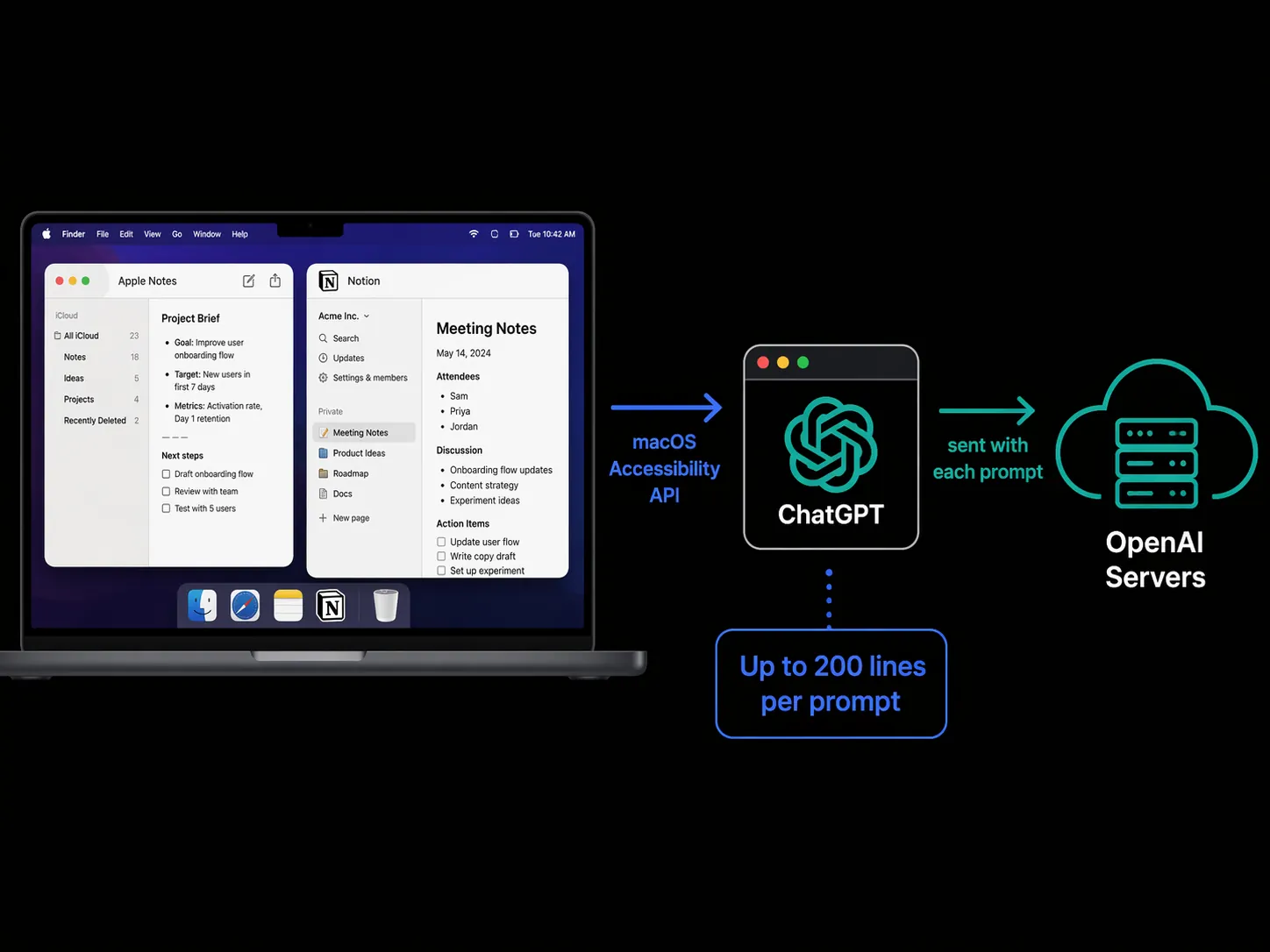
The important phrase is with each prompt. A user may think they are asking ChatGPT to rewrite one sentence, while the app context includes recent lines from an open note pane. OpenAI’s documentation states that content shared through Work with Apps is sent to OpenAI servers, becomes part of chat history, and is saved in the account until deleted. It may also be used to improve model performance unless the user disables that setting. [2]
The permission chain is also unusually broad. Kaspersky’s privacy guide notes that enabling the feature requires the macOS Accessibility API, which grants extensive capabilities, including monitoring activities, managing other applications, simulating keystrokes, and interacting with the user interface. [3]
That does not mean ChatGPT is secretly reading every note all the time. The documented risk is narrower and more useful to understand: supported open app panes can provide recent content to ChatGPT when Work with Apps is used, and that content can then be stored in chat history. The mistake is treating the feature like autocomplete. It is a data-sharing feature with a convenient interface.
A practical workflow should assume open panes matter. If Apple Notes contains a draft performance review in one window and a harmless project outline in another, the user should not rely on vague intuition about what ChatGPT can see. Close or switch away from notes that should not provide context. Use direct paste for the smallest necessary excerpt when precision matters. Turn Work with Apps off when it is not actively needed.
What changes after using it
After a Work with Apps session, the cleanup target is not only the original note app. The shared content can now exist in ChatGPT chat history. If model training was still enabled, that is a second setting to revisit before future sessions. If the content caused ChatGPT to save a memory, memory deletion is a third place to check.
| If you did this | Check this afterward |
|---|---|
| Used Work with Apps while Apple Notes or Notion was open | Review the resulting ChatGPT thread for note content that should not remain in history. |
| Asked ChatGPT to remember preferences or recurring details | Open memory settings and delete any saved memory that should not persist. |
| Used Temporary Chat for sensitive notes | Do not treat it as a complete retention guarantee while the cited legal situation remains unresolved. |
| Enabled Advanced Account Security | Confirm more than one passkey or FIDO key is safely available before relying on the account. |
A workable security posture for note-takers
The right setup depends on how much of the note system ChatGPT is allowed to touch. Someone who occasionally asks for a generic outline can keep the account relatively simple. Someone who summarizes meeting notes, stores memories, or connects ChatGPT to Notion and Apple Notes needs stronger account controls because the account has become a searchable extension of their work surface.
- Use passkeys or FIDO security keys for the account, and enable Advanced Account Security only after planning for loss of access.
- Disable model training before putting real note content, uploads, or app context into ChatGPT.
- Review saved memories separately from chat history, especially after using ChatGPT with recurring personal or work details.
- Keep Work with Apps off by default, and treat enabling it as granting access to recent content in supported open panes.
- After sensitive sessions, delete the relevant chat history and any related saved memories rather than assuming the original note app is the only copy.
That is the decision point. ChatGPT can be useful beside a real note system, especially for summarizing messy notes and carrying preferences across sessions. But if those conveniences are used without configuring account security, training controls, memory deletion, and Work with Apps permissions, the note system has quietly gained another place where private material can live. If a user is not willing to manage those controls, ChatGPT should remain outside the trusted note system rather than becoming an invisible extension of it.
References
- Kaspersky: more than 36 million AI & gaming credentials compromised by infostealers in 3 years, Kaspersky
- Work with Apps on macOS, OpenAI Help Center
- How to configure privacy and security in ChatGPT, Kaspersky official blog
- Advanced Account Security, OpenAI Help Center