
The easiest way to overbuy approval workflow software is to treat an important approval as an enterprise approval. A purchase request, client signoff, hiring requisition, expense exception, or contract review can feel serious enough to deserve a “real platform.” That does not mean the team needs enterprise BPM software.
For most small teams, the first decision is not whether a tool has every routing feature on a comparison grid. It is whether the organization actually has the scale that makes enterprise approval software worth its cost: dedicated IT capacity, compliance-driven routing, existing ERP or ITSM systems to integrate with, formal governance requirements, and a budget that can absorb multi-thousand-dollar monthly software plus implementation. If those conditions are missing, a $20–$150/month approval tool is usually the safer starting point than a $2,500+/month enterprise platform, with pricing last verified June 2026.[1][2][3][4]

The cost cliff comes before the feature list
Approval workflow software has an unusually sharp price break. SMB-focused products commonly sit in the $20–$150/month range, while enterprise platforms start around $2,500/month, $3,000/month, or move into custom enterprise contracts. That is not a small premium for more features. It is a different buying tier.
| Buying tier | Typical pricing | Implementation expectation | Best fit |
|---|---|---|---|
| SMB approval tools | $20–$150/month; examples include ApproveThis at $29–$99/month flat, Zite at $24–$99/month, Jotform Workflows at $39–$99/month, and Flowlu at $39–$149/month; pricing last verified June 2026 | First workflow often live within a week; full rollout commonly under 60 days | Startups, small businesses, and departments that need structured approvals without a heavy IT project |
| Enterprise approval and BPM platforms | Kissflow starts at about $2,500/month with a roughly 100-user minimum; ProcessMaker starts at about $3,000/month; Nintex is quote-based; ServiceNow commonly appears in six-figure-plus annual contract discussions; pricing last verified June 2026 | Often 8–12 weeks, commonly with a dedicated implementation partner | Organizations with compliance obligations, complex routing, ERP/ITSM integrations, SLA tracking, and staff to administer the platform |
The difference can be 20x to 150x before implementation, administration, and internal rollout time are counted. That matters because approvals are usually a coordination problem before they are a software architecture problem. If the office manager is still collecting signoffs in Slack and the finance lead just needs cleaner purchase approvals, buying a platform designed for deep enterprise process management can turn one workflow into a quarter-long internal project.
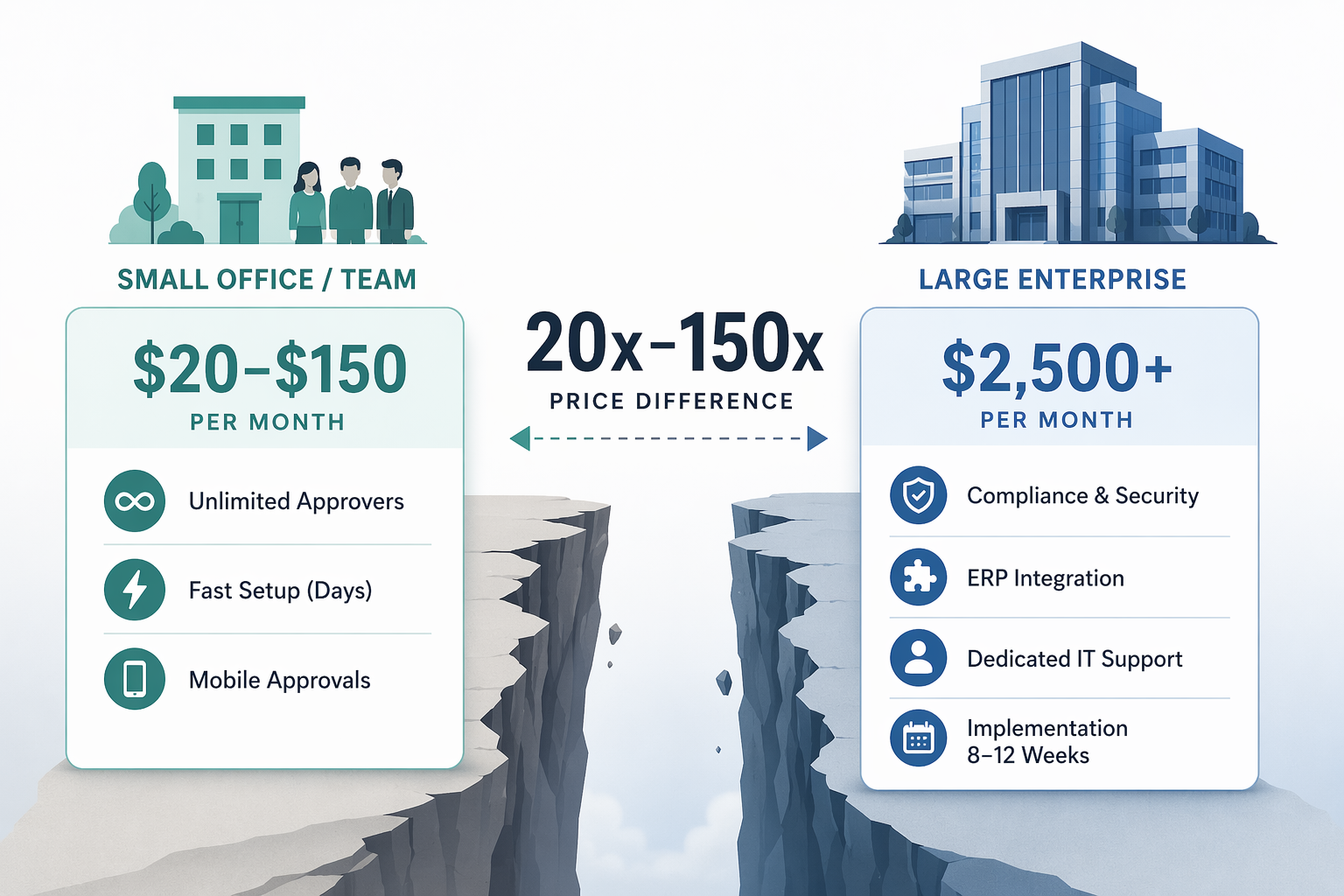
There are good reasons enterprise platforms cost more. Kissflow, ProcessMaker, Nintex, ServiceNow, and similar platforms are built for organizations that need formal process governance, conditional routing at scale, audit controls, integration depth, and administrative oversight. They are not simply “better versions” of lightweight approval tools. They assume a different operating environment.
If that is the environment you are actually in, compare enterprise platforms on integration depth, governance, and administration rather than small-team convenience. The enterprise BPA platform comparison is a better next stop than a small-business workflow list.
What SMB approval tools are actually buying you
A good SMB approval tool should reduce the number of places an approval can disappear. It should let someone build a request form, choose approvers, set basic routing rules, send reminders, approve from email or mobile, and keep a record of what happened. That is enough for many recurring approvals: expenses, purchase requests, document signoffs, content approvals, discount exceptions, hiring requests, and client approvals.
The better small-team tools make rollout boring in the right way. Someone close to the process can set up the first workflow, test it with a few people, and expand from there. ApproveThis and Zite are examples of flat-rate tools positioned around unlimited approvers, while Jotform Workflows, Monday.com, Hive, and Flowlu sit closer to the broader small-business workflow and project-management category, with pricing models that need to be checked against the number of users and approvers involved; pricing last verified June 2026.[1][2][3][4]
For a small team, the practical test is simple: can the person who owns the process get the first useful workflow live without a consultant, a steering committee, or a long internal change-management plan? If the answer is no, the software may already be too large for the problem.
Teams in this profile should usually compare approval tools alongside broader small-business workflow automation options. The small-business workflow automation comparison is useful when approvals are only one part of a broader operations cleanup. If the budget is extremely tight, the under-$20/month workflow tools guide keeps the search from drifting into software the team cannot sustain.
What enterprise platforms are built to handle
Enterprise approval platforms earn their keep when the approval is part of a larger controlled system. A purchase approval may need to check a budget in an ERP. A service request may need to create or update a ticket in an ITSM platform. A healthcare, finance, or government process may need stronger audit trails, authorization layers, retention controls, and evidence that the organization followed a defined process.
That explains why enterprise approval workflow software emphasizes conditional routing, role-based administration, SOC 2 or HIPAA-style compliance support, SLA tracking, ERP connections such as SAP or Oracle NetSuite, ITSM integrations such as ServiceNow, BPMN-style process modeling, and formal governance. Those features are valuable when the organization has the systems and staff to use them. Without that environment, they can become expensive shelfware.
The broader market helps explain the enterprise bias. One market report valued the approval workflow software market at $7.4 billion in 2025 and projected $18.6 billion by 2034 at a 10.8% CAGR, while another placed the market at $10.4 billion in 2024 using a different scope.[6][7] Those numbers should not be treated as a purchasing argument for a small team, but they do explain why vendors are chasing regulated, complex, and high-volume use cases.
The same report identified BFSI as the largest segment at 22.5% market share and government as the fastest-growing segment at 13.5% CAGR.[6] Financial institutions and government agencies have approval problems that naturally push software toward immutable audit trails, multi-tier authorization, formal retention, and compliance reporting. A 25-person services firm may need accountability, but it usually does not need the same machinery.
The hidden cost is often the approver, not the workflow
Per-seat pricing looks reasonable until the workflow leaves the employee directory. Many approvals involve people who are not daily users: vendors approving a statement of work, clients signing off on a deliverable, contractors confirming a change, a board member reviewing an exception, or an executive who approves only a handful of requests each month.
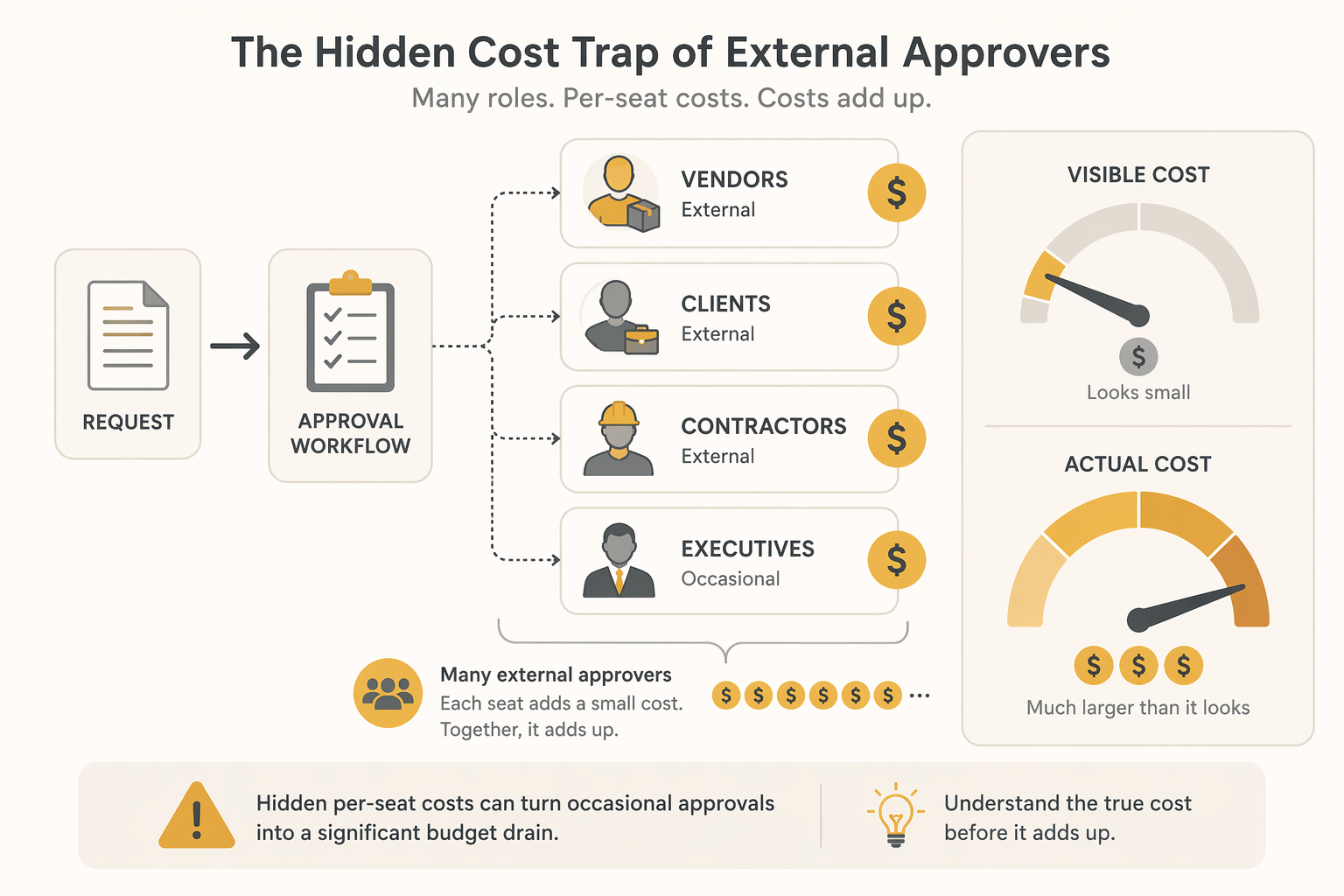
This is where flat-rate and unlimited-approver models can matter more than a long feature checklist. Vendor-owned buyer guides from ApproveThis and Zite position unlimited approvers as a way to avoid paid-seat penalties for external participants; those sources should be read with the usual caution because they are selling into the category, but the pricing issue itself is real enough to put in every evaluation spreadsheet.[1][2]
A small team should count approvers differently from users. Users are the people building, managing, and monitoring workflows. Approvers are everyone who may need to click approve, reject, request changes, or comment. If a pricing page charges for every person who touches the workflow, occasional approvers can turn a cheap plan into a recurring annoyance.
Before buying, list the people who approve in a normal month and mark which ones are external, occasional, or senior enough that they will not tolerate a complicated login. Then price the tool against that real list. The painful surprise is rarely the first workflow. It is the fifth workflow, when client approvals, vendor signoffs, and contractor confirmations all start asking for seats.
Mobile and email approval are adoption requirements now
Approval tools fail quietly. The workflow is technically live, the form exists, the routing is correct, and the request still sits because the approver is between meetings, on a phone, or unwilling to open another system for a two-second decision.
That is why mobile and email approval should be treated as core requirements, not convenience features. One market report found that 55% of approval actions were completed via mobile devices, and 42% of the global knowledge workforce was operating in hybrid or remote configurations in early 2026.[6] The exact share will vary by organization, but the operating lesson is hard to miss: if approvers cannot respond from where they already are, the approval queue slows down.
For SMBs without heavy VPN infrastructure or tightly managed enterprise devices, email-based approval and mobile-native flows can be the difference between adoption and another abandoned operations tool. The approver should not need to remember a new dashboard just to approve a routine request.
When crossing into enterprise software makes sense
Enterprise approval workflow software starts to make sense when the cost and implementation burden are smaller than the risk of running approvals informally. The signal is not headcount alone. A 40-person company in a regulated workflow may have more enterprise approval needs than a 300-person company with simple internal signoffs.
The stronger enterprise signals are operational:
- Approvals must read from or write back to ERP, finance, HRIS, CRM, or ITSM systems.
- Routing depends on multiple conditions such as amount, geography, entity, department, risk level, customer type, or policy exception.
- The organization needs formal SLA tracking, escalation paths, delegated authority, and audit-ready evidence.
- Compliance requirements make informal approvals risky, especially in finance, healthcare, public sector, or other regulated environments.
- There is dedicated staff to configure, administer, secure, and continuously improve the platform.
- The budget can tolerate not only the subscription, but also implementation support, internal training, governance work, and ongoing administration.
If several of those are true, the price jump may be justified. Enterprise platforms derive much of their advantage from integration depth and governance controls, especially around ERP and ITSM environments; teams without those systems often pay for capabilities they cannot use.[8]
Department-specific patterns can also change the answer. Legal approvals, procurement approvals, HR approvals, finance approvals, and customer-facing signoffs can all have different routing and recordkeeping needs. If the question is less “SMB or enterprise?” and more “what does this department actually require?”, use an approval workflow software by use case comparison before committing to a platform tier.
A practical self-diagnosis before you buy
Use the following questions before sitting through enterprise demos. They are not meant to produce a perfect score. They are meant to keep the buying conversation anchored to the work that will actually happen after the contract is signed.
| Question | If yes | If no |
|---|---|---|
| Do approvals need to integrate deeply with ERP, ITSM, HRIS, finance, or other core systems? | Enterprise platforms deserve consideration. | An SMB approval tool is usually enough to start. |
| Do you have dedicated IT or operations staff to administer workflow logic, permissions, integrations, and changes? | A larger platform may be maintainable. | Avoid tools that require ongoing technical ownership you do not have. |
| Are compliance, auditability, SLA tracking, or formal governance central to the process? | Enterprise controls may be worth the cost. | Look for clear approval history and basic audit trails without overbuying. |
| Will many vendors, clients, contractors, or occasional executives approve requests? | Scrutinize per-seat pricing before buying. | User-based pricing may be less risky, but still model growth. |
| Can the first workflow go live in days, not months? | That favors SMB tools and phased rollout. | If the workflow truly needs 8–12 weeks of design, test whether the complexity is real or self-inflicted. |
| Are documents the center of the approval process? | Compare document-specific workflow tools as well. | A general approval workflow tool may be sufficient. |
Document-heavy teams should be careful here. If the main pain is version control, redlines, signatures, document routing, and review history, a general approval workflow tool may not be the whole answer. The document workflow automation comparison is a better fit for that branch of the decision.
How to keep the first rollout from becoming the real project
A sensible first rollout should be narrow. Pick one approval that happens often enough to matter and is painful enough that people will notice the improvement. Purchase requests, invoice approvals, client deliverable signoffs, content approvals, and hiring requisitions are common candidates. Avoid starting with the one exception-heavy process that everyone already argues about.
The first workflow should prove four things:
- Requesters know where to submit the approval.
- Approvers receive the request somewhere they will actually respond.
- The process owner can see what is waiting and who is blocking it.
- The record is clear enough to answer what was approved, by whom, and when.
After that, add complexity slowly. Add conditional routing only when the exception happens often enough to justify the rule. Add integrations only when copy-paste work is frequent or risky. Add more departments only after the first process owner is no longer babysitting every request.
This is also where vendor-owned claims need a steady hand. Buyer guides from approval software vendors can be useful for pricing signals, category language, and implementation expectations, but they have an incentive to frame their own model as the obvious answer. Use them for concrete details, then test those details against your approver count, rollout capacity, and integration needs.
The buying judgment
Most small teams should start with SMB approval workflow software. The right tool is usually the one that gets a real workflow live quickly, supports mobile and email approvals, keeps external approvers from becoming paid-seat clutter, and gives the process owner enough visibility to stop chasing people manually.
Enterprise platforms are justified when the organization already looks like an enterprise process environment: regulated approvals, complex conditional routing, SLA obligations, ERP or ITSM integrations, formal governance, and people available to administer the system. Without those conditions, the extra spend rarely buys maturity. It usually buys a larger implementation burden for the same stalled approvals.
References
- ApproveThis buyer guide, ApproveThis, June 2026.
- Zite approval workflow software guide, Zite, June 2026.
- Flowlu pricing, Flowlu, June 2026.
- The Digital Project Manager approval workflow software pricing coverage, The Digital Project Manager, June 2026.
- UI Bakery approval workflow software comparison, UI Bakery, June 2026.
- Approval Workflow Software Market Report, Dataintelo.
- Approval Workflow Software Market, DataHorizzon Research.
- Moxo approval workflow overbuying guidance, Moxo.