
If you are looking for a second brain template for AI research, the real choice is not between three note-taking brands. It is between three failure modes. Notion gives you the fastest structured start, then makes PDF annotations and citation handoff awkward. Obsidian plus Zotero gives you the deepest research workstation, then asks you to care for plugins, sync, folders, AI settings, and import rules. AI-native tools give you conversational retrieval with almost no setup, then ask you to trust a system that may not preserve citations, local files, or long-term portability the way research work often needs.
That distinction matters more in AI and ML than it does in ordinary productivity writing. A research note is not just a thought you want to remember. It may need to point back to a PDF margin note, a Zotero item, a failed baseline, a dataset version, a reviewer comment, and a half-written claim in a related-work draft. A clean dashboard is pleasant. The harder test is whether it can answer a question from the paper you annotated last week without making you rebuild the context by hand.
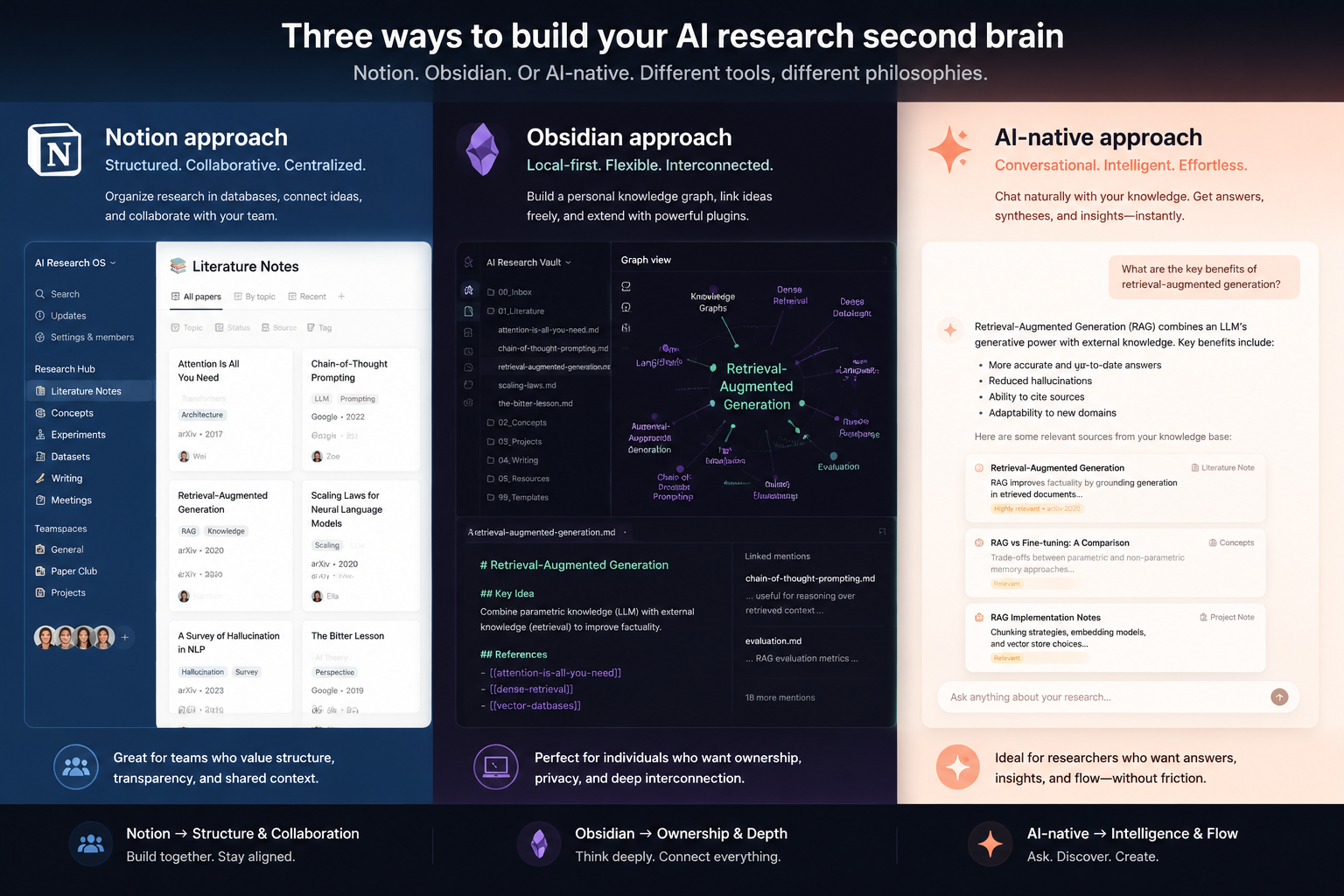
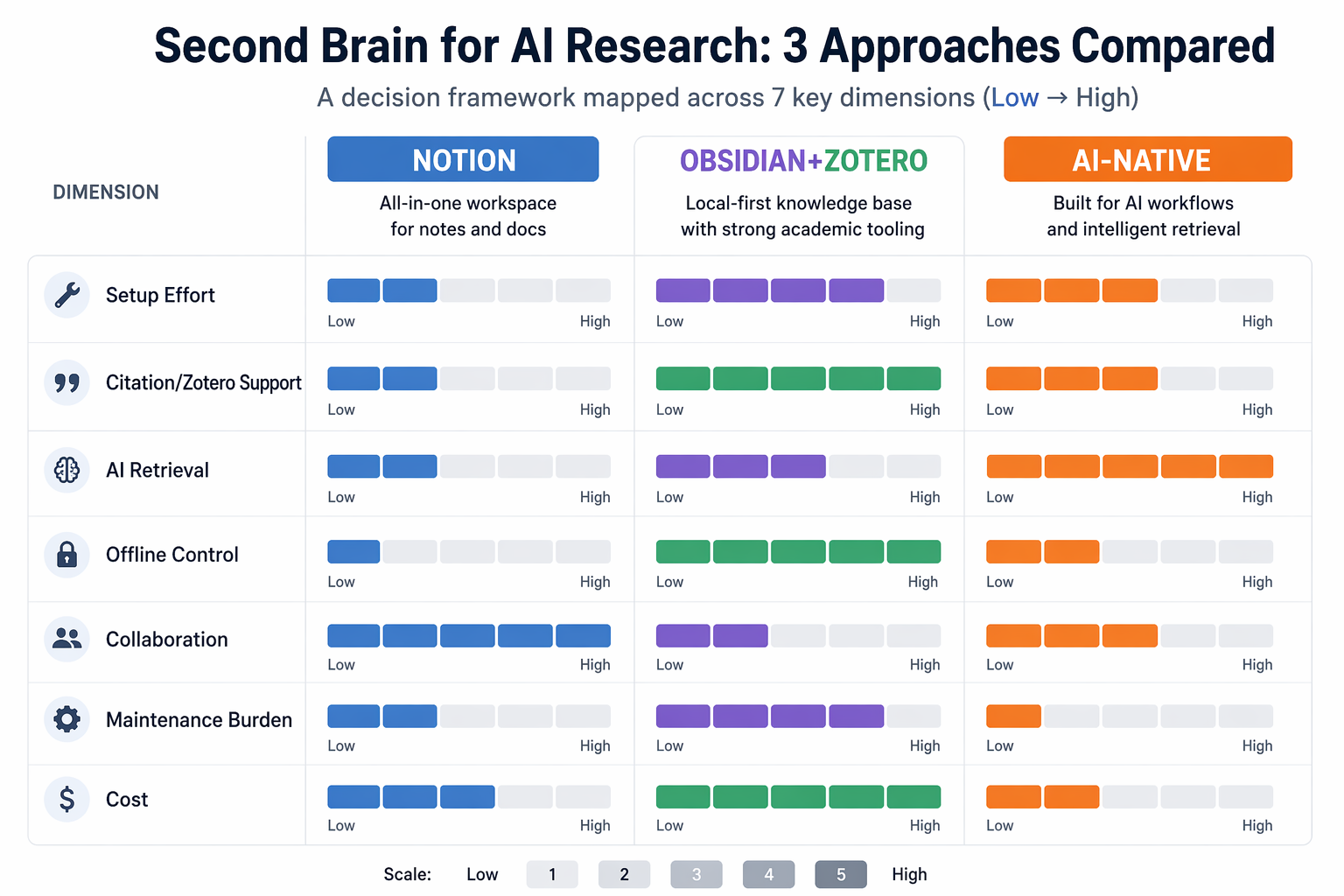
| Approach | Best for | Setup effort | Maintenance burden | Citation/Zotero support | AI retrieval | Offline/local control | Typical cost range |
|---|---|---|---|---|---|---|---|
| Notion templates | Researchers or teams that need structured project databases quickly | Low | Medium: templates stay useful only if fields and relations are maintained | Weak to medium: citation metadata can be tracked, but attached PDF annotations are not natively queryable | Medium: Notion AI helps with writing and database Q&A, but does not search attached papers | Weak: cloud-first and limited for offline research workflows | Templates from free to $79 one-time; Notion AI $10/user/month |
| Obsidian + Zotero + AI plugins | Researchers who want local markdown, citation workflow, linked notes, and control | High: commonly estimated at 5-10 hours for a serious research setup | High: plugin changes, sync choices, templates, and AI connections need care | Strong: Zotero-centered workflows are the main advantage | Medium to strong: possible through plugins and MCP/Claude-style setups, but not effortless | Strong: local markdown vaults and offline notes are core strengths | $0 core; Sync $48-96/year; some AI/plugin costs may add more |
| AI-native tools | Researchers who want fast conversational retrieval and minimal setup | Very low | Medium: less configuration, more dependence on subscription and vendor direction | Weak: no native Zotero integration identified as of July 2026 | Strong for conversational search, with source-grounding claims varying by vendor | Weak to medium: full offline AI is generally not available | Roughly $120-180/year for many paid AI-native subscriptions |
The Fastest Useful Start Is Usually Notion
Notion works best when the first problem is structure. You can create databases for papers, claims, projects, experiments, datasets, reading status, and follow-up questions. You can relate a paper to a project, a claim to a method, and an experiment to a milestone. For a lab, startup research team, or solo researcher who has let too many notes scatter across docs and browser tabs, that first week of order is genuinely valuable.
The template market reflects that appeal. Notion Everything lists several second-brain-style templates for 2026, including Ultimate Brain at $79 one-time, Notion Second Brain 3.0 at $49, and Research Flow as a free option.[1] The Notion Marketplace also lists a Research Second Brain template by ReClingman at $19.[2] Those prices are modest compared with the cost of losing a week to a chaotic literature review, and a good template can make the basic objects visible: papers, authors, concepts, projects, notes, and tasks.
This is where Notion deserves credit. It is much easier to show a supervisor, collaborator, or product lead a Notion database than an Obsidian vault with five community plugins and a naming convention. The same structure that feels slightly rigid for private thinking can be useful when a team needs to agree on what counts as “reviewed,” “implemented,” “needs replication,” or “citation needed.”
The weak point appears when the research object is not the database row but the PDF. A Notion paper database can store bibliographic metadata, summaries, tags, links, and decisions. It can help you remember that a paper used a certain benchmark or that you planned to revisit a method section. But it cannot natively query the annotations inside attached papers, and Notion AI cannot search those attached PDFs as if they were a properly indexed research library. For AI research, that gap is not cosmetic. Margin notes are often where the real judgment lives.
Notion also makes citation work feel adjacent rather than native. You can paste BibTeX, store DOIs, track citation status, or link out to Zotero. You can build a neat relation between “claim” and “source.” What you do not get is the same smooth handoff between reference manager, annotated PDF, literature note, and cited manuscript that Zotero-centered workflows are built to protect.
For readers who mainly want a general framework for capturing and organizing knowledge, the Second Brain method and starter Notion second brain templates may be enough. For AI research, the deciding question is narrower: can the system preserve the path from source to note to argument to experiment?
Obsidian + Zotero Is the Deepest Workstation, If You Can Keep It Alive
Obsidian starts from a different assumption: your notes should be local files first. For research, that is not nostalgia. Local markdown means you can inspect, export, back up, script, and migrate your work without waiting for a platform to expose the right button. Zotero then supplies the missing academic spine: papers, metadata, citation keys, collections, and annotated PDFs.
The ecosystem is large enough to be a real advantage and a real risk. NxCode reported Obsidian at 1.5 million users, 22% year-over-year growth, and more than 2,700 plugins in February 2026.[3] That means the pieces exist for serious research workflows: Zotero import, literature note templates, backlinks, dataview-style indexes, canvas mapping, local folders, and AI retrieval experiments. It also means your “second brain” can quietly become a plugin portfolio.
A strong Obsidian setup can give each paper a note with citation metadata, extracted annotations, a short contribution summary, methodological warnings, links to related papers, and connections to project notes. An experiment note can link back to the paper that motivated the run, the dataset being tested, the baseline being challenged, and the reason the attempt was abandoned. Six months later, that chain is far more useful than a tag called “interesting.”
The cost is setup and care. Iwo Szapar’s 2026 comparisons estimate that a serious Obsidian research setup may require 5-10 hours of configuration, and quote a Reddit user’s blunt summary: “maintaining the system part is what kills most setups.”[4] That sounds dramatic until you have watched a vault slowly split into old templates, new templates, broken plugin assumptions, duplicate citation keys, and notes whose frontmatter no longer matches the query that was supposed to surface them.
This does not make Obsidian a bad choice. It makes it a choice with an operating cost. Someone has to decide how Zotero annotations become notes. Someone has to choose whether AI runs through a plugin, an MCP connection, a local model, Claude-style tooling, or manual copy-paste. Someone has to notice when a plugin changes licensing, breaks after an update, or stops matching the workflow. Szapar reported that Smart Connections moved to $99/year licensing in 2026, a useful reminder that “free plugin ecosystem” does not mean every important component stays free forever.[4]
Obsidian’s strongest version is not a prettier notes app. It is a research workstation where Zotero remains the citation authority, markdown remains the durable storage layer, and AI is added as a retrieval or synthesis layer rather than becoming the place where evidence disappears. That architecture favors researchers who care about being able to inspect the chain of custody from source to conclusion.
If the immediate decision is specifically between Notion and Obsidian for AI notes, a narrower comparison of Obsidian vs Notion for AI Notes can help. The research-specific difference is that Obsidian becomes much more compelling once Zotero, annotations, and citation keys are part of the daily workflow.
AI-Native Tools Solve Retrieval First
AI-native second-brain tools such as Mem, Reflect, Atlas, and Fabric approach the problem from the retrieval side. Instead of asking you to design a database or maintain a vault, they try to let you ask the system what you know. For an exhausted researcher, that is not a small benefit. The best workflow is sometimes the one that gets used before midnight.
The pricing tends to look simple at first. Fabric’s May 2026 comparison lists Fabric Plus at $5/month, Reflect at $10/month, and Mem at $14.99/month, while noting that Mem’s free tier is limited to 25 notes and 25 AI messages per month, which makes it closer to a trial for serious use.[5] Across this category, paid subscriptions commonly land around $120-180/year, before considering whether a researcher also keeps Zotero storage, cloud drives, or a separate writing tool.
Atlas’s own July 2026 comparison gives Atlas 8.5/10 for cognitive load, 9.5/10 for AI retrieval, and 9.5/10 for source-grounding depth.[6] Those are useful vendor disclosures, not independent proof. They do tell us what AI-native products are optimizing for: lower setup friction, faster search, and a feeling that the system can answer from accumulated context. They do not settle whether the tool will preserve a citation trail well enough for a paper, grant, model card, or technical report.
The citation boundary is the serious one. The research brief found no AI-native tool in this comparison with native Zotero integration as of July 2026. That does not mean these tools cannot hold sources, links, excerpts, or generated answers. It means they do not yet replace the reference-manager-centered workflow that many researchers depend on when writing cited outputs.
Offline control is the other boundary. AI-native retrieval generally depends on a hosted service, and full offline AI is not the norm. If the tool changes pricing, export quality, model behavior, or retrieval rules, the researcher has less control than they would with markdown files and a Zotero library. Some users will accept that trade gladly because the system removes enough friction to be worth it. The mistake is pretending there is no trade.
A Research Workflow Test
A second brain for AI research should be judged by the work it must survive, not by its homepage. A reasonable test starts with a common sequence: read a paper, annotate it, connect it to prior work, try an experiment, abandon or continue the experiment, and later write a cited argument that explains why.
| Research task | Notion template | Obsidian + Zotero | AI-native tool |
|---|---|---|---|
| Paper intake | Good for metadata, status, tags, projects, and reading queues | Strong when Zotero is the paper library and Obsidian stores literature notes | Good if sources can be imported or clipped easily, but structure varies by tool |
| PDF annotation flow | Weak for querying attached PDF annotations directly | Strong when Zotero annotations are extracted into markdown notes | Variable; may retrieve uploaded or clipped text, but not a Zotero-native annotation workflow |
| Literature synthesis | Good for visible databases and team-facing summaries | Strong for linked claims, paper clusters, and durable notes | Strong for conversational synthesis, with citation reliability depending on implementation |
| Experiment logs | Good for structured logs, owners, status, and collaboration | Strong for linking runs to papers, hypotheses, and local files | Useful for summarizing notes, less ideal when logs need reproducible structure |
| Citation tracking | Possible through fields and links, but not native as a citation workflow | Strongest when Zotero citation keys remain central | Weak if the final output requires formal citation management |
| Retrieval under pressure | Good for database filters; weaker for paper-level annotation questions | Strong if the vault is maintained; uneven if setup decays | Often strongest for natural-language recall with minimal preparation |
The paper-and-annotation step is where many beautiful Notion setups start to thin out. A database row can say that a paper is “high relevance” and “needs replication.” It can hold a summary. It can include a URL or file. But if the important note is an annoyed highlight beside a threat-to-validity paragraph, Notion does not naturally turn that marginalia into a queryable research object.
Obsidian plus Zotero handles that step more cleanly, provided the pipeline is actually built. Zotero remains the library. The PDF is annotated there. The annotations and metadata are pulled into a markdown literature note. That note then links to methods, datasets, arguments, and experiment logs. The gain is not that Obsidian has a graph view. The gain is that the graph can be made from research-native objects rather than decorative backlinks.
AI-native tools do something different. They may let you ask, “What did I save about retrieval-augmented generation evaluation?” or “Which notes mention baseline leakage?” and get an answer quickly. That can be extremely useful during literature synthesis. The question is whether the answer carries enough source detail to trust it. A conversational answer that cannot cleanly identify the paper, excerpt, or annotation behind a claim is helpful for recall and dangerous for citation.
Experiment notes expose a second difference. Notion is comfortable with structured experiment tracking: hypothesis, model, dataset, metric, owner, date, result, next action. Obsidian is better when the experiment is one node in a wider knowledge graph: this run tested a claim from this paper, using this dataset, after this earlier failure. AI-native tools are best when the main need is to retrieve the surrounding context quickly, not necessarily to preserve a reproducible lab notebook format.
Maintenance Is Part of the Price
The published price is only one part of the cost. The more expensive part is the system you have to keep believing in after the first burst of enthusiasm. Template-based second brains are reportedly abandoned at rates around 60-70% in syntheses from blogs and Reddit discussions, but that figure should be treated as a reported pattern rather than a formal study.[4] The pattern still matches a familiar failure: the setup was satisfying to build and too fussy to maintain.
Notion’s maintenance cost is field discipline. If a paper database has columns for method, dataset, claim type, replication status, and citation status, someone has to fill them in. If a team changes its categories halfway through a project, old entries become unreliable unless someone cleans them. Notion makes structure visible, but visibility is not the same as upkeep.
Obsidian’s maintenance cost is infrastructure discipline. File naming, folder strategy, Zotero import templates, plugin versions, sync choices, AI settings, and note conventions all matter. The reward is a system that can be local, inspectable, and deeply integrated. The penalty is that a researcher who only wanted to write a related-work section may end up debugging their knowledge environment instead.
AI-native tools shift the maintenance burden to trust and subscription management. You spend less time configuring, but more of the workflow lives inside the vendor’s retrieval layer. If the tool is excellent, this feels like relief. If the tool changes direction, gives thin source grounding, or exports poorly, the hidden cost appears later.
| Cost component | What it means in practice |
|---|---|
| Notion templates: free to $79 one-time | Low entry cost, especially for structured databases; ongoing value depends on whether the template fits the research workflow |
| Notion AI: $10/user/month | Useful for writing and database Q&A, but not a replacement for PDF annotation search |
| Obsidian core: $0 | Strong baseline if local markdown is enough and the researcher can manage the workflow |
| Obsidian Sync: $48-96/year | Optional, but often relevant for researchers moving across devices |
| Obsidian AI/plugin costs: variable | Some previously free-feeling workflows may gain paid components, such as the reported Smart Connections $99/year licensing |
| AI-native subscriptions: roughly $120-180/year | Lower setup time, higher dependence on the tool’s hosted retrieval, pricing, and export path |
A 2012 McKinsey report, cited in Storyflow’s 2026 AI second-brain guide, estimated that workers spent 19% of the workweek searching and gathering information.[7] That number is not specific to AI research or second-brain tools, so it should not be used to promise a productivity gain. It does explain why retrieval claims are so tempting. Search pain is real. The question is whether the tool reduces search without weakening evidence.
Which Failure Mode Can You Tolerate?
For a wider view of the category, compare AI-powered PKM tools or broader personal knowledge management apps. If the tool keeps failing because it does not match how you think, the more useful question may be how to choose a PKM method and app that fit your thinking style.
Choose Notion if the most important work is shared structure: project dashboards, reading queues, paper metadata, team reviews, experiment status, and visible ownership. It is the strongest choice when low setup and collaboration matter more than deep PDF annotation retrieval or formal citation workflow. A Notion setup can be a very good research operating table. It should not be mistaken for a full reference and annotation engine.
Choose Obsidian plus Zotero if the research library is the center of gravity. This is the best fit when annotated papers, citation keys, local markdown, durable export, and links between sources and experiments justify the setup time. It is also the easiest recommendation to make on research integrity grounds and the hardest to recommend to someone who will not maintain it.
Choose an AI-native tool if the main pain is recall. If you want to ask your notes questions immediately, avoid weekend configuration, and accept subscription dependence, the category is compelling. It is weaker when the final deliverable must move cleanly through Zotero, citations, offline archives, and inspectable source trails.
References
- The Best Second Brain Notion Templates for 2026, Notion Everything, 2026
- Research Second Brain template by ReClingman, Notion Marketplace
- Obsidian AI Second Brain: Complete Guide (2026), NxCode, February 2026
- Best AI Second Brain Solutions for 2026 and Obsidian vs Second Brain: Why MCP Access Isn't Enough, Iwo Szapar, March-May 2026
- Best second brain app in 2026, Fabric.so, May 2026
- 7 Best Second Brain Apps (2026): Cognitive-Load Tested, Atlas Workspace, July 2026
- What is an AI Second Brain? Complete Guide (2026), Storyflow, 2026