
Why Open-Source Workflow Automation Is Trending — But Not for Everyone
The numbers are hard to ignore. According to the GitHub Octoverse report, workflow automation repositories grew 67% year over year. Teams are clearly looking beyond proprietary platforms like Zapier and Make, drawn by the promise of lower marginal costs, data sovereignty, and the ability to customize every step of a pipeline.
But open source is not a free upgrade. The license cost is zero; the operational cost is not. Every self-hosted tool requires server infrastructure, someone to patch it, someone to handle failures at 2 AM, and someone to manage upgrades that can break existing workflows. The real price of open-source automation is operational ownership, and that resource is always scarce.
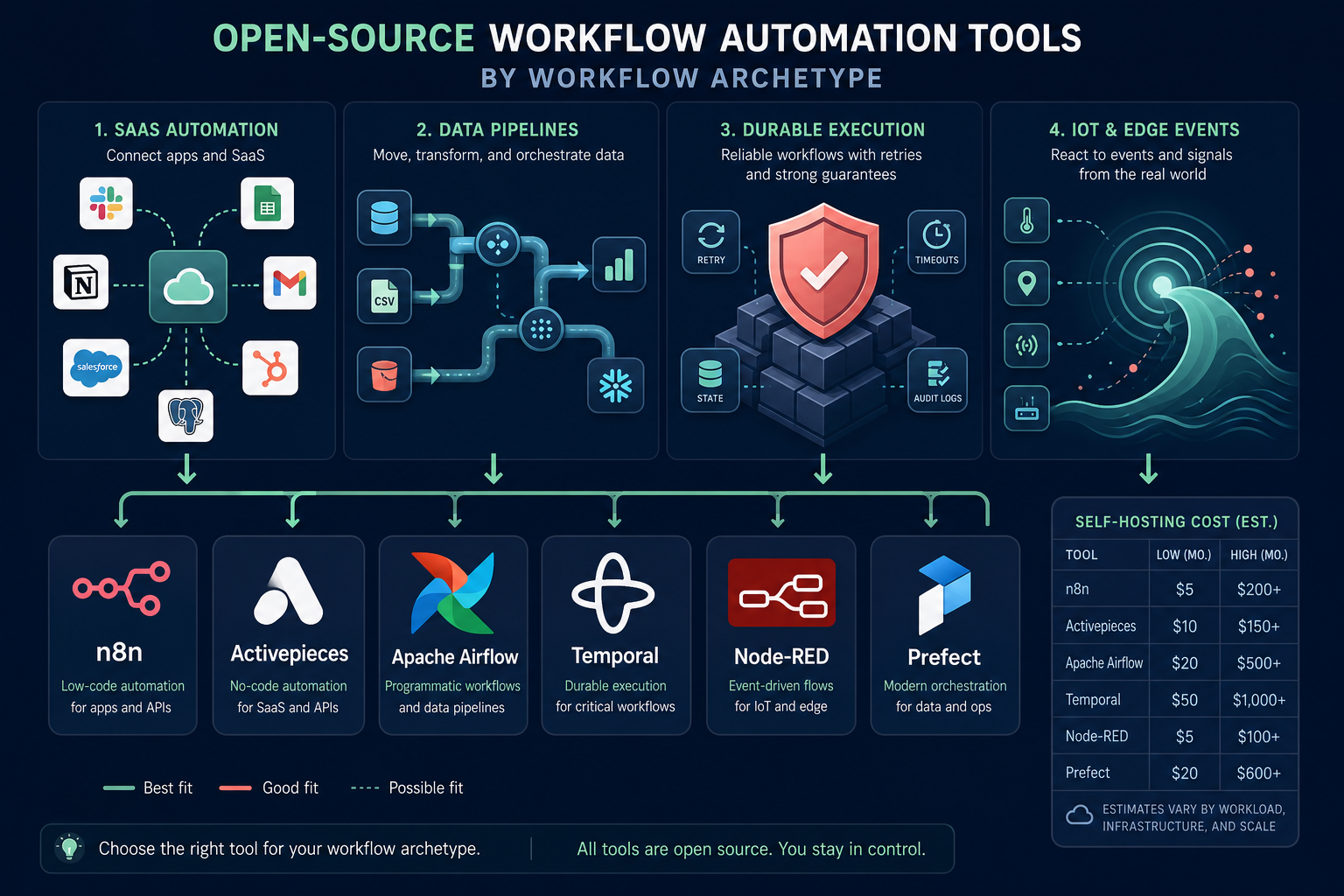
The core thesis of this comparison is simple: open-source workflow automation tools are not interchangeable substitutes. The right choice depends entirely on the type of work you are automating. A tool that excels at chaining SaaS APIs will collapse under the weight of a petabyte-scale data pipeline. A tool built for durable, long-running stateful workflows is overkill for a simple Slack notification. This article organizes the landscape by workflow archetype, not by popularity, so you can match the tool to the job.
The Workflow Archetype Framework: Match the Tool to the Job
Before comparing tools, it helps to categorize the work itself. Most automation needs fall into one of four archetypes. Each archetype makes different demands on the execution engine, and each open-source tool is optimized for a different subset of these demands.
| Archetype | What It Does | Key Requirements | Best-Fit Tools |
|---|---|---|---|
| SaaS Automation | Connects cloud apps (CRM, email, Slack, spreadsheets) to move data and trigger actions | Rich connector library, low-code UI, fast setup, webhook support | n8n, Activepieces |
| Data Pipelines | Extracts, transforms, and loads large datasets between databases, data warehouses, and analytics platforms | Python/SQL-native, scheduling, retry logic, observability, parallel execution | Apache Airflow, Prefect |
| Durable Execution | Manages long-running, stateful processes that must survive restarts and partial failures (e.g., order fulfillment, multi-step approvals) | Workflow state persistence, deterministic replay, fault tolerance, SDK support | Temporal |
| IoT / Event Streams | Processes sensor data, MQTT messages, and edge-device events in real time or near-real time | Lightweight runtime, MQTT/Modbus support, edge deployment, visual flow editor | Node-RED |
The table above is a starting point, not a prison. Teams sometimes run n8n for lightweight data movement or use Airflow to orchestrate SaaS API calls. But when you push a tool outside its native archetype, you inherit its failure modes. Understanding those failure modes is the real value of this framework.
Tool Profiles by Archetype
SaaS Automation: n8n and Activepieces
For teams that need to connect cloud applications — CRM, email marketing, Slack, spreadsheets, billing systems — n8n and Activepieces are the two serious contenders. Both offer visual flow builders, webhook triggers, and self-hosted deployment. But they differ significantly in maturity, governance, and ecosystem depth.
n8n leads on enterprise readiness. It offers user access control with RBAC, secure secrets management via external vaults, and true environment separation (Dev/Stage/Prod) backed by Git-based source control. It is built to scale horizontally — a Redis queue and PostgreSQL database distribute execution across multiple worker nodes. With over 400 integrations, its connector library is the deepest in the open-source SaaS automation space.
Activepieces, by contrast, prioritizes simplicity. It offers a drag-and-drop flow designer that genuinely works for non-technical users, an AI Copilot assistant, and support for approval steps with manual review triggers. It claims 450 pre-built integrations, with roughly 60% contributed by the community. The trade-off is depth: Activepieces struggles with complex, multi-layered data arrays, advanced branching, and massive parallel execution. It is best suited for fast internal automations, simple marketing pipelines, and lightweight integrations.
The decision between the two often comes down to team composition. If your automation builders are technical and you need enterprise governance, n8n is the safer bet. If you are offloading Zapier costs for non-technical teams and your integration needs fit Activepieces' official pieces, the cleaner UX may win.
Data Pipelines: Apache Airflow and Prefect
When the job involves moving and transforming data at scale — ETL jobs, data warehouse loading, ML pipeline orchestration — Apache Airflow has been the default choice for years, holding an estimated 60% or more of the data orchestration market. Its DAG-based programming model is well understood by data engineers, and its ecosystem of operators and hooks is vast.
But Airflow's dominance comes with real costs. The scheduler becomes a bottleneck beyond roughly 1,000 DAGs. Upgrades are painful — the migration from 1.x to 2.x, and now toward 3.x, has been a multi-year effort for many teams. Setting up a production-grade Airflow deployment requires 10 to 40 hours initially, with 4 to 10 hours of maintenance per month.
For new builds, Prefect is increasingly recommended over Airflow. Prefect offers a more modern developer experience with native async support, automatic retries, and a built-in UI for observability. It avoids the scheduler bottleneck by design and handles dynamic task mapping more gracefully. If you are starting a data pipeline project today and do not already have Airflow infrastructure in place, Prefect (or Dagster) is likely the better choice.
Durable Execution: Temporal
Some workflows must survive anything — server crashes, network partitions, partial failures, restarts. Order fulfillment pipelines, multi-step approval processes with human-in-the-loop delays, and financial settlement systems all fall into this category. These are not simple API chains; they are long-running, stateful processes that need deterministic replay and fault tolerance.
Temporal is the only open-source tool that solves this problem properly. It provides a workflow runtime that guarantees execution state is preserved across failures, with SDKs in multiple languages. If you try to build durable execution yourself with queues, a database, and a custom retry loop, you will end up rebuilding Temporal badly.
The cost of this capability is operational complexity. A production Temporal deployment requires 20 to 60 hours of initial setup and 8 to 15 hours of maintenance per month. Self-hosted infrastructure costs range from $100 to $1,000+ per month depending on scale. Temporal Cloud is available as a managed alternative, with usage-based pricing roughly between $50 and $2,000+ per month.
IoT and Event Streams: Node-RED
Node-RED occupies a distinct niche. It was built for IoT, MQTT, Modbus, and edge deployment — scenarios where the runtime must be lightweight enough to run on a Raspberry Pi and the programming model is visual flow wiring. It is not designed for SaaS API orchestration or enterprise data pipelines.
Node-RED's governance capabilities are practically non-existent out of the box. It lacks RBAC, environment separation, and a rich ecosystem of business connectors. If your primary need is connecting cloud applications, Node-RED is the wrong tool. But if you are processing sensor data on an edge device, it is often the only tool that fits.
The Real Cost of Self-Hosting: Setup Hours, Monthly Maintenance, and Managed Alternatives
The license is free. The infrastructure, setup time, and ongoing maintenance are not. The table below provides honest cost ranges for each tool, based on typical production deployments. These figures assume a willing and capable maintainer — the scarcest resource in any open-source adoption decision.
| Tool | Self-Hosted Infrastructure (Monthly) | Initial Setup Hours | Monthly Maintenance Hours | Managed Cloud Alternative |
|---|---|---|---|---|
| n8n | $5–20 (basic VPS) to $50–150 (with DB/backups) | 2–4 | 1–3 | n8n Cloud ($20–50/mo) |
| Activepieces | $5–20 (basic VPS) to ~$200 (typical production) | 2–4 | 1–2 | Activepieces Cloud (tiered) |
| Apache Airflow | $100–300 (small) to $300–1,000+ (production) | 10–40 | 4–10 | Astronomer, MWAA, Cloud Composer |
| Temporal | $100–300 (dev) to $300–1,000+ (production) | 20–60 | 8–15 | Temporal Cloud (~$50–2,000+ usage-based) |
| Node-RED | Minimal (often runs on edge hardware) | 1–2 | <1 | FlowForge |
Managed cloud alternatives exist for every tool listed above. They eliminate the operational burden but reintroduce a monthly subscription cost. The decision between self-hosted and managed is not a binary — many teams run a self-hosted instance for development and staging, then use the managed service for production workloads where uptime guarantees matter.
AI Workflow Readiness: Which Tools Support Agentic and LLM-Powered Workflows?
The demand for AI-powered automation is reshaping the tool landscape. Teams increasingly want workflows that can call LLMs, make decisions based on unstructured data, and loop until a condition is met — patterns that look more like agentic behavior than traditional deterministic automation.
n8n has the most mature AI capabilities among the tools covered here. It supports AI agent nodes that can call OpenAI, Anthropic, and other LLM providers, with built-in support for tool use, memory, and multi-step reasoning. These capabilities are integrated directly into the visual flow builder, so you can combine AI steps with traditional API calls in the same workflow.
Activepieces offers an AI Copilot that assists with flow creation, but its AI execution capabilities are less developed than n8n's. For teams that need to build production AI workflows today, n8n is the stronger choice.
For data pipeline tools like Airflow and Prefect, AI integration typically happens at the code level — calling LLM APIs from Python tasks, storing results in a data warehouse, and orchestrating the pipeline with the tool's native scheduling and retry logic. Temporal is well-suited for AI workflows that require durable execution, such as long-running document processing pipelines where each step involves an LLM call that could fail and needs to be retried with full state preservation.
- n8n: Native AI agent nodes with LLM integration, tool use, and memory — best for AI-forward SaaS automation
- Activepieces: AI Copilot for flow creation, limited AI execution capabilities
- Airflow / Prefect: AI at the code level — call LLMs from Python tasks, orchestrate with native scheduling
- Temporal: Best for durable AI workflows that require state preservation across LLM call retries
The Migration Decision Framework: Should You Even Switch?
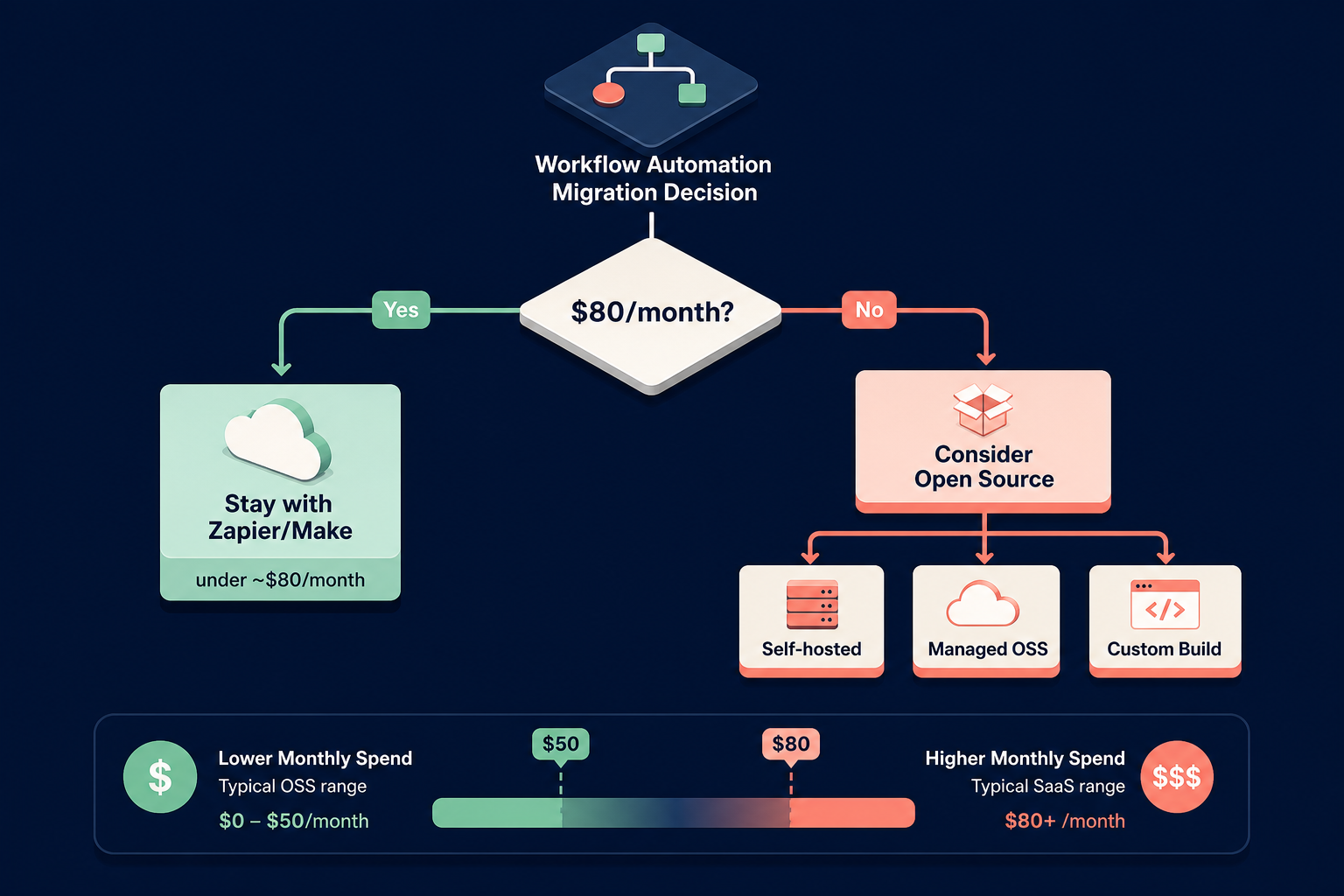
The most important question is not which open-source tool to choose. It is whether you should switch at all. The break-even analysis is straightforward: self-hosted n8n becomes clearly cheaper than Zapier at around $80 to $100 per month of Zapier spend, but only if someone on the team is willing to own the server. Both conditions must be met.
Before starting a migration, run through this five-question pre-migration test:
- Is your monthly automation spend above $80–100? If not, the math does not favor migration.
- Does your team have someone willing to own server maintenance, patching, and upgrades? This is the most common failure point.
- Are your current workflows simple enough to be rebuilt in the target tool without custom code? Complex workflows with custom JavaScript or Python may be harder to migrate than they appear.
- Do your integrations have official connectors in the target tool? Community nodes are riskier and may break without notice.
- Can you tolerate a migration window of 2–4 weeks with potential downtime? If uptime is critical, plan a phased migration with parallel running.
If you answered yes to all five, the six-step migration sequence is: audit all existing workflows and categorize them by complexity → identify the target tool that best fits your primary workflow archetype → set up the self-hosted environment and test with a single low-risk workflow → migrate workflows in order of increasing complexity, validating each one → run both systems in parallel for at least one billing cycle → decommission the old platform only after all workflows have been verified in production.
One additional caveat: some APIs maintain informal rate-limit allowlists for Zapier's infrastructure that do not apply to self-hosted instances. If your workflows depend on high-volume API calls to services like Salesforce or HubSpot, verify rate limits with the provider before migrating.
Comparison Table: Best For, Pros, Cons, and Pricing at a Glance
The table below summarizes the key dimensions for quick comparison. Use it as a reference when narrowing down your shortlist.
| Tool | Best For (Archetype) | Key Strength | Signature Failure Mode | Self-Hosted Cost Range (Monthly) | Managed Option |
|---|---|---|---|---|---|
| n8n | SaaS Automation | 400+ integrations, enterprise governance (RBAC, environments, Git), horizontal scaling | Community node rot — third-party nodes go stale | $5–150 | n8n Cloud ($20–50/mo) |
| Activepieces | SaaS Automation (lightweight) | Clean UX, 450+ integrations (60% community), AI Copilot, approval steps | Struggles with complex data arrays and advanced branching | $5–200 | Activepieces Cloud (tiered) |
| Apache Airflow | Data Pipelines | 60%+ data orchestration market share, vast operator ecosystem, Python-native | Scheduler bottlenecks past ~1,000 DAGs, painful upgrades (1.x → 2.x → 3.x) | $100–1,000+ | Astronomer, MWAA, Cloud Composer |
| Prefect | Data Pipelines (greenfield) | Modern DX, native async, automatic retries, no scheduler bottleneck | Smaller ecosystem than Airflow, newer project | $100–500+ | Prefect Cloud |
| Temporal | Durable Execution | Only proper durable execution solution, SDKs in multiple languages, fault-tolerant state management | Event history bloat, workflow drift from code changes | $100–1,000+ | Temporal Cloud (~$50–2,000+ usage-based) |
| Node-RED | IoT / Event Streams | Lightweight runtime, MQTT/Modbus support, edge deployment, visual flow wiring | No governance (RBAC, environments), no business connector ecosystem | Minimal (often edge hardware) | FlowForge |
Frequently Asked Questions
Which open-source tool has the most integrations?
n8n offers over 400 integrations with a strong focus on enterprise connectors. Activepieces claims 450+ integrations, but roughly 60% are community-contributed, which means lower reliability guarantees. For production SaaS automation, n8n's official connector library is the safer bet.
Is n8n enterprise-ready?
Yes, for most definitions of enterprise-ready. n8n supports user access control with RBAC, secure secrets management via external vaults, true environment separation (Dev/Stage/Prod) backed by Git source control, and horizontal scaling via a Redis queue and PostgreSQL database. It is used in production by organizations that require audit trails and deployment pipelines.
Can I run Airflow for simple SaaS automation?
You can, but you probably should not. Airflow is designed for data pipelines, not API chaining. Its DAG-based model is overkill for connecting a CRM to a spreadsheet, and its operational overhead (10–40 hours initial setup, 4–10 hours monthly maintenance) is hard to justify for simple SaaS workflows. Use n8n or Activepieces instead.
What happens when a community node breaks?
This is the signature failure mode for n8n and, to a lesser extent, Activepieces. When a third-party node goes unmaintained, workflows that depend on it will fail. Your options are: fork the node and maintain it yourself, find an alternative node or API endpoint, or rewrite the affected workflow using a different integration pattern. This risk is inherent to any open-source ecosystem with community-contributed connectors.
How do I estimate my Zapier spend accurately?
Log into your Zapier account and review the billing history for the last three months. Include the base subscription cost plus any premium app fees. Do not forget to account for team seats if you are on a team plan. The $80–100/month break-even threshold applies to total monthly spend, not just the base plan. If you are below that threshold, the small-business automation guides on this site offer more appropriate recommendations.