
The expensive mistake with workflow orchestration tools is usually not picking Zapier instead of Make, or Prefect instead of Airflow. It is picking the wrong operating tier for the people who will own the workflow after launch.
A business operations team can build impressive automations in a visual SaaS tool and still create a brittle system if every exception depends on one coordinator remembering which filter, delay, and webhook to inspect. An engineering team can also overbuild a simple approval flow into a Python project that now needs deployment, monitoring, and backlog space. The tool category matters because it decides who can debug the work at 4:45 p.m. on a Thursday.
If you are still unsure whether you need orchestration at all, start with the workflow orchestration vs. automation diagnostic. If you already know you need workflows that coordinate multiple systems, approvals, retries, or branching paths, the practical choice is between three tiers: no-code/low-code, hybrid, and code-first.
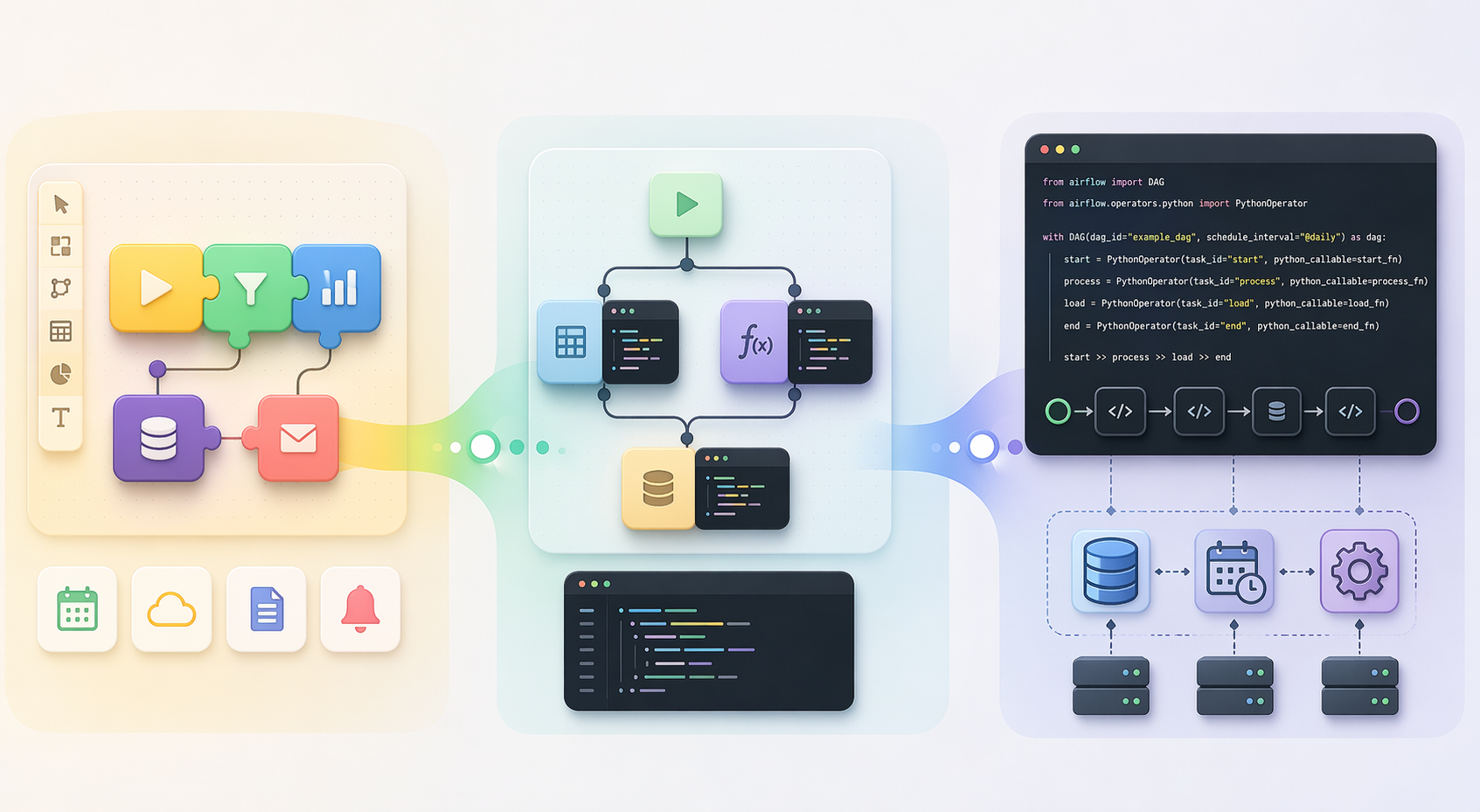
A quick tier map, verified in June 2026
Pricing below was last verified in June 2026 from publicly available vendor and comparison sources. Treat it as orientation, not a purchase quote: regional pricing, annual billing, enterprise contracts, usage limits, add-ons, and negotiated terms can change the real number. Vendor-published comparisons also deserve a raised eyebrow, especially when the publisher’s own product appears as a top recommendation.
| Tier | Example tools | Typical public pricing range verified June 2026 | Best fit | Ownership reality |
|---|---|---|---|---|
| No-code / low-code | Zapier, Make, Wrike, Microsoft Power Automate | Zapier $0–$69/mo; Make $0–$38/mo; Wrike $0–$24.99/user/mo; Power Automate $15–$215/bot/mo | Business users building connector-heavy workflows across SaaS apps | The business team can usually build and edit; complexity hides in branches, tasks, operations, and exception handling |
| Hybrid | n8n, Camunda | n8n free self-hosted Community Edition to $800/mo Cloud; Camunda free tier plus custom enterprise pricing | Teams that want a visual builder but can tolerate code nodes, webhooks, credentials, and possibly self-hosting | Ops and technical owners share responsibility; someone must own runtime, credentials, logs, and upgrades if self-hosted |
| Code-first | Apache Airflow, Prefect, Dagster | Airflow free open source; Prefect free hobby tier to $100/user/mo Cloud; Dagster free open source to enterprise | Engineering teams building DAGs, data pipelines, SDK-driven workflows, and infrastructure-controlled orchestration | Engineering owns code, deployment, monitoring, workers, scheduling, state, and failure recovery |
This table is deliberately not a feature matrix. Most teams do not fail because they missed one connector in a checklist. They fail because the tool asks for a kind of ownership the team does not actually have.
Start with the people who will maintain the workflow
A useful workflow orchestration decision starts with a maintenance question: when this breaks, who knows where to look?
Not who approved the tool. Not who built the first version during a quiet week. The relevant person is the one who can read the run history, understand the failed step, safely retry or patch it, and explain the consequence to the team waiting on the output.
That person’s skill set usually tells you the right tier faster than a product demo does.
Choose no-code or low-code when business users own the process
No-code and low-code tools fit when the workflow lives close to the business process: lead routing, form intake, task creation, CRM updates, approval reminders, client onboarding handoffs, simple document movement, and notifications between SaaS tools.
The healthy version of this tier looks ordinary. A sales operations manager can add a filter. A client services coordinator can inspect a failed run. A team lead can tell whether the trigger fired and whether the next app rejected the payload. The workflow may be important, but it does not require a developer to change field mappings or add another Slack notification.
Zapier, Make, Wrike, and Power Automate all belong in this conversation because they reduce the distance between the person who understands the process and the person who can automate it. Zapier and Make are especially familiar for cross-app automation. Wrike sits closer to work management and project workflows. Power Automate is often most compelling when the team already lives inside the Microsoft ecosystem.
The warning label is volume and branching. These tools are approachable because they package infrastructure, connectors, authentication, UI, logs, and support into a subscription. That is also why task-, operation-, bot-, or user-based pricing can become uncomfortable once a workflow fans out across many paths or fires thousands of times. The first invoice is rarely the stress test; the third redesign is.
For readers staying in this range and comparing the usual suspects, the deeper Zapier, n8n, and Make comparison is the better next stop than a code-first orchestration rabbit hole.
Choose hybrid when visual workflows are still useful, but the edges are getting technical
Hybrid tools are for teams that still benefit from a visual canvas but keep running into moments where a pure no-code builder feels too sealed off. Maybe a workflow needs a custom JavaScript or Python step. Maybe an API has to be called directly because the connector lags behind the product. Maybe the team wants to self-host for cost, data control, or customization reasons.
n8n is the clearest bridge case in this category. It offers a visual builder, prebuilt integrations, code-node support, and a self-hosted Community Edition, with Cloud plans reaching $800/month in the June 2026 pricing set used here.[1][5] That combination is why it often appears when teams have outgrown a pure no-code setup but are not ready to turn every workflow into an engineering-owned DAG.
The bridge cuts both ways. A visual workflow with code nodes is no longer fully business-owned if only one technical operator can understand the custom pieces. A self-hosted workflow is not free in the operational sense if someone must manage the server, credentials, backups, upgrades, queue behavior, and logs. That may still be a good trade. It is just not a no-maintenance trade.
The commonly cited Zapier-to-self-hosted-n8n break-even point is roughly $80–$100/month of Zapier spend, provided the team has someone willing to own the infrastructure.[5] That last clause is doing most of the work. If the only available maintainer is a busy operations generalist who has never managed a hosted service, the subscription savings can be eaten by downtime, confusion, and delayed fixes.
Use the n8n tool profile if n8n is your likely migration path, and the free vs. paid workflow orchestration guide if the real question is total cost of ownership rather than subscription price.
Choose code-first when workflows are software, not office automation
Code-first orchestration tools make sense when workflows are best expressed, reviewed, deployed, and monitored as software. This is the world of Python DAGs, SDKs, version control, CI/CD, observability, workers, scheduling, retries, dependencies, and infrastructure boundaries.
Apache Airflow, Prefect, and Dagster belong here. They are not simply “more powerful Zapier.” They assume a different owner. A team choosing this tier should be comfortable with code review, environment management, deployment discipline, and incident response. If a workflow fails overnight, the answer is not “ask the operations coordinator to open the visual editor.” It is closer to “check the run state, logs, worker health, scheduler behavior, deployment version, and upstream dependency.”
Airflow makes the hidden cost of open source especially visible. Running it means dealing with components such as the scheduler, workers, metadata database, and web server, not just writing a DAG and walking away.[6] That architecture is a strength when the team needs control and scale. It is a burden when the actual need is “create a task when a form is submitted.”
Prefect’s hybrid model, with a managed cloud control plane and self-hosted workers, can be attractive for teams that want more managed orchestration without giving up all runtime control. Dagster is often considered when data asset awareness, software-defined assets, and engineering workflows are central. Those distinctions matter once you are already in the code-first tier. They matter much less if your team cannot confidently maintain code-first orchestration in the first place.
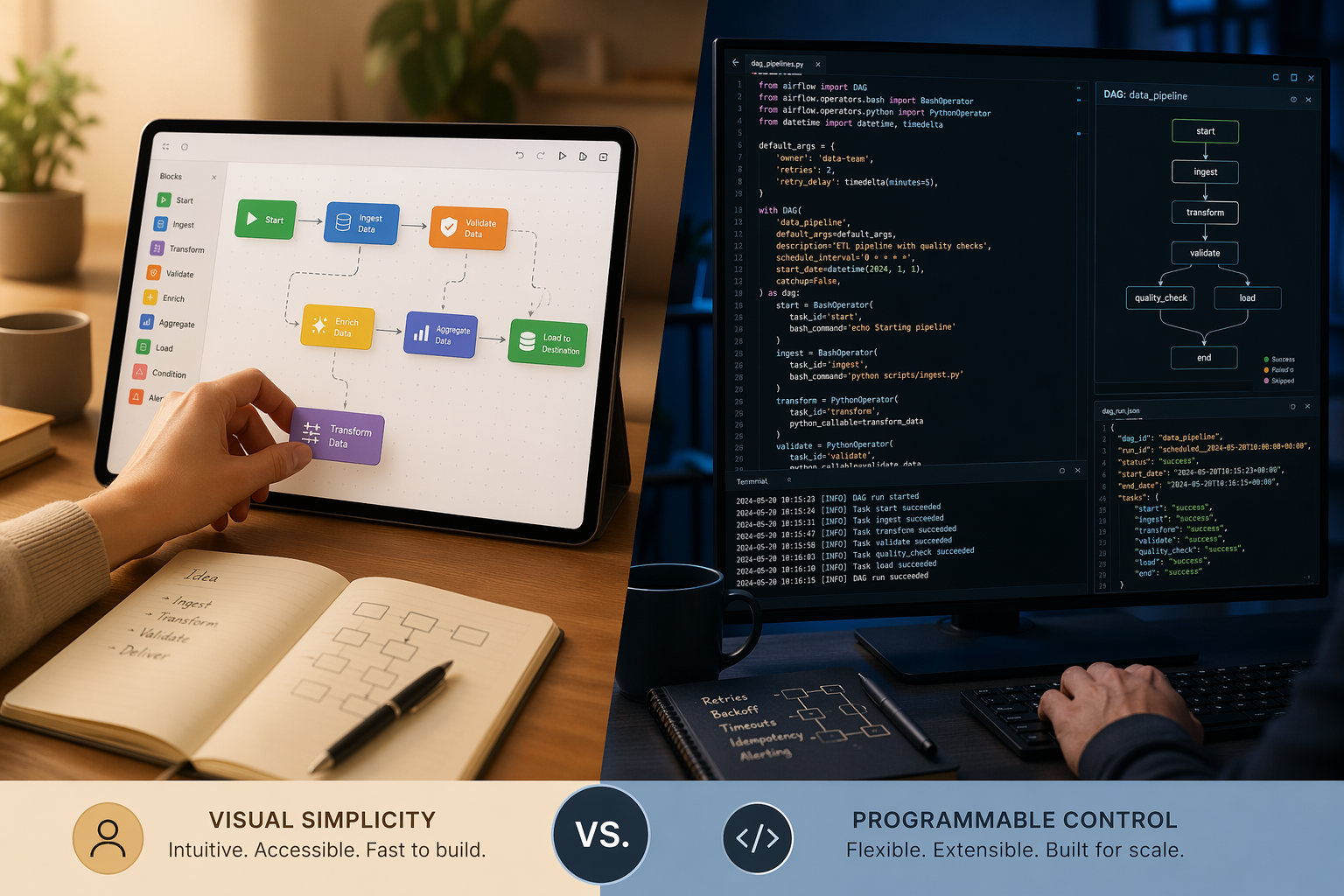
The technical-level diagnostic
Here is the diagnostic I would use before letting a pricing page or demo call steer the decision.
| Question | If the honest answer is yes | Likely tier |
|---|---|---|
| Can a nontechnical process owner build and safely edit most workflow steps? | The team needs fast SaaS automation and visual ownership more than infrastructure control. | No-code / low-code |
| Do workflows increasingly need custom code, direct API calls, complex transformations, or self-hosting? | The team has crossed into technical edges, but a visual canvas still helps collaboration. | Hybrid |
| Are workflows versioned, reviewed, deployed, monitored, and incident-managed like software? | The team is ready for orchestration as engineering infrastructure. | Code-first |
| Would a failed run be debugged by an operations manager, a technical ops owner, or a software/data engineer? | The debugger is usually the real buyer, whether procurement knows it or not. | Match the tier to that owner |
| Does the team need to control workers, runtime environments, secrets, queues, and deployment behavior? | The workflow has moved beyond business automation into platform or data engineering concerns. | Code-first or mature hybrid |
The easy trap is to answer based on aspiration. “We want to be more technical” is not the same as “we have someone accountable for schedulers, workers, credentials, logging, upgrades, and failed runs.” “We want business users to move faster” is not the same as “we can let every department create unreviewed automations that touch customer data.”
A business-user team should optimize for understandable workflows, connector coverage, permission controls, and run history that the process owner can read. A mixed team should optimize for safe handoffs between visual logic and technical escape hatches. An engineering team should optimize for reproducibility, testability, deployment patterns, observability, and infrastructure fit.
For a related segmentation by organization profile rather than technical depth, see Workflow Orchestration Tools Compared by Team Type. The two lenses work well together: team type tells you the operating context; technical level tells you who can keep the system alive.
When the current tier starts failing
Teams usually do not need to move up a tier because a workflow has become “important.” Plenty of important workflows belong in no-code tools. The move becomes worth considering when the current tier produces recurring operational symptoms.
The double-execution problem appears
One of the clearest signs is the double-execution problem: the same workflow, job, or process runs twice when it should run once, often because triggers, retries, or parallel paths are not coordinated well enough.[7] In a simple notification workflow, that may be annoying. In billing, provisioning, customer messaging, or data sync, it can create real cleanup work.
This is where orchestration differs from simple automation. The issue is no longer “can App A send something to App B?” It is “can the system track state, prevent duplicate work, handle retries predictably, and show which execution is authoritative?” If your current tool makes that hard to reason about, moving from no-code to hybrid or from hybrid to code-first may be justified.
Pricing starts punishing normal growth
No-code pricing often feels fair while workflows are low-volume and linear. It can feel very different after the same process gains filters, paths, loops, enrichment steps, approvals, and retries. A workflow that once consumed a small number of tasks or operations per customer can start multiplying usage in ways that are hard for a business team to predict from the original diagram.
That does not automatically mean self-hosting is the answer. The $80–$100/month Zapier-to-self-hosted-n8n break-even estimate is useful because it forces a real comparison, not because it declares a universal migration point.[5] At $90/month, a team with a capable technical owner may reasonably test n8n Community Edition. Another team may be better off paying Zapier because the alternative is turning an operations manager into an unwilling infrastructure admin.
Branching logic becomes unreadable
A visual builder can be wonderfully clear until it becomes a wall of branches, nested conditions, copied steps, and exception paths. At that point, the problem is not that the tool lacks a feature. The problem is that the workflow no longer has a maintainable shape.
For a business workflow, the fix may be governance: naming conventions, owner fields, documentation, approval rules, and fewer one-off automations. For a technical workflow, the fix may be code: reusable functions, tests, version control, typed configuration, and clearer deployment boundaries. The same symptom can point to different tiers depending on who is capable of cleaning it up.
Integration pain becomes a recurring constraint
Tool integration gaps are not imaginary. Teamwork.com’s Sprint to AI report found that, among professional services firms in its dataset, 33% said current tools fell short on end-to-end workflows and 40% said they fell short on tool integrations; together, the report framed this as 92% finding current tools lacking in at least one operational area.[8] Because this is vendor-published research, it should be read as a directional signal rather than a neutral market measurement.
Still, the pattern is familiar: teams buy one more app, then one more connector, then one more exception. If the gaps are mostly standard SaaS handoffs, no-code may still be right. If the gaps keep requiring custom API calls, transformations, private network access, or controlled execution environments, the tool tier is probably too low.
Use pricing as a behavior test, not just a budget line
Pricing tables are useful because they reveal what the vendor expects you to do more of. Per-task and per-operation models ask you to care about execution volume. Per-user pricing asks you to care about who needs access. Bot-based pricing asks you to define automation capacity differently. Open-source licensing asks you to supply the missing labor yourself.
Before choosing a tool, model one real workflow under expected growth:
- How often does the trigger fire today, and what would double that volume?
- How many steps, branches, filters, retries, and notifications does one run create?
- Which steps are business logic, and which are technical transformations?
- Who investigates failed runs, duplicate runs, missing data, and permission errors?
- What happens if the workflow is down for one hour, one business day, or one billing cycle?
- What work moves from vendor subscription cost to internal maintenance if you self-host?
The last question is the one that gets skipped in optimistic migration plans. A self-hosted n8n instance, an Airflow deployment, or an open-source Dagster setup may have little or no license cost. None of them removes the cost of ownership. They move it into engineering time, infrastructure, monitoring, upgrades, security review, and incident handling.
What not to over-compare
There are adjacent categories worth knowing about, but they should not hijack this decision.
AI-augmented orchestration tools such as LangGraph, CrewAI, and AutoGen are aimed at dynamic LLM routing and agentic workflows. That is a different problem from choosing whether your revenue operations workflow belongs in Zapier, n8n, or Airflow. Enterprise platforms such as ServiceNow, Pega, and Appian also sit outside the main lane for many knowledge-worker and small-to-mid-size team decisions; they bring procurement, governance, and platform-program questions that deserve their own evaluation.
For solo professionals and individual knowledge workers, the decision can be lighter-weight than the team ownership model described here. The business process automation guide for knowledge workers is a better fit for that context.
A practical recommendation framework
Pick no-code or low-code if the workflow is mostly SaaS-to-SaaS coordination, the process owner is nontechnical, and the failure mode can be understood from a visual run history. Accept that costs may rise with volume and branching, and manage that deliberately.
Pick hybrid if visual building still helps, but the workflow needs code nodes, custom API work, self-hosting options, or more control than a pure no-code tool gives you. Do not pick hybrid just to feel more mature; pick it when someone is ready to own the technical edges.
Pick code-first if workflows are part of your engineering or data platform, need versioned code and deployment discipline, and will be maintained by people comfortable with runtime infrastructure. Airflow, Prefect, and Dagster are powerful choices when that is true. They are expensive distractions when it is not.
The safest rule is to choose the simplest tier your team can own today, then move up only when workflow scale, failure modes, or customization needs justify the extra maintenance burden.
References
- Teamwork.com comparison, Teamwork.com, June 2026.
- Wrike guide, Wrike, June 2026.
- Enate comparison, Enate, June 2026.
- The Digital Project Manager, The Digital Project Manager, June 2026.
- Leland analysis, Leland, 2026.
- Orchestra blog, Orchestra, 2026.
- n8n blog, n8n, April 2026.
- Sprint to AI report, Teamwork.com.