
The best handwritten notes app in 2026 is not the one with the prettiest template gallery or the longest feature list. It is the one that survives your actual week: the device you carry to class or meetings, the computer you use afterward, the budget you can tolerate, and the one feature you would genuinely miss if it disappeared.
That turns a simple app search into three separate decisions. First, where do your notes need to live: only on Apple devices, or across Windows, Android, macOS, iPadOS, iOS, and the web? Second, what pricing model will not annoy you six months from now: free, annual subscription, or one-time purchase? Third, what job matters most: smooth handwriting, audio-synced lecture playback, handwriting-to-text conversion, AI study help, or plain reliable access?

Handwriting still deserves a place in this conversation, especially for students. A 2024 meta-analysis of 24 studies involving 3,005 participants found that college students who took handwritten notes scored about 9.5% A grades, compared with about 6% for students who typed, and the benefit persisted regardless of test delay.[1] That does not prove handwriting is better for every person or every disability profile. It does explain why a stylus app can be more than a nostalgia purchase for lecture-heavy students who process material by drawing, spacing, circling, and rewriting.
The category is also crowded enough to punish casual choosing. The global note-taking app market was valued at about $7.91 billion in 2024 and is projected to more than triple by 2032, which helps explain why every app now seems to be selling templates, AI, study tools, or premium sync.[2] Growth does not tell you which app is better. It tells you why the sales pages have become so persuasive.
| If this describes you | Start with | Why |
|---|---|---|
| Apple-only student or planner who wants polished notebooks and a one-time option | GoodNotes | $11.99/year Essentials or $35.99 one-time Special Edition; strong structure and Apple-first handwriting experience.[3] |
| Lecture-heavy student who records class audio | Notability | $20/year Plus; audio-synced recording is its clearest advantage.[3] |
| Windows-at-work, iPhone-or-iPad-at-home user | OneNote | Free with a Microsoft account and native across Windows, macOS, iOS, Android, and web.[4] |
| Person who writes by hand but needs clean typed text afterward | Nebo | Best fit when handwriting-to-text conversion is the main job, especially across Android and Windows.[4] |
| Budget user who only needs simple handwriting | OneNote or Apple Notes | Free tools are less glamorous, but they avoid a subscription for basic note capture. |
| Student choosing between AI study help and lecture playback | GoodNotes or Notability | GoodNotes has student-specific exam practice and AI Math Assistance; Notability’s audio playback remains the reason to choose it.[5] |
If you want lab-style scoring across individual apps, the existing tested head-to-head comparison is the better next read. This guide is narrower and, in practice, more useful before you install anything: it sorts the major apps by the regrets they are most likely to create.
Start with your device ecosystem, not the app demo
A handwritten notes app can feel excellent for the first hour and become a nuisance the moment your notes have to leave the device where they were created. This is the most common place people choose badly: they buy the app that looks best on an iPad, then realize their work computer is Windows, their phone is Android, or their weekly review happens in a browser.
If you are Apple-only, GoodNotes and Notability are the real fork
For someone living on an iPad, iPhone, and Mac, GoodNotes and Notability are still the two apps most people should compare first. Both are built around stylus-first writing. Both can handle class notes, PDFs, planners, annotation, and long notebooks. The difference is not that one is “serious” and the other is “creative.” The difference is which daily friction you are willing to pay to remove.
GoodNotes is the easier recommendation for Apple-first users who care about notebook structure, long-term library organization, and avoiding a mandatory subscription. Its reported 2026 pricing gives buyers a choice: $11.99 per year for Essentials or $35.99 as a one-time Special Edition purchase.[3] The one-time option is not automatically the cheapest choice for every person, because feature tiers and future upgrade policies still matter. But it is a real difference in a category where subscriptions are increasingly treated as inevitable.
Notability earns its place when audio is central to the way you learn. Its Plus plan is reported at $20 per year and does not offer a one-time purchase option, but its audio-synced recording remains the feature that separates it from polished notebook competitors: tap a word in your notes and hear what the lecturer said at that moment.[3] If that is how you review difficult lectures, the subscription is not paying for decoration. It is paying for a retrieval system.
The practical Apple-only split is simple: choose GoodNotes if your pain is organizing, annotating, planning, and keeping a structured notebook library; choose Notability if your pain is reconstructing what was said while you were writing quickly. If you have already narrowed the choice to those two, the dedicated GoodNotes vs Notability 2026 comparison is where the small interface and workflow differences become worth studying.
If Windows or Android matters, do not treat “available” as the same as native
Cross-platform users have a less glamorous but more consequential decision. OneNote is the only app in this group described as having fully native apps across Windows, macOS, iOS, Android, and web, and it is free with a Microsoft account.[4] That combination is not exciting in a product demo. It is very exciting when your meeting notes need to open on a managed Windows laptop, your phone, and a home tablet without a workaround.
OneNote also supports handwriting search, ink-to-text, and ink-to-math conversion, which means it is not merely a typed-notes app with a pen tool attached.[4] The trade-off is feel. Its inking is commonly judged less refined than dedicated handwriting apps, and that matters if you write for hours at a time.[4][6] Free and everywhere can still lose to smooth and focused if all your real work happens on one tablet.
GoodNotes complicates this because it now reaches beyond Apple, but the experience is not equivalent. Its Windows and Android versions are reported as a WASM-based web-wrapper experience, with slower performance and higher battery drain than the native iPad app.[3] That does not make GoodNotes unusable outside Apple. It means Windows and Android support should be treated as a compromise, not as the same buying proposition as the iPad version.
For a professional split between a Windows workplace and an iPhone or iPad at home, OneNote should be the default starting point. Not because it is the prettiest handwriting app, but because access is a feature. If GoodNotes’ Windows experience is the reason you are hesitating, the cross-platform note-taking app comparison and the guide to GoodNotes alternatives for Windows are more relevant than another iPad handwriting shootout.
The pricing question is really a tolerance question
A $20 annual subscription can be reasonable. It can also be one more small recurring charge attached to a feature you used twice in September. The useful question is not whether an app is “cheap.” It is whether the paid feature removes friction every week.
| App | Reported 2026 pricing | What should justify paying |
|---|---|---|
| GoodNotes | $11.99/year Essentials or $35.99 one-time Special Edition[3] | Apple-first handwriting, notebook organization, PDF annotation, planning, and possibly AI study tools |
| Notability | $20/year Plus; no one-time purchase option[3] | Audio-synced recording for lectures, interviews, or meetings |
| OneNote | Free with a Microsoft account[4] | Native cross-platform access, shared notebooks, Windows compatibility, and basic ink tools |
| Nebo | Subscription pricing reported; exact current tier should be verified before purchase[4] | Handwriting-to-text conversion as the main workflow |
| Apple Notes | Free on Apple devices | Simple handwritten capture without a separate notebook app |
Prices in this category change often, and feature availability can vary by region or tier. Before buying, verify current pricing on the official app pages. The figures above are useful for comparing the shape of the decision: GoodNotes gives Apple users a one-time option, Notability asks for an ongoing subscription in exchange for its signature audio workflow, and OneNote removes app cost from the equation entirely.
For students, the price of the app is also not the whole cost. A stylus, tablet storage, cloud storage, replacement tips, screen protectors, and backup plans can matter more over a full semester than a $12 app difference. If you are comparing the total setup rather than just the software line item, use the stylus note-taking cost guide before committing.
The cleanest budget recommendation is OneNote if you need cross-platform access, and Apple Notes if you are already in Apple’s ecosystem and only need light handwritten capture. Neither gives you the same planner culture, paper feel, or specialty workflows as GoodNotes or Notability. But free is not a compromise if the paid features would sit unused.
Pick the feature you would actually reorganize your routine around
Most handwritten notes apps can now import PDFs, create notebooks, search handwriting, sync across devices, and offer some kind of template system. That makes ordinary feature checklists less helpful than they look. The deciding feature is the one that changes what happens after you write.
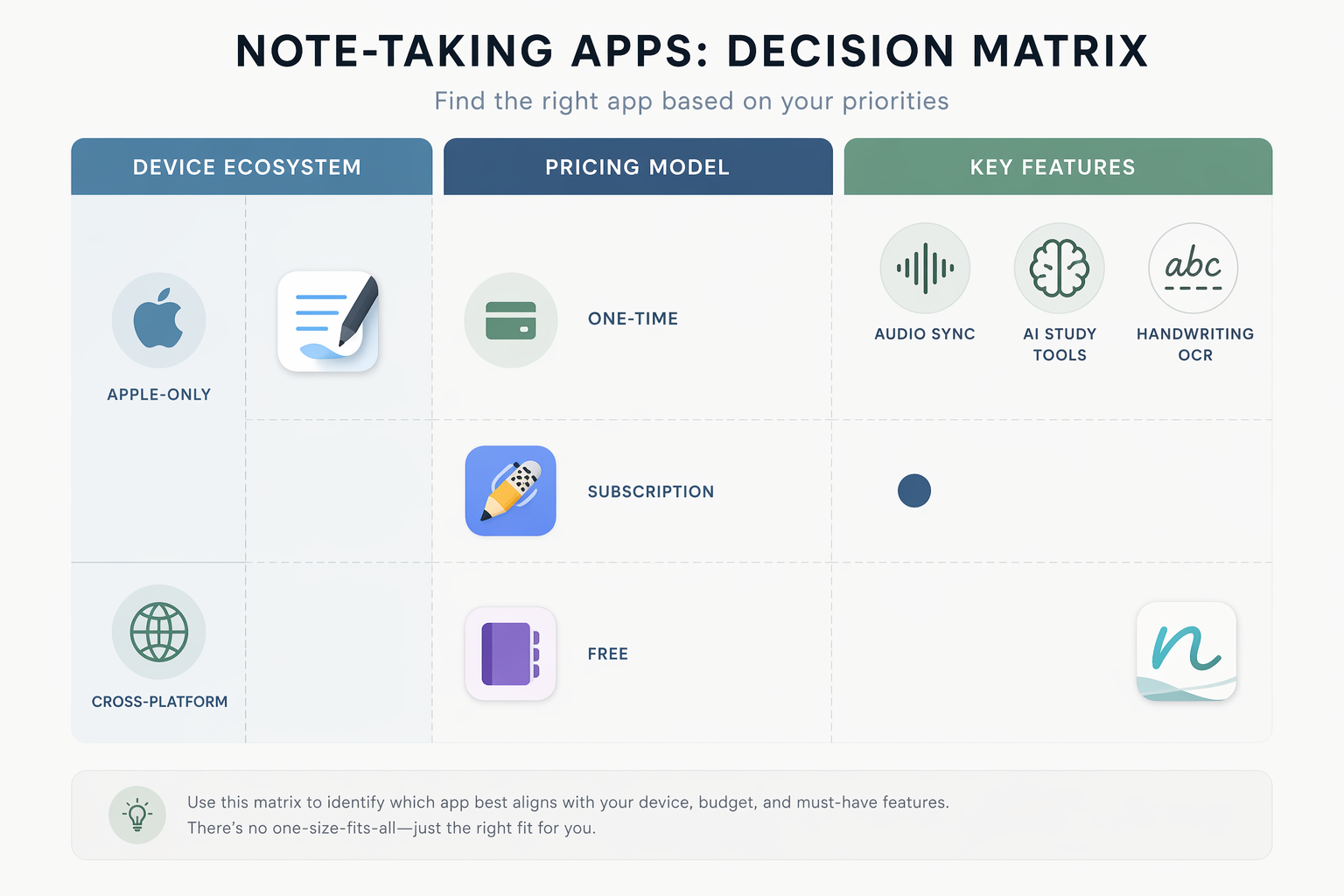
Audio sync: choose Notability when review depends on what was said
Notability is easiest to justify for lectures, client conversations, interviews, and meetings where your handwritten notes are only half the record. Audio-synced playback lets a student tap a written word and hear the lecture audio from that moment.[3] That is more specific than “has recording.” It links the mark on the page to the explanation that produced it.
If you never record audio, this advantage collapses. Paying annually for Notability because audio sync is impressive in a demo is exactly how a reasonable subscription becomes clutter. But if you regularly leave class with partial diagrams and half-finished phrases, synced playback can save more time than another export option or template pack.
Handwriting-to-text: choose Nebo when conversion is the job
Nebo is the app to consider when handwritten input is a temporary form and typed text is the deliverable. It is identified as having the strongest handwriting-to-text conversion engine across Android and Windows, though its subscription pricing and simpler organization can limit its appeal as a full notebook system.[4]
That distinction matters. A researcher cleaning field notes, a consultant turning meeting scribbles into a memo, or a student who prefers to handwrite first and revise in typed form has a different problem from a digital planner building a semester dashboard. Nebo’s appeal is not maximal notebook beauty. It is the shortest path from stylus input to usable text.
AI study tools: useful when tied to a real study loop
AI has become hard to avoid in note apps. Market coverage in 2026 describes AI bundling, price increases, and free-tier upgrades as forces reshaping the category, with major apps adding paid study tools such as flashcards, summaries, and quizzes.[6][7] That should make buyers curious, not obedient.
GoodNotes has one of the more concrete student-specific cases: Interactive Exam Practice for SAT and DSE math, plus AI Math Assistance.[5] Those features are unusually specific for a handwritten notes app. A student working through math practice on an iPad may get real value from that. A professional annotating meeting PDFs probably should not let it influence the decision.
For students still deciding whether handwriting, typing, or a stylus workflow fits their learning, the broader handwriting vs typing vs stylus guide is worth reading before assuming an AI notebook is the missing piece.
Use-case recommendations
For Apple-first students and digital planners
Start with GoodNotes. It offers the strongest blend of structured notebooks, polished handwriting, PDF markup, planning workflows, and pricing flexibility for someone who expects to live mostly on iPad and Mac. The $35.99 one-time Special Edition option is the detail that changes the value equation for buyers tired of small annual charges.[3]
The caution is cross-platform expectation. If your iPad is the main device and your Windows laptop is only for occasional viewing, GoodNotes may still work. If your Windows laptop is where you review, reorganize, export, and present, test that workflow before paying.
For lecture-heavy students
Choose Notability if your notes are inseparable from recorded explanation. Its subscription is easiest to defend when audio-synced playback is part of your weekly review, not an emergency feature you might use someday. This is especially relevant in courses where the lecturer’s wording, sequence, or verbal examples carry meaning that your handwritten page only partly captures.[3]
If you are a student comparing the whole study system rather than just the handwriting surface, the student note-taking app decision guide may be more useful than another general app ranking.
For Windows, Android, and mixed-device users
Start with OneNote. It is free, native across the major platforms, and strong enough on handwriting search, ink-to-text, and ink-to-math that most mixed-device users should test it before buying a specialty app.[4] Its handwriting feel may not win over someone who loves the smoothness of a dedicated iPad app, but the ability to open the same notebook everywhere is not a minor feature.
This is also the branch where a beautiful iPad demo can be most misleading. The person who takes notes is often not the only person who needs them. A manager may need to share meeting notes from a corporate Windows machine. A student may need to submit annotated PDFs from a browser. A consultant may need notes to survive a device change. OneNote’s plainness starts looking different when the consequence of choosing badly is lost access.
For handwriting conversion
Choose Nebo if the main job is turning handwriting into typed text. It is the app to test when conversion quality matters more than notebook decoration or deep planning structure.[4] This is a narrower recommendation than “best notes app,” and that is the point. Nebo is strongest when the handwritten page is a staging area, not the final archive.
For light note-takers and subscription avoiders
Use Apple Notes if you are on Apple devices and only need quick sketches, simple handwritten notes, and basic capture. Use OneNote if your devices are mixed or you want a free notebook system with more reach. Noteshelf, Noteful, and similar lighter tools can also make sense when you want a more focused writing surface or lower-friction planning setup, but they should be chosen for a specific constraint rather than because they appear in a roundup.
For deeper app-by-app testing beyond the main names here, the 8 stylus note-taking apps tested comparison is the better place to look.
The confident shortlist
- Pick GoodNotes if you are Apple-first, want polished handwriting and structured notebooks, and value having a one-time purchase option.
- Pick Notability if lecture or meeting audio is central to how you review notes.
- Pick OneNote if native cross-platform access and free pricing matter more than the most refined handwriting feel.
- Pick Nebo if handwriting-to-text conversion is the main reason you are using a stylus.
- Pick Apple Notes, Noteshelf, or Noteful only when their specific simplicity, platform fit, or writing experience matches your constraints better than the larger apps.
A handwritten notes app becomes expensive when it asks you to change devices, duplicate notes, export constantly, or pay for a feature you do not use. Choose the app that matches the way your notes move after you write them.
References
- Handwritten versus Typed Note-Taking Effects on College Students' Performance, The Learning Scientists.
- Global Note Taking App Market: Trends to Watch in 2026, Codewave.
- Goodnotes vs Notability: App Review [Updated 2026], Paperlike.
- 8 best handwriting apps for cross-platform notes, beingpaperless.com.
- 9 Best Notetaking Apps for Students in 2026, Drawboard.
- Best Note-Taking Apps 2026: Tested and Ranked, Tech Insider.
- Note-Taking Statistics, Worldmetrics.