
The best note taking app with stylus is not one app. It is the app that fails least often in the moment you actually use it: when the lecturer is still talking, when the PDF margin is too small, when your palm hits the glass, when you search for a phrase three weeks later, or when a subscription renewal turns a simple notebook into another bill.
The practical shortlist is clear: GoodNotes 6 is the safest pick for handwriting and PDF-heavy work; Notability is the strongest choice for audio-synced lectures; OneNote is the best free cross-platform option; Nebo is the specialist for handwriting-to-text conversion; Samsung Notes is the native S Pen pick; Noteshelf is the best one-time-purchase value; Apple Notes is enough for zero-cost casual iPad capture; CollaNote is the free app to try when you want more depth than a default notes app without paying upfront.
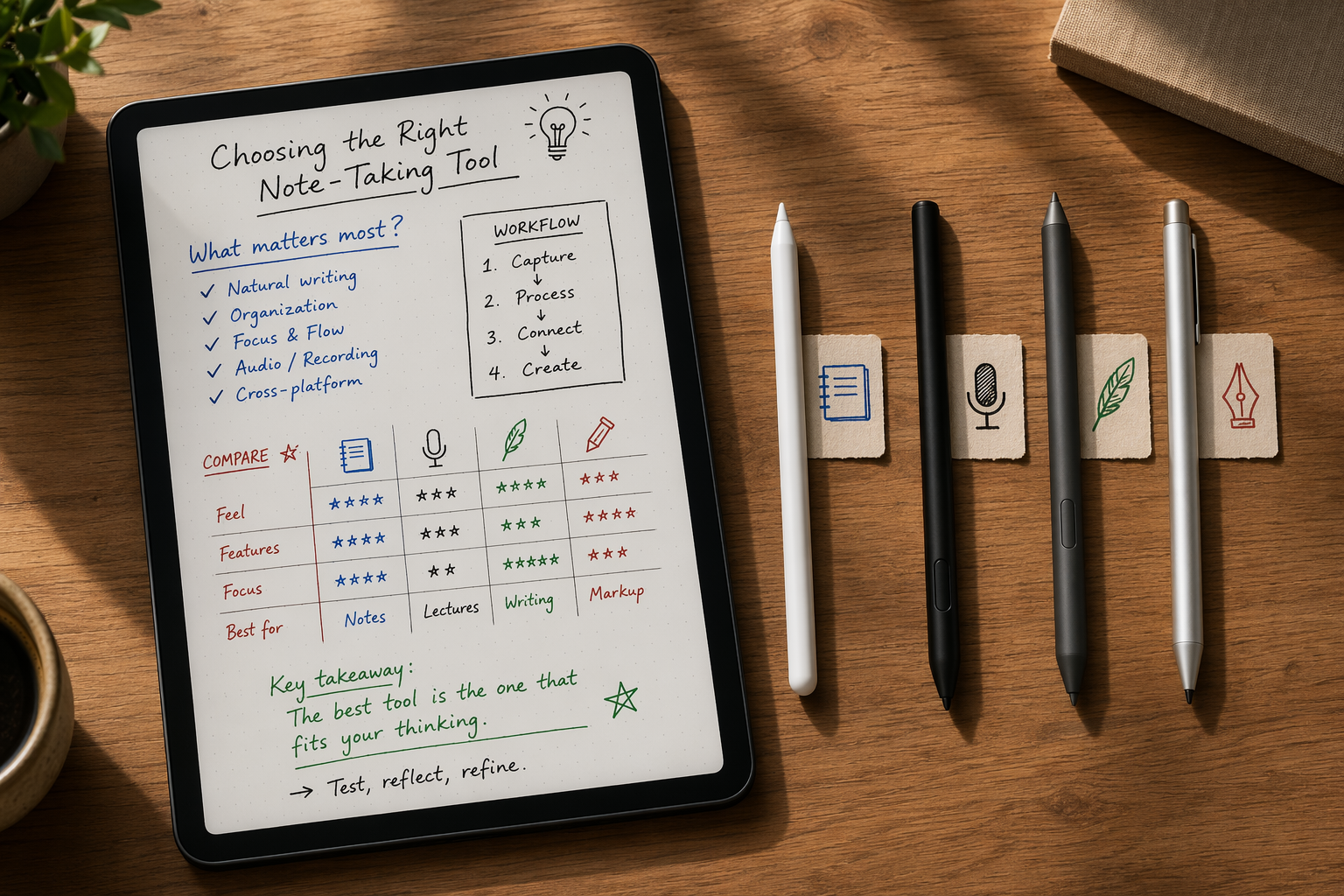
Quick Picks by Workflow
- Best for handwriting and PDF annotation: GoodNotes 6.
- Best for recorded lectures: Notability.
- Best free cross-platform option: OneNote.
- Best handwriting-to-text conversion: Nebo, using MyScript recognition.
- Best native S Pen experience: Samsung Notes.
- Best one-time-purchase value: Noteshelf at $9.99, based on current pricing comparisons [1].
- Best zero-cost casual iPad capture: Apple Notes.
- Best free feature depth: CollaNote.
Comparison Table: 8 Stylus Note-Taking Apps
| App | Best fit | Handwriting feel | PDF annotation | Audio recording / sync | OCR and search | Handwriting-to-text | AI features | Platform fit | Pricing / 3-year cost |
|---|---|---|---|---|---|---|---|---|---|
| GoodNotes 6 | Handwriting, notebooks, PDFs | Very strong; Atlas measured about 11ms latency on tested iPad setup [2] | Deep PDF markup and organization | Available, but not the main reason to choose it | Strong; returned the right page within first 3 hits 88% of the time in one 30-day iPad Pro M2 test [2] | Good, but not Nebo-level | AI features available; AI Pass costs $9.99/month, or $119.88/year [1] | Best on iPad; broader platform support than older GoodNotes versions | Essential $9.99/year; GoodNotes plus AI add-on can reach about $210 over three years if current pricing holds [1] |
| Notability | Lectures, meetings, audio-linked notes | Very strong; Atlas measured about 13ms latency on tested iPad setup [2] | Good PDF markup, less notebook-system depth than GoodNotes | Best-in-group for audio-synced note review | Strong; returned the right page within first 3 hits 91% of the time in one 30-day iPad Pro M2 test [2] | Useful, not the primary selling point | Pro tier with AI features listed at $99/year in 2026 pricing coverage [1] | Primarily an iPad-first choice | Subscription model; Pro AI tier raises long-term cost [1] |
| OneNote | Free cross-platform notes | Good enough for mixed typing and handwriting; less paper-notebook-like | Usable for PDFs, but less elegant for heavy markup | Audio support varies by platform and is not as central as Notability | Strong search across notebooks, especially for Microsoft users | Basic compared with Nebo | Depends on Microsoft ecosystem features rather than a stylus-first AI layer | iPad, Windows, Android, web, and Microsoft 365 environments | $0 for core use; three-year app cost can be $0 [1] |
| Apple Notes | Casual iPad capture | Excellent native feel; Atlas measured about 9ms latency on tested iPad setup [2] | Adequate for light markup, not a PDF power-user app | Not a lecture-audio specialist | Moderate; returned the right page within first 3 hits 76% of the time in one 30-day iPad Pro M2 test [2] | Improved by iPadOS 18+ features such as Smart Script and Math Notes [4] | Native Apple intelligence depends on device and OS support | Apple devices only | $0; three-year app cost $0 [1] |
| Samsung Notes | Galaxy Tab and S Pen users | Fastest tested native-feeling setup; S Pen on Samsung Notes measured about 6.2ms [2] | Strong for native PDF import and markup | Useful, though not the same lecture-review experience as Notability | Good within Samsung ecosystem | Useful for native notes, not the main conversion specialist | Samsung ecosystem features vary by device and region | Best on Galaxy Tab with S Pen | $0 on supported Samsung devices; three-year app cost $0 [1] |
| Noteshelf | Paid app without subscription creep | Polished handwriting feel in real-world stylus testing [3] | Good for PDF annotation and notebook-style work | Audio recording available | Solid search and OCR tools | Useful but not class-leading | Less AI-centered than GoodNotes or Notability | iPad and Android support make it broader than Apple-only tools | $9.99 one-time purchase in current pricing coverage [1] |
| Nebo | Converting handwriting into editable text | Good, but optimized around recognition rather than decorative notebooks | Can mark up documents, but not the top PDF workstation | Not the reason to choose it | Strong because recognition is central to the app | Best-in-group; Nebo/MyScript reached 96% handwriting-to-text accuracy in controlled Atlas testing [2] | Conversion intelligence matters more here than chat-style AI | Works across major tablet platforms depending on version | $9.99–$14.99 one-time pricing range in current comparisons [1] |
| CollaNote | Free depth for iPad users | Capable handwriting with more tools than many free apps | Surprisingly capable for free PDF markup | Includes recording features, though polish trails paid leaders | Useful enough for students testing a workflow | Not the conversion leader | Not a premium AI-first app | iPad-centered | $0; three-year app cost $0 [1] |
How to Read the Test Numbers Without Overreading Them
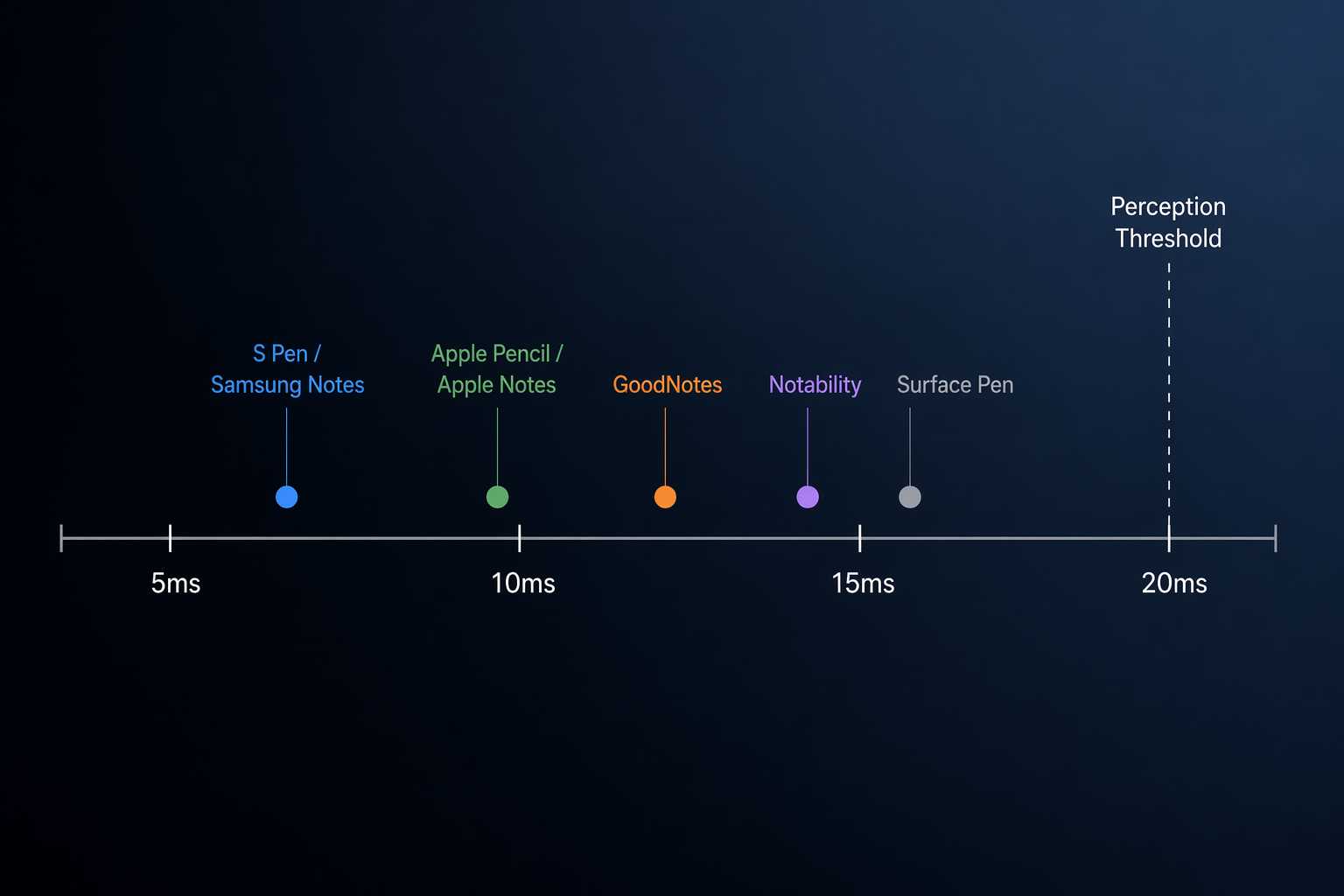
Latency matters because it is the difference between writing through a tool and writing against one. Atlas measured Apple Notes at about 9ms, GoodNotes at about 11ms, Notability at about 13ms, and Surface Pen at about 14ms, all under the 20ms perception threshold used in its comparison; Samsung Notes with S Pen came in lowest at about 6.2ms [2]. That does not mean a normal writer can reliably feel the difference between 9ms and 11ms during a lecture. It does explain why the strongest native pairings, especially S Pen with Samsung Notes and Apple Pencil with Apple Notes, feel unusually settled.
The OCR numbers need an even lighter grip. In Atlas’s 30-day single-user iPad Pro M2 test, Notability returned the correct page within the first three search hits 91% of the time, GoodNotes 88%, and Apple Notes 76% [2]. That is useful directional evidence, not a universal score. Handwriting style, language, page density, paper template, and device model can all move the result.
The pricing numbers are more concrete but less stable. GoodNotes moved into Essential and Pro-style tiers, Notability added a $99/year Pro tier with AI features, and GoodNotes AI Pass costs $9.99/month, or $119.88/year, which is more than the $9.99/year base Essential subscription [1]. If AI summaries become central to your study workflow, the app comparison becomes a software-budget comparison very quickly.
GoodNotes 6: The Best Default for Handwriting and PDFs
GoodNotes 6 is the easiest app to recommend to someone whose tablet is primarily a handwritten notebook and PDF desk. Its advantage is not one spectacular trick. It is the accumulation of small writing-room decisions: paper templates, pen behavior, page navigation, folder structure, PDF import, annotation tools, and enough OCR to make old notes retrievable.
In the GoodNotes-versus-Notability comparison that most iPad users eventually run into, GoodNotes is the better fit when the page itself is the main workspace. Paperlike’s updated 2026 comparison frames GoodNotes as stronger for organization and document-style note management, while Notability keeps the edge for audio-centered review [5]. That matches the way the apps feel under pressure: GoodNotes asks you to build a reliable notebook system; Notability asks you to capture a live session.
The PDF case is where GoodNotes earns its place. A professional marking a long contract or a student annotating weekly readings needs more than a highlighter. They need page thumbnails, stable imports, clean exports, predictable pen tools, and search that usually gets them back to the right page. The 88% first-three-hit OCR result from Atlas’s single-user test is not a guarantee, but it is good enough to treat GoodNotes as a serious handwritten archive rather than a digital sketchpad [2].
The catch is cost complexity. GoodNotes Essential at $9.99/year is easy to understand; the AI Pass at $9.99/month is harder to shrug off, especially because it reaches $119.88/year by itself [1]. If you mainly need ink, PDFs, and search, do not let an AI add-on decide the purchase. If you actually use AI study help every week, calculate that cost separately from the base notebook.
Notability: Still the Lecture App to Beat
Notability’s strongest argument appears after class, not during the first line of handwriting. When notes and recorded audio stay linked, a messy half-page from a fast lecture becomes a map back to the explanation. That is a different kind of usefulness from prettier notebooks or deeper PDF filing.
For students, this can matter more than having the most elaborate pen library. If you tap a line and hear the lecturer at that moment, your notes do not need to be perfect in real time. Notability’s audio-centered workflow is why it remains the better choice for lecture capture even when GoodNotes feels more complete as a general notebook and PDF tool [5].
The writing experience is not a compromise in any meaningful way. Atlas measured Notability at about 13ms on its tested iPad setup, still below the 20ms perception threshold, and its OCR result was slightly higher than GoodNotes in the same single-user search test, at 91% versus 88% [2]. Those numbers should not be stretched into a universal ranking, but they are enough to say Notability is technically credible, not just convenient.
The subscription story is less comfortable. Notability’s $99/year Pro tier with AI features makes sense only if those features replace work you were actually doing: lecture review, summaries, study extraction, or meeting processing [1]. If audio sync is the feature you came for, judge the paid tier by that workflow first and treat AI as a separate decision.
OneNote: The Free Choice That Is Not Just the Cheap Choice
OneNote is not the most elegant stylus notebook here. Its page model can feel loose if you want the discipline of a paper notebook, and PDF annotation is not as frictionless as GoodNotes. Still, it wins a scenario that premium iPad apps sometimes treat as secondary: you need your notes on an iPad, a Windows laptop, an Android phone, a browser, and possibly a work or school Microsoft account.
That reach changes the cost calculation. A free app that opens where your assignment, meeting, or shared notebook already lives may beat a more refined handwriting app that traps your best material on one device. Tool Finder’s 2026 comparison lists OneNote among the $0 options, and Zapier’s broader note-taking landscape continues to treat OneNote as a major cross-platform notebook rather than a stylus-only niche [1][7].
Choose OneNote when access is the constraint. It is the right answer for students moving between campus PCs and tablets, professionals inside Microsoft 365, and anyone who cares more about finding the note on any device than about the most paper-like ink.
Apple Notes: The Zero-Cost iPad App People Underestimate
Apple Notes should not be forced into a fight it is not trying to win. It is not GoodNotes for PDF libraries, and it is not Notability for lectures. It is the app that opens instantly, feels native with Apple Pencil, syncs through iCloud, and costs nothing extra.
The handwriting feel is the best part. Atlas measured Apple Notes at about 9ms in its tested iPad setup, and ZDNET’s iPad-focused testing continues to include Apple Notes as a serious default option rather than mere preinstalled filler [2][4]. For quick capture, meeting scratch notes, diagrams, math work, and personal lists, that matters more than a long feature sheet.
Its limits show up when notes become a system. The 76% OCR result in Atlas’s single-user test trailed GoodNotes and Notability, and heavy PDF workflows will outgrow Apple Notes quickly [2]. But if your real habit is casual capture rather than semester-long notebook management, paying for a heavier app can add friction instead of removing it.
Nebo: Pick It When Conversion Is the Workflow
Nebo should not be judged as a general notebook with a conversion feature attached. Its purpose is more specific: write by hand, then turn that writing into editable text with as little cleanup as possible. If that is your workflow, it belongs near the top of the list. If you mainly want beautiful notebooks, stickers, audio review, or complex PDF markup, it does not need to beat GoodNotes or Notability.
The number that matters is 96%. In Atlas testing, Nebo/MyScript reached 96% handwriting-to-text accuracy, the highest result in the tested group [2]. That is not the same as saying every user will get 96% on every page. It does mean Nebo represents a genuinely different note-taking path: handwriting as an input method for clean text, not handwriting as the final artifact.
This is especially useful for people who draft by hand but deliver in text: researchers turning field notes into paragraphs, students rewriting class notes into study guides, or professionals who think better with a pen but need searchable typed output later. Nebo’s $9.99–$14.99 one-time pricing range also keeps the experiment relatively contained compared with annual AI subscriptions [1].
Samsung Notes: The Best Answer If You Live on Galaxy Tab
Samsung Notes is hard to evaluate apart from the hardware because its main advantage is the hardware-software pairing. On a Galaxy Tab with S Pen, it feels less like a third-party app choice and more like the tablet’s native writing layer. Atlas measured S Pen with Samsung Notes at about 6.2ms, the lowest latency figure in its comparison [2].
That figure helps explain the loyalty Galaxy Tab users often have toward Samsung Notes. The app is free on supported Samsung devices, handles native handwriting cleanly, supports PDF markup, and avoids the awkward feeling of paying for a premium app just to recover the writing experience your tablet was already built to provide [1]. AI Study Master’s Galaxy Tab-focused coverage also treats Samsung Notes as the central baseline for students in that ecosystem, not an afterthought [6].
The boundary is equally clear: this is not the best recommendation for someone choosing across iPad, Windows, and Android. It is the best recommendation for someone already committed to Galaxy Tab. Other Android stylus apps, including Reddit-popular options such as Notein, Flexcil, and Kilonotes, may be worth testing if you want different PDF or planner behavior, but the native S Pen experience remains the benchmark.
Noteshelf: The Paid App for People Tired of Subscriptions
Noteshelf’s case is simple and stronger than it first looks: it gives you a polished stylus notebook for a one-time $9.99 purchase in current pricing coverage [1]. In a category where premium apps increasingly separate base subscriptions, Pro tiers, and AI passes, that clarity has real value.
It is not just a budget placeholder. Real-world stylus testing from MakeUseOf includes Noteshelf among the apps that hold up for handwriting feel and palm rejection, and its feature set covers the basics most daily users need: notebooks, PDF annotation, audio recording, templates, and search [3].
Choose it if you want a serious notebook but do not want to rent one. The trade-off is that you give up some of the ecosystem gravity and AI-forward development of GoodNotes and Notability. For many users, that is not a loss; it is the point.
CollaNote: Free, Deep, and Less Polished
CollaNote is the app to try before deciding that a capable stylus notebook must be a subscription. It remains free while offering enough depth to matter: handwriting tools, PDF annotation, recording features, templates, and a community-driven feel that can be charming or uneven depending on what you expect from software.
The reason to choose CollaNote is not that it beats GoodNotes at GoodNotes’s job or Notability at Notability’s job. It is that the cost is $0 and the feature ceiling is higher than many people expect from a free iPad app [1]. If you are a student still figuring out whether you actually maintain digital notebooks after week three, that matters.
What This Comparison Leaves Out
This comparison is limited to mainstream stylus note-taking apps for iPad, Android, and Windows-style tablet workflows. E-ink systems such as reMarkable, Boox, and Supernote are a different category because the hardware, writing surface, sync model, and app constraints change the decision. They deserve a device comparison, not a slot in this table.
Vendor-owned broad lists are also useful only up to a point. XPPen-style roundups can surface compatible apps, but compatibility is not the same as daily reliability under lecture, PDF, or search pressure. For this article, independent testing and workflow-specific comparisons carry more weight than long app inventories.
Final Shortlist
Choose GoodNotes 6 if handwriting and PDF annotation dominate your week. Choose Notability if recorded lectures or meetings are the reason you take notes in the first place. Choose OneNote if free cross-platform access matters more than paper-like polish. Choose Nebo if your handwritten notes need to become editable text. Choose Samsung Notes if you live on a Galaxy Tab with S Pen. Choose Noteshelf if one-time value matters. Choose Apple Notes if casual native iPad capture is enough. Choose CollaNote if free depth outweighs polish.
References
- Best Note-Taking for Styluses in 2026 — Tool Finder
- Best Stylus Note-Taking Apps (2026): 7 Tested on iPad — Atlas
- I Tested the Best Note-Taking Apps With a Stylus — MakeUseOf
- Best note-taking apps for iPad of 2026: Expert tested — ZDNET
- Goodnotes vs Notability: App Review [Updated 2026] — Paperlike
- Best Note-Taking Apps for Samsung Galaxy Tab Students (2026) — AI Study Master
- The 7 best note taking apps in 2026 — Zapier